
Introduction
In this article, we explore how a ReactJS frontend application can securely access a protected REST API exposed by a Spring Boot backend, using an access token issued by Keycloak.
The authentication is performed using OpenID Connect (OIDC) with the Authorization Code Flow + PKCE, which is the recommended approach for browser-based applications. This flow is the foundation of single sign-on (SSO) for modern web apps. The React application acts as the OIDC Relying Party, while Spring Boot functions as an OAuth2 Resource Server, validating incoming JWT access tokens.
Overview of the Architecture
The solution consists of the following components:
- ReactJS application
- Acts as an OIDC Relying Party
- Built using Vite (modern replacement for CRA)
- Uses the official
keycloak-jsJavaScript adapter
- Spring Boot backend
- Built with Spring Boot 4
- Uses Spring Web and Spring Security
- Configured as an OAuth2 Resource Server
- Keycloak
- Used as the Identity Provider (IdP)
- A public OIDC client configured with Authorization Code + PKCE
Vite is a modern frontend build tool and development server that replaces Create React App (CRA) while keeping React unchanged.
More details on JavaScript adaptor of Keycloak are available at the Keycloak documentation. You can also explore our Skycloak documentation for getting started with managed Keycloak.
OIDC Flow Used
The ReactJS application authenticates users using:
- Authorization Code Flow
- PKCE (Proof Key for Code Exchange)
- Public client (no client secret)
After successful authentication:
- Keycloak issues an access token (JWT)
- The React application sends this token as a Bearer token
- The Spring Boot backend validates the token and serves the request
You can inspect and debug your JWT tokens using the JWT Token Analyzer to verify claims, expiration, and signing algorithms.
Step 1: Configure the Keycloak Client for ReactJS
From the Keycloak Admin Console, create a new client in your realm:
- Client ID:
react-client - Client Type: Public
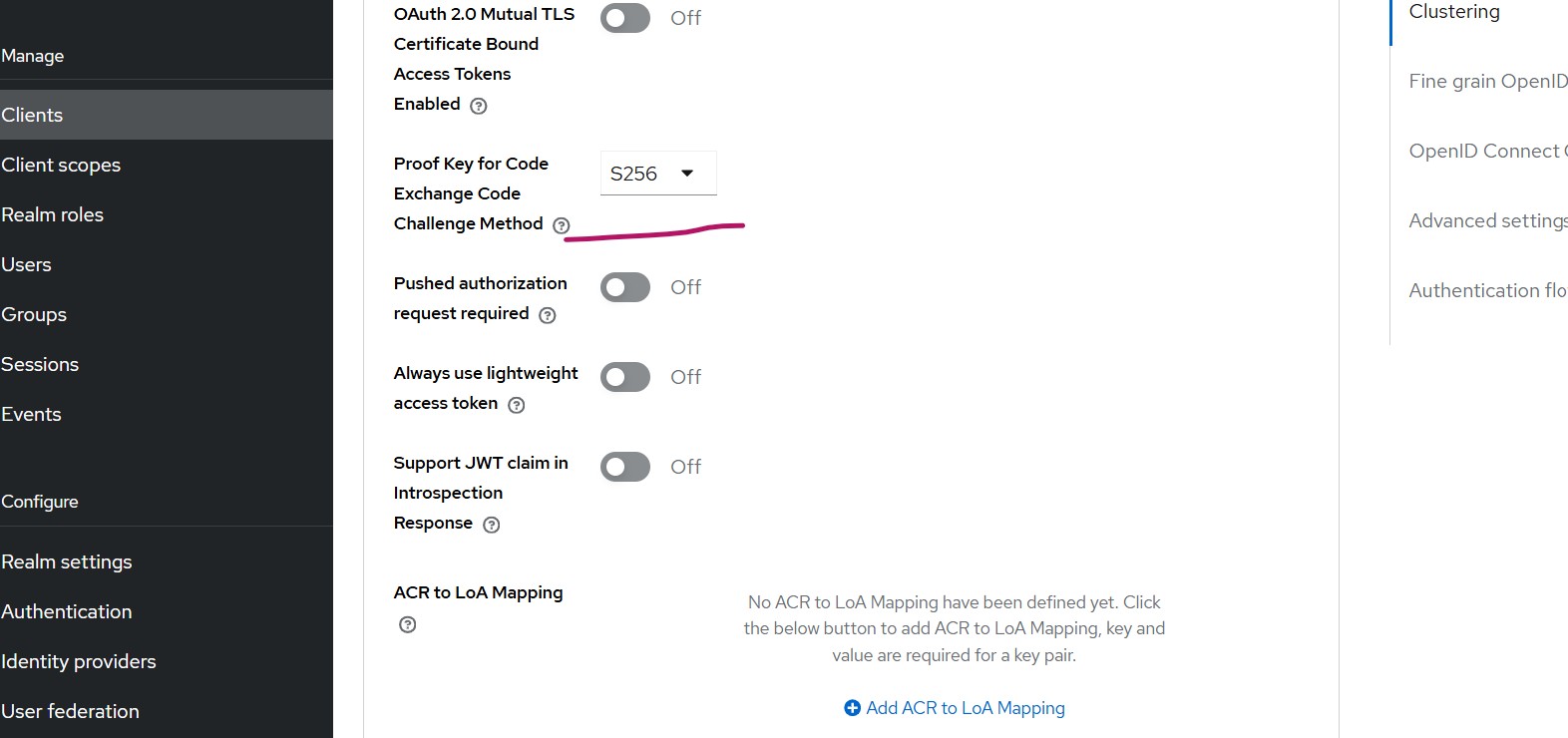
- Standard Flow: Enabled (Authorization Code)
-
PKCE: Enabled
- Code Challenge Method:
S256
- Code Challenge Method:
Client URLs
- Web Origins:
http://localhost:5173 - Root URL:
http://localhost:5173 - Home URL:
http://localhost:5173 - Valid Redirect URIs:
http://localhost:5173/*
Step 2: Set Up the ReactJS Application
Create the Project
npm create vite@latest react-keycloak-demo
cd react-keycloak-demo
npm install
Choose:
- Framework: React
- Variant: JavaScript or TypeScript (For this article, JavaScript selected)
Install Dependencies
npm install keycloak-jsCreate Keycloak Instance
src/keycloak.js
import Keycloak from "keycloak-js";

const keycloak = new Keycloak({
  url: "https://<skycloak_host_name>",
  realm: "myrealm",
  clientId: "react-client"
});

export default keycloak;
Initialize Keycloak Before Rendering React
src/main.jsx
import React from "react";
import ReactDOM from "react-dom/client";
import App from "./App";
import keycloak from "./keycloak";

keycloak
  .init({
    onLoad: "login-required",
    pkceMethod: "S256",
    checkLoginIframe: false
  })
  .then((authenticated) => {
    if (!authenticated) {
      keycloak.login();
    }

    ReactDOM.createRoot(document.getElementById("root")).render(
      <React.StrictMode>
        <App keycloak={keycloak} />
      </React.StrictMode>
    );
  })
  .catch((error) => {
    console.error("Keycloak initialization failed", error);
  });
Secure API Call Helper
src/api/secureApi.js
import keycloak from "../keycloak";

export const callApi = async () => {
  try {
    // Following ensure token is valid (refresh if expiring)
    await keycloak.updateToken(30);

    const response = await fetch("http://localhost:9090/api/data", {
      method: "GET",
      headers: {
        Authorization: `Bearer ${keycloak.token}`,
        "Content-Type": "application/json"
      }
    });

    if (!response.ok) {
      throw new Error("API call failed");
    }

    return await response.json();
  } catch (err) {
    console.error("API call error", err);

    // Token refresh failed or session expired
    keycloak.login();
  }
};
React UI Component
src/App.jsx
import { callSecureApi } from "./api/secureApi";

function App({ keycloak }) {

  const handleApiCall = async () => {
    const data = await callSecureApi();
    console.log("API Response:", data);
  };

  return (
    <div>
      <h2>
        Welcome {keycloak.tokenParsed?.preferred_username}
      </h2>

      <button onClick={handleApiCall}>
        Call Secure API
      </button>

      <br /><br />

      <button onClick={() => keycloak.logout()}>
        Logout
      </button>
    </div>
  );
}

export default App;
Step 3: Create the Protected Spring Boot Backend
Generate the Project
Go to Spring Initializr and create a Spring Boot project with:
Dependencies
- Spring Web
- Spring Security
- OAuth2 Resource Server
Security Configuration
Note: CSRF is disabled because this is a stateless REST API secured with Bearer tokens. CORS is handled separately using a dedicated CORS configuration.
SecurityConfig.java
import java.util.List;

import org.springframework.context.annotation.Bean;
import org.springframework.context.annotation.Configuration;
import org.springframework.security.config.Customizer;
import org.springframework.security.config.annotation.web.builders.HttpSecurity;
import org.springframework.security.config.annotation.web.configuration.EnableWebSecurity;
import org.springframework.security.web.SecurityFilterChain;
import org.springframework.web.cors.CorsConfiguration;
import org.springframework.web.cors.CorsConfigurationSource;
import org.springframework.web.cors.UrlBasedCorsConfigurationSource;

@Configuration
@EnableWebSecurity
public class SecurityConfig {

    @Bean
    SecurityFilterChain filterChain(HttpSecurity http) throws Exception {

        http
            .cors(Customizer.withDefaults())
            .csrf(csrf -> csrf.disable())
            .authorizeHttpRequests(auth -> auth
                .requestMatchers("/api/**").authenticated()
                .anyRequest().permitAll()
            )
            .oauth2ResourceServer(oauth2 ->
                oauth2.jwt(Customizer.withDefaults())
            );

        return http.build();
    }

    @Bean
    CorsConfigurationSource corsConfigurationSource() {

        CorsConfiguration config = new CorsConfiguration();
        config.setAllowedOrigins(
            List.of("http://localhost:5173")
        );
        config.setAllowedMethods(
            List.of("GET", "POST", "PUT", "DELETE", "OPTIONS")
        );
        config.setAllowedHeaders(
            List.of("Authorization", "Content-Type")
        );
        config.setAllowCredentials(true);

        UrlBasedCorsConfigurationSource source =
            new UrlBasedCorsConfigurationSource();

        source.registerCorsConfiguration("/**", config);
        return source;
    }
}
URL /api/** is protected
Note: In production, you should also validate the audience (aud claim) to ensure the token was issued specifically for this API by modifying the above code.
REST Controller
ApiController.java
import java.time.Instant;
import java.util.HashMap;
import java.util.Map;

import org.springframework.http.ResponseEntity;
import org.springframework.web.bind.annotation.GetMapping;
import org.springframework.web.bind.annotation.RequestMapping;
import org.springframework.web.bind.annotation.RestController;

@RestController
@RequestMapping("/api")
public class ApiController {

    // Authenticated endpoint — token required, no specific role
    @GetMapping("/data")
    public ResponseEntity<Map<String, Object>> secureData() {

        Map<String, Object> response = new HashMap<>();
        response.put("status", "SUCCESS");
        response.put("message", "Success in accessing!");
        response.put("timestamp", Instant.now());

        return ResponseEntity.ok(response);
    }
}
Application Configuration
application.properties
server.port=9090
spring.application.name=reactjsdemo
spring.security.oauth2.resourceserver.jwt.issuer-uri=https://<skycloak_hostname>/realms/<realm_name>
Testing the Integration
- Access the React application: (http://localhost:5173)
- You are redirected to the Keycloak login page
- After successful authentication:
- The React app loads
- The username from the token (
preferred_username) is displayed
- Click “Call Secure API”
- Observe the successful JSON response in the browser console
Note: In production environments, HTTPS must be enforced and access tokens should be short-lived.
If you need to configure CORS between your React app and Keycloak, check out our guide on configuring CORS with your Keycloak OIDC client.
Summary
In this article, we demonstrated how a ReactJS frontend can securely call a Spring Boot protected REST API using a Keycloak-issued JWT access token.
This approach follows modern security best practices:
- Authorization Code Flow with PKCE
- Public OIDC client for SPAs
- Stateless backend secured with JWT Bearer tokens
We used Skycloak, a fully managed Keycloak hosting solution, for demonstration. For teams looking to integrate Keycloak with other frontend frameworks, see our tutorial on integrating Keycloak with Angular.
Skycloak provides production-ready managed Keycloak hosting, helping teams avoid the complexity of maintaining and scaling Keycloak themselves. Check out our pricing plans to find the right fit for your team.
If you’re new to Skycloak, visit the Skycloak Getting Started Guide to learn more.