
Last updated: July 2026
A SAMLRequest is the authentication request a service provider (SP) sends to an identity provider (IdP) to start SAML single sign-on. It is an XML <AuthnRequest> document that, in the common HTTP-Redirect binding, gets deflate-compressed, Base64-encoded, and URL-encoded, which is why it shows up as an unreadable blob in your address bar. To decode one, reverse those steps: URL-decode, Base64-decode, then inflate the result back to XML.
The fastest way to do that is our free SAML Decoder. It decodes both SAMLRequest and SAMLResponse blobs entirely client-side, so nothing you paste leaves your browser.
What is a SAMLRequest?
SAMLRequest is the name of the query parameter (or POST form field) that carries a SAML 2.0 <AuthnRequest> message from a service provider to an identity provider. The SP is the app you are trying to reach. The IdP is the system that knows who you are. When you open an app protected by SAML SSO and have no active session, the SP builds an AuthnRequest and redirects your browser to the IdP with that request attached. If the SP and IdP roles are still fuzzy, we cover them in the difference between an SP and an IdP.
Why it looks like line noise depends on the binding, which is SAML’s term for how the message travels, defined in the OASIS SAML 2.0 bindings spec:
- HTTP-Redirect binding: the XML is compressed with raw DEFLATE (RFC 1951), Base64-encoded, then URL-encoded so it survives as a query parameter. This is the usual case for requests, since URLs have length limits.
- HTTP-POST binding: the XML is only Base64-encoded and submitted as a hidden form field. No compression.
Same XML underneath, two different envelopes. That is the whole mystery.
How do you decode a SAMLRequest?
Reverse the encoding in order: URL-decode, Base64-decode, then inflate.
The zero-effort option is the SAML Decoder. Paste the raw value and it returns readable XML, handling both the redirect and POST encodings automatically. Because it runs in your browser, it is safe for values pulled from real environments. As a rule, never paste production SAML messages into an online decoder that ships them to a backend; assertions and requests can reveal entity IDs, endpoints, and user identifiers you do not want in someone else’s logs.
If you prefer the terminal, Python does it in one command:
python3 -c "
import base64, sys, urllib.parse, zlib
blob = urllib.parse.unquote(sys.argv[1])
data = base64.b64decode(blob)
print(zlib.decompress(data, -15).decode())
" 'PASTE_SAMLREQUEST_VALUE_HERE'
The -15 tells zlib to expect raw DEFLATE with no header, which is what the redirect binding uses. If the value came from an HTTP-POST form instead, drop the zlib.decompress step: it is plain Base64-encoded XML and decompressing it will just throw an error.
What do the fields in a SAMLRequest mean?
A decoded AuthnRequest is short. Here is a typical one, aimed at a Keycloak realm:
<samlp:AuthnRequest xmlns:samlp="urn:oasis:names:tc:SAML:2.0:protocol"
    xmlns:saml="urn:oasis:names:tc:SAML:2.0:assertion"
    ID="_809707f0030a5d00620c9d9df97f627af8e9dcc2"
    Version="2.0"
    IssueInstant="2026-07-17T18:04:22Z"
    Destination="https://idp.example.com/realms/acme/protocol/saml"
    AssertionConsumerServiceURL="https://app.example.com/saml/acs"
    ProtocolBinding="urn:oasis:names:tc:SAML:2.0:bindings:HTTP-POST">
  <saml:Issuer>https://app.example.com/saml/metadata</saml:Issuer>
  <samlp:NameIDPolicy
      Format="urn:oasis:names:tc:SAML:2.0:nameid-format:persistent"
      AllowCreate="true"/>
</samlp:AuthnRequest>
Each attribute earns its place, per the OASIS SAML 2.0 core spec:
| Field | What it does |
|---|---|
ID |
Unique identifier for this request. The IdP echoes it back as InResponseTo in the response so the SP can match the two and reject unsolicited responses. |
IssueInstant |
UTC timestamp of when the SP generated the request. IdPs reject stale requests, which is why clock skew breaks SAML. |
Issuer |
The SP’s entity ID. The IdP uses it to look up which registered client is asking and which certificate and settings apply. |
Destination |
The exact IdP endpoint this request is intended for. The IdP compares it against the URL that actually received the request. |
AssertionConsumerServiceURL |
Where the IdP should send the SAMLResponse after authentication. Must match an ACS URL registered at the IdP. |
ProtocolBinding |
How the response should travel back, usually HTTP-POST. |
NameIDPolicy |
The identifier format the SP wants back for the user: email, persistent, or transient. |
Two of these do most of the security work. The ID/InResponseTo pairing stops an attacker from replaying a captured response into a fresh session. The Destination and ACS URL checks stop a request or response from being redirected somewhere it was never meant to go, which is why IdPs validate them strictly instead of trusting whatever the message claims.
Identity management as a service, on open source
Skycloak does what Auth0 and Okta do, SSO, MFA, SCIM, audit logs and enterprise federation, on an open source core. Unlimited users and applications on every plan, no charge per monthly active user, and you can export and self-host whenever you want.
Where the SAMLRequest fits in the SSO flow
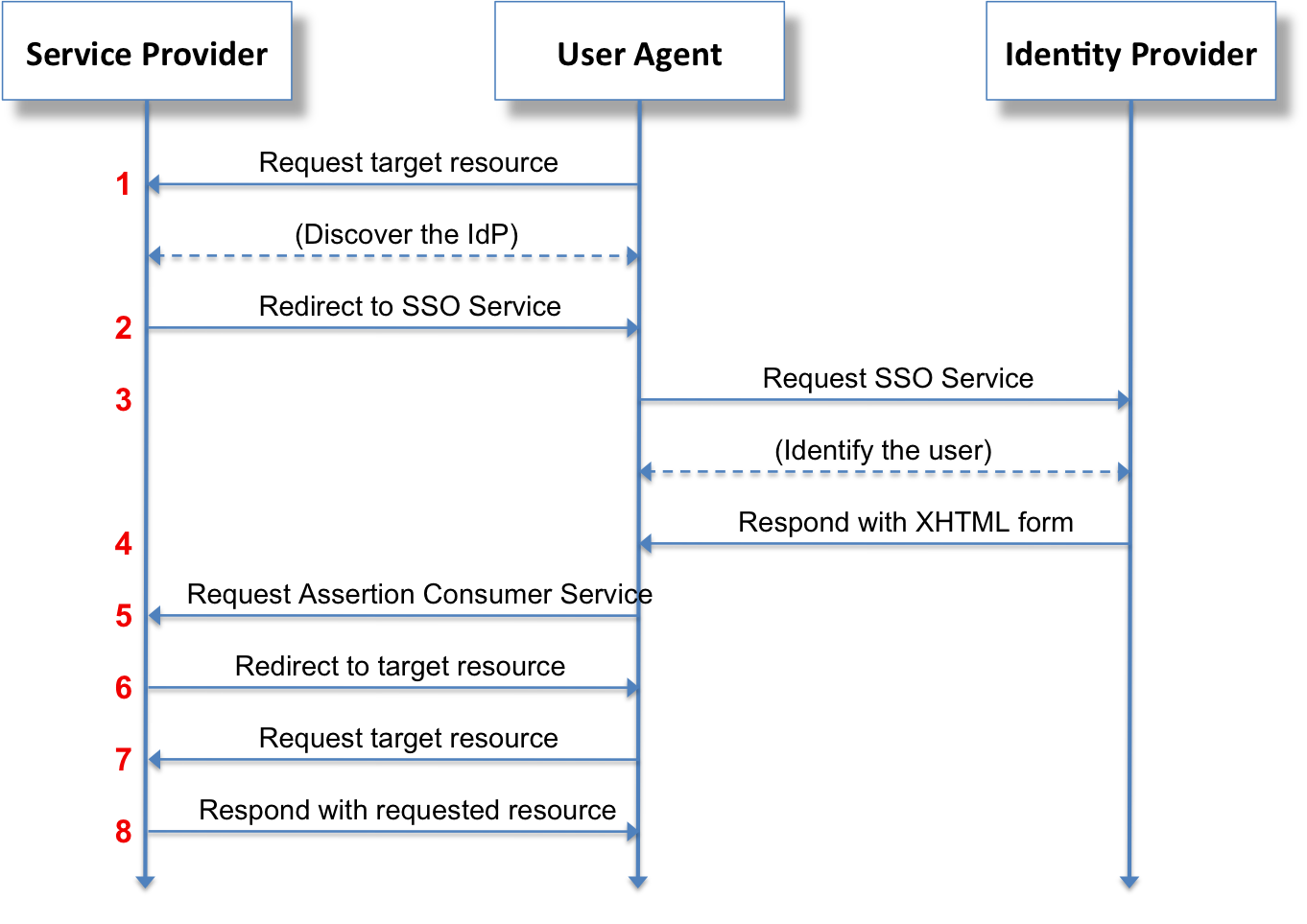
The request is step two of five in SP-initiated SSO:
- You open a protected page on the SP with no active session.
- The SP generates the
SAMLRequestand redirects your browser to the IdP. - The IdP validates the request, then authenticates you (password, MFA, or an existing session).
- The IdP builds a signed
SAMLResponsecontaining the assertion and auto-submits it to the SP’s ACS URL. - The SP verifies the signature, creates a session, and you are in.
Keycloak plays either role. It acts as the IdP for your apps out of the box, and it can act as an SP toward an upstream IdP through identity brokering. We walk through the second setup in using SAML as an SP in Keycloak, and Skycloak’s identity provider support covers brokering to Azure AD, Okta, Google, and others.
Why do IdPs reject SAMLRequests?
When the IdP throws an error instead of a login page, decode the request first, then check these usual suspects in order:
- Destination mismatch. The
Destinationin the request does not match the URL the IdP received it on. The classic cause is a reverse proxy or load balancer rewritinghttpstohttpor changing the hostname, so the IdP sees a different URL than the SP wrote into the XML. - Unsigned request when the IdP requires signing. In Keycloak, a SAML client with “Client signature required” turned on will reject any AuthnRequest that is not signed with the registered certificate. Either sign the request on the SP side or disable the requirement, as described in the Keycloak server administration guide. Prefer signing with
RSA-SHA256; SHA-1 signatures are still seen in the wild and some IdPs refuse them outright. - Clock skew. If the SP’s clock drifts,
IssueInstantlands outside the IdP’s tolerance window and the request is treated as expired or from the future. Run NTP on both sides; this fixes most “worked yesterday” SAML failures. - Unregistered ACS URL. The
AssertionConsumerServiceURLis not in the IdP’s list of valid redirect targets for that client. IdPs refuse rather than send an assertion to an unknown address. - Binding mismatch. The SP sends via a binding the IdP endpoint does not accept, or requests a response binding the IdP will not use. Compare both sides’ metadata.
Nine times out of ten, thirty seconds in the decoder plus this checklist finds the problem faster than digging through IdP logs. And if you would rather not babysit certificates, ACS lists, and signature settings at all, Skycloak runs managed Keycloak so the IdP side stays configured and patched without you thinking about it.
Frequently asked questions
What is a SAMLRequest?
A SAMLRequest is the SAML 2.0 <AuthnRequest> message a service provider sends to an identity provider to initiate single sign-on. It travels as a query parameter or form field, encoded so it can pass through a browser, and tells the IdP who is asking and where to send the response.
How do I decode a SAMLRequest?
URL-decode it, Base64-decode it, then inflate the raw DEFLATE payload back to XML. Values from an HTTP-POST form skip the inflate step because they are not compressed. Our SAML Decoder does all of this in the browser, with nothing sent to a server.
What is the difference between SAMLRequest and SAMLResponse?
The SAMLRequest goes from SP to IdP and asks for authentication. The SAMLResponse goes from IdP back to the SP and carries the signed assertion that proves who the user is. The response’s InResponseTo attribute must match the request’s ID, which ties the pair together.
Why is my SAMLRequest rejected by the IdP?
The three most common causes are a Destination value that does not match the URL the IdP received the request on (often a reverse proxy rewriting the scheme or host), an unsigned request when the IdP requires request signing, and clock skew that pushes IssueInstant outside the IdP’s tolerance. Decode the request and check those three fields before anything else.