
What Keycloak offers an enterprise
Keycloak is an open-source identity and access management (IAM) server that gives an enterprise one place to log users in, using OpenID Connect, OAuth 2.0 and SAML 2.0. It connects to existing LDAP and Active Directory directories, brokers logins from corporate and social identity providers, and secures APIs, so every application shares one login and one access policy.
Most large organizations already have users spread across a directory, a few cloud applications, some older internal tools and a growing set of APIs. Without a central identity layer, each of those systems ends up with its own login page, its own password rules and its own idea of who is allowed to do what. Keycloak solves that by sitting in the middle: applications hand authentication to Keycloak, and Keycloak talks to the directories and identity providers you already run.
This guide covers the integrations enterprises use most, the support options available when you run Keycloak in production, who uses it, and how to size and operate it at scale. Keycloak’s current release line is 26.x, and the details below match the 26.8 documentation. We run managed Keycloak at Skycloak, so where it helps we mention how we handle a topic, but everything here applies to any Keycloak deployment.
Keycloak’s core concepts
A handful of terms come up in every Keycloak integration, and it is worth having them straight before connecting anything:
- Realm: an isolated space that holds its own users, credentials, roles, groups and settings. Many enterprises use one realm for employees and another for customers, because the two populations need different login rules.
- Client: an application or service that asks Keycloak to authenticate a user or to issue it a token. A web app, a mobile app and a backend API can each be a client.
- Identity provider: an external system, such as Microsoft Entra ID, Okta, Google or another SAML or OpenID Connect server, that Keycloak can hand the actual login to. Keycloak calls this identity brokering.
- User federation: linking an external user store, usually LDAP or Active Directory, so Keycloak can look users up and check their passwords there instead of keeping its own copy of the credentials.
- Organization: a group of users that belong to one business customer or partner, with its own members, domains and identity providers inside a single realm. This is how Keycloak handles business-to-business (B2B) multi-tenancy.
Key enterprise features of Keycloak
Keycloak ships the features an enterprise identity platform needs without paid add-ons, because the whole server is released under the Apache License 2.0:
- Single sign-on (SSO): a user logs in once and can then open every application connected to the same realm without logging in again.
- Identity brokering: delegating login to external OpenID Connect or SAML identity providers, plus built-in social providers such as Google, Microsoft, GitHub, GitLab and LinkedIn.
- User federation: reading users from LDAP or Active Directory, with Kerberos support for desktop single sign-on on a Windows domain.
- Role-based access control (RBAC): realm roles, client roles and groups that end up in tokens, so applications can decide what a user may do.
- Multi-factor authentication (MFA): one-time passwords from an authenticator app (TOTP or HOTP) and WebAuthn security keys and passkeys, configured through authentication flows.
- Organizations: B2B multi-tenancy with per-organization members, email domains and identity providers, described in the organizations chapter of the admin guide.
- Fine-grained admin permissions: policy-based delegation, so that a regional administrator can manage only the users or groups they are responsible for.
- SCIM API: a standard API for creating and updating users and groups from other systems, promoted from preview to supported in Keycloak 26.8.
- Auditing: login events and admin events that record who logged in and who changed what, which you can review in the Admin Console or forward to a SIEM.
- Extensions: service provider interfaces (SPIs) that let you add custom authenticators, user storage, event listeners and themes in Java.
Integrating Keycloak into enterprise environments
Integration is where most of Keycloak’s value comes from. Once your directories, identity providers and applications all point at Keycloak, you get one login experience and one place to change authentication policy for the whole organization.
Integrating with LDAP and Active Directory
Many enterprises keep their employees in LDAP or Active Directory, and Keycloak’s user federation connects to either without moving anyone. Keycloak imports users into its own database and keeps them in sync, but it never imports passwords: password checks always go to the LDAP server, so the directory remains the source of truth for credentials.
To connect a directory in the Keycloak 26 Admin Console:
- Select your realm and open User federation in the left menu.
- Click Add LDAP providers and pick the vendor (Active Directory, Red Hat Directory Server, Tivoli, Novell eDirectory or Other).
- Enter the connection URL (prefer
ldaps://so traffic is encrypted), the bind DN and credential of a service account, and the users DN where your user entries live. - Choose the edit mode (see the table below) and save.
- Click Synchronize all users once, then turn on periodic changed-users sync so new and modified accounts flow in automatically.
The edit mode decides what happens when a user or administrator changes a profile field in Keycloak:
| Edit mode | What Keycloak does with changes | When to use it |
|---|---|---|
READ_ONLY |
Rejects changes to mapped attributes such as username and email, and does not support password updates | The directory is managed elsewhere and Keycloak should never write to it |
WRITABLE |
Writes attribute and password changes back to LDAP automatically | Keycloak is allowed to update the directory |
UNSYNCED |
Stores changes in Keycloak’s own database, and an administrator syncs them back to LDAP | The LDAP server is read-only but users still need to edit their profiles |
Choose the edit mode when you create the provider, because Keycloak sets up its attribute mappers based on it and does not reconfigure them if you change it later. For a full walkthrough with screenshots, see our Keycloak LDAP integration tutorial and the Active Directory integration guide.
Brokering logins from corporate and social identity providers
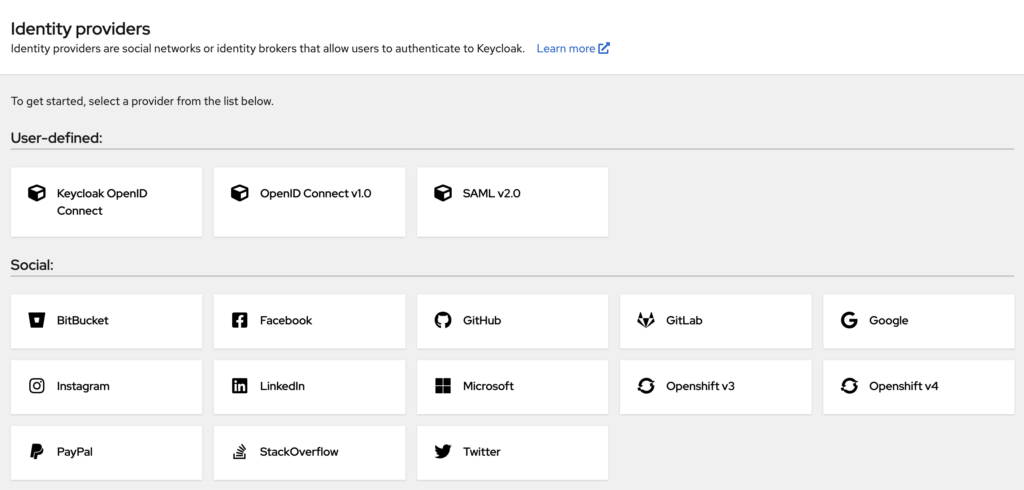
Identity brokering means Keycloak hands the login step to another identity provider and then issues its own tokens to your applications. This is how you let a partner company log in with its own Microsoft Entra ID or Okta tenant, or let customers sign in with Google, without your applications knowing anything about those providers.
You add a provider under Identity providers in the realm, choosing either a built-in social provider or a generic OpenID Connect or SAML provider. Keycloak can create a local account on first login, link it to an existing account with the same email after the user confirms the link by email or by logging in to that account, and map claims from the external provider (for example, a group or department) onto Keycloak roles. Skycloak’s identity providers feature covers the same setup on a managed cluster.
Connecting legacy applications with SAML
Older enterprise applications often speak only SAML 2.0, an XML-based single sign-on protocol that predates OpenID Connect. Keycloak acts as a SAML identity provider as well as an OpenID Connect one, so you can register a legacy application as a SAML client in the same realm as your modern apps. Users then get one login across both kinds of application, and you can retire the old application’s own user database without rewriting it.
Securing APIs and services
APIs are usually protected with OAuth 2.0 access tokens: the caller presents a token issued by Keycloak, and the API checks its signature, expiry and audience before serving the request. For service-to-service calls with no user involved, a backend uses the client credentials grant, where it authenticates as itself with a client ID and secret. In Keycloak 26 the token endpoint has no /auth/ prefix:
curl -s -X POST \
  "https://auth.example.com/realms/acme/protocol/openid-connect/token" \
  -d "grant_type=client_credentials" \
  -d "client_id=billing-service" \
  -d "client_secret=${BILLING_SERVICE_SECRET}"
The response contains a short-lived access_token that the calling service sends in an Authorization: Bearer header. When role checks in code are not enough, Keycloak Authorization Services let you define resources, scopes and policies centrally, for example allowing only a specific client to initiate payments.
Automating user provisioning with SCIM
SCIM (System for Cross-domain Identity Management) is a standard REST API for creating, updating and deactivating users and groups. With the SCIM API supported in Keycloak 26.8, an HR system or another identity platform can push joiners, movers and leavers into Keycloak directly instead of relying on scripts against the Admin REST API. Our post on the Keycloak 26.8 SCIM API explains how to enable it, and the SCIM feature page describes how Skycloak exposes it.
Who uses Keycloak in production
Keycloak is used by public sector agencies, research institutions and large companies. The project’s ADOPTERS list, collected through the Keycloak community survey from organizations that agreed to be public references, includes Accenture, Capgemini, CERN, Hewlett-Packard Enterprise, Hitachi, UnitedHealthcare, Wayfair and Germany’s Federal Employment Agency (Bundesagentur für Arbeit). Keycloak is also a Cloud Native Computing Foundation (CNCF) incubating project, which means its governance and development happen in the open under a vendor-neutral foundation.
The common use cases fall into a few groups:
- Workforce SSO: employees log in once, against Active Directory or LDAP, and reach internal tools, dashboards and SaaS applications.
- Customer identity: sign-up, social login, MFA and self-service account management for a customer-facing product.
- B2B SaaS: each business customer gets its own organization, its own identity provider and its own administrators inside a shared realm.
- API and microservice security: services authenticate to each other with client credentials and check tokens on every request.
- Legacy modernization: older SAML or form-login applications move behind a central identity provider without being rewritten.
Talk through your identity setup with us
Book a demo and we will walk you through Skycloak with the sign-in, SSO and migration questions your team is working on.
Keycloak enterprise support options
There is no separate paid “Keycloak Enterprise” edition: the open-source project contains every feature. What changes between options is who runs the servers and who you call when something breaks.
| Option | Who runs it | Where support comes from | Good fit when |
|---|---|---|---|
| Community Keycloak, self-hosted | Your team | Community channels: the mailing list, CNCF Slack and GitHub issues, with no response-time commitment | You have identity and Kubernetes expertise in-house and accept owning upgrades and incidents |
| Red Hat build of Keycloak, self-hosted | Your team | A Red Hat subscription, which adds a commercially supported distribution and vendor support | You already standardize on Red Hat and want vendor-backed builds while still operating it yourself |
| Managed Keycloak (for example, Skycloak) | The provider | The provider’s support team, under a published SLA | You want Keycloak’s features without running clusters, upgrades, backups and on-call yourself |
With Skycloak, response times and uptime commitments depend on the plan and are published on our SLA page: support runs in business hours on the smaller plans, extended weekday hours on Business, and 24/7 only on Enterprise. Contractual uptime with service credits starts at 99.9% on Business and goes up to 99.99% on Enterprise, while Developer and Launch are best effort. Whichever option you choose, check that it covers the things that tend to cause enterprise incidents: upgrades between minor versions, database and cache problems, and expiring certificates.
Common challenges when running Keycloak at enterprise scale
Sizing and performance
Keycloak’s CPU use grows with the rate of requests, not with the number of registered users, so size it from your peak login rate. The official, load-tested guidance in the Keycloak sizing guide is:
- 1 vCPU for every 15 password-based logins per second, because hashing the submitted password takes most of the CPU time.
- 1 vCPU for every 120 client credentials grants per second, and 1 vCPU for every 120 refresh token requests per second.
- 150% extra CPU head-room on top of that, to absorb spikes, fast restarts and failover.
- About 1,250 MB of RAM per pod as a base, which includes cached realm data and 10,000 cached sessions. In containers Keycloak gives about 70% of the memory limit to the Java heap and uses roughly 300 MB outside it.
As an example, a peak of 45 password logins per second needs 45 ÷ 15 = 3 vCPU, and with 150% head-room that becomes 7.5 vCPU across the cluster. Our Keycloak production sizing guide works through a fuller calculation, including the database.
High availability across data centers
A single Keycloak cluster with several pods behind a load balancer survives the loss of one pod. To survive the loss of a whole data center or cloud region, Keycloak 26.8 supports multi-cluster v2, which connects two or more clusters by keeping session data in the database, and which you turn on with the stateless feature (--features=stateless). It replaces the older multi-site setup, which needed an external Infinispan cluster and is now deprecated, according to the 26.8 release notes.
Customizing login pages
Enterprises usually want the login page to look like their own product. Keycloak themes let you change the login, account and email templates with your own CSS and FreeMarker templates, and you can give each realm a different theme, so employee and customer logins can look different. On Skycloak, branding covers the common changes without building a theme.
Upgrades
Keycloak publishes new releases regularly, and many of them include security fixes listed in the release notes, so staying current is part of running it. Test each upgrade against a copy of production first, read the migration notes for every version you skip, and plan for database schema migrations on startup. Our guide to upgrading a Keycloak cluster covers rolling and blue-green approaches.
Best practices for implementing Keycloak
Security
- Use TLS everywhere: serve Keycloak only over HTTPS, and use
ldaps://or StartTLS for directory connections so passwords are never sent in the clear. - Keep Keycloak up to date: apply patch releases promptly, because many of them fix security vulnerabilities.
- Turn on auditing: enable login and admin events and send them to your SIEM, so that suspicious logins and configuration changes are visible. Skycloak’s audit logs keep these for you.
- Require MFA for administrators: protect the master realm and every realm administrator with a second factor.
Performance
- Tune caches for your client count: if more than about 2,500 clients make requests at the same time, the sizing guide recommends raising the cache sizes so client data is not reloaded from the database constantly.
- Load balance across pods: run at least two Keycloak pods behind a load balancer and spread requests evenly between them. Since Keycloak 26.6 the reverse proxy guide no longer recommends sticky sessions, because they stopped bringing a meaningful performance benefit.
- Size the database: the sizing guide budgets about 1,400 write IOPS for every 100 login, logout or refresh requests per second on Aurora PostgreSQL, because sessions are stored in the database by default.
Professional help
If your team would rather spend its time on applications than on identity infrastructure, a managed service such as Skycloak runs, scales, patches and backs up Keycloak clusters for you, and our team can help with migrations and integrations.
Frequently asked questions
Is there an enterprise version of Keycloak?
There is no separate enterprise edition of Keycloak, because the open-source project includes every feature. Enterprises that want commercial support either buy the Red Hat build of Keycloak through a Red Hat subscription and run it themselves, or use a managed Keycloak service such as Skycloak, where the provider runs the clusters and supports them under an SLA.
Is Keycloak free for commercial use?
Yes. Keycloak is released under the Apache License 2.0, which allows commercial use, modification and redistribution without a license fee. What you pay for is the infrastructure to run it, the people to operate it, and optionally a support subscription or a managed service.
Who uses Keycloak in production
Keycloak’s public ADOPTERS list includes companies such as Accenture, CERN, Hitachi and UnitedHealthcare, along with government agencies and research organizations, and the section above lists more of them. Keycloak is also a CNCF incubating project.
What are the main benefits of Keycloak for an enterprise?
Keycloak gives an enterprise single sign-on, MFA, LDAP and Active Directory integration, identity brokering and fine-grained authorization in one open-source server, built on the open standards OpenID Connect, OAuth 2.0 and SAML 2.0. Because it uses those standards and has no license fee, you avoid per-user licensing and can move between self-hosting and managed hosting without changing your applications.
Does Keycloak work with Active Directory?
Yes. Keycloak connects to Active Directory through its LDAP user federation, imports users and groups, and checks passwords against Active Directory without storing them. It can also use Kerberos so that users already logged in to a Windows domain are signed in to Keycloak automatically.
Conclusion
Keycloak gives an enterprise one identity layer that connects to the directories, identity providers and applications it already has. Start by connecting your directory through user federation, register your applications as OpenID Connect or SAML clients, broker any partner or social identity providers, and size the cluster from your peak login rate using the official formula. Then decide whether your team will operate it, buy vendor support, or hand it to a managed service.
If you want help planning that, you can talk to our team, or book a demo and get a production-ready Keycloak cluster without running it yourself.