Identity Management Software: The 2026 Buyer's Guide. How to choose identity management software in 2026: split by workforce, customer or B2B SaaS use, check SAML, OIDC, SCIM and passkeys, then compare total cost.
Identity management software creates, governs and removes user identities and their access across your apps, using open standards such as SAML, OpenID Connect (OIDC) and SCIM. To choose one, decide on the use case first (workforce, customer or B2B SaaS), then compare protocol support, provisioning, the pricing model (per user, per active user, per connection or by infrastructure), hosting and how hard it would be to leave.
Most pages that rank for “identity management software” are either one vendor’s product page, a list of tools where every entry ends with a plug for the publisher’s own add-on, or a general explainer of what IAM means. None of them tells you how to compare vendors that are priced on different units and built for different users. This guide is a vendor-neutral way to do that: it splits the market by use case, gives you a standards checklist, compares the pricing models with public list prices, and covers the costs that only show up when you migrate or leave.
If you want the basics of the discipline first, our guide to identity and access management covers its four functions and the standards behind each of them.
What does identity management software do?
Identity management software keeps one record for each person or system that needs access, proves who they are when they sign in, decides what they may do, and removes that access when it should end. In practice that means four jobs: administering the lifecycle of each account (joiners, movers and leavers), authentication, authorization and audit. A product that does all four for your users is usually called an identity provider (IdP), and the apps that trust it are called service providers or relying parties.
Three open standards do most of that work, and they are what make a product replaceable later:
- OpenID Connect handles sign-in for modern web and mobile apps. Its specification describes it as “a simple identity layer on top of the OAuth 2.0 protocol” that “enables Clients to verify the identity of the End-User based on the authentication performed by an Authorization Server”.
- SAML 2.0 is the older XML-based standard for the same job, and most enterprise apps and corporate IdPs still support it. Its rules for assertions (the signed statements an IdP sends about a user) are in the OASIS SAML 2.0 core specification.
- SCIM 2.0 handles provisioning, meaning the creation, update and removal of accounts in other systems. RFC 7644 calls it “an HTTP-based protocol that makes managing identities in multi-domain scenarios easier to support via a standardized service”.
Some products add identity governance and administration (IGA) on top: access requests, approvals and periodic reviews that prove access was removed. If auditors are asking for that evidence, our comparison of IAM vs IGA explains when you need a separate governance product and when good hygiene in your IdP is enough.
Which use case are you buying for?
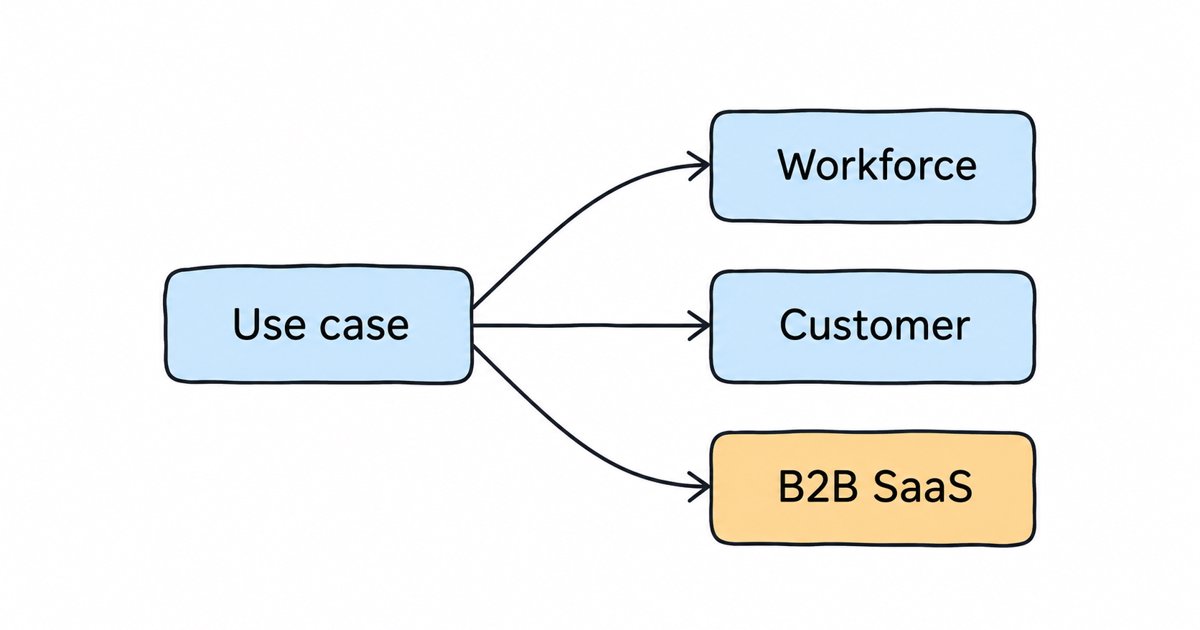
Decide which users the software is for before you compare any features, because vendors are built, and priced, around one of three use cases. A tool that is excellent for employees signing in to Slack and Salesforce can be a poor and expensive fit for the customers of your own app, and the reverse is also true.
| Use case | Who signs in | What you need most | Usual pricing unit | Examples |
|---|---|---|---|---|
| Workforce | Your employees and contractors | SSO into many third-party apps, MFA, SCIM out to those apps, lifecycle driven by HR | Per user per month | Microsoft Entra ID, Okta Workforce Identity |
| Customer (CIAM) | The users of your own app | Self sign-up, social login, passkeys, branded login pages, scale | Per monthly active user (MAU) | Auth0, Amazon Cognito, Keycloak |
| B2B SaaS | Your business customers’ employees | One SAML or OIDC connection per customer, SCIM in from their IdP, per-customer roles | Per connection or per MAU | WorkOS, Auth0 B2B plans, Keycloak Organizations |
The workforce case is about connecting your own people to apps you buy. The customer case is about your login page, and the questions are sign-up conversion, branding and how the bill grows with your user base. The B2B SaaS case is a mix: your product is the app, but each enterprise customer wants its employees to sign in through its own IdP and wants IT to switch people off in one place. Our guide on how to choose an SSO provider for B2B SaaS goes deeper into that third case, and federated identity management for B2B SaaS shows how it is modeled with the Organizations feature in Keycloak.
Many companies have more than one use case. It is common to run Entra ID or Okta for staff and a separate customer identity system for the product, and that is usually cheaper than forcing one tool to cover both.
Which standards should identity management software support?
Score every product on your shortlist against the same standards checklist, because standards support decides both what the product can connect to today and how much of your integration survives if you replace it. Ask each vendor to show you the setting or the documentation page for each line rather than accepting a yes on a sales call.
| Criterion | What to ask | A good answer looks like |
|---|---|---|
| OIDC | Can it act as an OIDC provider for your apps, and broker to other OIDC providers? | Both, with standard discovery and token endpoints |
| SAML 2.0 | Can it act as a SAML IdP for apps, and accept SAML from customer IdPs? | Both directions, with signed assertions and metadata import |
| SCIM 2.0 | In which direction: receiving users from an IdP, sending them to apps, or both? | The direction you need, documented, with groups as well as users |
| Passkeys and WebAuthn | Can users register passkeys or security keys, and can you require them? | Passkeys as a first-class option with a recovery path |
| Machine identities | How do services and AI agents get tokens, and are they billed as users? | OAuth 2.0 client credentials with scoped roles, priced clearly |
| Export | Can you export users with password hashes and the full configuration? | A documented export in a standard or open format |
Passkeys deserve their own line in 2026 because the main US guideline now expects a phishing-resistant option. NIST published its Digital Identity Guidelines, SP 800-63-4, in July 2025, and their authentication volume, SP 800-63B-4, says that “Verifiers SHALL offer at least one phishing-resistant authentication option at AAL2”, which is the assurance level most business logins aim for. The same volume says that “The authentication keys on syncable authenticators are inherently exportable” and describes “Exportable authentication keys (usable at AAL2 or below)”, so synced passkeys can be used at that level. A product that offers only SMS codes or app codes as the second factor will not meet that expectation.
How is identity management software priced?
Identity software is sold on four different units, and the unit matters more than the headline price because it decides how your bill grows. The prices below are the public list prices on each vendor’s pricing page as we read them on 18 November 2026; they change often, and negotiated contracts can differ, so check the linked page before you budget.
Per user per month (workforce). You pay for every employee account, whether they sign in once or all day. Microsoft lists Entra ID P1 at “$7.00” and P2 at “$10.00” per “user/month, paid yearly”. Okta says its “Starter Suite begins at $6 per user/month” and its “Essentials Suite begins at $17 per user/month”, with a “$1,500 annual contract minimum required for Okta Workforce Identity”.
Per monthly active user (customer identity). You pay for users who sign in during the month, usually in bands. Auth0’s free plan covers “Up to 25,000 monthly active users”, and its paid B2C Essentials plan starts “from $35/month” for 500 MAUs. Amazon Cognito gives its Lite and Essentials tiers “a free tier of 10,000 monthly active user (MAU) per month” for direct sign-in, but users who sign in through SAML or OIDC federation have a separate free tier of 50 MAUs, above which “the price for MAUs above the 50 MAU free tier is $0.015”.
Per enterprise connection (B2B SaaS). You pay for each customer company that connects its own IdP. WorkOS lists SSO connections at “$125/ea” for the first 15, and directory sync (SCIM) connections at the same price, while its AuthKit user management is free for the “First 1 million monthly active users”. Auth0’s B2B Essentials plan starts “from $150/month”, includes 3 enterprise SSO connections and charges “$100/month ($1,100/year) per additional connection”.
Infrastructure. You pay for the servers, not the users. Keycloak is open source under the Apache License, Version 2.0, so there is no licence fee, and your cost is the infrastructure plus the engineering time to run, patch and upgrade it. Managed Keycloak services, Skycloak included, charge for the cluster you run rather than for each user, and our plans include unlimited users.
Watch for the “SSO tax” as well. The SSO Wall of Shame lists vendors that, in its words, “offer competitive starter plans and gate SSO behind an “Enterprise” paywall”. It is mostly a concern for the SaaS apps you connect to your IdP rather than the IdP itself, but it is worth checking for every app on your workforce list, and B2B founders should check whether their own plans do the same to their customers.
To see how these units play out at two and five times your current user count, our post on modeling per-MAU pricing at scale walks through a simple spreadsheet model.
How do the main vendors compare?
The table compares the vendors that come up most often in each use case, with the public starting price linked to its source and checked on 18 November 2026. The tradeoffs are the points we would raise with a colleague who was shortlisting them; they are not a ranking.
| Vendor | Best fit | Pricing model | Public starting price | Tradeoff to weigh |
|---|---|---|---|---|
| Microsoft Entra ID | Workforce on Microsoft 365 | Per user, paid yearly | P1 $7.00 per user per month | Strong if you already run Microsoft 365; workload identities are a separate product |
| Okta Workforce Identity | Workforce with many SaaS apps | Per user, billed annually | Starter $6 per user per month | $1,500 annual minimum, and features are grouped into suites |
| Auth0 | Customer and B2B identity in your app | Per MAU in bands | Free up to 25,000 MAUs; B2C Essentials from $35 a month | B2C Essentials does not include enterprise connections; B2B plans count them |
| Amazon Cognito | Customer identity on AWS | Per MAU by tier | 10,000 direct sign-in MAUs free on Lite and Essentials | Federated SAML and OIDC users are priced separately, with 50 free |
| WorkOS | Adding enterprise SSO and SCIM to a B2B app | Per connection | $125 per SSO connection for the first 15 | Cost grows with the number of enterprise customers |
| Keycloak, self-hosted | Any use case, when you have people to run it | Infrastructure | No licence fee (Apache 2.0) | You own uptime, upgrades and security patches |
| Managed Keycloak, such as Skycloak | Teams that want Keycloak without running it | Infrastructure, by cluster | Developer plan from $29 a month, with unlimited users (pricing page) | You still configure Keycloak, but someone else runs the servers |
Two things are easy to miss in a table like this. First, workforce prices are per named user, so contractors and dormant accounts cost money until someone removes them, which makes SCIM and offboarding a cost control as well as a security control. Second, the per-MAU and per-connection prices above are starting points: read the band limits and add-on prices on each page, because that is where a growing app’s bill is decided.
Open source, without the per-user bill
Most identity platforms charge per monthly active user and gate enterprise SSO behind an upgrade. Skycloak bills for infrastructure instead, so every plan carries unlimited users and unlimited applications, on real upstream Keycloak you can export at any time.
What does identity management software really cost over three years?
The total cost of ownership is the licence or subscription, plus the engineering time to integrate and run it, plus what it would cost to leave. Teams usually price the first part carefully and guess at the other two, and the guesses are where budgets go wrong. Our post on what to check before you build or buy identity breaks down the engineering and on-call side.
Leaving is the cost most buyers skip. Before you sign, ask each vendor four questions in writing: can you export users including password hashes, can you export the full configuration in a standard format, can you take complete backups out of the platform, and how long is your data kept after termination. Our IdP exit plan explains each of those questions and what a good answer looks like. If password hashes cannot be exported, every user has to reset their password when you move, and that is often what keeps a team on a vendor it has outgrown.
Keycloak does well on this point because its formats are open. Its server can “Import and export realms as JSON files”, where a realm is Keycloak’s unit of configuration holding users, apps and login settings. On Skycloak, a realm export produces a standard Keycloak realm file with every user and their credentials, including password hashes, encrypted with a password you set; it is available on the Launch plan and above.
Should non-human and AI agent identities change your choice?
Yes, and in 2026 they belong on the buying checklist. Non-human identities are the accounts that software uses rather than people: service accounts, API clients, workloads and, more and more, AI agents that call tools on behalf of a user. Ask every vendor how a service or an agent gets a token, how you limit what it can do, how you see what it did, and whether each one counts as a billable user.
The pricing question is not hypothetical. Microsoft, for example, sells Workload ID as its own product at “$3.00” per “user/month, paid yearly”, separate from Entra ID P1 and P2. In Keycloak, the administration guide says that “Each OIDC client has a built-in service account” used “to obtain an access token”, and you configure the service account roles for it in the admin console, so machine permissions sit next to human ones. Our guide to non-human identity for AI agents on Keycloak covers how to model one client per agent and which habits fail an audit.
When does open source Keycloak fit, and when does it not?
Keycloak fits when you want one standards-based identity server that you control, without per-user pricing. Its site says it “provides support for OpenID Connect, OAuth 2.0, and SAML”, and its administration guide says identity brokering “provides support for SAML v2.0 and OpenID Connect v1.0 protocols”, so you can connect each business customer’s IdP. For B2B products, the Organizations feature “enables multi-tenancy within a realm” and is described as “the entry point to start using the IAM capabilities of Keycloak to also address Business-to-Business (B2B) use cases”. Recent releases closed two gaps that used to come up in evaluations: the Keycloak 26.4.0 release notes include a section titled “Passkeys integration (supported)”, and the 26.8.0 release notes include “SCIM API (supported)”, which describes the SCIM API as “a standards-based interface for managing users and groups within a realm”.
Keycloak is a weaker fit in three situations:
- You are a Microsoft 365 shop buying workforce SSO. If your staff already live in Entra ID, adding a second identity system for employees mostly adds work.
- Nobody can own it. Self-hosting means someone is responsible for upgrades, database backups and security patches. If your team cannot take that on, choose a managed option, either a hosted service or managed Keycloak.
- Your main need is governance. If the request is access reviews and certification campaigns for auditors, you are shopping for IGA, and the IAM vs IGA post is the better starting point.
Between self-hosted and managed Keycloak, the choice is about who runs the servers, since the product and its standards are the same. Our guide to cloud identity management compares multi-tenant services, self-hosted open source and managed dedicated deployments, and how to pick an identity vendor without an identity team gives a two-week evaluation plan for smaller companies.
A scorecard for your shortlist
Put each vendor through the same eight questions, and give each a 0 (no), 1 (partly, or only on a higher plan) or 2 (yes, and documented). A vendor with a 0 on any question that matters for your use case is out, however well it scores elsewhere.
- Is it built for your use case (workforce, customer or B2B SaaS), not adapted to it?
- Does it support OIDC and SAML in the directions you need?
- Does it support SCIM in the direction you need, for users and groups?
- Can users register passkeys, and can you require a phishing-resistant factor?
- How do services and AI agents get tokens, and are they billed as users?
- What does it cost at your current users, at two times and at five times, on the plan that includes SSO?
- Can you export users with password hashes and the full configuration?
- Where is it hosted, and can you choose the region your data lives in?
The answers to questions 6 and 7 usually separate the finalists, because the feature lists of mature products overlap far more than their pricing and exit terms do.
FAQ
What is identity management software?
Identity management software creates and maintains digital identities for people and systems, verifies them at sign-in, decides what each one may access, and removes that access when it ends. It connects to your apps through open standards such as OIDC, SAML and SCIM.
What is the difference between workforce and customer identity management?
Workforce identity management connects your employees to the apps your company uses and is usually priced per user. Customer identity management (CIAM) runs the login for your own product’s users, focuses on sign-up, branding and scale, and is usually priced per monthly active user.
Is open source identity management software free?
The licence is free: Keycloak is published under the Apache License 2.0. You still pay for the servers, the database and the engineering time to run, patch and upgrade it, or for a managed service that does that for you.
What is the SSO tax?
The SSO tax is the practice of offering single sign-on only on a vendor’s most expensive plan. The SSO Wall of Shame tracks vendors that do it, and it is worth checking for every app your team plans to connect to its identity provider.
What to do next
Write down your use case, then score each vendor on your shortlist with the eight questions above, using the vendor’s own documentation and pricing page as evidence for every answer. Price the finalists at two and five times your current users, and get the export answers in writing before you sign. If managed Keycloak is on your list, you can compare our plans on the pricing page, read how managed Keycloak hosting works, or contact us to talk through your use case.