
Last updated: March 2026
The Model Context Protocol (MCP) is an open standard for connecting AI clients to tool-serving backends. Because MCP servers can execute code, query databases, and call external APIs, they must authenticate every caller, anonymous access is not an option. The recommended approach is to use OAuth 2.0 bearer token authentication, where the MCP server validates tokens issued by an authorization server rather than managing credentials itself.
In this post, we build a minimal MCP server in TypeScript that delegates authentication entirely to Keycloak (via Skycloak, a managed Keycloak offering). The MCP server validates OAuth 2.0 bearer tokens using Keycloak’s token introspection endpoint and enforces audience checks using RFC 8707 resource indicators. This builds on the same single sign-on and OAuth 2.0 foundations that Keycloak provides for all application types.
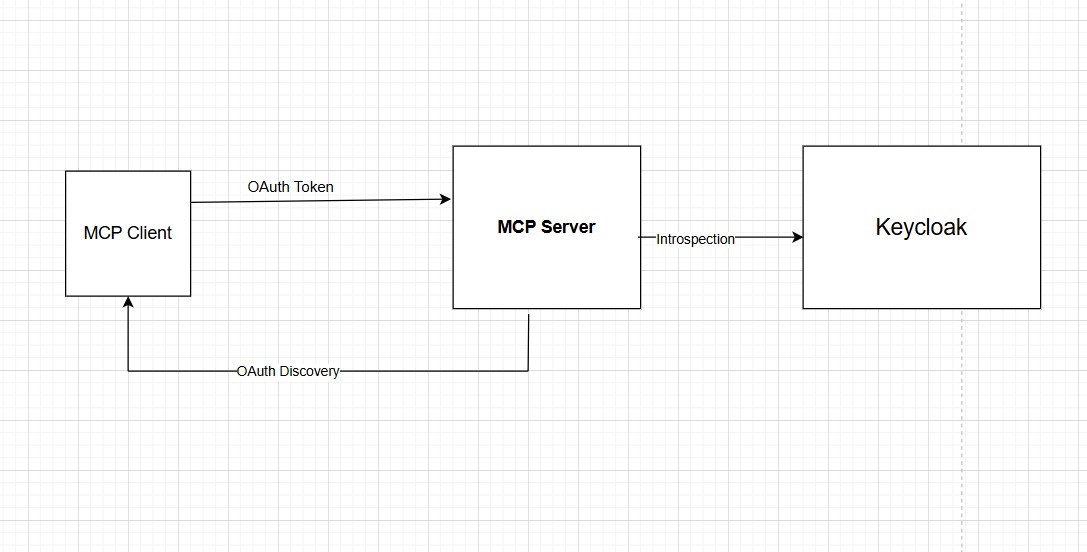
Architecture
The setup involves three parties:
- MCP Client
- Keycloak
- MCP Server
Flow details:
- The MCP client discovers the auth requirements by hitting the MCP server and reading its OAuth metadata.
- The client authenticates with Keycloak and obtains an access token.
- The client sends requests to the MCP server with the token in the
Authorizationheader. - The MCP server introspects the token against Keycloak to verify it’s valid and has the right audience.
The MCP server never handles usernames, passwords, or login pages. Keycloak owns the entire identity layer.
Step 2 is where most first setups break: older Keycloak versions ignore the client’s requested resource and mint a token whose aud claim does not name your MCP server, so the audience check in step 4 rejects an otherwise valid token. Our walkthrough of the Keycloak MCP server 401 and the audience claim traces that failure end to end.
The OAuth 2.0 Discovery Chain
MCP defines a structured discovery flow so clients can find the authorization server automatically. Here’s what happens step by step:
Step 1: Client Gets Rejected
The client sends an MCP request without credentials:
POST http://localhost:3000/
Content-Type: application/json

{"jsonrpc":"2.0","method":"initialize","id":1,...}
The server responds with a 401 and a pointer to its resource metadata:
HTTP/1.1 401 Unauthorized
WWW-Authenticate: Bearer resource_metadata="http://localhost:3000/.well-known/oauth-protected-resource"
Step 2: Client Fetches Resource Metadata
The client follows the URL from the WWW-Authenticate header:
GET http://localhost:3000/.well-known/oauth-protected-resourceSample JSON response (realm for me is acme):
{
  "resource": "http://localhost:3000/",
  "authorization_servers": [
    "https://<instance>.us.dev.skycloak.io/realms/acme/"
  ],
  "scopes_supported": ["mcp:tools"],
  "resource_name": "MCP Demo Server"
}
This tells the client: “To access me, authenticate with this Keycloak realm, and request the mcp:tools scope.”
Step 3: Client Fetches Authorization Server Metadata
The client discovers Keycloak’s full capabilities:
GET https://<instance>.us.dev.skycloak.io/realms/acme/.well-known/oauth-authorization-serverKeycloak responds with its standard OAuth 2.0 / OpenID Connect metadata, including:
authorization_endpoint, where to redirect users for logintoken_endpoint, where to exchange authorization codes for tokensintrospection_endpoint, where the MCP server validates tokens etc.
In this example, the MCP server validates tokens using Keycloak’s introspection endpoint. This is useful when:
- Tokens are opaque
- Immediate revocation is required
Alternatively, MCP servers could validate JWTs locally using Keycloak’s JWKS endpoint, at the cost of revocation latency. You can use the JWT Token Analyzer to decode and inspect the tokens during development.
Step 4: Client Authenticates
MCPClient uses the Client Credentials grant to authenticate with Keycloak for machine-to-machine communication. If MCPClient needs to act on behalf of an authenticated user, OAuth 2.0 Authorization Code flow with PKCE can be used against Keycloak for clients that support interactive login.
The Keycloak documentation on MCP authorization servers has more information on MCP integration.
Keycloak Configuration
On the Keycloak side, you need:
A Realm (e.g., acme), the tenant boundary for users and clients.
Two Keycloak Clients: this is a detail that’s easy to miss. The MCP server and the MCP client (the caller) are separate Keycloak clients with separate roles:
mcp-server, Token introspection (validating incoming tokens), used by MCP Servermcp-test-client, Obtaining access tokens to call the MCP server, used by The MCP client / caller
Both are confidential clients with client authentication enabled and their own client secrets. The MCP server uses its credentials to call Keycloak’s introspection endpoint. The MCP client uses its credentials to obtain tokens from Keycloak’s token endpoint.
A Custom Scope (mcp:tools), so tokens can carry MCP-specific permissions.
This scope represents MCP-specific permissions and ensures issued access tokens are accepted by the MCP server.
After creating the mcp:tools client scope, configure it as follows:
-
Client Scopes ->
mcp:tools-> Settings-
Enable Include in token scope
This ensures
mcp:toolsappears in thescopeclaim of the access token.
-
-
Client Scopes ->
mcp:tools-> Mappers -> By configuration -> Audience- Name:
audience-config(any descriptive name) -
Included Custom Audience:
http://localhost:3000This value must match what the MCP server expects as its audience.
- Name:
-
Clients ->
{your-client}-> Client scopes-
Add
mcp:toolsas a Default Client ScopeThis ensures the scope and audience are included in all tokens issued to the client.
-
With this configuration, Keycloak issues access tokens that contain:
- the
mcp:toolsscope, and - an
audclaim that explicitly targets the MCP server,
allowing the MCP server to successfully validate and authorize incoming requests.
Audience mapping: The access token must include the MCP server’s URL as an audience (aud) claim. In Keycloak, this is done via a protocol mapper: (as discussed above)
- Mapper type: Audience
- Included Custom Audience:
http://localhost:3000(the MCP server’s resource URL)
This audience claim is what the MCP server checks to confirm the token was issued for it, not for some other service.
MCP Server Code
The MCP Server code reference is taken from the min-ts-mcp-auth reference server on GitHub and further slightly modified (to align with Skycloak URLs). That reference server ships with add and multiply tools.
Using the MCP SDK Client
Here’s code from test-client.ts, an MCP client for illustration that uses a separate Keycloak client (mcp-test-client) to obtain tokens:
import 'dotenv/config';
import { Client } from "@modelcontextprotocol/sdk/client/index.js";
import { StreamableHTTPClientTransport } from "@modelcontextprotocol/sdk/client/streamableHttp.js";

const SERVER_URL = "http://localhost:3000";
const CLIENT_SECRET = process.env.OAUTH_MCP_CLIENT_SECRET || ""; //defined in OAUTH_MCP_CLIENT_SECRET .env file

  // --- Step 1: Get token from Keycloak ---
  async function getToken(): Promise<string> {
    const tokenUrl = "https://<instance>.us.dev.skycloak.io/realms/acme/protocol/openid-connect/token";

    const res = await fetch(tokenUrl, {
      method: "POST",
      headers: { "Content-Type": "application/x-www-form-urlencoded" },
      body: new URLSearchParams({
        grant_type: "client_credentials",
        client_id: "mcp-test-client",
        client_secret: CLIENT_SECRET,
        resource: SERVER_URL,
      }),
    });
    if (!res.ok) throw new Error(`Token request failed: ${res.status} ${await res.text()}`);
    const data = await res.json();
    return data.access_token;
  }

  // --- Step 2: Connect MCP client ---
  async function main() {
    const token = await getToken();

    console.log("Token: " + token)

    const transport = new StreamableHTTPClientTransport(
      new URL(SERVER_URL),
      {
        requestInit: {
          headers: {
            Authorization: `Bearer ${token}`,
          },
        },
      }
    );

    const client = new Client({ name: "test-client", version: "1.0.0" });
    await client.connect(transport);

    // --- Step 3: Use the server ---
    // List available tools
    const tools = await client.listTools();
    console.log("Tools:", tools);

    // Call "add"
    const addResult = await client.callTool({ name: "add", arguments: { a: 3, b: 7 } });
    console.log("add result:", addResult);

    // Call "multiply"
    const mulResult = await client.callTool({ name: "multiply", arguments: { x: 4, y: 5 } });
    console.log("multiply result:", mulResult);

    await client.close();
  }

  main().catch(console.error);
Run it with:
npx tsx src/test-client.tsResult (The console log):
Tools: {
  tools: [
    {
      name: 'add',
      title: 'Addition Tool',
      description: 'Add two numbers together',
      inputSchema: [Object]
    },
    {
      name: 'multiply',
      title: 'Multiplication Tool',
      description: 'Multiply two numbers together',
      inputSchema: [Object]
    }
  ]
}
add result: { content: [ { type: 'text', text: '3 + 7 = 10' } ] }
multiply result: { content: [ { type: 'text', text: '4 × 5 = 20' } ] }
For more details on securing a Model Context Protocol (MCP) server with Keycloak, see the MCP authorization tutorial, which covers dynamic client registration as well. For the Keycloak side of that flow, see securing MCP servers with Keycloak dynamic client registration.
For another example of advanced token handling with Keycloak, see our article on DPoP with Keycloak Admin API Using Node.js.
Note: Skycloak Console at realm level has recipes for MCP Server Authentication to quickly start with MCP.
Summary
In this article, we demonstrated how an MCP client can securely communicate with an MCP server protected by Keycloak. By leveraging MCP’s built-in OAuth discovery endpoints, the MCP SDK’s bearer authentication support, and Keycloak’s standards-compliant OAuth 2.0 implementation, authentication can be implemented without custom security code.
The MCP server does not manage users, passwords, or login flows. Instead, it publishes its authorization requirements, validates tokens via introspection, and enforces audience checks to ensure tokens were issued specifically for it. Keycloak owns the identity layer end to end.
In real-world deployments, LLMs interact only with MCP clients and remain completely isolated from OAuth complexity.
Frequently asked questions
What is the Model Context Protocol (MCP)?
MCP is an open protocol that standardizes how AI clients (such as LLM-based agents) discover and call tools hosted on backend servers. An MCP server exposes a set of named tools, functions the client can invoke, along with metadata describing their inputs and outputs. Because MCP servers can execute arbitrary logic, they must authenticate every incoming request; anonymous tool invocations should never be permitted.
Why use Keycloak for MCP authentication instead of API keys?
API keys are shared secrets with no built-in expiry, rotation mechanism, or scope. OAuth 2.0 tokens issued by Keycloak are short-lived, scoped to specific resources (via the aud claim), and can be revoked immediately. Keycloak’s introspection endpoint gives the MCP server a real-time validity check, including revocation status, something a static API key cannot provide. Keycloak also handles the full authentication flow, so the MCP server never touches user credentials.
What is the difference between token introspection and local JWT validation for MCP servers?
Local JWT validation verifies the token signature using Keycloak’s JWKS endpoint without a network call per request, it is fast but cannot detect tokens that have been revoked before their expiry. Token introspection calls Keycloak’s introspection endpoint on every request, which adds latency but gives an authoritative real-time answer on whether the token is still active. For MCP servers where immediate revocation matters (e.g., a user’s session was terminated), introspection is the safer choice.
How does the MCP OAuth discovery chain work?
When an MCP client sends an unauthenticated request, the MCP server responds with a 401 and a WWW-Authenticate header pointing to its resource metadata at /.well-known/oauth-protected-resource. The client fetches that document, which lists the authorization server (Keycloak realm URL) and required scopes. The client then fetches the Keycloak authorization server metadata to discover the token endpoint and authenticates there. This three-step chain is fully standardized and requires no manual configuration on the client side.
About Skycloak
If you’re new to Skycloak, visit the Skycloak Getting Started Guide to learn more about securing your Keycloak deployments.
Skycloak is a fully managed Keycloak platform hosted in the cloud. It enables organizations to leverage the power of open-source Keycloak IAM without the operational overhead of installing, maintaining, and scaling production-grade Keycloak environments, delivered securely and cost-effectively. See our pricing for details.