Last updated: March 2026
Introduction
In this article, we demonstrate how to access the Admin REST API of Keycloak using DPoP-bound tokens with a confidential client.
We will:
- Enable Require DPoP bound tokens
- Use Client Credentials flow
- Generate DPoP proof using Node.js
- Call the Admin API to list users
This example uses the realm acme and a confidential client kc-admin-client and demonstrates Keycloak API admin access to list the first five users (role used: realm-management -> view-users).
Why DPoP?
Normally, OAuth2 access tokens are Bearer tokens. If stolen, anyone can use them.
DPoP (Demonstration of Proof-of-Possession):
- Cryptographically binds the access token to a private key
- Requires a signed proof per request
- Prevents replay attacks
When enabled in Keycloak:
The token can only be used by the client that possesses the private key.
For more details on DPoP, refer to RFC 9449 – Demonstrating Proof-of-Possession at the Application Layer.
You can inspect and decode your DPoP-bound access tokens using our JWT Token Analyzer to verify that the cnf claim contains the correct JWK thumbprint.
Implementation Steps
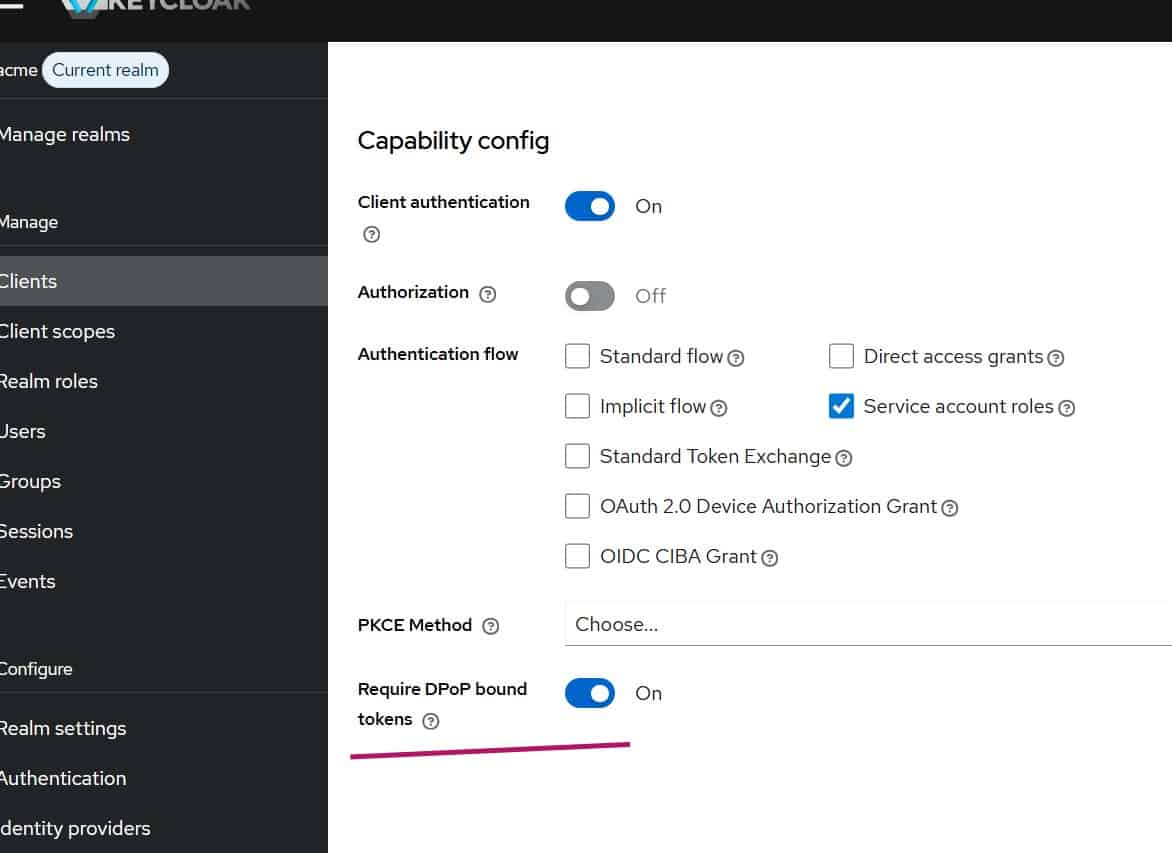
Step 1: Create an OIDC client in Keycloak with DPoP enabled
- Create a confidential OIDC client with Client Credentials enabled (named
kc-admin-client):- Client Authentication = ON
- Service Accounts Enabled = ON
- Enable Require DPoP bound tokens = ON
- From Service Account Roles of the client settings, assign client role view-users (realm-management -> view-users)
The role realm-management -> view-users is sufficient to list users (which we are targeting for the admin API call).
For more details on configuring clients in Keycloak, see the Keycloak Client documentation.
Step 2: Node.js script to handle DPoP
Instead of manually crafting JWK and signing JWTs, we let Node.js do everything.
Install dependencies:
npm install joseNow create a JavaScript file with the following content (dpop-admin-viewusers.js):
import { generateKeyPair, exportJWK, SignJWT } from "jose";
import crypto from "crypto";

const KEYCLOAK_BASE = "your_keycloak_hostname";
const REALM = "acme";
const CLIENT_ID = "kc-admin-client";
const CLIENT_SECRET = "your_client_secret";

// Reuse a single key pair across all requests.
// Generate once at startup — the key is stable, only the DPoP proof JWT is ephemeral.
const { publicKey, privateKey } = await generateKeyPair("ES256");
const jwk = await exportJWK(publicKey);

async function main() {
  // ── Step 1: Obtain DPoP-bound access token ──────────────────────────────────
  const tokenUrl = new URL(
    `/realms/${REALM}/protocol/openid-connect/token`,
    KEYCLOAK_BASE
  ).toString();

  // No `ath` at token endpoint — there is no access token yet at this stage.
  const dpopForToken = await createDpopProof(privateKey, jwk, tokenUrl, "POST");

  const tokenResponse = await fetch(tokenUrl, {
    method: "POST",
    headers: {
      "Content-Type": "application/x-www-form-urlencoded",
      "DPoP": dpopForToken,
    },
    body: new URLSearchParams({
      grant_type: "client_credentials",
      client_id: CLIENT_ID,
      client_secret: CLIENT_SECRET,
    }),
  });

  // Handle DPoP-Nonce challenge from the token endpoint.
  // If Keycloak returns `use_dpop_nonce`, retry once with the server-supplied nonce.
  if (!tokenResponse.ok) {
    const errorJson = await tokenResponse.json();

    if (errorJson.error === "use_dpop_nonce") {
      const serverNonce = tokenResponse.headers.get("DPoP-Nonce");
      console.log("Server requested DPoP nonce — retrying with nonce:", serverNonce);

      const dpopForTokenWithNonce = await createDpopProof(
        privateKey, jwk, tokenUrl, "POST", null, serverNonce
      );

      const retryResponse = await fetch(tokenUrl, {
        method: "POST",
        headers: {
          "Content-Type": "application/x-www-form-urlencoded",
          "DPoP": dpopForTokenWithNonce,
        },
        body: new URLSearchParams({
          grant_type: "client_credentials",
          client_id: CLIENT_ID,
          client_secret: CLIENT_SECRET,
        }),
      });

      if (!retryResponse.ok) {
        console.error("Token error after nonce retry:", await retryResponse.json());
        return;
      }

      return await callAdminApi(await retryResponse.json(), serverNonce);
    }

    console.error("Token error:", errorJson);
    return;
  }

  return await callAdminApi(await tokenResponse.json(), null);
}

async function callAdminApi(tokenJson, dpopNonce) {
  const accessToken = tokenJson.access_token;
  console.log("DPoP-bound token obtained");

  // ── Step 2: Call Admin API ────────────────────────────────────────────────
  const usersUrlString = `${KEYCLOAK_BASE}/admin/realms/${REALM}/users?first=0&max=5`;
  console.log("Users URL:", usersUrlString);

  // Strip query string from `htu` (RFC 9449 §4.2).
  // `htu` must be the URL without query string or fragment.
  // The actual fetch still uses the full URL with query params.
  const htu = (() => {
    const u = new URL(usersUrlString);
    return `${u.origin}${u.pathname}`;
  })();

  // `ath` is required when presenting an access token to a resource server (RFC 9449 §4.2).
  // It is the base64url-encoded SHA-256 hash of the ASCII access token string.
  const ath = crypto
    .createHash("sha256")
    .update(accessToken)
    .digest("base64url");

  const dpopForUsers = await createDpopProof(
    privateKey, jwk, htu, "GET", ath, dpopNonce
  );

  const usersResponse = await fetch(usersUrlString, {
    method: "GET",
    headers: {
      // Must use `DPoP` scheme — NOT `Bearer` — when DPoP is required.
      "Authorization": `DPoP ${accessToken}`,
      "DPoP": dpopForUsers,
    },
  });

  // Handle DPoP-Nonce challenge from the resource server too.
  if (!usersResponse.ok) {
    const errorText = await usersResponse.text();

    const newNonce = usersResponse.headers.get("DPoP-Nonce");
    if (newNonce) {
      console.log("Resource server requested DPoP nonce — retrying:", newNonce);

      const dpopRetry = await createDpopProof(
        privateKey, jwk, htu, "GET", ath, newNonce
      );

      const retryUsers = await fetch(usersUrlString, {
        method: "GET",
        headers: {
          "Authorization": `DPoP ${accessToken}`,
          "DPoP": dpopRetry,
        },
      });

      if (!retryUsers.ok) {
        console.error("Users API error after nonce retry:", await retryUsers.text());
        return;
      }

      console.log("Users:", await retryUsers.json());
      return;
    }

    console.error("Users API error:", errorText);
    return;
  }

  const users = await usersResponse.json();
  console.log("Users:", users);
}

/**
 * Creates a DPoP proof JWT.
 *
 * @param {CryptoKey}     privateKey  - ES256 private key
 * @param {object}        jwk         - Corresponding public JWK (embedded in header)
 * @param {string}        htu         - HTTP URI — MUST NOT include query string or fragment (RFC 9449 §4.2)
 * @param {string}        htm         - HTTP method (GET, POST, …)
 * @param {string|null}   ath         - base64url SHA-256 of access token; required at resource server, omit at token endpoint
 * @param {string|null}   nonce       - Server-supplied DPoP nonce (include when server requests it)
 */
async function createDpopProof(privateKey, jwk, htu, htm, ath = null, nonce = null) {
  const payload = { htm, htu };

  // `ath` binds the proof to a specific access token — mandatory at resource servers.
  if (ath) payload.ath = ath;

  // `nonce` prevents replay attacks when the server opts in to nonce-based replay protection.
  if (nonce) payload.nonce = nonce;

  return await new SignJWT(payload)
    .setProtectedHeader({
      alg: "ES256",
      typ: "dpop+jwt",
      jwk,           // Public key so the server can verify the signature
    })
    .setIssuedAt()   // `iat` — Keycloak rejects proofs outside its clock-skew window (~5 s default)
    .setJti(crypto.randomUUID()) // `jti` — unique per proof, enables replay detection
    .sign(privateKey);
}

main().catch(console.error);
Make sure to substitute KEYCLOAK_BASE and CLIENT_SECRET placeholders with correct values in your code.
Important Differences From Bearer Flow
Notice the Admin API call:
Authorization: DPoP <access_token>
DPoP: <signed_proof>
NOT:
Authorization: Bearer <access_token>If you use Bearer, you will get 401 Unauthorized because DPoP is mandatory.
When the Admin API is called:
- Keycloak extracts JWK from DPoP header
- Validates ES256 signature
- Computes JWK thumbprint
- Verifies it matches
cnf.jktinside access token - Performs additional checks (Keycloak also verifies
htmmatches the HTTP method andiatis within an acceptable clock skew window)
Testing the Implementation
Run the Node.js file:
node dpop-admin-viewusers.jsYou should see the details of the first 5 realm users listed.
Production Considerations
For production:
- Store private key securely
- Consider hardware-backed keys
- Enable TLS always
- Monitor replay detection logs
For a comprehensive overview of Skycloak’s security features, including WAF, geo-blocking, and IP access control, see our security page.
Summary
We have demonstrated how to use Demonstrating Proof-of-Possession (DPoP) bound tokens with the Keycloak Admin API.
DPoP is especially useful for:
- Public clients
- Mobile apps
- SPA + API architectures
- Zero Trust environments
It significantly reduces token replay risk. For related reading on securing APIs with Keycloak tokens, see our guide on securing your Spring Boot REST API with Keycloak token. You may also be interested in securing MCP servers with Keycloak OAuth 2.0 for another approach to API security.
About Skycloak
Skycloak is a fully managed Keycloak platform hosted in the cloud. It enables organizations to leverage the power of open-source Keycloak IAM without the operational overhead of installing, maintaining, and scaling production-grade Keycloak environments — delivered securely and cost-effectively.
If you’re new to Skycloak, visit the Skycloak Getting Started Guide to learn more.

Ready to simplify your authentication?
Deploy production-ready Keycloak in minutes. Unlimited users, flat pricing, no SSO tax.