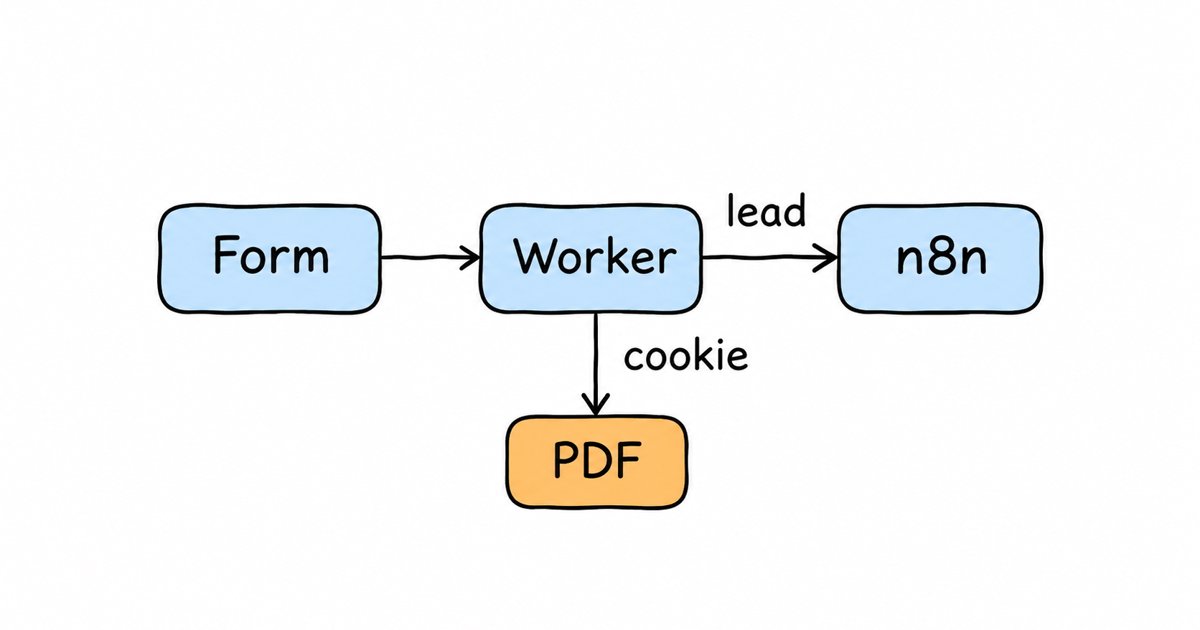
Gate a PDF Lead Magnet on Cloudflare Workers and Astro. Gate a PDF download on an Astro site served by Cloudflare Workers: bundle the file into the Worker, send the lead to n8n, then unlock it with a signed cookie.
To gate a PDF lead magnet on an Astro site served by Cloudflare Workers, keep the PDF out of the public assets and bundle it into the Worker instead. The Astro form posts to a Worker route that validates the fields and sends the lead to an n8n webhook. Once n8n accepts it, the Worker sets a signed, HttpOnly cookie that unlocks that one PDF, and any request for the PDF without a valid cookie is redirected back to the form.
This is how the PDF reports on skycloak.io are delivered today, after we moved the site from WordPress to Astro on Cloudflare Workers. This post walks through what we shipped: the Wrangler config, the Worker route, the n8n hand-off, the cookie signing code, and the choices we made on purpose, including the ones that will not suit every site.
Key takeaways
- A file under Astro’s
public/folder becomes a static asset, and Cloudflare serves static assets without running your Worker, so it can never be gated there.- Bundling the PDF into the Worker as a Data module means the only way to read its bytes is through your own code.
- Unlock the PDF with a cookie that the Worker signs and checks itself, scoped to the PDF path, rather than with a link anyone can forward.
- In the code below, a failed or timed-out post to n8n returns an error and sets no cookie, because losing a download is better than silently losing a lead.
- The code in this post includes no Turnstile check and no double opt-in. Both are worth adding if your traffic needs them.
Why can’t you gate a PDF that lives in public/?
Our Astro site builds with output: 'static', and a small hand-written Worker serves the built dist/ folder through the assets binding. That arrangement is fast, but it has one consequence for gated files. Cloudflare’s static assets documentation says that by default, “if a requested URL matches a file in the static assets directory, that file will be served, without invoking Worker code.” So if report.pdf sits in public/, it ends up in dist/, and a request for it never reaches the code that would check whether the visitor filled in the form.
The same is true when you use the @astrojs/cloudflare adapter instead of your own Worker: its documentation explains that routing for static assets follows the file structure of the build directory, and only when no file matches does the request fall back to the Worker. A gate has to sit in front of the file, so the file has to live somewhere the asset router cannot see.
Step 1: Send the PDF path through the Worker first
Workers static assets has an option for exactly this. run_worker_first can be true for every request or, as the static assets docs put it, “an array of route patterns for selective Worker-script-first routing.” We list the lead magnet path there next to our other Worker-owned paths:
{
  "main": "./worker/index.ts",
  "assets": {
    "directory": "./dist",
    "binding": "ASSETS",
    "run_worker_first": ["/wp-json/*", "/lead-magnets/*"]
  },
  "rules": [
    { "type": "Data", "globs": ["**/*.pdf"], "fallthrough": true }
  ]
}
Our Worker then answers every request under /lead-magnets/ itself and never hands one to the assets binding.
Step 2: Bundle the PDF into the Worker as a Data module
The rules entry in the config above tells Wrangler how to treat .pdf imports. Wrangler’s configuration reference notes that you need to specify rules to use Text, Data and CompiledWasm modules, and the bundling guide covers how Wrangler bundles everything else. With a Data rule, the import gives the Worker the file’s bytes as an ArrayBuffer, which is exactly what a Response body accepts:
// worker/lead-magnet-files.ts
import keycloakTco from './lead-magnets/keycloak-tco-analysis.pdf';

// Astro's client types declare a .pdf import as an asset URL string.
// Under Wrangler's Data rule it is the file's bytes.
const bytes = (module: unknown) => module as ArrayBuffer;

export const LEAD_MAGNET_PDFS: Readonly<Record<string, ArrayBuffer>> = {
  'keycloak-tco-analysis': bytes(keycloakTco),
};
The PDFs live in worker/lead-magnets/, outside both public/ and dist/, so they are deployed as part of the Worker script and nothing else can reach them. One detail caught us in tests: Vitest runs through Vite, which turns a .pdf import into an asset URL. We added a tiny Vite plugin that loads .pdf files as their bytes, so the tests see the same ArrayBuffer the Worker does.
Step 3: Post the form to a Worker route and forward the lead to n8n
On the Astro page, have a small browser script post the form as JSON and show the success state only when the Worker answers with a 2xx, because a success now also unlocks the file:
const response = await fetch('/wp-json/skycloak/v1/lead-magnet', {
  method: 'POST',
  headers: { 'Content-Type': 'application/json' },
  body: JSON.stringify({ email, full_name, source: 'landing-page', lead_magnet: slug, ...utm }),
});
if (!response.ok) return showError(form);
showSuccess(form);
Have the Worker route validate the email and the source and check that a lead magnet slug is present before it posts the lead to n8n. On the n8n side the entry point is a Webhook node, and the Worker treats any 2xx answer as “n8n has the lead”. The webhook URL is a Worker secret, so it never appears in the repo, in the browser or in our logs. If you want the webhook itself to demand a credential as well, the n8n Webhook node offers Basic, Header and JWT authentication, and a Header auth credential that the Worker sends from another secret is the simplest of the three.
const INLINE_TIMEOUT_MS = 10_000;

async function postToN8n(url: string, payload: unknown): Promise<boolean> {
  try {
    const response = await fetch(url, {
      method: 'POST',
      headers: { 'Content-Type': 'application/json' },
      body: JSON.stringify(payload),
      signal: AbortSignal.timeout(INLINE_TIMEOUT_MS),
    });
    await response.arrayBuffer().catch(() => undefined); // release the connection
    return response.status >= 200 && response.status < 300;
  } catch {
    return false; // timeout or network error
  }
}
The visitor waits on this request, so we give it ten seconds rather than the thirty WordPress used to allow. Set the n8n Webhook node to respond immediately, or once your first step has stored the lead, so the answer comes back well inside that time. A 4xx from n8n counts as a failure too, so it grants nothing.
Step 4: Sign a cookie that unlocks one PDF
When n8n accepts the lead, the Worker adds a Set-Cookie header to its JSON answer. The sample below signs the slug and an expiry timestamp with the Web Crypto API, which Workers support for HMAC signing and verification:
const ACCESS_SECONDS = 30 * 24 * 60 * 60; // 30 days
const encoder = new TextEncoder();

function hmacKey(secret: string, usage: KeyUsage[]) {
  return crypto.subtle.importKey('raw', encoder.encode(secret), { name: 'HMAC', hash: 'SHA-256' }, false, usage);
}

function base64url(bytes: Uint8Array): string {
  return btoa(String.fromCharCode(...bytes)).replace(/\+/g, '-').replace(/\//g, '_').replace(/=+$/, '');
}

export async function accessCookie(slug: string, secret: string): Promise<string> {
  const expires = Math.floor(Date.now() / 1000) + ACCESS_SECONDS;
  const key = await hmacKey(secret, ['sign']);
  const signature = new Uint8Array(await crypto.subtle.sign('HMAC', key, encoder.encode(`${slug}:${expires}`)));
  return `lead_magnet_${slug}=${expires}.${base64url(signature)}; Max-Age=${ACCESS_SECONDS}; Path=/lead-magnets/; HttpOnly; Secure; SameSite=Lax`;
}

function base64urlDecode(value: string): Uint8Array | null {
  try {
    const base64 = value.replace(/-/g, '+').replace(/_/g, '/');
    const padded = base64.padEnd(Math.ceil(base64.length / 4) * 4, '=');
    return Uint8Array.from(atob(padded), (char) => char.charCodeAt(0));
  } catch {
    return null;
  }
}
A few choices in that string matter. MDN’s Set-Cookie reference explains each attribute: HttpOnly forbids JavaScript from reading the cookie, Path sets the URL path that must exist in a request for the browser to send it, and SameSite=Lax still sends it when a visitor follows a link to the site from somewhere else. Thirty days is long enough for someone to open a delivery email a week later and still get the file.
If the same secret also signs something else on your site, derive a separate key from it for this purpose, so a key used elsewhere can never sign a download cookie. If you only have one use for the secret, signing with it directly is fine.
Step 5: Serve the PDF or redirect to the form
The PDF route is the gate. In the sample below, FORMS maps each slug to the path of its landing page form and notFound returns your 404 page; a request with a valid cookie gets the bundled bytes, and one without gets a redirect to the form:
export async function serveLeadMagnet(request: Request, env: Env): Promise<Response> {
  const url = new URL(request.url);
  const slug = /^\/lead-magnets\/([a-z0-9-]+)\.pdf$/.exec(url.pathname)?.[1];
  const read = request.method === 'GET' || request.method === 'HEAD';
  if (!read || !slug || !Object.hasOwn(FORMS, slug)) return notFound(request);

  if (!env.LEAD_MAGNET_SECRET || !(await hasAccess(request, slug, env.LEAD_MAGNET_SECRET))) {
    const form = new URL(FORMS[slug], url);
    form.search = url.search; // keep the UTM parameters
    return new Response(null, { status: 302, headers: { Location: form.href, 'Cache-Control': 'no-store' } });
  }

  const pdf = LEAD_MAGNET_PDFS[slug];
  return new Response(request.method === 'HEAD' ? null : pdf, {
    headers: {
      'Content-Type': 'application/pdf',
      'Content-Length': String(pdf.byteLength),
      'Content-Disposition': `inline; filename="${slug}.pdf"`,
      'Cache-Control': 'private, no-store',
    },
  });
}
hasAccess parses the cookie, rejects it when its expiry has passed (so a copied cookie stops working when the browser would have dropped it anyway), and checks the signature with crypto.subtle.verify rather than comparing strings by hand:
async function hasAccess(request: Request, slug: string, secret: string): Promise<boolean> {
  const name = `lead_magnet_${slug}=`;
  const cookie = (request.headers.get('Cookie') ?? '').split(';').map((part) => part.trim()).find((part) => part.startsWith(name));
  const match = /^(\d{1,12})\.([A-Za-z0-9_-]{43})$/.exec(cookie?.slice(name.length) ?? '');
  if (!match) return false;
  const expires = Number(match[1]);
  if (expires <= Math.floor(Date.now() / 1000)) return false;
  const signature = base64urlDecode(match[2]);
  const key = await hmacKey(secret, ['verify']);
  return signature !== null && crypto.subtle.verify('HMAC', key, signature, encoder.encode(`${slug}:${expires}`));
}
Copy the original query string onto the redirect, so that a campaign link pointing straight at the PDF still reaches the form with its UTM parameters and the lead records where it came from. Mark the file itself as private and not storable, because a gated file must never sit in a shared cache where the next visitor could be served it without the cookie. And treat a missing secret as no access, so a configuration mistake keeps the gate shut instead of opening it.
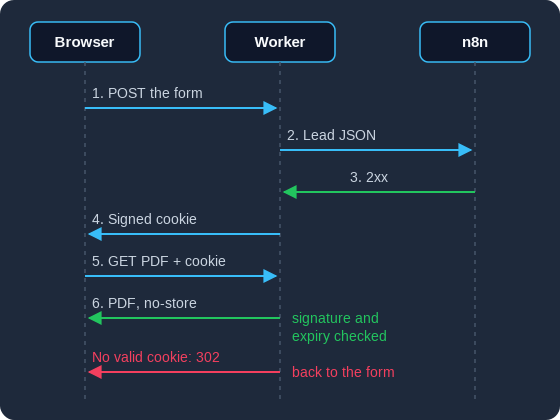
The browser posts the form to the Worker (1), the Worker posts the lead to n8n (2), and only after n8n answers 2xx (3) does the Worker set a signed cookie (4). The browser then requests the PDF with that cookie (5), and the Worker checks the signature and expiry before streaming the file with no-store (6). A request without a valid cookie gets a 302 back to the form.
Identity management as a service, on open source
Skycloak does what Auth0 and Okta do, SSO, MFA, SCIM, audit logs and enterprise federation, on an open source core. Unlimited users and applications on every plan, no charge per monthly active user, and you can export and self-host whenever you want.
What happens when n8n is down?
This was the decision we argued about most. Our contact form is built so a submission is not lost: when the post to n8n fails or times out, the Worker puts it on a Cloudflare Queue, and the queue consumer retries it with backoff (starting at one minute and doubling up to three hours), with a dead letter queue at the end so nothing is silently dropped. That makes sense for a contact request, because the visitor only needs to know their message will arrive eventually.
For a gated download, do not queue: when n8n fails, return an error, let the form ask the visitor to try again, and set no cookie. A download is immediate: if you handed out the PDF and queued the lead, an n8n outage would give away every report for free while you hoped the queue caught up, and a lead stuck in a dead letter queue is a lead nobody follows up. Telling the visitor to retry keeps the exchange honest, since they get the PDF exactly when we have their details. The cost is that an n8n outage blocks downloads for its duration, so watch the Worker logs for failed deliveries.
How do you keep bots off the form?
The code in this post includes no bot protection. If your lead magnet attracts spam, have the Worker check a Turnstile token before forwarding anything. Cloudflare’s server-side validation guide is clear that “the client-side widget alone does not protect your forms”: the Worker must call the Siteverify API, and each token is valid for 300 seconds and intended for single use. Do that check before the n8n post, so a bot never reaches your workflow or your CRM.
What about consent and double opt-in?
The code in this post gates a file and leaves the email list to n8n. If your audience or your jurisdiction needs explicit consent or a confirmed opt-in, add a consent field to the form, pass it through to n8n, and have the workflow send a confirmation email before adding anyone to a list. That belongs in the workflow, and the gate described here does not change.
Why a cookie and bundled bytes instead of R2 and signed URLs?
R2 with presigned URLs is the textbook answer, and it is a good one for large files. We chose otherwise for three reasons. First, the file count is small, so the bundled files fit easily within the Workers limit of 64 MiB uncompressed per Worker. Second, the R2 presigned URLs guide notes that the R2 Workers binding cannot generate presigned URLs, so you need an S3 client and separate credentials, and a presigned URL is a bearer link that works for anyone it is forwarded to until it expires. Third, a cookie lets one stable /lead-magnets/ URL, the one a delivery email can link to, work for the person who asked for it while sending everyone else to the form.
The approach has limits worth stating plainly. Every PDF adds to the Worker bundle and a new PDF means a deploy, so a library of dozens of large files belongs in R2, read by the Worker through its binding behind the same cookie check. The cookie also lives in one browser: someone who fills in the form on a laptop and opens the email on their phone is sent back to the form on the phone. For us that is an acceptable cost, since the form takes a few seconds, but it is worth knowing before you copy the design.
How this relates to signing users in
A signed cookie that unlocks one file is not authentication. It proves that this browser submitted a form, and nothing about who the person is. When the content behind the gate is customer data or anything account-specific, use a real identity provider: our Keycloak authentication in Astro guide covers OpenID Connect login with server-side sessions on Astro, and if the protected thing is an internal tool rather than a marketing download, Keycloak as an identity provider for Cloudflare Access shows how to use Keycloak as the OIDC identity provider that Cloudflare Access checks before letting anyone reach an app.
FAQ
Can I gate a PDF in Astro without a Worker?
Not on a static build. A static Astro site has no server code at request time, and a file in public/ is served to anyone who has the URL. You need code that runs before the file is served, which on Cloudflare means a Worker route listed in run_worker_first.
Is a signed cookie safe enough for a lead magnet?
For marketing content, yes. The signature means nobody can forge a cookie without the Worker secret, the expiry stops a copied cookie from working forever, and HttpOnly with a /lead-magnets/ path keeps it away from page scripts. Someone who gets the PDF can still share the file itself, and no gate prevents that.
Should the Worker retry when the n8n webhook fails?
For a contact form, yes, through a queue. For a gated download we decided not to, because the visitor is waiting for the file and granting it before the lead is stored gives the content away during an outage. Return an error and let the visitor try again.
Does this work with the @astrojs/cloudflare adapter?
The same ideas apply. Keep the PDF out of public/, bundle it with a Wrangler Data rule, and make sure the PDF path runs your code before the asset router, either as an on-demand route or with run_worker_first.
Next steps
Copy the Worker route and cookie code from this post, move your PDF from public/ into the Worker with a Data rule, add its path to run_worker_first, and point the form at your n8n webhook. Then request the PDF in a private window to confirm you are redirected to the form, submit the form, and request it again to confirm it opens.
If you would rather spend that engineering time on your product than on running identity infrastructure, Skycloak’s managed Keycloak hosting runs Keycloak for you.