
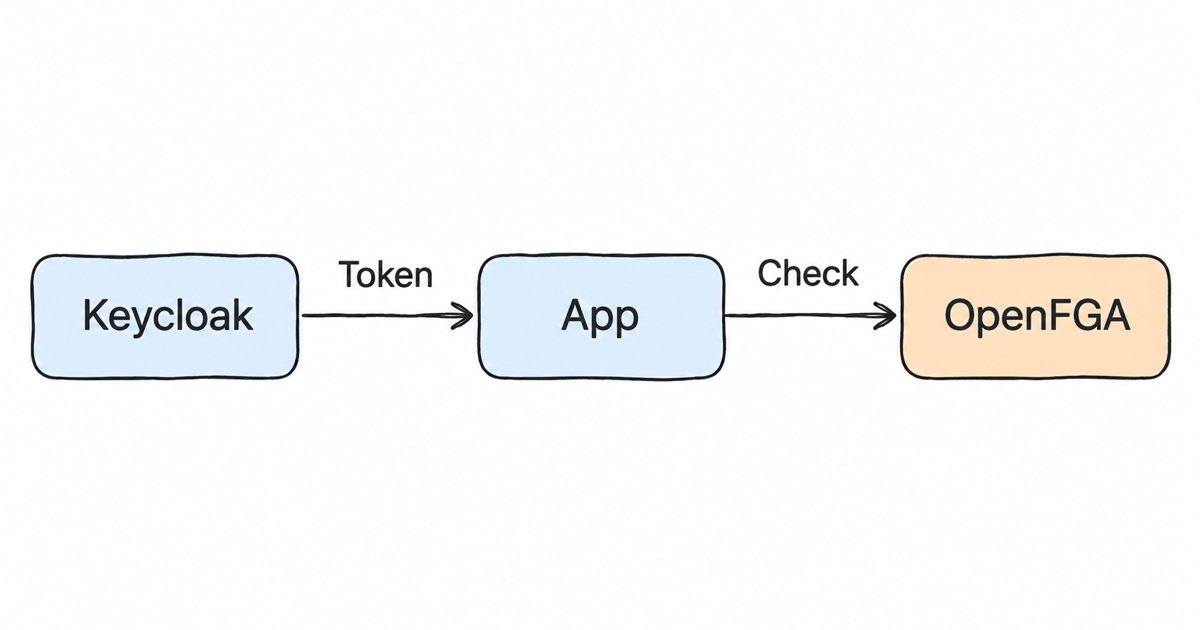
OpenFGA with Keycloak: Managed Authorization per Realm. Use OpenFGA with Keycloak: Keycloak signs users in, OpenFGA answers who can edit what. A multi-tenant model, the check flow, and a managed instance per realm.
To use OpenFGA with Keycloak, you let Keycloak handle login and issue tokens, and you let OpenFGA answer relationship checks such as “can this user edit this document?”. Your API validates the Keycloak token, takes the user ID from its sub claim, and asks OpenFGA for a yes or no. On Skycloak Enterprise workspaces you can turn on a managed OpenFGA instance for a Keycloak realm today: your app writes the relationship tuples through the OpenFGA API, and Skycloak runs the instance and its database for you.
This post walks through that setup end to end with one worked example: how Keycloak identities become OpenFGA identifiers, where the check runs, a multi-tenant SaaS model with sample tuples and checks, when Keycloak Authorization Services is the better fit, and what changes when you run OpenFGA yourself instead of having it managed. If you want the broader landscape of authorization options first, our post on fine-grained authorization in Keycloak covers it.
What do Keycloak and OpenFGA each do?
Keycloak answers “who is this?”. It signs the user in, runs MFA and federation, and gives your application an access token that says which realm issued it and which user it is about. It can also carry roles and groups in that token, which is enough for coarse rules like “admins can open the billing page”.
OpenFGA answers “may this user do this to that object?”. It is an open source authorization engine (OpenFGA on GitHub) modeled on the ideas in the Zanzibar paper. Zanzibar is the authorization system Google describes in its Zanzibar paper. The idea it popularized is relationship-based access control (ReBAC): you store facts like “Ana is an editor of folder Q4” and “document plan is in folder Q4”, and the engine works out that Ana can edit the plan.
A few OpenFGA terms come up through the rest of the post, so here they are in OpenFGA’s own words (OpenFGA concepts):
- A store “is an OpenFGA entity used to organize authorization check data” (OpenFGA concepts).
- An authorization model “combines one or more type definitions”, and each type (such as
document) defines relations (such aseditor). - A relationship tuple “is a base tuple/triplet consisting of a user, relation, and object”, for example user
user:anne, relationeditor, objectdocument:roadmap(OpenFGA concepts). - A check request returns “whether the user has a certain relationship with an object” (OpenFGA concepts).
The split is clean because the two systems answer different questions. Keycloak tells you the caller’s identity with a signed token, and OpenFGA holds the relationships between that identity and your data, which change far too often to live in a token.
How do Keycloak users, groups and clients map to OpenFGA identifiers?
OpenFGA does not know about Keycloak. A user in OpenFGA is just a string such as user:anne, so you decide which Keycloak value goes after the colon. Pick values that never change, because every tuple you write refers to them.
| Keycloak identity | Where it is in the token | OpenFGA identifier |
|---|---|---|
| A user | The sub claim, the token’s subject identifier |
user:{sub} |
| A group | The group’s ID, or a groups claim if your tokens carry one |
group:{id}#member |
| A service account (client credentials) | The token’s sub, or the client ID if you model clients separately |
user:{sub} or a client type keyed by client ID |
| A tenant you model yourself | Your own tenant ID, often a custom claim or a database row | organization:{id} |
Use sub, not the username or email, for users. OpenID Connect defines sub as “a locally unique and never reassigned identifier within the Issuer for the End-User” (OpenID Connect Core 1.0). A tuple that names a profile value silently stops matching if that value is ever edited, so key your tuples on the user ID that sub carries rather than on fields people can change.
Groups have two options. You can write a tuple for each membership (user:{sub} is a member of group:{id}) and keep OpenFGA in step with Keycloak from your app or a job that reacts to Keycloak admin events. Or, if your tokens carry a groups claim, you can read it and send the memberships as contextual tuples, which OpenFGA describes as tuples that “only exist within the context of that particular request and are not persisted in the datastore” (OpenFGA concepts). OpenFGA’s guide on token claims as contextual tuples covers this pattern and its trade-off: “if those relationships change while the token has not expired, users will still get access to the resources the content of the token entitled them to.” Keep access tokens short-lived if you go that way.
The managed instance does not copy Keycloak users or groups into OpenFGA in this release, as the Skycloak OpenFGA docs say: you write models and tuples through the OpenFGA API yourself.
Where does the authorization check run?
The check runs in your API (or your API gateway, if it can call out per request), after the Keycloak token has been validated. The order matters: you only ask OpenFGA about a user once you trust that the token really came from your realm and has not expired.
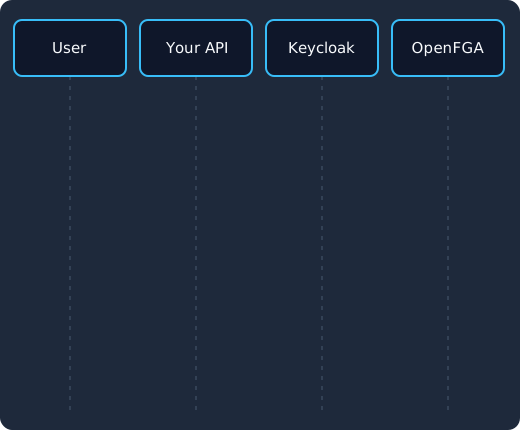
The user signs in to the realm (1) and gets an access token whose sub is the user ID (2). They call your API with it (3), your API verifies it with the realm’s keys (4), asks OpenFGA whether that user can edit the document using its own token from the same realm (5), gets allowed: true or false (6), and returns the document or a 403 (7).
On Skycloak, the call from your API to OpenFGA is itself authenticated with Keycloak. The instance “accepts only tokens signed by that realm”, and a token must also carry the instance’s audience (Skycloak OpenFGA docs). So your backend gets its own access token from the realm with the client credentials grant, using a confidential client that has an Audience mapper for the instance, and sends that token to OpenFGA. The user’s token stays between the user and your API; OpenFGA only ever sees your backend’s token and the user ID you put in the check.
A worked model for a multi-tenant SaaS
Here is a model for a typical B2B app: customers are organizations, organizations contain folders, and folders contain documents. Organization admins can edit everything in their organization, members can read it, and individual users or groups can be given access to a single folder or document. It uses the OpenFGA modeling language described in getting started with modeling.
model
  schema 1.1

type user

type group
  relations
    define member: [user]

type organization
  relations
    define admin: [user]
    define member: [user, group#member] or admin

type folder
  relations
    define organization: [organization]
    define editor: [user, group#member] or admin from organization
    define viewer: [user, group#member] or editor or member from organization

type document
  relations
    define parent: [folder]
    define editor: [user, group#member] or editor from parent
    define viewer: [user, group#member] or editor or viewer from parent
Read admin from organization as “anyone who is an admin of this folder’s organization”. That one line is the reason you do not need to write a tuple for every admin on every folder: OpenFGA follows the relationship from the folder to its organization at check time.
Now some tuples. The user IDs are Keycloak sub values from one realm, shortened here to keep the lines readable.
| User | Relation | Object | Meaning |
|---|---|---|---|
user:7a1c... (Ana) |
admin |
organization:acme |
Ana administers Acme |
user:b52e... (Ben) |
member |
organization:acme |
Ben works at Acme |
user:d09f... (Chloe) |
member |
organization:globex |
Chloe works at Globex |
organization:acme |
organization |
folder:acme-finance |
The folder belongs to Acme |
folder:acme-finance |
parent |
document:q4-plan |
The document is in that folder |
With those five tuples, the checks come out like this:
| Check | Answer | Why |
|---|---|---|
Ana editor of document:q4-plan |
allowed | Admin of Acme, so editor of the folder, so editor of the document |
Ben viewer of document:q4-plan |
allowed | Member of Acme, so viewer of the folder and the document |
Ben editor of document:q4-plan |
denied | Members can view but nobody made Ben an editor |
Chloe viewer of document:q4-plan |
denied | Globex has no path to an Acme folder |
The last row is your tenant isolation. Chloe is a valid user in the same Keycloak realm, but nothing in the graph links her to Acme’s data, so every check against it fails without any tenant filter in your code.
Writing tuples and running a check
Once the instance is ready, you create a store, upload the model and write tuples with the OpenFGA API. The model above is written in OpenFGA’s modeling language (getting started with modeling); the API reference shows the form the API expects when you upload it.
# Your backend's token from the realm (client credentials, with the Audience mapper)
TOKEN=$(curl -s "$ISSUER/protocol/openid-connect/token" \
  -d grant_type=client_credentials \
  -d client_id="$CLIENT_ID" \
  -d client_secret="$CLIENT_SECRET" | jq -r .access_token)

# Create a store and keep its ID
STORE_ID=$(curl -s -X POST "$API_URL/stores" \
  -H "Authorization: Bearer $TOKEN" \
  -H "Content-Type: application/json" \
  -d '{"name": "docs-app"}' | jq -r .id)

# Upload the model in the API's JSON form
MODEL_ID=$(curl -s -X POST "$API_URL/stores/$STORE_ID/authorization-models" \
  -H "Authorization: Bearer $TOKEN" \
  -H "Content-Type: application/json" \
  -d @model.json | jq -r .authorization_model_id)
When something happens in your app, such as Ana creating a folder, your code writes the matching tuple:
curl -s -X POST "$API_URL/stores/$STORE_ID/write" \
  -H "Authorization: Bearer $TOKEN" \
  -H "Content-Type: application/json" \
  -d '{
    "authorization_model_id": "'"$MODEL_ID"'",
    "writes": { "tuple_keys": [
      { "user": "organization:acme", "relation": "organization", "object": "folder:acme-finance" }
    ] }
  }'
And when Ben opens the document, your API takes sub from his validated token and runs a check:
curl -s -X POST "$API_URL/stores/$STORE_ID/check" \
  -H "Authorization: Bearer $TOKEN" \
  -H "Content-Type: application/json" \
  -d '{
    "authorization_model_id": "'"$MODEL_ID"'",
    "tuple_key": { "user": "user:'"$BEN_SUB"'", "relation": "viewer", "object": "document:q4-plan" }
  }'
# {"allowed": true}
Two details save debugging time. Pin the authorization_model_id in your app’s config, so a model you upload while testing does not change production answers. And if a user is granted access and checked straight after, know how OpenFGA treats freshness: its docs say “OpenFGA caching is disabled by default. When caching is disabled, all queries will have strong consistency regardless of the consistency mode specified”, and with caching on you can ask for HIGHER_CONSISTENCY on a request so it will “skip the cache and query the database directly” (OpenFGA consistency).
For “which documents can Ben see?” style lists, running one check per document gets slow as the list grows. If your lists run to many thousands of rows, our post on Auth0 FGA’s Permissions Index versus Keycloak explains why filtering big result sets is a different problem from single checks.
Managed identity, built on open source
Skycloak runs real upstream Keycloak for you, so you get SSO, MFA and SCIM without operating the infrastructure. Unlimited users on every plan, no fork, and you can export at any time.
When should you use OpenFGA instead of Keycloak Authorization Services?
Keycloak already ships an authorization engine. Keycloak Authorization Services is Keycloak’s own option: its documentation says “Keycloak supports fine-grained authorization policies” and provides “the necessary means to create permissions for your protected resources and scopes”. Our post on Keycloak Authorization Services policy types goes through each policy, and dynamic authorization policies in Keycloak shows the context-aware ones.
| Keycloak Authorization Services | OpenFGA beside Keycloak | |
|---|---|---|
| Decides on | Roles, groups, user attributes, time, client and custom rules | Relationships between users and objects, followed across types |
| Best fit | A fixed set of protected resources and rules an admin manages | Many objects that users create and share (documents, projects, workspaces) |
| Where data lives | Resources and policies in the Keycloak realm | Tuples written by your app to the OpenFGA store |
| Inheritance | You express it in policies yourself | Built into the model (editor from parent) |
| Runs | Inside Keycloak | A separate service your API calls |
As a rule of thumb, if your rules sound like “people with the finance role can call the invoices API”, Keycloak Authorization Services, or plain roles in the token, is less to run. If they sound like “people who can see a folder can see what is in it, and anyone can share a document with a colleague”, you are describing relationships, and OpenFGA models them directly. Many teams use both: roles in the token for coarse gates on routes, and OpenFGA for per-object decisions. Other engines fit here too, such as Open Policy Agent (Keycloak plus OPA) or a standard AuthZEN decision point (Keycloak as an AuthZEN PDP).
One instance per realm: what it means for tenants and environments
On Skycloak an OpenFGA instance “is bound to one realm, chosen when you create it and never changed”, each realm can have one instance, and each instance has its own database (Skycloak OpenFGA docs). Because the instance only accepts tokens from its own realm, a backend that holds a token from another realm gets a 401.
That shapes how you lay things out:
- Environments. If you keep development, staging and production in separate realms, each one gets its own instance and its own data. Test tuples written from staging cannot reach production checks, because the instances do not share a database or accept each other’s tokens.
- Tenants inside one realm. Most SaaS apps keep all customers in one realm. Then all tenants share that realm’s instance, and isolation comes from the model, as with Acme and Globex above. Make the organization part of every object’s path so no check can succeed without it.
- A realm per tenant. If you give some large customers their own realm, each of those realms can have its own instance. Your workspace has a limit on how many instances it can run, so plan for that before you promise every customer a dedicated one.
- Lifecycle. Deleting a realm deletes its instance, and deleting an instance removes “its database, and every store, model and tuple in it” (Skycloak OpenFGA docs). Treat the tuples as data you can rebuild from your app’s own records, or export them before you remove a realm.
Self-hosting OpenFGA next to Keycloak or having it managed
You can run OpenFGA yourself; it is open source (OpenFGA on GitHub). Self-hosting it next to Keycloak means you own another service in the request path: its deployment, its database and the backups of that database, its upgrades, its monitoring, and the wiring that makes it trust only your Keycloak realm’s tokens. If you already run Keycloak and PostgreSQL well, that is a reasonable amount of extra work, but it is work that does not ship features. Self-hosting is the better choice when you need the same OpenFGA instance to serve realms or applications that do not run on Skycloak.
With the managed instance, Skycloak runs the OpenFGA deployment and its database for one realm of your cluster (Skycloak OpenFGA docs). In practice:
- Open a cluster, choose OpenFGA under Configure, select New instance and pick the realm.
- The instance shows Provisioning and becomes Ready in a few minutes, then gives you three values to copy: the API URL, the Issuer and the Audience.
- In Keycloak, add an Audience mapper with that audience to the dedicated client scope of the client your backend uses, with Add to access token turned on.
- Get a token with the client credentials grant and call the API URL, as in the examples above.
The same operations are available through the Skycloak API (openfga:read and openfga:write scopes), a skycloak_openfga_instance Terraform resource and the Skycloak MCP server, so you can create the instance in the same pipeline as the realm. OpenFGA is included in the Enterprise plan; on other plans the page is visible but turned off. This release has no model editor and no Keycloak user or group sync, so your app still owns the model and the tuples.
Frequently asked questions
Does Keycloak support OpenFGA out of the box?
Keycloak and OpenFGA are separate open source projects, and the pattern in this post connects them in your application: Keycloak issues the token, and your API uses the sub claim as the OpenFGA user in its checks. On Skycloak, the managed instance also uses the realm’s tokens to authenticate your backend’s calls to OpenFGA.
Should I put permissions in the Keycloak token instead?
Put coarse, slow-changing facts in the token, such as roles. Per-object permissions do not belong there, because a user can have access to thousands of objects and that access changes while the token is still valid. Ask OpenFGA at the moment of the request instead.
Do I have to sync Keycloak users into OpenFGA?
You do not create users in OpenFGA at all; a user only exists there as the subject of a tuple. You do need to write tuples for the relationships your model uses, such as organization membership. Group memberships can be written as tuples or passed as contextual tuples from a groups claim, if you add one to the token.
Can one OpenFGA instance serve several Keycloak realms?
Not on Skycloak. Each instance is bound to one realm and accepts only that realm’s tokens. If several realms need authorization, each one gets its own instance, within your workspace’s instance limit.
Is OpenFGA the same as Auth0 FGA?
No. Auth0 FGA is a separate offering, and OpenFGA is the open source engine you can run yourself or, on Skycloak, have run beside your Keycloak realm. Our Auth0 FGA comparison covers where they differ.
Next steps
Start by writing down three or four real authorization rules from your app and checking which ones are about relationships between users and objects; those are the ones worth moving to OpenFGA. Then sketch the model, using the multi-tenant one above as a base, and decide which values from the Keycloak token become OpenFGA identifiers.
If you are on an Enterprise workspace, turn on OpenFGA for a realm by following the OpenFGA setup docs, load the model from this post and run your first check against it. If you are not on Enterprise, contact us to talk it through, or see how managed Keycloak hosting works.