

Is OAuth the same as SSO?
No, they are different things. OAuth is an authorization framework that lets an application get limited access to an API on a user’s behalf without seeing their password. Single sign-on (SSO) lets you authenticate once with an identity provider and then reach many applications without logging in again. OAuth is often used to build SSO, but it is not SSO.
The two terms get mixed up because they show up in the same places. When you click “Sign in with Google”, you are using SSO, and the protocol doing the work underneath is usually OpenID Connect, which is built on top of OAuth 2.0. This guide explains what each one is, where they overlap, when you need which, and how to set both up in Keycloak, the open-source identity server we host at Skycloak.
Understanding OAuth
What is OAuth?
OAuth (short for Open Authorization) is an open standard for delegated authorization. The current version, OAuth 2.0, is defined in RFC 6749, which describes it as a framework that lets a third-party application obtain limited access to an HTTP service, either on behalf of a user or on its own behalf. “Delegated” is the key word: the user grants an application permission to do specific things, and the application receives a token that represents that permission instead of the user’s credentials.
A few terms come up in every OAuth discussion, so it helps to define them once:
- Resource owner: the user who owns the data, for example your calendar.
- Client: the application that wants access, for example a scheduling app.
- Authorization server: the service that authenticates the user, asks for consent and issues tokens. Keycloak plays this role.
- Resource server: the API that holds the data and accepts tokens.
- Access token: a short-lived credential the client sends to the API. It carries scopes, which are the specific permissions granted, such as read-only calendar access.
How OAuth works
The most common OAuth flow for apps with a user present is the authorization code flow. In simplified form it runs like this:
- The application redirects the user to the authorization server and says which scopes it wants.
- The user logs in to the authorization server (not to the application) and approves the request.
- The authorization server redirects back to the application with a one-time authorization code.
- The application exchanges that code for an access token in a back-channel request to the token endpoint, meaning a direct server-to-server call that never passes through the user’s browser.
- The application calls the resource server with the access token, and the API decides from the token whether to allow the request.
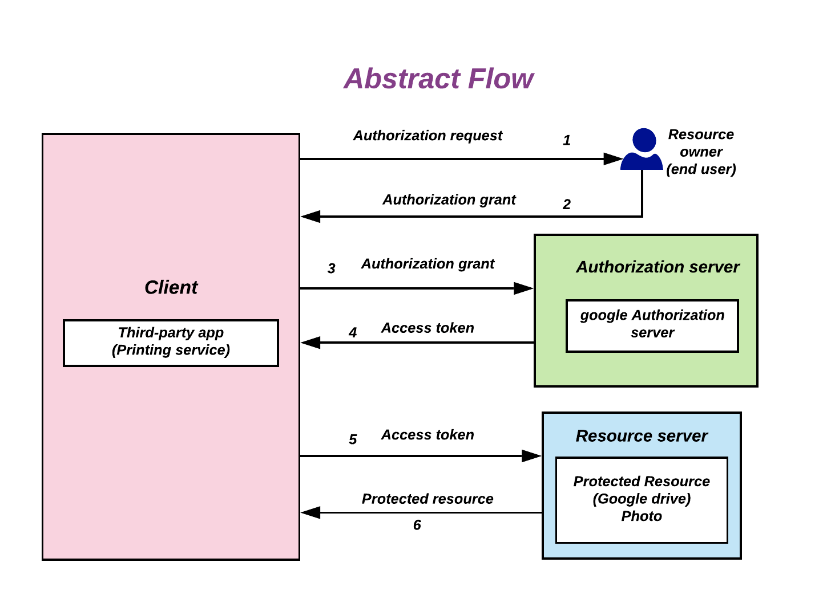
Notice that the application never handles the user’s password, and that the token says what the application may do, not reliably who the user is. That second point is why plain OAuth is not an authentication protocol. If you want a step-by-step walkthrough of each request, our visual guide to how OAuth 2.0 works goes through them one at a time.
Common use cases for OAuth
OAuth fits any situation where one piece of software needs to call an API with limited rights, without holding someone’s password:
- A third-party app posting to a social network on a user’s behalf.
- An analytics or reporting tool reading data from a user’s SaaS account.
- A scheduling app reading a user’s contacts or calendar events.
- A backend service calling another service with its own identity, using the client credentials grant, where no user is involved at all.
Understanding single sign-on (SSO)
What is SSO?
SSO stands for single sign-on, an authentication arrangement in which a user signs in once with a central identity provider and can then use several applications without entering credentials again. The identity provider (IdP) is the system that verifies who the user is, and each application that trusts it is called a service provider or a relying party.
SSO is not a protocol itself but the result you get when applications delegate login to the same identity provider using a federation protocol, most often SAML 2.0 or OpenID Connect (OIDC). Users get fewer passwords to remember, and the security team gets one place to enforce password rules, multi-factor authentication and account deactivation.
How SSO works
SSO depends on a session at the identity provider. The first login creates that session, and later applications reuse it:
- The user opens application A, which sees that they are not signed in.
- Application A redirects the browser to the identity provider.
- The user signs in, and the identity provider creates its own session, usually held in a browser cookie.
- The identity provider sends application A a signed statement about the user (an ID token in OIDC, or an assertion in SAML), and application A starts its own session.
- Later the user opens application B, which also redirects to the identity provider. The identity provider finds the existing session and sends application B its own signed statement straight away, so the user does not see a login form.
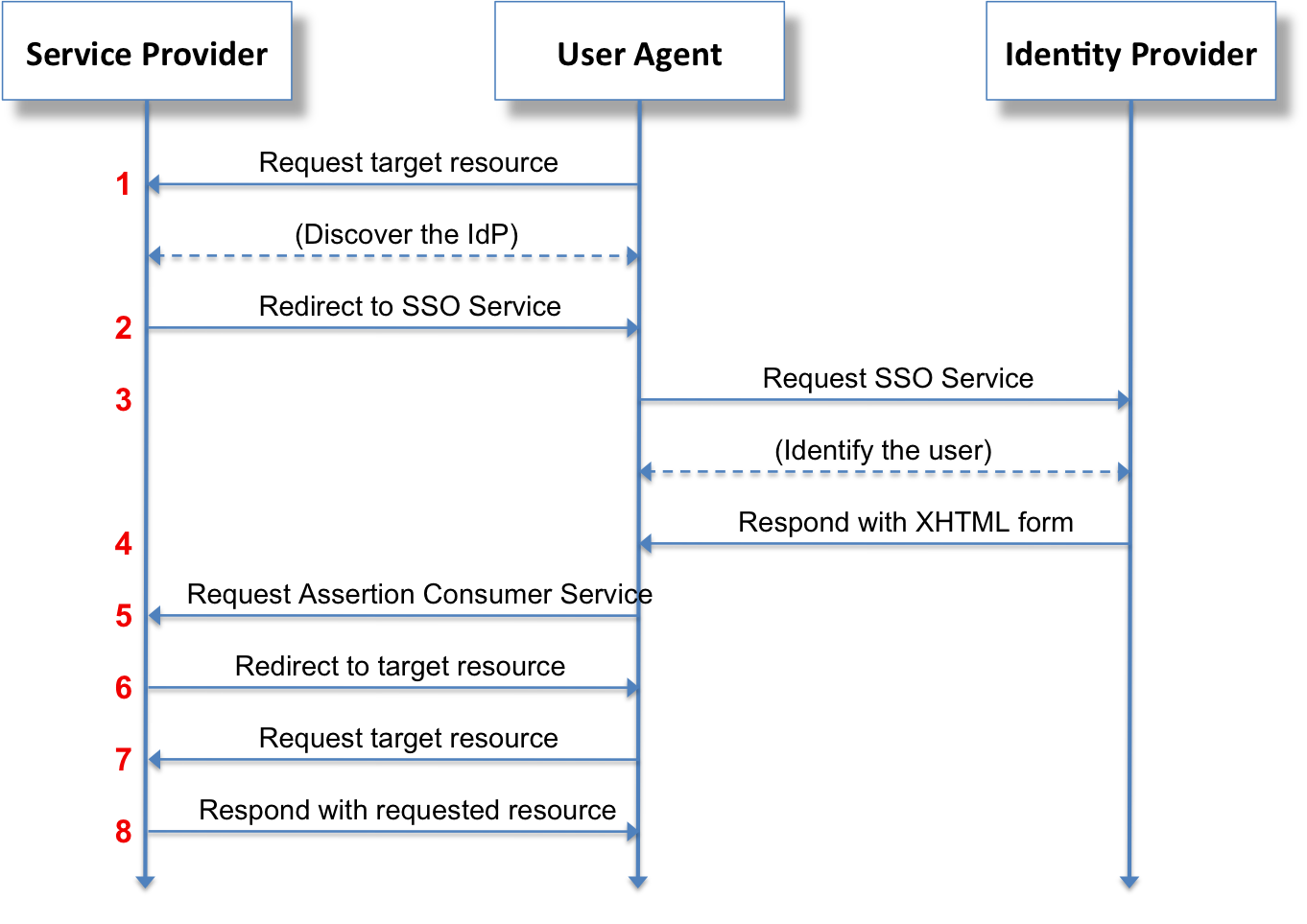
The diagram shows the SAML version of this flow. If you want to understand how SAML relates to SSO specifically, read our post on the difference between SSO and SAML.
Common use cases for SSO
SSO helps most wherever people use many applications that belong to the same organization or trust the same identity provider:
- Employees signing in once to reach email, the CRM, the ERP and the intranet.
- Universities giving students one login for the learning platform, the library and course forums.
- B2B SaaS products letting each customer sign in with their own corporate identity provider, such as Microsoft Entra ID or Okta.
SSO vs OAuth: the key differences
Comparing OAuth and SSO
They are easy to confuse because both involve redirects to a central server and both end with the application receiving a token. The difference is in what that token is for. An OAuth access token is meant for an API and answers the question “what is this application allowed to do?”. An SSO token or assertion is meant for the application and answers the question “who is this user, and when did they sign in?”.
Key differences between OAuth and SSO
This table compares the two on the points that usually cause the confusion, from what each one is to who reads the token.
| OAuth 2.0 | SSO | |
|---|---|---|
| What it is | An authorization framework (RFC 6749) | A login experience across many applications |
| Main question it answers | What may this application access? | Who is this user? |
| Typical protocols | OAuth 2.0 grants such as authorization code and client credentials | OpenID Connect or SAML 2.0 |
| What the application receives | An access token, scoped to specific permissions | An ID token (OIDC) or a signed assertion (SAML) |
| Who consumes the token | The resource server (the API) | The application the user is signing in to |
| Works without a user present | Yes, through the client credentials grant | No, it always involves a user |
| Typical example | A reporting tool reading your Google Drive files | Signing in to Slack with your company account |
How OAuth and SSO work together
The overlap is OpenID Connect. The OpenID Connect Core 1.0 specification defines OIDC as an identity layer on top of OAuth 2.0: it uses the same authorization code flow, but the authorization server also returns an ID token, which is a signed JSON Web Token (JWT) describing the user who just logged in. The Keycloak server administration guide describes the same split, calling OAuth 2.0 a framework for building authorization protocols and OIDC a full authentication and authorization protocol.
So when people say “OAuth SSO”, they almost always mean SSO built with OpenID Connect. The application gets an ID token to sign the user in and, in the same response, an access token it can use to call APIs. One login gives you both authentication for SSO and delegated authorization for API access. Our comparison of SAML vs OIDC covers how to choose between the two SSO protocols.
When to use OAuth vs SSO
You rarely choose one instead of the other, because they solve different problems. These rules of thumb cover most cases:
- Use OAuth 2.0 when an application or service needs to call an API with limited permissions, whether on behalf of a user or as itself.
- Use SSO when users should sign in once and move between several applications, which is the usual requirement for workforce apps and for B2B products sold to companies.
- Use OpenID Connect when you need both, which is the normal case for a modern web or mobile app that signs users in and then calls its own backend APIs.
- Use SAML for SSO when the application or the customer’s identity provider only supports SAML, which is still common with older enterprise software.
Talk through your identity setup with us
Book a demo and we will walk you through Skycloak with the sign-in, SSO and migration questions your team is working on.
Implementing OAuth and SSO with Keycloak
Keycloak as an identity and access management solution
Keycloak is an open-source identity and access management (IAM) server. It acts as an OAuth 2.0 authorization server, an OpenID Connect provider and a SAML identity provider at the same time, so the same Keycloak realm (Keycloak’s isolated unit of users, clients and settings) can issue access tokens to your APIs and provide SSO across your applications. It also supports identity brokering (letting users sign in through an external provider such as Google or Entra ID), user federation with LDAP and Active Directory, and social login. On Skycloak these are the same capabilities you configure through our single sign-on feature, without running the servers yourself.
Setting up OAuth in Keycloak
To let an application request tokens from Keycloak, register it as an OpenID Connect client. These steps follow the current admin console in Keycloak 26.x:
- Create or choose a realm. A realm is an isolated space that holds a set of users, credentials, roles, groups and clients. Use a dedicated realm for your applications rather than the
masterrealm, which is meant for administering Keycloak. - Create the client. Go to Clients, click Create client, leave Client type set to OpenID Connect, and enter a Client ID.
- Choose public or confidential. Turn Client authentication on for server-side applications that can keep a client secret safe (Keycloak calls these confidential clients), or leave it off for browser and mobile apps, which cannot (public clients). Older guides call this setting “Access Type”, which was replaced in the newer admin console.
- Pick the flows. Keep Standard flow enabled for the authorization code flow. For public clients, also require PKCE (Proof Key for Code Exchange, a one-time secret that stops a stolen authorization code from being redeemed) by setting PKCE method to
S256in the Capability config section of the client’s Settings tab. In Keycloak 26.3 and earlier the same setting sits on the Advanced tab as “Proof Key for Code Exchange Code Challenge Method”, which is where our PKCE client guide shows it. Enable Service account roles only if the client needs the client credentials grant. - Set the redirect URIs. Add the exact URLs Keycloak may send users back to under Valid redirect URIs, and avoid broad wildcards in production.
- Request tokens. Your application exchanges the authorization code at the token endpoint,
https://<keycloak-host>/realms/<realm>/protocol/openid-connect/token. Current Keycloak versions no longer include the/authprefix that older tutorials show in this path; it was dropped from the default when the Quarkus-based distribution replaced WildFly in Keycloak 17.
For a confidential client, the code exchange in step 6 is a form-encoded POST like the one below. A public client sends no client_secret and adds the PKCE code_verifier instead.
curl -X POST "https://<keycloak-host>/realms/<realm>/protocol/openid-connect/token" \
  -d grant_type=authorization_code \
  -d code="<authorization-code>" \
  -d redirect_uri="https://app.example.com/callback" \
  -d client_id=my-app \
  -d client_secret="<client-secret>"
The JSON response contains an access_token for your APIs and a refresh_token, and when the original request included the openid scope it also contains an id_token, which is the OpenID Connect part that signs the user in. You can paste either token into our JWT token analyzer to see the claims inside.
To compare the grant types available for different kinds of apps, read choosing the best authorization flows for your app.
Setting up SSO in Keycloak
Once two or more applications are registered as clients in the same realm, SSO works without any extra switch, because they all share the realm’s login session. Beyond creating the clients, the work is mostly about deciding where users come from and how long sessions last:
- Register each application as a client. Use an OpenID Connect client as described above, or a SAML client for applications that only support SAML. Both kinds of client in the same realm share one SSO session.
- Connect external identity providers if you need them. Under Identity providers you can add Google, GitHub, Microsoft Entra ID or any OIDC or SAML provider, so users sign in with an account they already have. This is called identity brokering.
- Set session lifetimes. In Realm settings, on the Sessions tab, SSO Session Idle controls how long a session survives without activity and SSO Session Max caps its total length. You can give an individual client shorter limits on its Advanced tab. The Keycloak documentation on session and token timeouts explains each value, and our session timeouts guide covers the same settings on Skycloak.
For a deeper, protocol-level walkthrough with example configuration, see our SSO implementation guide for SAML and OIDC with Keycloak.
Best practices and security considerations
Security implications of OAuth and SSO
Both make security easier to manage centrally, but each brings risks you should plan for:
- Token leakage. An access token works for anyone who holds it until it expires. Always use HTTPS, keep access tokens short-lived, and avoid putting tokens in URLs or browser storage that scripts can read.
- Outdated flows. The OAuth 2.0 security best current practice, RFC 9700, recommends the authorization code flow with PKCE and says the implicit grant should not be used and the resource owner password credentials grant must not be used.
- A single point of failure. With SSO, an attacker who takes over a user’s identity provider account reaches every connected application. Enforce multi-factor authentication at the identity provider, because that one login now protects everything.
- Misconfiguration. Loose redirect URIs, overly broad scopes and long session lifetimes are common mistakes. Review client settings regularly and give each client only the scopes it needs.
Common challenges and solutions
These are the problems teams most often hit when they roll out OAuth and SSO together:
- Mixing protocols. Supporting OAuth, OIDC and SAML side by side can get complicated. Keycloak supports all three in one realm, so you can add a SAML application next to OIDC ones without running a second system.
- Mapping user identities. The same person can exist in several systems with different usernames or attributes. Identity brokering and user federation let you link those accounts to one Keycloak user and map attributes into tokens consistently.
- Managing sessions across applications. Logging out of one app does not automatically end the others. Keycloak’s session management and its logout options (front-channel, which redirects the browser through each application, and back-channel, where Keycloak calls each application’s logout URL directly) let you end the SSO session and tell every client about it.
Real-world examples
Three scenarios show how the pieces fit together:
- Enterprise application integration. A company puts its CRM, ERP and intranet portal behind one Keycloak realm, so employees sign in once each morning and IT can disable access everywhere from one place.
- Third-party API access. A mobile app uses OAuth so that users can import photos from a social network into the app without giving the app their social network password.
- Education platforms. An online learning platform uses SSO so that students reach courses, forums and resources with a single login provided by their university.
Frequently asked questions
What does SSO mean?
SSO means single sign-on. It describes signing in once with a central identity provider and then using several applications without logging in again. Each application trusts the identity provider to confirm who the user is, usually through OpenID Connect or SAML.
Is OAuth an SSO protocol?
Not on its own. OAuth 2.0 only defines how an application gets permission to call an API, and its access tokens are not designed to tell the application who the user is. SSO built “with OAuth” almost always uses OpenID Connect, which adds an ID token for authentication on top of OAuth 2.0.
Can you use OAuth and SSO together?
Yes, and most modern applications do. With OpenID Connect, a single login gives the application an ID token to sign the user in and an access token to call APIs, and the identity provider’s session gives the user SSO across every other application in the same realm.
What is the main difference between SAML and OAuth for single sign-on?
SAML is an authentication protocol designed for SSO, and it sends the application a signed XML assertion about the user. OAuth 2.0 is an authorization framework for API access, so for SSO you use OpenID Connect, its authentication layer, which sends a signed JSON token instead. SAML remains common in older enterprise software, while OIDC is the usual choice for new web, mobile and API-driven applications.
What is the difference between an OAuth identity provider and a service provider?
In SSO terms, the identity provider is the system that authenticates the user, and the service provider (called a relying party in OIDC) is the application that trusts it. In OAuth terms, the identity provider plays the role of the authorization server that issues tokens, and the APIs that accept those tokens are resource servers. Keycloak can act as the identity provider and authorization server for all of your applications.
Conclusion
OAuth and SSO answer different questions. OAuth decides what an application may access on a user’s behalf, while SSO lets a user sign in once and move between applications. OpenID Connect connects the two, which is why the same identity server usually handles both.
If you want to try this yourself, start by registering one OpenID Connect client in a Keycloak realm, then add a second application to the same realm and watch the second login happen without a password prompt. If you would rather not run Keycloak yourself, Skycloak runs a managed instance you can try this on, and you can book a demo if you would like help setting up OAuth and SSO.