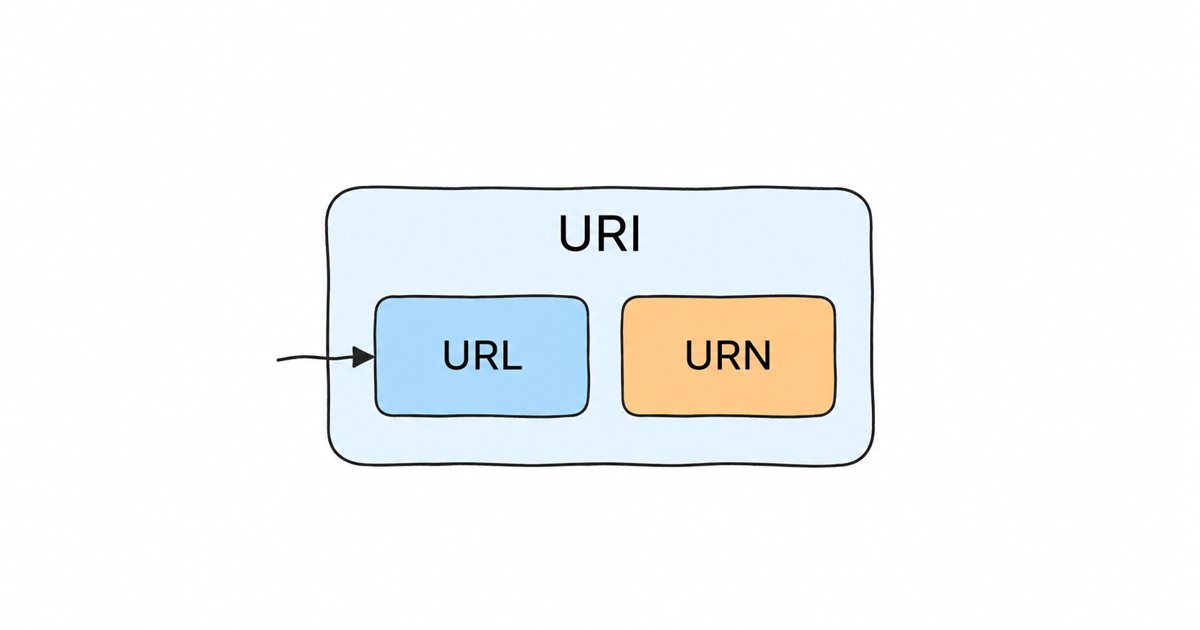
Auth0 Attack Protection vs Keycloak Brute Force Detection, Feature by Feature. Auth0 Attack Protection has four features. Keycloak ships per-user brute force detection only. See how each maps, and how to add IP limits, CAPTCHA and breach checks.
Auth0 Attack Protection bundles four features: bot detection, suspicious IP throttling, brute-force protection and breached password detection (Auth0, Attack Protection). Keycloak ships per-user brute force detection only, so when you move from Auth0 to Keycloak you add per-IP limits, CAPTCHA and breached password checks yourself, with an extension, a WAF or your reverse proxy.
This post is for teams on Auth0, or weighing it against Keycloak, who already know what brute force and credential stuffing are and want to see which protections carry over before they move. Auth0 documents each feature on its own page and describes only Auth0, so we put all four in one table, map each to the Keycloak setting that matches it (or to the gap), and then show how to close each gap with real configuration. Auth0’s MFA and adaptive MFA are a separate topic and are left out here.
Auth0 Attack Protection and Keycloak, side by side
Auth0’s overview page pairs each feature with the signal it watches. Bot detection uses “IP reputation”, suspicious IP throttling uses the “velocity of login attempts from an IP for any number of accounts”, brute-force protection uses the “velocity of login attempts from an IP for a particular account”, and breached password detection looks for the “use of a breached password” (Auth0, Attack Protection). Here is how each one maps to Keycloak 26.x:
| Auth0 feature | What it counts or checks | Keycloak equivalent | How to close the gap on Keycloak |
|---|---|---|---|
| Brute-force protection | Failed logins from one IP to one user identifier | Realm settings, Security defenses, Brute force detection, which counts failures per user (any IP) | Built in; turn it on, since it is off by default |
| Suspicious IP throttling | Failed logins and sign-ups from one IP across many accounts | None | The open source keycloak-bruteforce-guard extension, which answers 429 to an IP over its limit before credentials are checked, or per-IP rate limiting at a WAF or reverse proxy, or an intrusion prevention tool fed by Keycloak’s login error log |
| Bot detection | IP reputation, then a CAPTCHA or challenge for risky requests | Google reCAPTCHA on the registration form only | A server-side CAPTCHA authenticator such as the open source Cloudflare Turnstile SPI on login, registration and password reset |
| Breached password detection | Passwords seen in third-party breaches | The Password blacklist password policy, checked when a password is set or changed | Load a list of known compromised passwords into the blacklist file; there is no live breach feed |
The rest of the post goes through these rows one at a time, and then covers unblocking, monitoring and which plan each protection needs.
How does Auth0 brute-force protection compare to Keycloak brute force detection?
Both products ship a brute force feature, but they count different things. Auth0 counts the “incorrect login attempts allowed from a single IP address to a single user identifier”, with a default threshold of 10 that you can set “between 1 and 100” (Auth0, Brute-Force Protection). When the threshold is reached, the default response, Block Brute-force Logins, stops that IP from logging in as that user, while a second option, Account Lockout, blocks every login attempt to the identifier and is off by default (Auth0, Brute-Force Protection). Auth0 also states that “by default, brute-force protection is enabled when you create an Auth0 tenant”, and it offers an IP allowlist whose addresses “are exempt from brute-force protection” (Auth0, Brute-Force Protection).
Keycloak counts failures per user account, whatever IP they come from, and it starts switched off: the Server Administration Guide warns that “brute force detection is disabled by default” (Keycloak Server Administration Guide, brute force attacks). You turn it on per realm under Realm settings, Security defenses tab, Brute force detection tab, and choose one of three modes: lock the account permanently until an administrator re-enables it, lock it temporarily for a wait time that grows as the attack continues, or lock it temporarily a set number of times and then permanently.
The temporary mode has these defaults in the same guide (Keycloak Server Administration Guide, brute force attacks):
| Keycloak setting | Default |
|---|---|
| Max login failures | 30 failures |
| Wait increment | 1 minute |
| Max wait | 15 minutes |
| Failure reset time | 12 hours |
| Quick login check milliseconds | 1000 milliseconds |
| Minimum quick login wait | 1 minute |
Keycloak applies this protection “only to password, OTP and recovery codes”, and a locked user sees the same “Invalid username or password” message as anyone who mistyped, so an attacker cannot tell that the account is locked (Keycloak Server Administration Guide, brute force attacks). There is also a separate Maximum secondary authentication failures setting, off by default, that permanently locks an account after too many wrong one-time codes, for the case where the attacker already has the password (Keycloak Server Administration Guide, secondary authentication failures lockout).
If you are migrating, note the difference in defaults. An Auth0 tenant blocks an IP and user pair after 10 failures out of the box, while a new Keycloak realm blocks nothing until you enable detection, and then waits for 30 failures unless you lower the number. NIST’s guidance caps consecutive failed attempts on one account “to no more than 100” and says that “agencies MAY impose lower limits” (NIST SP 800-63B-4, section 3.2.2), so both defaults sit inside that ceiling and you can choose your own number. Our post on the IP-based gap in Keycloak brute force protection goes through tuning these values in more detail.
Why per-user lockout alone misses password spraying
In password spraying, an attacker tries one common password against thousands of usernames, so each account sees one or two failures and never reaches its threshold. Credential stuffing is the related attack where the attacker replays username and password pairs leaked from another site. In both cases, Keycloak’s per-user counter has nothing to react to, because no single account receives enough failures to lock.
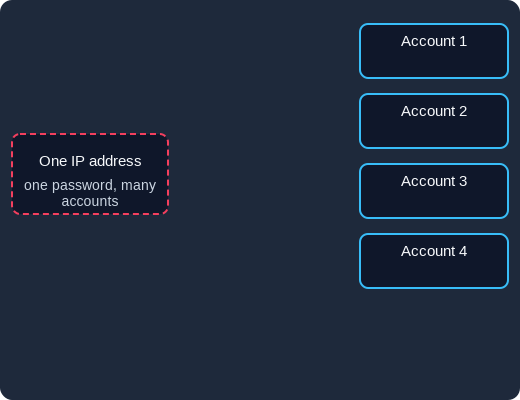
One IP address tries one password against four accounts (1 to 4). Each account has only 1 of 30 failures, so per-user lockout locks nothing (5). A per-IP limit in front of Keycloak counts all four failures as coming from one address (6), and its next guess gets 429 Too Many Requests before any password is checked (7).
Per-user lockout also has a cost of its own. Keycloak’s guide says plainly that “the downside of Keycloak brute force detection is that the server becomes vulnerable to denial of service attacks”, because an attacker who knows usernames can fail logins on purpose until those accounts are disabled (Keycloak Server Administration Guide, downside of brute force detection). Auth0’s default avoids this by blocking only the attacking IP for that user, and keeps the account-wide lockout as an option you choose.
Suspicious IP throttling: what Keycloak is missing and how to add it
Auth0’s suspicious IP throttling watches the other axis: failed logins and sign-ups from one IP address across any number of accounts, counted separately for logins and sign-ups. When an IP goes over the limit, further attempts get “HTTP 429 Too Many Requests” until the IP is no longer throttled, and Auth0 says it is “enabled by default when you create your Auth0 tenant” and “strongly recommends that you do not disable” it (Auth0, Suspicious IP Throttling). The limit refills over time; Auth0’s own example is that “a throttling rate of 100 means that Auth0 grants a new attempt approximately every 15 minutes”. You can exempt up to 100 IP addresses or CIDR ranges, such as an office network or a load-testing host (Auth0, Suspicious IP Throttling).
Keycloak has no per-IP counter, so you add one in front of it or beside it. You have three practical options:
- Rate limit at the edge. A WAF, CDN or reverse proxy in front of Keycloak can limit requests per client IP to the login and token endpoints, and this is the most common way to cover the gap.
- Feed Keycloak’s log to an intrusion prevention tool. Keycloak’s guide suggests this itself: it “logs every login failure and client IP address failure”, and you can “point the IPS to the Keycloak server’s log file” so the tool can block those addresses at the firewall (Keycloak Server Administration Guide, downside of brute force detection).
- Count failures per IP inside Keycloak with the open source keycloak-bruteforce-guard extension, which we publish under Apache 2.0 for Keycloak 24 to 26. Copy its JAR into
/opt/keycloak/providers/and restart Keycloak, add theskycloak-bruteforce-guardevent listener to the realm under Realm settings, Events tab, Event listeners, so it records the source IP of eachLOGIN_ERRORacross the cluster, and then copy the browser or direct grant flow and put the Skycloak IP Rate Limit execution first in it. An IP at or over the threshold then gets429 Too Many Requestsbefore any credentials are checked. The defaults are 5 failures in a 300 second window, set with--spi-events-listener-skycloak-bruteforce-guard-thresholdand--spi-events-listener-skycloak-bruteforce-guard-window-seconds, and an administrator can clear a blocked address withPOST /realms/myrealm/bruteforce-guard/unblock?ip=.
Whichever you pick, Keycloak has to see the real client address. Behind a proxy, set proxy-headers to forwarded or xforwarded and limit which proxies Keycloak trusts with proxy-trusted-addresses, because “by default, Keycloak accepts proxy headers from any source” (Keycloak, Configuring a reverse proxy). Without that, every event records your proxy’s address, and a client could send its own forwarded header to look like someone else.
bin/kc.sh start \
  --proxy-headers=xforwarded \
  --proxy-trusted-addresses=10.0.0.0/8
On Skycloak, the Rate Limiting feature does the first option for you. It enforces a per-IP limit in requests per minute “at the cluster’s ingress gateway, in front of every pod”, alongside an overall limit and stricter limits on exact paths such as a realm’s token endpoint (Skycloak docs, Rate Limiting).
Bot detection: adding a server-side CAPTCHA to Keycloak
Auth0’s bot detection “mitigates scripted attacks by detecting when a request is likely coming from a bot”, and asks users from high-risk IPs to complete an extra verification step (Auth0, Bot Detection). Its default response is Auth Challenge, which Auth0 describes as “CAPTCHA-free user verification”, and you can set the challenge on password, passwordless and reset flows to Never, When Risky or Always (Auth0, Bot Detection). The same page lists Enterprise and social connections as “Not supported”, since those logins happen at another identity provider.
Keycloak’s guide describes no IP reputation scoring. It does include Google reCAPTCHA, which the guide describes as a way “to safeguard registration against bots”, set up in the registration flow (Keycloak Server Administration Guide, enabling reCAPTCHA). It does not cover password reset or the login form, where credential stuffing and password spraying happen.
To challenge bots on login as well, add a CAPTCHA authenticator that checks the token on the server, because Cloudflare’s own Turnstile documentation says that “the client-side widget alone does not protect your forms” and that “tokens can be forged”, so you “must call the Siteverify API to complete your Turnstile implementation” (Cloudflare, Turnstile server-side validation). A widget that only appears in a theme can be skipped by a bot that posts the login form directly.
We publish one such authenticator as open source, the Keycloak Turnstile SPI (Apache 2.0, for Keycloak 26.x). Its README describes it as “server-side Cloudflare Turnstile enforcement for Keycloak login, registration, and reset-credentials flows”, and setting it up takes four steps:
- Create a Turnstile widget in Cloudflare for your login hostname and note its site key and secret (Cloudflare Turnstile).
- Copy the JAR from the latest release into
/opt/keycloak/providers/and restart Keycloak. - Give the Keycloak process the two required environment variables. Until both are set, the authenticator does nothing.
- Copy the built-in browser, registration or reset credentials flow, add the Skycloak CAPTCHA Protection (Turnstile) execution, set it to Required (in the browser flow, after the username and password form), and bind the copied flow.
SKYCLOAK_TURNSTILE_SITE_KEY=your-site-key
SKYCLOAK_TURNSTILE_SECRET=your-secret
# optional, default 2000
SKYCLOAK_TURNSTILE_TIMEOUT_MS=2000
The authenticator fails open on infrastructure errors such as a timeout or a 5xx answer from Cloudflare, so the login goes ahead with a warning in the log, while an invalid token or a hostname mismatch is always rejected. Its README puts the reason simply: “Bot protection should never become a login outage.” Each verification also increments the metric skycloak_turnstile_verifications, labelled by outcome (pass, reject or fail_open) and realm, which you can chart next to your login errors.
On Skycloak, the CAPTCHA Protection add-on puts a Cloudflare Turnstile challenge on a realm’s login as its own step in the login flow, so there are no theme files to edit (Skycloak docs, Keycloak Security Hardening).
Patched on the day, not on your next maintenance window
Keycloak 26.7.2 fixed CVE-2026-18963, an account takeover through password reset. Skycloak had it available for auto-upgrade and told customers the same day upstream shipped it. Self-hosted teams schedule that work themselves.
Breached password detection: the honest state of things in Keycloak
Auth0’s breached password detection “tracks large security breaches that occur on major third-party sites”, and can block a compromised password at sign-up, at login and at password reset, notify the user by email, and notify administrators immediately, daily, weekly or monthly (Auth0, Breached Password Detection). Auth0 compares two levels of the feature in a table: standard detection, which can take “up to 7-13 months” to learn of a breach, and Credential Guard, which takes “12-36 hours” (Auth0, Breached Password Detection).
Keycloak’s guide describes no breach feed and no check of passwords at login against outside data. The nearest built-in control is the Password blacklist password policy, which rejects any password found in a file you provide. Keycloak reads it as a UTF-8 text file in which “every line represents a blacklisted password”, compares “in a case-insensitive manner”, and resolves the file name against ${kc.home.dir}/data/password-blacklists/ by default (Keycloak Server Administration Guide, password policy types). Because it checks membership with a Bloom filter, a small share of passwords that are not on the list can be refused as well; the guide gives a default false positive probability of 0.01% (Keycloak Server Administration Guide, password policy types).
You add it under Authentication, Policies tab, Password policy, by choosing Password blacklist and entering the file name. The policy runs when a user sets or changes a password, and the guide notes that a new policy “will not be effective for existing users” until they update their password, for example through an Update password required action or the Expire password policy (Keycloak Server Administration Guide, password policies).
This lines up with NIST, which asks verifiers to “compare the prospective secret against a blocklist that contains known commonly used, expected, or compromised passwords” when a password is set or changed (NIST SP 800-63B-4, section 3.1.1.2). For the list itself, Have I Been Pwned offers a “free and open source Pwned Passwords downloader to take the entire corpus offline” (Have I Been Pwned, Pwned Passwords), and that downloader saves “Pwned Passwords hash ranges”, SHA1 or NTLM hashes rather than passwords (PwnedPasswordsDownloader README). The built-in blacklist compares the passwords listed in its file, one per line, so checking against those hashes needs a custom password policy provider. A file of plain passwords from a public list of common passwords works with the built-in policy as it is.
A gap remains at login, because Auth0 can block an existing user whose password shows up in a new breach, while Keycloak only checks a password when it is set. Our Keycloak password policy best practices post covers the other policies to pair with the blacklist, and requiring a second factor or passkeys makes a leaked password much less useful either way.
Unblocking users in Auth0 and Keycloak
In Auth0, a brute-force block ends when one of several things happens: 30 days pass since the last failed attempt, an administrator removes the block, an administrator raises the threshold, the user clicks the unblock link in the notification email, or the user changes their password (Auth0, Brute-Force Protection). Administrators remove blocks through the Management API with DELETE /user-blocks for an identifier or DELETE /user-blocks/{id} for a user, and block emails are limited to “a maximum of 1 per hour per unique IP address” (Auth0, Brute-Force Protection).
In Keycloak, a temporary lockout ends on its own when the wait time runs out, while a permanent lockout lasts “until an administrator re-enables” the account, and “enabling an user account resets the count” (Keycloak Server Administration Guide, lockout permanently). The guide describes no unblock link emailed to the user, so the self-service path is a password reset or a call to your help desk. For scripts and support tools, the Admin REST API has an attack detection resource: GET on a user shows their brute force status, and DELETE clears the login failures for one user or for all users, which “can release temporary disabled users” (Keycloak Admin REST API, Attack Detection).
# Check one user's brute force status
curl -H "Authorization: Bearer $ADMIN_TOKEN" \
  "https://keycloak.example.com/admin/realms/myrealm/attack-detection/brute-force/users/$USER_ID"

# Clear that user's login failures
curl -X DELETE -H "Authorization: Bearer $ADMIN_TOKEN" \
  "https://keycloak.example.com/admin/realms/myrealm/attack-detection/brute-force/users/$USER_ID"
If you want users told about a lockout, Keycloak’s Email Event Listener can send optional “User disabled by temporary lockout” and “User disabled by permanent lockout” emails to a user with a verified address, once you enable it under Realm settings, Events tab, Event listeners (Keycloak Server Administration Guide, event listener).
Monitoring attack events in Auth0 logs and Keycloak events
Auth0 writes attack protection events to the tenant log with their own codes: limit_wc for a blocked account, limit_mu for a blocked IP address, and pwd_leak, signup_pwd_leak and reset_pwd_leak for a breached password at login, sign-up and password recovery (Auth0, View Attack Protection Log Events). If you turn a feature on without choosing a response, Auth0 runs it in monitoring mode, “which records related events in your tenant log only” (Auth0, Attack Protection), which is a useful way to test thresholds before blocking anyone.
Keycloak stores no user events until you ask it to. “By default, Keycloak does not store or display events in the Admin Console. Only the error events are logged to the Admin Console and the server’s log file” (Keycloak Server Administration Guide, auditing user events). Turn on Save events under Realm settings, Events tab, User events settings, set an expiration, and you can search events in the console, including the brute force events “User disabled by permanent lockout” and “User disabled by temporary lockout” (Keycloak Server Administration Guide, auditing user events). Keycloak logs every login failure with the client IP address (Keycloak Server Administration Guide, downside of brute force detection), and a burst of LOGIN_ERROR events from one address is what you would alert on to catch a spray across many usernames from one address. Our Keycloak auditing and event logging guide shows how to ship these events to a SIEM.
The edge controls report separately from Keycloak. On Skycloak, Security Logs show WAF detections, geo-blocking decisions, IP access control and rate limiting blocks for a cluster in one view (Skycloak docs, Security Logs).
Which protections need a paid plan
On Auth0, the attack protection pages do not list plans for brute-force protection, suspicious IP throttling or bot detection, although the bot detection page notes that you “may need to upgrade your plan” if a risk assessment setting is missing (Auth0, Bot Detection). Breached password detection is stated: standard detection is for “B2B / B2C Professional and Enterprise”, and Credential Guard is “part of Attack Protection add-on in Enterprise plan” (Auth0, Breached Password Detection). Check Auth0’s pricing for your own tenant before you plan around a feature.
On Keycloak, everything in this post that is built in, brute force detection, reCAPTCHA on registration, the password blacklist and events, is described in the Server Administration Guide of Keycloak, which its site calls “Open Source Identity and Access Management” (Keycloak), and so is the Turnstile SPI. What you pay for instead is the infrastructure around it: the WAF or proxy that rate limits, and the time to run it. On Skycloak, the edge protections (WAF, rate limiting, IP access control, geo-blocking and CAPTCHA) are included in the Enterprise plan and available as separate add-ons on Launch and Business (Skycloak docs, Security and Protection).
A checklist for moving from Auth0 to Keycloak
If you are comparing the two platforms more broadly, our Auth0 alternatives roundup and the Auth0 vs Keycloak login and token customization comparison cover the rest. For attack protection specifically, these are the steps that recreate what an Auth0 tenant gives you by default:
- Turn on brute force detection in every realm, choose temporary lockout, and lower Max login failures to the number you used in Auth0.
- Put per-IP rate limiting on the login, registration, password reset and token endpoints at your edge, and set
proxy-headersandproxy-trusted-addressesso Keycloak logs the real client IP. - Add a server-side CAPTCHA, such as the Turnstile SPI, to the browser, registration and reset credentials flows.
- Add the Password blacklist policy with a list of compromised passwords, and expire existing passwords if you need everyone checked.
- Save user events, and alert on bursts of
LOGIN_ERRORfrom one IP across many usernames. - Decide how locked-out users get help, since Keycloak sends no unblock link.
To add per-IP limits to the Keycloak you run today, install the open source keycloak-bruteforce-guard extension. If you would rather not run the WAF, rate limiting and CAPTCHA yourself, managed Keycloak on Skycloak lets you switch them on from the cluster’s Security page in the dashboard, where the WAF and rate limiting apply to the whole cluster and CAPTCHA is turned on per realm (Skycloak docs, Keycloak Security Hardening). See Skycloak managed Keycloak hosting.