PCI DSS Requirement 8: What Your Login Must Meet. PCI DSS is the card industry's security standard. Requirement 8 sets your login rules: unique IDs, MFA, 12-character passwords, lockout and a 15-minute timeout.
PCI DSS (the Payment Card Industry Data Security Standard) is the card industry’s security standard for all entities that store, process or transmit cardholder data (Stripe’s PCI guide). Its Requirement 8 sets the login rules for access to the cardholder data environment: a unique ID for every user, multi-factor authentication (MFA) for all access, passwords of at least 12 characters, lockout after at most 10 failed attempts, and re-authentication after 15 idle minutes (PCI DSS v4.0 SAQ D, Requirement 8).
This post gives you a short overview of the standard, then goes through Requirement 8 of PCI DSS v4.0.1 control by control and names the Keycloak setting that enforces each one. It also settles which of your accounts are in scope, explains the MFA change that became mandatory on 31 March 2025, and ends with the evidence an assessor will ask your identity provider for.
Key takeaways
- PCI DSS v4.0.1 is the only active version: the Council retired v4.0 on 31 December 2024.
- Requirement 8 covers your staff, admins, contractors and service accounts. It does not apply to your customers’ own accounts (Summary of Changes, Requirement 8).
- Since 31 March 2025, MFA is required for all access into the cardholder data environment, not only for administrators and remote access (Summary of Changes, 8.4.2).
- A default Keycloak realm does not meet Requirement 8: brute force detection is off on a new realm, its defaults once enabled allow 30 failures and a 15-minute maximum wait, and the default browser flow only asks for a second factor from users who already set one up.
What is PCI DSS?
PCI DSS is published by the PCI Security Standards Council, and the standard and its supporting documents are in the Council’s document library. Stripe’s guide describes it as “the global security standard for all entities that store, process, or transmit cardholder data and/or sensitive authentication data” (Stripe). The cardholder data environment, or CDE, is the set of people, processes and systems that handle that data, plus anything connected to them.
The current version is 4.0.1. The Council says “there are no additional or deleted requirements in this revision” compared with 4.0; it corrected formatting and clarified some requirements and guidance (PCI SSC blog). That is why you will still see 4.0 documents quoted for requirement text, including in this post.
The standard is organised into 12 requirements (PCI DSS v4.0 SAQ D):
- Install and maintain network security controls.
- Apply secure configurations to all system components.
- Protect stored account data.
- Protect cardholder data with strong cryptography during transmission over open, public networks.
- Protect all systems and networks from malicious software.
- Develop and maintain secure systems and software.
- Restrict access to system components and cardholder data by business need to know.
- Identify users and authenticate access to system components.
- Restrict physical access to cardholder data.
- Log and monitor all access to system components and cardholder data.
- Test security of systems and networks regularly.
- Support information security with organizational policies and programs.
Requirements 7, 8 and 10 are the ones your identity provider touches most. Requirement 7 decides who should have access, Requirement 8 decides how those people prove who they are, and Requirement 10 records what they did. We covered all three, side by side with SOC 2, HIPAA and GDPR, in what auditors check at login. This post stays on Requirement 8, because it is the one that turns into concrete settings.
Which accounts does Requirement 8 cover?
Requirement 8 applies to the accounts of people and systems that can reach the CDE. The applicability note on 8.2.4 says it “applies to all user accounts, including employees, contractors, consultants, temporary workers, and third-party vendors” (SAQ D, 8.2.4). Application and system accounts are in scope too, under their own section, 8.6.
Your customers’ accounts are out. When the Council moved from v3.2.1 to v4.0 it “clarified in the overview that requirements do not apply to accounts used by consumers (cardholders)” (Summary of Changes). If your shoppers sign in to see their saved cards, Requirement 8 does not set their password length or force MFA on them, although nothing stops you from applying the same rules. Several requirements also exclude point-of-sale accounts that can only reach one card number at a time, such as cashier IDs on a terminal (SAQ D, 8.3.4).
| Account type | In scope of Requirement 8? | Notes |
|---|---|---|
| Staff and contractors who can reach the CDE | Yes | All of 8.2 to 8.5 |
| Administrators of CDE systems | Yes | Also 8.4.1, MFA for administrative access |
| Third-party and vendor remote access | Yes | 8.2.7 and 8.4.3 |
| Service and system accounts | Yes | 8.6, and 8.2.2 for shared credentials |
| Consumer (cardholder) accounts | No | Excluded in the Requirement 8 overview |
There is also a way to make the whole question smaller. If a payment processor collects the card number for you, the systems behind your login may never handle card data. Stripe.js and Elements, for example, “host all card data collection inputs within an iframe served from Stripe’s domain (not yours), so your customers’ card information never touches your servers” (Stripe). The same guide is clear that this does not remove the obligation, since “all businesses that accept credit card payments must comply with PCI DSS”, but fewer in-scope systems means fewer accounts that Requirement 8 governs. Agree the scope with your assessor before you change any settings.
Requirement 8 mapped to Keycloak settings
The table below lists each Requirement 8 control that turns into a login setting, quotes or summarises the rule, and names where you enforce it in Keycloak. The requirement wording is from the v4.0.1 text as reproduced by Cloudaware and the v4.0 SAQ D; the Keycloak names are from the Server Administration Guide.
| Control | What it requires | Where Keycloak enforces it |
|---|---|---|
| 8.2.1 | A unique ID for every user | One user per person; no shared logins |
| 8.2.5 | Access for terminated users “is immediately revoked” | Disable the user and sign out their sessions |
| 8.2.6 | Inactive accounts removed or disabled within 90 days | A scheduled job or a Keycloak workflow |
| 8.2.8 | Re-authenticate after 15 idle minutes | Realm settings, Sessions, SSO Session Idle |
| 8.3.2 | Strong cryptography for factors in transit and storage | Password hashing policy, TLS |
| 8.3.4 | Lock out after at most 10 attempts, for at least 30 minutes | Realm settings, Security defenses, Brute force detection |
| 8.3.5 | First and reset passwords unique and changed after first use | The Temporary switch when you set a password |
| 8.3.6 | At least 12 characters, letters and numbers | Password policy: Minimum length 12, Digits 1 |
| 8.3.7 | No reuse of the last four passwords | Password policy: Not recently used 4 or more |
| 8.4.1, 8.4.2 | MFA for administrative access and for all access into the CDE | Browser flow with a required second factor |
| 8.5.1 | MFA that resists replay and that users cannot bypass | No optional path around the second factor |
| 8.6.1 to 8.6.3 | System accounts kept non-interactive, secrets protected and rotated | Client service accounts, signed JWT or secret rotation |
The sections below go through the settings that need more than one line.
Passwords: 8.3.5, 8.3.6 and 8.3.7
Requirement 8.3.6 asks for “a minimum length of 12 characters (or IF the system does not support 12 characters, a minimum length of eight characters)” and passwords that “contain both numeric and alphabetic characters” (SAQ D, 8.3.6). Under v3.2.1 the floor was seven characters, and the 12-character rule was one of the requirements that only became mandatory after 31 March 2025 (Summary of Changes).
In Keycloak you set this under Authentication, Policies, Password policy. Add Minimum length with a value of 12 and Digits with a value of 1, which together cover the length and the numeric part, and add Not recently used with a value of at least 4 to meet 8.3.7. Keycloak’s guide describes that policy as keeping “a history of used passwords” and rejecting any of them (Server Administration Guide, password policy types). Our Keycloak password policy guide walks through every policy type and a sensible baseline.
PCI’s composition rule is stricter than NIST’s current guidance, which says verifiers “SHALL NOT impose other composition rules” (NIST SP 800-63B-4, 3.1.1.2). For the accounts in your CDE, PCI is the rule you are assessed against, so keep the Digits policy there even if your customer realm follows NIST.
For 8.3.5, leave Temporary on when you set a password for a user in the admin console. The guide says that with it on, “the user must change the password at the first login” (Server Administration Guide). Requirement 8.3.2 is largely covered by Keycloak’s defaults: passwords are hashed with Argon2 by default outside FIPS mode, or PBKDF2-SHA512 in FIPS deployments (Server Administration Guide, password policy types), and you serve the login over TLS.
There is one password rule you may not need. Requirement 8.3.9 asks for a 90-day change, or dynamic analysis of each account’s risk, only where a password is the single factor. The Council’s FAQ says MFA is required for components inside the CDE, and that where MFA covers all in-scope components “the assessor can mark Requirements 8.3.9 and 8.3.10.1 as ‘not applicable’” (PCI SSC FAQ). If you put MFA in front of everything in scope, leave Expire password off.
Lockout: 8.3.4
Requirement 8.3.4 limits failed logins by “locking out the user ID after not more than 10 attempts” and “setting the lockout duration to a minimum of 30 minutes or until the user’s identity is confirmed” (SAQ D, 8.3.4). A new Keycloak realm has no lockout at all, because “brute force detection is disabled by default”, and once you enable it the defaults still do not meet either half: Max Login Failures defaults to 30 and Max Wait to 15 minutes (Server Administration Guide, brute force).
Open Realm settings, Security defenses, Brute force detection, and pick one of two approaches:
- Lockout permanently. Keycloak “disables a user account (blocking log in attempts) until an administrator re-enables it” (Server Administration Guide). This matches “until the user’s identity is confirmed”, as long as your help desk confirms who is calling before re-enabling the account. Set Max Login Failures to 10 or fewer.
- Lockout temporarily. Set Max Login Failures to 10 or fewer, Wait Increment to 30 minutes and Max Wait to at least 30 minutes. With the default “multiple” strategy, the wait is “Wait Increment in Seconds * (count / Max Login Failures)”, so the first lockout at the tenth failure lasts the full increment. Keep Failure Reset Time longer than Max Wait, because the guide warns that otherwise “the effective wait time will never reach the value you have set to Max wait” (Server Administration Guide).
Per-account lockout has known limits against password spraying and can be used to lock real users out on purpose. Our post on the gap in Keycloak’s brute force protection explains both and how IP-based rate limiting covers them.
Idle timeout: 8.2.8
Requirement 8.2.8 says that “if a user session has been idle for more than 15 minutes, the user is required to re-authenticate to re-activate the terminal or session” (Cloudaware, 8.2.8). The realm side of this is SSO Session Idle under Realm settings, Sessions. Set it to 15 minutes for the realm your CDE staff use; on Skycloak, the Session & timeout policy recipe has a “PCI DSS 8.2.8 baseline” preset that sets it in one step (session timeouts and idle policy).
Two details change the effective value. First, when persistent user sessions are not active, the guide says “a two-minute window of time exists that the session is active”, so a 30-minute setting expires at 32 minutes (Server Administration Guide, idle timeouts); in that setup, use 13 minutes to stay at 15. Second, a token refresh counts as activity, so an application that refreshes in the background keeps an unattended session alive indefinitely. Our documentation explains this and shows how to stop refreshing when the user has done nothing (session timeouts and idle policy), and our Keycloak session timeout guide covers the rest of the session settings.
Service and system accounts: 8.6
Section 8.6 governs accounts that systems and applications use. Requirement 8.6.1 says that if such accounts “can be used for interactive login”, interactive use is prevented except in documented exceptional circumstances; 8.6.2 says their passwords are “not hard coded in scripts, configuration/property files, or bespoke and custom source code”; and 8.6.3 requires changing them periodically at a frequency set by your own targeted risk analysis (SAQ D, 8.6). These requirements were also future-dated to 31 March 2025.
In Keycloak, the natural fit is a confidential client with its service account enabled, which uses the client credentials grant to get a token (Server Administration Guide, service accounts). That gives each workload its own identity instead of a shared human login. Keycloak lets you authenticate the client “with a signed JWT assertion” rather than a shared secret, and for clients that keep a secret, a client policy can rotate it with “up to two concurrently active secrets for each client” during the changeover (Server Administration Guide, client secret rotation). Keep the secret in a secrets manager, not in the repository. Our guide to Keycloak machine-to-machine authentication shows the setup end to end.
Joiners, leavers and inactive accounts: 8.2.5 and 8.2.6
For leavers, disable the user in Keycloak and end their active sessions from the user’s Sessions tab, so that access is revoked right away rather than when a token expires. If your users come from a directory or an identity provider through federation, disabling them at the source is usually what your process should rely on.
Requirement 8.2.6 asks that inactive accounts are “removed or disabled within 90 days of inactivity” (Cloudaware, 8.2.6). Recent Keycloak releases add workflows, and the guide’s example “Track inactive users” sends reminders and then runs a disable-user step after a period without a login (Server Administration Guide, workflows). The example’s timings are longer than 90 days, so shorten them before you use it. On a Keycloak version without workflows, a scheduled job that reads last-login events and disables stale users does the same job.
What changed for MFA in PCI DSS v4.0?
Requirement 8.4.2 says “MFA is implemented for all non-console access into the CDE” (Cloudaware, 8.4.2). Version 4.0 added 8.4.2 as a “new requirement to implement multi-factor authentication (MFA) for all access into the CDE”, which was “a best practice until 31 March 2025” (Summary of Changes). Since that date, every person who logs in to a CDE system or application needs a second factor, not only admins.
The applicability notes answer the questions teams usually ask (SAQ D, 8.4.2):
- MFA “includes access directly to an entity’s networks or systems as well as web-based access to an application or function”, so an internal web admin tool counts.
- MFA can sit at the network or the application level: “if MFA is used when a user connects to the CDE network, it does not have to be used when the user logs into each system or application within the CDE.”
- Remote access (8.4.3) and access into the CDE (8.4.2) are separate. Someone who connects over the VPN and then reaches into the CDE “would authenticate using MFA twice”.
- Application or system accounts “performing automated functions” are excluded from 8.4.2; 8.6 covers them instead.
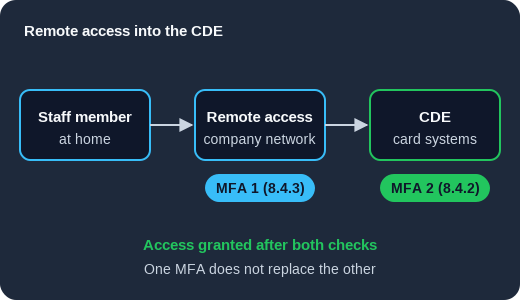
A staff member connecting from home completes MFA at the remote access gateway (8.4.3), then completes MFA a second time when connecting into the cardholder data environment (8.4.2), because one does not replace the other.
Requirement 8.5.1 then describes a good MFA system: it is “not susceptible to replay attacks”, it “cannot be bypassed by any users, including administrative users” except by documented, time-limited exception, it uses “at least two different types of authentication factors”, and “success of all authentication factors is required before access is granted” (SAQ D, 8.5.1).
Passkeys and phishing-resistant authentication
Version 4.0.1 added a note to 8.4.2 that it “does not apply to user accounts that are only authenticated with phishing-resistant authentication factors” (PCI SSC blog). The Council’s FAQ 1595 confirms that synced passkeys “implemented according to the FIDO2 requirements, are considered phishing-resistant authentication, and may be used as a single authentication factor in place of multi-factor authentication (MFA) to meet PCI DSS Requirement 8.4.2” (PCI SSC FAQ 1595).
That exception covers 8.4.2 only. The same FAQ says passkeys that do not follow FIDO2 “must include an additional factor to meet PCI DSS Requirements 8.4.1, 8.4.2, and 8.4.3”, and the note is about non-administrative access, so keep a second factor for administrators and for remote access. This matters in Keycloak because, when passkeys are enabled, the default browser flow skips the 2FA sub-flow for a user who signed in with a passkey (Server Administration Guide, passkeys). That is fine for ordinary CDE users and not enough for admins. Our Keycloak passkeys guide covers the setup.
Making MFA mandatory in Keycloak
The default browser flow does not enforce MFA. Its Browser - Conditional 2FA sub-flow “executes only when the user has a configured OTP credential”, so a user who never set one up signs in with a password alone (Server Administration Guide, built-in flows). That fails 8.4.2 and 8.5.1.
To close the gap, make enrolment mandatory. Mark Configure OTP (or WebAuthn Register) as a default action under Authentication, Required actions, so new users set up a factor at first login (Server Administration Guide, default required actions), and add it as a required action on existing users who have not. The guide’s “Conditional 2FA sub-flow with OTP default” example goes further and configures the OTP Form step as required in the flow itself (Server Administration Guide, 2FA examples). Then check the paths around the browser flow: a client with direct access grants enabled signs users in through the realm’s direct grant flow, which is bound separately from the browser flow (Server Administration Guide, built-in flows), so turn direct access grants off for CDE applications. If you want a second factor only for the CDE apps within a larger realm, our step-up authentication guide shows how to require a stronger level for specific clients.
On Skycloak, the Multi-factor authentication (MFA) recipe in the dashboard sets this up for a realm: you pick TOTP, WebAuthn or both as the second factors, and turn on Enforce for all users to prompt every user, including existing ones, to set up a second factor at their next login (security hardening guide, realm users).
Patched on the day, not on your next maintenance window
Keycloak 26.7.2 fixed CVE-2026-18963, an account takeover through password reset. Skycloak had it available for auto-upgrade and told customers the same day upstream shipped it. Self-hosted teams schedule that work themselves.
What evidence will an assessor ask your identity provider for?
The testing procedures in the SAQ tell you what an assessor does for each control: for 8.2.8, 8.3.4, 8.3.6 and 8.3.7 they “examine system configuration settings”, for 8.4.2 they “observe personnel logging in to the CDE”, and for 8.2.6 they “examine user accounts and last logon information” (SAQ D, Requirement 8). From Keycloak, that usually means:
- Configuration exports or screenshots of the password policy, brute force detection, session settings and the authentication flows bound to your CDE clients. An exported copy of the realm configuration is easier to compare between assessments than screenshots.
- The list of users and their credentials, showing a unique ID per person, a second factor configured for everyone, and no shared accounts.
- Login events that show MFA happening and failed logins being locked out. Keycloak records user events such as
LOGINandLOGIN_ERRORand, separately, admin events for configuration changes, once you turn them on (Server Administration Guide, auditing). Our Keycloak auditing and event logging guide covers retention, and why it recommends forwarding events to an external archive for the retention period your compliance framework sets. - Leaver and inactivity records that show disabled accounts lining up with HR leave dates and the 90-day rule.
- Service account inventory, naming each client with a service account, what it can access, how it authenticates and when its secret last changed.
On Skycloak, SIEM export can forward Keycloak events and server logs to Splunk, QRadar, Azure Sentinel, Datadog, Sumo Logic, syslog or S3 for long-term retention; it is included in Enterprise and a paid add-on on Launch and Business (SIEM integration guide), and the Security posture card on each realm summarises brute-force protection, password policy, session lifetimes and MFA enforcement, with a dot on any row that needs attention (security hardening guide). Your assessor still decides what counts as sufficient evidence for your environment.
Requirement 8 checklist for your Keycloak realm
Run through this list on the realm your CDE staff and admins sign in to:
- Every person has their own user, and no group or shared login is used without a documented exception (8.2.1, 8.2.2).
- Password policy includes Minimum length 12, Digits 1 and Not recently used 4 or more (8.3.6, 8.3.7).
- Admin-set passwords use the Temporary switch (8.3.5).
- Brute force detection is on with Max Login Failures at 10 or fewer, and either permanent lockout or a wait of at least 30 minutes (8.3.4).
- SSO Session Idle is 15 minutes (13 without persistent user sessions), and your applications stop refreshing tokens for idle users (8.2.8).
- A second factor is enforced for everyone through a default required action or a required flow step, and direct access grants are off for CDE clients (8.4.2, 8.5.1).
- Administrators and remote users need a second factor even when they sign in with a passkey (8.4.1, 8.4.3).
- Leavers are disabled and signed out on their last day, and inactive users are disabled within 90 days (8.2.5, 8.2.6).
- Each workload uses its own client service account, with a signed JWT or a rotated secret kept outside the code (8.6.1 to 8.6.3).
- User and admin events are on and forwarded to a log store that keeps them for your Requirement 10 retention period.
Frequently asked questions
What is PCI DSS Requirement 8?
Requirement 8 of PCI DSS is “Identify Users and Authenticate Access to System Components” (SAQ D). It sets the rules for user IDs, passwords, account lockout, session idle timeouts, multi-factor authentication and system accounts for anyone who can access the cardholder data environment.
Does PCI DSS 4.0 require MFA for all users?
PCI DSS v4.0.1 requires MFA for all non-console access into the cardholder data environment by any user, not only administrators, under Requirement 8.4.2, which became mandatory on 31 March 2025. Automated system accounts are excluded, and accounts authenticated only with phishing-resistant factors such as FIDO2 passkeys may skip a second factor for 8.4.2, but not for administrative or remote access.
What is the PCI DSS password length requirement?
Requirement 8.3.6 requires passwords of at least 12 characters containing both letters and numbers, or at least eight characters if a system cannot support 12. Passwords must also differ from the user’s last four (8.3.7).
Does Requirement 8 apply to customer accounts?
No. Since v4.0, the Requirement 8 overview says its requirements do not apply to accounts used by consumers (cardholders). It applies to your employees, contractors, administrators, vendors and system accounts.
How long must a PCI DSS account lockout last?
Requirement 8.3.4 says to lock a user ID after no more than 10 failed attempts, for at least 30 minutes or until the user’s identity is confirmed. In Keycloak, that means turning on brute force detection, which is off on a new realm, and changing its defaults, which allow 30 failures and a 15-minute maximum wait.
What to do next
Open the realm your CDE staff and admins use and go through the checklist above, starting with brute force detection and MFA enforcement, because the defaults there fall short of Requirement 8. Export the realm configuration once it passes, take it to your assessor together with your login events, and agree with them early on which systems are in scope, especially if a processor handles your card numbers.
If you would rather not run the Keycloak underneath yourself, Skycloak runs managed Keycloak clusters where you keep full access to these settings in the admin console.