Last updated: March 2026
Introduction
Modern applications often require access control beyond simple role-based access control (RBAC). Keycloak addresses this need through its sophisticated fine-grained authorization services. Unlike static role checks, fine-grained authorization allows decisions to be made based on users, resources, scopes, attributes, context, or even runtime conditions such as time.
Keycloak’s authorization model is built upon UMA (User-Managed Access), a standard that enables resource-centric authorization. UMA allows a resource owner to securely control access to their assets — even when the protected resources are hosted on different systems. Using UMA principles, Keycloak enables applications to evaluate “who can do what on which resource” dynamically.
A Quick Overview of Permission Evaluation
Keycloak returns permissions through an artifact called the Requesting Party Token (RPT) — a JWT token that contains the evaluated access rights. You can inspect RPTs using the JWT Token Analyzer. There are three main ways to obtain authorization decisions:
- Explicit Permission Ticket Flow
- Direct Token Request Flow (RPT returned)
- Direct Token Request Flow returning decisions/permissions in JSON (no RPT)
Options 1 and 2 return an RPT token that the resource server needs to validate and interpret.
Option 3 bypasses JWT parsing and instead returns a plain JSON response representing decisions or permissions directly.
In this article, we primarily focus on Option 3, though we briefly outline the other two for context.
Option 1 — Explicit Permission Ticket Flow
This is the full UMA negotiation process and is needed only when permission requests must be dynamically raised per resource or per request.
Steps:
- Resource server calls
/authz/protection/permission-> gets permission ticket (Requires PAT — Protection API Token) - Client then exchanges ticket at
/protocol/openid-connect/tokenusinggrant_type=urn:ietf:params:oauth:grant-type:uma-ticket
Option 2 — Directly Access Token Endpoint
Here we directly invoke with user access token as Bearer token:
POST /protocol/openid-connect/token
grant_type=urn:ietf:params:oauth:grant-type:uma-ticket
audience=<resource-server-client-id>
Authorization: Bearer <user-access-token>
This approach works best when:
- All resources and scopes already exist
- No dynamic resource creation or ad-hoc permission requests are required
- A single evaluation pass is enough
- User identity maps naturally from the bearer token
Keycloak returns an RPT token, which the application must decode and interpret.
Note: In the above, we could optionally send a permission parameter in the body.
Option 3 — Direct Token Request Returning Decisions or Permissions (JSON)
This is a simplified approach where the client does not receive an RPT token.
Instead, Keycloak responds with evaluation results directly:
granted = trueor response to indicate failure, or- a list of identified permissions
For more details on authorization, please refer to the Keycloak Authorization Services Guide.
Practical Example Use Case
According to Keycloak documentation:
“A permission associates the object being protected with the policies evaluated to determine whether access is granted.”
Permissions typically express a rule such as:
User X can perform action Y on resource Z
Where:
- X -> user, group, role, or contextual attribute
- Y -> read, update, approve, delete
- Z -> product, order, account, document, etc.
Let us define a business requirement:
A Supervisor (Bob) can update any order, but only within an allowed timeframe.
For a step-by-step guide on implementing attribute-based policies that complement this approach, see our tutorial on Keycloak ABAC configuration.
Pre-requisite:
A confidential client with Authorization Services Enabled
Step 1 — Create Resource
Navigate to:
Client -> Authorization -> Resources -> Create
Fill values:
| Field | Value |
|---|---|
| Name | order_1 |
| Type | order |
| Display Name | Order |
| URI | /orders/order_1 |
Note: If per-order rules exist, create order_1, order_2, etc.
Add scope update for this resource.
Step 2 — Create Policies
2.1 Supervisor Policy
Path:
Authorization -> Policies -> Create -> Role-based
Values:
| Field | Value |
|---|---|
| Name | supervisor-can-modify |
| Realm Role | supervisor |
This policy grants Bob supervisory privileges. He has the realm role supervisor initially assigned.
2.2 Time Policy
Path:
Authorization -> Policies -> Time Policy
Configure allowed time window.
Assume we call it:
allowed-time-policy
Note: By default, time policy evaluates realm timezone.
Step 3 — Create Permission
Path:
Authorization -> Permissions -> Scope-Based Permission
| Field | Value |
|---|---|
| Name | update-order_1 |
| Apply to Resource Type | order |
| Scope | update |
| Policies | supervisor-can-modify, allowed-time-policy |
| Decision Strategy | Unanimous |
Decision Strategy: Unanimous -> both policies must evaluate to TRUE.
Since we specified Apply to Resource Type as order, it applies permission to all resources of that type — not just to order_1.
Expected Runtime Evaluation
Keycloak effectively executes:
IF (user has role SUPERVISOR)
   AND (current time is within allowed window)
THEN
      access = granted
ELSE
      access = denied
This becomes part of the JSON decision.
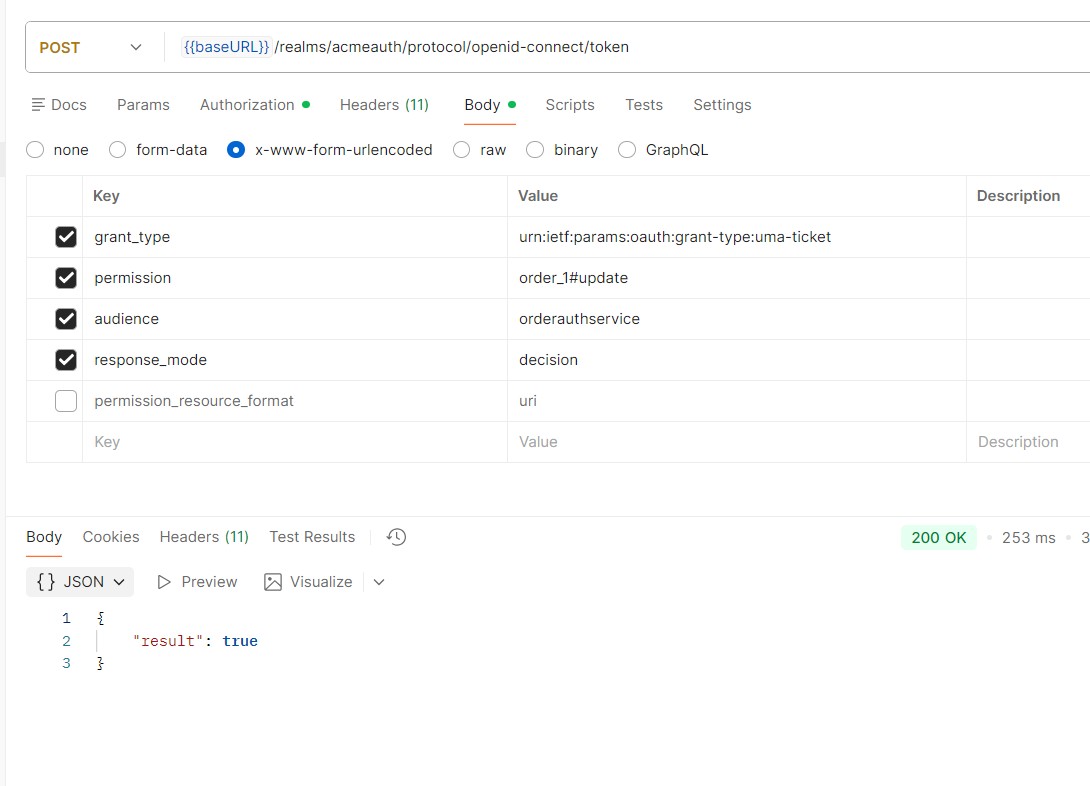
Testing the Flow
- Obtain user access token
- Make request to the token endpoint similar to the following, and the result will yield true if permission is granted:
curl -X POST "{{baseURL}}/realms/acmeauth/protocol/openid-connect/token"
  -H "Authorization: Bearer <YOUR_BEARER_USER_TOKEN>"
  -H "Content-Type: application/x-www-form-urlencoded"
  -d "grant_type=urn:ietf:params:oauth:grant-type:uma-ticket"
  -d "permission=order_1#update"
  -d "audience=orderauthservice"
  -d "response_mode=decision"
Where baseURL points to your Skycloak hostname.
Summary
Keycloak authorization services enable precise access decisions — beyond static RBAC — using UMA-based policies. Among the three approaches described:
For REST-based microservices, Option 3 often yields the lowest overhead and cleanest design. Option 1 is a requirement for special use cases (more dynamic permission at runtime).
To learn more about how Skycloak supports role-based and fine-grained authorization, visit our RBAC feature page. For details on securing your Keycloak environment, see our security overview.
Skycloak provides production-ready managed Keycloak hosting, helping teams avoid the complexity of maintaining and scaling Keycloak themselves.
If you’re new to Skycloak, visit the Skycloak Getting Started Guide to learn more. Explore the full documentation or review pricing plans to find the right fit.

Ready to simplify your authentication?
Deploy production-ready Keycloak in minutes. Unlimited users, flat pricing, no SSO tax.