
How to configure Azure AD B2C as an identity provider in Keycloak. Connect an Azure AD B2C user flow to Keycloak: register an app in B2C, add an OpenID Connect provider with the flow's endpoints, map the emails claim and test.
Register an app in your Azure AD B2C tenant, then add an OpenID Connect identity provider in Keycloak with the endpoints of your B2C user flow (from its discovery URL) plus the app’s client ID and secret. Add Keycloak’s broker endpoint to the B2C app as a redirect URI, map B2C’s emails claim to the Keycloak email, and test one login.
We did these steps on Keycloak 26.8.2 with a sign-up and sign-in user flow. For custom policies, see our IEF mapping guide.
Prerequisites
- Keycloak 26.8.2 and an admin account that can create realms and identity providers.
- An existing Azure AD B2C tenant with a sign-up and sign-in user flow, made with Microsoft’s tutorial. B2C prepends
B2C_1_to the name, so ours isB2C_1_signupsignin. Have it return the email address, given name and surname as application claims. - An app registration for Keycloak, made with Microsoft’s registration steps: choose Accounts in any identity provider or organizational directory (for authenticating users with user flows) and a Web redirect URI of
https://your-keycloak-host/realms/b2c-demo/broker/azure-ad-b2c/endpoint, whereazure-ad-b2cis the alias from Step 2. Create a client secret under Certificates & secrets and copy its value right away. - The flow’s discovery document, at
https://your-tenant.b2clogin.com/your-tenant.onmicrosoft.com/B2C_1_signupsignin/v2.0/.well-known/openid-configuration. B2C puts the policy name in the endpoint paths, so a provider set up from them serves that one user flow.
Step 1: Create a test realm
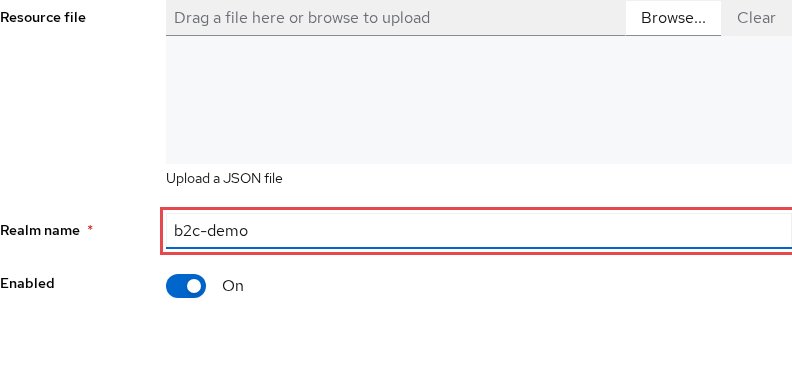
Open Manage realms, choose Create realm, name it b2c-demo and choose Create.
Step 2: Name the OpenID Connect provider
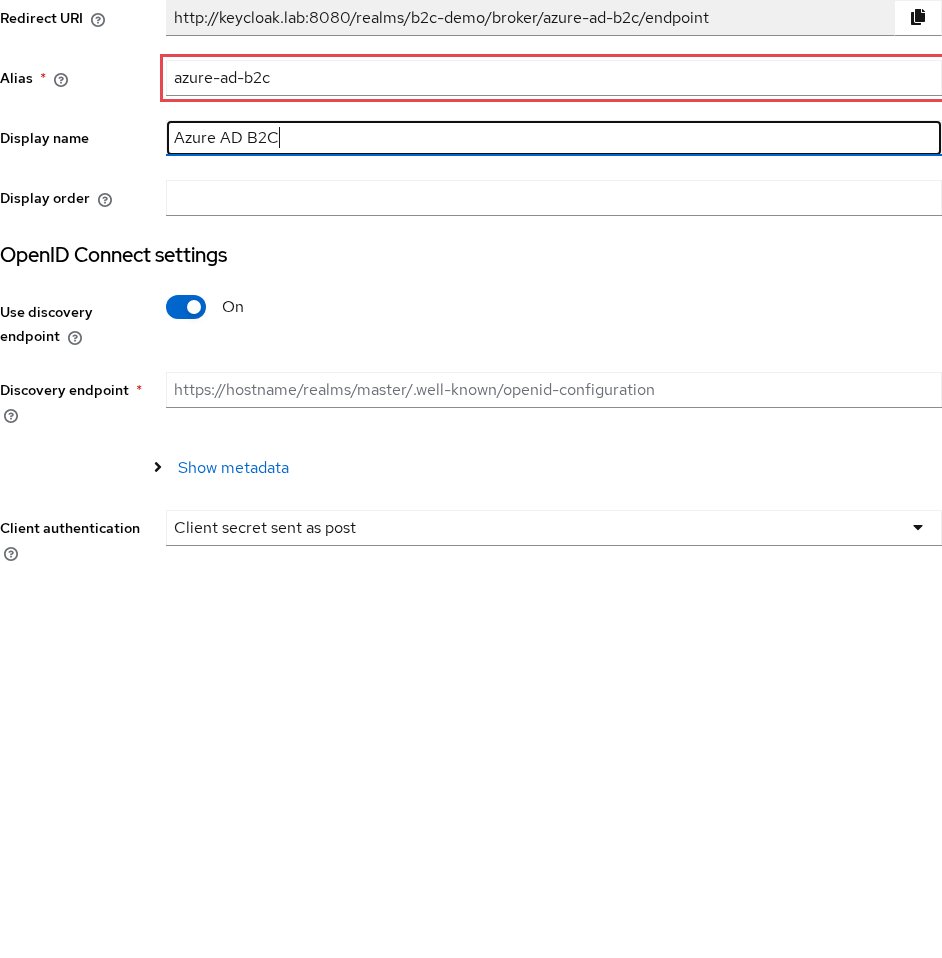
In the b2c-demo realm, open Identity providers and choose OpenID Connect v1.0. Set the Alias to azure-ad-b2c and the Display name to Azure AD B2C. The Redirect URI at the top of the form is the URL you registered in B2C.
Step 3: Enter the user flow’s endpoints
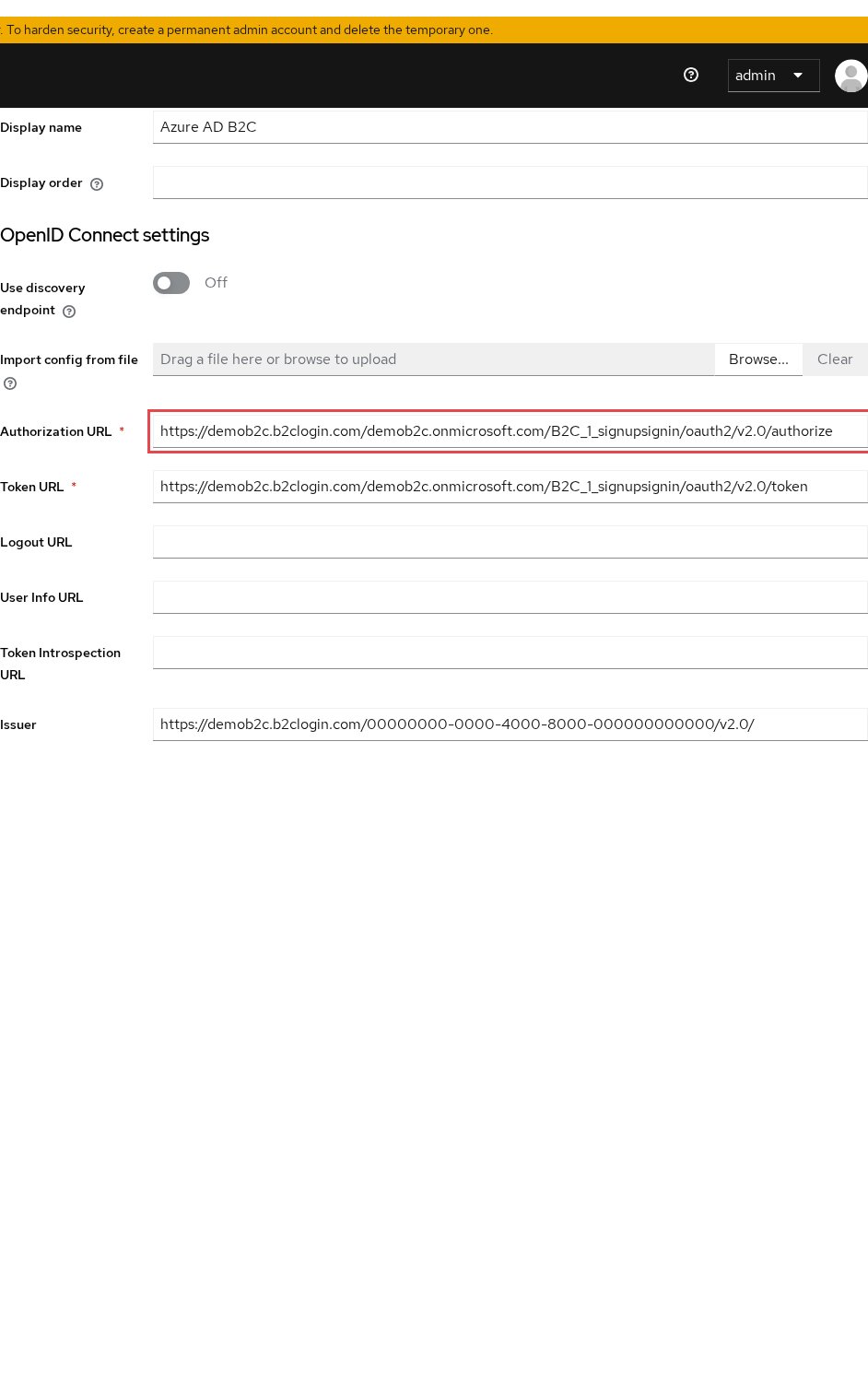
We fill the endpoints in by hand. Turn Use discovery endpoint off and copy these values from the discovery document:
- Authorization URL:
authorization_endpoint, ending in/B2C_1_signupsignin/oauth2/v2.0/authorize - Token URL:
token_endpoint, ending in/oauth2/v2.0/token - Issuer:
issuer, whose default value ishttps://your-tenant.b2clogin.com/{B2C tenant GUID}/v2.0/, with the tenant GUID rather than the tenant name - Validate signatures and Use JWKS URL on, with JWKS URL set to
jwks_uri, ending in/discovery/v2.0/keys
Leave User Info URL empty: for user flows, Microsoft’s UserInfo endpoint page says “This feature is available only for custom policies.” Keycloak then reads the user’s details from the ID token.
Step 4: Add the client ID and secret
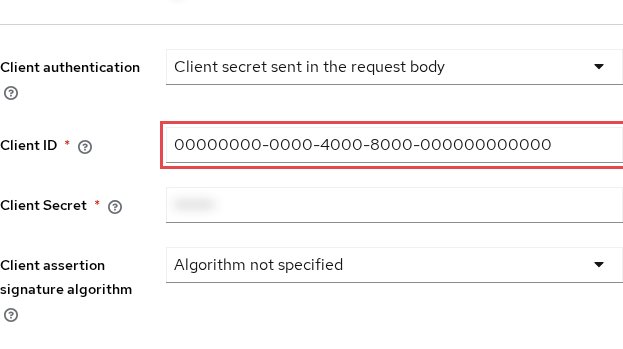
Paste the app’s Application (client) ID into Client ID and the secret value into Client Secret. Keep Client authentication on Client secret sent as post, then choose Add. Keycloak saves the provider and opens its settings.
Somewhere to run this that stays patched
Everything above works the same on Skycloak, because it is real upstream Keycloak rather than a fork. What changes is who handles the upgrades, backups and security patches afterwards.
Step 5: Map the emails claim to email
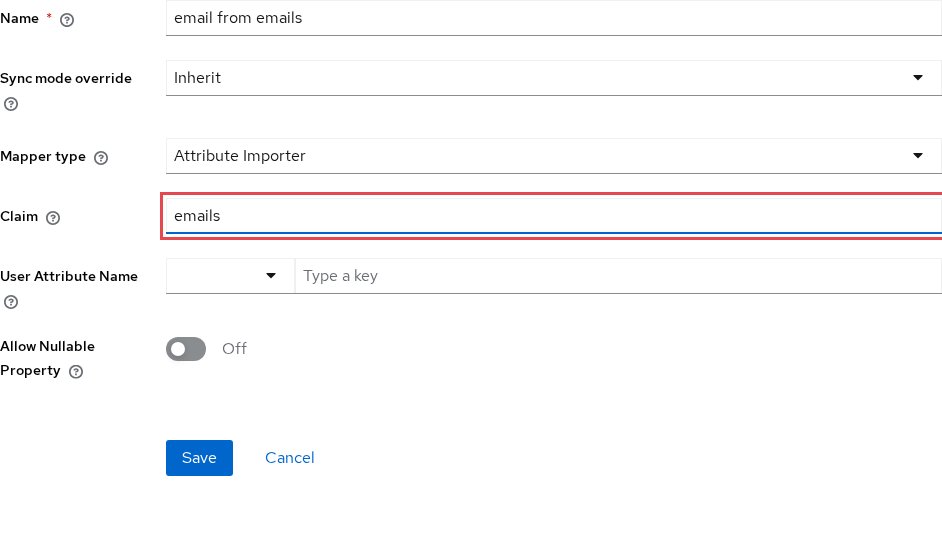
Look at one ID token from your user flow and find the claim that holds the email address. When it is named emails rather than email, add a mapper that copies it to the user’s email.
On the Mappers tab, choose Add mapper. Name it email from emails, pick the Attribute Importer type, set Claim to emails and User Attribute Name to email, and choose Save. The Keycloak docs describe identity provider mappers, and our attribute mapping post covers other claims.
Test it
Open https://your-keycloak-host/realms/b2c-demo/account in a private window. The login page shows an Azure AD B2C button. Choose it, sign up or sign in on the B2C page, and you should land in the account console, signed in.
In the admin console, Users in b2c-demo now lists the user with the email from B2C, and its Identity provider links tab shows azure-ad-b2c.
Troubleshooting
AADB2C90006 on the B2C page. The message is “The redirect URI ‘{0}’ provided in the request is not registered for the client ID ‘{1}’”. The app’s redirect URI differs from the one Keycloak sends, often in the realm name, the alias or a trailing slash, which makes URLs non-matching. Copy the Redirect URI from Step 2 into the app exactly, and see our redirect URI mismatch guide.
A Keycloak error page after B2C sign-in. Read the Keycloak server log for the reason. When it shows AADB2C90081, whose message in Microsoft’s error code list reads “The specified client_secret does not match the expected value for this client”, paste a fresh secret into Step 4. If the log mentions the issuer, copy issuer from the discovery document into the Issuer field again.
Keycloak asks the user for an email after B2C sign-in. The Keycloak docs describe the provider’s First Login Flow as “the authentication flow Keycloak triggers when users use this identity provider to log into Keycloak for the first time” (first login flow). Check that the user flow returns the email address claim and that the Step 5 mapper reads the claim your tokens use.
A 502 Bad Gateway on the B2C connection while other connections work. RFC 9110 says a 502 comes from a server “acting as a gateway or proxy” that “received an invalid response from an inbound server”, so check the proxy in front of Keycloak, such as Cloudflare, for the requests to /broker/azure-ad-b2c/endpoint. Our Keycloak 502 Bad Gateway guide walks through the checks.
FAQ
Do I need one Keycloak identity provider per B2C user flow?
With this setup, yes: the endpoints from Step 3 carry the flow’s name in their path, as in Microsoft’s endpoint list. A second flow gets a second provider with its own alias and redirect URI.
How do I send users straight to Azure AD B2C from my app?
Add kc_idp_hint=azure-ad-b2c to the authorization request. The Keycloak docs say OIDC applications can bypass the Keycloak login page by hinting at the provider this way. Our kc_idp_hint guide has examples.
Why does Keycloak not get the email from Azure AD B2C?
Your user flow may send the address in an emails claim rather than email. The mapper in Step 5 sets emails as the source claim and email as the target user property, as our attribute mapper docs describe.
Next steps
Connect a test B2C sign-up and sign-in user flow to a Keycloak realm and verify one full login. If you plan to leave B2C, read on:
- Azure AD B2C vs Entra External ID vs Keycloak, to compare where to go next.
- Azure AD B2C end of sale and support timeline, for the dates that set your schedule.
- Running Azure AD B2C and Keycloak side by side, for the cutover, passwords and rollback.