How to detect a wrong email OTP code in Keycloak events. A wrong email OTP code in Keycloak logs a LOGIN_ERROR event with error invalid_user_credentials. Turn on Save events, then search user events for Login error.
When a user types a wrong email OTP code, Keycloak records a LOGIN_ERROR event with the error invalid_user_credentials: the email OTP extension’s code sets that error on the login event when the submitted code does not match the code it sent. Like the example login error in the Keycloak admin guide, the event carries the user, the client and the IP address. To see those events, turn on Save events under Realm settings > Events, then search the realm’s user events for Login error and open the row for your user.
The steps below were done on Keycloak 26.4.0, and the email OTP event values are taken from the source code of the for-keycloak email OTP authenticator, the extension we cover in using email OTP with Skycloak.
Prerequisites
- Keycloak 26.x (this post used 26.4.0) with the email OTP extension installed and its Email OTP Form in the realm’s browser flow.
- An admin account that can view and change the realm’s events settings.
- A test user with an email address you can read, so that you can type a wrong code on purpose.
Step 1: Turn on Save events
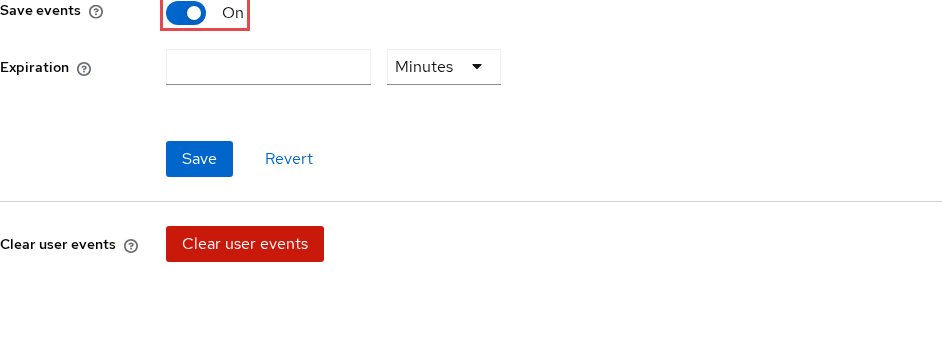
Open Realm settings, choose the Events tab and then User events settings, switch Save events on and choose Save. The Keycloak admin guide says that “by default, Keycloak does not store or display events in the Admin Console”, so without this switch the Events page stays empty. Set Expiration too, so that stored events are deleted after a period you choose and do not fill the database.
Step 2: Check that Login error is a saved event type
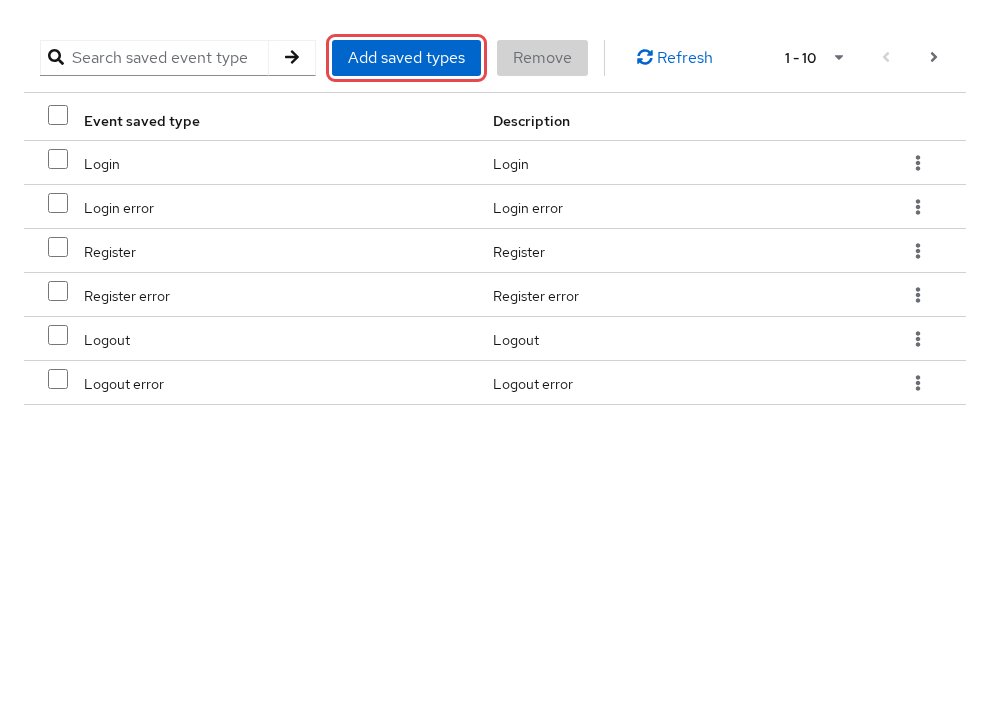
Stay on User events settings and look through the table of saved event types below the form for Login error, the console’s label for LOGIN_ERROR. If it is missing, the admin guide says to “click Add saved types to see other events you can save”: select Login error there and choose Add.
Step 3: Search the user events for Login error
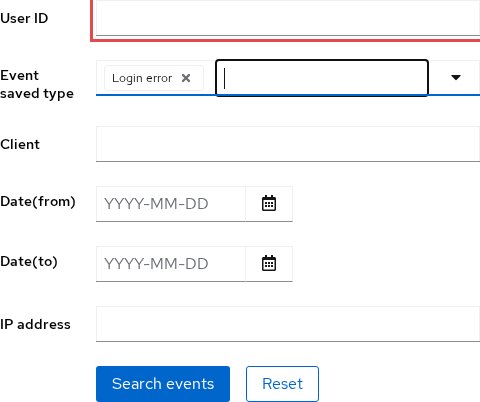
Open Events in the main menu, stay on User events, and choose Search events. In the search form, select Login error as the event type and, if you are looking at one person, paste their User ID (the ID shown on the user’s details page, not the username). Choose Search to list only failed logins.
Somewhere to run this that stays patched
Everything above works the same on Skycloak, because it is real upstream Keycloak rather than a fork. What changes is who handles the upgrades, backups and security patches afterwards.
Test it
Open a private browser window, sign in to the realm as your test user with the right password, and type a wrong code on the email OTP form. The extension shows the code form again with an error message, so you can try again. Back in the admin console, run the search from Step 3 again and expand the newest row. The console lists every detail of the event and then its error, and for a wrong code you should see:
Event type:  LOGIN_ERROR
User:        the test user's ID
Client:      the client the user was signing in to
IP address:  the address of your browser
error:       invalid_user_credentials
Because the extension sets this error every time a submitted code does not match, several rows like this for the same user in a few minutes point to someone retrying, or someone guessing.
Troubleshooting
The Events page shows no events at all. Save events is off, or Login error is not in the saved types. Repeat Steps 1 and 2, then trigger a new wrong code.
The error is expired_code, not invalid_user_credentials. The user typed the right code after it expired. In the extension’s code, the comparison of the code comes first and the expiry check runs only after a match, which records expired_code and emails a fresh code. So by that code, a wrong code is recorded as invalid_user_credentials even when the code on screen had also expired.
The error is email_otp_resend_cooldown or email_otp_issuance_limit. These are not wrong codes. The extension’s README says each refused resend or each code it refused to send because of the per-user limit “records one LOGIN_ERROR event”, and these refusals do not count as failed logins.
The user is locked out and the error is user_temporarily_disabled. Brute force detection is on and the wrong codes reached the limit. The admin guide says Keycloak applies the protection to “password, OTP and recovery codes”, and the extension reports a wrong code to Keycloak as an invalid credentials failure, so repeated wrong codes may count toward a lockout under your brute force settings. In Keycloak’s code, the username form checks for a brute force lockout and records the lockout as the event’s error. To let the user in before the lockout ends, look on the user’s details page for the console’s Temporarily locked switch.
FAQ
Does Keycloak log failed email OTP attempts?
It does, as a LOGIN_ERROR event with the error invalid_user_credentials, but only when Save events is on and Login error is a saved type. Keycloak also logs error events to the server log, which helps when events are not stored.
How do I tell a wrong email OTP code from a wrong password in Keycloak events?
You often cannot tell from the error alone: the admin guide’s example of a failed login also shows invalid_user_credentials, and the extension uses the same error for a wrong code. Compare the time of the row with when the user says they reached the code form. In a flow where the password step comes before the email code, also ask whether they received the email, since the code form only appears once the password step has passed.
Can I get an alert when a user enters wrong email OTP codes?
Yes, by sending events out of Keycloak and alerting on repeated LOGIN_ERROR rows with invalid_user_credentials for the same user. On Skycloak, event webhooks deliver LOGIN_ERROR events to your endpoint, and our guide to forwarding Keycloak events to a SIEM shows the setup.
Does brute force detection lock users after wrong email OTP codes?
It can when brute force detection is on: the admin guide says the protection applies to OTP, and the extension reports a wrong code as an invalid credentials failure, so try a few wrong codes on a test user to see how your lockout settings treat them. Our post on the brute force protection gap explains how lockouts behave and where they fall short.
Next steps
Turn on login events in your realm and search for Login error to see wrong email OTP attempts. On Skycloak managed Keycloak, open the Events page and apply the same filter there. These links help next:
- Keycloak auditing and event logging: the complete guide, for every event type and listener.
- Introducing Skycloak’s Keycloak event viewer, for searching events across your clusters.
- Forward Keycloak events to a SIEM via the Skycloak HTTP webhook, to alert on repeated failures.
If you would rather not run the Keycloak server yourself, you can try managed Keycloak hosting on Skycloak.