
What is the JWT authorization grant in Keycloak?
The JWT authorization grant lets a confidential client send a signed JWT from an issuer that Keycloak trusts to the token endpoint and receive a Keycloak access token for the linked user, with no login page in between. It implements RFC 7523, and it has been fully supported since Keycloak 26.6.
In this guide the trusted issuer is a small Node.js application that signs its own JWTs with an RSA key, and Keycloak is configured to accept those JWTs as proof of who the user is. This builds on our earlier post about the JWT authorization grant with an external identity provider, where Auth0 issued the JWT. Replacing Auth0 with your own code is useful when the system that already knows the user is a legacy identity store, a partner’s backend or an internal service, and it has no OpenID Connect server to federate with.
A few terms come up throughout. An assertion is the signed JWT that the client presents as evidence of the user’s identity. The issuer is the system that signs that JWT, identified by the iss claim. An identity provider in Keycloak is the configuration object that records which issuers Keycloak trusts and how to check their signatures.
How the flow works
The Node.js application plays the role of an external identity provider, and Keycloak acts as the authorization server that validates the assertion and issues its own token.
Custom Node.js application (JWT Issuer)
        ↓
JWT (Assertion)
        ↓
Keycloak (JWT Identity Provider Validation)
        ↓
Keycloak Access Token
When the request arrives, Keycloak runs the checks described in its JWT Authorization Grant guide, and the request fails if any of them does not pass:
- The client must be confidential and must have the JWT Authorization Grant capability enabled.
- The
issclaim must match the issuer of exactly one identity provider in the realm. Since Keycloak 26.6, issuers must be unique across the providers that allow this grant, and Keycloak refuses to save a second provider with the same issuer. - That identity provider must be enabled, able to accept the JWT authorization grant, and listed as allowed on the client. A disabled provider, or an OpenID Connect provider with its grant switch off, is simply not found when Keycloak looks up the issuer.
- The signature must verify against the provider’s keys, the
expclaim must be present, and the assertion must be used within the provider’s maximum allowed lifetime, counted fromiatwhen the JWT has one. - The
audclaim must contain a single value that names this Keycloak realm (its issuer URL or its token endpoint). Keycloak rejects assertions with more than one audience. - The
subclaim must match the user ID of an existing Keycloak user who is already linked to that identity provider.
If all of that passes, Keycloak returns an access token. It never issues a refresh token for this grant and it creates a transient session rather than a stored one, so the client sends a fresh assertion when the access token expires.
JWT authorization grant vs client credentials, token exchange and private_key_jwt
Several Keycloak features involve a JWT at the token endpoint, and they are easy to confuse. The table below separates them by what the JWT proves and whose token you get back.
| Mechanism | What the JWT proves | Token you get back | Typical use |
|---|---|---|---|
| JWT authorization grant (RFC 7523 section 2.1) | Which user an external issuer vouches for | Access token for that linked user, no refresh token | A trusted system already authenticated the user and you need a Keycloak token for them |
| Client credentials grant | Nothing about a user; the client authenticates itself | Access token for the client’s service account | Machine-to-machine calls with no user involved |
| Standard token exchange (RFC 8693) | The subject token must be an access token issued by the same realm | A new token for the same user, often with a narrower audience | One service calling another on the user’s behalf |
private_key_jwt client authentication (RFC 7523 section 2.2) |
Which client is calling, instead of a client secret | Whatever grant the client requested | Replacing shared client secrets with key pairs |
The last row matters because private_key_jwt is defined in the same RFC, and the two are easy to mix up. Client authentication with a signed JWT answers “which application is this”, while the authorization grant answers “which user is this”. You can use both in one request: the client can authenticate with client_assertion and present the user’s JWT as assertion, but this guide uses a client secret to keep the example short. Token exchange is covered in detail in our post on how Keycloak token exchange works, and the Keycloak 26.5 release notes recommend the JWT authorization grant as the alternative to the older external-to-internal token exchange from V1.
Step 1: Create a Node.js application that signs the JWT
Install the dependency
npm install jsonwebtokencrypto.randomUUID() is built into Node.js 14.17 and later, so you do not need the uuid package to generate the jti claim.
Generate an RSA key pair
The example signs with RS256, which is an asymmetric signature algorithm: a private key creates the signature and a separate public key verifies it, so Keycloak never needs the secret half.
| Key | Purpose |
|---|---|
| Private key | Used by the Node.js application to sign the JWT. Keep it secret. |
| Public key | Given to Keycloak so it can verify the signature. |
# Generate private key
openssl genpkey -algorithm RSA -out private.pem -pkeyopt rsa_keygen_bits:2048

# Extract public key
openssl rsa -pubout -in private.pem -out public.pem
Sign the assertion in Node.js
const jwt = require('jsonwebtoken');
const crypto = require('crypto');
const fs = require('fs');

// Load the PRIVATE KEY (used for signing)
const privateKey = fs.readFileSync('./private.pem', 'utf8');

const now = Math.floor(Date.now() / 1000);

// JWT payload
const payload = {
  iss: 'http://localhost:3000',              // this Node.js application
  sub: 'nodejsuser-1234',                    // the user's unique ID in this application
  aud: 'http://localhost:8080/realms/acme',  // Keycloak issuer URL for realm "acme"
  jti: crypto.randomUUID(),                  // unique ID, required unless assertion reuse is allowed
  iat: now
};

// Sign the JWT
const token = jwt.sign(payload, privateKey, {
  algorithm: 'RS256',
  expiresIn: '5m',      // adds the exp claim
  keyid: 'node-issuer-1' // sets kid in the header
});

console.log('Generated JWT:\n', token);
Each claim maps to one of Keycloak’s checks. The aud value is the realm’s issuer URL, which you can copy from http://localhost:8080/realms/acme/.well-known/openid-configuration. The five minute lifetime matches Keycloak’s default Max allowed assertion expiration. When the JWT carries iat, as this one does, Keycloak accepts it for at most that long after iat even if exp is later, and it only rejects a far-off exp outright when iat is missing. The jti claim is required by default because Keycloak only accepts each assertion once, which stops a captured JWT from being replayed. The keyid option is optional when you paste a fixed public key into Keycloak, but it becomes useful as soon as you publish keys through a JWKS endpoint (see the production section below).
Because the default Allowed clock skew is zero, make sure the machine running Node.js and the Keycloak server agree on the time. A clock that runs a few seconds ahead can make a fresh assertion look like it was issued in the future.
Project structure
project/
 ├── private.pem   KEEP SECRET
 ├── public.pem    SHARE WITH KEYCLOAK
 └── app.js
Step 2: Configure the JWT Authorization Grant identity provider
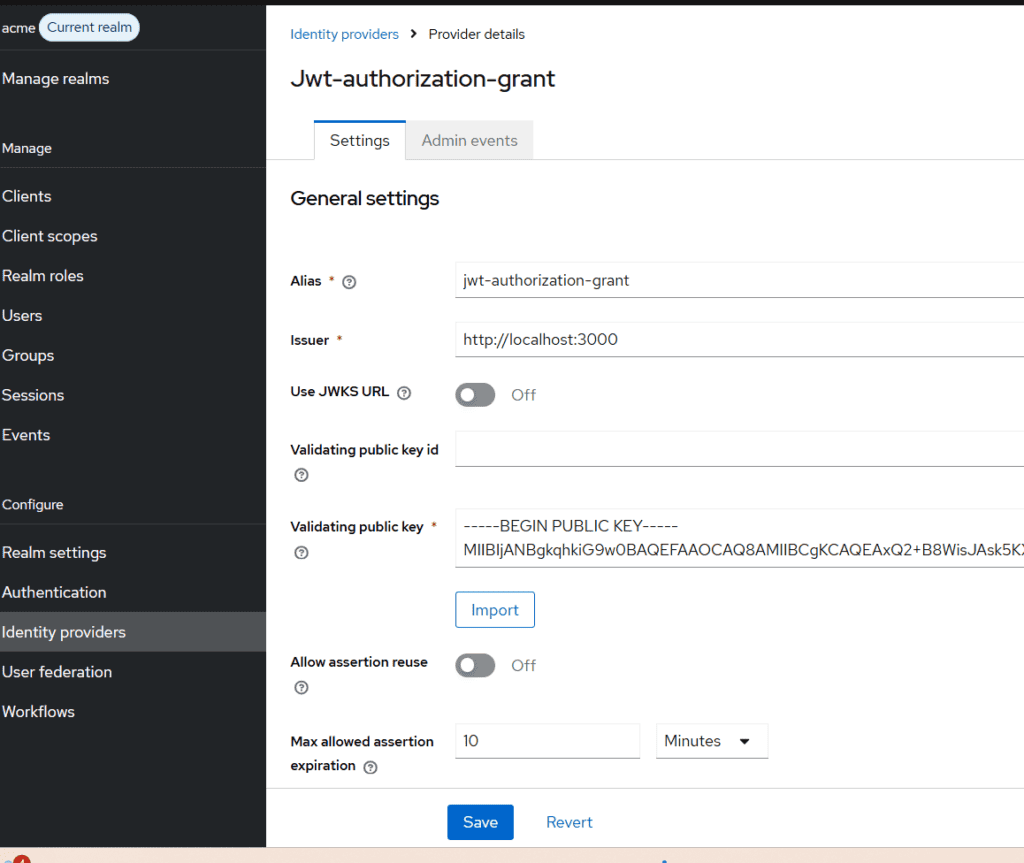
In the admin console, open your realm and go to Identity providers, then add a provider of type JWT Authorization Grant. Keycloak also accepts this grant through an OpenID Connect v1.0 provider, which is the usual choice when the issuer is a real OpenID provider such as Auth0, but the dedicated JWT type fits a custom issuer like this one.
Configure it as follows:
- Alias:
jwt-authorization-grant. The client configuration refers to the provider by this alias. - Issuer:
http://localhost:3000. This must match theissclaim character for character, and it must be an http or https URL. With the realm’s default Require SSL setting of external requests, a public host has to use https, and the same check applies to a JWKS URL. - Use JWKS URL: off for this first test, because we paste the key by hand.
- Validating public key: paste the contents of
public.pem. Keycloak accepts a PEM key or a JWKS document here.
Because this provider type exists only for the grant, it has no separate on switch. The same settings page holds Allow assertion reuse (off by default), Max allowed assertion expiration (5 minutes by default), the accepted signature algorithm, Allowed clock skew and Limit access token expiration, which caps the Keycloak token’s lifetime at the assertion’s expiry when that is shorter.
Step 3: Configure the Keycloak client
Create a client with Client authentication turned on, which makes it confidential. Keycloak only allows confidential clients to use this grant, because a public client such as a browser app has no credentials of its own to prove which application is asking.
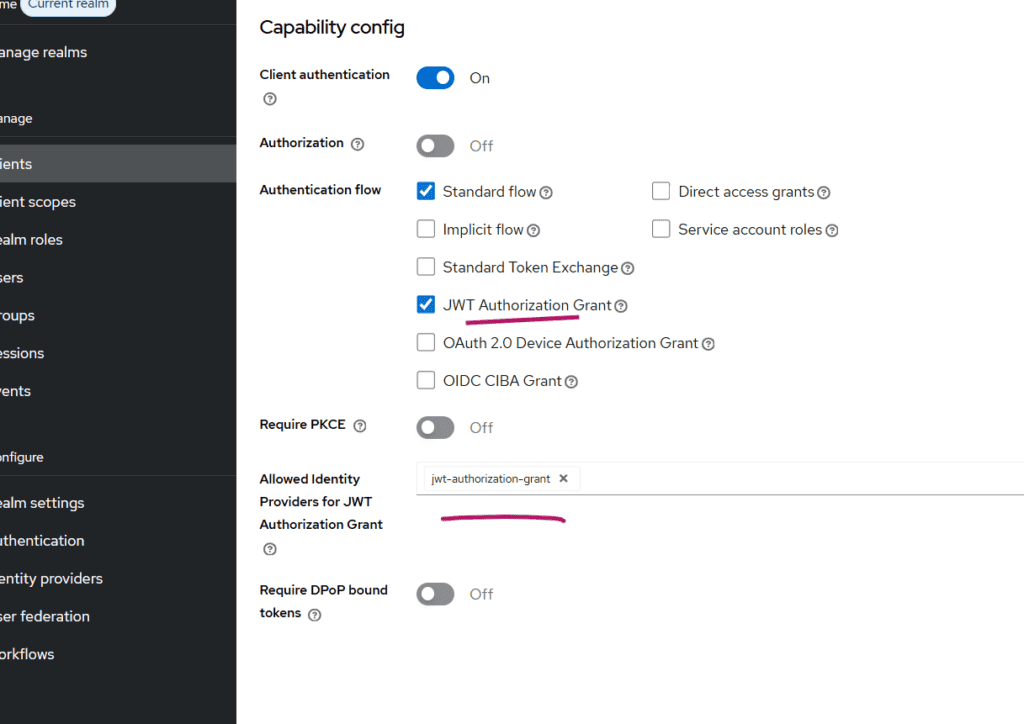
Then, on the client’s Settings tab under Capability config:
- Enable JWT Authorization Grant.
- In Allowed Identity Providers for JWT Authorization Grant, select
jwt-authorization-grant. The value must be the alias of the provider from Step 2, and a provider that is not selected here is refused even if its assertion is valid.
Step 4: Link the external user to a Keycloak user
Keycloak does not create users from a JWT authorization grant. It finds the user through an existing identity provider link, where the link’s user ID equals the assertion’s sub claim, so every user must be linked before their first request. This is the main operational difference from a browser login through identity brokering, where Keycloak can create and link the account on the fly.
Create the user
Create a user in the realm, for example with the username nodejsuser-1234@acme.com. Do not leave required actions such as Verify Email or Update Password on the account, because Keycloak refuses the grant with “Account is not fully set up” while any are pending.
Link the identity provider in the admin console
- Open the user and go to the Identity provider links tab.
- Under Available identity providers, find
jwt-authorization-grant. - Click Link account.
- Enter
nodejsuser-1234as the User ID, which must match thesubclaim exactly, and a Username for the external account (we used the same value).
The external user is now linked to the Keycloak user.
Link users with the Admin REST API
Linking users one at a time in the console does not scale, so for a real integration you would link them with the Admin REST API, usually from the same job that provisions the users. The endpoint is POST /admin/realms/{realm}/users/{user-id}/federated-identity/{provider-alias}:
curl -X POST "http://localhost:8080/admin/realms/acme/users/$KEYCLOAK_USER_ID/federated-identity/jwt-authorization-grant" \
  -H "Authorization: Bearer $ADMIN_TOKEN" \
  -H "Content-Type: application/json" \
  -d '{"identityProvider":"jwt-authorization-grant","userId":"nodejsuser-1234","userName":"nodejsuser-1234"}'
Here $KEYCLOAK_USER_ID is Keycloak’s own ID for the user, and userId is the external ID that will appear in sub.
Step 5: Request a Keycloak token with the assertion
Run the Node.js application to print a JWT, then send it to the realm’s token endpoint with the JWT bearer grant type:
curl -X POST "http://localhost:8080/realms/acme/protocol/openid-connect/token" \
  -H "Content-Type: application/x-www-form-urlencoded" \
  -d "grant_type=urn:ietf:params:oauth:grant-type:jwt-bearer" \
  -d "client_id=custom-client" \
  -d "client_secret=the-client-secret" \
  -d "assertion=<JWT_ASSERTION>"
You can add a scope parameter if the client needs scopes beyond its defaults. A successful response contains an access_token, an expires_in value and "refresh_expires_in": 0, which confirms that no refresh token was issued. If you want to see what Keycloak put in the token, paste it into our JWT token analyzer.
Because the assertion is single use by default, running the same curl command twice with the same JWT fails the second time. Generate a new JWT for each request while you test.
Common errors and fixes
Keycloak returns invalid_grant for almost every failure, with an error_description that tells you which check failed. The exception is a client with Consent required turned on, where a user who has not consented gets invalid_scope with “Missing consents for the client” followed by the client ID. The messages below are the ones raised by the grant handler and its validators in Keycloak 26.8.
| Error description | What it means | Fix |
|---|---|---|
| JWT Authorization Grant is not supported for the requested client | The client does not have the capability enabled | Enable JWT Authorization Grant on the client and confirm it is confidential |
| The provided assertion is not a valid JWT | The assertion parameter could not be parsed |
Send the compact JWT string itself, with nothing around it |
| Missing claim: iss, Missing claim: sub | A mandatory claim is absent | Add iss and sub to the payload |
| No Identity Provider for provided issuer | No enabled provider that accepts the grant has an issuer equal to iss |
Make the provider’s Issuer and the iss claim identical, including the scheme and any trailing slash; check that the provider is enabled and, for an OpenID Connect provider, that its JWT Authorization Grant switch is on |
| Identity Provider is not allowed for the client | The provider exists but is not selected on the client | Add the provider alias to Allowed Identity Providers for JWT Authorization Grant |
| Invalid signature | The signature does not verify against the provider’s key | Check that the key in Keycloak is the public half of private.pem, or that the JWKS URL serves a key whose kid matches the JWT header |
| Invalid signature algorithm | The JWT’s alg is not the one the provider accepts |
Use an asymmetric algorithm such as RS256 or ES256 (symmetric algorithms like HS256 are always refused), matching Assertion signature algorithm if it is set |
| Invalid token audience | aud does not name this realm |
Set aud to the realm issuer URL or its token endpoint, or check the client’s Custom audience mapping on the Advanced tab, which replaces the accepted audience for that provider |
| Multiple audiences not allowed | aud is an array with more than one value |
Send a single audience |
| Token exp claim is required, Token is not active | exp is missing or already past |
Generate a fresh JWT with expiresIn set |
| Token was issued in the future | iat is ahead of Keycloak’s clock |
Sync the clocks with NTP, or raise Allowed clock skew slightly |
| Token was issued too far in the past to be used now | More than the maximum allowed lifetime has passed since iat |
Sign a new JWT just before each request |
| Token expiration is too far in the future and iat claim not present in token | There is no iat and exp is further out than the maximum allowed lifetime |
Add iat, or shorten expiresIn |
| Token jti claim is required, Token reuse detected | jti is missing, or this assertion was already used |
Add a fresh jti to every JWT and never resend one |
| User not found | No user is linked to this provider with a user ID equal to sub |
Link the user as in Step 4 and compare the user ID with sub exactly |
| User is not enabled | The linked user is disabled | Enable the user |
| Account is not fully set up | The linked user has pending required actions | Remove the required actions from the user |
If you have login events enabled for the realm, the error event shows the issuer and the external user ID, the identity provider once one was matched, and a reason with the error text, which makes mismatches much quicker to spot.
Before you use this in production
The setup above is enough to prove the flow works, but a few changes make it safer to run for real.
Publish keys through a JWKS endpoint. The Keycloak guide recommends turning Use JWKS URL on, so you can rotate the signing key without editing the identity provider. A JWKS (JSON Web Key Set) is a JSON document that lists public keys, each with a kid that matches the kid in the JWT header. Node.js can produce one from your existing public key:
const crypto = require('crypto');
const fs = require('fs');
const http = require('http');

const jwk = crypto.createPublicKey(fs.readFileSync('./public.pem')).export({ format: 'jwk' });
const jwks = { keys: [{ ...jwk, kid: 'node-issuer-1', use: 'sig', alg: 'RS256' }] };

http.createServer((req, res) => {
  if (req.url === '/.well-known/jwks.json') {
    res.writeHead(200, { 'Content-Type': 'application/json' });
    return res.end(JSON.stringify(jwks));
  }
  res.writeHead(404);
  res.end();
}).listen(3000);
Then set the provider’s JWKS URL to http://localhost:3000/.well-known/jwks.json. The URL has to be reachable from the Keycloak server, which matters when Keycloak runs in a container where localhost points at the container itself. Our JWKS verifier is a quick way to check that a token’s signature verifies against the keys your endpoint serves.
Protect the private key. Whoever holds private.pem can mint a valid assertion for any linked user, so treat it like a database password. Keep it in a secrets manager or a KMS rather than on disk next to the code, and rotate it on a schedule.
Limit what an assertion can unlock. Keycloak adds client policy building blocks for this grant: an identity-provider-alias condition that matches requests from a given provider, a downscope-assertion-grant-enforcer executor that rejects requests for scopes not already present in the assertion’s scope claim, and a jwt-claim-enforcer executor that requires specific claims or claim values. Together they stop a client from getting more scopes than the assertion grants and let you require specific claims. They do not protect you if the signing key itself is stolen, because whoever holds the key also controls those claims, which is why the key handling above matters.
Keep the assertion single use and short-lived. Leave Allow assertion reuse off and keep the maximum lifetime at a few minutes. Turning on Limit access token expiration also stops Keycloak from issuing a token that outlives the assertion it came from.
Frequently asked questions
Which Keycloak version supports the JWT authorization grant?
Keycloak 26.5 introduced the JWT authorization grant as a preview feature, and Keycloak 26.6 promoted it to fully supported. In 26.6 and later it is enabled by default, so you only need to configure the identity provider and the client. If you are still on an earlier release, upgrade before building on it rather than relying on the preview behavior.
Does the JWT authorization grant return a refresh token?
No. Following the RFC’s recommendation, Keycloak never issues a refresh token for this grant and creates a transient session that is not stored. When the access token expires, the client obtains a new assertion from the issuer and repeats the request.
Is the JWT authorization grant the same as private_key_jwt client authentication?
They come from the same RFC but solve different problems. The authorization grant uses a JWT to say which user the token is for, while private_key_jwt uses a JWT to prove which client is calling instead of sending a client secret. A request can use both at once, with the client’s JWT in client_assertion and the user’s JWT in assertion.
Can Keycloak create the user automatically from the JWT?
No. The user must already exist and be linked to the identity provider, with the link’s user ID equal to the assertion’s sub claim. If you need users created on first contact, provision them and create the link through the Admin REST API before the first grant request, or use a browser login through identity brokering instead.
Can I use the JWT authorization grant across two Keycloak realms?
Yes. The first realm issues a token whose audience is the second realm, typically through standard token exchange, and the second realm treats the first as an identity provider and accepts that token as the assertion. Keycloak documents the full setup in its guide to authorization chaining across domains.
Summary and next steps
To accept JWTs from your own Node.js issuer, you create a JWT Authorization Grant identity provider whose issuer matches iss, allow that provider on a confidential client, link each user so that sub resolves to them, and post the signed JWT to the token endpoint with the jwt-bearer grant type. The approach suits federated architectures, custom identity systems and external authentication services that need to hand users to Keycloak-protected APIs without a second login.
From here, move key distribution to a JWKS endpoint, add the client policy executors so an assertion cannot request more scopes than it carries, and automate user linking through the Admin REST API.
If you would rather not run the Keycloak side yourself, Skycloak is a fully managed Keycloak platform that supports external identity providers out of the box, and the Skycloak getting started guide walks you through your first cluster.