

PKCE (Proof Key for Code Exchange, RFC 7636) protects the OAuth 2.0 authorization code flow from stolen codes. The client sends a hashed challenge with the authorization request, then proves it holds the matching secret verifier when it exchanges the code for tokens, so an intercepted code is useless.
The RFC says the name is pronounced “pixy”. You have probably met it as a client setting or an SDK option, and this post follows one complete exchange with real values so you can see what that option does. It then covers which clients need PKCE, how it differs from state, nonce and a client secret, and why a PKCE login usually fails.
Key takeaways
- The verifier is a random secret that your client creates for each authorization request. The challenge sent with that request is its base64url-encoded SHA-256 hash (RFC 7636, section 4.2).
- Public clients “MUST use PKCE”, and it is “RECOMMENDED” for confidential clients (RFC 9700, section 2.1.1), meaning clients “capable of maintaining the confidentiality of their credentials” (RFC 6749, section 2.1).
- Use
S256, which RFC 9700 names as the only current method that does not expose the verifier in the authorization request (RFC 9700, section 2.1.1).- A server can support PKCE without requiring it, so test your client: a wrong verifier must end in
invalid_grant(RFC 7636, section 4.6).
What problem does PKCE solve?
In the authorization code flow, the authorization server (the service that signs the user in and issues tokens) sends a short-lived code back through a browser redirect, and your client swaps that code for tokens at the token endpoint (RFC 6749, sections 4.1 and 4.1.2). The code travels through places your client does not control. RFC 7636 describes an attacker intercepting it “within a communication path not protected by Transport Layer Security (TLS), such as inter-application communication within the client’s operating system”, for example when a malicious app registers itself as a handler for the same custom URL scheme as the real app (RFC 7636, section 1).
A mobile or single-page app has no client secret it can truly keep, so without PKCE the code on its own is enough to get tokens. PKCE ties the code to a value that only the client that started the login knows, and that value never travels through the redirect.
How does PKCE work? One S256 exchange from start to finish
The example below uses the published test values from RFC 7636, appendix B, so you can check your own code against them. Treat them as test data, because a real client needs a new random verifier every time. The client ID and URLs are placeholders.
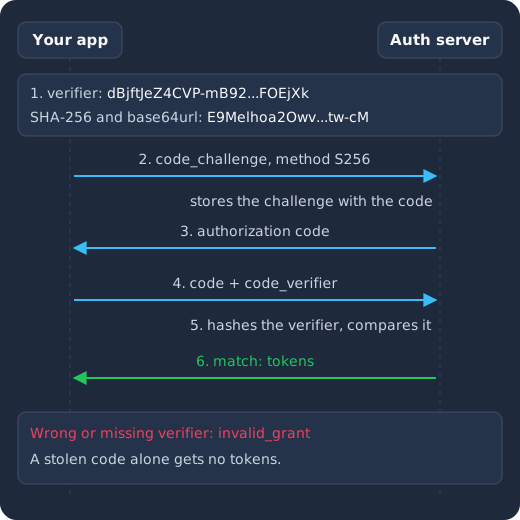
Your app creates a verifier and hashes it into a challenge (1), then sends the challenge in the authorization request (2). The server stores the challenge with the code it returns (3). Your app sends the code and the verifier (4), the server hashes the verifier and compares the result with the stored challenge (5), and a match returns tokens (6). A wrong verifier gets invalid_grant.
Step 1: Create the code verifier
The verifier is a random string of 43 to 128 characters drawn from letters, digits and -, ., _ and ~. The RFC recommends base64url-encoding 32 random bytes, which gives a 43-character string (RFC 7636, section 4.1). Base64url is the URL-safe form of base64, which omits the trailing = padding (RFC 7636, section 3) and replaces + with - and / with _ (appendix A). Our example verifier is:
dBjftJeZ4CVP-mB92K27uhbUJU1p1r_wW1gFWFOEjXkStep 2: Derive the code challenge
For S256, the formula is BASE64URL-ENCODE(SHA256(ASCII(code_verifier))) (RFC 7636, section 4.2). You can reproduce the RFC’s result in a terminal:
printf %s 'dBjftJeZ4CVP-mB92K27uhbUJU1p1r_wW1gFWFOEjXk' \
  | openssl dgst -binary -sha256 \
  | openssl base64 -A \
  | tr '+/' '-_' | tr -d '='
# E9Melhoa2OwvFrEMTJguCHaoeK1t8URWbuGJSstw-cM
In a browser, the Web Crypto API can do the same steps: crypto.getRandomValues() gives cryptographically strong random bytes, and crypto.subtle.digest() computes the hash. To check the code below, pass the example verifier to sha256Challenge and compare the result with the RFC’s challenge. Most apps should let a maintained OAuth library do this, but the code shows what the library does for you:
function base64url(bytes) {
  return btoa(String.fromCharCode(...bytes))
    .replace(/\+/g, "-").replace(/\//g, "_").replace(/=+$/, "");
}

async function sha256Challenge(codeVerifier) {
  const data = new TextEncoder().encode(codeVerifier);
  const digest = await crypto.subtle.digest("SHA-256", data);
  return base64url(new Uint8Array(digest));
}

const codeVerifier = base64url(crypto.getRandomValues(new Uint8Array(32)));
const codeChallenge = await sha256Challenge(codeVerifier);
Keep codeVerifier somewhere your callback can read it, because you need the same value in step 5.
Step 3: Send the challenge in the authorization request
Your client adds two parameters to the usual request, which is wrapped here for reading (RFC 7636, section 4.3):
https://auth.example.com/authorize
  ?response_type=code
  &client_id=web-app
  &redirect_uri=https%3A%2F%2Fapp.example.com%2Fcallback
  &scope=openid
  &state=RANDOM_STATE
  &code_challenge=E9Melhoa2OwvFrEMTJguCHaoeK1t8URWbuGJSstw-cM
  &code_challenge_method=S256
Always send code_challenge_method, because under RFC 7636 it defaults to plain when it is missing.
Step 4: The server stores the challenge with the code
The user signs in, and the server redirects back with a code. It must associate the challenge and its method with that code so it can verify them later (RFC 7636, section 4.4). Anyone watching the redirect can see the code, and the challenge may be visible too, but SHA-256 is a one-way hash, so neither reveals the verifier.
Step 5: Send the verifier in the token request
Your client sends the code and the original verifier in the body of a request to the token endpoint (RFC 7636, section 4.5). A confidential client “MUST authenticate” in this request as well (RFC 6749, section 4.1.3):
curl -X POST https://auth.example.com/token \
  -d grant_type=authorization_code \
  -d code=AUTHORIZATION_CODE \
  -d client_id=web-app \
  --data-urlencode redirect_uri=https://app.example.com/callback \
  -d code_verifier=dBjftJeZ4CVP-mB92K27uhbUJU1p1r_wW1gFWFOEjXk
Step 6: The server compares the values
The server hashes the verifier it just received and compares the result with the stored challenge. If they match, it returns tokens. If they differ, it must return invalid_grant (RFC 7636, section 4.6). An attacker holding only the intercepted code cannot pass this check, because the attacker never saw the verifier.
Which clients should use PKCE?
Every client that uses the authorization code flow should use it. PKCE started as a fix for native apps, but RFC 9700 says “this advice applies to all kinds of OAuth clients, including web applications” (RFC 9700, section 2.1.1).
| Client | Can it keep a secret? (RFC 6749, section 2.1) | Current guidance |
|---|---|---|
| Mobile or desktop app | No | “Public native app clients MUST implement” PKCE (RFC 8252, section 6), and servers “SHOULD reject authorization requests from native apps that don’t use PKCE” (section 8.1) |
| Single-page app | No | As a public client, it “MUST use PKCE” (RFC 9700, section 2.1.1) |
| Server-side web app | Yes | PKCE is “RECOMMENDED”, because it protects against misuse and injection of codes (RFC 9700, section 2.1.1) |
| Service with no user (client credentials) | Yes | PKCE has no code to protect here, because the client requests a token “using only its client credentials” (RFC 6749, section 4.4) |
OAuth 2.1 goes further. The OAuth 2.1 working draft, which is still an Internet-Draft and not a finished standard, says in draft 17 of 31 October 2026 that clients “MUST use” PKCE and servers “MUST enforce” it. Its exception needs two things at once: “a confidential client”, and “reasonable assurance by the authorization server that the client implements the OpenID Connect nonce mechanism properly”. Even then PKCE is “still RECOMMENDED” (section 7.5.1.1). That draft also forbids the plain method outright.
For help picking a flow, see choosing the best authorization flows for your app. If you are building a native client, read our OAuth best practices for mobile apps, and if your API is called by services, our comparison of API keys and OAuth covers when each one fits.
How is PKCE different from state, nonce and a client secret?
These four values can appear in the same login, but each one has a different job, so PKCE does not simply replace the others. The state check comes from RFC 6749, section 10.12, and the nonce check from OpenID Connect Core.
| Proves | Checked by | Stops | |
|---|---|---|---|
| PKCE | The client redeeming the code started this authorization request | Authorization server, at the token endpoint | Redeeming a stolen code, and injecting a stolen code into another login |
state |
The callback belongs to this browser session | Your client, on the callback | Cross-site request forgery (CSRF), where an attacker makes your browser complete a login callback the attacker started |
| Nonce | The ID token belongs to this login | Your client, in the ID token | Helps mitigate replay attacks (OpenID Connect Core, section 3.1.2.1) and can protect against authorization code injection (RFC 9700, section 4.5.3.2) |
| Client secret | The caller is the client the code was issued to (RFC 6749, section 3.2.1) | Authorization server, at the token endpoint | Reduces the risk of another client impersonating this one, which RFC 6749 says is possible when a client fails to keep its credentials confidential (section 10.2) |
A server-side app may seem not to need PKCE once it has a client secret, but RFC 9700 describes a case where the secret does not help: an attacker starts a login with your real client and swaps in a stolen code, your client sends that code to the token endpoint with its “client ID and client secret”, and “all checks succeed” (RFC 9700, section 4.5.1). With PKCE, “the check of the code_verifier fails”, because the stolen code is tied to a different challenge (RFC 9700, section 4.5.3.1). PKCE adds to the secret and does not replace it, so a confidential client keeps authenticating as before.
The CSRF protection overlaps. RFC 9700 says clients that have made sure the server supports PKCE may rely on it for CSRF protection, that the OpenID Connect nonce also provides it, and that otherwise one-time values in state must be used (RFC 9700, section 2.1). We suggest keeping state anyway unless your library documents otherwise, and our post on nonce, state and PKCE walks through all three in one login.
Why does PKCE fail? The usual mistakes
The five mistakes below are the ones to check first. The first three produce an error, while the last two can look like a working login, so they need a deliberate test.
The verifier does not match the challenge
The server hashes the verifier it receives and compares the result with the stored challenge (RFC 7636, section 4.6), so a verifier that differs from the one the client hashed ends in invalid_grant. Check whether the app generated a new verifier when the callback loaded because the stored one did not survive the redirect, or hashed the raw random bytes when it should have hashed the encoded string that the formula calls for. Log the verifier in a test environment only, run it through the openssl command above, and compare the output with the challenge your app sent.
The encoding is standard base64, or it keeps its padding
Standard base64 uses + and / and adds = padding, while base64url uses - and _ and omits the padding. The same hash looks like this in each form, and only the first one is correct. Removing the two tr commands from the openssl example above prints the second form:
base64url:        E9Melhoa2OwvFrEMTJguCHaoeK1t8URWbuGJSstw-cM
standard base64:  E9Melhoa2OwvFrEMTJguCHaoeK1t8URWbuGJSstw+cM=
Keycloak, for example, only accepts letters, digits and -, ., ~ and _ in a challenge. The isValidPkceCodeChallenge method in its authorization endpoint checks fails on the + and = in the second form, so the request is refused with Invalid parameter: code_challenge.
The verifier breaks the length or character rules
A verifier must have 43 to 128 characters from the allowed set (RFC 7636, section 4.1). A short test string such as abc123 is a common cause here, and servers that check the format can reject it even though the hash matches.
The client uses plain, or falls back to it
With plain, the challenge is the verifier, so anyone who can read the authorization request can also read the secret. RFC 7636 says plain “SHOULD NOT be used in new implementations” unless a client cannot support S256, and that clients “MUST NOT downgrade to plain” after trying S256 (RFC 7636, section 7.2). Because the method defaults to plain when it is left out, a client that forgets the parameter can end up here without any error.
The server supports PKCE but does not enforce it
RFC 9700 warns that a server that “supports PKCE but does not make its use mandatory for all flows can be susceptible to a PKCE downgrade attack”, in which a code that has no challenge is redeemed without a verifier check (RFC 9700, section 4.8). Servers must also reject a token request that carries a verifier when the authorization request had no challenge (section 4.8.2). Your login still works in this situation, so you only find the gap by testing for it. Metadata does not settle the question either, because code_challenge_methods_supported tells you what a server can do, not what it requires for your client.
Identity you do not have to patch yourself
Skycloak is a managed identity platform for SSO, MFA, SCIM and audit logs. When an advisory lands, the fix is ours to ship: Keycloak 26.7.2 closed an account takeover through password reset and customers had it the same day upstream published it.
How do you enforce S256 PKCE in Keycloak?
Open the client in the Keycloak admin console and set PKCE method to S256. The Keycloak Server Administration Guide describes this option in its Capability Config section and says it lets you “specify which PKCE challenge method is required for this client”. When it is blank, Keycloak “does not apply PKCE unless the client sends the appropriate PKCE parameters”, so “it is not required”. The Keycloak 26.0 guide describes the same setting in its “Advanced configuration” topic, under the name Proof Key for Code Exchange Code Challenge Method, so look there on an older server.
Leaving it blank is the “supported but not enforced” case from the previous section. Keycloak’s discovery document lists both plain and S256 in code_challenge_methods_supported, so that list will not tell you what a particular client requires.
Keycloak’s source shows the errors you can expect once S256 is set. A bad authorization request fails with invalid_request (checkParamsForPkceEnforcedClient in the authorization endpoint checks), while a bad token request fails with invalid_grant (PKCE checks):
| What your client did | OAuth error | Keycloak’s error_description |
|---|---|---|
| Sent no method | invalid_request |
Missing parameter: code_challenge_method |
Sent plain to an S256 client |
invalid_request |
Invalid parameter: code challenge method is not matching the configured one |
| Sent no verifier in the token request | invalid_grant |
PKCE code verifier not specified |
| Sent a verifier that breaks the format rules | invalid_grant |
PKCE verification failed: Invalid code verifier |
| Sent the wrong verifier | invalid_grant |
PKCE verification failed: Code mismatch |
So the response to a wrong verifier looks like this:
{
  "error": "invalid_grant",
  "error_description": "PKCE verification failed: Code mismatch"
}
An invalid_grant without a PKCE message has other causes, such as a code that is expired or used more than once, and our Keycloak invalid_grant troubleshooting guide goes through them. For the client setup step by step, see how to create a PKCE authorization flow client in Keycloak. On Skycloak’s managed Keycloak, the dashboard’s PKCE recipe creates a public client with PKCE enabled using the method you choose, and we recommend choosing S256.
What does PKCE not protect against?
PKCE is a check on the token request: the server compares the verifier, then returns tokens or an error (RFC 7636, section 4.6). That check does not cover what happens to the tokens after your client receives them. If you are worried about tokens stored in a browser, our post on the backend for frontend pattern covers keeping them on a server. PKCE also depends on the attacker not having chosen the challenge, a limitation of the kind RFC 9700, section 4.5.4 describes: when an attacker starts the login and a server sends the code to the attacker’s address, the attacker already knows the verifier, which is why exact redirect URI validation still matters, as our post on redirect URI parser confusion explains.
Frequently asked questions
What does PKCE stand for?
PKCE stands for Proof Key for Code Exchange, and it is defined in RFC 7636.
Does PKCE replace the client secret?
No. A public client has no secret and relies on PKCE, while a confidential client should use both, since RFC 9700 recommends PKCE for confidential clients too.
Is the code challenge secret?
No. It travels in the authorization request, where it can be seen. With S256, seeing the challenge does not reveal the verifier, and the verifier is the part you must keep secret.
Should I reuse a code verifier?
No. RFC 7636 says the client creates a verifier for each authorization request, so generate a new one for every login attempt.
What error should a wrong code verifier return?
It should return invalid_grant, as RFC 7636, section 4.6 requires. If tokens come back with a wrong verifier, your server is not enforcing PKCE for that request.
Sources
- OpenID Foundation, OpenID Connect Core 1.0, retrieved 2026-11-05.
- IETF, RFC 7636 (PKCE, 2015), RFC 9700 (OAuth Security Best Current Practice, 2025), RFC 8252 (OAuth for Native Apps, 2017) and RFC 6749 (OAuth 2.0, 2012), retrieved 2026-11-05.
- IETF OAuth working group, The OAuth 2.1 Authorization Framework, draft 17 (31 October 2026, a work in progress) and its datatracker page, retrieved 2026-11-05.
- MDN Web Docs, Crypto: getRandomValues() and SubtleCrypto: digest(), retrieved 2026-11-06.
- Keycloak, Server Administration Guide, and its source: PkceUtils, AuthorizationEndpointChecker and OIDCWellKnownProvider, retrieved 2026-11-05.
Enforce S256 PKCE and test it
Set S256 as the required method on each of your OAuth clients, then run one test login where you change the verifier before the token request and confirm that the exchange fails with invalid_grant. Also send an authorization request with no challenge and confirm that the server refuses it. When you are ready to set this up step by step, follow our Keycloak PKCE client how-to. If you would rather not run the Keycloak server yourself, you can read about managed Keycloak hosting on Skycloak.