Introduction
This article builds on an earlier post about JWT Authorization Grant using an external Identity Provider.
Previously, we used Auth0 to issue the JWT assertion required for the JWT Bearer Grant flow. In this article, we replace Auth0 with a custom Node.js application that issues a signed JWT. This JWT is then used as an assertion to request an access token from Keycloak.
This flow requires configuring a JWT-based Identity Provider, in Keycloak 26.6+
Architecture
Custom Node.js application (JWT Issuer)
        ↓
JWT (Assertion)
        ↓
Keycloak (JWT Identity Provider Validation)
        ↓
Keycloak Access Token
💡 In this setup, the Node.js application acts as an external Identity Provider, and Keycloak acts as a broker that validates and trusts the JWT.
For more details on JWT Authorization Grant, please visit this link.
Implementation Steps
Step 1: Create a Node.js Application to Generate JWT
Install Dependencies
npm install jsonwebtoken uuidGenerate Asymmetric Keys
JWT Bearer flow uses RS256 (asymmetric encryption).
| Key | Purpose |
|---|---|
| 🔐 Private Key | Used by Node.js to sign JWT |
| 🔓 Public Key | Shared with Keycloak for verification |
# Generate private key
openssl genpkey -algorithm RSA -out private.pem -pkeyopt rsa_keygen_bits:2048

# Extract public key
openssl rsa -pubout -in private.pem -out public.pem
Generate JWT (Node.js)
const jwt = require('jsonwebtoken');
const { v4: uuidv4 } = require('uuid');
const fs = require('fs');

// Load PRIVATE KEY (used for signing)
const privateKey = fs.readFileSync('./private.pem', 'utf8');

const now = Math.floor(Date.now() / 1000);


// JWT payload
const payload = {
  iss: 'http://localhost:3000',   // Node.js application
  sub: 'nodejsuser-1234',  //unique user at Node.js
  aud: 'http://localhost:8080/realms/acme', //Keycloak URL for realm acme
  jti: uuidv4(),
  iat: now
};

// Sign JWT
const token = jwt.sign(payload, privateKey, {
  algorithm: 'RS256',
  expiresIn: '5m',   // automatically adds exp claim
});

console.log('Generated JWT:\n', token);
Project Structure
project/
 ├── private.pem   ❗ KEEP SECRET
 ├── public.pem    ✅ SHARE WITH KEYCLOAK
 └── app.js
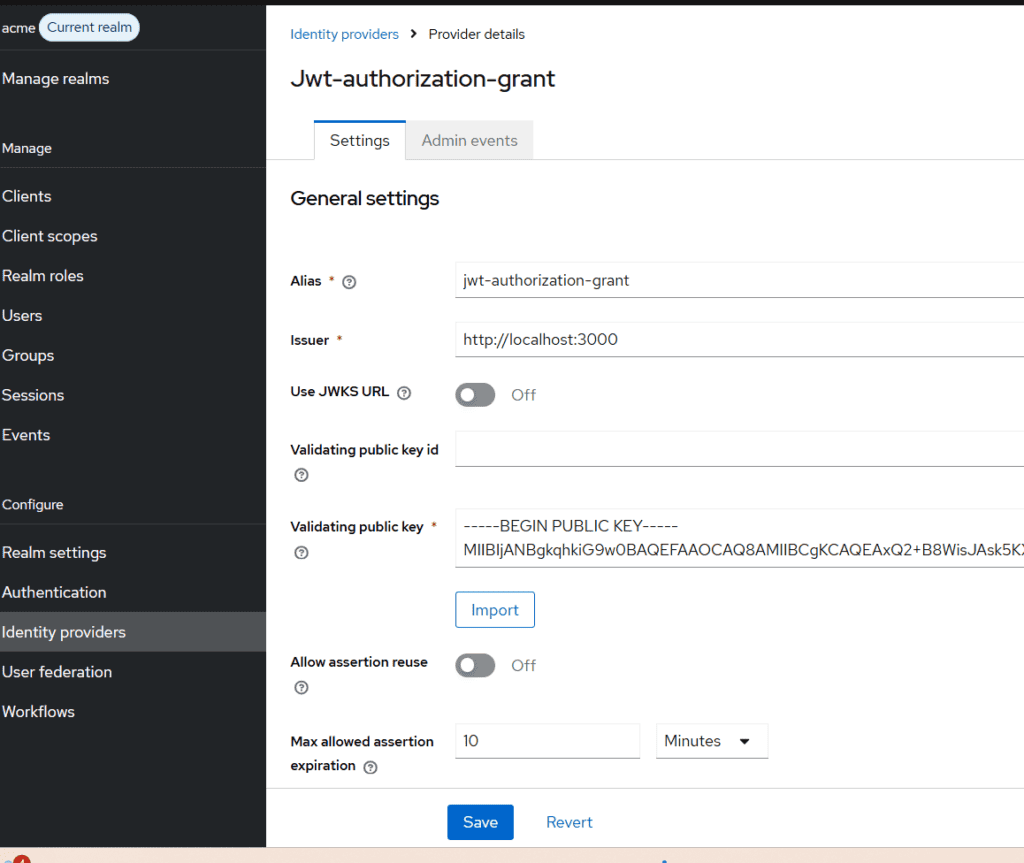
Step 2: Configure JWT Identity Provider in Keycloak
Navigate to:
Identity Providers → Add Provider → JWT Authorization Grant
Configure:
- Alias:
jwt-authorization-grant - Issuer:
http://localhost:3000(Must exactly matchissin JWT) - Validating Public Key:
- Paste contents of
public.pem - Disable JWKS URL (since we are uploading manually)
- Paste contents of
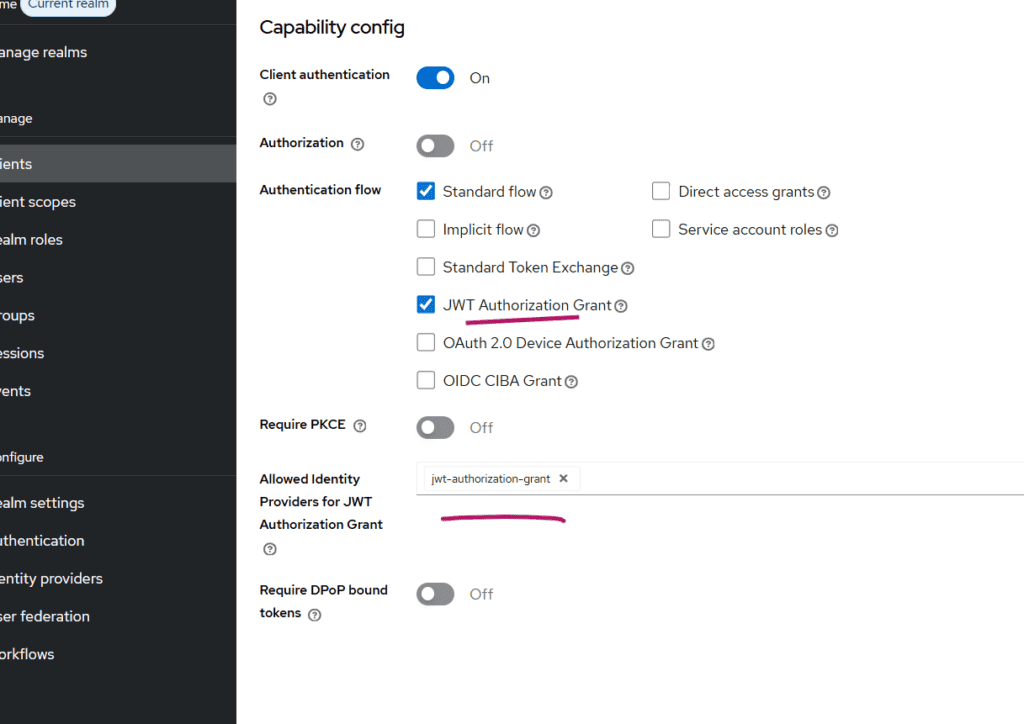
Step 3: Configure Keycloak Client
Create a client:
- Client Type: Confidential
- Enable:
- ✅ JWT Authorization Grant
Important Configuration:
Set:
Allowed Identity Providers = jwt-authorization-grant
⚠️ This must match the alias of the Identity Provider created earlier.
Step 4: Map External User to Keycloak User
In JWT Authorization Grant (via IDP), Keycloak does not automatically map users, and mappers are not available for this provider type.
So we must manually link users.
Create a User
Example:
Username: [email protected] Link Identity Provider
- Open the user in Keycloak
- Go to Identity Provider Links
- Under Available Identity Providers, find:
jwt-authorization-grant - Click Link Account
- Specify userid and username – in our case nodejsuser-1234 (it should match sub claim in JWT)
Now the external user (sub) is linked to the specified Keycloak user.
Step 5: Test the Flow
Run Node.js App
Generate JWT.
Call Token Endpoint (append curl -X to below)
POST "http://keylcoak-hostname/realms/your-realm/protocol/openid-connect/token" \
  -H "Content-Type: application/x-www-form-urlencoded" \
  -d "grant_type=urn:ietf:params:oauth:grant-type:jwt-bearer" \
  -d "client_id=custom-client" \
  -d "client_secret=the-client-secret" \
  -d "assertion=<JWT_ASSERTiON>"
Common Errors and Fixes
❌ No Identity Provider for provided issuer
- Ensure
issmatches IDP issuer exactly
❌ User not found
- Ensure:
- User exists
- Identity Provider is linked and provide values matching sub of JWT issued by Node,js
❌ Signature validation failed
- Verify:
- Correct public key in Keycloak
- Matching private key in Node.js
Key Takeaways
- In Keycloak 26.6+, JWT Authorization Grant requires an Identity Provider configuration
issmust be a valid URL and match the IDP- Node.js acts as a trusted external token issuer
- User mapping must be handled manually using Link Account
Summary
In this article, we explored how to implement JWT Authorization Grant in Keycloak using a custom Node.js application as the token issuer.
This approach is useful when integrating with:
- Federated IAM architectures.
- Custom identity systems
- External authentication providers
About Skycloak
Skycloak is a fully managed Keycloak platform hosted in the cloud. It enables organizations to leverage the power of open-source Keycloak IAM without the operational overhead of installing, maintaining, and scaling production-grade Keycloak environments — delivered securely and cost-effectively.
If you’re new to Skycloak, visit the Skycloak Getting Started Guide to learn more