
What are Keycloak workflows?
Keycloak workflows are YAML definitions that make Keycloak run a series of administrative steps on a user when something happens, such as the user being created, logging in or joining a group, or on a schedule. Each step can run immediately or after a delay, so one workflow can send a welcome email and disable an inactive account months later.
Workflows became a fully supported feature in Keycloak 26.6, when the 26.6.0 release notes promoted them from preview. Keycloak describes them as bringing key capabilities of Identity Governance and Administration (IGA) into the server itself. IGA is the discipline of controlling who gets access, keeping that access correct as people change roles, and removing it when they leave. Before workflows, that kind of automation meant writing a Java extension or running an external script against the Admin REST API, and now a realm administrator can express many of those rules in a short YAML file. Keycloak 26.8 added an invite-user step, and this guide covers the feature as it stands in the 26.x line.
How Keycloak workflows are triggered
A workflow starts in one of three ways, and you choose the one that matches the job:
- On an event. The
onsetting names an event, either a user event (something the user does, such as logging in or registering) or an admin event (something an administrator does through the Admin Console or the API, such as creating a user or granting a role). - On a schedule. The
schedulesetting makes the workflow engine look for matching users at a fixed interval, which suits periodic jobs such as finding inactive accounts. - On both. When a workflow defines both
onandschedule, it starts on whichever comes first, which is how you combine a login event with a periodic sweep.
The event names are written as functions, and several accept a parameter that narrows them down. The workflow events reference in the Server Administration Guide lists these:
| Event | When it fires | Optional parameter |
|---|---|---|
user-created |
A user is added to the realm | None |
user-authenticated |
A user logs in | Client ID of the application the user logged in to |
user-federated-identity-added |
A user is linked to an external identity provider | Identity provider alias |
user-federated-identity-removed |
That link is removed | Identity provider alias |
user-role-granted |
A role is granted to the user | Role name |
user-role-revoked |
A role is revoked from the user | Role name |
user-group-membership-added |
The user joins a group | Group name or path |
user-group-membership-removed |
The user leaves a group | Group name or path |
client-created |
A client is added to the realm | None |
client-authenticated |
A client authenticates | None |
You can combine events with and, or, not and parentheses, for example on: user-created or user-authenticated, but a single event is always what starts a given workflow execution. If you leave on out and set no schedule, the workflow never starts on its own, although you can still activate it for a user manually through the API.
How workflow execution works
When an event fires, the workflow engine checks every workflow in the realm to see whether the event type and the workflow’s conditions match. For each match it creates a workflow execution, which is one running instance of the workflow with its own identifier, and binds it to the resource the event was about.
What is a realm resource?
A realm resource is anything an administrator manages inside a realm, such as a user, client, group or role. The Keycloak documentation’s resource list still names only users, but the 26.6 release notes describe workflows as covering user and client lifecycle management, and Keycloak ships the two client events above and two client steps (delete-client and disable-client). Users get by far the richest set of events, conditions and steps, so most real workflows today are user lifecycle rules.
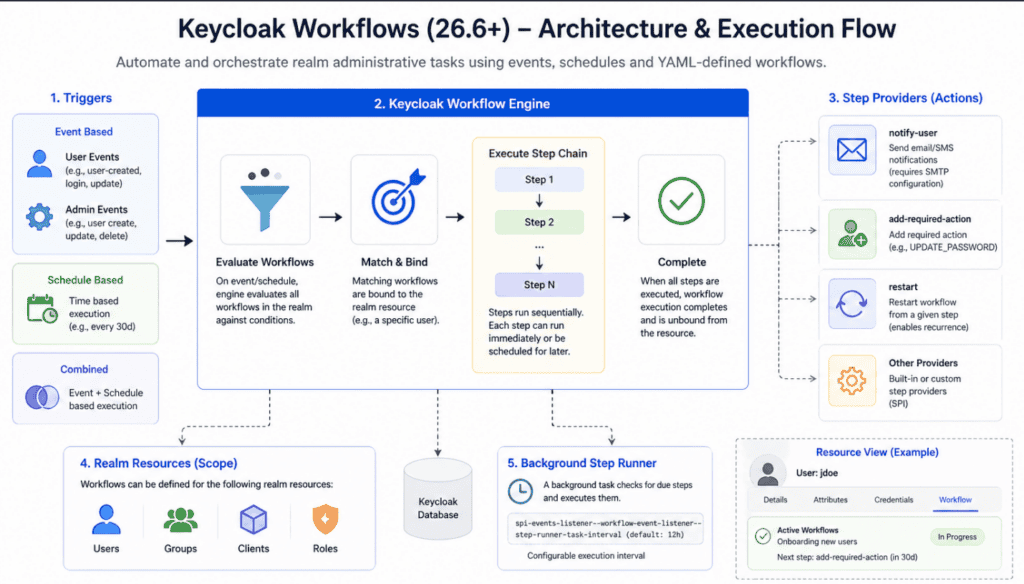
The diagram shows the full design, so two details in it go further than the 26.x releases do: groups and roles appear as realm resources even though workflows cannot target them yet, the only admin event it lists that can trigger a workflow is user-created, and the notify-user step sends email only, not SMS.
The execution lifecycle
Once an execution is bound to a user, these rules apply:
- Only one execution of a given workflow can be active for the same user at a time.
- Steps run in order, one after another.
- A step without a delay runs as soon as the previous step finishes, and a step with an
afterdelay is scheduled to run that long after the previous step. - When the last step finishes, the execution completes and the user is no longer bound to that workflow.
The engine runs all of this asynchronously, on a background thread pool rather than inside the HTTP request that caused the event. A login is not slowed down by the workflow it triggers, but it also means a step may run a moment after the event rather than in the same instant.
The parts of a workflow definition
A workflow definition is a YAML document with a small set of top-level settings. These are the ones the workflow definition reference documents:
| Setting | Required | What it does |
|---|---|---|
name |
Yes | A unique, readable name for the workflow within the realm, used in the console and in logs |
on |
No | The event expression that starts the workflow |
schedule |
No | Runs the workflow at an interval, with after (the interval) and batch-size (how many users per run) |
if |
No | A condition the user must meet, checked before an execution is created |
steps |
Yes | The ordered list of steps to run |
concurrency |
No | What happens when a new triggering event arrives while an execution is already active: restart-in-progress starts it over, and cancel-in-progress cancels it |
enabled |
No | Defaults to true; setting it to false stops new executions and pauses active ones |
Each step has a uses field naming the step, an optional with block for its settings, and an optional after delay. A delay is a number followed by a unit (ms, s, m, h or d, with seconds as the default) or an ISO-8601 duration such as P1DT2H, which means one day and two hours.
Example: a user onboarding workflow
This is the onboarding example from the Keycloak documentation, slightly shortened:
name: Onboarding new users
on: user-created
steps:
  - uses: notify-user
    with:
      message: |
        <p>Welcome ${user.firstName} ${user.lastName}</p>
  - uses: add-required-action
    after: 30d
    with:
      action: UPDATE_PASSWORD
  - uses: restart
    with:
      position: 1
Here is what each step does:
- When the user is created,
notify-usersends them a welcome email straight away. The realm needs a working SMTP configuration for this, which our Keycloak email configuration guide walks through. - Thirty days later,
add-required-actionadds theUPDATE_PASSWORDrequired action, so the next time the user logs in, Keycloak asks them to choose a new password before letting them through. - The
restartstep sends the execution back to the step atposition: 1. Positions count from zero, so position 1 is the second step, the password update, and not the welcome email. The effect is a password change every 30 days for as long as the user exists and the workflow stays enabled, without sending the welcome email again.
That zero-based detail is easy to get wrong. If you set position: 0, the user would receive the welcome email again every 30 days, which is almost never what you want.
Built-in workflow steps
Keycloak ships these steps for users in 26.8. Everything except invite-user was already in 26.6, and the steps reference lists the full settings for each:
| Step | What it does | Main settings |
|---|---|---|
notify-user |
Sends the user an email | subject, message (plain text or HTML), optional to |
invite-user (26.8+) |
Sends an invitation email with an action token link | actions (defaults to UPDATE_PASSWORD and VERIFY_EMAIL), optional client-id and redirect-uri |
add-required-action / remove-required-action |
Adds or removes a required action, a task the user must finish at next login | action |
grant-role / revoke-role |
Grants or revokes one or more roles | role (a name or a list) |
join-group / leave-group |
Adds the user to, or removes them from, one or more groups | group (a name, path or list) |
set-user-attribute / remove-user-attribute |
Sets or removes user attributes | <name>: <value> pairs for set, attribute (a name or list) for remove |
unlink-user |
Removes links to external identity providers | idp (an alias, a list, or * for all) |
disable-user |
Disables the account | None |
delete-user |
Deletes the account | None |
restart |
Sends the execution back to an earlier step | position (zero-based) |
The invite-user step builds its link from the realm’s frontend URL or the server’s --hostname option, and Keycloak rejects a workflow that uses it with 400 Bad Request if neither is set, because the step runs in the background without a browser request to take the hostname from.
Adding conditions with if
The if setting decides whether an execution is created at all. If the event matches but the condition is false, nothing happens. The built-in user conditions are has-user-attribute, has-role, has-identity-provider-link and is-member-of, and they combine with the same and, or and not operators as events:
name: Onboarding gold members
on: user-created
if: has-user-attribute(membership=gold)
steps:
  - uses: notify-user
    with:
      message: "Welcome to the Gold Membership program!"
  - uses: grant-role
    with:
      role: gold-member
A user created with the attribute membership set to gold gets the welcome email and the gold-member role, and every other new user is ignored by this workflow.
Security: who can write the attribute you check?
The example above is only safe if users cannot set membership themselves. The workflow security section of the Keycloak guide points out that when self-registration is on, a user can fill in an attribute on the registration form, satisfy the condition and receive the role with no administrator involved. To prevent that, keep the realm’s Unmanaged Attributes policy on Disabled or Admin can edit rather than Enabled, and for the managed attribute itself, set Who can edit to Admin only under Realm settings > User profile > Attributes. If users are only ever created by administrators, the risk does not apply, because the administrator controls the attribute values.
Scheduled workflows: finding inactive users
A scheduled workflow works the other way round from an event-based one. Instead of waiting for an event, the engine wakes up every after interval, looks for users that match the workflow’s condition, and creates an execution for up to batch-size of them per run. If there is no condition, every user in the realm is eligible, except users that already have an execution of that workflow, which the scheduler skips.
The Keycloak documentation combines both triggers to handle inactive accounts:
name: Track inactive users
on: user-authenticated
schedule:
  after: 5s
  batch-size: 2
concurrency:
  restart-in-progress: true
steps:
  - uses: notify-user
    after: 180d
    with:
      message: It has been a while since your last login. We miss you!
  - uses: notify-user
    after: 60d
    with:
      message: Your account will be disabled in ${workflow.daysUntilNextStep} days!
  - uses: disable-user
    after: 7d
  - uses: notify-user
    with:
      message: Your account was disabled. Sorry to see you go.
Every login restarts the execution because of restart-in-progress, so the 180-day timer only runs out for users who stop logging in. A user who stays away gets a reminder at 180 days, a warning 60 days after that, and a disabled account 7 days later, followed by a final email. Because a completed execution unbinds the user, a later scheduled run will pick the disabled user up again and start the reminders over, so end the chain with delete-user if that matters to you. The schedule makes sure users who existed before the workflow was created, and so never triggered user-authenticated under it, are picked up as well. The 5s interval and batch size of 2 come from the documentation’s demo; in production you would use a longer interval and a larger batch.
Creating and managing workflows
In the Admin Console
- Select your realm and click Workflows in the left menu.
- Click Create workflow, paste or write the YAML definition, and click Save.
- Use the toggle in the Status column to enable or disable a workflow, and the row actions to copy or delete it.
- To see which workflows are active for one person, open Users, select the user, and open the Workflows tab.
Only realm administrators with the right permissions can manage workflows, because a workflow can grant roles or delete users.
Through the Admin REST API
Workflows live under /admin/realms/{realm}/workflows, and the create endpoint accepts either JSON or YAML, so you can keep definitions in Git and push them from CI. With an admin access token (our Keycloak Admin REST API guide shows how to get one), creating a workflow from a file looks like this:
curl -X POST "https://auth.example.com/admin/realms/myrealm/workflows" \
  -H "Authorization: Bearer $ADMIN_TOKEN" \
  -H "Content-Type: application/yaml" \
  --data-binary @onboarding.yaml
GET /admin/realms/{realm}/workflows lists the realm’s workflows, and GET /admin/realms/{realm}/workflows/scheduled/{resource-id} shows which workflows have scheduled steps for a specific user, where the resource ID is the user’s ID.
Updating a workflow that has active executions
You cannot change the step chain of a workflow while it has active executions with scheduled steps. Keycloak blocks this so it does not have to move running executions onto a new set of steps. Your choices for now are to wait until the active executions finish, or to delete the workflow and create a new one. Deleting a workflow also deletes its active executions, so the affected users will not be processed further until something triggers a new workflow for them. There is also a POST /admin/realms/{realm}/workflows/migrate endpoint that moves users scheduled on one step to a step in the same or another workflow, which lets you create the new workflow first and move the active users over instead of dropping them.
Common use cases for Keycloak workflows
The workflows introduction frames the feature around the user lifecycle, and these are the jobs it handles well today:
- Onboarding: send a welcome or invitation email and grant starting roles or groups when a user is created.
- Joiner, mover and leaver changes: revoke a set of roles when a user leaves a group, for example
on: user-group-membership-removed(/Sales)followed byrevoke-role. - Periodic credential policies: add
UPDATE_PASSWORDor another required action on a fixed cycle, as in the onboarding example. - Inactive account cleanup: warn, disable and eventually delete users who stop logging in.
- Just-in-time access: grant a role and revoke it again after a set delay.
For approval-based access requests, where a manager has to say yes before a role is granted, workflows do not provide an approval step. Our guide to access request and approval workflows in Keycloak shows how to build that on the Admin REST API, and IAM vs IGA explains where both fit in a wider governance program.
Configuring the scheduled step interval and timeout
Scheduled steps, such as anything with after: 30d, are run by a background task that checks for due steps. It runs every 12 hours by default, and it first runs one full interval after the server starts. That means a step due at 09:00 may not run until the next check, which matters if you test with short delays. The workflows engine section documents three server options:
# Check for due workflow steps every hour instead of every 12 hours
--spi-events-listener--workflow-event-listener--step-runner-task-interval=1h

# Align the checks to a fixed time of day (server local time, HH:mm)
--spi-events-listener--workflow-event-listener--step-runner-task-start-time=02:00

# Allow each workflow run up to 10 seconds instead of the default 5
--spi-workflow--default--executor-task-timeout=10s
Note the double dashes between the SPI name, the provider name and the option name, which is the format the provider configuration guide gives for provider options. Keycloak only accepts a single-dash form when the names cannot be read in more than one way, and because events-listener, workflow-event-listener and step-runner-task-interval all contain dashes, the double-dash form is the one to use here. With a start time of 02:00 and a 12-hour interval, the check always runs at 02:00 and 14:00, whenever the server was started.
The timeout covers one run of an execution, which includes every immediate step until the engine reaches a scheduled one. If a run takes longer than the timeout, the current step fails and is retried on the next check.
Handling failures and debugging workflows
When a step fails, whether from an error or a timeout, Keycloak logs it, fires an event and leaves the execution’s saved state where it was, so the same step is retried on the next run. The Keycloak guide notes that there is no retry limit in this first version, so an execution can stay stuck until an administrator fixes the cause or cancels the execution through the API. The saved state is also what lets executions resume after a server restart.
To see what the engine is doing, turn on debug logging for the workflow category:
--log-level=org.keycloak.models.workflow:debugWith it on, the log shows lines such as Workflow '<name>' activated for resource <id>, Scheduled step <step> to run in <duration> and Step <step> failed, which are usually enough to see why a step did not run. Two common causes are a notify-user step for a user with no email address, which logs User <id> has no email address, skipping notification, and a misspelled required action name in add-required-action. Keycloak does not keep a history of workflow executions beyond these logs, so if you need an audit trail, forward the logs to your logging system, or write a provider that listens to the workflow events Keycloak fires and stores them. Our guide to Keycloak auditing and event logging covers the wider options.
Performance considerations
Workflows run in the background, but they still use CPU, database work and thread pool capacity, and a workflow triggered on user-authenticated runs on every login. The Keycloak guidance comes down to three points:
- Keep each workflow small and focused, and avoid steps that run for a long time, especially immediate ones.
- Keep the executor timeout short so one slow step cannot tie up the workflow thread pool.
- Tune the step runner interval to the volume of executions in your realm rather than leaving it at the default without thought.
Keycloak workflows vs the Event Listener SPI
Before workflows, reacting to a user event meant writing a Java provider against the Event Listener SPI (a service provider interface, Keycloak’s extension point for custom code) or polling the Admin REST API from an external job. Workflows replace a good share of that, but not all of it:
| Workflows | Event Listener SPI or custom extension | |
|---|---|---|
| How you write it | YAML in the Admin Console or through the API | Java code packaged as a JAR and deployed to the server |
| Who can change it | A realm administrator, at runtime | A developer, with a build and redeploy |
| Delayed and repeating actions | Built in with after, schedule and restart |
You build your own scheduler and state |
| Actions available | The built-in steps listed above, plus any custom step provider you write and deploy | Anything Java can do, including calls to external systems |
| Approvals and external systems | Not built in; possible with a custom step provider | Possible, with your own code |
A sensible approach is to use workflows for user lifecycle rules that the built-in steps already cover, and to keep custom code, or an event streaming setup such as the one in our Keycloak event streaming and webhooks guide, for anything that has to reach outside Keycloak.
Frequently asked questions
Which Keycloak version supports workflows?
Workflows are fully supported from Keycloak 26.6, where the release notes promoted them from preview, and the workflows feature is enabled by default from that release. Keycloak 26.8 added the invite-user step. Before that, workflows were an experimental feature in 26.4 and a preview feature in 26.5, so use 26.6 or later for anything in production.
Can Keycloak workflows run on clients, groups or roles?
Workflows can target users and, in a more limited way, clients: the 26.6 release notes cover user and client lifecycle management, and Keycloak ships client-created and client-authenticated events and delete-client and disable-client steps. Groups and roles cannot be the target of a workflow yet. Groups and roles can still appear in user workflows as triggers, conditions and steps.
How often do scheduled workflow steps run?
A background task checks for due steps every 12 hours by default. You can shorten that with --spi-events-listener--workflow-event-listener--step-runner-task-interval, and align it to a time of day with the matching step-runner-task-start-time option.
Do Keycloak workflows send emails?
Yes, the notify-user step sends an email to the user, and invite-user in 26.8 and later sends an invitation with an action link. Both need SMTP configured for the realm, and notify-user skips users who have no email address.
Are Keycloak workflows a replacement for an IGA product?
They cover the automation part of identity governance, meaning lifecycle rules for joiners, movers and leavers, but there is no built-in approval step, access review screen or certification campaign. Teams with formal access review requirements usually pair Keycloak with a separate governance process or tool.
Summary
Keycloak workflows let you describe user lifecycle rules in YAML: what starts them, which users they apply to, and the steps to run now or later. They are supported from Keycloak 26.6, and in most realms the practical starting points are an onboarding workflow, a group-based offboarding workflow and an inactive account workflow. Before you rely on them, check that SMTP is configured, that the attributes your conditions read cannot be edited by users, and that the 12-hour default check interval suits the delays you use.
About Skycloak
Skycloak is a fully managed Keycloak platform hosted in the cloud. It lets you use open-source Keycloak without the operational work of installing, maintaining and scaling production Keycloak clusters, and our user management features sit on top of the same realms your workflows run in. If you are new to Skycloak, the Skycloak Getting Started Guide is the place to start, and you can book a demo to compare plans.