
Last updated: March 2026
Managing Keycloak configuration manually through the admin console works for small deployments, but it does not scale. When you have development, staging, and production environments, configuration drift becomes inevitable. Someone changes a client setting in staging but forgets to apply it to production. A new role gets added in dev but never makes it to the other environments.
GitOps solves this by treating Keycloak configuration as code. You store realm exports in a Git repository, and a CI/CD pipeline applies those configurations to your Keycloak instances automatically. This guide walks through setting up a complete GitOps pipeline for Keycloak using GitHub Actions and the keycloak-config-cli tool.
Why GitOps for Keycloak
The benefits of managing Keycloak configuration through Git and CI/CD are the same benefits that drove infrastructure-as-code adoption:
- Auditability. Every configuration change is a Git commit with a timestamp, author, and description.
- Reproducibility. You can recreate any environment from scratch by applying the configuration.
- Review process. Configuration changes go through pull requests with code review before being applied.
- Rollback. Reverting a bad configuration change is a
git revertaway. - Environment promotion. The same configuration moves from dev to staging to production through a defined pipeline.
For production deployments, Skycloak provides managed audit logging that captures every configuration change made through the admin console or API, giving you a complete history even for changes made outside your GitOps pipeline.
Project Structure
Organize your Keycloak configuration repository like this:
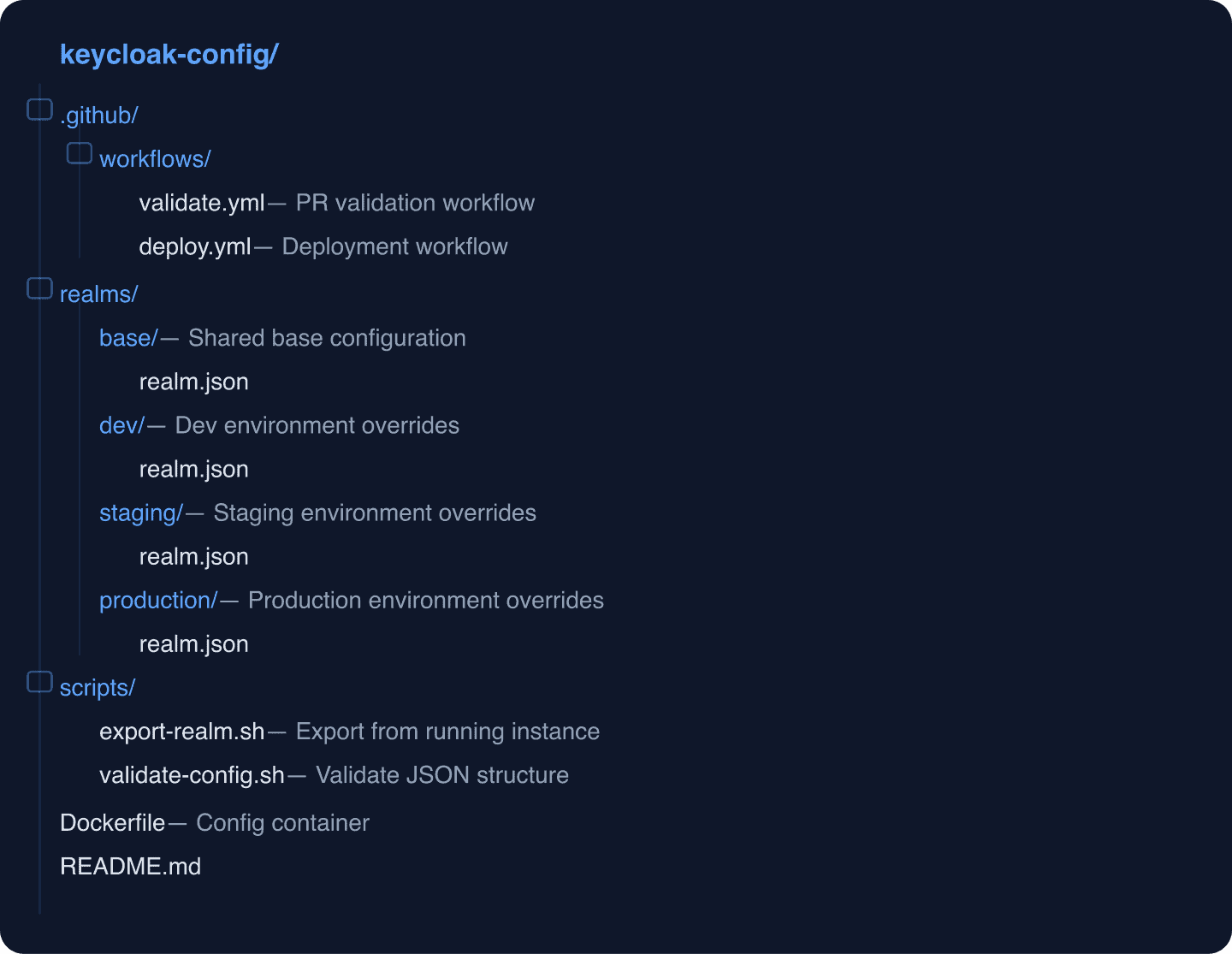
Realm Configuration as Code
Exporting Your Current Configuration
Start by exporting your existing realm configuration. If you are running Keycloak locally (use our Docker Compose Generator for a quick setup), export with the Admin CLI:
#!/bin/bash
# scripts/export-realm.sh
# Export realm configuration from a running Keycloak instance

KEYCLOAK_URL="${KEYCLOAK_URL:-http://localhost:8080}"
REALM="${REALM:-my-realm}"
ADMIN_USER="${ADMIN_USER:-admin}"
ADMIN_PASS="${ADMIN_PASS:-admin}"

# Acquire admin token
TOKEN=$(curl -s -X POST \
  "${KEYCLOAK_URL}/realms/master/protocol/openid-connect/token" \
  -H "Content-Type: application/x-www-form-urlencoded" \
  -d "client_id=admin-cli" \
  -d "username=${ADMIN_USER}" \
  -d "password=${ADMIN_PASS}" \
  -d "grant_type=password" | jq -r '.access_token')

# Export realm configuration
curl -s -X POST \
  "${KEYCLOAK_URL}/admin/realms/${REALM}/partial-export?exportClients=true&exportGroupsAndRoles=true" \
  -H "Authorization: Bearer ${TOKEN}" \
  -H "Content-Type: application/json" | jq '.' > "realms/base/realm.json"

echo "Realm exported to realms/base/realm.json"
Structuring Configuration for Multiple Environments
The keycloak-config-cli tool supports importing multiple JSON files in order, with later files overriding earlier ones. This lets you define a base configuration and environment-specific overrides.
Base configuration (realms/base/realm.json):
{
  "realm": "my-app",
  "enabled": true,
  "sslRequired": "external",
  "registrationAllowed": false,
  "loginWithEmailAllowed": true,
  "duplicateEmailsAllowed": false,
  "resetPasswordAllowed": true,
  "editUsernameAllowed": false,
  "bruteForceProtected": true,
  "permanentLockout": false,
  "maxFailureWaitSeconds": 900,
  "minimumQuickLoginWaitSeconds": 60,
  "waitIncrementSeconds": 60,
  "quickLoginCheckMilliSeconds": 1000,
  "maxDeltaTimeSeconds": 43200,
  "failureFactor": 5,
  "roles": {
    "realm": [
      { "name": "app-user", "description": "Standard application user" },
      { "name": "app-admin", "description": "Application administrator" },
      { "name": "app-viewer", "description": "Read-only access" }
    ]
  },
  "clients": [
    {
      "clientId": "frontend-app",
      "enabled": true,
      "publicClient": true,
      "standardFlowEnabled": true,
      "directAccessGrantsEnabled": false,
      "protocol": "openid-connect",
      "redirectUris": [],
      "webOrigins": [],
      "defaultClientScopes": [
        "openid",
        "profile",
        "email"
      ]
    },
    {
      "clientId": "backend-api",
      "enabled": true,
      "publicClient": false,
      "bearerOnly": true,
      "protocol": "openid-connect"
    }
  ],
  "clientScopes": [
    {
      "name": "custom-claims",
      "protocol": "openid-connect",
      "protocolMappers": [
        {
          "name": "realm-roles",
          "protocol": "openid-connect",
          "protocolMapper": "oidc-usermodel-realm-role-mapper",
          "config": {
            "claim.name": "roles",
            "jsonType.label": "String",
            "multivalued": "true",
            "id.token.claim": "true",
            "access.token.claim": "true"
          }
        }
      ]
    }
  ]
}
Dev overrides (realms/dev/realm.json):
{
  "realm": "my-app",
  "sslRequired": "none",
  "clients": [
    {
      "clientId": "frontend-app",
      "redirectUris": [
        "http://localhost:3000/*",
        "http://localhost:5173/*"
      ],
      "webOrigins": [
        "http://localhost:3000",
        "http://localhost:5173"
      ]
    }
  ]
}
Production overrides (realms/production/realm.json):
{
  "realm": "my-app",
  "sslRequired": "external",
  "bruteForceProtected": true,
  "failureFactor": 3,
  "clients": [
    {
      "clientId": "frontend-app",
      "redirectUris": [
        "https://app.example.com/*"
      ],
      "webOrigins": [
        "https://app.example.com"
      ]
    }
  ]
}
This approach keeps sensitive differences (redirect URIs, SSL requirements, brute force thresholds) environment-specific while maintaining a single source of truth for the core configuration.
keycloak-config-cli
keycloak-config-cli is a command-line tool that imports Keycloak configuration from JSON files. Unlike Keycloak’s built-in import, it handles incremental updates: it compares the current state with the desired state and only applies changes.
Docker Image
The simplest way to use keycloak-config-cli is through its Docker image:
docker run --rm \
  -e KEYCLOAK_URL=http://keycloak:8080 \
  -e KEYCLOAK_AVAILABILITYCHECK_ENABLED=true \
  -e KEYCLOAK_USER=admin \
  -e KEYCLOAK_PASSWORD=admin \
  -e IMPORT_FILES_LOCATIONS='/config/*' \
  -v $(pwd)/realms/base:/config/base \
  -v $(pwd)/realms/dev:/config/dev \
  adorsys/keycloak-config-cli:latest
Config Container Dockerfile
For CI/CD, build a container that bundles your configuration:
# Dockerfile
FROM adorsys/keycloak-config-cli:latest

# Copy base configuration
COPY realms/base/ /config/base/

# ARG for environment-specific config
ARG ENVIRONMENT=dev
COPY realms/${ENVIRONMENT}/ /config/env/

ENV IMPORT_FILES_LOCATIONS=/config/base/*,/config/env/*
ENV KEYCLOAK_AVAILABILITYCHECK_ENABLED=true
Build environment-specific images:
docker build --build-arg ENVIRONMENT=staging -t keycloak-config:staging .
docker build --build-arg ENVIRONMENT=production -t keycloak-config:production .
GitHub Actions Workflows
PR Validation Workflow
Validate configuration changes before they are merged:
# .github/workflows/validate.yml
name: Validate Keycloak Configuration

on:
  pull_request:
    paths:
      - 'realms/**'

jobs:
  validate-json:
    runs-on: ubuntu-latest
    steps:
      - uses: actions/checkout@v4

      - name: Validate JSON syntax
        run: |
          find realms/ -name "*.json" -type f | while read file; do
            echo "Validating: $file"
            if ! jq empty "$file" 2>/dev/null; then
              echo "ERROR: Invalid JSON in $file"
              exit 1
            fi
          done
          echo "All JSON files are valid"

      - name: Check required fields
        run: |
          for file in realms/base/*.json; do
            echo "Checking required fields in: $file"
            REALM=$(jq -r '.realm' "$file")
            if [ "$REALM" = "null" ] || [ -z "$REALM" ]; then
              echo "ERROR: Missing 'realm' field in $file"
              exit 1
            fi
            echo "  realm: $REALM - OK"
          done

      - name: Test import against ephemeral Keycloak
        run: |
          # Start Keycloak in background
          docker run -d --name keycloak-test \
            -p 8080:8080 \
            -e KC_BOOTSTRAP_ADMIN_USERNAME=admin \
            -e KC_BOOTSTRAP_ADMIN_PASSWORD=admin \
            quay.io/keycloak/keycloak:26.1.0 \
            start-dev

          # Wait for Keycloak to be ready
          echo "Waiting for Keycloak..."
          for i in $(seq 1 60); do
            if curl -sf http://localhost:8080/realms/master > /dev/null 2>&1; then
              echo "Keycloak is ready"
              break
            fi
            sleep 2
          done

          # Run config import
          docker run --rm --network host \
            -e KEYCLOAK_URL=http://localhost:8080 \
            -e KEYCLOAK_AVAILABILITYCHECK_ENABLED=true \
            -e KEYCLOAK_USER=admin \
            -e KEYCLOAK_PASSWORD=admin \
            -e IMPORT_FILES_LOCATIONS='/config/*' \
            -v ${{ github.workspace }}/realms/base:/config/base \
            -v ${{ github.workspace }}/realms/dev:/config/dev \
            adorsys/keycloak-config-cli:latest

          echo "Configuration import succeeded"

      - name: Cleanup
        if: always()
        run: docker rm -f keycloak-test || true
Deployment Workflow
Deploy configuration to your environments:
# .github/workflows/deploy.yml
name: Deploy Keycloak Configuration

on:
  push:
    branches: [main]
    paths:
      - 'realms/**'
  workflow_dispatch:
    inputs:
      environment:
        description: 'Target environment'
        required: true
        type: choice
        options:
          - dev
          - staging
          - production

jobs:
  deploy-dev:
    if: github.event_name == 'push' || github.event.inputs.environment == 'dev'
    runs-on: ubuntu-latest
    environment: dev
    steps:
      - uses: actions/checkout@v4

      - name: Deploy to dev
        run: |
          docker run --rm \
            -e KEYCLOAK_URL=${{ secrets.KEYCLOAK_URL_DEV }} \
            -e KEYCLOAK_USER=${{ secrets.KEYCLOAK_ADMIN_USER }} \
            -e KEYCLOAK_PASSWORD=${{ secrets.KEYCLOAK_ADMIN_PASSWORD }} \
            -e KEYCLOAK_AVAILABILITYCHECK_ENABLED=true \
            -e IMPORT_FILES_LOCATIONS='/config/base/*,/config/env/*' \
            -v ${{ github.workspace }}/realms/base:/config/base \
            -v ${{ github.workspace }}/realms/dev:/config/env \
            adorsys/keycloak-config-cli:latest

  deploy-staging:
    if: github.event.inputs.environment == 'staging'
    needs: [deploy-dev]
    runs-on: ubuntu-latest
    environment: staging
    steps:
      - uses: actions/checkout@v4

      - name: Deploy to staging
        run: |
          docker run --rm \
            -e KEYCLOAK_URL=${{ secrets.KEYCLOAK_URL_STAGING }} \
            -e KEYCLOAK_USER=${{ secrets.KEYCLOAK_ADMIN_USER }} \
            -e KEYCLOAK_PASSWORD=${{ secrets.KEYCLOAK_ADMIN_PASSWORD }} \
            -e KEYCLOAK_AVAILABILITYCHECK_ENABLED=true \
            -e IMPORT_FILES_LOCATIONS='/config/base/*,/config/env/*' \
            -v ${{ github.workspace }}/realms/base:/config/base \
            -v ${{ github.workspace }}/realms/staging:/config/env \
            adorsys/keycloak-config-cli:latest

  deploy-production:
    if: github.event.inputs.environment == 'production'
    needs: [deploy-staging]
    runs-on: ubuntu-latest
    environment:
      name: production
      # Require manual approval for production deployments
    steps:
      - uses: actions/checkout@v4

      - name: Deploy to production
        run: |
          docker run --rm \
            -e KEYCLOAK_URL=${{ secrets.KEYCLOAK_URL_PROD }} \
            -e KEYCLOAK_USER=${{ secrets.KEYCLOAK_ADMIN_USER }} \
            -e KEYCLOAK_PASSWORD=${{ secrets.KEYCLOAK_ADMIN_PASSWORD }} \
            -e KEYCLOAK_AVAILABILITYCHECK_ENABLED=true \
            -e IMPORT_FILES_LOCATIONS='/config/base/*,/config/env/*' \
            -v ${{ github.workspace }}/realms/base:/config/base \
            -v ${{ github.workspace }}/realms/production:/config/env \
            adorsys/keycloak-config-cli:latest
Talk through your identity setup with us
Book a demo and we will walk you through Skycloak with the sign-in, SSO and migration questions your team is working on.
Secrets Management
GitHub Actions Secrets
Store Keycloak credentials as GitHub Actions secrets. For each environment, configure:
KEYCLOAK_URL_DEV/KEYCLOAK_URL_STAGING/KEYCLOAK_URL_PRODKEYCLOAK_ADMIN_USERKEYCLOAK_ADMIN_PASSWORD
Use GitHub Environments to enforce protection rules:
- Dev: Auto-deploy on push to main
- Staging: Require approval from one team member
- Production: Require approval from two team members + wait timer
Client Secrets in Configuration
Never store client secrets directly in your realm JSON files. Instead, use keycloak-config-cli’s variable substitution:
{
  "clients": [
    {
      "clientId": "backend-api",
      "secret": "$(env:BACKEND_API_CLIENT_SECRET)"
    }
  ]
}
Pass the secret via environment variable in your GitHub Actions workflow:
- name: Deploy configuration
  run: |
    docker run --rm \
      -e KEYCLOAK_URL=${{ secrets.KEYCLOAK_URL }} \
      -e KEYCLOAK_USER=${{ secrets.KEYCLOAK_ADMIN_USER }} \
      -e KEYCLOAK_PASSWORD=${{ secrets.KEYCLOAK_ADMIN_PASSWORD }} \
      -e BACKEND_API_CLIENT_SECRET=${{ secrets.BACKEND_API_SECRET }} \
      -e IMPORT_FILES_LOCATIONS='/config/*' \
      -v ./realms:/config \
      adorsys/keycloak-config-cli:latest
Handling Configuration Drift
Even with a GitOps pipeline, someone might change configuration directly in the admin console. Detect drift with a scheduled workflow:
# .github/workflows/drift-detection.yml
name: Detect Configuration Drift

on:
  schedule:
    - cron: '0 6 * * 1-5'  # Weekdays at 6 AM UTC

jobs:
  check-drift:
    runs-on: ubuntu-latest
    steps:
      - uses: actions/checkout@v4

      - name: Export current configuration
        run: |
          # Export current realm config from production
          TOKEN=$(curl -s -X POST \
            "${{ secrets.KEYCLOAK_URL_PROD }}/realms/master/protocol/openid-connect/token" \
            -d "client_id=admin-cli" \
            -d "username=${{ secrets.KEYCLOAK_ADMIN_USER }}" \
            -d "password=${{ secrets.KEYCLOAK_ADMIN_PASSWORD }}" \
            -d "grant_type=password" | jq -r '.access_token')

          curl -s -X POST \
            "${{ secrets.KEYCLOAK_URL_PROD }}/admin/realms/my-app/partial-export?exportClients=true&exportGroupsAndRoles=true" \
            -H "Authorization: Bearer $TOKEN" | jq '.' > /tmp/current-config.json

      - name: Compare configurations
        run: |
          # Compare key fields (ignore dynamic values like IDs)
          DRIFT=$(diff \
            <(jq '{realm, sslRequired, registrationAllowed, clients: [.clients[] | {clientId, enabled, publicClient, redirectUris}]}' realms/production/realm.json) \
            <(jq '{realm, sslRequired, registrationAllowed, clients: [.clients[] | {clientId, enabled, publicClient, redirectUris}]}' /tmp/current-config.json) \
            || true)

          if [ -n "$DRIFT" ]; then
            echo "::warning::Configuration drift detected!"
            echo "$DRIFT"
            # Could create an issue or send a Slack notification here
          else
            echo "No drift detected"
          fi
For managed Keycloak deployments, Skycloak’s audit logs track all admin console changes, making it easy to identify who changed what and when.
Testing Configuration Changes
Before deploying configuration changes to any environment, test them with Testcontainers:
# In your validation workflow
- name: Integration test with new config
  run: |
    # Start Keycloak with the proposed configuration
    docker run -d --name keycloak-test \
      -p 8080:8080 \
      -e KC_BOOTSTRAP_ADMIN_USERNAME=admin \
      -e KC_BOOTSTRAP_ADMIN_PASSWORD=admin \
      -v ${{ github.workspace }}/realms/base:/opt/keycloak/data/import/base \
      quay.io/keycloak/keycloak:26.1.0 \
      start-dev --import-realm

    # Wait and run your application's integration tests
    sleep 30
    npm test -- --testPathPattern=integration
Terraform Alternative
If your team is already using Terraform for infrastructure management, the Keycloak Terraform provider is another option for managing Keycloak configuration as code. We covered this approach in our Terraform and Keycloak guide.
The trade-off: Terraform works well for infrastructure-level configuration (realms, clients, identity providers) but can be verbose for fine-grained settings. keycloak-config-cli with JSON files maps more naturally to Keycloak’s data model.
Best Practices
- Never export and commit the master realm. Keep master realm configuration minimal and managed manually.
- Separate infrastructure from application config. Realm-level settings (branding, security policies) change less frequently than client configurations.
- Use branch protection rules. Require PR reviews for configuration changes, especially for production.
- Tag releases. When deploying to production, tag the commit so you can easily identify which configuration is running.
- Monitor deployment outcomes. Check Keycloak logs and session management after deployments to verify nothing broke.
- Document breaking changes. If a configuration change requires application updates (new client scopes, changed redirect URIs), note it in the PR description.
Further Reading
- keycloak-config-cli on GitHub
- Keycloak Server Administration: Export and Import
- Keycloak Testcontainers for CI Testing
- How to Deploy Keycloak in Kubernetes Using ArgoCD
- Using Terraform to Set Up and Configure Keycloak
- Top 7 Keycloak Cluster Configuration Best Practices
Managing Keycloak configuration across environments is essential, but managing the Keycloak infrastructure itself is a different challenge. Skycloak handles upgrades, backups, scaling, and monitoring so your team can focus on configuration and application development. Book a demo to learn more.