
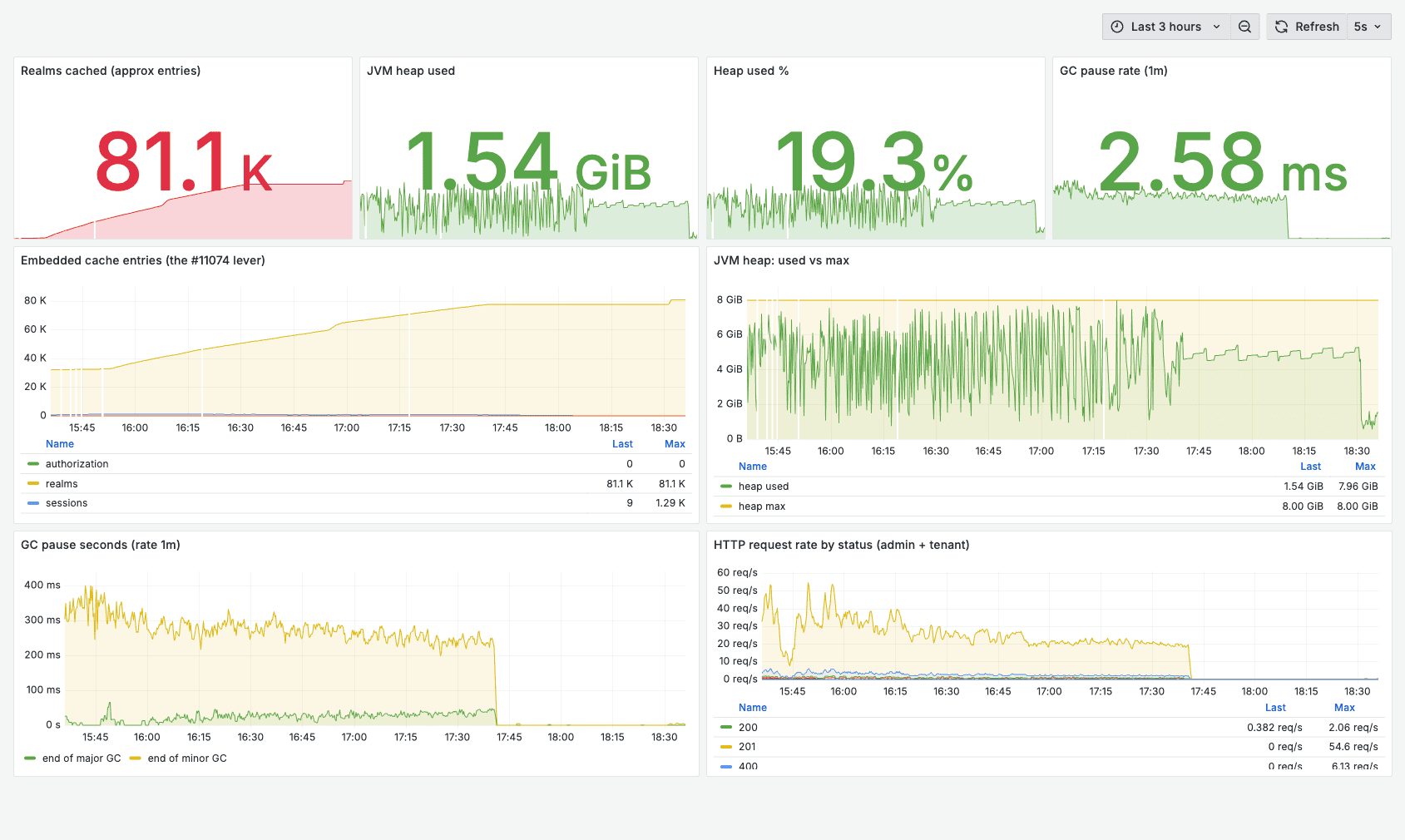
Keycloak has no hard-coded limit on the number of realms. We pushed it to thousands of realms on real clusters (Keycloak 26.6, operator-managed, Quarkus-based) and measured what actually happens. One cluster will hold 2000+ realms with heap to spare, but a full restart hit 7.5 minutes and whole-cluster admin calls ran in tens of seconds. The real ceiling is not a fixed number, it is time: startup, restart, and admin-list cost that grow linearly with realm count. The practical operating limit is a few hundred realms per cluster, then you shard.
TL;DR
- One cluster can hold 2000+ realms, but you should not run it that way. A 3-replica cluster held 2000 realms with heap to spare, yet a full restart took 7.5 minutes and whole-cluster admin calls ran in seconds to tens of seconds.
- Realms are cheap on RAM, expensive on time. About 1 MB of heap per empty realm. 2000 empty realms fit in ~2 GiB of heap. The cost is startup time, restart time, and admin-list time, all of which grow linearly with realm count.
- The realm cache has to hold every realm, or the admin console crawls. Make sure it is not capped below your realm count and that the JVM has the heap to hold it. Details below.
- End-user login stays flat. Login, token refresh, userinfo, discovery, and per-realm admin do not slow down as you add realms. Only whole-cluster operations do.
- The fix for large estates is sharding, not a bigger box. We explain the threshold with numbers.
- If you are deciding the architecture, not just the size, realm-per-tenant is one of three patterns. Organizations and groups scale differently. We cover the trade-off below.
The question operators keep asking
If you run Keycloak as a B2B identity platform with one realm per customer, you hit the same question fast: how many realms can a single cluster hold before it falls over? The answer in older Keycloak was “not many” (performance fell apart past 100 to 200 realms). Modern Keycloak is much better, and the canonical thread, Keycloak discussion #11074, now says 1000+ realms is fine “as long as you keep increasing the realm cache.” We wanted to know exactly what that costs, so we measured it.
The cache settings that come up for thousands of realms
The realm cache has to be able to hold every realm you run, or it evicts and the admin console crawls. The community fix, from Keycloak discussion #11074, is to raise the embedded-cache max counts (Keycloak 26.4+, PostgreSQL):
KC_CACHE_EMBEDDED_REALMS_MAX_COUNT=200000
KC_CACHE_EMBEDDED_USERS_MAX_COUNT=20000
KC_CACHE_EMBEDDED_AUTHORIZATION_MAX_COUNT=20000
The rule of thumb from the Keycloak maintainers is roughly 50 cache entries per realm, so 200,000 is a sensible lower bound for around 4000 realms.
One nuance worth knowing, because it changes what you actually tune: in our own clusters the realm cache was already unbounded (kc.sh show-config showed no realms cap), so it never evicted, we watched it fill to ~26,000 entries at 1000 realms with no thrashing, and raising the cap was a no-op. Whether your distribution ships a low default cap (raise it) or runs the cache unbounded (nothing to raise), the real ceiling at scale is the same: heap. The cached realms have to fit in the JVM, so give it enough memory (we ran 4 to 8 GiB per pod). That is the whole story: version 26.4+, Postgres, a realm cache big enough to hold your realms, and enough heap. (See the official Keycloak caching configuration docs.) On managed Keycloak hosting this is handled for you; if you self-host, confirm your realm cache is not capped below your realm count.
Realms are cheap on memory
Here is the counterintuitive part. We measured heap directly:
- 1000 empty realms: ~882 MiB of heap (about 21% of a 4 GiB allowance), GC pauses averaging ~10 ms.
- 2000 empty realms on a 3-replica cluster: 1.1 to 2.0 GiB of heap per replica, comfortably inside a 4 GiB limit.
That works out to roughly 0.9 to 1.3 MB of heap per empty realm. We then loaded 3000 realms with 270,000 users on a single node: heap spiked to ~6 GiB during the bulk user creation, then settled back to 825 MiB at rest once loading stopped, because the user cache is bounded. The point stands: 2000 to 3000 realms is not a memory problem. A 4 GiB pod holds them. The problems are time-based.
What actually slows down (and what does not)
Everything in this list grows with realm count and does not improve with more RAM:
- Restart time. Per-pod cold start was ~176 to 240 seconds at 2000 realms (faster on more CPU). Because a StatefulSet restarts pods in order, a full restart took 450 seconds on a 3-replica cluster and 462 seconds on a 2-replica cluster, about 7.5 to 8 minutes either way. A single node at 1212 realms restarted in 22 seconds. Adding replicas does not speed restarts up; it is O(realms) per pod, serialized.
- Whole-cluster realm listing. At 3000 realms, the full
GET /admin/realmstook 39 seconds and returned 13 MB. Asking for?briefRepresentation=truecut the payload to 236 KB but still took 37 seconds, because the cost is the server enumerating every realm, not serializing the response. The paginated admin-console endpoint (ui-ext/realms/names) returned in 137 ms regardless, because it is O(page). If your automation lists all realms in one call, that call is your bottleneck. - Bulk realm provisioning. Create throughput decayed from 2.33 realms/sec at 100 realms to 0.89 realms/sec at 2000 on real hardware, because each new realm adds a client and admin-role composites to the master realm.
- Admin console load. The realm switcher enumerates realms; community reports ~20 s at 1000 realms and ~50 s at 3000, matching our list-latency numbers.
- Node-failure recovery. Losing a node stalls the embedded Infinispan/JGroups cluster ~31 to 40 seconds on rebalance (we measured this separately). More realms make the rebalance heavier.
What stays flat, measured on a cluster holding hundreds of populated realms: login, token refresh, userinfo, OIDC discovery, JWKS, and single-realm admin. Each request touches only its own realm, so a tenant logging in sees the same speed whether the cluster hosts 100 realms or 2000.
What the cluster sizes actually give you
Running operator-managed clusters, we read the real per-size configuration off the live StatefulSets:
| Size | Replicas | CPU request | RAM request / limit | Session cache |
|---|---|---|---|---|
| Small | 1 | 100m | 512 Mi / 1.5 GiB | 2,500 |
| Medium | 2 | 250m | 1 GiB / 2 GiB | 10,000 |
| Large | 3 | 500m | 2 GiB / 4 GiB | 30,000 |
Bigger sizes add replicas (for authentication-traffic high availability) and a larger session cache. They do not raise the realm ceiling: that limit is set by the per-cluster startup and admin cost, which is the same on 1, 2, or 3 replicas. More replicas actually make whole-cluster listing slightly slower because of cross-node invalidation.
Sizing guidance up to 2000 realms
| Realm count | Recommended layout | Per-replica CPU / RAM | Full restart |
|---|---|---|---|
| up to 300 | 1 Small or Medium cluster | 0.25 to 1 vCPU / 2 GiB | seconds |
| 300 to 500 | 1 Medium cluster | 0.5 to 1 vCPU / 2 GiB | tens of seconds |
| 500 to 1000 | 1 Large cluster, 4 to 6 GiB RAM | 1 to 2 vCPU / 4 to 6 GiB | 1 to 3 minutes |
| 1000 to 2000 | Shard into 3 to 5 clusters of ~400 | 1 to 2 vCPU / 4 GiB each | seconds per shard |
A single Large cluster will technically run 2000 realms with the realm cache raised and 4 to 6 GiB per replica, but you inherit multi-minute restarts, tens-of-seconds admin operations, and a heavy node-failure rebalance that hits all 2000 tenants at once. For production we shard instead.
Two notes on the underlying CPU math, so the numbers above are defensible. Authentication CPU is driven by request rate, not realm count: the official Keycloak load-test formula budgets roughly 1 vCPU per 15 password logins/sec (also ~1 vCPU per 120 client-credential grants/sec and per 120 refreshes/sec), plus ~150% CPU head-room, on a ~1250 MB base RAM/pod. So a realm-heavy cluster with light per-realm traffic stays CPU-cheap. The realm count drives the time-based costs in the previous section, not the steady-state login budget.
Why sharding wins
Sharding is an availability decision before it is a performance one. On one cluster at 2000 realms, a single node loss affects every tenant and triggers a heavy rebalance, and every routine restart is a 7.5-minute all-tenant event. Split the same estate into ~400-realm clusters and the blast radius is bounded, restarts are back to seconds, and admin operations stay snappy. Because per-realm authentication latency is flat across shards, end users notice nothing, and each tenant can keep a fully branded login on its own custom domain with single sign-on unchanged. This is exactly how Skycloak runs realm-heavy customers: each shard is a separate managed cluster, fronted by per-tenant domains, so the estate grows by adding shards instead of overloading one box.
Should you even use one realm per tenant?
The numbers above answer “how many realms,” but plenty of teams are really asking “is realm-per-tenant the right shape at all?” It is one of three multi-tenancy patterns, and the right choice depends on how many tenants you expect and how strict your isolation has to be. The short version: realm-per-tenant gives the strongest isolation but costs the most per tenant, Organizations scale to thousands of tenants cheaply, and groups are a legacy partition you should not pick for new builds.
| Pattern | Isolation | Tenant ceiling | Per-tenant IDP | Dedicated issuer URL | New builds |
|---|---|---|---|---|---|
| Realm-per-tenant | Strongest (realm-scoped) | Low hundreds, then shard | Yes, native | Yes | Only if isolation is mandatory |
| Organizations (26+) | Strong (org-scoped, shared issuer) | Thousands | Yes, native | No | Recommended |
| Groups + attributes | Moderate (app-enforced) | Thousands | Custom work | No | No |
Realm-per-tenant is the natural first choice because each realm is a fully independent namespace: separate user store, its own clients and roles, its own identity providers and login themes, and its own token issuer (a dedicated JWKS endpoint per realm). For regulated SaaS, healthcare, finance, government, that isolation is genuinely valuable. The catch is the per-realm cost this whole post measures, so it fits low tenant counts (comfortably under ~100 per cluster) where a misconfiguration in one tenant cannot bleed into another.
Organizations (introduced as Technology Preview in Keycloak 25, supported in 26) partition users and clients inside a single realm. Each organization can federate its own IdP, carry org-scoped roles, route through the Organization authenticator, and surface an organization claim in tokens. The per-tenant overhead is a database row, not a full realm object in memory, so it scales to thousands of tenants. The trade-off is a shared issuer URL and per-tenant theming that needs a custom selector. For most new SaaS multi-tenancy on Keycloak 26+, this is the default.
Groups plus attributes is the pre-Organizations pattern: one group per tenant, a tenant_id attribute, custom mappers to carry tenant context into tokens. It works and plenty of production systems still run it, but tenant-isolation enforcement lives in your application, not Keycloak, and there is no native per-tenant IdP federation. Fine to keep if you already run it; not what we would pick for a new deployment.
A common hybrid: run Organizations for the long tail of tenants and provision dedicated realms only for the few that contractually require full isolation. That keeps the realm count low (where this post shows it is manageable) while serving everyone else cheaply. For the full architecture walkthrough, including the migration from realm-per-tenant to Organizations, see our deep dive on multitenancy in Keycloak using the Organizations feature.
Frequently asked questions
How many realms can a single Keycloak cluster handle?
Technically 1000 to 2000+ on Keycloak 26.4+ with the realm cache raised and enough heap, but the practical operating limit is a few hundred. Keycloak has no hard-coded realm limit; the ceiling is heap plus the O(realms) startup and admin-list cost. Past a few hundred, restarts and whole-cluster admin operations grow into minutes and tens of seconds even though memory is fine. We recommend at or under ~300 to 400 realms per cluster and sharding beyond that.
What cache settings does Keycloak need for many realms?
The realm cache must hold every realm without eviction, so it cannot be capped below your realm count (roughly 50 cache entries per realm). On distributions that ship a low default cap, raise it with KC_CACHE_EMBEDDED_REALMS_MAX_COUNT (the #11074 guidance uses 200000), plus the users and authorization caches, on Keycloak 26.4+ with PostgreSQL. On distributions where the realm cache is already unbounded there is nothing to raise. Either way, give the JVM enough heap to hold the cached realms, since heap is the real ceiling at scale.
Does adding RAM or CPU let one cluster hold more realms?
No. Realms cost about 1 MB of heap each, so memory is rarely the wall. The limits are O(realms) startup time, admin-list time, and node-failure rebalance, none of which RAM fixes. CPU helps admin and provisioning up to a point; beyond that, only sharding scales.
Why is restarting a Keycloak cluster with many realms so slow?
Startup work is proportional to realm count (~176 seconds per pod at 2000 realms in our test), and a multi-replica StatefulSet restarts pods one at a time, so a 3-replica cluster took 7.5 minutes for a full restart. Keeping realm count per cluster low keeps restarts in seconds.
Does end-user login slow down as I add realms?
No. Login, token refresh, userinfo, discovery, and per-realm admin are O(1) and stay flat regardless of total realm count, because each request touches only its own realm. Only whole-cluster operations grow with realm count.
Should I use realms or Organizations for multi-tenancy?
For new Keycloak 26+ deployments, default to Organizations unless you need something only realm isolation provides: a dedicated issuer URL per tenant, complete administrative namespace separation, or a regulatory mandate. Organizations give per-tenant IdP federation, org-scoped roles, and an organization claim in tokens, and they keep per-tenant overhead to a database row instead of a full realm object. Reserve realm-per-tenant for the handful of tenants that truly require strict isolation.
Run realm-heavy Keycloak without the operational tax
The measurements are clear: realms are cheap on memory and expensive on time, the realm cache must be tuned, and past a few hundred realms per cluster you shard for fast restarts and a bounded blast radius. If you are still choosing the shape, Organizations cover most SaaS multi-tenancy and realm-per-tenant is for strict isolation. Skycloak does the tuning and the sharding for you, with per-tenant custom domains and managed hosting across regions. Try Skycloak free or spin up a local stack with our Keycloak Docker Compose generator.