How do you do multitenancy in Keycloak?
Keycloak gives you two ways to run multitenancy: the Organizations feature (multiple tenants inside one realm, introduced in Keycloak 25) or the realm-per-tenant model (one realm per customer). For most B2B SaaS, Organizations is the right default: you authenticate each tenant against its own identity provider, route users by email domain, and keep one realm to operate. You reach for realm-per-tenant only when tenants need hard isolation of config, themes, or admins.
This guide walks the Organizations approach end to end, then gives you a clear rule for when to switch models, backed by our own cluster measurements.
Key Takeaways
- Organizations = multitenancy in a single realm. One tenant maps to one Organization, each linked to its own external identity provider and email domain (Keycloak 25+, this guide uses 26.2.4).
- Users route by email domain. Enter
user@abc.comand Keycloak redirects to the IdP linked to theabc.comorganization automatically.- One realm is cheaper to operate than many. We measured a single cluster holding 2000+ realms, but whole-cluster operations (restart, admin listing) grow linearly with realm count, so prefer Organizations unless you need true per-tenant isolation.
- Org context ships in the token. Add the
organizationscope to get the organization id and attributes into your OIDC tokens.
For this walkthrough I am using Skycloak, a managed cloud-hosted Keycloak IAM service. The Keycloak guide on managing organizations has more detail.
What is the Organizations feature in Keycloak?
The Organizations feature lets you create multiple tenants (Organizations) inside a single realm, each authenticating its users against their own identity source while sharing the applications protected by that realm. It was introduced in Keycloak 25 and is the feature designed specifically for B2B multitenancy.
Each Organization is assigned a unique domain. If your external IdP authenticates users whose emails end in abc.com, you set abc.com as the organization domain, and Keycloak uses that domain to route logins. When the feature is enabled, the browser and first broker login flows gain additional Organization-aware steps automatically.
Pre-requisites
- External Identity Providers configured. See attribute mapping in Keycloak during OIDC identity brokering.
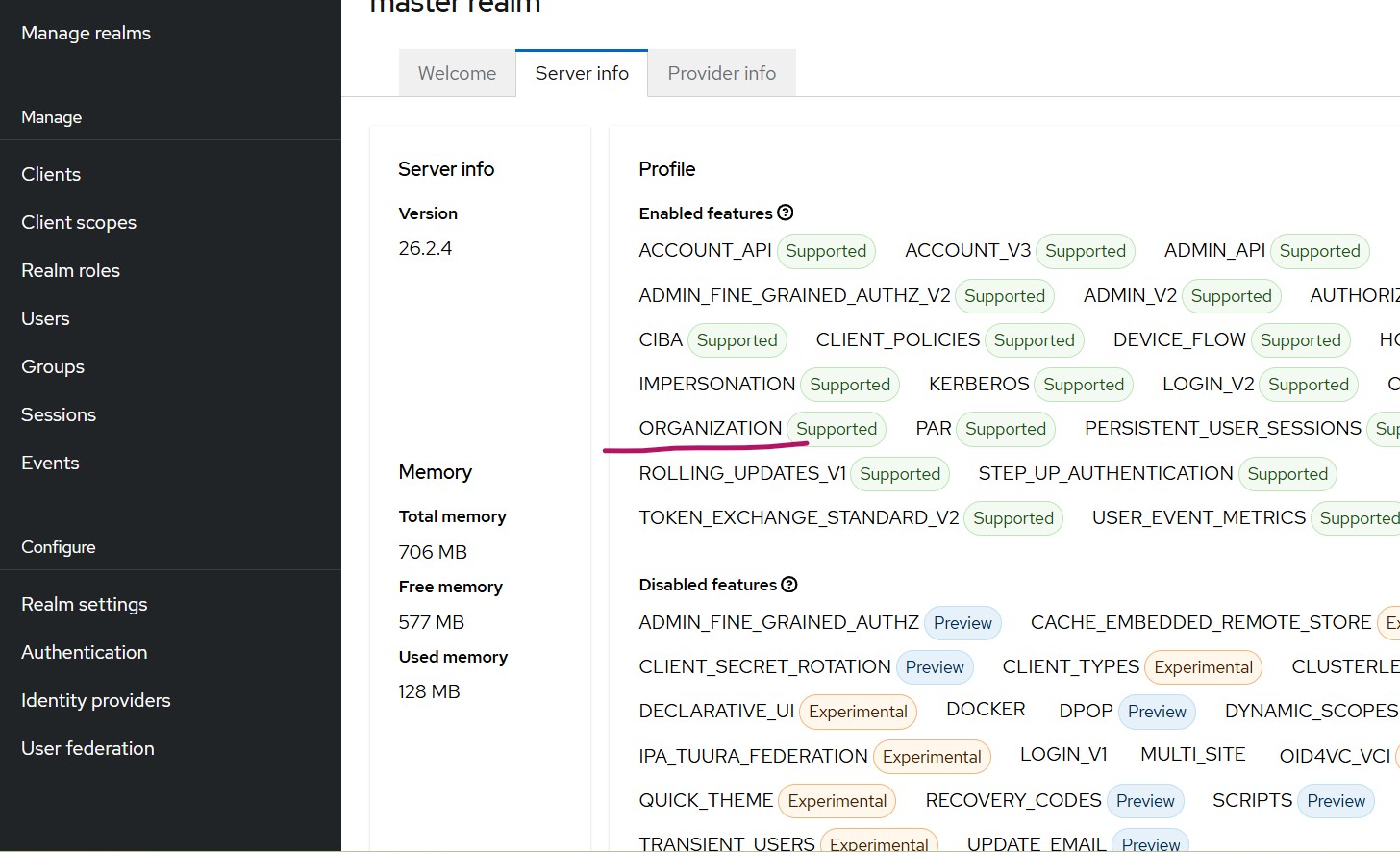
- A Keycloak version with the Organizations feature. This article uses Keycloak 26.2.4 (the feature arrived in 25). Confirm via master realm -> Server Info that Organizations is listed as supported.
- The feature enabled for your realm: Realm Settings -> Turn On Organization. An Organization option then appears in the left navigation.
For the realm-per-tenant alternative, see our Keycloak multi-tenancy guide.
How do you configure an organization in Keycloak?
Configuring a tenant is two steps: create the Organization, then link its identity provider.
Step 1, create the Organization
- Name: a display name (for example,
abc). - Alias: an alias value (for example,
abc). - Domain: add the domain(s) for the tenant, for example
abc.com, and save.
Step 2, link the Identity Provider
- Select the organization created in step 1.
- Go to the Identity Providers tab and choose Link Identity Provider.
- Pick the IdP whose user email domain matches the organization domain.
Keycloak provides a toggle for automatic redirection to the external IdP when the login email matches the organization domain. With it on, a user entering testuser@abc.com is sent straight to the linked IdP, the same way enterprise single sign-on flows behave.
Once an organization is configured, launching the built-in console or any client app prompts for the user email first. After successful authentication the First Broker Login flow runs and new users are created in Keycloak, appearing under the organization’s Membership tab as Managed members.
How does Keycloak route users across multiple organizations?
Keycloak routes by email domain: each organization owns a unique domain, and the address a user types decides which identity provider they reach. Create a second organization (domain acme.com) and a user entering testuser@acme.com is redirected to the IdP linked to that organization, while abc.com users go to theirs.
Two rules make this deterministic:
- Each organization must link to a unique Identity Provider.
- A domain already assigned to one organization cannot be reused by another.
How do you get the organization claim in tokens?
Add the organization scope to your OIDC client so the organization context is included in issued tokens. For example, a Spring Boot OAuth2 client sets it in application.properties:
spring.security.oauth2.client.registration.keycloak.scope=openid,profile,email,organizationWith the scope present, your application receives organization claims and can identify which organization a user belongs to. You can inspect the result with the JWT Token Analyzer. Keycloak can also push organization attributes and the organization id into tokens:
- In the Admin Console, go to Client Scopes and select Organization.
- Open the Mappers tab and choose the organization mapper.
- Toggle Add organization attributes to ON.
- Toggle Add organization id to ON.
- Go to Organizations, select the organization to configure.
- Open the Attributes tab and add the attributes to associate with it.
Organizations or realm-per-tenant: which should you choose?
Default to Organizations; choose realm-per-tenant only when a tenant genuinely needs an isolated realm. The deciding factor is operational cost, and we have measured it: a single Keycloak cluster can hold 2000+ realms, but whole-cluster operations scale with realm count. In our testing a full restart of a 2000-realm cluster took about 7.5 minutes, and listing all realms at 3000 realms took 39 seconds, while per-tenant login and token traffic stayed flat regardless of realm count. Full numbers are in our write-up on how many realms one Keycloak cluster can handle.
The practical rule:
- Use Organizations (single realm) for B2B SaaS where tenants share the same app, flows, and branding, and you want one thing to operate. This is most teams.
- Use realm-per-tenant only when tenants require isolated configuration, separate admins, distinct themes or policies, or strict data separation, and you accept the linear operational cost.
You can also redirect users to a specific IdP upfront with the kc_idp_hint parameter, covered in using kc_idp_hint to choose identity provider in Keycloak.
Frequently asked questions
What is multitenancy in Keycloak?
Multitenancy in Keycloak means serving multiple independent customer groups (tenants) from one Keycloak deployment. Keycloak supports two models: the Organizations feature (multiple tenants in a single realm, Keycloak 25+) and realm-per-tenant (one realm each). Organizations suits most B2B SaaS; realm-per-tenant suits hard isolation needs.
Do I need a separate realm for each tenant?
Usually no. The Organizations feature lets one realm serve many tenants, each with its own identity provider and email domain, which is simpler to operate. Use a separate realm per tenant only when a tenant needs isolated configuration, admins, themes, or data, since whole-cluster operations grow with realm count.
What Keycloak version is required for the Organizations feature?
The Organizations feature was introduced in Keycloak 25 and is production-ready in current releases (this guide uses 26.2.4). Confirm it under master realm -> Server Info, where Organizations should be listed as supported, then enable it per realm under Realm Settings.
How does Keycloak know which identity provider to use for a user?
By email domain. Each organization is assigned a unique domain and linked to one identity provider. When a user enters their email, Keycloak matches the domain to the organization and redirects them to the linked IdP, optionally automatically if the redirection toggle is enabled.
How do I include the organization in the access token?
Request the organization scope from your OIDC client, then enable the organization mapper’s “Add organization attributes” and “Add organization id” options under Client Scopes. The organization id and attributes will then appear in the issued tokens, which you can verify with the JWT Token Analyzer.
Summary
The Organizations feature gives you multitenancy inside a single Keycloak realm: one organization per tenant, each linked to its own identity provider and routed by email domain, with organization context available in tokens. It is the right default for B2B SaaS that wants one realm to operate. Reserve realm-per-tenant for tenants that need true isolation, and size that decision with real numbers from our realm scaling measurements. If you are provisioning users across organizations, automate their lifecycle with SCIM.
Skycloak provides production-ready managed Keycloak hosting so teams avoid the complexity of maintaining and scaling Keycloak themselves. Review our security practices and SLA commitments to see how we keep identity infrastructure reliable, or start with the Skycloak Getting Started Guide.