
To protect an internal app with Keycloak, run oauth2-proxy as an OpenID Connect client of your realm and have Nginx call it through an auth_request subrequest on every request. A request without a session gets a 401 from the subrequest, so Nginx redirects the browser to the Keycloak login page; a request with a valid session gets a 202, and Nginx passes it to the app with the user’s name and email in headers. The app needs no code change, and the whole stack fits in one Docker Compose file.
This post is for platform and IT engineers who run Keycloak 26.x and want pre-authentication in front of something that cannot log users in by itself: an internal dashboard, a metrics UI, a static site, a legacy tool. We give one complete, runnable lab, then cover the three places teams get stuck. If you are here because of the Entra application proxy vulnerability published on 22 October 2026, the first section explains why that bug is a good reason to know what your own pre-authentication layer does.
Key Takeaways
- CVE-2026-97785, published on 22 October 2026, describes improper authentication in Microsoft’s Entra application proxy (AAD App Proxy) that lets an unauthorized attacker elevate privileges over a network (NVD and its API record).
- Nginx
auth_requestsends a subrequest to oauth2-proxy at/oauth2/auth, which answers 202 for a valid session and 401 otherwise.- The Keycloak client is confidential, uses PKCE with
S256, and carries an audience mapper and a groups mapper.- Start oauth2-proxy only after the realm exists, and shrink the token or split the cookie if the session cookie passes 4KB.
Why look at this now: CVE-2026-97785
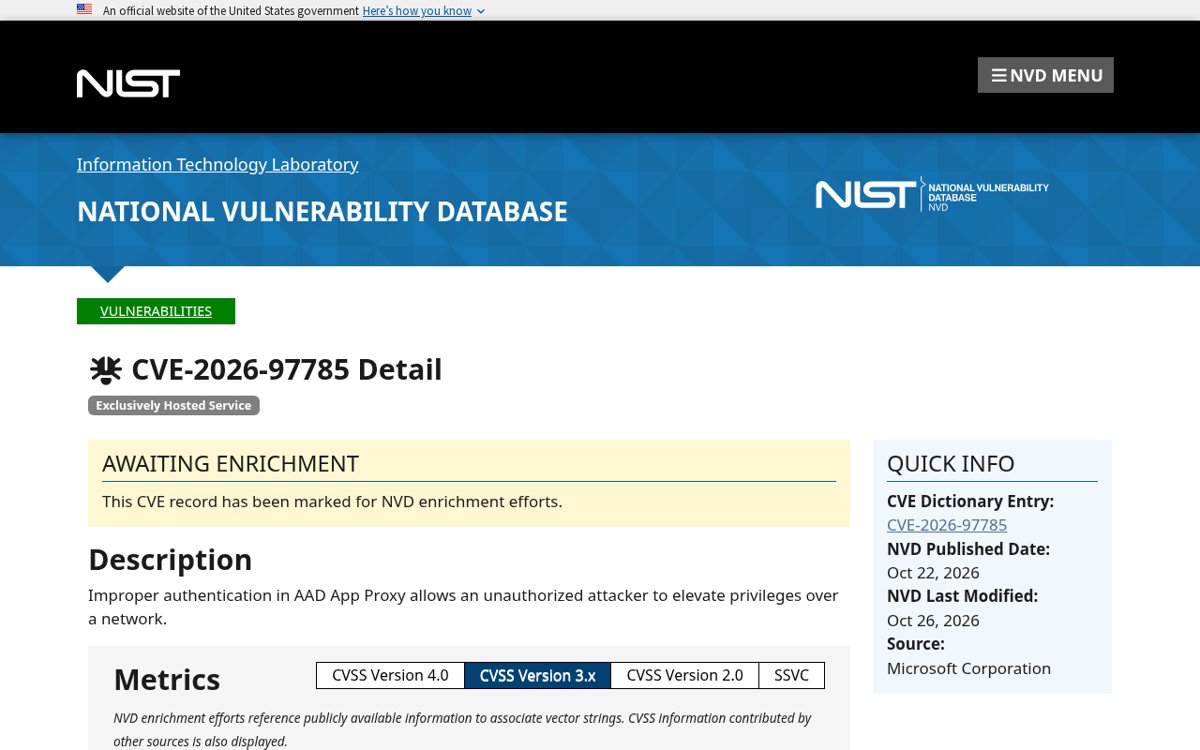
On 22 October 2026 the National Vulnerability Database published CVE-2026-97785 with the description “Improper authentication in AAD App Proxy allows an unauthorized attacker to elevate privileges over a network” (NVD, CVE-2026-97785; the same record is readable as plain JSON from the NVD API). The affected product is Microsoft Entra application proxy, which is Microsoft’s own pre-authentication layer for on-premises web apps. Its documentation says, under “Security benefits”, that it “blocks all traffic without a valid token for applications configured with preauthentication”, and, in its overview, that “You don’t need to change or update your applications to work with application proxy” (Microsoft Learn, Publish on-premises apps with Microsoft Entra application proxy). An authentication flaw in that layer is a flaw in the one thing standing between the network and the apps it publishes.
For what to do about the bug itself, follow Microsoft’s guidance for the service and check the NVD record as it is updated (NVD, CVE-2026-97785). The broader point does not depend on those details: a pre-authentication layer you cannot inspect is a layer you cannot verify, and the alternative, a reverse proxy and an OIDC client you run and read the logs of, is small enough to keep in one file.
The rest of this post builds that alternative. It is not an argument that Entra is worse than Keycloak (for that comparison, see Keycloak vs Microsoft Entra ID: The Self-Hosted Case). It is the setup you need when the identity provider is Keycloak and the app in front of it has no login of its own.
How the three pieces fit together
Nginx has a module, ngx_http_auth_request_module, that authorizes a request based on the result of a subrequest: “If the subrequest returns a 2xx response code, the access is allowed. If it returns 401 or 403, the access is denied with the corresponding error code”, and any other code is treated as an error (nginx.org, ngx_http_auth_request_module). The directive auth_request_set “Sets the request $variable to the given value after the authorization request completes”, and that value may use variables from the subrequest such as $upstream_http_*, which is how Nginx picks up a header from oauth2-proxy and forwards it to the app (nginx.org, ngx_http_auth_request_module).
oauth2-proxy is the thing Nginx asks. Its documentation describes it as “a reverse proxy and static file server that provides authentication using Providers (Google, GitHub, and others) to validate accounts by email, domain or group” (oauth2-proxy docs), and by default it keeps the user’s session in a cookie, where the cookie-secret “will ensure data is encrypted within the cookie data” (oauth2-proxy docs, session storage). Its /oauth2/auth endpoint “only returns a 202 Accepted response or a 401 Unauthorized response without proxying the request through”, which is exactly what auth_request wants, and with the --set-xauthrequest flag it adds X-Auth-Request-User, X-Auth-Request-Groups, X-Auth-Request-Email and X-Auth-Request-Preferred-Username to that response (oauth2-proxy docs, Nginx integration; configuration overview). Keycloak is the identity provider oauth2-proxy talks to, through its keycloak-oidc provider (oauth2-proxy docs, Keycloak OIDC).
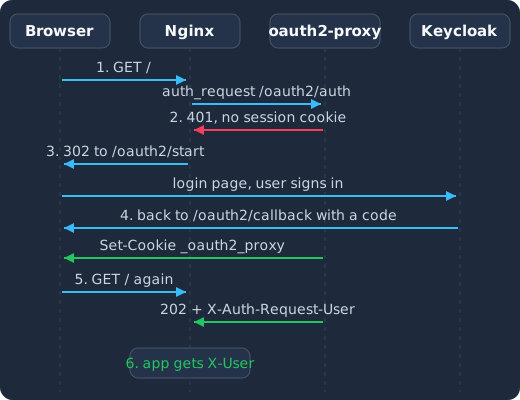
The browser asks Nginx for a page (1), the subrequest to oauth2-proxy answers 401 because there is no session cookie (2), Nginx redirects the browser to the Keycloak login page (3), Keycloak sends the browser back to the callback and oauth2-proxy sets its cookie (4), the next subrequest answers 202 with the user’s name and email (5), and Nginx passes the request to the app with that identity in headers (6).
The app sees only requests that passed the subrequest, and it sees who the user is in a header Nginx set. That is the whole contract, and it is why the app needs no OIDC library, no session code and no change at all.
The lab: what you need and what the host names mean
The lab runs five containers: Postgres, Keycloak 26.8.1, oauth2-proxy v7.15.5, Nginx, and a tiny “internal app” (the traefik/whoami image, a “Tiny Go webserver that prints OS information and HTTP request to output” per its GitHub README), so you can see the identity headers arrive. Keycloak 26.8.1 is the current release at the time of writing (Keycloak releases on GitHub), as is oauth2-proxy v7.15.5 (oauth2-proxy releases on GitHub).
It uses two host names, both served by the same Nginx:
sso.example.testis Keycloak. The browser uses it to log in, and oauth2-proxy uses it to discover the realm and redeem the authorization code.app.example.testis the protected app. Everything under/oauth2/on it goes to oauth2-proxy; everything else is checked withauth_requestand then proxied to the app.
To keep the lab runnable on a laptop, it speaks plain HTTP on port 80. Add both names to your hosts file pointing at 127.0.0.1, and read the production notes at the end before you put anything real behind it. You need Docker with Compose and a shell; you need no credentials from anyone.
Step 1: the Keycloak client
Start Postgres, Keycloak, the app and Nginx first, but not oauth2-proxy yet (step 4 gives the exact command), because oauth2-proxy finds Keycloak’s endpoints through OIDC discovery on the realm’s issuer URL (the reference’s skip-oidc-discovery option is the way to turn that off, oauth2-proxy docs, configuration overview), and the realm does not exist until you create it here. Open http://sso.example.test/admin/, log in with the bootstrap admin, create a realm called internal, and in it a client:
- Client type OpenID Connect, Client ID
internal-app. - Client authentication On, so the client is confidential and has a secret, which oauth2-proxy needs to redeem the code.
- Authentication flow: Standard flow on, Direct access grants off.
- Valid redirect URIs
http://app.example.test/oauth2/callback. That path is oauth2-proxy’s callback, not the app’s. - Set the PKCE challenge method to
S256(Proof Key for Code Exchange Code Challenge Method on the Advanced tab; for more on PKCE clients, see Keycloak: How To Create A PKCE Authorization Flow Client?). Here it routes this client’s authorization-code requests through PKCE even though the client also has a secret, as the PKCE guide linked above describes for the same setting (labelled PKCE method in current consoles).
Copy the secret from the Credentials tab. Then add two mappers to the client’s dedicated scope (Clients, internal-app, Client scopes, internal-app-dedicated, Configure a new mapper):
- Audience, with Included Client Audience set to
internal-app, added to the ID token and the access token. The oauth2-proxy docs are explicit that the client “must be configured with an audience mapper to include the client’s name in theaudclaim”, because oauth2-proxy checks that claim against its own--client-id(oauth2-proxy docs, Keycloak OIDC). - Group Membership, with Token Claim Name
groupsand Full group path on, added to the ID token. With the full path on, the group names you allow in oauth2-proxy start with a slash, like/platform(oauth2-proxy docs, Keycloak OIDC).
Finally create a group platform under Groups, create a user with an email address, and add the user to the group. Only members of that group will get through the proxy.
Step 2: the oauth2-proxy configuration
oauth2-proxy “can be configured via command line options, environment variables or config file”. The reference tables list each option’s flag and config file (TOML) name (oauth2-proxy docs, configuration overview); in our setup, the environment variable for each option is the flag with an OAUTH2_PROXY_ prefix, capitalised, with hyphens turned into underscores. The lab uses environment variables in Compose so nothing hides in a second file. These are the ones that matter:
| Setting | Value in the lab | Why |
|---|---|---|
provider |
keycloak-oidc |
The Keycloak-aware OIDC provider, which also understands allowed-role (Keycloak OIDC) |
oidc-issuer-url |
http://sso.example.test/realms/internal |
The realm’s issuer; the /realms/ path without /auth/ is for Keycloak 17 and later (Keycloak OIDC) |
client-id, client-secret |
internal-app and its secret |
The client from step 1 |
redirect-url |
http://app.example.test/oauth2/callback |
Must match the client’s valid redirect URI |
code-challenge-method |
S256 |
PKCE, “recommended” by the reference (overview) |
allowed-group |
/platform |
Only this Keycloak group gets in |
email-domain |
* |
Group membership is the gate here; the reference says “Use * to authenticate any email” (overview) |
upstream |
static://202 |
Nginx does the proxying here, so oauth2-proxy’s upstream uses the static:// form, which the reference lists for a “static response” with the status code you name, and 202 is the code auth_request accepts (overview) |
reverse-proxy |
true |
Required for the Nginx integration (Nginx integration) |
trusted-proxy-ip |
the Compose network, 172.28.0.0/16 |
The reference describes it as the “list of direct proxy IPs or CIDR ranges allowed to supply X-Forwarded-* headers when --reverse-proxy is enabled” (overview) |
set-xauthrequest |
true |
Puts the user, email and groups on the auth response for auth_request_set (overview) |
cookie-secret |
32 random bytes | The seed for the encrypted session cookie; the file variant “must be raw binary, exactly 16, 24, or 32 bytes” (overview) |
cookie-secure |
false in the lab, true anywhere real |
The lab is plain HTTP |
cookie-refresh |
4m |
Refreshes the session with Keycloak after this long; the reference notes that not every provider supports it, so test it with yours (overview) |
skip-provider-button |
true |
The reference says it “will skip sign-in-page to directly reach the next step: oauth/start”, so the browser goes straight to Keycloak (overview) |
Generate the cookie secret once, and keep it out of the Compose file. The reference asks for “the seed string for secure cookies (optionally base64 encoded)” (overview); this is the documented command from that page: it produces 32 random bytes in URL-safe base64 (the last tr swaps + and / for - and _), and you paste the output into .env as OAUTH2_PROXY_COOKIE_SECRET:
dd if=/dev/urandom bs=32 count=1 2>/dev/null | base64 | tr -d -- '\n' | tr -- '+/' '-_'Somewhere to run this that stays patched
Everything above works the same on Skycloak, because it is real upstream Keycloak rather than a fork. What changes is who handles the upgrades, backups and security patches afterwards.
Step 3: the Nginx server blocks
The app.example.test block is the one from the oauth2-proxy documentation, trimmed to what the lab needs and with the upstream names of the Compose file. The structure is three locations: /oauth2/ goes to oauth2-proxy for the login start, the callback and sign-out; /oauth2/auth is the subrequest target, with the request body stripped because “nginx auth_request includes headers but not body”; and / is the protected app (oauth2-proxy docs, Nginx integration).
server {
  listen 80;
  server_name app.example.test;

  location /oauth2/ {
    proxy_pass       http://oauth2-proxy:4180;
    proxy_set_header Host                    $host;
    proxy_set_header X-Real-IP               $remote_addr;
    proxy_set_header X-Forwarded-Proto       $scheme;
    proxy_set_header X-Auth-Request-Redirect $request_uri;
  }

  location = /oauth2/auth {
    proxy_pass       http://oauth2-proxy:4180;
    proxy_set_header Host             $host;
    proxy_set_header X-Real-IP        $remote_addr;
    proxy_set_header X-Forwarded-Uri  $request_uri;
    # nginx auth_request includes headers but not body
    proxy_set_header Content-Length   "";
    proxy_pass_request_body           off;
  }

  location / {
    auth_request /oauth2/auth;
    error_page 401 = @oauth2_signin;

    # identity headers for the app, set by --set-xauthrequest
    auth_request_set $user   $upstream_http_x_auth_request_user;
    auth_request_set $email  $upstream_http_x_auth_request_email;
    auth_request_set $groups $upstream_http_x_auth_request_groups;
    proxy_set_header X-User   $user;
    proxy_set_header X-Email  $email;
    proxy_set_header X-Groups $groups;

    # needed for --cookie-refresh to work through auth_request
    auth_request_set $auth_cookie $upstream_http_set_cookie;
    add_header Set-Cookie $auth_cookie;

    proxy_pass http://app:80/;
  }

  location @oauth2_signin {
    return 302 /oauth2/start?rd=$scheme://$host$request_uri;
  }
}
Two details are worth a sentence each. The 401 handler is a named location that returns a real 302, because the older pattern error_page 401 =403 /oauth2/sign_in answers with a 403 and a Location header, and “Browsers do not automatically follow redirects on 403 responses”, which with skip-provider-button leaves users looking at a bare “Found.” link (oauth2-proxy docs, Nginx integration). And the redirect target here is /oauth2/start rather than /oauth2/sign_in: the endpoints reference describes /oauth2/sign_in as “the login page” and /oauth2/start as “a URL that will redirect to start the OAuth cycle”, so going to /oauth2/start does not show the page in between; both work (oauth2-proxy docs, Endpoints).
The sso.example.test block is a plain reverse proxy in front of Keycloak with the forwarding headers Keycloak reads. If you have never put Keycloak behind Nginx, see How to Run Keycloak Behind a Reverse Proxy?. The short version is that Keycloak needs to know the scheme and host the browser used, or every URL it generates will be wrong.
server {
  listen 80;
  server_name sso.example.test;

  location / {
    proxy_pass         http://keycloak:8080;
    proxy_set_header   Host              $host;
    proxy_set_header   X-Forwarded-For   $proxy_add_x_forwarded_for;
    proxy_set_header   X-Forwarded-Proto $scheme;
    proxy_set_header   X-Forwarded-Host  $host;
    proxy_set_header   X-Forwarded-Port  $server_port;
    proxy_buffer_size          128k;
    proxy_buffers              4 256k;
    proxy_busy_buffers_size    256k;
  }
}
Put both blocks in one file, nginx/default.conf, and the Compose file mounts it.
Step 4: the Docker Compose file
services:
  postgres:
    image: postgres:16
    environment:
      POSTGRES_DB: keycloak
      POSTGRES_USER: keycloak
      POSTGRES_PASSWORD: ${POSTGRES_PASSWORD:?set it in .env}
    volumes:
      - pgdata:/var/lib/postgresql/data

  keycloak:
    image: quay.io/keycloak/keycloak:26.8.1
    command: start
    environment:
      KC_DB: postgres
      KC_DB_URL: jdbc:postgresql://postgres:5432/keycloak
      KC_DB_USERNAME: keycloak
      KC_DB_PASSWORD: ${POSTGRES_PASSWORD}
      KC_BOOTSTRAP_ADMIN_USERNAME: ${KC_ADMIN_USER:-admin}
      KC_BOOTSTRAP_ADMIN_PASSWORD: ${KC_ADMIN_PASSWORD:?set it in .env}
      KC_HOSTNAME: http://sso.example.test
      KC_HTTP_ENABLED: "true"
      KC_PROXY_HEADERS: xforwarded
      KC_PROXY_TRUSTED_ADDRESSES: 172.28.0.0/16
    depends_on:
      - postgres

  oauth2-proxy:
    image: quay.io/oauth2-proxy/oauth2-proxy:v7.15.5
    environment:
      OAUTH2_PROXY_PROVIDER: keycloak-oidc
      OAUTH2_PROXY_OIDC_ISSUER_URL: http://sso.example.test/realms/internal
      OAUTH2_PROXY_CLIENT_ID: internal-app
      OAUTH2_PROXY_CLIENT_SECRET: ${OAUTH2_PROXY_CLIENT_SECRET:?paste the client secret in .env}
      OAUTH2_PROXY_REDIRECT_URL: http://app.example.test/oauth2/callback
      OAUTH2_PROXY_CODE_CHALLENGE_METHOD: S256
      OAUTH2_PROXY_ALLOWED_GROUPS: /platform
      OAUTH2_PROXY_EMAIL_DOMAINS: "*"
      OAUTH2_PROXY_UPSTREAMS: static://202
      OAUTH2_PROXY_HTTP_ADDRESS: 0.0.0.0:4180
      OAUTH2_PROXY_REVERSE_PROXY: "true"
      OAUTH2_PROXY_TRUSTED_PROXY_IPS: 172.28.0.0/16
      OAUTH2_PROXY_SET_XAUTHREQUEST: "true"
      OAUTH2_PROXY_COOKIE_SECRET: ${OAUTH2_PROXY_COOKIE_SECRET:?run the dd command and paste it in .env}
      OAUTH2_PROXY_COOKIE_SECURE: "false"
      OAUTH2_PROXY_COOKIE_REFRESH: 4m
      OAUTH2_PROXY_SKIP_PROVIDER_BUTTON: "true"
    extra_hosts:
      - "sso.example.test:host-gateway"
    depends_on:
      - keycloak

  app:
    image: traefik/whoami

  nginx:
    image: nginx:1.27
    ports:
      - "80:80"
    volumes:
      - ./nginx/default.conf:/etc/nginx/conf.d/default.conf:ro
    depends_on:
      - keycloak
      - oauth2-proxy
      - app

networks:
  default:
    ipam:
      config:
        - subnet: 172.28.0.0/16

volumes:
  pgdata:
The extra_hosts line is the one non-obvious part. oauth2-proxy must reach sso.example.test at the same address the browser uses, because that is the issuer it discovers and validates tokens against, so the line sends that name to the Docker host, where Nginx listens on port 80 and proxies to Keycloak. The subnet is pinned so that both KC_PROXY_TRUSTED_ADDRESSES and OAUTH2_PROXY_TRUSTED_PROXY_IPS can name it. For a fuller Keycloak service definition, see Keycloak Docker Compose: From Development to Production; the Keycloak block itself can also come from the Docker Compose generator, which at the time of writing offers versions up to 26.6.3, so change its image tag to 26.8.1 after generating to match this lab.
The Compose file reads four values from .env. The first two you choose, the client secret comes from step 1, and the cookie secret from step 2:
POSTGRES_PASSWORD=choose-one
KC_ADMIN_PASSWORD=choose-one
OAUTH2_PROXY_CLIENT_SECRET=paste-the-secret-from-the-Credentials-tab
OAUTH2_PROXY_COOKIE_SECRET=paste-the-output-of-the-dd-command
The order matters. oauth2-proxy fetches the realm’s discovery document when it starts, and Keycloak is only reachable through Nginx, so start everything except oauth2-proxy, create the realm and client from step 1, then start oauth2-proxy:
docker compose up -d postgres keycloak app nginx
# now create the realm, client, mappers, group and user from step 1
docker compose up -d oauth2-proxy
docker compose logs -f oauth2-proxy
A healthy oauth2-proxy log ends with it listening on 0.0.0.0:4180 after a successful discovery of the issuer. Open http://app.example.test/ in a private window. You should land on the Keycloak login page for the internal realm, sign in as the user you put in the platform group, and come back to the whoami page. The response lists the headers the app received, and X-User, X-Email and X-Groups are in it. Sign in as a user outside the group and oauth2-proxy answers 403 after login, because only the platform group is allowed.
Where people get stuck
The issuer does not match, or Keycloak redirects to the wrong host
oauth2-proxy fetches the realm’s discovery document from the issuer URL and compares the iss claim in every token to it. Keycloak builds that claim from its hostname settings, so the lab sets KC_HOSTNAME to the full public URL, which gives the browser and oauth2-proxy the same issuer; the hostname guide covers the options (keycloak.org, Configuring the hostname (v2)).
The second half is the proxy headers. Keycloak only believes X-Forwarded-Proto and friends when proxy-headers is set, and the reverse proxy guide warns to restrict who may send them: “To ensure that proxy headers are used only from proxies you trust, set the proxy-trusted-addresses option”, because otherwise “rogue clients can inject false values” (keycloak.org, Using a reverse proxy). The same guide says that with TLS ended at the proxy, “enabling HTTP through the http-enabled setting is required”, which is why the Keycloak block has both KC_HTTP_ENABLED and KC_PROXY_HEADERS (keycloak.org, Using a reverse proxy). If you want to see what Keycloak thinks its own URLs are, start it with --hostname-debug=true and open /realms/internal/hostname-debug (keycloak.org, Configuring the hostname (v2)).
If oauth2-proxy must reach Keycloak over a private network under a different name than the browser uses, Keycloak has hostname-backchannel-dynamic for exactly that: “Set to true if your application accesses Keycloak via a private network” (keycloak.org, Configuring the hostname (v2)). The lab avoids the question by sending oauth2-proxy through the same Nginx as the browser.
The session cookie is too large
oauth2-proxy stores the whole session, including the tokens Keycloak issued, in its cookie by default. The Nginx integration page explains the consequence: “Large OIDC tokens can make the session cookie exceed the 4KB limit, causing OAuth2 Proxy to split the cookie into multiple parts”, and “Nginx normally only copies the first Set-Cookie header from the auth_request to the response”, so the second part never reaches the browser and the user is sent to log in again on every request (oauth2-proxy docs, Nginx integration). The documented fix is to extract $upstream_cookie__oauth2_proxy_1 with a second auth_request_set and emit both cookies; the full snippet is on that page. For consistently large sessions the same page recommends --session-store-type=redis, “so only a small session ticket is stored in the browser cookie”.
The better fix is to shrink the token. Keycloak tokens grow with realm roles, client roles and group paths, and a client with “Full Scope Allowed” on puts the user’s realm and client roles in the token, as Fixing Keycloak’s 431 ‘Request Header Fields Too Large’ explains. Turn off full scope on internal-app, and keep only the mappers the proxy needs; that post has more on shrinking tokens.
Users are logged out at odd times, or never
Two clocks run at once. oauth2-proxy’s cookie has its own expiry and refresh interval, and Keycloak has the realm’s SSO session idle and max timeouts. With cookie-refresh set, oauth2-proxy refreshes the session with Keycloak after that interval (oauth2-proxy docs, configuration overview). Without it, the cookie alone decides, for as long as cookie-expire says. Pick the refresh interval below your access token lifespan and keep the realm’s idle timeout the way you would for any other client (for the realm side, see Keycloak Session Timeout Best Practices: Idle, Max, Refresh). Remember also that the add_header Set-Cookie $auth_cookie line in the Nginx block is what lets a refreshed cookie reach the browser through auth_request; without it, refreshes silently fail (oauth2-proxy docs, Nginx integration).
Before you put anything real behind it
The lab is plain HTTP so that it runs anywhere. For a real internal app:
- Terminate TLS in Nginx for both host names, set
OAUTH2_PROXY_COOKIE_SECUREtotrue, and switch the issuer, redirect URL andKC_HOSTNAMEtohttps://. - Do not expose Keycloak’s admin paths through the public server block. The reverse proxy guide covers which paths to expose (keycloak.org, Using a reverse proxy).
- Make the app trust the identity headers only from Nginx. Put the app on a network that only Nginx can reach, and have Nginx overwrite
X-User,X-EmailandX-Groupson every request as the block above does, so a client cannot supply them. - Give API routes a plain 401 instead of a redirect. The oauth2-proxy docs say the 302 to sign-in “should only be used for browser-facing routes” and show a second
location /api/withauth_requestand noerror_page(oauth2-proxy docs, Nginx integration). - Rotate the client secret through Keycloak and reload it with
client-secret-file: the docs say you “can use the client-secret-file option to reload the secret when it is updated” (oauth2-proxy docs, Nginx integration).
If your edge is Traefik rather than Nginx, see Keycloak + Traefik: Reverse Proxy Authentication Setup, and for another pre-authentication option, see Keycloak as an Identity Provider for Cloudflare Access.
Frequently asked questions
Does the app really need no change? For a browser-facing app, none: Nginx only forwards requests that passed the subrequest, and the user’s identity arrives in headers the app may read or ignore. The app does need to stop trusting those headers from anywhere but Nginx, which is a network boundary, not a code change.
Why both a client secret and PKCE?
The secret proves to Keycloak that the token request comes from oauth2-proxy. PKCE ties the authorization code to a random “code verifier” that the client made for that one login and presents at the token endpoint, so that the server “can perform the proof of possession” and a code captured in transit cannot be redeemed without it (RFC 7636). oauth2-proxy’s reference recommends S256, and Keycloak can require it per client through the setting in step 1, so turning both on costs nothing.
Can oauth2-proxy do the proxying itself, without Nginx?
Yes: give it the app’s URL as --upstream instead of static://202; the reference says it can “pass requests on to HTTP(S) servers” (oauth2-proxy docs, configuration overview). The auth_request pattern is worth it when Nginx is already your edge, when several apps share one proxy, or when you want Nginx’s routing, buffering and TLS in front.
How do I restrict by role instead of group?
The keycloak-oidc provider accepts --allowed-role for a realm role, or client-id:role for a client role, and it is the one provider that supports that flag (oauth2-proxy docs, Keycloak OIDC). Roles are already in Keycloak’s tokens, so no extra mapper is needed, but keep the token small as the 431 section explains.
What does this give me that Entra application proxy does not? Both pre-authenticate and both leave the app untouched. The difference is where the pre-authentication runs and who can read it: here it is two containers you can log, inspect and upgrade on your own schedule, which is the question CVE-2026-97785 raised. The cost is that patching them is now your job too.
What to do next
Generate the Keycloak side of this lab with the Docker Compose generator, add the oauth2-proxy and Nginx services from this post, and put your first internal app behind it. If you would rather not operate the Keycloak side yourself, Skycloak’s managed Keycloak hosting runs the cluster, its upgrades and its backups, and you keep only Nginx and oauth2-proxy on your side.