Smithery MCP Servers: Adding OAuth Login With Keycloak. Smithery is now a public registry that lists each MCP server's own URL, so OAuth is your server's job. Here is how to add it with Keycloak 26.8 and DCR.
Smithery is a public registry of MCP servers, now part of Arcade, and since 31 October 2026 it lists each server’s own MCP URL instead of hosting or proxying the connection (Smithery, “The future of Smithery”). That makes OAuth your server’s job.
To put a Keycloak login in front of a server you list there, make the server an OAuth resource server: publish protected resource metadata that names your Keycloak realm (RFC 9728), let MCP clients register themselves through Dynamic Client Registration (DCR) or Client ID Metadata Documents (CIMD), and reject any access token whose audience is not your server’s URL (MCP authorization, 2025-11-25).
This post is for developers who publish or install MCP servers through Smithery, have a server running, and now want real user sign-in in front of it. We start with what Smithery is today, because it changed a lot this autumn, and where authorization sits as a result. Then we walk through a Keycloak 26.8 setup step by step: the realm, an mcp:tools scope with an audience mapper, the anonymous registration policies that let MCP clients register, the metadata your server publishes, the token checks it runs, and a test from an MCP client.
What is Smithery?
MCP, the Model Context Protocol, is the protocol AI clients such as Claude, Cursor or VS Code use to call tools on a server, and Smithery (smithery.ai) is a directory of those servers. A listing such as Exa’s shows the server’s description, its tools and a Connect URL for clients (Smithery, Exa Search).
Until recently Smithery was also a hosting and connection platform. Servers could run behind URLs on server.smithery.ai and run.tools, and Smithery Connect managed MCP connections and their sign-ins on behalf of apps. That part is gone. Smithery’s own notice says its “MCP Proxy and managed identity shut down on October 31”, and lists what stopped working that day: “Server URLs on run.tools and server.smithery.ai”, “Smithery API, Connect, and Toolbox”, “Smithery accounts and API keys”, and the Smithery CLI and SDKs, whose current versions are marked deprecated (Smithery, “The future of Smithery”).
The directory stays. The same notice says Smithery “will remain as a public (non-proxied) MCP registry”, powered by Arcade, with “a curated set of verified servers, whose registry pages will show direct MCP URLs (e.g. mcp.linear.app/mcp instead of linear.run.tools or server.smithery.ai/linear)” (Smithery). You can see this on a listing such as Exa’s, whose Connect field now shows the vendor’s own https://mcp.exa.ai/mcp (Smithery, Exa Search).
Where does authorization sit for a server listed on Smithery?
Before the shutdown there were two hosting models, and authorization sat in a different place in each. A server hosted on Smithery ran behind a Smithery URL, and an app using Smithery Connect could leave the connection and its sign-in to Smithery. A self-hosted server listed on Smithery answered at its own URL, and the server and its authorization server handled sign-in like any other remote MCP server.
Today only the second model is left. If your server ran on server.smithery.ai, you need to run it yourself first, at a public HTTPS URL you control, because those URLs no longer answer (Smithery). If your app relied on Smithery Connect to manage MCP connections for your users, the notice says plainly that “you’ll need a replacement” (Smithery).
Either way, the MCP client now talks straight to your server, and nothing sits in between to sign users in. The client follows the MCP authorization spec on its own: it gets a 401 from your server, reads your metadata, finds your authorization server, registers, sends the user to log in and comes back with a token. Your server checks that token on every request. Keycloak plays the authorization server in that picture, and the rest of this post sets up both sides.
If you are still deciding whether your server needs OAuth at all (a local stdio tool usually does not), our MCP authorization decision tree walks through that choice first.
What does the MCP spec ask of your server?
The authorization part of the MCP spec gives the server four duties, and each one maps to a step below.
- Publish protected resource metadata. “MCP servers MUST implement OAuth 2.0 Protected Resource Metadata”, and the document “MUST include the
authorization_serversfield containing at least one authorization server” (MCP authorization, 2025-11-25). RFC 9728 defines the document and itsresourcefield, which is your server’s identifier (RFC 9728). - Point clients at it. A server answers an unauthenticated request with 401 and a
WWW-Authenticateheader carryingresource_metadata, or serves the document at a well-known URL; clients must support both (MCP authorization). - Check the audience. “MCP servers MUST validate that access tokens were issued specifically for them as the intended audience” (MCP authorization). Clients name your server in a
resourceparameter, defined by RFC 8707 as the “target service or resource to which access is being requested” (RFC 8707, section 2). - Never pass the token on. In the spec’s words, “If the MCP server makes requests to upstream APIs, it may act as an OAuth client to them. The access token used at the upstream API is a separate token, issued by the upstream authorization server. The MCP server MUST NOT pass through the token it received from the MCP client” (MCP authorization, Access Token Privilege Restriction).
Client registration is the part that is moving. The 2025-11-25 spec lets clients use pre-registration, Client ID Metadata Documents or Dynamic Client Registration, and the 2026-07-28 revision keeps all three but says “Dynamic Client Registration is deprecated. New implementations should use Client ID Metadata Documents instead” (MCP client registration, 2026-07-28). Deprecated features keep “a minimum twelve-month deprecation window” (MCP changelog, 2026-07-28), so DCR still works with today’s clients. We cover the other changes in that revision in stateless MCP and the 2026-07-28 spec.
On the Keycloak side, its own MCP guide lists DCR (RFC 7591) as supported, while CIMD and RFC 8707 resource indicators are both experimental (Keycloak, “Integrating with Model Context Protocol”). That is why this walkthrough uses DCR for registration and an audience mapper for the audience, and points to CIMD as the next step.
How does the sign-in flow work end to end?
Here is the whole exchange once everything below is in place.
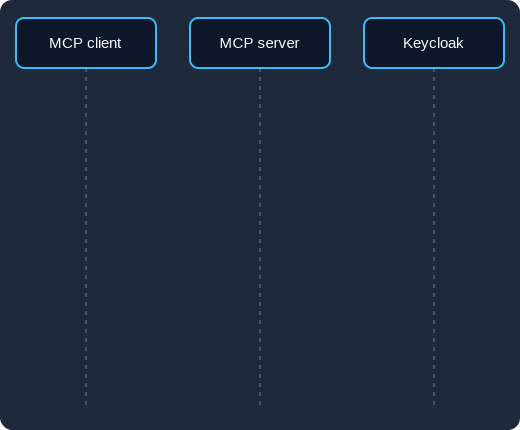
The client calls your server’s own URL with no token and gets a 401 that links to your metadata (1). The metadata names your Keycloak realm (2). The client registers with Keycloak (3), the user logs in with PKCE and Keycloak issues a token whose audience is your server’s URL (4). The client calls again with that token (5), and your server checks the issuer, audience and scope before running the tool, answering 401 to a token meant for anything else (6).
PKCE (Proof Key for Code Exchange) is required of MCP clients: the spec says they “MUST implement PKCE”, because it “helps prevent authorization code interception and injection attacks by requiring clients to create a secret verifier-challenge pair, ensuring that only the original requestor can exchange an authorization code for tokens” (MCP authorization).
Prerequisites
- Keycloak 26.8, the current release line, reachable over HTTPS. The examples use
https://keycloak.example.comand a realm namedmcp. - Your MCP server at a public HTTPS URL. The examples use
https://mcp.example.com/mcp, which is the URL your Smithery listing shows and the value clients send asresource. kcadm.sh, Keycloak’s Admin CLI (see “Using the Admin CLI” in the Keycloak Server Administration Guide), signed in to the master realm withkcadm.sh config credentials --server https://keycloak.example.com --realm master --user admin.- An MCP client that supports OAuth, such as the MCP Inspector, VS Code or Claude Code.
Step 1: Create the realm and an mcp:tools scope with an audience mapper
Keycloak’s MCP guide handles the audience with a client scope per MCP scope, of type Optional, carrying an Audience mapper whose Included Custom Audience is the MCP server’s URL (Keycloak MCP guide). When a client asks for mcp:tools, the token gets your server’s URL in its aud claim.
kcadm.sh create realms -s realm=mcp -s enabled=true

# Create the scope and keep its ID
SCOPE_ID=$(kcadm.sh create client-scopes -r mcp -i \
  -s name=mcp:tools \
  -s protocol=openid-connect \
  -s 'attributes."include.in.token.scope"=true')

# Put the MCP server's URL in the aud claim of tokens that carry this scope
kcadm.sh create "client-scopes/$SCOPE_ID/protocol-mappers/models" -r mcp -b '{
  "name": "mcp-server-audience",
  "protocol": "openid-connect",
  "protocolMapper": "oidc-audience-mapper",
  "config": {
    "included.custom.audience": "https://mcp.example.com/mcp",
    "access.token.claim": "true",
    "id.token.claim": "false"
  }
}'

# Offer it as an optional scope to clients created in this realm
kcadm.sh update "realms/mcp/default-optional-client-scopes/$SCOPE_ID"
The audience value has to match what your server checks exactly, so a trailing slash or http instead of https is enough to fail every call. Our post on the Keycloak MCP server 401 and the audience claim goes deeper into why this mapper is needed.
Keycloak can also read the resource parameter itself if you start it with --features=resource-indicators and set the MCP server’s resource_url client attribute, but the guide marks that as experimental and warns it “may introduce breaking changes in future versions” (Keycloak MCP guide). Without the feature, Keycloak ignores the resource parameter that MCP clients send and the scope decides the audience, which is why the mapper is the safe default.
Somewhere to run this that stays patched
Everything above works the same on Skycloak, because it is real upstream Keycloak rather than a fork. What changes is who handles the upgrades, backups and security patches afterwards.
Step 2: Let MCP clients register through DCR
An MCP client registers with no credentials at all, which Keycloak calls anonymous registration, and Keycloak’s docs note that “by default, there is not any whitelisted host, so anonymous client registration is de-facto disabled” (Keycloak, client registration). You open it up with the anonymous access policies, under Clients, Client registration, Anonymous access policies in the admin console. The MCP guide names three that matter (Keycloak MCP guide):
- Trusted Hosts. Requests are accepted only from the listed hosts or domains, and “URLs of newly registered client must also use just those trusted hosts or domains” (Keycloak, client registration). Add the host the registration request comes from, plus the hosts in your clients’ redirect URIs (for example
localhostfor desktop clients, since Keycloak normalizes loopback addresses tolocalhost). - Allowed Client Scopes. Keycloak’s docs say that only “the client scopes defined as Realm Default Client Scopes are allowed by default” (Keycloak, client registration), so add
mcp:toolsto this policy if registered clients are refused it, as our Keycloak DCR walkthrough explains. - Allowed Registration Web Origins. Needed only for clients that register from a browser, such as the MCP Inspector, whose backend’s web origin goes here (Keycloak MCP guide).
Leave the other defaults alone. They are useful limits: newly registered clients have the Consent Allowed switch enabled, and the client limit is “200 by default for anonymous registrations” (Keycloak, client registration). Our Keycloak DCR walkthrough with VS Code lists the exact hosts VS Code needs and how to harden these policies for production.
If your clients support it, CIMD avoids anonymous registration altogether, because the client’s client_id is an HTTPS URL that Keycloak fetches its metadata from. In Keycloak it needs --features=cimd and a client policy, and it is experimental (Keycloak MCP guide). Our Keycloak CIMD guide has the setup for Claude Code and VS Code.
Step 3: Publish protected resource metadata from your server
RFC 9728 puts the metadata at /.well-known/oauth-protected-resource and says “The resource value returned MUST be identical to the protected resource’s resource identifier value” (RFC 9728, section 3.3). For a server whose URL has a path, like /mcp, the path goes after the well-known part, so this server publishes it at https://mcp.example.com/.well-known/oauth-protected-resource/mcp:
{
  "resource": "https://mcp.example.com/mcp",
  "authorization_servers": ["https://keycloak.example.com/realms/mcp"],
  "scopes_supported": ["mcp:tools"],
  "bearer_methods_supported": ["header"]
}
The authorization_servers entry is the realm’s issuer URL. The client reads Keycloak’s metadata from there, including the registration_endpoint it uses in step 2, and Keycloak also serves OpenID Connect discovery at /realms/mcp/.well-known/openid-configuration (Keycloak, client registration).
Step 4: Validate the issuer, audience and scope on every request
Your server verifies the token’s signature against the realm’s public keys, which Keycloak’s certificate endpoint, /realms/{realm-name}/protocol/openid-connect/certs, returns “encoded as a JSON Web Key (JWK)” (Keycloak, OIDC endpoints), and then checks three claims: iss is your realm, aud contains your server’s URL, and scope contains mcp:tools. Here is a minimal Express middleware using the jose library, whose jwtVerify “Validates the JWT’s JWS Signature (digital signature or MAC) and JWT Claims Set”, including the issuer and audience options used here (jose, jwtVerify):
import express from "express";
import { createRemoteJWKSet, jwtVerify } from "jose";

const RESOURCE = "https://mcp.example.com/mcp";
const ISSUER = "https://keycloak.example.com/realms/mcp";
const METADATA_URL = "https://mcp.example.com/.well-known/oauth-protected-resource/mcp";
const jwks = createRemoteJWKSet(new URL(`${ISSUER}/protocol/openid-connect/certs`));

const app = express();

app.get("/.well-known/oauth-protected-resource/mcp", (req, res) => {
  res.json({
    resource: RESOURCE,
    authorization_servers: [ISSUER],
    scopes_supported: ["mcp:tools"],
    bearer_methods_supported: ["header"],
  });
});

async function requireToken(req, res, next) {
  const challenge = `Bearer resource_metadata="${METADATA_URL}", scope="mcp:tools"`;
  const header = req.headers.authorization ?? "";
  if (!header.startsWith("Bearer ")) {
    return res.status(401).set("WWW-Authenticate", challenge).end();
  }
  try {
    const { payload } = await jwtVerify(header.slice(7), jwks, {
      issuer: ISSUER,
      audience: RESOURCE, // rejects tokens minted for any other server
    });
    const scopes = String(payload.scope ?? "").split(" ");
    if (!scopes.includes("mcp:tools")) {
      return res.status(403).set("WWW-Authenticate",
        `Bearer error="insufficient_scope", scope="mcp:tools", resource_metadata="${METADATA_URL}"`).end();
    }
    req.user = payload.sub;
    next();
  } catch {
    return res.status(401).set("WWW-Authenticate",
      `Bearer error="invalid_token", resource_metadata="${METADATA_URL}"`).end();
  }
}

app.use("/mcp", requireToken);
// mount your MCP transport on /mcp here
app.listen(3000);
The 403 with error="insufficient_scope" follows the spec, which says that for “an access token with insufficient scope during runtime operations, the server SHOULD respond with” HTTP 403 Forbidden and that error in WWW-Authenticate (MCP authorization). If a tool calls another API, get a separate token for that API rather than forwarding the user’s token, because forwarding is the passthrough the spec rules out with “MUST NOT pass through” (MCP authorization).
Pinning ISSUER matters on the client side too. Our post on the MCP Python SDK flaw and issuer pinning shows what goes wrong when a client trusts whatever authorization server a server names. The older securing MCP servers with Keycloak OAuth 2.0 shows the same checks done with token introspection instead of local JWT validation.
Test it
Start with plain HTTP checks, so you know each piece answers before a client is involved:
# 1. No token: expect 401 with a resource_metadata link
curl -i https://mcp.example.com/mcp

# 2. The metadata names your realm
curl -s https://mcp.example.com/.well-known/oauth-protected-resource/mcp

# 3. Keycloak advertises a registration endpoint
curl -s https://keycloak.example.com/realms/mcp/.well-known/openid-configuration | grep registration_endpoint
Then connect a real client to the same URL your Smithery listing shows. The MCP Inspector’s docs show a remote HTTP server connected with npx @modelcontextprotocol/inspector --server-url https://mcp.example.com/mcp --transport http, (MCP Inspector), and its Authorization page covers the OAuth flow end to end. You should see the registration succeed, a Keycloak login and consent screen for mcp:tools, and then the tool list. In the Keycloak admin console the new client appears under Clients, and if you decode the access token, its aud contains https://mcp.example.com/mcp and its scope contains mcp:tools.
Troubleshooting
- Login works, but every MCP call gets 401. The token’s
auddoes not match yourRESOURCEvalue exactly. Decode the token and compare character by character, and check that the client asked formcp:tools, since that is the scope carrying the audience mapper. - Registration is rejected. Trusted Hosts usually refused it, because the request came from a host you did not list, or a redirect URI uses one, and the policy checks both (Keycloak, client registration).
- Registration fails on scopes.
mcp:toolsis not a realm default client scope and is not listed in the Allowed Client Scopes policy. - The client never reaches Keycloak. The 401 has no
resource_metadata, the metadata URL is wrong for a server with a path, orresourcein the document differs from the URL the client connected to. - A browser-based client fails with a CORS error. Add its origin to Allowed Registration Web Origins.
FAQ
What is Smithery MCP?
Smithery is a public registry of Model Context Protocol servers, now part of Arcade. Since 31 October 2026 it no longer hosts or proxies servers, and its listings show each server’s own MCP URL (Smithery).
Does Smithery still host MCP servers?
No. Server URLs on server.smithery.ai and run.tools stopped working on 31 October 2026, along with the Smithery API, Connect, accounts and API keys (Smithery). You run the server yourself and the listing points to it.
Does Smithery handle OAuth for my MCP server?
Not any more. Its managed identity shut down with the proxy, so the MCP client signs in against your authorization server directly, following the MCP authorization spec (Smithery, MCP authorization).
Should MCP clients use DCR or CIMD with Keycloak?
The 2026-07-28 MCP spec deprecates DCR in favour of CIMD (MCP client registration), but Keycloak lists DCR as supported and CIMD as experimental (Keycloak MCP guide). DCR with tight anonymous policies is the safe choice today, and CIMD is worth enabling for clients that support it.
Can one Keycloak realm protect several MCP servers?
Nothing in this setup ties the realm to a single server. Following the pattern of step 1, you would give each server its own scope with an audience mapper for that server’s URL, and because each server’s middleware checks aud against its own URL, a token whose audience names only one server fails that check on the others.
Next steps
Pick the URL your Smithery listing will show, create the mcp realm and the mcp:tools scope with its audience mapper, open anonymous registration with Trusted Hosts and Allowed Client Scopes, then add the metadata route and the token check to your server and test with the MCP Inspector. When your clients support CIMD, move them to it and tighten or close anonymous registration.
You can follow this walkthrough on your own Keycloak, or start a cluster on Skycloak’s managed Keycloak hosting and use its realm as the authorization server for your Smithery MCP server, so we run and upgrade Keycloak while you work on the server.