Datadog SCIM Provisioning From Keycloak: Step by Step. Datadog documents SCIM only for Okta and Entra ID. How to provision Datadog users and roles from Keycloak with an outbound SCIM extension or a small sync job.
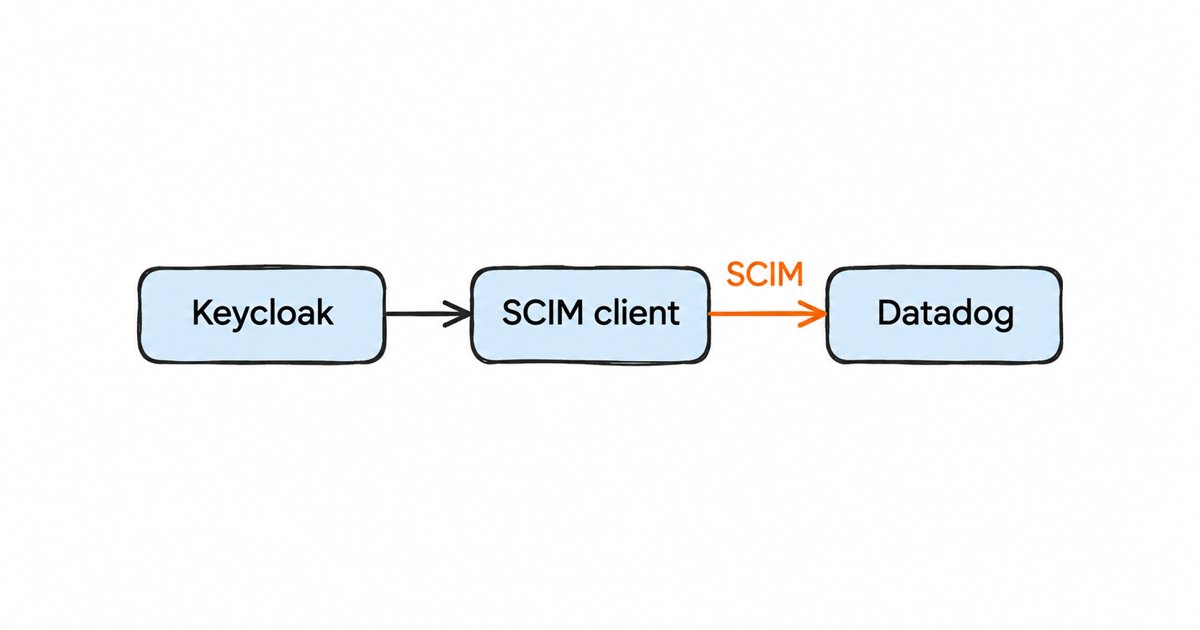
Datadog’s SCIM API accepts requests from any SCIM 2.0 client, but Datadog’s SCIM page says it “supports using SCIM with the Microsoft Entra ID and Okta identity providers” and that other identity providers “may work, but are not explicitly supported”, and Keycloak’s native SCIM API is an interface for receiving users, not for sending them. To provision Datadog from Keycloak, you add an outbound SCIM client extension or run a small sync job that calls Datadog’s SCIM endpoint with an application key owned by a Datadog service account.
This how-to uses Keycloak 26.8, where the native SCIM API is promoted from preview to supported (our 26.8 SCIM post covers the details) but, as in the 26.7 preview, only receives users: the release announcement describes it as “a standards-based interface for managing users and groups within a realm”. It covers users and roles. Datadog Teams are left out, because the SCIM API reference says Team provisioning “is only available for select organizations at this point”.
Prerequisites
You need a Keycloak 26.8 realm and a group, here /datadog-users, that decides who gets a Datadog account. On the Datadog side, prepare these by hand:
- A plan with SCIM: Infrastructure Pro, Infrastructure Enterprise or Startup (SCIM overview).
- A service account for SCIM, with a role that has at least
user_access_inviteanduser_access_manage, the permissions the SCIM overview names for it and the create user endpoint requires. Datadog recommends one because a key owned by a person is revoked when that person leaves, which breaks the integration (SCIM overview). - An application key for that service account, created with New Key in its side panel. Copy it at once, since “you cannot retrieve the value of the key” later (service accounts).
- The UUID of each role you will assign, read from the role’s URL on the Roles page (Okta guide).
- Your site’s API host. The base URL is
/api/v2/scimon the API host, for examplehttps://api.datadoghq.com/api/v2/scimon US1 (SCIM API reference).
Step 1: Choose between an extension and a sync job
Both paths send the requests RFC 7644 defines, and they differ in where the code runs and what it can map. For Datadog the deciding question is roles, because Datadog assigns them from a roles attribute holding role UUIDs, and, as of November 2026, none of the three extensions named in Step 2 documents a way to send one: roles appear neither in the README and configuration guide of scim-outbound-for-keycloak nor in the READMEs of keycloak-scim-outbound and mitodl/keycloak-scim.
| Outbound SCIM extension | Sync job | |
|---|---|---|
| Runs | Inside Keycloak, as a provider JAR | As your own small service |
| Learns about changes | Keycloak’s Event Listener SPI | Admin events, webhooks or a nightly comparison |
| Datadog roles from groups | Not documented | Yes, group to role UUID |
| Upkeep | Re-check at each Keycloak upgrade | Your code, outside Keycloak |
If everyone can start on Datadog’s default role, the extension is shorter. If roles must follow Keycloak groups, write the sync job.

A user changes in Keycloak (1), the extension or sync job picks it up (2) and calls Datadog’s SCIM API with the application key as a bearer token (3), and Datadog creates, updates or deactivates the user with the mapped role (4).
Step 2: Install an outbound SCIM extension in Keycloak
Keycloak’s own SCIM API receives users rather than sending them, so this path uses a community extension built on the Event Listener SPI, which Keycloak’s server development guide calls “an internal SPI” that a new release can change “without prior notice”. Our example is scim-outbound-for-keycloak, whose README gives its license as Apache License 2.0 and lists Keycloak 26.6.x, 26.7.x and 26.8.x for plugin 0.1.x. keycloak-scim-outbound and mitodl/keycloak-scim are alternatives configured under User Federation.
cp scim-outbound-for-keycloak-0.1.1.jar /opt/keycloak/providers/
/opt/keycloak/bin/kc.sh build
/opt/keycloak/bin/kc.sh start --optimized \
  --spi-scim-outbound--default--allowed-hosts='api.datadoghq.com'
The allowed-hosts option is the extension’s host allowlist for target URLs, as its configuration guide describes it. Then add scim-outbound under Realm settings, Events, Event listeners, since its configuration guide says user creation and updates need the listener. On Skycloak, you upload a custom JAR from the cluster’s Extensions page.
Step 3: Point the extension at Datadog
Store the application key in a Keycloak vault under a key starting with scim-, because the extension’s configuration guide rejects plain-text secrets by default and requires that prefix, then create a target through its Admin REST API with an admin token that holds manage-realm. These names follow the project’s README and guides as of November 2026, so check them against the version you install before you paste them:
curl -X POST "https://keycloak.example.com/admin/realms/acme/scim-outbound/targets" \
  -H "Authorization: Bearer $KEYCLOAK_ADMIN_TOKEN" \
  -H "Content-Type: application/json" \
  -d '{
    "name": "datadog",
    "baseUrl": "https://api.datadoghq.com/api/v2/scim",
    "auth": { "type": "BEARER", "token": "${vault.scim-datadog-app-key}" },
    "deprovision": "DEACTIVATE",
    "syncGroups": false,
    "scope": { "groups": ["/datadog-users"] }
  }'
The configuration guide says DEACTIVATE sets active=false rather than deleting, and that users who leave scope.groups are deprovisioned. syncGroups stays off because Datadog turns SCIM groups into Teams. The guide’s default mapping covers the username, names, email and enabled flag and lists no roles attribute, so new users get Datadog’s default role.
Step 4: Or call Datadog’s SCIM API from a sync job
A sync job reads users and group memberships from Keycloak’s Admin REST API and sends one SCIM request per change. To react within seconds, trigger it from admin events: on Skycloak, webhooks deliver them as HTTP POSTs. Keep a nightly full comparison too, so a missed event is corrected. A create follows Datadog’s create user reference and the RFC 7643 user schema:
curl -X POST "https://api.datadoghq.com/api/v2/scim/Users" \
  -H "Authorization: Bearer $DD_SCIM_APP_KEY" \
  -H "Content-Type: application/json" \
  -d '{
    "schemas": ["urn:ietf:params:scim:schemas:core:2.0:User"],
    "userName": "jane.doe@example.com",
    "active": true,
    "emails": [{ "value": "jane.doe@example.com", "type": "work", "primary": true }],
    "name": { "formatted": "Jane Doe" },
    "roles": [{ "value": "ROLE_UUID_FROM_DATADOG" }]
  }'
Datadog’s create user reference lists 201 Created as the success response, which carries the user’s id; store it against the Keycloak user ID. Updates and deactivation are PATCH requests on that ID, and the patch user reference uses the replace operation and lists 200 OK as the success response. A role change for a mover replaces roles:
curl -X PATCH "https://api.datadoghq.com/api/v2/scim/Users/$DD_USER_ID" \
  -H "Authorization: Bearer $DD_SCIM_APP_KEY" \
  -H "Content-Type: application/json" \
  -d '{
    "schemas": ["urn:ietf:params:scim:api:messages:2.0:PatchOp"],
    "Operations": [{ "op": "replace", "path": "roles", "value": [{ "value": "NEW_ROLE_UUID" }] }]
  }'
Deactivation replaces active with false:
curl -X PATCH "https://api.datadoghq.com/api/v2/scim/Users/$DD_USER_ID" \
  -H "Authorization: Bearer $DD_SCIM_APP_KEY" \
  -H "Content-Type: application/json" \
  -d '{
    "schemas": ["urn:ietf:params:scim:api:messages:2.0:PatchOp"],
    "Operations": [{ "op": "replace", "path": "active", "value": false }]
  }'
Somewhere to run this that stays patched
Everything above works the same on Skycloak, because it is real upstream Keycloak rather than a fork. What changes is who handles the upgrades, backups and security patches afterwards.
Step 5: Map Keycloak groups to Datadog roles
Keep one table in the job from group path to role UUID, such as /datadog-admins to the Admin role. Send all of a user’s roles in one replace on roles, as Datadog’s PATCH example does, so a mover loses the old role in the same request. Datadog provisions “only the roles that match a role in your organization”, falls back to Standard when none match, logs the miss to Audit Trail, and treats SCIM as “the source of truth for role assignment” over SAML role mappings (SCIM overview).
Step 6: Pair SCIM with Keycloak SAML SSO
Your Keycloak SAML client still handles sign-in. With SCIM on, Datadog “strongly recommends disabling SAML just-in-time (JIT) provisioning” (SCIM overview), so turn JIT off in its SAML settings once the sync runs. Our post on JIT provisioning vs SCIM explains why JIT never removes anyone.
Test it
- Add a test user to
/datadog-users. It should appear in Datadog with the mapped role, or Standard with the extension. - Rename the user or move them to
/datadog-admins. The change should reach Datadog. - Remove the user from the group. The user should show as disabled in Datadog.
Datadog never deletes users outright: its user management page says “you cannot permanently remove users”, because their dashboards and monitors keep their ID, and that “disabling a user revokes all of their application keys and personal access tokens (PATs)”. That is why the steps above deactivate rather than delete.
Troubleshooting
- 401 or 403 on every call. The key is missing, revoked, not sent as
Authorization: Bearer, or its role lacksuser_access_manageanduser_access_invite. - 404 on the base URL. You used the app host, such as
app.datadoghq.com, instead of your site’s API host. - Standard instead of the mapped role. The UUID matches no role in this organization, or the extension sent no
roles. Audit Trail shows the unmatched role. - Two accounts for one person. JIT created the user at login before SCIM did. Turn JIT off, and send the same email over SCIM that Keycloak puts in the SAML assertion.
FAQ
Does Datadog support SCIM with Keycloak?
Not officially. Datadog’s SCIM API is standard SCIM 2.0 and its SCIM page names only Okta and Entra ID as supported, so Keycloak drives it through an outbound extension or a sync job that you own.
Can Keycloak’s built-in SCIM API push users to Datadog?
No. The 26.8 release announcement describes the SCIM API as an interface “for managing users and groups within a realm”, which external systems call to send users into Keycloak, not a client that pushes them out. For the other direction, see SCIM provisioning from Microsoft Entra ID to Keycloak.
What token does Datadog’s SCIM API need?
A Datadog application key, sent as a bearer token. Datadog’s Okta guide asks for “a valid Datadog application key”, and it should belong to a service account.
Can I sync Keycloak groups to Datadog Teams?
Datadog’s per-IdP Team sync steps are in its Okta guide, and its SCIM API reference says Team provisioning “is only available for select organizations at this point”, so test it in a sandbox organization before relying on it.
Next steps
Create the Datadog service account and its application key, then run one test user through create, update and deactivate from Keycloak before you turn on the full sync. Our joiner-mover-leaver guide helps you decide which groups drive which access, and if you would rather not run Keycloak yourself, see managed Keycloak hosting.