
Last updated: March 2026
Go’s performance characteristics make it a natural fit for building APIs that handle high-volume authentication workflows. When you combine Go with Keycloak for identity management, you get a stack that is fast, standards-compliant, and avoids vendor lock-in. The gocloak library provides a comprehensive Go client for Keycloak, covering everything from token validation to admin API operations.
This guide walks through building a secure Go API with Keycloak authentication using gocloak v13, the Gin web framework, and the golang-jwt library for JWT parsing. By the end, you’ll have middleware that validates tokens, extracts roles, supports token introspection, and enables service account authentication.
Prerequisites
- Go 1.22+
- A running Keycloak instance (version 22+). Spin one up with our Docker Compose Generator or use Skycloak’s managed hosting.
- Familiarity with Go modules and HTTP middleware patterns
Step 1: Configure the Keycloak Client
In the Keycloak Admin Console:
- Navigate to Clients > Create client
- Set Client ID to
go-api - Set Client type to
OpenID Connect - Enable Client authentication (confidential)
- Enable Service accounts roles (for service-to-service auth)
- Set Valid redirect URIs to
http://localhost:8080/*
After saving, copy the Client secret from the Credentials tab.
Create Roles
Create two client roles for this tutorial:
api:read— basic read accessapi:admin— full administrative access
Assign these to test users via Users > Role mappings > Client roles.
For a thorough understanding of Keycloak’s role model, see our RBAC overview or the post on fine-grained authorization in Keycloak.
Step 2: Initialize the Go Module
mkdir keycloak-go-api && cd keycloak-go-api
go mod init github.com/yourorg/keycloak-go-api
Install dependencies:
go get github.com/Nerzal/gocloak/v13@latest
go get github.com/gin-gonic/gin@latest
go get github.com/golang-jwt/jwt/v5@latest
Your go.mod should look similar to:
module github.com/yourorg/keycloak-go-api

go 1.22

require (
    github.com/Nerzal/gocloak/v13 v13.9.0
    github.com/gin-gonic/gin v1.10.0
    github.com/golang-jwt/jwt/v5 v5.2.2
)
Step 3: Configuration
Create a config.go to centralize Keycloak settings:
// config/config.go
package config

import (
    "fmt"
    "os"
)

type Config struct {
    KeycloakURL    string
    Realm          string
    ClientID       string
    ClientSecret   string
    ServerPort     string
}

func Load() *Config {
    return &Config{
        KeycloakURL:  getEnv("KEYCLOAK_URL", "http://localhost:8080"),
        Realm:        getEnv("KEYCLOAK_REALM", "your-realm"),
        ClientID:     getEnv("KEYCLOAK_CLIENT_ID", "go-api"),
        ClientSecret: getEnv("KEYCLOAK_CLIENT_SECRET", ""),
        ServerPort:   getEnv("SERVER_PORT", "8080"),
    }
}

func (c *Config) IssuerURL() string {
    return fmt.Sprintf("%s/realms/%s", c.KeycloakURL, c.Realm)
}

func getEnv(key, fallback string) string {
    if val, ok := os.LookupEnv(key); ok {
        return val
    }
    return fallback
}
Create a .env file (loaded by your process manager or shell):
KEYCLOAK_URL=http://localhost:8080
KEYCLOAK_REALM=your-realm
KEYCLOAK_CLIENT_ID=go-api
KEYCLOAK_CLIENT_SECRET=your-client-secret
SERVER_PORT=9090
Step 4: Build the Authentication Middleware
This is the core of the authentication layer. We use gocloak for token introspection and retrospection, and golang-jwt for local JWT parsing:
// middleware/auth.go
package middleware

import (
    "context"
    "fmt"
    "net/http"
    "strings"

    "github.com/Nerzal/gocloak/v13"
    "github.com/gin-gonic/gin"
    "github.com/golang-jwt/jwt/v5"

    "github.com/yourorg/keycloak-go-api/config"
)

// TokenClaims holds the parsed JWT claims from Keycloak.
type TokenClaims struct {
    Sub               string   `json:"sub"`
    Email             string   `json:"email"`
    PreferredUsername  string   `json:"preferred_username"`
    RealmRoles        []string `json:"-"`
    ClientRoles       []string `json:"-"`
}

// keycloakClaims maps Keycloak's nested JWT structure.
type keycloakClaims struct {
    jwt.RegisteredClaims
    Email              string         `json:"email"`
    PreferredUsername   string         `json:"preferred_username"`
    RealmAccess        realmAccess    `json:"realm_access"`
    ResourceAccess     resourceAccess `json:"resource_access"`
}

type realmAccess struct {
    Roles []string `json:"roles"`
}

type resourceAccess map[string]struct {
    Roles []string `json:"roles"`
}

type contextKey string

const userContextKey contextKey = "user"

// GetUser retrieves the authenticated user from the Gin context.
func GetUser(c *gin.Context) (*TokenClaims, bool) {
    user, exists := c.Get(string(userContextKey))
    if !exists {
        return nil, false
    }
    claims, ok := user.(*TokenClaims)
    return claims, ok
}

// AuthMiddleware validates the JWT token in the Authorization header.
func AuthMiddleware(client *gocloak.GoCloak, cfg *config.Config) gin.HandlerFunc {
    return func(c *gin.Context) {
        token, err := extractBearerToken(c.GetHeader("Authorization"))
        if err != nil {
            c.AbortWithStatusJSON(http.StatusUnauthorized, gin.H{
                "error": "Missing or malformed authorization header",
            })
            return
        }

        // Introspect the token with Keycloak to check if it's active
        ctx := context.Background()
        rptResult, err := client.RetrospectToken(
            ctx,
            token,
            cfg.ClientID,
            cfg.ClientSecret,
            cfg.Realm,
        )
        if err != nil {
            c.AbortWithStatusJSON(http.StatusUnauthorized, gin.H{
                "error": "Failed to validate token with Keycloak",
            })
            return
        }

        if !*rptResult.Active {
            c.AbortWithStatusJSON(http.StatusUnauthorized, gin.H{
                "error": "Token is inactive or expired",
            })
            return
        }

        // Parse the JWT to extract claims and roles
        claims, err := parseTokenClaims(token, cfg.ClientID)
        if err != nil {
            c.AbortWithStatusJSON(http.StatusUnauthorized, gin.H{
                "error": fmt.Sprintf("Failed to parse token: %v", err),
            })
            return
        }

        c.Set(string(userContextKey), claims)
        c.Next()
    }
}

// LocalAuthMiddleware validates the JWT locally using Keycloak's public key.
// Faster than introspection but does not detect revoked tokens.
func LocalAuthMiddleware(client *gocloak.GoCloak, cfg *config.Config) gin.HandlerFunc {
    return func(c *gin.Context) {
        tokenStr, err := extractBearerToken(c.GetHeader("Authorization"))
        if err != nil {
            c.AbortWithStatusJSON(http.StatusUnauthorized, gin.H{
                "error": "Missing or malformed authorization header",
            })
            return
        }

        // Decode the token using gocloak, which fetches and caches
        // the public key from Keycloak's JWKS endpoint.
        ctx := context.Background()
        _, mapClaims, err := client.DecodeAccessToken(
            ctx,
            tokenStr,
            cfg.Realm,
        )
        if err != nil {
            c.AbortWithStatusJSON(http.StatusUnauthorized, gin.H{
                "error": "Invalid or expired token",
            })
            return
        }

        // Also parse with our structured claims for role extraction
        claims, err := parseTokenClaims(tokenStr, cfg.ClientID)
        if err != nil {
            c.AbortWithStatusJSON(http.StatusUnauthorized, gin.H{
                "error": fmt.Sprintf("Failed to parse token claims: %v", err),
            })
            return
        }

        _ = mapClaims // Available if you need raw claims
        c.Set(string(userContextKey), claims)
        c.Next()
    }
}

// RequireRoles returns middleware that checks for all specified roles.
func RequireRoles(roles ...string) gin.HandlerFunc {
    return func(c *gin.Context) {
        claims, ok := GetUser(c)
        if !ok {
            c.AbortWithStatusJSON(http.StatusUnauthorized, gin.H{
                "error": "Not authenticated",
            })
            return
        }

        allRoles := make(map[string]bool)
        for _, r := range claims.RealmRoles {
            allRoles[r] = true
        }
        for _, r := range claims.ClientRoles {
            allRoles[r] = true
        }

        for _, required := range roles {
            if !allRoles[required] {
                c.AbortWithStatusJSON(http.StatusForbidden, gin.H{
                    "error": fmt.Sprintf("Missing required role: %s", required),
                })
                return
            }
        }

        c.Next()
    }
}

// RequireAnyRole returns middleware that checks if the user has any of
// the specified roles.
func RequireAnyRole(roles ...string) gin.HandlerFunc {
    return func(c *gin.Context) {
        claims, ok := GetUser(c)
        if !ok {
            c.AbortWithStatusJSON(http.StatusUnauthorized, gin.H{
                "error": "Not authenticated",
            })
            return
        }

        allRoles := make(map[string]bool)
        for _, r := range claims.RealmRoles {
            allRoles[r] = true
        }
        for _, r := range claims.ClientRoles {
            allRoles[r] = true
        }

        for _, allowed := range roles {
            if allRoles[allowed] {
                c.Next()
                return
            }
        }

        c.AbortWithStatusJSON(http.StatusForbidden, gin.H{
            "error": "Insufficient permissions",
        })
    }
}

func extractBearerToken(authHeader string) (string, error) {
    if authHeader == "" {
        return "", fmt.Errorf("authorization header is required")
    }
    parts := strings.SplitN(authHeader, " ", 2)
    if len(parts) != 2 || !strings.EqualFold(parts[0], "bearer") {
        return "", fmt.Errorf("authorization header must be Bearer {token}")
    }
    return parts[1], nil
}

func parseTokenClaims(tokenStr string, clientID string) (*TokenClaims, error) {
    parser := jwt.NewParser(jwt.WithoutClaimsValidation())
    token, _, err := parser.ParseUnverified(tokenStr, &keycloakClaims{})
    if err != nil {
        return nil, err
    }

    kc, ok := token.Claims.(*keycloakClaims)
    if !ok {
        return nil, fmt.Errorf("unexpected claims type")
    }

    var clientRoles []string
    if access, exists := kc.ResourceAccess[clientID]; exists {
        clientRoles = access.Roles
    }

    return &TokenClaims{
        Sub:              kc.Subject,
        Email:            kc.Email,
        PreferredUsername: kc.PreferredUsername,
        RealmRoles:       kc.RealmAccess.Roles,
        ClientRoles:      clientRoles,
    }, nil
}
The middleware provides two validation strategies:
AuthMiddleware— introspects the token with Keycloak on every request. Most secure (catches revoked tokens) but adds network latency.LocalAuthMiddleware— validates the JWT signature locally using Keycloak’s public key. Faster, but won’t detect revoked tokens until they expire.
Choose based on your security requirements. For most APIs, local validation is sufficient. Use introspection for high-security endpoints like administrative operations or financial transactions.
Step 5: Service Account Authentication
For backend-to-backend communication where no user is involved, use Keycloak’s client credentials grant:
// service/auth.go
package service

import (
    "context"
    "fmt"

    "github.com/Nerzal/gocloak/v13"

    "github.com/yourorg/keycloak-go-api/config"
)

// ServiceAuth manages service account authentication with Keycloak.
type ServiceAuth struct {
    client *gocloak.GoCloak
    cfg    *config.Config
}

func NewServiceAuth(client *gocloak.GoCloak, cfg *config.Config) *ServiceAuth {
    return &ServiceAuth{client: client, cfg: cfg}
}

// GetServiceToken obtains an access token using client credentials.
func (s *ServiceAuth) GetServiceToken(ctx context.Context) (string, error) {
    jwt, err := s.client.LoginClient(
        ctx,
        s.cfg.ClientID,
        s.cfg.ClientSecret,
        s.cfg.Realm,
    )
    if err != nil {
        return "", fmt.Errorf("failed to obtain service token: %w", err)
    }
    return jwt.AccessToken, nil
}

// GetUsers fetches users from Keycloak using service account credentials.
func (s *ServiceAuth) GetUsers(ctx context.Context) ([]*gocloak.User, error) {
    token, err := s.GetServiceToken(ctx)
    if err != nil {
        return nil, err
    }

    users, err := s.client.GetUsers(
        ctx,
        token,
        s.cfg.Realm,
        gocloak.GetUsersParams{
            Max: gocloak.IntP(100),
        },
    )
    if err != nil {
        return nil, fmt.Errorf("failed to fetch users: %w", err)
    }

    return users, nil
}
This is useful when your Go service needs to call the Keycloak Admin REST API — for example, to look up users, create groups, or manage roles programmatically.
Step 6: Wire Everything Together
Create the main application:
// main.go
package main

import (
    "log"
    "net/http"

    "github.com/Nerzal/gocloak/v13"
    "github.com/gin-gonic/gin"

    "github.com/yourorg/keycloak-go-api/config"
    "github.com/yourorg/keycloak-go-api/middleware"
    "github.com/yourorg/keycloak-go-api/service"
)

func main() {
    cfg := config.Load()

    // Initialize the gocloak client
    client := gocloak.NewClient(cfg.KeycloakURL)

    // Initialize service auth
    svcAuth := service.NewServiceAuth(client, cfg)

    // Create Gin router
    r := gin.Default()

    // CORS middleware
    r.Use(corsMiddleware())

    // Public endpoints
    r.GET("/health", func(c *gin.Context) {
        c.JSON(http.StatusOK, gin.H{"status": "healthy"})
    })

    // Protected endpoints using local JWT validation (faster)
    api := r.Group("/api")
    api.Use(middleware.LocalAuthMiddleware(client, cfg))
    {
        // Any authenticated user
        api.GET("/me", func(c *gin.Context) {
            user, _ := middleware.GetUser(c)
            c.JSON(http.StatusOK, gin.H{
                "sub":      user.Sub,
                "email":    user.Email,
                "username": user.PreferredUsername,
                "roles": gin.H{
                    "realm":  user.RealmRoles,
                    "client": user.ClientRoles,
                },
            })
        })

        // Requires api:read or api:admin role
        api.GET("/items", middleware.RequireAnyRole("api:read", "api:admin"),
            func(c *gin.Context) {
                user, _ := middleware.GetUser(c)
                c.JSON(http.StatusOK, gin.H{
                    "items": []gin.H{
                        {"id": 1, "name": "Widget", "owner": user.Sub},
                        {"id": 2, "name": "Gadget", "owner": user.Sub},
                    },
                })
            },
        )
    }

    // Admin endpoints with full introspection (more secure)
    admin := r.Group("/admin")
    admin.Use(middleware.AuthMiddleware(client, cfg))
    admin.Use(middleware.RequireRoles("api:admin"))
    {
        admin.GET("/users", func(c *gin.Context) {
            users, err := svcAuth.GetUsers(c.Request.Context())
            if err != nil {
                c.JSON(http.StatusInternalServerError, gin.H{
                    "error": err.Error(),
                })
                return
            }

            var result []gin.H
            for _, u := range users {
                result = append(result, gin.H{
                    "id":       u.ID,
                    "username": u.Username,
                    "email":    u.Email,
                    "enabled":  u.Enabled,
                })
            }

            c.JSON(http.StatusOK, gin.H{"users": result})
        })
    }

    log.Printf("Starting server on :%s", cfg.ServerPort)
    if err := r.Run(":" + cfg.ServerPort); err != nil {
        log.Fatalf("Failed to start server: %v", err)
    }
}

func corsMiddleware() gin.HandlerFunc {
    return func(c *gin.Context) {
        c.Writer.Header().Set("Access-Control-Allow-Origin", "http://localhost:3000")
        c.Writer.Header().Set("Access-Control-Allow-Methods", "GET, POST, PUT, DELETE, OPTIONS")
        c.Writer.Header().Set("Access-Control-Allow-Headers", "Content-Type, Authorization")
        c.Writer.Header().Set("Access-Control-Allow-Credentials", "true")

        if c.Request.Method == "OPTIONS" {
            c.AbortWithStatus(http.StatusNoContent)
            return
        }

        c.Next()
    }
}
Notice how the route groups use different authentication strategies:
/api/*routes use local JWT validation for speed/admin/*routes use token introspection for maximum security, plus a role check
This is a common pattern in production — use lightweight validation for high-throughput endpoints and stronger validation for sensitive operations.
Step 7: Run and Test
go run main.goGet a Token
TOKEN=$(curl -s -X POST
  http://localhost:8080/realms/your-realm/protocol/openid-connect/token
  -d "client_id=go-api"
  -d "client_secret=your-client-secret"
  -d "grant_type=password"
  -d "username=testuser"
  -d "password=testpassword"
  | jq -r '.access_token')
Test the Endpoints
# User info
curl -H "Authorization: Bearer $TOKEN" http://localhost:9090/api/me

# List items (requires api:read role)
curl -H "Authorization: Bearer $TOKEN" http://localhost:9090/api/items

# Admin: list users (requires api:admin role)
curl -H "Authorization: Bearer $TOKEN" http://localhost:9090/admin/users
Use our JWT Token Analyzer to decode and inspect the access token structure. You’ll see the realm_access and resource_access fields where Keycloak stores roles.
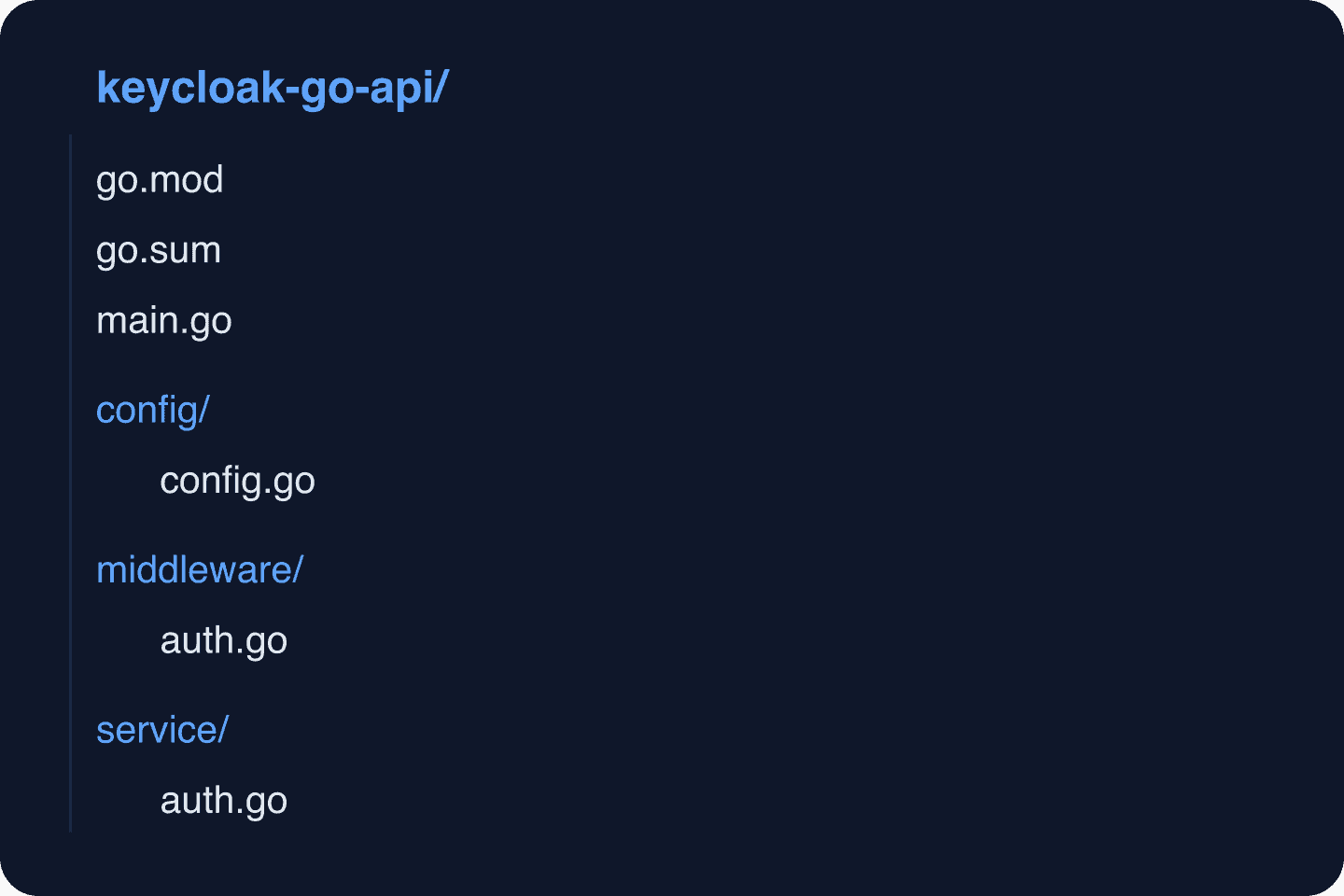
Project Structure
Production Considerations
Token Caching
For APIs with high request volumes, consider caching validated tokens briefly (30-60 seconds) to reduce load on Keycloak’s introspection endpoint:
import (
    "sync"
    "time"
)

type tokenCache struct {
    mu      sync.RWMutex
    entries map[string]cacheEntry
}

type cacheEntry struct {
    claims    *TokenClaims
    expiresAt time.Time
}

func (tc *tokenCache) Get(token string) (*TokenClaims, bool) {
    tc.mu.RLock()
    defer tc.mu.RUnlock()
    entry, ok := tc.entries[token]
    if !ok || time.Now().After(entry.expiresAt) {
        return nil, false
    }
    return entry.claims, true
}

func (tc *tokenCache) Set(token string, claims *TokenClaims, ttl time.Duration) {
    tc.mu.Lock()
    defer tc.mu.Unlock()
    tc.entries[token] = cacheEntry{
        claims:    claims,
        expiresAt: time.Now().Add(ttl),
    }
}
Security Checklist
- Enable audit logging in Keycloak to track all authentication events. See our guide on Keycloak auditing best practices.
- Use HTTPS in production for all communication between your API, Keycloak, and clients.
- Set appropriate token lifetimes — 5-15 minutes for access tokens.
- Enable MFA for admin users.
- Run Keycloak behind a reverse proxy — see our guide on running Keycloak behind a reverse proxy.
- Monitor authentication metrics with Insights.
What’s Next
- Set up SCIM provisioning for automated user management. Test SCIM endpoints with our SCIM Endpoint Tester.
- Implement identity brokering so users can log in via external providers.
- Add SSO across multiple services in your organization.
- Read about session management best practices.
- See the gocloak documentation for the full API reference.
Prefer not to operate Keycloak yourself? Skycloak provides fully managed Keycloak with automated scaling, backups, and zero-downtime upgrades. View pricing or explore our SLA guarantees.