
Every API needs an authentication strategy, but the choice between API keys and OAuth is rarely straightforward. API keys are simple. OAuth is powerful. And in many real-world systems, you need both. The decision depends on who is calling your API, what they need access to, and how much risk you can tolerate.
This guide breaks down the security tradeoffs, maps use cases to the right authentication method, and shows how to implement both approaches alongside Keycloak for identity management and single sign-on.
API Keys: Simple, Stateless, and Dangerous
An API key is a long, randomly generated string that a client includes in every request, usually in a header or query parameter. The server looks up the key, identifies the caller, and grants access.
How API Keys Work
Client → sends request with header: X-API-Key: sk_live_abc123...
Server → looks up key in database → identifies client → returns response
That is the entire protocol. There is no token exchange, no redirect flow, no expiration dance. The simplicity is the selling point, and the risk.
When API Keys Make Sense
- Internal service-to-service communication where both services are under your control and behind a firewall
- Public read-only APIs where rate limiting matters more than identity (weather data, public datasets)
- Webhook verification where the receiving service needs to validate that the sender is legitimate
- Developer experience where onboarding friction directly impacts adoption (think Stripe, Twilio, SendGrid)
- Machine-to-machine integrations where there is no user context and the calling service is fully trusted
Security Tradeoffs of API Keys
API keys have fundamental security limitations:
| Risk | Details |
|---|---|
| No expiration | Keys are valid until manually revoked. A leaked key stays valid indefinitely unless someone notices. |
| No scope control | A key typically grants full access. You cannot issue a key that only allows read access vs write access without building that logic yourself. |
| No identity context | The key identifies an application, not a user. You cannot answer “which user performed this action?” without additional context. |
| Transmitted in plaintext | Keys are sent in every request. Without TLS, they are visible to anyone on the network. |
| Hard to rotate | Changing a key requires updating every client that uses it, often simultaneously. |
For API security auditing and tracking, Keycloak’s audit log functionality provides visibility that API keys alone cannot offer.
OAuth 2.0: Flexible, Scoped, and Complex
OAuth 2.0 is an authorization framework that issues short-lived, scoped tokens. Instead of sharing a static credential, clients obtain tokens through a defined flow and include them in API requests.
How OAuth Works with Keycloak
Client → authenticates with Keycloak (various grant types)
Keycloak → validates credentials → issues access token (JWT)
Client → sends request with header: Authorization: Bearer eyJhbG...
Server → validates JWT signature → checks claims/scopes → returns response
OAuth Grant Types and Their Use Cases
Authorization Code + PKCE: Best for SPAs and mobile apps where a user is present. The user authenticates through Keycloak’s login page, and the client receives tokens via a callback. This is the flow behind single sign-on.
Client Credentials: Best for service-to-service communication. No user is involved; the client authenticates with its own credentials and receives an access token.
# Client credentials token request
curl -X POST
  "https://keycloak.example.com/realms/myrealm/protocol/openid-connect/token"
  -H "Content-Type: application/x-www-form-urlencoded"
  -d "grant_type=client_credentials"
  -d "client_id=my-service"
  -d "client_secret=my-secret"
Device Authorization: Best for IoT devices and CLIs with limited input capabilities.
You can test token requests and inspect the resulting JWTs with our JWT Token Analyzer.
Security Advantages of OAuth
| Advantage | Details |
|---|---|
| Short-lived tokens | Access tokens expire (typically 5–15 minutes). A leaked token has a limited blast radius. |
| Scoped access | Tokens carry scopes that limit what the bearer can do. |
| User context | Tokens carry user identity claims (sub, email, roles). |
| Centralized revocation | Keycloak can revoke sessions and tokens from a single point. See session management. |
| Standards-based | Interoperable across languages, frameworks, and vendors. |
| Audit trail | Every token issuance, refresh, and revocation is logged. |
Decision Guide: Which to Use
Choose API Keys When
- Your callers are machines, not users, and they are under your operational control
- Simplicity outweighs security: internal tools, development environments, low-risk data
- You need zero-friction onboarding: developer platforms where sign-up-to-first-API-call time is a KPI
- The API is read-only or low-sensitivity: public data endpoints where abuse means extra load, not data breach
Choose OAuth When
- Users are involved: any scenario where you need to know which human performed an action
- Third-party integrations: external developers or partners accessing your API on behalf of their users
- Fine-grained permissions: you need scopes, roles, or RBAC to control access
- Regulatory requirements: compliance frameworks (SOC 2, HIPAA, GDPR) typically require short-lived credentials and audit trails
- Multi-service architectures: microservices that need to propagate user context across service boundaries
Choose Both When
Many production systems use both. The pattern:
- OAuth for user-facing API access (web apps, mobile apps, third-party integrations)
- API keys for server-to-server communication where OAuth’s complexity adds overhead without proportional security benefit
- OAuth for administrative actions, API keys for high-volume read operations
Implementing API Keys Alongside Keycloak
Keycloak does not natively manage API keys, but you can implement API key authentication that integrates with Keycloak’s authorization model. Here is an approach using a Node.js API gateway:
API Key Storage and Validation
// api-key-service.js
import crypto from "crypto";

// In production, use a database. This is illustrative.
const apiKeys = new Map();

/**
 * Generate a new API key linked to a Keycloak service account
 */
export function generateApiKey(keycloakClientId, scopes = []) {
  const prefix = "sk_live_";
  const key = prefix + crypto.randomBytes(32).toString("hex");
  const hashedKey = crypto
    .createHash("sha256")
    .update(key)
    .digest("hex");

  apiKeys.set(hashedKey, {
    clientId: keycloakClientId,
    scopes,
    createdAt: new Date().toISOString(),
    lastUsed: null,
  });

  // Return the unhashed key to the caller (only time it is visible)
  return { key, scopes };
}

/**
 * Validate an API key and return its metadata
 */
export function validateApiKey(key) {
  const hashedKey = crypto
    .createHash("sha256")
    .update(key)
    .digest("hex");

  const record = apiKeys.get(hashedKey);
  if (!record) return null;

  // Update last used timestamp
  record.lastUsed = new Date().toISOString();
  return record;
}
Express Middleware Supporting Both Methods
// auth-middleware.js
import { validateApiKey } from "./api-key-service.js";
import jwt from "jsonwebtoken";
import jwksClient from "jwks-rsa";

const jwks = jwksClient({
  jwksUri:
    "https://keycloak.example.com/realms/myrealm/protocol/openid-connect/certs",
  cache: true,
  rateLimit: true,
});

function getSigningKey(kid) {
  return new Promise((resolve, reject) => {
    jwks.getSigningKey(kid, (err, key) => {
      if (err) return reject(err);
      resolve(key.getPublicKey());
    });
  });
}

/**
 * Middleware that accepts either API key or OAuth token
 */
export async function authenticate(req, res, next) {
  const apiKey = req.headers["x-api-key"];
  const authHeader = req.headers["authorization"];

  if (apiKey) {
    // API Key authentication
    const record = validateApiKey(apiKey);
    if (!record) {
      return res.status(401).json({ error: "Invalid API key" });
    }
    req.auth = {
      method: "api_key",
      clientId: record.clientId,
      scopes: record.scopes,
    };
    return next();
  }

  if (authHeader?.startsWith("Bearer ")) {
    // OAuth token authentication
    const token = authHeader.slice(7);
    try {
      const decoded = jwt.decode(token, { complete: true });
      const publicKey = await getSigningKey(decoded.header.kid);
      const claims = jwt.verify(token, publicKey, {
        algorithms: ["RS256"],
        issuer:
          "https://keycloak.example.com/realms/myrealm",
      });
      req.auth = {
        method: "oauth",
        claims,
        scopes: claims.scope?.split(" ") || [],
      };
      return next();
    } catch (err) {
      return res.status(401).json({
        error: "Invalid token",
        details: err.message,
      });
    }
  }

  return res.status(401).json({
    error:
      "Authentication required. Provide X-API-Key header or Bearer token.",
  });
}
Scope-Based Authorization
// authorize.js
export function requireScope(...requiredScopes) {
  return (req, res, next) => {
    const userScopes = req.auth?.scopes || [];
    const hasAll = requiredScopes.every((s) =>
      userScopes.includes(s)
    );

    if (!hasAll) {
      return res.status(403).json({
        error: "Insufficient permissions",
        required: requiredScopes,
        provided: userScopes,
      });
    }
    next();
  };
}

// Usage in routes
app.get(
  "/api/data",
  authenticate,
  requireScope("read:data"),
  getDataHandler
);
app.post(
  "/api/data",
  authenticate,
  requireScope("write:data"),
  createDataHandler
);
Implementing OAuth Client Credentials in Keycloak
For service-to-service communication that needs OAuth, Keycloak’s client credentials grant is the right choice. This is similar to what we covered in Keycloak machine-to-machine authentication.
Create a Service Account Client
- In Keycloak Admin Console, go to Clients > Create client
- Set Client type to
OpenID Connect - Enable Client authentication
- Under Authentication flow, enable only Service accounts roles
- Disable all other flows (Standard flow, Direct access grants, etc.)
Assign Roles and Scopes
- Go to the client’s Service account roles tab
- Assign the specific roles this service needs
- Under Client scopes, configure the scopes that will appear in the access token
This gives you scoped, short-lived credentials with a full audit trail, which are the security properties that API keys lack.
Hybrid Architecture Example
Here is how a typical SaaS application might combine both approaches:
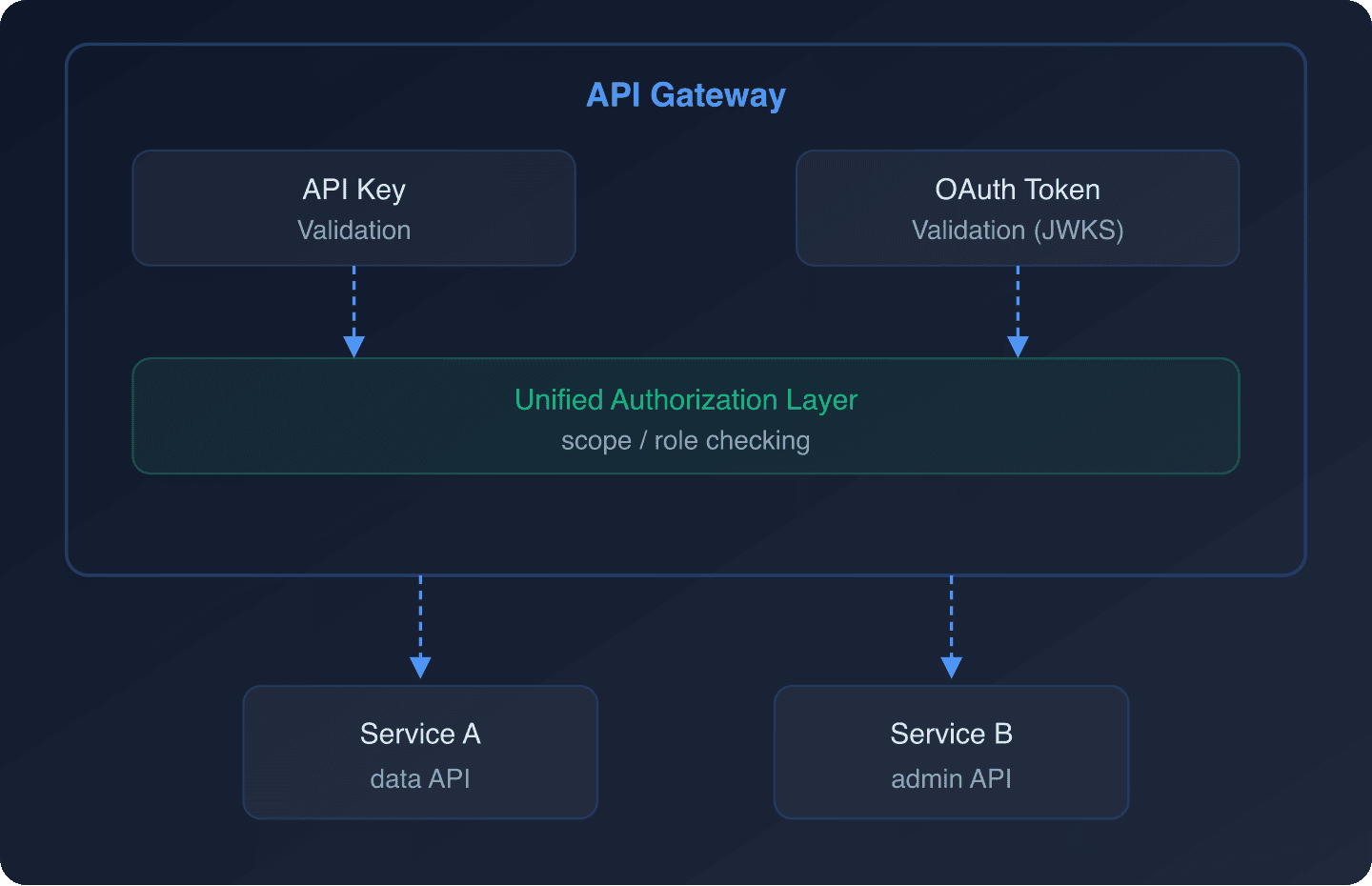
In this model:
- External webhook providers send requests with API keys
- Internal services use OAuth client credentials
- User-facing frontends use OAuth authorization code with PKCE
- All authentication methods map to the same authorization model
Security Best Practices
For API Keys
- Always hash keys before storage: store SHA-256 hashes, never plaintext
- Prefix keys for identification: e.g.,
sk_live_for production,sk_test_for staging - Implement rate limiting per key: prevent abuse from a single compromised key
- Log all key usage: you need this for incident response. Forward events to your SIEM using Keycloak audit logs.
- Support key rotation: allow multiple active keys per client so rotation does not require downtime
- Set expiration dates: even if optional, encourage key rotation by defaulting to 90-day expiry
For OAuth Tokens
- Keep access tokens short-lived: 5–15 minutes is standard
- Use refresh tokens carefully: rotate on use, bind to client
- Validate all claims server-side: issuer, audience, expiration, and signature. See token validation for APIs.
- Use PKCE for public clients: never use implicit flow. Read more about upcoming changes in OAuth 2.1.
- Configure token lifetimes in Keycloak: under Realm Settings > Tokens or per-client under Advanced Settings
For Both
- Always use TLS: API keys and tokens are both bearer credentials
- Implement proper CORS: see configuring CORS with Keycloak
- Enable MFA for human users: multi-factor authentication should always be available for user-facing access
When to Migrate from API Keys to OAuth
Consider migrating when:
- You need to know which user performed an action (not just which application)
- Your compliance requirements mandate short-lived credentials
- You are adding third-party integrations that need delegated access
- You want centralized credential management across multiple services
- You need to implement step-up authentication for sensitive operations (see our guide on step-up authentication)
The migration does not have to be all-or-nothing. Support both methods during the transition period, then deprecate API keys for use cases where OAuth is a better fit.
Calculating the Cost
Authentication infrastructure is an investment. Whether you choose API keys, OAuth, or both, the operational cost includes development time, infrastructure, and ongoing maintenance. Our ROI Calculator can help estimate the total cost of your authentication stack. For a deeper analysis, read the true cost of self-hosting Keycloak.
Further Reading
- Keycloak Authorization Services Guide
- OAuth 2.0 RFC 6749
- API Authentication Best Practices in 2026
- JWT token lifecycle management
- DPoP with Keycloak Admin API: proof-of-possession tokens that address some API key concerns
Frequently asked questions
When should I use API keys instead of OAuth?
Use API keys when the caller is a machine you control, the data is low-sensitivity or read-only, and simplicity of integration matters more than fine-grained access control. They are a natural fit for webhook verification, public-read APIs, and server-to-server calls inside a trusted network. Avoid them when you need user identity in the audit trail or short-lived credentials enforced by policy.
Can I use OAuth for machine-to-machine (M2M) API calls?
Yes. OAuth 2.0’s Client Credentials grant is designed specifically for M2M scenarios. The calling service authenticates with Keycloak using its client ID and secret and receives a short-lived access token scoped to the permissions it needs. This gives you the security properties API keys lack: token expiry, scoped access, and a centralized audit trail.
How do I rotate API keys without causing downtime?
Allow each client to have multiple active keys at the same time. Issue the new key, update the client to use it, then revoke the old one. The code samples in this post store keys as SHA-256 hashes so a leaked key can be rotated without exposing the stored value.
Is OAuth too complex for internal service-to-service calls?
For many internal calls behind a firewall, the Client Credentials grant adds minimal overhead: one token request at startup (or on expiry) and a JWT validation on each API call. The complexity argument is strongest when compared to a simple shared secret, but the security and auditing benefits usually justify the trade-off for any service that handles sensitive data.
Do API keys and OAuth tokens both need TLS?
Yes. Both are bearer credentials: whoever holds them gets access. Without TLS, both are visible to anyone on the network. TLS is a baseline requirement for either approach, not an optional extra.
Wrapping Up
API keys and OAuth are not competing standards; they solve different problems. API keys prioritize simplicity for trusted, machine-to-machine scenarios. OAuth prioritizes security, user context, and fine-grained authorization for everything else. Most production systems benefit from both, with clear boundaries between when each is appropriate.
If you want to skip the infrastructure work of running your own Keycloak instance, Skycloak provides managed Keycloak with built-in security features and a guaranteed SLA. See our pricing page to compare plans.