
Last updated: August 2026
Standard authentication treats every login the same: the user enters credentials and gets full access. But viewing a dashboard is not the same as transferring money. Step-up authentication addresses this by requiring stronger authentication only when the user performs a sensitive action, keeping the normal flow frictionless while protecting high-risk operations.
Keycloak supports step-up authentication through Authentication Context Class Reference (ACR) values, conditional authentication flows, and Level of Authentication (LoA) mapping. This guide walks through a complete implementation.
What is Step-Up Authentication?
Step-up authentication (also called adaptive authentication or progressive authentication) is a pattern where the authentication strength is increased on demand. The user initially authenticates with a basic method (e.g., username and password), and when they attempt a sensitive operation, they are prompted for a stronger factor (e.g., OTP or WebAuthn).
Common scenarios:
- Banking: View account balance with password, require OTP for transfers.
- E-commerce: Browse products with basic auth, require MFA before checkout.
- Healthcare: View patient lists with SSO, require biometric for accessing patient records.
- SaaS admin panels: Normal access with password, require hardware key for security settings.
The key benefit is that users only encounter friction when it matters, improving the overall experience while maintaining strong security for critical operations. For more on multi-factor authentication capabilities, see the Skycloak MFA feature page.
How Keycloak Implements Step-Up Auth
Keycloak uses ACR (Authentication Context Class Reference) values to indicate the level of authentication that was performed. Step-up authentication was added in Keycloak 17 and polished into a first-class feature in Keycloak 18.
The flow works like this:
- Initial login: The user authenticates with username/password. Keycloak issues a token with
acr: "1"(Level of Authentication 1). - Sensitive action: The application requests a token with
acr_values=2, indicating it needs a higher authentication level. - Step-up prompt: Keycloak checks if the user’s current session meets the required level. If not, it prompts for the additional factor (e.g., OTP).
- Upgraded token: After successful step-up, Keycloak issues a new token with
acr: "2".
Configuring Authentication Flows
Step 1: Create the Step-Up Authentication Flow
- Go to Authentication in the Keycloak Admin Console.
- Click Create flow.
- Name it
step-up-browserand set the type tobasic-flow.
Build the flow with these steps:

Step 2: Configure the LoA Condition
The Conditional - Level of Authentication execution is the key component. Configure it:
- Click the settings icon on the
Conditional - Level of Authenticationexecution. - Set:
- Level of Authentication (LoA):
2 - Max Age:
300(seconds: how long the step-up is valid before requiring re-authentication)
- Level of Authentication (LoA):
This means the OTP form will only be shown when the application requests acr_values=2 or higher.
Step 3: Map ACR Values to LoA Levels
- Go to Authentication > Required Actions.
- In the step-up flow configuration, you can define the mapping between ACR string values and numeric LoA levels.
By default, Keycloak maps:
- LoA 0: No authentication (e.g., cookie-based session)
- LoA 1: Single-factor authentication (username + password)
- LoA 2+: Multi-factor authentication (password + OTP/WebAuthn)
Step 4: Bind the Flow to the Realm
- Go to Authentication > Flows.
- Select your
step-up-browserflow. - Click Action > Bind flow and bind it as the Browser flow.
Requesting Step-Up from the Application
OpenID Connect Authorization Request
To request step-up authentication, the application includes the acr_values parameter in the authorization request:
GET /realms/my-realm/protocol/openid-connect/auth?
  client_id=my-app&
  redirect_uri=https://app.example.com/callback&
  response_type=code&
  scope=openid&
  acr_values=2
If the user already has a session at LoA 1 (password only), Keycloak will prompt for OTP. If the user already completed OTP within the configured max age, Keycloak will skip the prompt and return the token with acr: "2".
Using claims Parameter for Essential ACR
For stronger guarantees, use the claims parameter to make the ACR requirement essential:
GET /realms/my-realm/protocol/openid-connect/auth?
  client_id=my-app&
  redirect_uri=https://app.example.com/callback&
  response_type=code&
  scope=openid&
  claims=%7B%22id_token%22%3A%7B%22acr%22%3A%7B%22essential%22%3Atrue%2C%22values%22%3A%5B%222%22%5D%7D%7D%7D
The decoded claims parameter:
{
  "id_token": {
    "acr": {
      "essential": true,
      "values": ["2"]
    }
  }
}
When ACR is marked as essential, Keycloak will return an error if it cannot satisfy the requirement, rather than silently falling back to a lower level.
Frontend Implementation
Here is a React application that implements step-up authentication:
// src/auth/stepUpAuth.js
import Keycloak from 'keycloak-js';

const keycloak = new Keycloak({
  url: 'https://keycloak.example.com',
  realm: 'my-realm',
  clientId: 'my-app',
});

// Initialize with standard authentication (LoA 1)
export async function initAuth() {
  await keycloak.init({
    onLoad: 'login-required',
    checkLoginIframe: false,
  });
  return keycloak;
}

// Request step-up authentication (LoA 2)
export async function requestStepUp() {
  const currentAcr = getTokenAcr();

  if (currentAcr >= 2) {
    // Already authenticated at the required level
    return true;
  }

  // Redirect to Keycloak with acr_values=2
  await keycloak.login({
    acr: {
      values: ['2'],
      essential: true,
    },
  });
}

// Extract ACR from the token
export function getTokenAcr() {
  if (!keycloak.tokenParsed) return 0;
  const acr = keycloak.tokenParsed.acr;
  return parseInt(acr, 10) || 0;
}

// Check if step-up is still valid
export function isStepUpValid() {
  return getTokenAcr() >= 2;
}
Using it in a React component:
// src/components/TransferForm.jsx
import { useState } from 'react';
import { requestStepUp, isStepUpValid } from '../auth/stepUpAuth';

function TransferForm() {
  const [amount, setAmount] = useState('');
  const [recipient, setRecipient] = useState('');

  async function handleTransfer(e) {
    e.preventDefault();

    // Require step-up authentication before processing
    if (!isStepUpValid()) {
      await requestStepUp();
      return; // The page will redirect to Keycloak for step-up
    }

    // Step-up verified, proceed with the transfer
    const response = await fetch('/api/transfers', {
      method: 'POST',
      headers: {
        'Content-Type': 'application/json',
        Authorization: `Bearer ${keycloak.token}`,
      },
      body: JSON.stringify({ amount, recipient }),
    });

    if (response.ok) {
      alert('Transfer successful');
    }
  }

  return (
    <form onSubmit={handleTransfer}>
      <input
        type="text"
        placeholder="Recipient"
        value={recipient}
        onChange={(e) => setRecipient(e.target.value)}
      />
      <input
        type="number"
        placeholder="Amount"
        value={amount}
        onChange={(e) => setAmount(e.target.value)}
      />
      <button type="submit">Transfer Funds</button>
    </form>
  );
}
The pattern above, already wired up
Skycloak gives you a managed Keycloak with OIDC and SAML, social and enterprise identity providers, MFA and fine-grained roles configured and running. Pick your framework during onboarding and you get a working sign-in in about three minutes.
Backend ACR Validation
The backend API must validate the ACR claim in the access token before allowing sensitive operations:
// Express.js middleware for ACR validation
function requireAcr(minLevel) {
  return (req, res, next) => {
    const token = req.decodedToken; // Assume JWT has been validated by earlier middleware

    const acr = parseInt(token.acr, 10) || 0;

    if (acr < minLevel) {
      return res.status(403).json({
        error: 'step_up_required',
        message: `This operation requires authentication level ${minLevel}`,
        required_acr: minLevel.toString(),
        current_acr: acr.toString(),
      });
    }

    next();
  };
}

// Usage in routes
app.get('/api/account/balance', requireAuth(), (req, res) => {
  // LoA 1 is sufficient for viewing balance
  res.json({ balance: 1234.56 });
});

app.post('/api/transfers', requireAuth(), requireAcr(2), (req, res) => {
  // LoA 2 required for transfers
  processTransfer(req.body);
  res.json({ status: 'success' });
});

app.put('/api/account/security-settings', requireAuth(), requireAcr(3), (req, res) => {
  // LoA 3 required for security settings changes
  updateSecuritySettings(req.body);
  res.json({ status: 'updated' });
});
You can decode and inspect the ACR claim in your tokens using the JWT Token Analyzer.
Custom Step-Up with WebAuthn
For higher security levels, you can require WebAuthn (passkeys/FIDO2) instead of OTP. Modify the authentication flow:
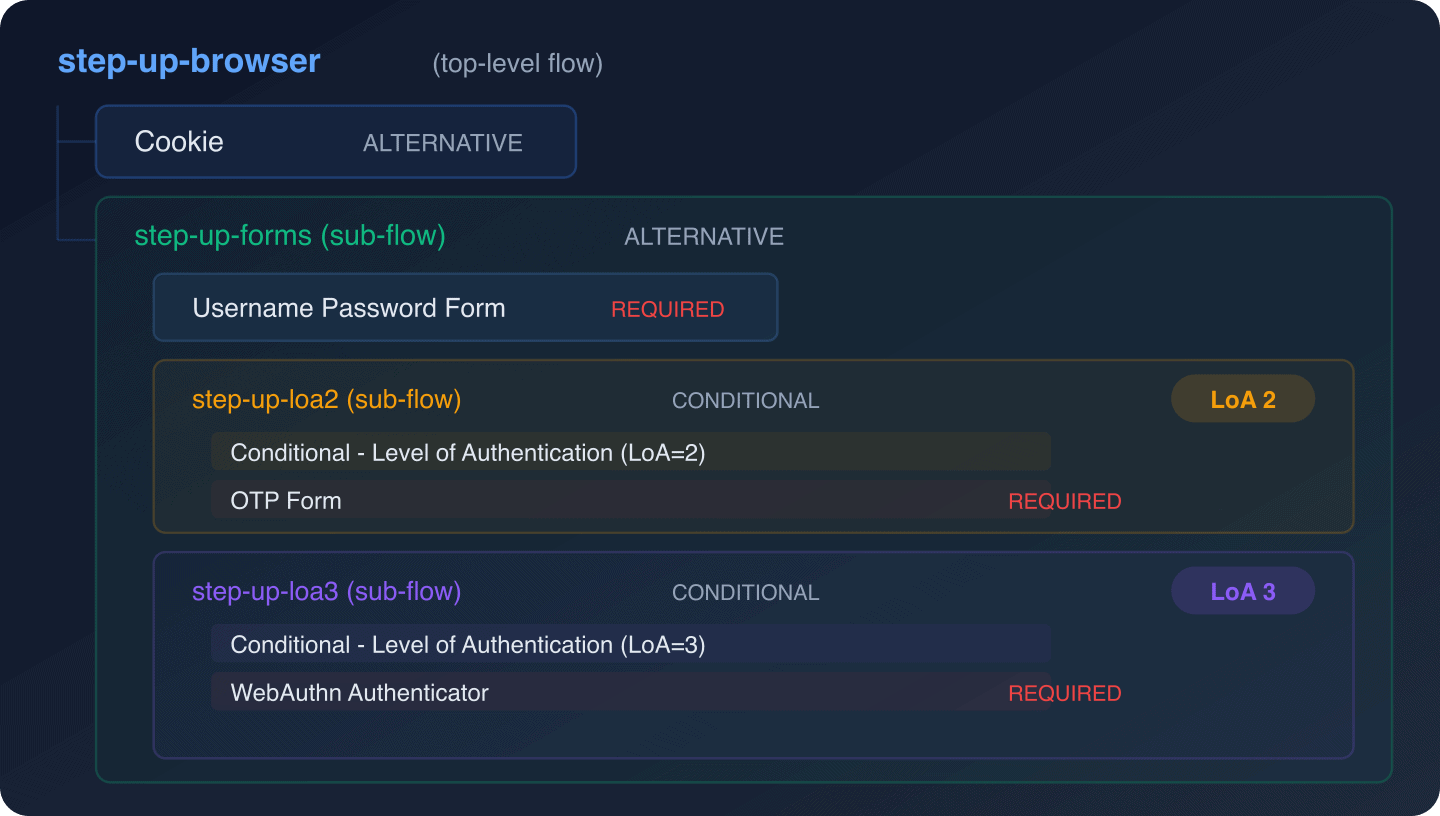
This creates a three-tier system:
- LoA 1: Password only (standard browsing)
- LoA 2: Password + OTP (financial transactions)
- LoA 3: Password + WebAuthn (security settings, admin actions)
For more on WebAuthn/passkey integration, see our complete guide to Keycloak passkeys and WebAuthn, which covers both passwordless and 2FA modes.
Session and Token Considerations
Max Age for Step-Up
The max_age parameter on the LoA condition controls how long a step-up is considered valid. After this period, the user must re-authenticate at the higher level even if their session is still active.
For financial services, a common approach is:
- Set step-up max age to 300 seconds (5 minutes)
- Each sensitive action within the window does not require re-authentication
- After 5 minutes of no sensitive actions, the next one triggers step-up again
Token Claims
After step-up, the token includes:
{
  "acr": "2",
  "auth_time": 1711872000
}
The auth_time reflects when the last authentication event occurred. Your application can use this to implement time-based step-up policies without relying solely on Keycloak’s max age.
For comprehensive session management, see Session Management and the guide to Keycloak session timeout configuration.
Audit Logging for Step-Up Events
Step-up authentication events are logged by Keycloak’s event system. Key events to monitor:
LOGIN: Initial authentication (LoA 1)LOGIN: Step-up authentication (LoA 2+, same event type but with higher ACR)LOGIN_ERROR: Failed step-up attempt (wrong OTP, WebAuthn failure)
Enable event logging in your realm to track these events. For centralized event monitoring, see our guide on forwarding Keycloak events to SIEM and the audit logs feature page.
Best Practices
-
Keep LoA 1 frictionless. Most user actions should work at the basic level. Only require step-up for genuinely sensitive operations.
-
Use essential ACR claims. When security is critical, mark the ACR requirement as essential so Keycloak fails rather than silently downgrading.
-
Set appropriate max age values. Balance security with usability. A 5-minute window is common for financial operations; 30 minutes may be acceptable for admin panels.
-
Return actionable errors. When the backend rejects a request due to insufficient ACR, return a structured error that the frontend can use to trigger step-up.
-
Log step-up events. Track when users are prompted for step-up and how often they fail. This data helps tune your LoA thresholds.
-
Test the complete flow. Step-up involves interaction between the frontend, Keycloak, and backend. Test the entire chain, including edge cases like expired step-up and concurrent requests.
Wrapping Up
Step-up authentication with Keycloak provides a clean way to implement risk-based authentication without building a custom solution. The ACR/LoA system is standards-based (OpenID Connect), so it works with any OIDC-compliant client library.
The key is designing your LoA levels thoughtfully: keep the base level simple for everyday actions, and reserve higher levels for operations that genuinely need stronger assurance. Combined with RBAC for authorization, step-up authentication gives you fine-grained control over both who can do what and how strongly they must prove their identity.
If you need help implementing step-up authentication or want a managed Keycloak instance with pre-configured MFA flows, Skycloak provides managed Keycloak hosting with expert configuration support, detailed documentation, and enterprise-grade security.