AWS IAM Explained: What It Covers and What It Does Not. AWS IAM controls who and what can access your AWS account. Learn users, groups, roles and policies, what IAM costs, and why it does not sign in your app's users.
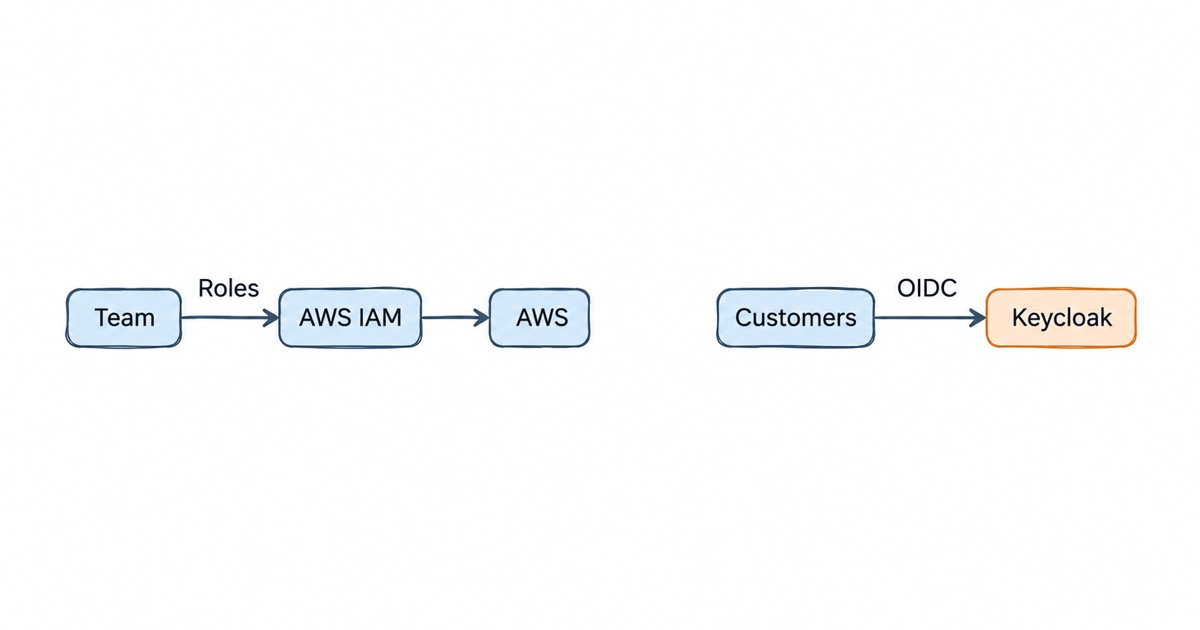
AWS IAM (Identity and Access Management) controls who and what can access your AWS account and its resources, using users, groups, roles and policies for your team and your workloads. It does not sign in your application’s customers: for that you need a customer identity service such as Amazon Cognito or Keycloak.
AWS describes IAM as “a web service that helps you securely control access to AWS resources”, and the key words there are “AWS resources”. IAM decides whether your engineer can read an S3 bucket or whether your Lambda function can write to a DynamoDB table. It has no opinion about the people who sign up for the product you build on top of AWS. Most pages about IAM, including AWS’s own product page, explain what it does without saying where it stops, so this guide covers both: the four building blocks in plain words, what IAM costs, the mistakes people make with it, and then the jobs it leaves to other services.
If the difference between proving who someone is and deciding what they may do is new to you, our explainer on authentication vs authorization is a good warm-up, because IAM does both, but only for AWS.
What is AWS IAM?
IAM is the permission system built into every AWS account. AWS’s user guide says you use it “to control who is authenticated (signed in) and authorized (has permissions) to use resources”. Every call to AWS, whether it comes from the console, the CLI, an SDK or another AWS service, goes through IAM before anything happens.
When you open a new account, you start with a single identity, the root user, which AWS says has “complete access to all AWS services and resources”. AWS also says “We strongly recommend that you don’t use the root user for everyday tasks”, and IAM is how you create the narrower identities you use instead.
IAM users, groups, roles and policies in plain words
IAM has four building blocks. Three of them are identities (who is asking), and the fourth is the rules (what they may do).
- IAM user. AWS defines it as “an entity that you create in your AWS account”, with long-term credentials such as a password or access keys. AWS now steers people away from them: its guide says “We recommend that you only use IAM users for specific use cases not supported by federated users”.
- User group. A user group “is a collection of IAM users”, so you can attach permissions once to “Developers” instead of to each person. A group is not something that can sign in, and AWS notes that “groups relate to permissions, not authentication”.
- Role. A role is “an IAM identity that you can create in your account that has specific permissions”, but unlike a user, “a role does not have standard long-term credentials such as a password or access keys associated with it”. Someone or something assumes the role and receives temporary credentials. EC2 instances, Lambda functions, people signing in through your company’s identity provider and other AWS accounts all use roles.
- Policy. A policy is “an object in AWS that, when associated with an identity or resource, defines their permissions”, and “Most policies are stored in AWS as JSON documents”. An identity-based policy is attached to a user, group or role, while a resource-based policy is attached to the resource itself, such as an S3 bucket.
What does an IAM policy look like?
Here is a small identity-based policy. Attached to a role, it lets whoever holds that role read objects from one bucket, and nothing else:
{
  "Version": "2012-10-17",
  "Statement": [
    {
      "Sid": "ReadReportsBucket",
      "Effect": "Allow",
      "Action": "s3:GetObject",
      "Resource": "arn:aws:s3:::example-reports/*"
    }
  ]
}
Effect says whether the statement allows or denies, Action names the API operation, and Resource names the object it applies to by its ARN (Amazon Resource Name, the unique ID AWS gives every resource). You can add a Condition block to narrow it further, for example to requests from one network, which is one of the practices AWS recommends.
How does IAM decide whether a request is allowed?
Every request goes through two checks. First comes authentication: AWS explains that “A principal signs in to AWS using their credentials which IAM authenticates to permit the principal to send a request to AWS”, where the principal is “The person or application that used an entity (user or role) to send the request”. Then comes authorization, which means “the principal having the required permissions to complete their request”.
IAM starts that second check from a refusal: “By default, all requests are denied”. A request only goes through when a policy allows that action on that resource and no policy explicitly denies it.
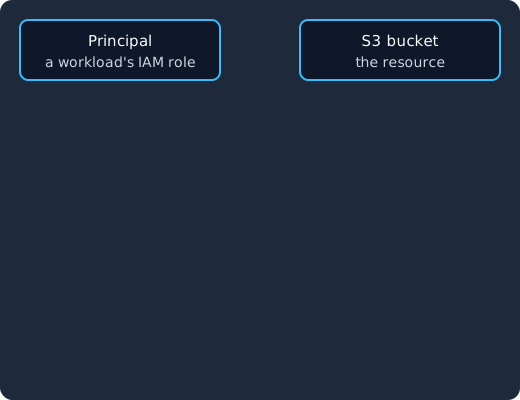
A workload using an IAM role sends an s3:GetObject request, IAM checks the credentials that signed it, then evaluates the policies starting from deny, and the request reaches the bucket only if a policy allows it and nothing denies it.
Is AWS IAM free?
Yes. AWS says that “AWS Identity and Access Management (IAM), AWS IAM Identity Center and AWS Security Token Service (AWS STS) are features of your AWS account offered at no additional charge”. You pay for what your identities use, because “You are charged only when you access other AWS services using your IAM users or AWS STS temporary security credentials”.
Costs do appear around IAM, mainly in IAM Access Analyzer, the tool that reviews your policies. Its external access analysis is free, but AWS notes that “you will incur charges for unused access analysis and customer policy checks”. The Access Analyzer pricing page gives the example of $0.20 per IAM role or user per month for unused access analysis, so the bill grows with the number of identities you ask it to watch. The other place costs appear is the customer identity service you add for your app’s own users, which we cover below.
Common IAM mistakes
Most IAM problems come from the same handful of habits. AWS’s security best practices are the reference for each of these.
- Long-lived access keys. An access key on an IAM user works until someone rotates or deletes it, so a key that leaks in a repository or a CI log stays useful to an attacker. AWS says “Where possible, we recommend relying on temporary credentials instead of creating long-term credentials such as access keys”, and for code running on AWS, roles mean “there is no need to distribute long lived credentials for an IAM user to your workloads running on AWS”.
- An IAM user for every engineer. AWS’s first best practice is to “Require human users to use federation with an identity provider to access AWS using temporary credentials”. People should sign in through your company’s identity provider and assume roles, so leaving the company means losing AWS access in one place.
- Using the root user. The root user should have MFA and should almost never be used, as the root user practices describe.
- Wildcard policies.
"Action": "*"on"Resource": "*"is easy to write and hard to take back later. AWS recommends you apply least-privilege permissions and use Access Analyzer to generate policies from real activity. - Never cleaning up. Old users, roles and keys pile up. AWS’s advice is to regularly review and remove unused users, roles, permissions, policies, and credentials.
Our enterprise IAM security checklist covers the same ground for identity systems in general, beyond AWS.
Identity management as a service, on open source
Skycloak does what Auth0 and Okta do, SSO, MFA, SCIM, audit logs and enterprise federation, on an open source core. Unlimited users and applications on every plan, no charge per monthly active user, and you can export and self-host whenever you want.
What AWS IAM does not do for your app’s users
IAM is built for the people and workloads that operate your AWS account. The users of the app you build are a different population, and IAM does not handle them. Here is what that leaves out:
- Customer sign-up and login. IAM has no hosted login page, sign-up form, password reset email or social login for your product’s users. You would not create an IAM user per customer, and AWS itself recommends IAM users only for cases that federation cannot cover. For app users, AWS points to a different service, Amazon Cognito, which it describes as “an identity platform for web and mobile apps” and “a user directory, an authentication server, and an authorization service”.
- SSO into your own application. IAM can trust an external identity provider, but AWS describes that feature as a way to “give these external user identities permissions to use AWS resources in your account”. Letting your customers’ employees sign in to your SaaS with their company account is a different job, done by an identity provider that your app trusts over OpenID Connect (OIDC) or SAML, such as a Cognito user pool, which AWS documents as a way to federate through a social or SAML/OIDC provider.
- MFA for end users. The MFA in IAM protects the root user and IAM users of your AWS account. It does not add a second factor to your app’s login page.
- User provisioning with SCIM. SCIM (System for Cross-domain Identity Management) is the standard a customer’s identity provider uses to create and remove their users in your app automatically. In AWS, SCIM belongs to IAM Identity Center, which supports automatic provisioning of user and group information from your identity provider into IAM Identity Center, so it provisions your workforce for AWS access rather than the users of your app.
- User management for your product. Profiles, consent, account linking, user roles inside your app and the admin screens around them are outside IAM. Our post on the role of user management in modern IAM solutions explains what that layer usually holds.
The same split shows up in your code. IAM still matters to your app, because your backend runs under a role that decides which tables and buckets it may touch, but who the logged-in customer is and what they may see inside your product is the job of a separate identity provider.
IAM vs IAM Identity Center vs Amazon Cognito
AWS has three services with “identity” in the description, and they serve three different groups of people, which the table below sets side by side.
| Service | Who it is for | What it does | Cost |
|---|---|---|---|
| AWS IAM | Your team’s roles and your workloads | Authenticates and authorizes every call to AWS APIs | No additional charge |
| AWS IAM Identity Center | Your workforce | “the AWS solution for connecting your workforce users to AWS managed applications” and other AWS resources | No additional charge |
| Amazon Cognito | Your app’s users | “an identity platform for web and mobile apps” | Free tier, then per monthly active user |
IAM Identity Center sits on top of IAM: it signs your employees in once and hands them roles in the accounts they need. We compare it with Keycloak in Keycloak vs AWS IAM Identity Center, including the common setup where Keycloak is the identity provider that Identity Center trusts.
Cognito is the AWS answer for app users. Its user pools are what you create “when you want to authenticate and authorize users to your app or API”, and its identity pools exchange a signed-in user for AWS credentials, which is where Cognito and IAM meet. The Cognito pricing page lists a free tier of 10,000 monthly active users per account on the Lite and Essentials tiers, but only 50 for users who sign in through SAML or OIDC federation, which matters if you sell to businesses that bring their own identity provider.
When does your team need a separate customer identity provider?
You need one as soon as people outside your company sign in to something you built. That includes a SaaS dashboard, a mobile app, a partner portal or an API that third parties call with their own tokens. The usual triggers are:
- your app needs sign-up, login, password reset or social login,
- business customers ask to sign in with their own identity provider over SAML or OIDC,
- customers want their users created and removed automatically over SCIM,
- you need MFA or passkeys on your app’s login page, not just on the AWS console.
Cognito is the default choice inside AWS, and our posts on whether Cognito is still the right fit as you scale and on Cognito alternatives for developers cover where teams run into its limits. Keycloak is the open-source option: its Server Administration Guide has sections on OpenID Connect clients, SAML clients, integrating external identity providers, LDAP and Active Directory, one-time password policies and WebAuthn.
Whichever you choose, it runs beside IAM rather than replacing it. Your workloads keep their IAM roles, your engineers keep signing in to AWS through federation, and the customer identity provider handles everyone who signs in to your product.
FAQ
Is AWS IAM free?
Yes. IAM, IAM Identity Center and AWS STS are offered at no additional charge. You pay for the AWS services your identities use, and some IAM Access Analyzer features, such as unused access analysis, are billed separately.
Can I use AWS IAM to log in users to my app?
No. IAM controls access to AWS resources, and it has no hosted login, sign-up or token issuance for your app’s users. Use a customer identity service such as Amazon Cognito or Keycloak for that, and keep IAM for the roles your backend runs under.
What is the difference between an IAM user and an IAM role?
An IAM user has long-term credentials, such as a password or access keys, and belongs to one person or application. A role has no long-term credentials: a person, service or another account assumes it and gets temporary credentials. AWS recommends roles for both workloads and people wherever possible.
What is the difference between AWS IAM and IAM Identity Center?
IAM is the permission system inside each AWS account. IAM Identity Center is, in AWS’s words, “the AWS solution for connecting your workforce users to AWS managed applications” and other AWS resources. Our Keycloak vs AWS IAM Identity Center post goes into Identity Center in depth.
Does AWS IAM support SCIM?
Not for your application. AWS documents SCIM as a feature of IAM Identity Center, which accepts SCIM v2.0 from your external identity provider to sync your workforce users and groups into Identity Center for access to AWS. If your business customers want their users created and removed in your app automatically, the identity provider that serves your app has to accept SCIM.
What to do next
Keep IAM for what it is good at: give your workloads roles instead of access keys, sign your engineers in through federation, and write policies that allow only what each role needs. Then pick a separate identity provider for your app’s users, sized for the login, SSO and provisioning your customers will ask for.
If you want Keycloak for that job without running the servers yourself, see how Skycloak’s managed Keycloak hosting can run alongside your AWS IAM setup. Its extension marketplace lists a SCIM 2.0 Server for Keycloak among its API and integration extensions.