What Is Ente Auth and How It Works With Keycloak OTP. Ente Auth is a free, open source TOTP authenticator with end-to-end encrypted sync. Learn how its codes work and how to pair it with Keycloak OTP step by step.
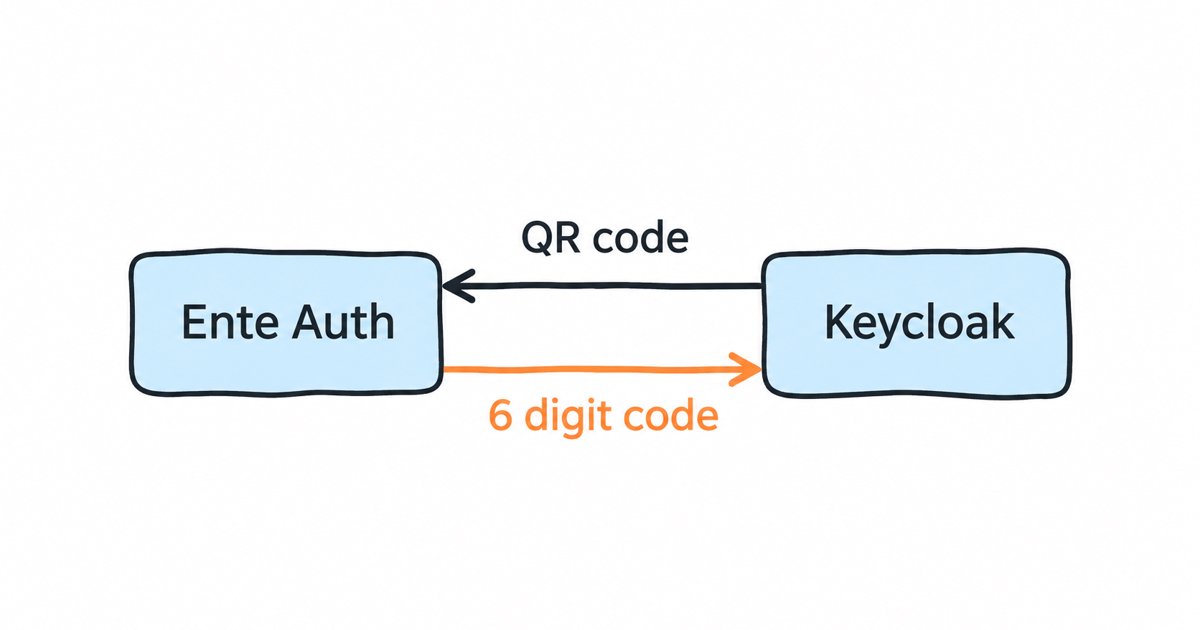
Ente Auth is a free, open source authenticator app that generates TOTP codes and keeps them in an end-to-end encrypted backup synced across your devices. It works with Keycloak like any standard TOTP app: scan the QR code Keycloak shows when you set up OTP, then type the 6 digit code at login.
Most pages about Ente Auth are Ente’s own product and download pages, so they describe the app but not the server it talks to. This guide covers both sides. It explains what Ente Auth is and whether its encrypted sync changes how safe your second factor is, how a code is worked out from a shared secret and the clock, and then how to pair the app with a Keycloak realm, including the OTP policy settings that decide whether the codes match.
If you want the basics first, our explainers on what multi-factor authentication is and what an OTP is cover why a second factor matters and what a one-time code is.
What is Ente Auth?
Ente Auth is the two-factor authentication (2FA) app from Ente, the company that also makes the Ente Photos app. Its product page calls it an “Open source 2FA authenticator, with end-to-end encrypted backups”, and its code lives in the public ente/ente repository on GitHub under the AGPL-3.0 license. The app’s own README calls it “An end-to-end encrypted, cross platform and free app for storing your 2FA codes with cloud backups”.
It runs on most devices you are likely to use. Ente lists apps for the App Store, Play Store, F-Droid, Windows, macOS, Linux and the web on its product page, and the README notes that the web app at auth.ente.com is for viewing codes, while adding or managing them happens in the mobile or desktop app.
A few features matter when you compare it with other authenticators:
- Optional account. Its offline mode lets you “Use without an account”, in which case your codes stay on that one device and are not backed up.
- Import and export. Ente says “You can export and import your data. No lockins.”, and the app offers “Bulk import from other 2FA apps”, with import steps for Google Authenticator and others in its help center.
- Standard codes. Its source code reads time-based (TOTP) and counter-based (HOTP) entries, plus Steam’s own format, from the otpauth URI that a QR code carries, so it works with any site that follows the usual standard.
Is Ente Auth safe, and does encrypted sync change the 2FA security model?
End-to-end encryption means your device encrypts each code’s secret before it is uploaded, so Ente’s servers hold only data they cannot read. Ente’s help center says “Ente’s servers store only encrypted copies of your codes and master key. They cannot read your codes or password.” The architecture document explains how: each token is encrypted with its own key, those keys are encrypted with an authenticator key, and that chain ends at a master key that is unlocked by a key derived from your password, which never leaves your device.
That design has been checked by outside reviewers. Ente’s March 2023 audit announcement says it was “audited by Cure53, in collaboration with Symbolic Software”. Its post on a later CERN-sponsored audit says Ente “was audited by a team of 5 researchers from the German cybersecurity firm Cure53”, that “The audit covered all the apps - Photos, Auth, and the upcoming Locker”, and that “12 of the 15 security related issues were fixed by the Ente team during the audit itself.”
Sync does change one thing about your second factor. Without sync, the TOTP secret lives only on your phone, so an attacker needs that phone. With sync, the secret can also be restored by anyone who has your Ente password, so the strength of that password, and of the email account behind it, now protects your second factor too. Use a long, unique Ente password, keep the recovery key Ente gives you somewhere safe, and remember that Ente “can’t reset your password or see your codes”, so losing both the password and the recovery key means losing the backup.
Sync does not change the limits of app codes in general. In its section on single-factor OTP, NIST SP 800-63B says plainly that “OTP authentication is not phishing-resistant”, because a fake login page can ask for your 6 digits and pass them to the real site while they are still valid. That is true of every TOTP app, Ente Auth included, and it is why passkeys are the stronger option where you can offer them.
How does a TOTP code work?
TOTP stands for Time-Based One-Time Password, and it is defined in RFC 6238. When you set it up, the server and your app agree on a shared secret, usually by the app scanning a QR code. After that, neither side sends the code to the other ahead of time: each one works it out independently from the secret and the current time, and the login succeeds when the two results match.
The calculation builds on HOTP, the counter-based version in RFC 4226. HOTP runs an HMAC (a keyed hash) over the secret and a counter, then truncates the result to a short number of digits. TOTP replaces the counter with a time step, computed as T = (Current Unix time - T0) / X, where X is the length of each step. The RFC says “We RECOMMEND a default time-step size of 30 seconds.”, which is why most codes change twice a minute.
HOTP uses HMAC-SHA-1, but RFC 6238 says “TOTP implementations MAY use HMAC-SHA-256 or HMAC-SHA-512 functions” instead. The hash algorithm, the number of digits and the length of the time step must therefore be the same on both sides. If your app assumes SHA1 and the server uses SHA256, both sides compute a valid code from the same secret and time, but different ones, and every login fails. The QR code solves this by carrying those settings next to the secret.
Because the time is part of the input, the clocks on your phone and on the server must roughly agree. Ente’s FAQ asks you to “verify that the time on both your mobile and desktop is the same” when two devices show different codes, and Keycloak tolerates small drift with its look around window, covered below.
How does Ente Auth compare with Google Authenticator and Authy?
All of these apps produce the same standard TOTP codes, so any of them works with Keycloak. They differ in how they back up your codes and where they run.
| App | Backup and sync | Where it runs |
|---|---|---|
| Ente Auth | End-to-end encrypted cloud backup, optional | Mobile, desktop and web |
| Google Authenticator | Google Account synchronization, announced in April 2023 | Phone app |
| Twilio Authy | Encrypted backups protected by a backups password | Mobile only: Twilio said its desktop apps would reach end of life on March 19, 2024 |
| Proton Authenticator | End-to-end encrypted sync | Phone, desktop and Apple Watch |
| 2FAS | User-controlled token storage | Mobile, with a browser extension |
Ente Auth stands out for people who want the same codes on a phone and a laptop without trusting the sync service with their secrets, and who like being able to read the source. Google Authenticator is fine if your Google Account is well protected, since it now holds your second factors too. For the full roundup, including the identity platforms that enforce 2FA for a team, see our comparison of the best 2FA tools for apps and teams.
Identity management as a service, on open source
Skycloak is a managed identity platform in the same category as Auth0 or Okta, built on real upstream Keycloak. You get SSO, MFA, SCIM and audit logs without running the servers, and you can export and self-host whenever you want.
How do you pair Ente Auth with Keycloak OTP?
Pairing takes a few minutes. An admin checks the realm’s OTP policy once, and then each user scans a QR code into Ente Auth. The steps below follow the Keycloak Server Administration Guide for the current 26.x releases.
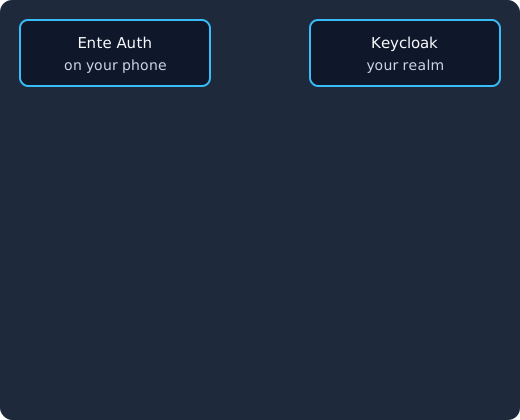
Keycloak shows a QR code with the secret and its OTP policy (1), Ente Auth stores the secret with those settings (2) and, if you use sync, encrypts it on the phone before backing it up (3). At login, Ente Auth works out a code from the secret and the time (4), you type it (5), and Keycloak works out the same code and signs you in (6).
- Check the OTP policy. In the admin console, open Authentication, then the policy tab, then OTP Policy, as the guide’s OTP policies section describes. The guide says “The default algorithm is SHA1.” The other defaults come from our reading of Keycloak’s source code, which may differ between versions: its default policy is time-based codes, SHA1, 6 digits and a 30 second period, and Ente Auth’s code reads them as they are.
- Ask users to enroll. Make OTP required for everyone through the Configure OTP required action, set as a default action for all new users or on each existing user. Users who want OTP on their own can add it in the Account Console under Account security, Signing in, Set up Authenticator application, as the guide’s section on two-factor authentication with OTP describes.
- Scan the QR code in Ente Auth. At their next login, Keycloak shows the user a QR code. In Ente Auth, the user adds a new code and scans it, and the app reads the secret, issuer, account name and policy settings from it.
- Confirm the first code. The user types the 6 digit code Ente Auth now shows into Keycloak’s setup page, along with an optional device name, and Keycloak saves the OTP credential.
- Log in again. From now on, the Browser - Conditional 2FA sub-flow of the default browser flow asks this user for a code after the password.
If you customize the OTP login page later, for example to hide its “Log In” link, our guide on removing the Log In link from the Keycloak OTP page shows how to do it in a login theme.
Which Keycloak OTP policy settings does Ente Auth accept?
The settings that decide compatibility are the hash algorithm, the number of digits and the period. Keycloak’s guide says “The default algorithm is SHA1. The other, more secure options are SHA256 and SHA512.”, and it describes the number of digits and the OTP token period as separate options.
We checked both sides by reading their source code; we did not run a pairing test on a device. Keycloak writes the realm’s choice into the QR code’s otpauth URI as algorithm=SHA1, SHA256 or SHA512, together with digits and period, in its OTPPolicy class. Ente Auth’s code parser reads sha256 and sha512 from that parameter, falls back to SHA1 otherwise, and reads the digits and period from the same URI, and its code generator passes all three to the TOTP calculation. Going by that code, a realm set to SHA256 or SHA512, 8 digits or a 60 second period should still pair with Ente Auth, as long as users scan the QR code rather than typing the secret in by hand, where they would have to set the advanced options themselves.
Two more settings are worth knowing about:
- Look around window. This is how many time steps before and after the current one Keycloak accepts. The guide says “The default value of 1 is adequate”, and its example adds that with a 30 second interval this setting accepts valid tokens “in the 90-second window”. Raise it only if users with drifting clocks are often rejected.
- Reusable code. By default a user cannot submit the same code twice, which the guide describes among the TOTP configuration options. Leave it that way unless you have a specific reason.
Before you move away from SHA1, think about the other apps your users already have. Ente Auth’s code reads all three algorithms, but you cannot be sure every app in your user base does. Changing the policy also does not seem to touch anyone who has already enrolled. This is based on our reading of Keycloak’s current source code, not on the guide, so it may differ between versions: there, OTPCredentialModel copies the policy’s algorithm, digits and period into each user’s credential when it is created, and OTPCredentialProvider validates codes against those stored values, so a new policy applies only to new enrollments.
What happens if a user loses the phone with Ente Auth?
The answer depends on how the user ran Ente Auth. With sync turned on, they install Ente Auth on a new device, sign in with their Ente password and get their codes back, so Keycloak never notices. In offline mode with no export, the secret was only on the lost phone, and the user needs to enroll again.
On the Keycloak side, an admin handles that second case from the user’s Credentials tab. The guide says “You can delete the credentials of a user in the event a user loses an OTP device or if credentials have been compromised”. After you delete the old OTP credential, the user sets up a new one: if OTP is required in your realm, Keycloak asks for it at their next login, and you can also use Credential Reset with the Configure OTP action to email the user a link to the OTP setup page.
Confirm who you are talking to before you delete anyone’s second factor, because a reset done on a phone call is an easy way around 2FA. To spare your help desk most of these requests, give users a fallback they can use themselves. Keycloak’s guide says Recovery Codes are “a number of sequential one-time passwords (currently 12) auto-generated by Keycloak” that can be used as a second factor: enable the Recovery Authentication Codes required action and add the Recovery Authentication Code Form to the browser flow. A passkey registered on a second device works as a fallback too, and our complete guide to passkeys and WebAuthn in Keycloak covers how to set one up. For the wider rollout, from policy to user communication, see our guide on setting up MFA for enterprise applications.
FAQ
Is Ente Auth free?
Yes. Ente’s product page lists it under “Free and open source”, and you can use it without an account in offline mode or create a free account for encrypted backups and sync.
Does Ente Auth work with Keycloak?
Yes. Keycloak’s OTP setup shows a standard otpauth QR code, and Ente Auth reads the secret, algorithm, digits and period from it. Going by the app’s source code (we did not test it on a device), the default Keycloak policy and the SHA256 and SHA512 options should all pair when users scan the code.
Is Ente Auth open source?
Yes. The app’s source is in the ente/ente repository under the AGPL-3.0 license, alongside the architecture notes that explain how tokens are encrypted.
Can I move my codes from Google Authenticator to Ente Auth?
Yes. Ente’s import guide covers Google Authenticator’s export QR codes and other apps’ export files. For Keycloak accounts, you can also skip the import and enroll again by deleting the old OTP credential and scanning a fresh QR code.
Why does Keycloak reject the code from Ente Auth?
Usually the phone’s clock is off, or the code was added by typing the secret with settings that differ from the realm’s OTP policy. Set the phone to use network time, and if that does not help, delete the entry and scan the QR code again so the app picks up the right algorithm, digits and period.
What to do next
Ente Auth is a good choice for users who want open source code, encrypted backups and the same codes on several devices, and it pairs with Keycloak’s default OTP policy without any changes. Check the realm’s OTP policy once, require the Configure OTP action, give users recovery codes or a passkey as a fallback, and decide how your team verifies people before resetting a lost device.
If you would rather not run the Keycloak server yourself, Skycloak runs managed Keycloak for you, and the realm OTP policy and required actions above are standard Keycloak settings: start a Skycloak free trial, or see how managed Keycloak hosting works.