

MCP vs API: What Changes When AI Agents Call Your Backend. MCP vs API: MCP wraps your API so AI agents can discover and call tools at runtime. What changes is the credential: delegated OAuth tokens, not shared API keys.
MCP does not replace your API. It wraps your API in a protocol that lets an AI agent discover tools and call them at runtime, and your existing REST or GraphQL endpoints keep doing the real work behind it. What changes is who holds the credential: the agent acts on a user’s behalf, so your backend needs delegated OAuth 2.1 access tokens that are bound to the MCP server as their audience and limited by per-tool scopes, not a shared API key.
This post is for backend and platform engineers who already run an API and want to know whether the Model Context Protocol (MCP) is a new kind of API, a wrapper around the one you have, or a new security problem. The short answer is that it is a wrapper, and that the security work is real but familiar, because it is OAuth done carefully. We will walk through what actually changes in the request path when an agent calls your backend, then set up Keycloak as the authorization server for an MCP server, step by step.
What is the difference between MCP and an API?
An API is a contract between your service and a program written by a developer who read your documentation. The developer decides which endpoints to call, in what order, with which arguments, and ships that decision as code. MCP is a contract between your service and a program that decides at runtime: a language model inside an MCP client (Claude Code, Cursor, an in-house agent) reads a list of tools your server describes and picks which one to call based on the user’s request.
The MCP tools specification describes tools as “model-controlled, meaning that the language model can discover and invoke tools automatically based on its contextual understanding and the user’s prompts.” Each tool carries a name, a description that the spec defines as a “Human-readable description of functionality” (MCP tools specification), and an inputSchema (a JSON Schema for its arguments).
In practice, an MCP server is a thin service that sits in front of your API. A tool such as refund_order validates its arguments, calls POST /orders/{id}/refunds on your existing backend, and returns the result to the agent. The API stays the system of record, with its business logic, its database and its rate limits. MCP adds a discovery layer and a calling convention on top that an agent can use without someone writing an integration for it first.
| Your API | An MCP server in front of it | |
|---|---|---|
| Who chooses the call | A developer, at build time | A language model, at runtime |
| How the caller learns the surface | OpenAPI file or docs | tools/list at connection time |
| Wire format | Your choice: REST, GraphQL, gRPC | JSON-RPC 2.0 over stdio or Streamable HTTP |
| Typical credential | API key, client credentials, or a user’s token from your app | A user-delegated OAuth access token for the MCP server |
| Who the call is for | The integrating application | A user, through an agent the user approved |
What changes in the request path when an agent calls your backend?
The protocol changes are mostly mechanical, and the authorization changes are the part you have to design. Here is the full path for a remote MCP server, as the MCP authorization specification (2025-06-18) defines it.
- The agent sends its first request to the MCP server with no token. The server answers
401 Unauthorizedwith aWWW-Authenticateheader that points to its protected resource metadata: the spec says MCP servers “MUST use the HTTP headerWWW-Authenticatewhen returning a 401 Unauthorized to indicate the location of the resource server metadata URL” (authorization server location). - The agent fetches that metadata document, defined in RFC 9728 (OAuth 2.0 Protected Resource Metadata), from
/.well-known/oauth-protected-resource, which is the default well-known path in RFC 9728 section 3. Itsauthorization_serversfield, a list of authorization server issuer identifiers (RFC 9728 section 2), tells the agent which authorization server issues tokens for this MCP server, Keycloak in our case. - The agent runs an OAuth 2.1 authorization code flow with PKCE against Keycloak. The user signs in and approves the access, and the agent sends a
resourceparameter naming the MCP server, as RFC 8707 (Resource Indicators) describes and the MCP spec requires of clients (resource parameter implementation). - Keycloak issues an access token whose
aud(audience) claim names the MCP server, with scopes that cover the tools the user approved. - The MCP server validates the token, checks that its own identifier is in the audience (the spec’s token handling section says servers “MUST validate that access tokens were issued specifically for them as the intended audience”), checks the scope for the tool being called, and only then runs the tool.
- To call your API, the MCP server obtains a separate token meant for the API, for example with OAuth 2.0 Token Exchange (RFC 8693), rather than forwarding the token it received.
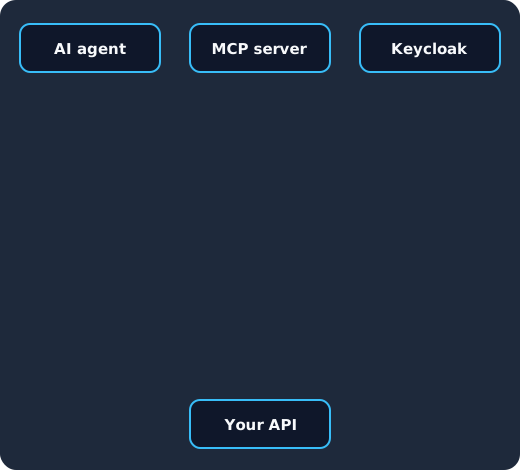
The agent is turned away without a token (1), reads the resource metadata and signs the user in at Keycloak (2), receives a token bound to the MCP server with a tool scope (3), passes the audience and scope checks (4), and the MCP server exchanges that token for a new one to call your API instead of passing it on (5).
Steps 1, 2 and 6 are the ones most API teams have never had to build, because a classic API client is configured by hand with a base URL, a client ID and a key. An agent may meet your MCP server for the first time in the middle of a conversation, so it has to discover everything from the server itself.
Why does the credential change from an API key to a delegated token?
An API key identifies an application, and everything that key does looks the same in your logs. That works well when the application is your own code doing a fixed job, which is why we still recommend API keys for some server-to-server work in our guide to API keys vs OAuth. An agent is different because it acts for a particular user, it chooses its own calls, and it can be steered by whatever text ends up in its context. If you hand it a shared key, every user’s agent can do everything the key can do, and you cannot tell afterwards which user asked for which action.
A delegated access token fixes both problems. It is issued to the agent for one user, after that user consented, so the token’s subject is the user and the token carries only the scopes that user approved. The OAuth 2.1 draft that MCP builds on says that “features not specified in OAuth 2.0 core, such as PKCE, are required in OAuth 2.1”, and that the “Implicit or Resource Owner Password Credentials grant types, are not specified in OAuth 2.1”, so the agent never sees the user’s password.
The MCP specification also tells the MCP server what to do with that token. It says MCP servers “MUST validate that access tokens were issued specifically for them as the intended audience”, that “MCP servers MUST NOT accept or transit any other tokens”, and that when the server calls an upstream API, “the MCP server MUST NOT pass through the token it received from the MCP client” (MCP authorization, 2025-06-18). That rule exists because a forwarded token lets your API believe the MCP server already checked something it never checked, which the spec calls the confused deputy problem.
If you want to go deeper on why agents need identities of their own, our posts on authenticating AI agents with Keycloak and on Cross App Access and ID-JAG for AI agents cover the wider picture beyond MCP.
How do per-tool scopes work?
Scopes are how you keep a user’s approval of an agent from giving that agent everything the user can do. The MCP specification does not define tool scopes for you, but it does list 403 Forbidden for “Invalid scopes or insufficient permissions”, and RFC 9728 lets the server advertise the scopes it understands in scopes_supported.
We suggest you name scopes after what the tools do to your data, so that one scope covers a small family of tools with the same risk. Read tools such as list_orders and get_order can share orders:read, while refund_order gets orders:refund of its own, so a user can let an agent look at orders without letting it move money. The MCP server then checks the scope on every tools/call, and it is good practice to also hide tools from tools/list when the token lacks their scope, so the model is never offered a tool it cannot use.
We do this in our own Keycloak MCP server. The Skycloak MCP server documentation says: “Tools are registered against the scopes on the credential you signed in with, so an account that cannot delete a realm cannot delete one through an agent either.” It also says that deleting a realm, an application, or an identity provider “requires confirm=true”.
How do you set up Keycloak as the authorization server for an MCP server?
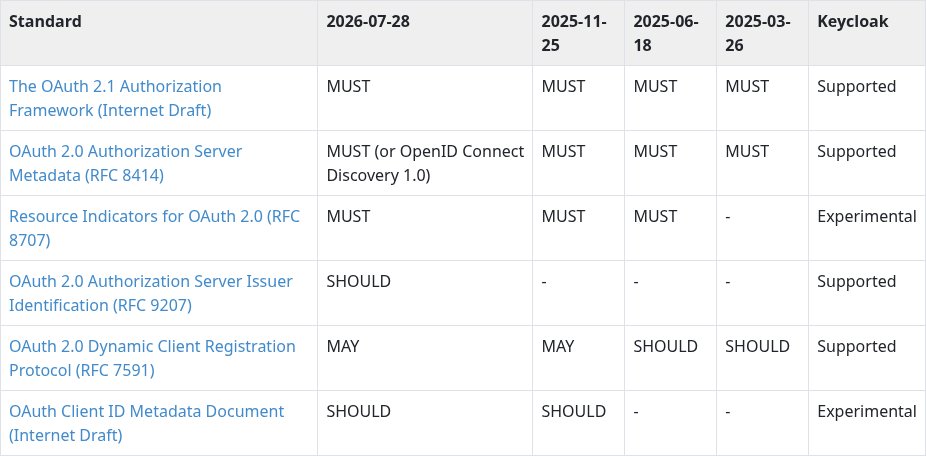
Keycloak has an upstream guide for this, Integrating with Model Context Protocol, and the Keycloak securing applications guides cover the underlying OIDC setup. The steps below follow that guide and add per-tool scopes and token exchange. They assume an MCP server at https://mcp.example.com/mcp that fronts an API at https://api.example.com.
Step 1: Create a realm and a client for the MCP server
In the admin console, create a realm for the users your agents act for, or reuse the realm your application already signs users into. Then create an OpenID Connect client for the MCP server itself, for example orders-mcp. This client represents the resource the tokens are for, and it is also the client that will call the token endpoint for token exchange later, so make it confidential by turning on Client authentication.
Your MCP server needs to publish its protected resource metadata. A minimal document looks like this:
{
  "resource": "https://mcp.example.com/mcp",
  "authorization_servers": ["https://auth.example.com/realms/acme"],
  "scopes_supported": ["orders:read", "orders:refund"],
  "bearer_methods_supported": ["header"]
}
The authorization_servers value is the realm’s issuer URL, and agents find Keycloak’s endpoints from there through its authorization server metadata.
Step 2: Create one client scope per family of tools
Under Client scopes, create orders:read and orders:refund as OpenID Connect scopes. Keycloak’s MCP guide uses the same pattern with broader scopes such as mcp:tools, and it creates them as Optional scopes so that a client gets them only when it asks.
Then decide how agents get a client in your realm. The simplest way to test is to pre-register one, which the MCP specification allows when a client cannot register itself: the client then uses a client ID that was set up in advance (MCP authorization, dynamic client registration). Create an OpenID Connect client named orders-agent with Client authentication off (a public client, because an agent on a laptop cannot keep a secret), Standard flow on, and the agent’s callback in Valid redirect URIs, and set the PKCE method to S256 under its Advanced tab. Then open the client’s Client scopes tab, click Add client scope, and add orders:read and orders:refund as Optional. Keycloak applies an optional client scope “only when requested by the scope parameter” (Keycloak docs: linking client scopes), so a token carries a tool scope only when the agent asks for it and the user approves it.
For production, the MCP specification recommends Dynamic Client Registration so that agents can register without anyone setting them up by hand. Keycloak’s MCP guide lists it as supported, but anonymous registration needs a policy whose allowed client scopes include the scopes your MCP server supports (Keycloak MCP guide). Newer MCP clients can use a Client ID Metadata Document instead, which Keycloak offers as an experimental feature; our post on CIMD for MCP in Keycloak walks through that setup for Claude Code and VS Code.
Step 3: Bind the audience to the MCP server
On each tool scope, add a mapper of type Audience and set Included Custom Audience to https://mcp.example.com/mcp. Every token that carries the scope then has the MCP server’s URL in aud, which is the check the MCP server must make. Keycloak’s MCP guide lists RFC 8707 resource indicators as experimental behind the resource-indicators feature, and without it Keycloak does not set the audience from the resource parameter, so the mapper is what makes the audience right. Our post on the Keycloak MCP server 401 and the audience claim covers the symptoms when this step is missing.
The value must match exactly. If your metadata says https://mcp.example.com/mcp and the mapper says https://mcp.example.com, the MCP server rejects every token with a 401, which looks like a sign-in bug but is a string mismatch.
Step 4: Exchange the token before calling your API
When a tool needs your API, the MCP server sends the agent’s token to Keycloak’s token endpoint as the subject_token of an RFC 8693 token exchange, authenticated as orders-mcp, and asks for a token for the API client:
POST /realms/acme/protocol/openid-connect/token
Content-Type: application/x-www-form-urlencoded
Authorization: Basic (orders-mcp client ID and secret)

grant_type=urn:ietf:params:oauth:grant-type:token-exchange
&subject_token=(the access token the agent sent)
&subject_token_type=urn:ietf:params:oauth:token-type:access_token
&requested_token_type=urn:ietf:params:oauth:token-type:access_token
&audience=orders-api
According to the Keycloak token exchange guide, standard token exchange is enabled by default on the server, but you turn on the Standard token exchange switch on the client that sends the request, and that client must be confidential. The subject token “must have the requester client set as an audience in the aud claim” (token exchange details), so add an Audience mapper that includes the orders-mcp client in the tool scopes as well. The audience parameter can only narrow the audiences of the new token, so orders-mcp also needs orders-api among its own audiences, for example through an Audience mapper in its dedicated client scope, and the guide states that “Keycloak Token exchange does not yet have support for the resource parameter” (same section). Our explainer on how Keycloak token exchange works goes through these rules in more detail.
Step 5: Add delegation if your API needs to know about the agent
A plain exchange gives your API a token for the user, so the API sees the user but not the agent. If you want the API to log or restrict what the agent does, Keycloak 26.8 offers token exchange delegation. Its token exchange delegation section says: “Token Exchange Delegation is Preview and is not fully supported. This feature is disabled by default.” It is enabled by starting the server with --features=token-exchange-delegation (or --features=preview), according to the same section. Under why use delegation, the guide says “Keycloak implements delegation, through the may_act and act claims” and that “the act claim provides a clear audit trail”. Its enabling delegation section says “the client requesting a delegation scope must have Consent required enabled” and “Delegation permissions require FGAP V2” (Fine-Grained Admin Permissions V2). We covered the full flow in Keycloak 26.8 token exchange delegation for AI agents.
Experimental and preview features are server start options, so check which ones your Keycloak runs with before you design around them. On Skycloak, the cluster documentation describes selecting the Keycloak version when you create a cluster, its version upgrades section says “you must upgrade one version at a time”, and it says to contact support “for specialized configurations not available in the dashboard”.
Step 6: Test a delegated, audience-bound token end to end
Before any agent connects, test the path by hand. Call the MCP endpoint without a token and check that you get a 401 with a WWW-Authenticate header naming your metadata URL. Then get a token for orders-agent through the authorization code flow, asking only for the read scope. The authorization request sends the scope parameter for the tool scope and the resource parameter that MCP clients must send (resource parameter implementation):
GET /realms/acme/protocol/openid-connect/auth
    ?response_type=code
    &client_id=orders-agent
    &redirect_uri=http://localhost:33418/callback
    &scope=openid orders:read
    &resource=https://mcp.example.com/mcp
    &code_challenge=(S256 hash of your code verifier)
    &code_challenge_method=S256
    &state=(random value)
Sign in as a test user, take the code from the redirect, and post it to the token endpoint with grant_type=authorization_code, the same redirect_uri, client_id=orders-agent, the code_verifier and the same resource. Paste the access token into our JWT decoder, which runs in your browser, and check that aud contains the MCP server’s URL and that scope contains orders:read and not orders:refund. Call get_order, which the token allows, and refund_order, which it does not, and expect a result and a 403. Finally, check your API’s logs to confirm that the token it received was the exchanged one, with your API as the audience, and not the agent’s original token.
MCP vs REST API: is MCP just REST for agents?
No, and the wire format shows why. The MCP transports specification says “MCP uses JSON-RPC to encode messages” (transports), that a remote server “MUST provide a single HTTP endpoint path (hereafter referred to as the MCP endpoint) that supports both POST and GET methods”, and that “Every JSON-RPC message sent from the client MUST be a new HTTP POST request to the MCP endpoint” (sending messages to the server). A tool call is one of those POSTs, with the tool’s name inside the body as "method": "tools/call" and "name": "refund_order" (calling tools). A REST API spreads the same operations across resources and HTTP verbs, so POST /orders/123/refunds tells a proxy, a cache and a log line what is happening before anything reads the body.
That difference is fine for agents, which read the tool list rather than URL patterns, but it matters for everything around your API that was built for REST. It is also why, in our experience, MCP is rarely a good fit for browsers, mobile apps or partner integrations that are written once and called millions of times: they get little from runtime discovery and would give up HTTP caching and per-route observability.
Identity management as a service, on open source
Skycloak is a managed identity platform in the same category as Auth0 or Okta, built on real upstream Keycloak. You get SSO, MFA, SCIM and audit logs without running the servers, and you can export and self-host whenever you want.
Dynamic tool discovery or a fixed OpenAPI contract?
An OpenAPI file is a contract you publish and version, and a client generated from it breaks loudly when you change it. MCP discovery is softer. The agent calls tools/list when it connects, and a server that declares the listChanged capability can send a notifications/tools/list_changed message when its tools change, after which the client lists them again (MCP tools specification).
This is useful because a model can adapt to a new tool without a release of the client, but it also means your tool descriptions are part of your interface and part of your attack surface. The spec warns that clients “MUST consider tool annotations to be untrusted unless they come from trusted servers” (MCP tools specification), and changing a description changes how a model will use the tool. Review tool names and descriptions as carefully as you would review a public API change.
Stateful sessions or stateless request and response?
REST APIs are usually stateless, with every request carrying its own credential. MCP in the 2025-06-18 revision allows a session: the server may return an Mcp-Session-Id header at initialization, and the client then sends it on every request. The spec still requires the Authorization header on every HTTP request “even if they are part of the same logical session” (MCP authorization, 2025-06-18), so the session never replaces the token.
The 2026-07-28 revision removed the initialization handshake and the session header, as we explain in stateless MCP and the 2026-07-28 spec. If you are building a new MCP server, design it stateless from the start, so that any request can land on any instance behind a plain load balancer, just like your API.
Can you convert an existing API into an MCP server?
Yes, and for most teams that is the right first step. You can generate tools from an OpenAPI file, but a one-to-one mapping of every endpoint can give a model a long list of tools to choose from. In our experience, a better result comes from picking the operations an agent actually needs, merging chatty sequences into one tool, and writing descriptions that say when to use the tool and what it changes.
Does your API security tooling cover MCP servers?
Partly. Anything that works at the HTTP layer still applies: TLS, request size limits, IP rules and rate limits. A web application firewall or API gateway that makes decisions by path and method, though, sees every tool call as POST /mcp, so per-route policies and per-route metrics no longer tell you which tool ran. To get the same control you need either a component that parses the JSON-RPC body or checks inside the MCP server itself.
Token validation also has to live in the MCP server, because only the server knows its own canonical URL and which scope each tool requires. Gateways can help with logging, rate limits and routing to many MCP servers, as our post on what an MCP gateway does and does not do for OAuth explains, but they do not remove the audience and scope checks from the server. The MCP tools specification also says servers must validate all tool inputs and rate limit tool invocations, which is the same discipline you already apply to your API.
When should you use MCP, and when should you keep calling the API directly?
Use MCP when the caller is an agent that should choose its own actions on behalf of a user, especially when you want many different MCP clients, such as editors, chat assistants and in-house agents, to use your service without writing an integration for each. Keep calling the API directly when the caller is code with a fixed job: your own frontend, a nightly batch, a partner integration, or a service-to-service call that runs under a service account with the client credentials grant.
In our experience, teams that add MCP usually keep their API as well, and that is a sound shape. The API remains the single place where business rules and data access are enforced, and the MCP server is one more client of it, with its own audience, its own scopes and its own entries in your logs. If you keep that boundary, adding MCP does not create a second way into your data, only a second, better-labelled caller.
What to do next
Start with one MCP server in front of one API and get the authorization right before you add more tools. Create a Keycloak realm and a confidential client for the MCP server, add one client scope per family of tools with an Audience mapper that names the MCP server’s URL, publish the protected resource metadata, and exchange the agent’s token for an API token instead of forwarding it. Then run the end-to-end test in step 6 and confirm that the audience, the scopes and the token your API receives are the ones you expect.
If you would rather not run the Keycloak side yourself, Skycloak’s managed Keycloak hosting runs your Keycloak cluster for you, and on Skycloak you start version upgrades from the cluster page, as the version upgrades section of the cluster documentation shows.
Sources
- Model Context Protocol, “Authorization”, specification 2025-06-18, retrieved 2026-11-18, modelcontextprotocol.io
- Model Context Protocol, “Transports”, specification 2025-06-18, retrieved 2026-11-18, modelcontextprotocol.io
- Model Context Protocol, “Tools”, specification 2025-06-18, retrieved 2026-11-18, modelcontextprotocol.io
- Model Context Protocol, “Key Changes”, specification 2026-07-28, retrieved 2026-11-18, modelcontextprotocol.io
- IETF, “The OAuth 2.1 Authorization Framework”, Internet-Draft, retrieved 2026-11-18, datatracker.ietf.org
- IETF, RFC 9728, “OAuth 2.0 Protected Resource Metadata”, retrieved 2026-11-18, rfc-editor.org
- IETF, RFC 8707, “Resource Indicators for OAuth 2.0”, retrieved 2026-11-18, rfc-editor.org
- IETF, RFC 8693, “OAuth 2.0 Token Exchange”, retrieved 2026-11-18, rfc-editor.org
- Keycloak, “Integrating with Model Context Protocol”, retrieved 2026-11-18, keycloak.org
- Keycloak, “Configuring and using token exchange”, retrieved 2026-11-18, keycloak.org
- Keycloak, “Securing applications and services”, retrieved 2026-11-18, keycloak.org
- Keycloak, “Server Administration Guide”, section “Link client scope with the client”, retrieved 2026-11-18, keycloak.org