Webhooks
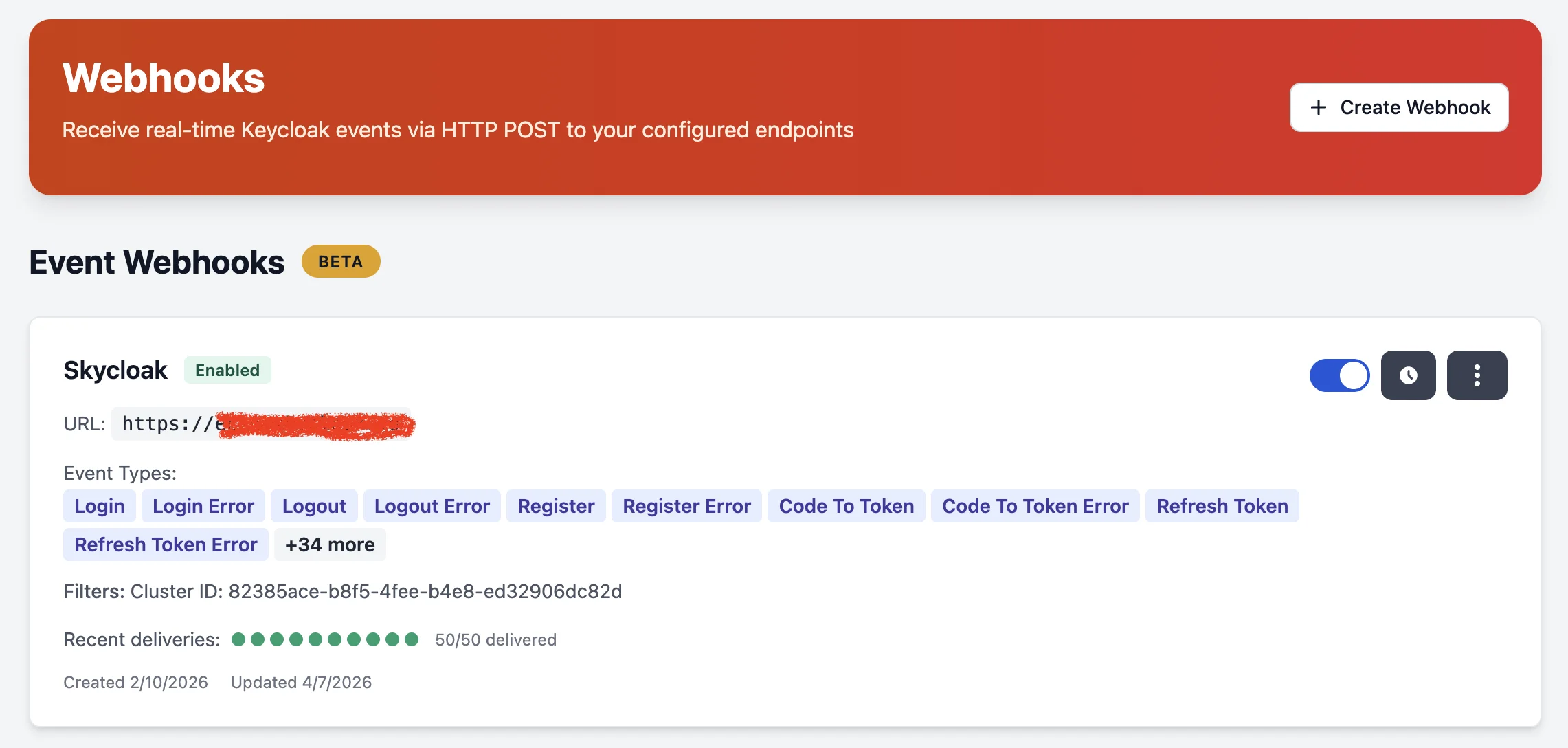
Receive real-time Keycloak events via HTTP POST to your configured endpoints. Webhooks let you integrate authentication events into your own monitoring, analytics, security, or workflow automation systems.
Key Features
- Near real-time delivery: Events are delivered within 3-5 seconds via HTTP POST
- Enriched data: Automatic enrichment with IP geolocation and user-agent parsing
- HMAC-SHA256 signing: Every delivery is signed with a per-webhook secret for payload authenticity
- Flexible filtering: Filter by event type, realm, or cluster
- Inline delivery status: Visual green/red dots show recent delivery health at a glance
- Auto-retry: Failed deliveries are retried with exponential backoff
- Multi-region: Webhooks work across all Skycloak regions (US, CA, EU, AU)
Event Enrichment
Webhook payloads are enriched with additional context that Keycloak does not natively provide:
IP Geolocation
Every event with a client IP address is enriched with geographic data using MaxMind GeoLite2:
{
  "geo": {
    "country": "Canada",
    "country_code": "CA",
    "city": "Toronto",
    "latitude": 43.709,
    "longitude": -79.406
  }
}
User-Agent
Browser, operating system, and device information is parsed from the HTTP User-Agent header:
{
  "user_agent": {
    "browser": "Chrome",
    "browser_version": "125.0.0.0",
    "os": "macOS",
    "os_version": "10.15.7",
    "device": "Macintosh",
    "device_type": "desktop",
    "raw": "Mozilla/5.0 (Macintosh; Intel Mac OS X 10_15_7) ..."
  }
}keycloak-audit-spi) baked into every Keycloak base image. The SPI’s JAX-RS request filter captures the User-Agent header in-process on every event — no log correlation, no timing tolerance, no missed lookups. The raw header is then parsed into structured browser/OS/device fields and attached to the webhook payload.Webhook Payload
Every delivery is a JSON envelope: top-level version, source, type, and timestamp, wrapping the event object that carries the data. Inside event, fields are grouped into nested objects (realm, auth, user, user_agent, geo), and any event-specific extras (for example an email change’s previous_email / updated_email) live under details.
{
  "version": "v1",
  "source": "skycloak",
  "type": "keycloak_event",
  "timestamp": "2026-07-16T09:25:30Z",
  "event": {
    "type": "UPDATE_EMAIL",
    "realm": {
      "id": "production",
      "name": "production"
    },
    "auth": {
      "client_id": "account-console"
    },
    "user": {
      "id": "9c8b7a6d-5e4f-4d3c-8b1a-0f9e8d7c6b5a",
      "ip_address": "203.0.113.42"
    },
    "user_agent": {
      "browser": "Chrome",
      "browser_version": "149.0.0.0",
      "device": "desktop",
      "device_type": "desktop",
      "os": "macOS",
      "os_version": "10.15.7",
      "raw": "Mozilla/5.0 (Macintosh; Intel Mac OS X 10_15_7) AppleWebKit/537.36 (KHTML, like Gecko) Chrome/149.0.0.0 Safari/537.36"
    },
    "geo": {
      "city": "Toronto",
      "country": "Canada",
      "country_code": "CA",
      "latitude": 43.709,
      "longitude": -79.406
    },
    "timestamp": "2026-07-16T09:25:29Z",
    "cluster_id": "2f4d5f2e-8c1a-4b6e-9d3f-5a7b9c1d3e5f",
    "workspace_id": "7e1a9c3b-2d4f-4a6c-8e0b-1f3d5c7a9e1b",
    "details": {
      "action": "update-email",
      "previous_email": "jane@example.com",
      "previous_username": "jane@example.com",
      "updated_email": "jane.doe@example.com",
      "updated_username": "jane.doe@example.com"
    }
  }
}
The
event.typeand thedetailskeys vary by event: aLOGINcarries session and auth fields, anUPDATE_EMAILcarriesprevious_email/updated_emailas above. The envelope (version/source/type/timestamp/event) is always the same.
Admin Events
Admin operation events use the same envelope. Inside event: the type is a composite {OPERATION}_{RESOURCE} (e.g. UPDATE_CLIENT), operation_type holds the raw operation, the affected resource is a nested resource object, and the field-level diff lives under details:
{
  "version": "v1",
  "source": "skycloak",
  "type": "keycloak_event",
  "timestamp": "2026-04-08T15:30:00Z",
  "event": {
    "type": "UPDATE_CLIENT",
    "operation_type": "UPDATE",
    "realm": { "id": "production", "name": "production" },
    "resource": {
      "type": "CLIENT",
      "path": "clients/abc-123"
    },
    "cluster_id": "2f4d5f2e-8c1a-4b6e-9d3f-5a7b9c1d3e5f",
    "workspace_id": "7e1a9c3b-2d4f-4a6c-8e0b-1f3d5c7a9e1b",
    "timestamp": "2026-04-08T15:30:00Z",
    "details": {
      "representation": "{\"id\":\"abc-123\",\"name\":\"new name\",...}",
      "diff_before": "{\"name\":\"old name\",\"directAccessGrantsEnabled\":false}",
      "diff_after": "{\"name\":\"new name\",\"directAccessGrantsEnabled\":true}",
      "changed_fields": ["name", "directAccessGrantsEnabled"]
    }
  }
}
The diff fields under event.details:
| Field | Operations | What it carries |
|---|---|---|
representation |
CREATE, UPDATE | Full post-state of the resource as a JSON string. Mirrors diff_after for newly-released code; kept under this name for legacy webhook consumers. |
diff_before |
UPDATE, DELETE | Pre-state JSON. null on CREATE, since the resource didn’t exist yet. |
diff_after |
CREATE, UPDATE | Post-state JSON. null on DELETE, since the resource is gone. |
changed_fields |
CREATE, UPDATE, DELETE | Dotted paths of keys whose value actually changed. Only fields the operator actually touched: Keycloak’s normalisation defaults that just appear in the post-state (e.g. alwaysDisplayInConsole=false, empty-string attributes) are filtered out. |
The diff is captured by the audit-SPI’s pre-fetch + post-capture pipeline: the SPI snapshots the resource just before Keycloak applies the update, then diffs against the post-state. This gives you a defensible audit trail showing exactly what changed (and from what value to what value), suitable for SOC 2 / change-management evidence.
Webhook Security
Each webhook is assigned a unique HMAC-SHA256 signing secret. Every delivery includes these headers:
| Header | Description |
|---|---|
X-Skycloak-Signature |
HMAC-SHA256 signature of timestamp.payload, prefixed with sha256= (e.g. sha256=a1b2c3…) |
X-Skycloak-Timestamp |
Unix timestamp of the delivery |
X-Skycloak-Delivery-ID |
Unique delivery identifier |
Verifying Signatures
To verify a webhook delivery:
- Concatenate the timestamp and raw request body:
{timestamp}.{body} - Compute the hex-encoded HMAC-SHA256 using your webhook’s signing secret
- Prefix your digest with
sha256=, then compare with theX-Skycloak-Signatureheader (which carries that prefix)
import hmac
import hashlib

def verify_webhook(body: bytes, timestamp: str, signature: str, secret: str) -> bool:
    message = f"{timestamp}.{body.decode()}"
    digest = hmac.new(secret.encode(), message.encode(), hashlib.sha256).hexdigest()
    expected = f"sha256={digest}"  # the X-Skycloak-Signature header is prefixed with "sha256="
    return hmac.compare_digest(expected, signature)
Supported Event Types
Authentication Events
-
LOGIN/LOGIN_ERROR— User login via browser -
LOGOUT/LOGOUT_ERROR— User logout -
REGISTER/REGISTER_ERROR— New user registration -
CLIENT_LOGIN/CLIENT_LOGIN_ERROR— Service account login -
CODE_TO_TOKEN/CODE_TO_TOKEN_ERROR— Authorization code exchange -
REFRESH_TOKEN/REFRESH_TOKEN_ERROR— Token refresh
User Profile Events
-
UPDATE_EMAIL— Email change -
UPDATE_PASSWORD— Password change -
UPDATE_PROFILE— Profile update -
VERIFY_EMAIL— Email verification -
RESET_PASSWORD— Password reset
MFA Events
-
UPDATE_TOTP/REMOVE_TOTP— TOTP configuration changes
Admin Events
-
CREATE/UPDATE/DELETE/ACTION— Administrative operations on resources
Delivery & Retry
- Deliveries that receive a 2xx response are marked as successful
- Failed deliveries are retried with exponential backoff
- After 10 consecutive failures, the webhook is automatically disabled
- Delivery history is visible directly on the webhook card (green/red dots)
- Click the delivery indicator or the history button for full delivery details
Getting Started
- Navigate to Webhooks in the sidebar
- Click Create Webhook
- Provide your HTTP endpoint URL, including the path events should be posted to
(
https://api.example.com/webhooks/events) - Optionally provide an auth token (sent as
Authorization: Bearerheader) - Select which event types to receive
- Optionally filter by specific cluster or realm
- Monitor delivery status directly on the webhook card
Endpoint URL
The URL must point at the route on your server that handles the event, not just at your
domain. https://api.example.com/webhooks/events is accepted;
https://api.example.com is not, because nothing on your server would answer a POST at
the root and every delivery would fail. Both the form and the API reject a URL with no
path, so you find out while configuring the webhook instead of when events go missing.
Webhooks you saved before this rule existed keep working exactly as they are. The check runs on the URL you are saving, so an older webhook with a bare URL is only asked to include a path when you edit its URL.
If you create webhooks through the API, the cluster you name must be one of your
workspace’s clusters, and the realm must be a realm on that cluster. If you send a
realm without a cluster, it must be a realm on one of your workspace’s clusters. A
cluster or realm we cannot find is answered with 404 Not Found at creation time,
rather than saved as a subscription that would never receive anything. Leave both
out to receive events from every cluster in your workspace.
Limits
| Plan | Max Webhooks |
|---|---|
| Trial | 1 |
| Developer | 1 |
| Launch | 3 |
| Business | 10 |
| Enterprise | Unlimited |