
Regulatory compliance means following the laws, industry standards and contractual rules that apply to your business, and being able to prove that you follow them with evidence. For your login system, that proof has a narrow and predictable shape. SOC 2, HIPAA, PCI DSS and GDPR auditors all expect the same core controls from identity and access management (IAM): multi-factor authentication (MFA) that users cannot skip, roles that grant the least access a job needs, periodic reviews of who holds what, prompt removal of access when people leave, session timeouts, and authentication logs that nobody can quietly edit and that you can export on request.
The guides that rank for “regulatory compliance” explain the term for the whole business: which U.S. agencies enforce what, what a compliance officer does, how to write a policy. They say almost nothing about what any of it means for the system that signs your users in. This post narrows to that. It goes framework by framework, lists the control each one asks for, names the evidence an auditor will pull, and shows where that evidence comes from in Keycloak, which is the identity server we run for customers.
What does regulatory compliance mean for a login system?
For most of the business, compliance is about policies and processes. For the login system it is about three questions that every framework asks in its own words: who can get in, what can they do once they are in, and can you show both after the fact. An auditor does not read your Keycloak configuration for fun. They sample users, dates and changes, and ask you to produce the record that answers each question for that sample.
That changes what “compliant” means in practice. A realm with MFA switched on is not evidence; a screenshot of the authentication flow that shows MFA is required, plus a log line for a sampled login that shows the second factor was used, is evidence. Most of the work of compliance in IAM is making sure the evidence exists before anyone asks for it, and that it still exists months later when the audit window closes.
The cost of not doing this varies by framework. GDPR fines for the most serious infringements can reach “20 000 000 EUR, or in the case of an undertaking, up to 4 % of the total worldwide annual turnover of the preceding financial year, whichever is higher”, under Article 83(5). HIPAA penalties are tiered by culpability, which our HIPAA compliance explainer walks through. A SOC 2 report with exceptions costs you deals rather than fines, since the customers who asked for the report read the exceptions first.
The six controls every framework expects from IAM
Before the framework detail, here is the shared core. If your login system does these six things and can prove each one, you have covered most of what any of the four audits will ask of it.
- Enforced MFA. A second factor that applies to everyone the framework cares about, with no path around it. “Available but optional” does not count.
- Least-privilege roles. Access is granted through roles or groups that match a job, not by hand per user, so that you can explain why each person has what they have.
- Periodic access reviews. Someone with authority looks at who holds each privileged role on a schedule, and the review is recorded.
- Prompt deprovisioning. When someone leaves or changes job, their access ends within the time your policy promises, and the record shows when it ended.
- Session controls. Sessions expire after inactivity and after a maximum lifetime, and repeated failed logins lock the account for a while.
- Tamper-resistant, exportable logs. Every login, failed login, logout and administrative change is recorded with who, what and when, kept for the retention period, protected from editing, and exportable for the auditor’s sample.
The rest of this post maps each framework onto that list.
What does a SOC 2 auditor expect from login?
SOC 2 is an attestation defined by the AICPA, the U.S. accountants’ body, against its Trust Services Criteria for security, availability, processing integrity, confidentiality and privacy. The security criteria are mandatory, and in our experience most of the login evidence in a SOC 2 audit is tested under two series of the Common Criteria, CC6, “Logical and Physical Access Controls”, and CC7, “System Operations”, as Secureframe’s walkthrough of the common criteria names them.
- CC6.1 asks that you restrict logical access, identify and authenticate users, and manage credentials. The evidence is your authentication flow showing MFA, your password policy, and a sample of logins.
- CC6.2 covers registering new users and removing access when it is no longer needed. Auditors ask for the list of joiners and leavers in the period and compare it against when each account was created and disabled.
- CC6.3 asks that access be granted by role and reviewed periodically. The evidence is the role model, the list of who holds each privileged role on the review date, and the record of who signed off.
- CC7.2 asks that you monitor for anomalies, which for login means failed-login and lockout events reaching someone who looks at them.
A SOC 2 Type II report covers a period rather than a point in time, and the auditor samples dates across that whole window. A login log that only goes back 30 days will not cover a sample from month two.
What does a HIPAA auditor expect from login?
HIPAA’s Security Rule, which the U.S. Department of Health and Human Services (HHS) summarises here, applies to any system that creates, receives, maintains or transmits electronic protected health information (ePHI). Its technical safeguards in 45 CFR 164.312 read like a login checklist:
- Access control, 164.312(a), requires you to “allow access only to those persons or software programs that have been granted access rights”, with a required specification to “assign a unique name and/or number for identifying and tracking user identity”, and an addressable one to “terminate an electronic session after a predetermined time of inactivity”. Shared accounts fail the first; a session with no idle timeout fails the second.
- Audit controls, 164.312(b), require mechanisms “that record and examine activity in information systems that contain or use electronic protected health information”.
- Person or entity authentication, 164.312(d), requires procedures “to verify that a person or entity seeking access to electronic protected health information is the one claimed”.
The administrative safeguards in 45 CFR 164.308 add the process side: in (a)(1)(ii)(D), procedures “to regularly review records of information system activity, such as audit logs, access reports, and security incident tracking reports”; in (a)(3)(ii)(C), procedures “for terminating access to electronic protected health information when the employment of, or other arrangement with, a workforce member ends”; in (a)(4)(ii)(C), procedures that “establish, document, review, and modify a user’s right of access”; in (a)(5)(ii)(C), “procedures for monitoring log-in attempts and reporting discrepancies”; and in (a)(5)(ii)(D), “procedures for creating, changing, and safeguarding passwords”.
The current rule does not say the word MFA, but the direction is clear. HHS published a proposed update to the Security Rule in the Federal Register on 6 January 2025. The proposal would require regulated entities “to deploy MFA to all technology assets in its relevant electronic information systems”, with three proposed exceptions; written procedures to restore critical systems and data “within 72 hours of the loss”; and notice to other regulated entities “no later than 24 hours after the workforce member’s authorization to access ePHI or relevant electronic information systems is changed or terminated”. Whether or not that rule is final by the time you read this, an auditor applying the current “addressable” standards will already expect MFA on anything that reaches ePHI. If you need the terms, our HIPAA compliance explainer covers covered entities, business associates and the BAA.
What does a PCI DSS auditor expect from login?
PCI DSS is the card brands’ standard for anything that stores, processes or transmits cardholder data, published by the PCI Security Standards Council in its document library. Version 4.0.1 is the current one: the Council retired v4.0 on 31 December 2024, leaving v4.0.1 as the only active version. The standard itself is a download from that library, so the quotes below link to Cloudaware’s PCI DSS v4.0.1 compliance repository, which reproduces the requirement text, for readers who cannot download it. Its Requirements 7 and 8 are the most prescriptive login rules of the four frameworks, which makes them a useful floor for everyone else.
- Requirement 7 restricts access to the cardholder data environment (CDE) by business need, and 7.2.4 requires that “all user accounts and related access privileges, including third-party/vendor accounts, are reviewed” “at least once every six months”.
- 8.3.6 sets “a minimum length of 12 characters (or IF the system does not support 12 characters, a minimum length of eight characters)” for passwords and passphrases, and 8.3.7 says individuals may not reuse “any of the last four passwords/passphrases used”.
- 8.3.9 keeps the 90-day change rule for accounts where a password is the only factor: passwords are “changed at least once every 90 days, or the security posture of accounts is dynamically analyzed”. The Council’s own FAQ on 8.3.9 and 8.3.10.1 says that where an entity has implemented MFA for access to all in-scope system components, “the assessor can mark Requirements 8.3.9 and 8.3.10.1 as “not applicable.””, so with MFA everywhere the rotation rule goes away.
- 8.3.4 requires “locking out the user ID after not more than 10 attempts” and a lockout duration of “a minimum of 30 minutes or until the user’s identity is confirmed”.
- 8.4.2 requires that “MFA is implemented for all non-console access into the CDE”, which the Cloud Security Alliance’s review of the future-dated controls explains as applying “irrespective of user or admin status and regardless of in-network or out-of-network connectivity”, and which, like the other future-dated v4 requirements, became mandatory after March 31, 2025.
- Requirement 10 covers the logs themselves: entries must carry user identification, event type, date and time, success or failure, origin and the affected resource, and 10.5.1 requires you to “retain audit log history for at least 12 months, with at least the most recent three months immediately available for analysis”.
Note that PCI DSS and NIST now disagree on password rotation for single-factor accounts. The current NIST guidance, SP 800-63B-4, section 3.1.1.2, says verifiers “SHALL NOT require subscribers to change passwords periodically” and “SHALL NOT impose other composition rules”, while requiring passwords “used as a single-factor authentication mechanism to be a minimum of 15 characters in length”, “a minimum of eight characters” when the password is only part of MFA, and a check against “a blocklist that contains known commonly used, expected, or compromised passwords”. The practical way out of the disagreement is the same for both: put MFA on every account that matters, and the rotation question stops applying.
What does a GDPR auditor expect from login?
GDPR has no login checklist. What it has is Article 32, which requires “appropriate technical and organisational measures to ensure a level of security appropriate to the risk”, including “the ability to ensure the ongoing confidentiality, integrity, availability and resilience of processing systems and services” and “a process for regularly testing, assessing and evaluating the effectiveness” of those measures. A supervisory authority or a data protection officer reading that against a login system lands on the same six controls as the other frameworks, because MFA, least privilege, reviews, deprovisioning and logging are what “appropriate” has come to mean in practice.
GDPR adds two things the other frameworks do not. First, the login system holds personal data of its own, so it is subject to the data subject rights: the right to erasure in Article 17, and the storage limitation principle in Article 5(1)(e), which says personal data shall be “kept in a form which permits identification of data subjects for no longer than is necessary for the purposes for which the personal data are processed”. Our guide to GDPR data erasure and retention in Keycloak covers deleting and anonymising users and setting event retention to match a documented period. Second, data residency: if your users are in the EU, where the identity server and its logs physically run is a question you will be asked.
Patched on the day, not on your next maintenance window
Keycloak 26.7.2 fixed CVE-2026-18963, an account takeover through password reset. Skycloak had it available for auto-upgrade and told customers the same day upstream shipped it. Self-hosted teams schedule that work themselves.
The evidence table: requirement, control, and where Keycloak produces it
This is the part to run against your own realm. For each control, the table names the requirements it satisfies, the evidence an auditor accepts, and where in Keycloak (admin console path, or an Admin REST API call) you produce it.
| Control | Requirements | Evidence the auditor accepts | Where Keycloak produces it |
|---|---|---|---|
| Enforced MFA | SOC 2 CC6.1; HIPAA 164.312(d); PCI DSS 8.4.2; GDPR Art. 32 | Screenshot of the browser flow with OTP or WebAuthn set to Required (or a Conditional 2FA step that cannot be skipped); the “Configure OTP” required action set as a default; a sampled login event showing the second factor | Authentication, Flows, the browser flow; Authentication, Required actions (docs); the conditional 2FA sub-flow |
| Password policy | PCI DSS 8.3.6, 8.3.7, 8.3.9; HIPAA 164.308(a)(5)(ii)(D) | The realm’s password policy list: minimum length, not recently used, hashing algorithm, password blacklist | Authentication in the menu, then the Policies tab, the path the password policies section of the guide gives; our password policy guide |
| Lockout on failed logins | PCI DSS 8.3.4; HIPAA 164.308(a)(5)(ii)(C) | Brute force detection settings (max login failures, wait increment, permanent lockout); a sampled LOGIN_ERROR event followed by a lockout |
Realm settings in the menu, then the Security defenses tab, then the Brute force detection tab, the path the brute force section of the guide gives (it also says “Brute force detection is disabled by default”) |
| Least-privilege roles | SOC 2 CC6.3; HIPAA 164.312(a); PCI DSS 7.2 | The realm and client role list with a short description of each; group-to-role mappings; proof that users get roles through groups, not one by one | Realm roles, Groups, and role mapping (docs) |
| Access reviews | SOC 2 CC6.3; HIPAA 164.308(a)(4)(ii)(C); PCI DSS 7.2.4 | A dated export of who holds each privileged role, the reviewer’s name and decisions, and the removal events that followed | GET /admin/realms/{realm}/roles/{role-name}/users for each privileged role, kept with the sign-off; the admin events that record the removals |
| Deprovisioning | SOC 2 CC6.2; HIPAA 164.308(a)(3)(ii)(C); PCI DSS 8.2 | The HR leaver list for the period beside the admin event that disabled or deleted each account, showing the gap in hours | PUT /admin/realms/{realm}/users/{id} with enabled: false, or a DELETE; the admin event it writes; POST .../users/{id}/logout to end sessions |
| Session controls | HIPAA 164.312(a)(2)(iii); PCI DSS 8.2.8; NIST 800-63B | The realm’s SSO Session Idle, SSO Session Max and client session settings; a user session limit if you set one | Realm settings, Sessions and Tokens (docs); our session timeout guide |
| Authentication logs | SOC 2 CC7.2; HIPAA 164.312(b); PCI DSS 10; GDPR Art. 32 | User events and admin events enabled, with the saved types and expiration; a sample of events for a given user and date range; proof they reach a system outside Keycloak | Realm settings, Events (docs); GET /admin/realms/{realm}/events and GET .../admin-events; a SIEM destination |
Two items in the table deserve a closer look because Keycloak’s defaults do not do them for you.
Access reviews are not a Keycloak feature. Keycloak can tell you who holds a role today, through the admin console or the role’s users endpoint, which the Admin REST API reference says “Returns a stream of users that have the specified role name”. We are not aware of a built-in feature that records that a person looked at the list and decided. The record of the review lives with you: the export, the date, the reviewer and the decisions, filed where the auditor can see them. Our security audit and hardening checklist includes the queries to run for the export.
Keycloak does not store events until you configure it to. The auditing section of the server administration guide says that “By default, Keycloak does not store or display events in the Admin Console”, and that “Only the error events are logged to the Admin Console and the server’s log file”. It gives the procedure to start storing events: under Realm settings, Events, “Toggle Save events to ON” on the User events settings tab and again on the Admin events settings tab, and for user events “specify the length of time to store events in the Expiration field”. Until you do that, Keycloak does not keep the login and admin events the auditor will ask for. Our complete guide to Keycloak auditing and event logging walks through the settings, the event types, and the “Include representation” switch for admin events, which the same section of the guide says “includes JSON documents sent through the admin REST API so you can view the administrators actions”. Without that configuration, a request for “the login events for this user on this date” has nothing to answer it.
Why your authentication logs are themselves in scope
Teams often treat the login log as a tool for the audit rather than a system under it, and that is a mistake for two of the four frameworks.
Under HIPAA, a log line saying that an identifiable person signed in to a specific provider’s patient portal can reveal that they are a patient of that provider, which is why we treat it as likely protected health information (PHI). The HHS Office for Civil Rights bulletin on online tracking technologies points the same way: it describes user-authenticated webpages “such as a patient or health plan beneficiary portal”, says tracking technologies on them “generally have access to PHI”, and says “Such PHI may include, for example, an individual’s IP address”. The identity server that authenticates patients, and the SIEM that stores those events, are both inside your HIPAA scope and both need a business associate agreement (BAA) if a vendor runs them. Our post on HIPAA-compliant managed Keycloak explains how that works for a hosted identity layer.
Under GDPR, a login event is personal data on its own, because it ties a username to an IP address and a time, and Recital 30 says natural persons “may be associated with online identifiers provided by their devices, applications, tools and protocols, such as internet protocol addresses”. So the log needs a documented retention period, a legal basis (Recital 49 says processing “to the extent strictly necessary and proportionate for the purposes of ensuring network and information security” constitutes a legitimate interest), and a plan for what happens to it when a user asks for erasure.
The consequence for both is the same: decide where logs live and for how long before the audit, not during it. A short expiration inside Keycloak keeps its event tables small, since they grow with every login, and a longer retention in a system built for it (a SIEM or a log store) covers the audit window.
How to produce the evidence from Keycloak
The flow below follows one leaver from the HR record to the moment an auditor accepts the evidence, because deprovisioning is the control auditors sample most and the one where a missing log hurts the most.
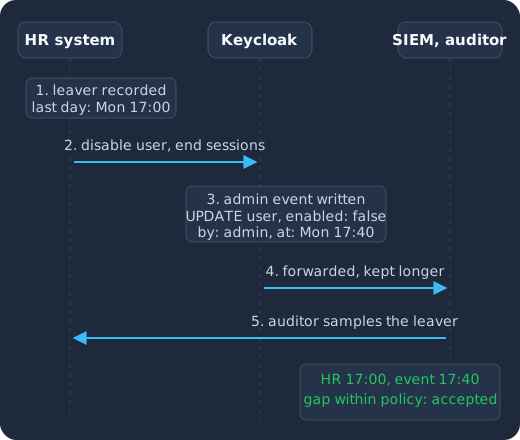
HR records the leaver’s last day (1), an administrator disables the account and ends its sessions (2), Keycloak writes an admin event with the actor and the time (3), the event is forwarded to a SIEM that keeps it past Keycloak’s expiration (4), and the auditor samples the leaver and accepts the gap between the two timestamps because it is within policy (5).
Here is what that looks like as configuration and calls, in order.
- Turn on events in every production realm. Under Realm settings, Events, enable “Save events” for user events, select the saved types (at least the login, logout, login error and credential update events in the guide’s event types list), and set an expiration. Do the same for admin events, and consider “Include representation” so the event carries the JSON the Admin API received.
- Forward events out. Add an event listener that sends events to your SIEM, or use the platform’s forwarding if you run managed Keycloak. On Skycloak that is the HTTP webhook to a SIEM. Keep the longer retention there.
- Disable, do not delete, on the day someone leaves. Set
enabledtofalseon the user, and end their sessions, so the account and its history stay for the audit while access ends immediately. Delete later, on the schedule your GDPR retention policy sets. Our joiner, mover, leaver guide covers wiring that to your HR system so that the gap is minutes rather than days. - Export the privileged role lists on the review date. For each role that matters (realm admin, any role that reaches regulated data), call the role’s users endpoint, save the output with the date, and have the owner mark each name keep or remove. The removals then show up as admin events, which closes the loop.
- Capture the configuration once per period. A realm export, or screenshots of the authentication flow, the password policy, brute force detection and the session settings, dated, is the evidence for the “is the control designed correctly” half of the test. The events are the evidence for the “did it operate” half.
The admin events part matters more than people expect. If someone changes the browser flow to make MFA optional for a week, the admin event is the only thing that will show it, and an auditor who finds the change without the event will ask what else they cannot see.
How Skycloak covers this for managed Keycloak
We run Keycloak for customers who do not want to run identity infrastructure themselves, so the platform is built with the evidence in mind. The facts you can rely on today:
- Skycloak holds SOC 2 Type II and ISO/IEC 27001, and the reports and certificate are shared under NDA through our trust center, with the broader controls described on the security page.
- Skycloak is HIPAA compliant and signs a BAA, so a hosted identity layer for patient logins can sit inside your HIPAA scope with the paperwork in place. We are also GDPR compliant.
- Every customer gets a dedicated Keycloak cluster with its own database, not a shared realm on a shared server.
- Production runs in five hosting regions: two in the United States, plus Canada, Germany and Australia, so EU and Canadian residency questions have a plain answer.
- From the Launch plan, audit logs cover logins, failures and admin actions and are retained on the platform. SIEM export, which sends them to your SIEM, is an add-on on the Launch and Business plans and included on Enterprise, so the retention window of the audit does not depend on Keycloak’s own event expiration.
None of that replaces the parts that are yours: the role model, the access reviews and the leaver process still have to be designed and run by your team. What the platform removes is the work of keeping the logging, forwarding and evidence export running underneath them.
Frequently asked questions
What is regulatory compliance, in one sentence?
Regulatory compliance is following the laws, standards and contractual requirements that apply to your organisation and being able to demonstrate that you do, with records an auditor or regulator can check.
Which compliance framework is strictest about login?
PCI DSS v4.0.1 is the most prescriptive, with numbered rules for password length, lockout thresholds, MFA scope, access review frequency and log retention. SOC 2, HIPAA and GDPR describe outcomes and leave the numbers to you, but their auditors tend to accept the PCI numbers as a reasonable floor.
Does Keycloak make me compliant?
No product does. Keycloak gives you the controls (MFA, roles, policies, session limits, events) and a way to export the records, but compliance is the combination of those controls being switched on, operating for the whole period, and evidenced. The two gaps Keycloak leaves you by default are events being off and access reviews being a process you run yourself.
How long should I keep authentication logs?
Long enough to cover your audit window plus the time it takes to investigate an incident. PCI DSS asks for at least 12 months with 3 months immediately available. SOC 2 needs the whole report period. GDPR asks you to document a period and justify it. Keep a short expiration in Keycloak and the long retention in a SIEM or log store.
Do I need MFA for every user, or only administrators?
For PCI DSS, every account with non-console access into the cardholder data environment, since 31 March 2025. For HIPAA, the proposed 2025 rule would require it for everyone with limited exceptions, and auditors already expect it on anything that reaches ePHI. For SOC 2 and GDPR the framework does not name a scope, so the honest answer is that an auditor will ask why any account without MFA does not need it.
Are login logs personal data under GDPR?
Yes. A login event ties a username to an IP address and a time, and both the username and the IP address are personal data. The log needs a retention period and a legal basis, and security logging is a recognised legitimate interest under Recital 49.
What to do next
Take the evidence table above and go through it against one production realm: for each row, write down where the evidence is today and whether it covers your whole audit period. The rows that come back empty are usually events, forwarding and the access review record, and all three are cheaper to fix a quarter before the audit than during it. For the wider list of controls beyond login, our enterprise IAM security checklist is the companion to this post.
If you would rather have the logging, retention and SIEM export already in place and spend your time on the role model and the reviews, Skycloak managed Keycloak includes audit logs from the Launch plan, with SIEM export as an add-on on Launch and Business and included on Enterprise, and MFA is available and ready to enforce in your realms. Turning on enforcement stays your choice, because under the shared responsibility model your team decides which users and applications must use it.