OAM CVE-2026-91510: What SSO Admins Must Patch Now. CVE-2026-91510 is a CVSS 10.0 flaw in Oracle Access Manager's Authentication Engine, in 12.2.1.4.0 and 14.1.2.1.0. Patch now, then review SSO sessions and admins.
CVE-2026-91510 is a CVSS 10.0 flaw in the Authentication Engine of Oracle Access Manager (OAM), part of Oracle Fusion Middleware, and it affects the supported versions 12.2.1.4.0 and 14.1.2.1.0 (NVD). The record describes it as exploitable by an unauthenticated attacker with network access over HTTP, and its CVSS vector records no user interaction (NVD API record), so apply the fix in Oracle’s November 2026 Critical Security Patch Update now, and then review your SSO sessions and admin accounts for logins you do not recognize.
This post is for the admin who runs OAM in front of internal or customer applications and wants to know quickly whether this CVE applies, how to patch it, and what to check afterwards. Oracle publishes very little about how the flaw works, so we stay with what the advisory and the NVD record say, and spend the rest of the post on the checks you control: the version on each server, the patch, the sessions, the audit events and the applications that trust OAM.
Key takeaways
- Affected: Oracle Access Manager 12.2.1.4.0 and 14.1.2.1.0, component Authentication Engine, per Oracle’s advisory, whose revision history lists Rev 1 as the initial release on 2026-November-17, and the NVD record, which showed a published date of 17 November 2026 when we checked.
- Score: CVSS 3.1 base score 10.0, vector
CVSS:3.1/AV:N/AC:L/PR:N/UI:N/S:C/C:H/I:H/A:L, from Oracle as the source, as shown on the NVD API record when we checked on 18 November 2026; the advisory’s risk matrix gives the same score and metrics.- Exploitation: not confirmed. We found no entry for it in CISA’s Known Exploited Vulnerabilities catalog when we checked its JSON feed on 18 November 2026 (catalog version 2026.11.18), and Oracle’s advisory does not say it is being exploited.
- After patching, end the active OAM sessions, review authentication and administrative audit events, and check the applications that keep their own sessions after an OAM login.
What is CVE-2026-91510?
The NVD record describes it as a “Vulnerability in the Oracle Access Manager product of Oracle Fusion Middleware (component: Authentication Engine)”, affecting the supported versions 12.2.1.4.0 and 14.1.2.1.0. As the NVD API record read when we checked, an unauthenticated attacker with network access over HTTP can exploit it to compromise Oracle Access Manager, which can lead to unauthorized creation, deletion or modification of critical data, unauthorized access to critical data, and a partial denial of service.
The record’s source is Oracle’s November 2026 advisory. Oracle notes that “if HTTP is listed as an affected protocol, it implies that HTTPS is also affected”, so serving OAM only over TLS does not take you out of scope. Oracle also states that it “does not disclose detailed information about this security analysis to customers”, which is why there is no public description of the bug itself, and why this post does not guess at one.
When we checked the NVD API record on 18 November 2026, it showed the status “Received”, with no CPE configuration or weakness (CWE) data on it yet, and its only reference was Oracle’s advisory.
How bad is a 10.0 here?
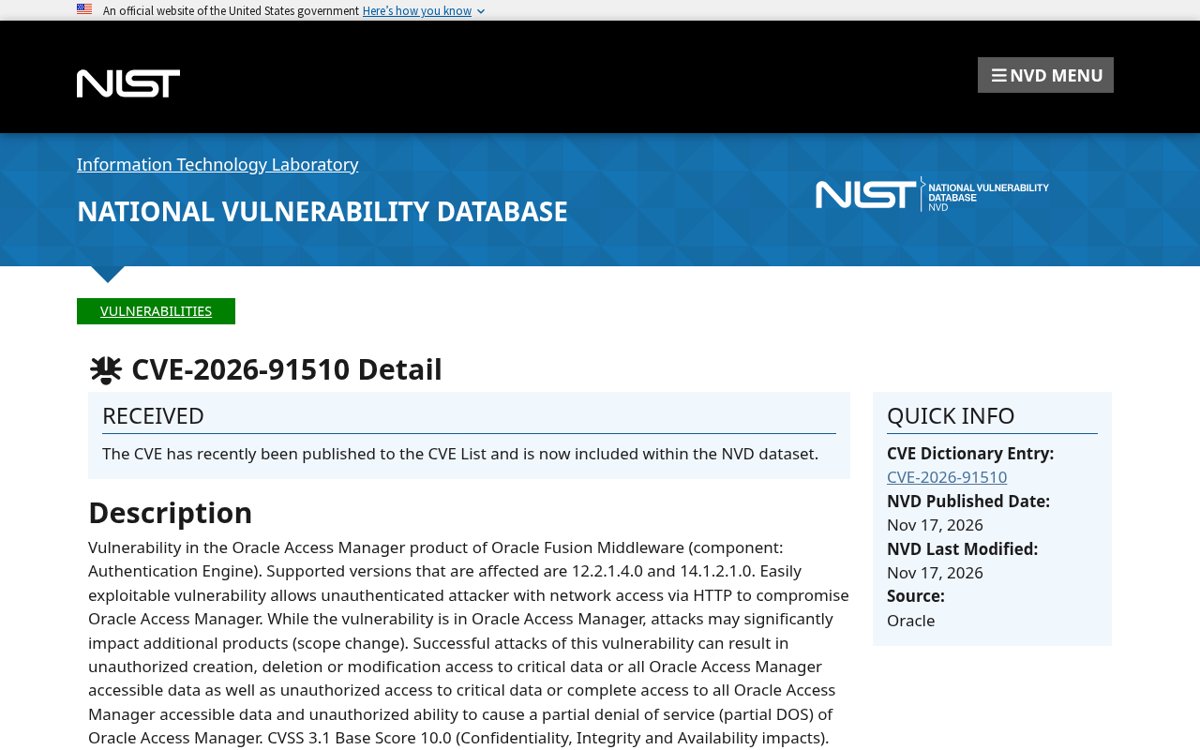
The vector string explains the score better than the number does. Read against FIRST’s CVSS 3.1 specification, AV:N/AC:L/PR:N/UI:N means the attack comes over the network, needs no special conditions, needs no account and needs nobody to click anything. S:C means the scope changes: a successful exploit affects resources beyond the vulnerable component itself. C:H/I:H/A:L means a high impact on confidentiality and integrity and a low impact on availability.
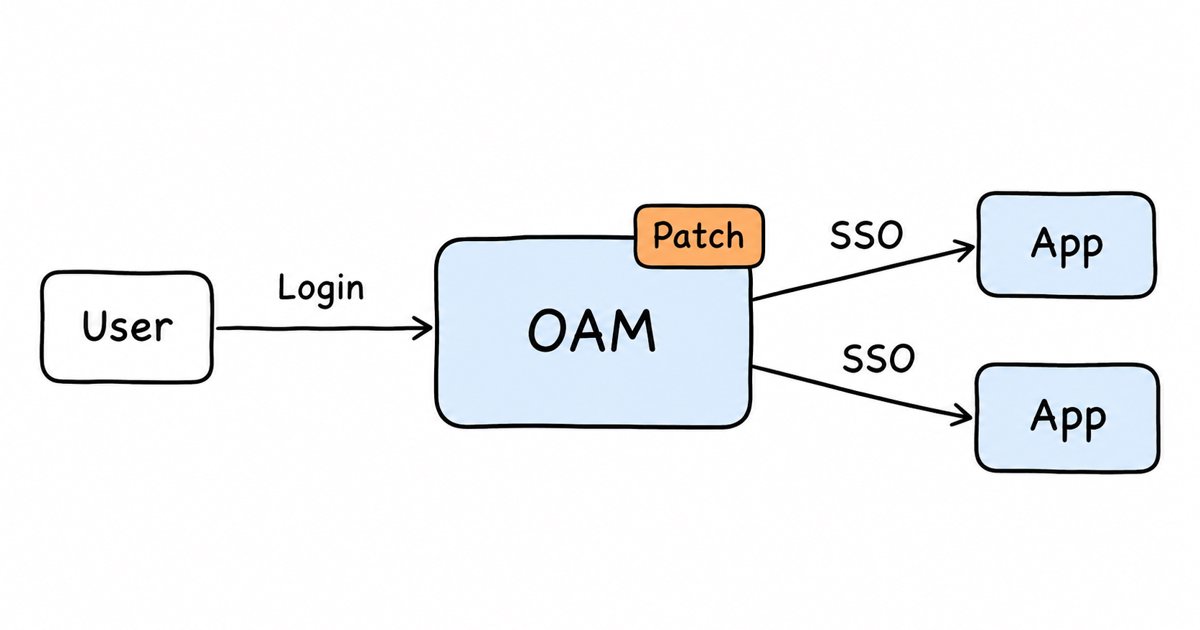
For an access manager, that combination is about as serious as it gets. OAM decides who is signed in for every application it protects, so a flaw that lets an attacker change critical data in it without logging in puts the applications behind it at risk, not only OAM. That is our reading of the vector, not a statement from Oracle about how the flaw is used, but it is the reason we treat the session and audit review below as part of the fix rather than an optional extra.
Is CVE-2026-91510 being exploited?
Nothing confirms it as of 18 November 2026. We checked CISA’s Known Exploited Vulnerabilities catalog through its JSON feed on 18 November 2026, when it was at catalog version 2026.11.18, and we found no entry for CVE-2026-91510 in it. Oracle’s advisory makes no statement about exploitation of this CVE either. Its general note is that Oracle “continues to periodically receive reports of attempts to maliciously exploit vulnerabilities for which Oracle has already released security patches”, and that attackers have succeeded where customers “had failed to apply available Oracle patches”.
A flaw with this vector in a system that is usually reachable by every user is the kind attackers study as soon as a patch is out, because the patch itself shows them where to look. Check the KEV catalog again over the next weeks, and patch on the assumption that it will be added rather than waiting for it.
Which OAM version do you run?
Oracle lists two supported versions as affected, 12.2.1.4.0 and 14.1.2.1.0. To see what each OAM server actually runs, Oracle’s Fusion Middleware documentation says to view the release number with OPatch, from the Oracle home of the installation:
# UNIX
$ORACLE_HOME/OPatch/opatch lsinventory

# Windows
%ORACLE_HOME%\OPatch\opatch lsinventory
In Oracle’s example on that page, the output reports the Oracle home and its inventory, and states whether any interim patches are installed in that Oracle home. Run it on every server in the OAM cluster, including any disaster recovery site, because a node that missed the patch still serves logins.
If the output shows a release older than 12.2.1.4.0, do not read that as safe. Oracle’s advisory says releases outside Premier Support or Extended Support “are not tested for the presence of vulnerabilities” and that “it is likely that earlier versions of affected releases are also affected by these vulnerabilities”. Patches in this program are only made for supported versions, so an older OAM needs an upgrade to a supported release before it can be patched at all.
Where is Oracle’s fix, and how do you apply it?
The fix ships in Oracle’s Critical Security Patch Update Advisory for November 2026, whose revision history lists Rev 1, the initial release, on 2026-November-17. A Critical Security Patch Update (CSPU) is, in Oracle’s words, a release of “targeted, high-priority security fixes in a smaller, more focused format”, and it complements the quarterly cumulative Critical Patch Updates rather than replacing them. You can find it, and earlier advisories, on Oracle’s Security Alerts page.
In the advisory’s “Affected Products and Patch Information” table, the Oracle Access Manager row points to the Fusion Middleware patch availability document, and Oracle says those documents hold the “patch availability information and installation instructions”. The advisory also names the overall document, the “Critical Security Patch Update November 2026 Patch Availability Document for Oracle Products, My Oracle Support Note CPU454”.
A few points make the patch go smoothly:
- Apply the whole set for your version. Check whether the advisory lists more than one fix for Oracle Access Manager, and apply everything Oracle lists for your version, not one patch in isolation.
- Update OPatch first if the instructions ask for it, then apply the patch to each Oracle home and run
opatch lsinventoryagain to confirm it is listed. - Patch every node. OAM often runs as a cluster of managed servers, and a single unpatched node behind the load balancer leaves the flaw reachable.
- Test a sign-in afterwards through each WebGate and federation partner you depend on, so that you find a broken login flow before your users do.
What can you do if you cannot patch today?
Oracle’s guidance in the advisory’s Workarounds section is to patch “as soon as possible”, and that “until you apply the Critical Security Patch Update patches, it may be possible to reduce the risk of successful attack by blocking network protocols required by an attack”. It adds that such measures “may break application functionality” and should be tested on non-production systems first.
For OAM that advice has limits, because the protocol here is HTTP and your users need HTTP to reach the login pages. What you can do in practice is reduce who can reach the servers:
- If OAM only serves internal users, make sure its endpoints are not reachable from the internet, and allow access only from the networks and reverse proxies that need it.
- Keep the Oracle Access Management Console and the WebLogic administration endpoints on an admin network, separate from the user-facing login path.
- Turn on, or raise, auditing now (see below) and forward the audit data off the servers, so that you have a record of the period until you patch.
None of these fix the flaw. They shrink the number of places an attack can come from while you schedule the patch, which should still happen within days, not weeks.
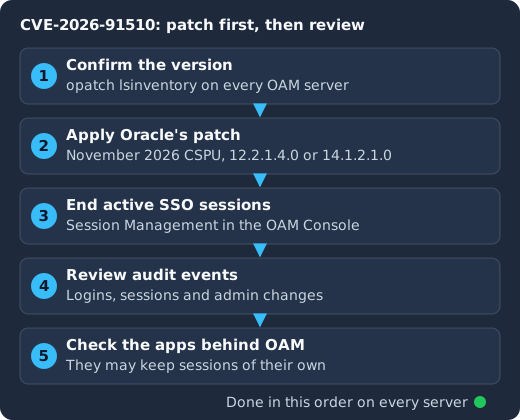
Confirm the version on every OAM server with OPatch, apply the November 2026 patch for 12.2.1.4.0 or 14.1.2.1.0, end the active SSO sessions, review the authentication, session and administrative audit events, and then check the applications that trust OAM, because they may keep sessions of their own.
Which sessions should you end after patching?
Patching closes the flaw, but it does nothing about sessions that already exist. If someone used the flaw before you patched, any SSO session they created stays valid until it expires or you end it. Ending the active OAM sessions once every node is patched is the cleanest way to make sure everyone, including any attacker, has to sign in again through the fixed code.
OAM’s guide to maintaining Access Manager sessions covers how to find and end active sessions from the Oracle Access Management Console; follow it for your version. Oracle’s documentation also notes that termination “is identical to user log out”.
Two practical notes from the same guide. Administrators can delete only active sessions, and remote session termination depends on the session database being available, so check the database is healthy before you rely on it. If you have many users and a mass sign-out would be disruptive, end the sessions of administrators and privileged users first, then everyone else at a quiet time the same day.
Identity you do not have to patch yourself
Skycloak is a managed identity platform for SSO, MFA, SCIM and audit logs. When an advisory lands, the fix is ours to ship: Keycloak 26.7.2 closed an account takeover through password reset and customers had it the same day upstream published it.
Which audit events show a suspicious login?
Oracle’s chapter on auditing administrative and run-time events points to the Audit Framework in Oracle Fusion Middleware for how OAM auditing works, and describes what it can capture, and how much it captures depends on your audit configuration. Wherever your audit data is stored, pull the records for the period your servers ran without the patch, and keep a copy before you change anything else.
The records most useful here are the ones about sign-ins and sessions: successful and failed authentications, and sessions being created and ended, with whatever user and client address details your configuration captures. In those records, look for sessions created for administrators or service accounts from addresses you do not recognize, for sign-ins outside the hours a person would work, and for a session that does not line up with a successful authentication for the same user around the same time. That last check is our suggestion rather than Oracle’s, but a session nobody signed in for is exactly what you would expect to see if someone got past the Authentication Engine without valid credentials.
Then check any records your audit configuration keeps of changes made through the Oracle Access Management Console, and compare the current authentication policies and schemes with what your team expects. A changed authentication scheme or a new policy that nobody on your team made is a strong sign that someone had more access than they should. While you are in the console, review who holds administrator rights for OAM and WebLogic, remove anyone who should not be there, and reset the passwords of the accounts that remain if your review finds anything you cannot explain.
What does this mean for the applications that trust OAM?
Every application behind OAM accepts OAM’s decision about who the user is. With WebGate agents in front of your web servers, see Oracle’s guide to centralized logout for how sign-out reaches each WebGate in your version. With federation, OAM is the identity provider for partner applications, which then create their own login sessions from the assertion or token they receive.
This matters after a flaw like this one for two reasons. First, if an attacker could act as any user in OAM, they could reach every application OAM protects as that user, so the audit review above is also the review of those applications. Second, ending sessions in OAM does not always end the sessions an application created for itself after the login. An application that issued its own session cookie, or a client that holds an OAuth refresh token, can keep a user signed in after the OAM session is gone. For the applications that matter most, check how they handle sessions and end them on the application side too, and for any federation partner whose signing or client credentials you cannot account for, rotate them.
How does the same review look in Keycloak?
If you also run Keycloak, or are comparing OAM with it, the same three checks map onto its admin console and API. Keycloak’s Server Administration Guide describes user events, such as logins and login errors, and admin events for changes made through the console or the API. Our guide to Keycloak auditing and event logging covers enabling both and forwarding them off the server.
For sessions, the Admin REST API reference documents GET /admin/realms/REALM/users/USER-ID/sessions, which lists a user’s sessions, and DELETE /admin/realms/REALM/sessions/SESSION, which removes one. Revoking one Keycloak session without logging the user out everywhere walks through both, along with logging out a whole realm when you want a clean break. The Keycloak security audit and hardening checklist covers who holds admin roles and the rest of the realm settings worth a look after any incident.
Have we seen this pattern before?
Several times this year, in products that sit at the front door of a network. Ivanti Connect Secure’s CVE-2026-111357, BeyondTrust’s CVE-2026-102764 and the Aruba AOS authentication bypass each called for the same response: patch, keep the forwarded logs, end the sessions the vulnerable system issued, and review sign-ins and admin changes for the window before the patch. The difference with OAM is that the vulnerable system is the identity provider itself, so the review covers every application that trusts it.
Frequently asked questions
Which Oracle Access Manager versions does CVE-2026-91510 affect?
The supported versions 12.2.1.4.0 and 14.1.2.1.0, according to the NVD record and Oracle’s advisory. Older releases are not tested, and Oracle says they are likely affected too.
Does CVE-2026-91510 need a login to exploit?
No. The NVD record and its API record say an unauthenticated attacker with network access over HTTP can exploit it, and the CVSS vector records no privileges and no user interaction (PR:N/UI:N).
Is CVE-2026-91510 in CISA’s KEV catalog?
We found no entry for it when we checked catalog version 2026.11.18 on 18 November 2026 through CISA’s KEV feed. Check the catalog again, because entries are added as evidence of exploitation arrives.
Where do I download the patch?
Start from the Oracle Access Manager entry in Oracle’s November 2026 advisory and follow its links to the patch for your version.
Do I have to log everyone out after patching?
Oracle does not require it for this CVE, but we recommend ending the active OAM sessions once every node is patched, because a session created before the patch stays valid until it expires. Oracle’s session guide describes how to end them from the console.
What to do next
Run opatch lsinventory on every OAM server today, and apply the November 2026 patch to each node that runs 12.2.1.4.0 or 14.1.2.1.0, upgrading any older release first. Once every node is patched, end the active SSO sessions, pull the authentication, session and administrative audit events for the time before the patch, and review OAM and WebLogic administrators for accounts and changes you cannot explain. Then check the applications behind OAM that keep their own sessions or tokens. If this incident has your team rethinking how you run single sign-on, our managed Keycloak hosting runs and patches Keycloak for you.
Sources
- NVD, CVE-2026-91510 and its API record, published 17 November 2026, retrieved 2026-11-18
- Oracle, Critical Security Patch Update Advisory, November 2026, Rev 1 (initial release 2026-November-17), retrieved 2026-11-18, and Oracle Security Alerts
- CISA, Known Exploited Vulnerabilities Catalog and its JSON feed, catalog version 2026.11.18, retrieved 2026-11-18
- FIRST, Common Vulnerability Scoring System v3.1: Specification Document, and CVSS overview
- Oracle, Viewing Release Numbers, Fusion Middleware 12.2.1.4 documentation
- Oracle, Maintaining Access Manager Sessions and Auditing Administrative and Run-time Events, Oracle Access Manager 12.2.1.4 Administrator’s Guide
- Keycloak, Server Administration Guide, “Auditing user events” and “Auditing admin events”, and the Admin REST API