
A keylogger is software or hardware that secretly records every keystroke on a device, so an attacker can read passwords, card numbers and messages as they are typed. Passkeys blunt it because nothing is typed and the credential never leaves the device, but the same malware often steals session cookies too, so passkeys plus short sessions and quick revocation are the real defence.
This post gives you the plain definition, a short section on how to spot and remove one, and then the part the usual explainers skip: which login methods a keylogger beats, which it cannot, and how to set the surviving ones up in Keycloak.
What is a keylogger?
A keylogger (short for keystroke logger) is a program or a physical device that records what you type and sends or stores it for someone else to read. MITRE’s ATT&CK catalogue files it as technique T1056.001, Input Capture: Keylogging, and sums up the purpose in one line: “Adversaries may log user keystrokes to intercept credentials as the user types them.” The same page lists the ways software does it, including “Hooking API callbacks used for processing keystrokes,” “Reading raw keystroke data from the hardware buffer,” “Windows Registry modifications,” and “Custom drivers.”
The hooking method is worth a sentence because it explains why a keylogger is so hard to notice. On Windows, a hook is an ordinary feature of the operating system: Microsoft’s own documentation describes it as “a mechanism by which an application can intercept events, such as messages, mouse actions, and keystrokes,” and a WH_KEYBOARD_LL hook “enables you to monitor keyboard input events about to be posted in a thread input queue” (Hooks Overview, Microsoft Learn). A keylogger simply installs such a hook and writes down everything that passes through it. Nothing is broken and nothing crashes, which is why MITRE notes that the technique “cannot be easily mitigated with preventive controls since it is based on the abuse of system features” (T1056.001).
Software keyloggers
A software keylogger is the common kind. Microsoft describes them as programs that “run silently in the background and are often disguised as legitimate programs or are embedded in malicious software” (What is a keylogger?, Microsoft). In practice they rarely come alone. Agent Tesla, a spyware family MITRE has tracked “since at least 2014,” is a good example of the bundle you actually get: it “can log keystrokes on the victim’s machine,” “can gather credentials from a number of browsers,” “can capture screenshots of the victim’s desktop,” and “can steal data from the victim’s clipboard” (Agent Tesla, MITRE ATT&CK). Keep that bundle in mind, because it matters for the defence section later.
Hardware keyloggers
A hardware keylogger is a physical part. Sophos describes one as “an inline device placed between a USB keyboard plug and the computer port” (Sophos), and Microsoft adds that they “are often hidden inside or between parts of a keyboard or computer” (Microsoft). No antivirus scan sees these, because nothing runs on the computer. Someone has to have touched the machine, so they turn up in shared offices, hotel business centres and public terminals rather than on your laptop at home.
Acoustic and visual keyloggers
Two rarer kinds do not touch the keyboard at all. Sophos explains that “acoustic keyloggers use sensitive microphones to record and analyze the distinct sound of different keys being pressed, while visual keyloggers use hidden cameras to watch a user type” (Sophos). You can treat a camera over a shared keypad the same way as a hardware keylogger: a password typed in front of it is gone.
Is a keylogger always malware?
Not always, and that is why the same tool can be sold openly. Microsoft lists employer monitoring on company devices and parental control as lawful uses (Microsoft). Whether a given installation is legal depends on who owns the device, who consented and the law where you are, so check that before you deploy monitoring software on a device someone else uses. For the rest of this post we mean the criminal case, where the person typing has no idea.
How does a keylogger get onto a device?
A software keylogger arrives the way any other malware does. It is attached to a phishing email, hidden in a cracked installer or a fake update, or dropped by a trojan that already has a foothold. Once installed it hooks the keyboard as described above and sends what it collects to the attacker, often with screenshots and browser data alongside. A hardware keylogger needs physical access and a few seconds at the back of the machine.
For your own risk, treat a keylogger as a symptom of a wider compromise rather than a stand-alone threat. If keystrokes are being read, assume the clipboard, the screen and the browser’s stored logins are being read as well, because the Agent Tesla example above shows that is how these tools are built.
How do you detect and remove a keylogger?
Detection is the weak part of the story, which is why this section is short. Microsoft lists “sluggish performance,” “unexpected pop-ups or crashes,” and “unusual network activity” as common signs (Microsoft), and Sophos adds “noticeable typing delays” and “unidentified processes running in your system settings,” but then says plainly that “many enterprise-grade keyloggers show no visible signs at all” (Sophos). So the absence of symptoms tells you very little.
What you can do:
- Run a full scan with an up-to-date antivirus or endpoint tool. Microsoft notes that antivirus software “helps identify and remove known cyberthreats, including many types of keyloggers, by scanning files” (Microsoft). The word “many” matters: a scanner catches the known families and misses the new ones.
- Look at the physical machine. Follow the keyboard cable to the port and check for anything inline, especially on a shared or public computer.
- Change your passwords from a different device that you trust. Microsoft’s advice is plain: “Don’t change your passwords on the infected device” (Microsoft). Changing them on the infected machine just hands the attacker the new ones.
- When in doubt, wipe and reinstall. If a scan finds a keylogger, or you have good reason to think one is there and the scan finds nothing, a clean reinstall of the operating system is the only way to be sure. Cleaning one file out of a bundle like Agent Tesla leaves the rest.
- Sign out everywhere and revoke sessions. This is the step most guides leave out, and the Keycloak section below shows how.
Everything above is reactive. The rest of this post is about making the keylogger’s output worthless in the first place.
Which login methods does a keylogger beat?
A keylogger beats any sign-in where the secret passes through the keyboard and loses against any sign-in where it never does, and that single rule sorts the common methods:
| Login method | What the keylogger captures | Does it survive a keylogger? |
|---|---|---|
| Password only | The whole password, on the first login | No |
| Password plus SMS or email code | Password and the code as you type it | No: NIST notes that with a typed code “an impostor verifier could relay an authenticator output to the verifier and successfully authenticate” (SP 800-63B-4, section 3.2.5), and it says “Use of the PSTN for out-of-band verification is restricted”, PSTN being the public telephone network that carries SMS and voice codes (section 3.1.3.3) |
| Password plus authenticator-app code (TOTP) | Password and the six-digit code | No: the code is typed too. NIST says authenticators that depend on manual entry “SHALL NOT be considered phishing-resistant” (SP 800-63B-4, section 3.2.5) |
| Password plus push approval | The password; the approval is a tap | Partly: nothing to type for the second step, but push bombing works instead, which CISA describes as attackers who “bombard a user with push notifications until they press the ‘Accept’ button, thereby granting threat actor access to the network” (CISA fact sheet) |
| Passkey (platform or synced) | Nothing: the unlock is a fingerprint, face or device PIN, and the PIN never goes to the website | Yes for the login itself, with the session caveat below |
| FIDO2 hardware security key | Nothing: a touch, or a PIN that stays on the key | Yes for the login itself, with the session caveat below |
Two things in that table deserve a closer look: why passkeys hold, and why the last two rows say “the login itself” rather than a plain yes.
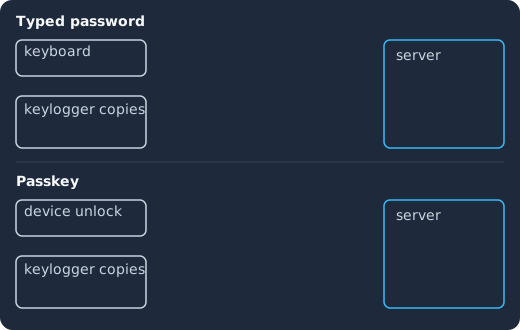
In the top lane the user types a password, the keylogger copies each character, and the attacker replays it to the server, which accepts it. In the bottom lane the user unlocks a passkey on the device, nothing is typed, the device signs a challenge that includes the site’s origin, the keylogger’s copy stays empty, and the server verifies the signature.
Why do passkeys survive a keylogger?
A passkey is a public-key credential. The FIDO Alliance defines it as “an authentication credential based on FIDO standards, that can be stored on your phone or computer, or in a hardware security key allowing a user to sign in to apps and websites with the same process that they use to unlock their device” (FIDO Alliance). When you register, the device creates a key pair and gives the website only the public half: in the words of the WebAuthn standard, the authenticator “creates an asymmetric key pair, and stores its private key portion” while “the public key portion is returned to the Relying Party” (WebAuthn Level 3, section 1). When you sign in, the website sends a random challenge, the device signs it with the private half after you unlock it, and the website checks the signature with the public key it kept.
Three properties of that design each close a door a keylogger would otherwise walk through:
- Nothing is typed. The unlock is your fingerprint, face or device PIN, and the FIDO Alliance notes that “biometric information and processing continues to stay on the device and is never sent to any remote server” (FIDO Alliance). The device PIN is checked locally too. A keylogger can at most capture a PIN that only works on that one device, in that attacker’s hands, which is a very different threat from a password that works from anywhere.
- There is no secret to replay. The WebAuthn standard, which is the browser API behind passkeys, says the credential private key “is bound to a particular authenticator” and “is expected to never be exposed to any other party” (WebAuthn Level 3, section 4). What crosses the network is a signature over a one-time challenge, which is useless a second time.
- The credential only answers the real site. The standard also says that “the public key credential can only be accessed by origins belonging to that Relying Party,” and that “this scoping is enforced jointly by conforming User Agents and authenticators” (WebAuthn Level 3, section 1). That is what makes passkeys phishing-resistant as well as keylogger-resistant: a look-alike page cannot even ask for the credential. CISA’s fact sheet says “The only widely available phishing-resistant authentication is FIDO/WebAuthn authentication” and, of phishing-resistant MFA, that “Push bombing, SS7, and SIM swap attacks are not applicable” (CISA fact sheet).
If you want the broader picture of which methods qualify and which do not, our post on what phishing-resistant MFA is goes through it, and our FIDO2 passwordless explainer covers the registration and sign-in ceremonies in more depth.
Does a virtual on-screen keyboard help?
It helps less than people hope. Sophos answers the question directly: virtual keyboards stop hardware keyloggers, “but advanced software keyloggers can take rapid screenshots or use malicious API calls to record screen coordinates every time a user clicks a virtual key” (Sophos). A password typed with a mouse is still a password that exists and can be copied. A passkey removes the password rather than hiding it.
Patched on the day, not on your next maintenance window
Keycloak 26.7.2 fixed CVE-2026-18963, an account takeover through password reset. Skycloak had it available for auto-upgrade and told customers the same day upstream shipped it. Self-hosted teams schedule that work themselves.
The caveat: the same malware steals session cookies
The phrase “the login itself” in the table matters because of what happens after you sign in. After you sign in, the website gives your browser a session cookie (or your app a token), and that is what every later request carries. MITRE files the theft of those as technique T1539, Steal Web Session Cookie: “An adversary may steal web application or service session cookies and use them to gain access to web applications or Internet services as an authenticated user without needing credentials.” The same page notes that “Session cookies can be used to bypasses some multi-factor authentication protocols,” and the Agent Tesla profile above shows that a keylogging bundle usually includes browser credential theft.
So a keylogger on your machine means two attacks, not one. The keystroke log is beaten by a passkey. The cookie theft is not, because the cookie is issued after the passkey has done its job. The defences for that second attack are about limiting what a stolen session is worth:
- Keep sessions short. NIST’s reauthentication guidance at AAL2 is that the overall timeout “SHOULD be no more than 24 hours” and “The inactivity timeout SHOULD be no more than 1 hour” (SP 800-63B-4, AAL2 requirements). AAL2 is the relevant level for most passkey deployments, because NIST says “syncable authenticators SHALL NOT be used at AAL3” (AAL3 requirements). MITRE’s own mitigation list for cookie theft includes configuring browsers to “regularly delete persistent cookies” and advises you to “minimize the length of time a web cookie is viable” (T1539).
- Be able to revoke everything at once. When you learn of an infection you need one action that ends every session the user has, including the attacker’s copy.
- Rotate refresh tokens. A refresh token that can only be used once turns a stolen copy into a detectable event. The OAuth 2.0 security best practice puts it this way: “If a refresh token is compromised and subsequently used by both the attacker and the legitimate client, one of them will present an invalidated refresh token, which will inform the authorization server of the breach” (RFC 9700, section 4.14.2).
- Bind tokens to the device that asked for them. DPoP (Demonstrating Proof of Possession) is the OAuth extension for this: RFC 9449 describes it as “a mechanism for sender-constraining OAuth 2.0 tokens via a proof-of-possession mechanism on the application level” that “allows for the detection of replay attacks with access and refresh tokens” (RFC 9449, abstract). A token copied off the machine is useless without the private key that stayed on it. Our post on DPoP with the Keycloak Admin API shows the client side.
- Ask for the passkey again before sensitive actions. A stolen cookie that cannot change the email address or add a new authenticator is worth much less. Our step-up authentication guide shows how to require a fresh, stronger sign-in for those actions in Keycloak.
We go deeper on the session side in how infostealers and stolen sessions bypass MFA. The point here is just that passkeys and session hygiene are one defence, not two alternatives.
How do you set this up in Keycloak?
Keycloak covers both halves. The Server Administration Guide says “Keycloak provides support for Passkeys” and that Keycloak “includes control of the session, cookie, and token timeouts through the Sessions and Tokens tabs in the Realm settings menu.” Everything below is in the admin console or the admin REST API, and each step links the section that describes it.
Turn on passkey login
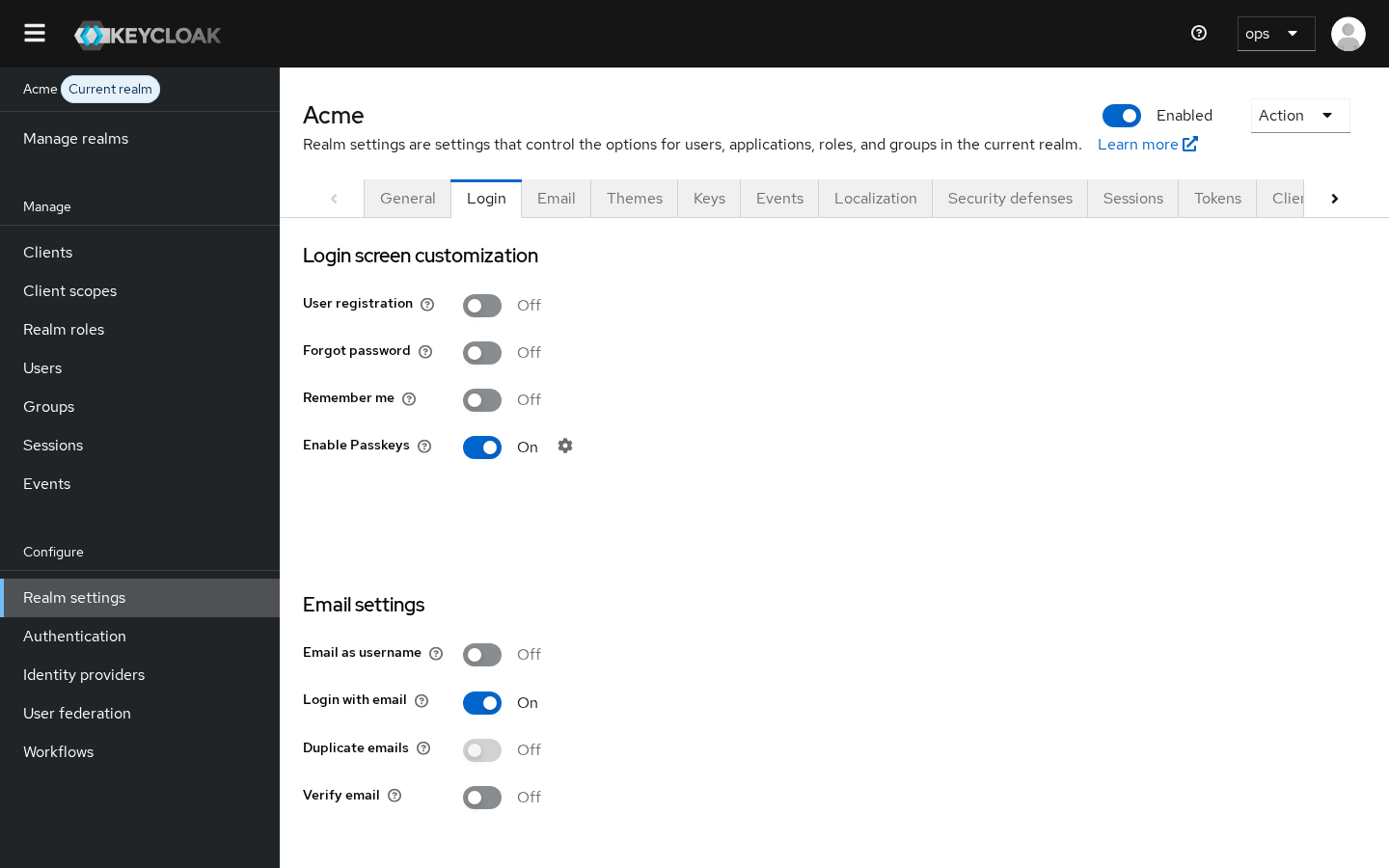
The Keycloak 26.4.0 release notes list “Passkeys integration (supported)” and say that “Passkeys are now seamlessly integrated in the Keycloak login forms using both conditional and modal UIs” (release notes). In the current guide, you open Realm settings, go to the Login tab and, in its words, “In the Login Screen Customization section, activate the Enable Passkeys switch” (passkeys section of the guide). The guide adds: “Use the settings icon next to the switch to navigate directly to the WebAuthn Passwordless Policy for additional configuration.” You rarely need to change it, because “By default, Keycloak sets User Verification Requirement to required and Discoverable Credential to required for the passwordless scenario to work properly” (loginless section).
Then open Authentication > Required actions and switch on Webauthn Register Passwordless. The guide’s registration steps say that when the register action “is Default Action in a realm, new users must set up the Passkey after their first login” (required action section), and its passkeys section tells you to follow those same steps “using WebAuthn Register Passwordless instead of WebAuthn Register” (passkeys section). Do not confuse it with plain Webauthn Register, which belongs to the second-factor policy: the guide notes that “Keycloak uses WebAuthn for two-factor authentication, but you can use WebAuthn as the first-factor authentication”, and the passwordless action is the first-factor one. The full walkthrough, including the second-factor mode, recovery and the usual mistakes, is in our complete guide to Keycloak passkeys and WebAuthn.
One rollout note from the table above: a passkey only protects the accounts where the weaker methods are gone. If a user can still fall back to a typed password plus an SMS code, a keylogger simply waits for that path. Our plan for moving off SMS MFA to Keycloak passkeys covers the fallback problem, and the enterprise passkeys for B2B SaaS post covers what to do when your customers’ own identity providers are in the loop.
Shorten sessions and rotate refresh tokens
Session lifetimes live under Realm settings > Sessions. The guide describes SSO Session Idle as the timeout after which, “if a user is inactive for longer than this timeout, the user session is invalidated,” and SSO Session Max as “the maximum time before a user session expires” (session and token timeouts). The NIST figures above (1 hour inactivity, 24 hours overall at AAL2) are a reasonable starting point for anything that holds personal or financial data, and you can set them per client when one application needs something shorter, since the per-client Client Session Idle and Client Session Max “should be shorter than” the realm values (same section). After you change them, paste a fresh token into our JWT token analyzer to check that the expiry claims match what you set.
Refresh token rotation is under Realm settings > Tokens. With Revoke Refresh Token enabled, “Keycloak revokes refresh tokens and issues another token that the client must use” on every refresh (same section). Our refresh token rotation guide explains the reuse-detection setting that goes with it and the client-side changes it needs.
Revoke everything after an infection
When a user tells you their laptop had malware, log them out everywhere. The admin REST API has a call for one user that the reference describes as “Remove all user sessions associated with the user”, adding that it will “send notification to all clients that have an admin URL to invalidate the sessions for the particular user” (Admin REST API):
curl -X POST \
  -H "Authorization: Bearer $ADMIN_TOKEN" \
  "$KC_URL/admin/realms/my-realm/users/$USER_ID/logout"
For a wider incident, the guide’s procedure under Sessions is: “From the Actions list, select Revocation,” then “Click Set to now to set the policy to the current time and date,” and “Click Push to push this revocation policy to any registered OIDC client with the Keycloak OIDC client adapter” (revoking active sessions). The guide describes the effect as making “sessions or tokens issued before that time and date” invalid. If you only need to end one session rather than all of them, our post on revoking a single Keycloak session covers the session-scoped endpoints.
After a logout, also check the user’s Credentials tab, where the guide says “You can manage credentials of a user” and “You can delete the credentials of a user in the event a user loses an OTP device or if credentials have been compromised” (defining user credentials). Look for any passkey or OTP registered around the time of the infection, since an attacker with a session can add their own. We walk through that audit, and the lure that leads to it, in device code phishing and passkey lures in Keycloak.
Running this on managed Keycloak
Everything above is realm configuration in the admin console or a call to the admin REST API, following the guide sections linked in each step. Skycloak runs managed Keycloak clusters on the version you pick from our supported list, with custom domains and branding for your login page, so you can follow these steps on your own realm without operating the servers. The passwordless feature page and the session management feature page describe what the platform exposes for each half.
Frequently asked questions
Can a keylogger steal a passkey?
No. The private key never leaves the device, and the website only ever receives a signature over a one-time challenge (WebAuthn Level 3, section 4). A keylogger has no keystrokes to record during a passkey sign-in, and the device PIN it might capture only works on that device.
Does two-factor authentication stop a keylogger?
It depends on the second factor. A code you type (SMS, email or an authenticator app) is captured like the password and can be replayed within its lifetime, which is why NIST says manually entered authenticators “SHALL NOT be considered phishing-resistant” (SP 800-63B-4, section 3.2.5). A passkey or a FIDO2 security key is not typed and does stop it.
If I use a passkey, do I still need to worry about malware?
Yes. Malware that logs keystrokes usually also steals session cookies and browser data, as the Agent Tesla profile shows (MITRE ATT&CK). A passkey protects the sign-in, and short sessions, refresh token rotation and quick revocation limit what the stolen session is worth.
Can a keylogger read what I type on my phone?
A phone can be infected like any other device, and malicious apps or accessibility abuse can capture input. The same answer applies: a passkey unlocked with the phone’s biometric or PIN sends nothing typed to the website, so there is nothing for the logger to forward.
Does a password manager protect me from a keylogger?
It helps only partly. Autofill means the password is not typed, so a pure keystroke logger misses it, but the bundle that logs keys usually also reads browser data and the clipboard (MITRE ATT&CK). A password manager is a good habit; a passkey removes the password altogether.
What to do next
If you run a Keycloak realm, turn on passkey login as above and follow the complete guide to Keycloak passkeys for enrollment and recovery, then set the session and token lifetimes and make sure someone on your team knows where the revocation action is before you need it. If you would rather not run Keycloak yourself, Skycloak runs managed Keycloak clusters, so you can follow the same realm settings on your own users without operating the servers. Talk to us if you want help rolling this out on managed Keycloak.
Sources
- MITRE ATT&CK, “Input Capture: Keylogging (T1056.001)”, retrieved 2026-10-28, https://attack.mitre.org/techniques/T1056/001/
- MITRE ATT&CK, “Steal Web Session Cookie (T1539)”, retrieved 2026-10-28, https://attack.mitre.org/techniques/T1539/
- MITRE ATT&CK, “Agent Tesla (S0331)”, retrieved 2026-10-28, https://attack.mitre.org/software/S0331/
- Microsoft Learn, “Hooks Overview”, retrieved 2026-10-28, https://learn.microsoft.com/en-us/windows/win32/winmsg/about-hooks
- Microsoft, “What is a keylogger?”, retrieved 2026-10-28, https://www.microsoft.com/en-us/security/business/security-101/what-is-keylogger
- Sophos, “What is a keylogger and how to detect and remove it?”, retrieved 2026-10-28, https://www.sophos.com/en-us/cybersecurity-explained/keylogger
- W3C, “Web Authentication: An API for accessing Public Key Credentials Level 3”, retrieved 2026-10-28, https://www.w3.org/TR/webauthn-3/
- FIDO Alliance, “Passkeys”, retrieved 2026-10-28, https://fidoalliance.org/passkeys/
- CISA, “Implementing Phishing-Resistant MFA” fact sheet, retrieved 2026-10-28, https://www.cisa.gov/sites/default/files/publications/fact-sheet-implementing-phishing-resistant-mfa-508c.pdf
- NIST, “SP 800-63B-4: Digital Identity Guidelines: Authentication and Authenticator Management”, sections 3.1.3.3 and 3.2.5 and the AAL2 and AAL3 requirements, retrieved 2026-10-28, https://pages.nist.gov/800-63-4/sp800-63b.html
- IETF, “RFC 9700: Best Current Practice for OAuth 2.0 Security”, section 4.14.2, retrieved 2026-10-28, https://www.rfc-editor.org/rfc/rfc9700.html
- IETF, “RFC 9449: OAuth 2.0 Demonstrating Proof of Possession (DPoP)”, abstract, retrieved 2026-10-28, https://www.rfc-editor.org/rfc/rfc9449.html
- Keycloak, “Server Administration Guide”, sections on passkeys, WebAuthn, user credentials, session and token timeouts and revoking active sessions, retrieved 2026-10-28, https://www.keycloak.org/docs/latest/server_admin/index.html
- Keycloak, “Release Notes”, Keycloak 26.4.0, retrieved 2026-10-28, https://www.keycloak.org/docs/latest/release_notes/index.html
- Keycloak, “Administration REST API”, users logout endpoint, retrieved 2026-10-28, https://www.keycloak.org/docs-api/latest/rest-api/index.html