Cursor Supply Chain Attack: How a Fireworks AI Key Spread. A Cursor access key held by Fireworks AI led to tampered Claude Code extensions. What SecurityWeek reported, who must act, and how to retire static keys.
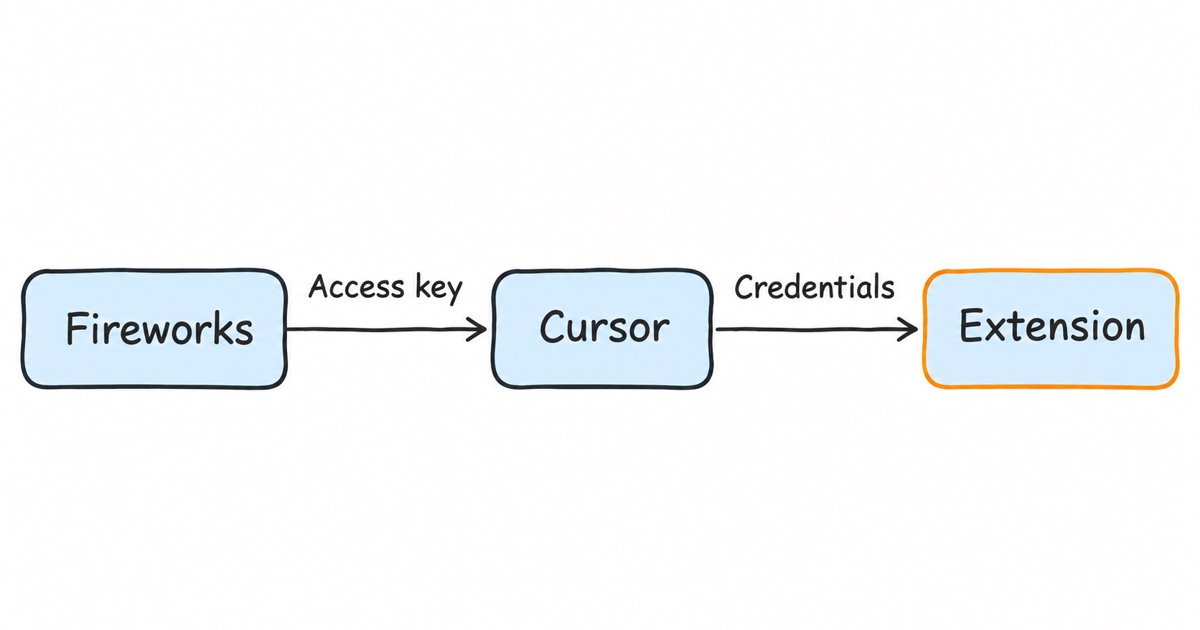
According to SecurityWeek, the Cursor supply chain attack started with an access key stolen at Fireworks AI: a Cursor access key issued to Fireworks was compromised in one of two October breaches there, and the attacker used it to copy credentials that opened Cursor’s SaaS tools and then to place tampered copies of Anthropic’s Claude Code extension on the cache behind Cursor’s VS Code extension marketplace (SecurityWeek). If you installed or updated that extension in Cursor during the window, follow Cursor’s notice. Everyone else should treat it as a prompt to rotate exposed API and cloud keys, scope service credentials to what they need, and move to short-lived tokens tied to workload identity.
This post is for developers, platform engineers and security leads who use Cursor or an AI model provider and want to know what happened and whether they need to do anything. The incident facts below come from SecurityWeek’s report only, because the story is still fresh, and we mark where we move from what was reported to our own advice. The second half explains the lasting fix with open-source Keycloak: service accounts, client credentials, token exchange and short-lived tokens.
Key takeaways
- The key was a Cursor access key that Fireworks AI held, and it was compromised in one of the two October incidents at Fireworks (SecurityWeek).
- The key could read a storage bucket that held unredacted credentials, and those credentials opened the door to SaaS tools Cursor uses, including the cache that serves its extension marketplace.
- Tampered
anthropic.claude-codeversions 2.1.312 and 2.1.313 were served for roughly 11 hours, to at most 5,000 users according to Cursor, and Cursor says uninstalling alone may not be enough.- In our reading, one credential held by a partner led to more credentials. Short-lived, narrowly scoped tokens that a workload gets for itself limit how far that chain can go.
| Item | Detail (all from SecurityWeek, 16 November 2026) |
|---|---|
| Starting point | “A Cursor access key issued to Fireworks was compromised” in one of two October incidents at Fireworks AI (SecurityWeek) |
| What the key reached | A read-only storage bucket with “unredacted credentials that opened the door to SaaS tools used by Cursor” (SecurityWeek) |
| What was published | “malicious, unauthorized copies of Anthropic’s Claude Code extension” on the cache serving the Cursor VS Code extension marketplace (SecurityWeek) |
| Affected versions | anthropic.claude-code 2.1.312 and 2.1.313 |
| Exposure | Roughly 11 hours, at most 5,000 users according to Cursor |
| Discovered | 29 October 2026; no attacker activity in Cursor’s environment since 1 November |
| Not affected | The Open VSX marketplace source; Anthropic says it was not hacked |
What happened in the Cursor supply chain attack?
SecurityWeek reports that Fireworks AI, a model hosting provider, “was hacked twice” in October. In the first incident “internal Fireworks credentials were used to access Fireworks stored secrets and account and billing information”, and in the second “a third-party cloud provider was compromised, Fireworks development machines were reached, and customer data was stolen” (SecurityWeek); Fireworks’ own account is in its security bulletin. The report does not say which incident exposed the Cursor key or how it was taken.
From there the chain ran through Cursor’s own systems, in the order SecurityWeek describes:
- A partner held a Cursor key. Cursor had issued an access key to Fireworks, and that key was compromised at Fireworks.
- The key read a storage bucket. The attacker used it “to copy data from a read-only storage bucket, including unredacted credentials that opened the door to SaaS tools used by Cursor.”
- The copied credentials opened Cursor’s SaaS tools. Through them the attacker took archived non-production source code repositories, limited customer support data and email, product usage metrics and contact details, summaries of some coding agent conversations, and “some credentials users had sent to the Cursor support team.”
- The same credentials reached the marketplace cache. The attacker placed tampered copies of the Claude Code extension “directly on the cache used to serve the Cursor VS Code extension marketplace.” The malware “was never present in the Open VSX marketplace source”, but users who requested the cached versions received it.
- Cursor found it and cut access. The activity was discovered on 29 October, and Cursor “blocked the attacker’s access immediately after discovering the unauthorized activity.”

Fireworks AI was breached twice in October (1), a Cursor access key held by Fireworks was taken (2), the key copied a read-only bucket holding unredacted credentials (3), those credentials opened Cursor’s SaaS tools including the marketplace cache (4), and tampered Claude Code 2.1.312 and 2.1.313 were served for about 11 hours until Cursor found them on 29 October (5).
SecurityWeek also reports that Notion and Uber disclosed data breaches linked to the Fireworks compromise, so the Cursor key was one of several things the Fireworks attacker reached (SecurityWeek).
Were you affected, and what should you do first?
You need to act if you installed or updated anthropic.claude-code to 2.1.312 or 2.1.313 from the Cursor extension marketplace on macOS or Windows between 2:27am PT and 1:35pm PT on 29 October 2026, the window the Cursor security notice gives. Cursor’s advice, as SecurityWeek quotes it, is to “follow the steps in our security notice. Uninstalling the extension alone may not be enough” (SecurityWeek). The Cursor security notice is the place for indicators and remediation scripts, and it ends with “Rotate credentials and sessions accessible from affected hosts, from a trusted system.” Do that rotation from a machine you know is clean, not from the affected laptop.
Two other groups should look closer even if they never ran the bad versions. If you have ever sent a credential to Cursor’s support team, rotate it, because SecurityWeek lists “some credentials users had sent to the Cursor support team” among the stolen data. If you are a Fireworks AI customer, read the Fireworks bulletin and rotate any keys you created there, since its first incident involved access to stored secrets.
How do you check which extension versions are installed?
In Cursor or VS Code, open the Extensions view, find Claude Code and read the version shown next to it. To check a fleet of machines, use the command line. VS Code’s command line documentation describes --list-extensions as “List the installed extensions” and --show-versions as “Show versions of installed extensions, when using --list-extensions”:
code --list-extensions --show-versions | grep -i "anthropic.claude-code"The output gives each extension as publisher.name@version, so a line ending in @2.1.312 or @2.1.313 needs Cursor’s remediation steps. Run it for each editor profile you use, since the same documentation says the “--profile argument can be used to list for a certain profile.” Keep in mind that a clean result today only tells you what is installed now. An extension that was updated past the bad version, or removed, may already have run, which is why Cursor’s notice relies on host indicators rather than on the extension list alone.
Why was one partner’s key enough to reach so far?
This section is our reading of the reported chain, not something SecurityWeek states. An API key is a bearer credential: whoever holds it can use it, from anywhere, until someone revokes it. It says nothing about which machine or which workload is presenting it. When a key is handed to a partner, it lives in that partner’s secret stores and on that partner’s machines, and its safety then depends on their security as much as yours. SecurityWeek’s account of the first Fireworks incident, where internal credentials were used to reach “Fireworks stored secrets”, shows how that exposure can happen.
The second factor was what the key could read. A storage bucket that holds unredacted credentials turns one secret into many, so the attacker’s reach grew from a single key to the SaaS tools those credentials opened, and from there to a channel that ships code to developers’ machines. Each step used a credential that was valid on its own terms, which is why nothing stopped it until Cursor noticed the activity. We wrote about this trade-off in general terms in API keys vs OAuth: when to use each: a static key is simple to hand out, but it carries no expiry, no audience and no link to the caller’s identity unless you build those yourself.
Checklist: rotate and audit your AI provider and cloud keys
These are the steps we would take this week, whether or not you ran the tampered extension. They apply to AI model providers, cloud accounts and any SaaS API key a tool or partner holds.
- Inventory every long-lived key. List the API keys for each model provider, cloud account and SaaS tool, who created each one, where it is stored and which machine or service uses it. Include keys you issued to partners and vendors, since the Cursor key sat at Fireworks.
- Rotate keys that were on developer machines or sent to support. Anything pasted into an editor setting, a
.envfile, a chat with a support team or an extension’s configuration should be replaced. Revoke the old key at the provider after the new one is in place. - Delete keys nobody can explain. A key without an owner or a caller is pure exposure.
- Narrow the scope of what remains. Most providers let you limit a key to a project, a set of models or a set of operations. A key that can only call inference cannot read billing data or another team’s storage.
- Get credentials out of buckets and repositories. Search object storage, repositories and ticket systems for stored secrets, and move the ones you need into a secrets manager. Keycloak’s own server secrets can come from a vault provider, as our Keycloak secrets management guide explains.
- Read provider audit logs for the window. Look for key use from unfamiliar addresses, at odd hours or against APIs the key’s owner never calls.
- Plan to replace static keys for service traffic. For calls between your own services and to APIs you control, short-lived tokens are the lasting fix, as the next sections describe.
Identity you do not have to patch yourself
Skycloak is a managed identity platform for SSO, MFA, SCIM and audit logs. When an advisory lands, the fix is ours to ship: Keycloak 26.7.2 closed an account takeover through password reset and customers had it the same day upstream published it.
How do short-lived, scoped tokens limit a stolen credential?
OAuth 2.0 gives services a way to get access without a user present: the client credentials grant, which RFC 6749 says is used “typically when the client is acting on its own behalf” (RFC 6749, section 1.3.4). Instead of one key that works forever, the service asks an authorization server for an access token, uses it for a few minutes and asks again. RFC 6749 also notes that “access tokens may have a shorter lifetime and fewer permissions than authorized by the resource owner” (RFC 6749, section 1.5), and we explain how the two token types divide the work in access token vs refresh token.
That changes what a thief gets. A copied access token stops working when it expires, it names an audience, so a resource server that checks the audience rejects it elsewhere, and it carries only the scopes the client was allowed. In Keycloak, the realm setting for this is Access Token Lifespan, which the Server Administration Guide, session and token timeouts describes this way: “When Keycloak creates an OIDC access token, this value controls the lifetime of the token.”
In Keycloak, the Server Administration Guide, using a service account says “Each OIDC client has a built-in service account. Use this service account to obtain an access token.” Its procedure turns Client authentication on, enables Service account roles, and then configures the roles available to that service account on the client’s Service Account Roles tab, so you can give the service only the roles it needs. Our machine-to-machine authentication guide walks through the client, the roles, a dedicated client scope and an audience mapper. The same service account section says that instead of a client secret “you can also authenticate the client with a signed JWT assertion”, which the client signs with its own private key, so Keycloak needs only the public key:
curl -s -X POST \
  https://auth.example.com/realms/services/protocol/openid-connect/token \
  -d grant_type=client_credentials \
  -d client_id=billing-worker \
  -d client_assertion_type=urn:ietf:params:oauth:client-assertion-type:jwt-bearer \
  -d client_assertion="$SIGNED_ASSERTION" \
  -d scope=inference-api
The private key still has to be protected, but it never travels over the network, and the token it buys expires on its own.
How does token exchange keep a service from holding broad credentials?
A service in the middle of a chain often needs to call another API. Handing it a broad key for that is how one compromised component reaches many systems. OAuth 2.0 Token Exchange, RFC 8693, instead lets the service trade the token it received for a new one. It defines the subject_token as “A security token that represents the identity of the party on behalf of whom the request is being made” and the audience parameter as “The logical name of the target service where the client intends to use the requested security token” (RFC 8693, section 2.1).
Keycloak’s standard token exchange implements this between clients of the same realm. Its token exchange documentation says “For standard token exchange, token-exchange-standard:v2 is enabled by default”, that you turn on the Standard token exchange switch for the requesting client, that the requester “must be a confidential client”, and that the audience parameter “is effectively used for “downscoping” the token”:
curl -s -X POST \
  https://auth.example.com/realms/services/protocol/openid-connect/token \
  -d grant_type=urn:ietf:params:oauth:grant-type:token-exchange \
  -d client_id=order-api \
  -d client_assertion_type=urn:ietf:params:oauth:client-assertion-type:jwt-bearer \
  -d client_assertion="$SIGNED_ASSERTION" \
  -d subject_token="$INCOMING_ACCESS_TOKEN" \
  -d subject_token_type=urn:ietf:params:oauth:token-type:access_token \
  -d audience=inventory-api
The same documentation warns that without audience, an exchange can ask for extra scopes and audiences, and that to prevent this “the downscope-assertion-grant-enforcer policy executor can be applied to the client” (token exchange documentation). Our post on how Keycloak token exchange works covers the parameters, the V2 and legacy V1 differences, and the cases V2 does not cover.
How does workload identity remove the stored secret?
Short-lived tokens still start from some credential the service holds. Workload identity replaces that credential with one the platform issues to the running workload. SPIFFE, in the words of its overview, “is a set of open-source standards for securely identifying software systems in dynamic and heterogeneous environments”, built around SVIDs, which it calls “short lived cryptographic identity documents”. The same page says “Workloads can then use these identity documents when authenticating to other workloads”, and in its table of software that implements SPIFFE it marks tools that “Can serve the Workload API for automatic rotation.” Where the platform issues the document to the running workload and rotates it, there is no long-lived secret to copy into a bucket.
Keycloak can accept a platform-issued workload credential in one case. The Server Administration Guide’s Kubernetes identity providers section relies on a feature named client-auth-federated, which that section calls both “enabled by default” and “the preview feature client-auth-federated”, and it says to “Change in the Credentials tab the Client Authenticator to Signed JWT - Federated” for each confidential client that should authenticate through a Kubernetes identity provider, so a workload can authenticate with the token Kubernetes gives it rather than a stored secret. Check that section for the feature’s status in your Keycloak version before you rely on it. For SPIFFE itself, the OAuth working group’s client authentication draft and what Keycloak supports today are in our post on workload identity federation with SPIFFE JWT-SVIDs.
None of this covers a third-party AI provider that only accepts its own static API key. For those, keep the key in a secrets manager, scope it as narrowly as the provider allows, give it to one service rather than to people and tools, and rotate it on a schedule.
Frequently asked questions
What was the Fireworks key in the Cursor supply chain attack?
SecurityWeek describes it as “A Cursor access key issued to Fireworks”, compromised in one of two October incidents at Fireworks AI (SecurityWeek). It was Cursor’s key, held by Fireworks, and the report does not say how it was taken.
Which Claude Code extension versions were tampered with?
anthropic.claude-code 2.1.312 and 2.1.313, served from the cache behind the Cursor VS Code extension marketplace for roughly 11 hours (SecurityWeek). SecurityWeek says the malware was never in the Open VSX marketplace source.
Was Anthropic hacked?
No. SecurityWeek reports that “Anthropic was never hacked, and all the malicious activity occurred in Cursor’s environment” (SecurityWeek).
Is uninstalling the extension enough?
Cursor says it may not be: “Uninstalling the extension alone may not be enough” (SecurityWeek). Follow the Cursor security notice and rotate credentials and sessions reachable from the affected machine, from a different, trusted system.
Do I need to rotate my AI provider keys if I never used Cursor?
Not because of this incident alone, unless you are a Fireworks AI customer or a key of yours sat somewhere the attacker reached. It is still a good moment to inventory and rotate long-lived provider keys, using the checklist above.
What to do next
Check today whether anyone on your team ran Claude Code 2.1.312 or 2.1.313 in Cursor, and if so work through Cursor’s notice and rotate everything those machines could reach. Then audit and rotate your AI provider and cloud keys, delete the ones nobody owns, and start moving service access to short-lived, scoped tokens: service accounts with client credentials, token exchange with an audience, and workload credentials in place of stored secrets in Keycloak. If you would rather not run that Keycloak yourself, Skycloak hosts and operates it for you.
Sources
- SecurityWeek, Cursor Supply Chain Attack Started at Fireworks AI, Ionut Arghire, 16 November 2026
- Cursor, Claude Code extension security notice, 29 October 2026, updated 30 October 2026
- Fireworks AI, October 2026 security incident update
- IETF, RFC 6749: The OAuth 2.0 Authorization Framework
- IETF, RFC 8693: OAuth 2.0 Token Exchange
- SPIFFE, SPIFFE overview
- Keycloak, Server Administration Guide and token exchange documentation
- Visual Studio Code, command line interface documentation