How Phishing Kits Replay Microsoft 365 Tokens, and the Fix. Phishing kits steal Microsoft 365 session tokens after MFA and replay them. How the replay works, and the Entra and Keycloak controls that stop it.
Modern phishing kits steal Microsoft 365 session tokens by proxying the real Microsoft sign-in page: the user types a password and passes MFA on the genuine service, the kit keeps a copy of the session cookie or refresh token that comes back, and the attacker replays that token from their own infrastructure. MFA does not stop this, because it protects the sign-in step and the token is issued after that step is done. You cut these kits off with phishing-resistant MFA such as passkeys, token protection that binds tokens to the user’s device, fast session revocation, and alerts on tokens used from a new device or location.
This post explains the replay in plain protocol terms, using the three kits described in a Huntress Labs write-up published on BleepingComputer on 17 November 2026. It then maps every defense to Microsoft Entra ID and to Keycloak side by side, because the same token theft works against any OpenID Connect (OIDC) provider, and the same controls answer it.
What do EvilTokens, Knight Office and Kali365 do?
All three kits are described in the Huntress Labs report on BleepingComputer, which is sponsored content written by Huntress, so the details below rest on Huntress’s research rather than on independent reporting. They take two different routes to the same result, a working Microsoft 365 session in the attacker’s hands.
| Kit | How it gets the token | What the report says it does next |
|---|---|---|
| EvilTokens | Device code phishing | Huntress found it “in early 2026”, using the Railway platform as “a token-harvesting and replay engine” |
| Knight Office | Adversary-in-the-middle (AiTM) proxy | “steals valid Microsoft 365 session tokens and feeds them into an operator console”, then replays them and sets up persistence (BleepingComputer) |
| Kali365 | Device code flows and reverse-proxy lures | Packages “a full Phishing as a Service (PhaaS) operation into a single control panel” for capture, replay and keeping access (BleepingComputer) |
An adversary-in-the-middle proxy is a phishing site that forwards everything between the victim and the real login page, so the victim sees the genuine Microsoft screens and the proxy sees every request and response. Device code phishing skips the proxy: the attacker starts a sign-in for a device, and the victim enters the attacker’s code on Microsoft’s real verification page. In the report’s words, “the victim authenticates directly with the identity provider while the attacker quietly captures the resulting authorization and uses it.”
Why does MFA pass while the stolen token still works?
MFA is a check during sign-in, and both routes let the real user complete that check on the real service. When the check succeeds, Microsoft issues the user’s browser a session cookie and issues the app an access token and a refresh token. These are bearer tokens, which means whoever presents one is treated as its owner, and nothing in the request proves which machine sent it. A proxy that copies the cookie or the refresh token can present it from anywhere, and the service has no reason to ask for MFA again because, as far as it can tell, MFA already happened.
That is why Huntress warns that “successfully completed MFA does not make the session trustworthy on its own” (BleepingComputer). A one-time code or a push approval proves the user was present, but the user really was present. The weakness sits in the token that the sign-in produces, not in the second factor.
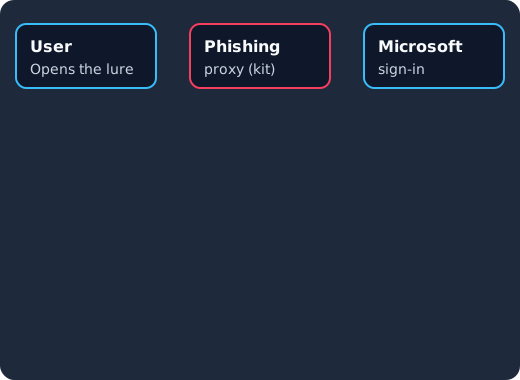
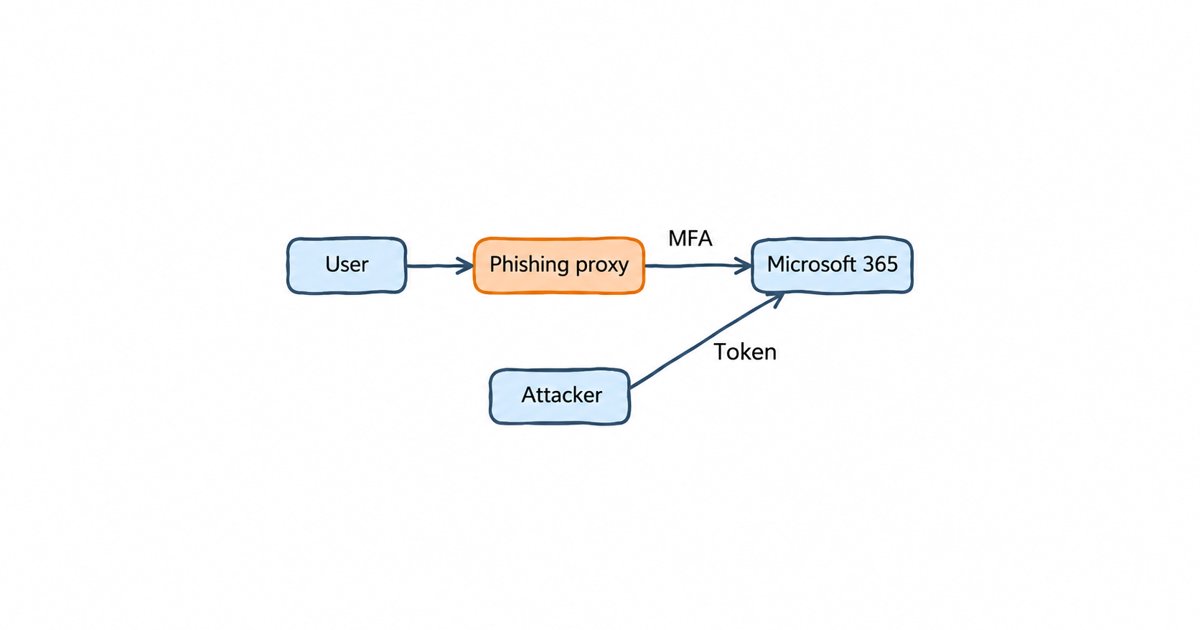
The kit relays the password (1) and the MFA answer (2) to Microsoft, keeps a copy of the session cookie and tokens Microsoft issues (3), and replays them from its own infrastructure, where a plain bearer token is accepted (4) and a token bound to the user’s device is rejected (5).
Session cookie, refresh token or device code: which one did they steal?
The three artifacts behave differently, and the difference decides how you clean up after an incident.
| Stolen artifact | How a kit gets it | What it gives the attacker | What ends it |
|---|---|---|---|
| Browser session cookie | AiTM proxy copies the Set-Cookie response after sign-in |
Browser access to Outlook on the web, SharePoint and other web apps as the user | Revoking the user’s sign-in sessions, or the session reaching its lifetime |
| Refresh token | AiTM proxy, or device code phishing, which hands the attacker’s client a token directly | New access tokens for APIs such as Microsoft Graph, without the user present | Revoking refresh tokens, rotation with reuse detection, or the token’s lifetime |
| Device code approval | The victim enters the attacker’s code on the real verification page | A full token set issued to the attacker’s own client | Blocking the device code flow where nobody needs it, then revoking the issued tokens |
A refresh token is the most valuable of the three, because it keeps producing fresh access tokens long after the original sign-in. Our explainer on access tokens and refresh tokens covers how the two relate, and the post on cookies, tokens and server-side sessions explains why a session cookie and a token are revoked in different places.
How do you revoke a stolen session in Entra ID and Keycloak?
Revoke every session the user has, not just the one you suspect, because you cannot tell from the outside which of them the kit copied. Then remove anything the attacker registered while they were in, because Huntress’s containment advice is to “revoke refresh tokens, then remove unauthorized devices and Windows Hello credentials” (BleepingComputer).
In Entra ID, Microsoft Graph’s revokeSignInSessions call “invalidates all the refresh tokens issued to applications for a user (and session cookies in a user’s browser)” by resetting the user’s signInSessionsValidFromDateTime property. It needs the User.RevokeSessions.All permission, and the same page notes “there might be a small delay of a few minutes before tokens are revoked.”
POST https://graph.microsoft.com/v1.0/users/{id}/revokeSignInSessionsIn Keycloak, the Admin REST API logs a user out of every session with one call, which the Keycloak Admin REST API reference describes as “Remove all user sessions associated with the user”. The code behind that call also sets a not-before time on the user (setNotBeforeForUser), the per-user form of the revocation policy under which “sessions or tokens issued before that time and date are invalid” (Keycloak server administration guide).
# End every session of a user and reject their older refresh tokens
curl -X POST \
  -H "Authorization: Bearer $ADMIN_TOKEN" \
  "$KC_URL/admin/realms/my-realm/users/$USER_ID/logout"

# List the user's credentials to find one the attacker registered
curl -H "Authorization: Bearer $ADMIN_TOKEN" \
  "$KC_URL/admin/realms/my-realm/users/$USER_ID/credentials"
Offline tokens need one more step: the server administration guide says “the offline token is valid after a user logout”, and that administrators “can revoke offline tokens for individual users in the Admin Console in the Consents tab”, as our post on Keycloak offline tokens explains. When you only want to end one device’s session rather than all of them, the guide to revoking a single Keycloak session covers the session-scoped endpoints.
In both products an access token that was already issued stays valid until it expires, unless the service checks back with the identity provider. That makes short access token lifetimes part of revocation, and it is the gap continuous access evaluation closes.
What are token protection and DPoP, and do they stop replay?
Token binding ties a token to a key that only the legitimate device holds, so a copied token is useless on another machine. It is the control that answers replay directly, because it makes the stolen artifact worthless rather than trying to catch its use.
Microsoft’s version is token protection, a Conditional Access session control that works by “ensuring only device bound sign-in session tokens, like Primary Refresh Tokens (PRTs), are accepted.” The page says “this binding ensures that even if a threat actor steals the token, it can’t be used from another device.” Its coverage has limits you should know before you rely on it: native apps are supported for Exchange Online, SharePoint Online and Teams, while browser apps are in preview only for selected web apps that access Azure Resource Manager, according to the same page. Microsoft itself says to use it “as part of a broader defense-in-depth strategy against token theft.”
For your own apps on an OIDC provider, the open standard is DPoP, Demonstrating Proof of Possession, defined in RFC 9449. The client holds a private key and signs a short proof for each request, and the token carries a hash of the matching public key, so a token sent without a proof from that key is refused. The RFC describes it as “sender-constraining OAuth 2.0 tokens via a proof-of-possession mechanism on the application level” that “allows for the detection of replay attacks with access and refresh tokens.” Its section 5 also says that when a server supporting DPoP issues a refresh token to a public client, such as a single-page app or a mobile app, it “MUST be bound to the respective public key”, which matters here because the refresh token is what an attacker most wants.
The Keycloak 26.4.0 release notes say DPoP “is now fully supported”, after it “was a preview feature since Keycloak 23”, and list the “possibility to make only refresh tokens of a public client to be DPoP bound”. You switch it on per client with the Require DPoP bound tokens switch under Capability config, described in Keycloak’s Securing applications with DPoP guide, and our walkthrough on DPoP with the Keycloak Admin API in Node.js shows the client side. That guide describes DPoP as binding “the access and refresh token” to the client’s key pair and says nothing about the browser’s sign-in session with Keycloak, so do not count on it against the AiTM route: that route still needs passkeys, covered further down.
Patched on the day, not on your next maintenance window
Keycloak 26.7.2 fixed CVE-2026-18963, an account takeover through password reset. Skycloak had it available for auto-upgrade and told customers the same day upstream shipped it. Self-hosted teams schedule that work themselves.
How does continuous access evaluation shorten the window?
Continuous access evaluation lets the service that receives a token learn about a security event, such as a revoked session, while the token is still valid, instead of waiting for it to expire. Microsoft’s continuous access evaluation (CAE) is based on the OpenID Continuous Access Evaluation Profile (CAEP), and its initial implementation in Exchange, Teams and SharePoint Online acts on critical events such as a disabled account, a password reset, or an administrator who “explicitly revokes all refresh tokens for a user”. Microsoft’s goal is near real time, but the page warns that “latency of up to 15 minutes might be observed because of event propagation time”, and it also says CAE sessions get access tokens that live “up to 28 hours”. So CAE helps only if the revocation call actually happens, which is why the alerts in the next section matter.
Keycloak does not have an equivalent you can switch on in production yet. An experimental Shared Signals Framework transmitter was merged in Keycloak pull request #48256, which says the code is gated behind a feature flag that is “experimental, off by default”, and our post on Keycloak CAEP and shared signals explains where that stands and how to approximate it. Today you get close with short access tokens, token introspection on sensitive APIs, and refresh token rotation: with Revoke Refresh Token on under Realm settings, Tokens, Keycloak “revokes refresh tokens and issues another token that the client must use” (Keycloak server administration guide), and our refresh token rotation guide shows how that limits a copied refresh token.
Session lifetimes set the outer limit. A new Keycloak realm ends a user session after 30 minutes idle and after 10 hours at most, the defaults set in the Keycloak source; the server administration guide confirms that 10 hours “is the default SSO Session Max timeout set in the realm”, and our Keycloak session timeout guide gives values for each kind of app.
What signals show a token being replayed?
A replayed token looks like a normal session, except that it arrives from a different place than the sign-in that created it. Huntress’s detection advice is to “start by checking for successful sign-ins from unfamiliar cloud infrastructure”, then “hunt for device code authentication and automated token refresh”, then “review new devices, authentication methods, and mailbox activity” (BleepingComputer).
| Signal | Where to look in Entra ID | Where to look in Keycloak |
|---|---|---|
| Same session, new IP or network | Sign-in logs: token use from an IP address that differs from the interactive sign-in, often a hosting provider | REFRESH_TOKEN and CODE_TO_TOKEN events whose IP address differs from the LOGIN event of the same session |
| Device code use | Sign-in logs filtered to the device code authentication protocol | OAUTH2_DEVICE_VERIFY_USER_CODE and OAUTH2_DEVICE_CODE_TO_TOKEN events on clients that should not use the grant |
| New authentication method | Audit logs for a registered security info method or device | UPDATE_CREDENTIAL events shortly after a login |
| Refresh token reuse | Errors from revoked or invalid refresh tokens | REFRESH_TOKEN_ERROR events, which record failed refreshes |
The Keycloak event names come from the Keycloak EventType reference and source, and the server administration guide says that “by default, Keycloak does not store or display events in the Admin Console”, so turn them on under Realm settings, Events before you need them, and send them somewhere you will read them: our walkthrough on forwarding Keycloak events to a SIEM covers that. Of these alerts, a new credential registered soon after a login is the one to set up first, because it fires rarely and an attacker who wants to keep access has to trigger it.
How do you stop device code phishing?
Turn the device code flow off for everything that does not need it, because a perfectly phishing-resistant sign-in still produces a token when the user approves the attacker’s code. The report’s advice is to “restrict or block device code authentication where you can” (BleepingComputer). In Entra ID that is a Conditional Access policy on authentication flows, and Microsoft’s page says it “recommends blocking device code flow wherever possible.” In Keycloak the grant is a per-client switch, OAuth 2.0 Device Authorization Grant, and a client “can use the OIDC Device Authorization Grant” only “if enabled” (server administration guide), so the work is an audit of the clients that have it. Our post on device code phishing and passkey lures has the kcadm.sh command for that audit and the settings to keep for clients that need the grant.
Why do passkeys stop the proxy route?
A passkey only answers the website it was registered for, so a proxy on a look-alike domain gets nothing it can relay. The WebAuthn standard says that “the public key credential can only be accessed by origins belonging to that Relying Party” (W3C WebAuthn Level 3). With a one-time code, the user types the code into the proxy and the proxy passes it on; with a passkey, the browser refuses to use the credential on the proxy’s domain at all, so the sign-in never completes and no token is issued.
That covers the AiTM route only. It does nothing against an approved device code, which is why passkeys and a closed device code flow go together. The Keycloak 26.4.0 release notes list passkeys integration as supported, and our Keycloak passkeys and WebAuthn guide walks through the realm setup. The whole set of controls, side by side:
| Defense | Microsoft Entra ID | Keycloak |
|---|---|---|
| Phishing-resistant MFA | Passkeys and Windows Hello for Business, required by Conditional Access | Passkeys (WebAuthn) |
| Token binding | Token protection (Conditional Access session control) | DPoP, required per client |
| Revoke all sessions | Graph revokeSignInSessions |
Admin API POST /users/{id}/logout |
| Faster reaction | Continuous access evaluation | Short access tokens, introspection, refresh token rotation |
| Block device code abuse | Conditional Access authentication flows policy | Device grant switched on only for clients that need it |
| Detection | Sign-in and audit logs | User and admin events, forwarded to a SIEM |
Frequently asked questions
Can an attacker steal a Microsoft 365 session token without the password?
Yes. Device code phishing never asks for the password: the victim signs in on Microsoft’s real page and approves the attacker’s code, and the tokens go to the attacker’s client. An AiTM proxy does see the password, but it is the copied session cookie or refresh token, not the password, that gives the attacker access past MFA.
Does resetting the user’s password end a stolen session?
Not reliably on its own. In Entra ID, a password reset is one of the critical events continuous access evaluation acts on, but only for services that support CAE, so revoke the user’s sign-in sessions explicitly as well. In Keycloak, use the admin logout call, which ends every session and rejects older refresh tokens.
Is token protection enough to stop token replay?
No. Microsoft’s own page calls it part of “a broader defense-in-depth strategy against token theft”, and its browser support is limited to selected web apps in preview. Pair it with passkeys, a blocked device code flow and alerts on token use from new networks.
Does Keycloak support Continuous Access Evaluation?
Not as a production feature. An experimental Shared Signals Framework transmitter exists behind a feature flag, and the pull request that added it says “receiver support remains on the roadmap”. Short access tokens, introspection on sensitive APIs, refresh token rotation and fast admin logout give you most of the effect today.
What to do next
Start with an audit you can finish this week: list your session and token lifetimes, confirm you can revoke every session of a user in one call and that refresh tokens die with it, find every app that still allows the device code flow, and set up an alert for a new credential registered right after a sign-in. Then move your administrators, and after them everyone else, to passkeys, and turn on token binding (token protection in Entra ID, DPoP in Keycloak) for the clients that support it.
If you run Keycloak for your own apps and would rather not maintain the server yourself, Skycloak’s managed Keycloak hosting runs it for you on real upstream Keycloak with no proprietary fork, as the Skycloak home page says, so short sessions, passkeys and DPoP work as this post describes.