What Is Enterprise SSO? How B2B Apps Connect Customer IdPs. Enterprise SSO lets each B2B customer sign in to your app through its own IdP over SAML or OIDC. How per-customer connections, routing and onboarding work.
Enterprise SSO lets a B2B app’s customers sign in through their own identity provider (IdP), such as Okta or Microsoft Entra ID, over SAML or OpenID Connect (OIDC). Each customer organization gets its own connection, so its IT team controls who has access, enforces MFA and removes leavers in one place, while your app trusts the IdP’s signed answer instead of storing those users’ passwords.
If your first enterprise prospect has just put “SSO required” in a security questionnaire, this post explains what they are asking for from your side of the table. Most explanations of enterprise SSO are written for the IT team buying it. Here we look at it as the vendor of a multi-tenant app: how each customer’s IdP connects, how your login page knows where to send each user, what the sign-in looks like, and what onboarding a customer’s IT team actually involves. Where it helps, we show how Keycloak does each part, since that is what Skycloak runs as a managed service.
What is enterprise SSO?
Single sign-on in general means one login gives a person access to many applications. The US government’s identity playbook puts it plainly: “SSO is a technology pattern used to centralize authentication among multiple applications.” An employee signs in once to their company’s IdP, and every application connected to it accepts that sign-in.
Enterprise SSO is the B2B version of that idea. Your app becomes one of the applications connected to a customer’s IdP, so the customer’s employees use their work accounts to sign in to your product. The customer gets the things the same playbook lists as the point of SSO, such as the ability to “centrally manage authentication policies across all integrated applications”. In practice that means their IT team decides who can use your app, which MFA method is required, and when someone loses access, without asking you to do anything.
The difference from consumer social login (“Sign in with Google”) is who owns the account. With social login the user owns it. With enterprise SSO the customer’s company owns it, and your app has to follow the company’s decisions about it.
How is enterprise SSO different for a SaaS vendor?
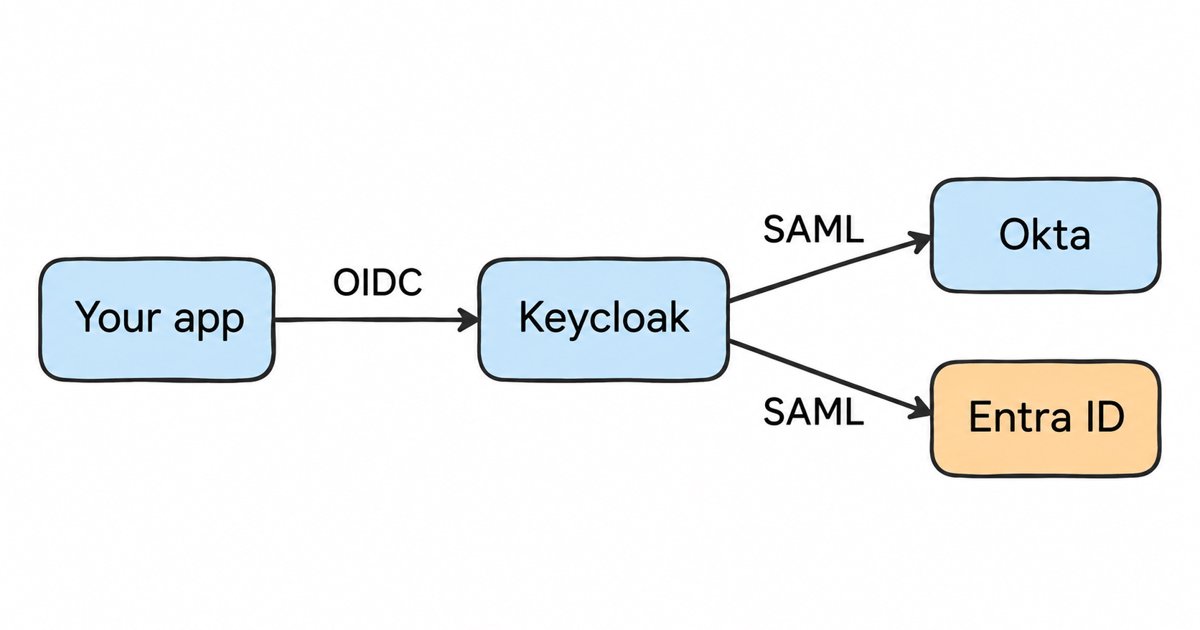
Inside one company, SSO usually means many apps connected to one IdP. As a SaaS vendor you have the opposite shape: one app that has to connect to many IdPs, one per customer. Acme may use Okta, Globex may use Entra ID and a third customer may run its own SAML server, and all three expect their employees to land in the right workspace of your product.
That gives you three problems that a single company never has:
- One connection per customer. Each customer organization needs its own trust relationship, with its own certificates or client credentials, its own attribute mappings and its own settings.
- Routing. Your login page has to work out which customer a user belongs to before it can send them anywhere, ideally without showing every customer’s name on a list.
- Isolation. A login from Acme’s IdP must only ever create or open an Acme account, so a misconfigured or malicious IdP cannot sign someone in to another customer’s data.
For a worked setup of per-customer IdPs with Keycloak Organizations, see federated identity management for B2B SaaS on Skycloak Organizations.
How does each customer’s IdP connect to your app?
The usual design puts an identity layer between your app and all the customer IdPs. Your app speaks one protocol, normally OIDC, to that layer, and the layer holds a separate connection to each customer’s IdP in whatever protocol that customer uses. The Keycloak guide calls such a layer an identity broker, an intermediary service that connects service providers (your app) with identity providers, so your app only ever talks to Keycloak. The benefit is that adding a customer is a configuration change in the identity layer, and your application code does not change. Our post on keeping enterprise SSO working through IdP changes explains why that separation pays off later, when a customer moves from one IdP to another.
Each connection uses one of two protocols:
- SAML 2.0 is the older XML standard that most enterprise IdPs support. The IdP sends your side an assertion, which the SAML 2.0 core specification describes as a package of statements from a SAML authority (here, the IdP), such as when the user authenticated and which attributes they have. The IdP signs it, and your side checks the signature against the IdP’s certificate.
- OIDC is a newer standard built on OAuth 2.0, which the OpenID Connect Core specification introduces as “a simple identity layer on top of the OAuth 2.0 protocol”. The IdP returns an ID token, a JSON Web Token that says who the user is and who issued it, and which the spec requires to be signed.
Both carry the same idea: the customer’s IdP vouches for the user, and you trust it because you checked its signature. If you need to choose between them for a given customer, our SAML vs OIDC guide compares them, though in practice you will support both, because the customer picks.
In Keycloak, the per-customer part is handled by Organizations. You create an organization for each customer and link that customer’s identity provider to it, and the guide explains that each of its domains can be configured to route users to an identity provider linked to the organization.
What does an enterprise SSO login look like for the user?
Here is what an enterprise SSO login looks like from the end user’s side. This is the most common flow, where the user starts at your app (called SP-initiated, because the service provider starts it):
- Jo, who works at Acme, opens your app and clicks Sign in.
- Your app redirects the browser to your identity layer, which is Keycloak in our example.
- Keycloak asks for an email address first. Jo types
jo@acme.com, and Keycloak matches the domain to the Acme organization. - Keycloak redirects Jo to Acme’s IdP with a SAML or OIDC request. If Jo is already signed in there, this step is invisible. Otherwise Jo signs in with the company password and whatever MFA Acme requires.
- Acme’s IdP sends a signed response back to Keycloak, which checks the signature and creates or updates Jo’s account in the Acme organization.
- Keycloak issues tokens to your app, and Jo lands in Acme’s workspace.
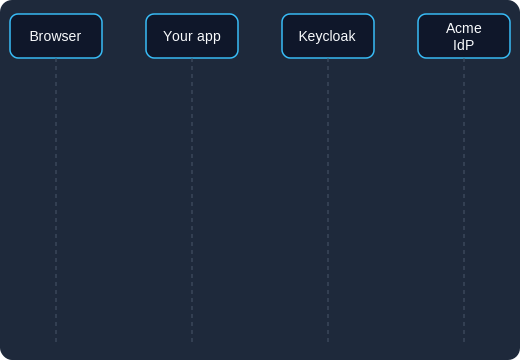
Jo clicks Sign in (1), your app redirects to Keycloak (2), Jo’s email domain picks the Acme organization (3), Keycloak sends a SAML or OIDC request to Acme’s IdP (4), the IdP returns a signed reply (5), and Keycloak gives your app tokens (6).
From Jo’s point of view, the whole thing is typing a work email, perhaps approving an MFA prompt, and landing in the app. Jo never creates a password for your app, which suits Acme’s IT team, because they cannot revoke or set policy for a password that lives outside their IdP.
How does your login page know which IdP to use?
Working out which IdP a user belongs to is called home realm discovery, a term that comes from Microsoft’s products. The common approach is the one in step 3 above: ask for the email address first, take the domain, and look up which customer owns it. In Keycloak this is built into Organizations. When a domain is linked to an organization’s IdP with redirection turned on, users on that domain are sent straight to their IdP without seeing a list of providers. Our home realm discovery post covers the setup and its traps, such as making sure a customer really owns a domain before you route logins on it, and the fact that a user who still has a local password is asked for it rather than redirected.
The other approach is for your app to name the IdP itself. If Acme’s users reach you through acme.yourapp.com, your app already knows the customer and can tell Keycloak which provider to use with the kc_idp_hint parameter, which the Keycloak guide documents as a client-suggested identity provider. Many products use both: email routing on the shared login page, and a hint on customer-specific URLs. Our kc_idp_hint guide has examples.
Should you support SP-initiated and IdP-initiated SSO?
The walkthrough above is SP-initiated. The other flow, IdP-initiated, starts in the customer’s IdP: Jo opens the Okta or Microsoft My Apps dashboard, clicks your app’s tile, and the IdP sends an unsolicited SAML assertion to your side without your app having asked for one.
SP-initiated SSO is the one to support first. It works for every customer, it handles deep links into your product, and because your side created the request, it can check that the response belongs to it. IdP-initiated SSO is a convenience some customers ask for because their employees live in the app dashboard, but an assertion nobody requested is harder to protect against replay and injection, so it needs more care. Our post on IdP-initiated vs SP-initiated SSO goes through the risks and when each one is the right answer.
On Skycloak, the SSO setup page configures SP-initiated SAML SSO, and IdP-initiated SSO takes some extra steps in the Keycloak admin console, which our enterprise SSO setup guide lists.
Identity management as a service, on open source
Skycloak is a managed identity platform in the same category as Auth0 or Okta, built on real upstream Keycloak. You get SSO, MFA, SCIM and audit logs without running the servers, and you can export and self-host whenever you want.
What does onboarding a customer’s IT team involve?
Onboarding a customer to enterprise SSO is mostly an exchange of configuration between you and their IdP administrator, followed by testing. The steps are much the same for every customer:
- You send your details. For SAML, that is your entity ID and your assertion consumer service URL (where the IdP posts its response), usually as a metadata file. For OIDC, it is your redirect URI.
- They create an app in their IdP. The administrator registers your app, chooses which users or groups are assigned to it, and decides which attributes to send, such as email, name and groups.
- They send their details back. For SAML, that is their metadata: the IdP’s entity ID, its sign-in URL and its signing certificate, in the format the SAML metadata specification defines. For OIDC, it is their issuer URL, a client ID and a client secret.
- You configure the connection in your identity layer, link it to the customer’s organization and domains, and map their attributes to the fields your app uses.
- You test with real accounts. Ask for at least one test user, ideally two, one who should get in and one who should not. Most first attempts fail on something small, such as an attribute name, a NameID format or a clock difference, and our SAML decoder shows exactly what the IdP sent.
- You plan for certificate rotation. SAML signing certificates expire, and when the customer rotates theirs, logins fail until your side trusts the new one. Agree on how they will tell you, or use their metadata URL so the new certificate can be picked up.
Each step waits on a person at the customer who has other priorities, which is why the elapsed time is usually much longer than the work. If you expect many enterprise customers, our post on how many customer SSO setups your team can support helps you estimate the effort and decide when to make onboarding self-service.
Does enterprise SSO also create and remove users?
SSO on its own answers “who is this person” at the moment they sign in. Creating and removing accounts is a separate concern called provisioning, and enterprise buyers usually ask about it in the same breath.
The simplest form is just-in-time (JIT) provisioning: the first time someone signs in through their IdP, your identity layer creates their account from the claims in the login response. Keycloak does this through its first login flow. JIT is easy, but it never removes anyone, because a person who has left the company simply stops logging in and their account stays as it was.
For leavers, customers want SCIM, a standard REST API that their directory calls to create, update and deactivate accounts in your app. The abstract of RFC 7644 calls SCIM “an HTTP-based protocol that makes managing identities in multi-domain scenarios easier” to support. The Keycloak 26.8.0 release notes say its native SCIM API “is promoted from preview to supported”, and our Keycloak 26.8 SCIM post explains what that changes. Our comparison of JIT provisioning vs SCIM covers when JIT is enough and when a customer’s security review will insist on SCIM.
Why do vendors charge more for enterprise SSO?
Some SaaS products offer SSO only on higher-priced plans, a practice critics call the “SSO tax”. The SSO Wall of Shame lists vendors that do this under the line “Security shouldn’t be a premium feature”, and its FAQ answers the vendor argument that providing SAML support costs money. Customers push back because SSO is a security control, and charging extra for it makes the secure option the expensive one.
For your own product, this is a pricing decision rather than a technical one, but the technical cost behind it is real. If each customer connection takes hours of engineering time to set up and debug, putting SSO on a high plan covers that cost. If your identity layer makes connections cheap to add and maintain, you have more freedom to offer SSO lower down, which can help you win smaller customers who still have an IdP. Our guide on how to choose an SSO provider for B2B SaaS looks at how the provider you pick affects that cost.
How does enterprise SSO work on Skycloak?
Skycloak runs Keycloak as a managed service, on a Keycloak image that Skycloak builds. You add each customer’s IdP under Identity providers, using the templates for providers such as Okta, Entra ID and Google Workspace or a generic SAML or OIDC connection, as our identity providers documentation shows. The per-customer routing described above comes from Keycloak Organizations, which the federated identity management post walks through.
Frequently asked questions
What is enterprise SSO in simple terms?
Enterprise SSO lets the employees of a business customer sign in to your app with their work account from their company’s identity provider, such as Okta or Entra ID. The customer’s IT team controls access, and your app trusts the identity provider’s signed response instead of keeping its own passwords for those users.
What is the difference between SSO and enterprise SSO?
SSO is the general idea of one login giving access to many applications. Enterprise SSO usually refers to the B2B case, where a SaaS app connects to each business customer’s own identity provider over SAML or OIDC, with one connection per customer organization.
Does enterprise SSO use SAML or OIDC?
Both. SAML 2.0 is the most widely supported by enterprise identity providers, and OIDC is common with newer setups. A B2B app normally supports both, because each customer chooses the protocol their identity provider uses.
How does an app know which identity provider to send a user to?
Most apps ask for the email address first and route the user by its domain, which is called home realm discovery. Keycloak does this with Organizations. Apps with customer-specific URLs can also name the provider directly, for example with Keycloak’s kc_idp_hint parameter.
Does enterprise SSO remove users who leave the company?
It stops them signing in through SSO, because the customer’s identity provider refuses them. It does not remove their account in your app. That needs SCIM provisioning, or a regular access review, alongside SSO.
How long does it take to set up enterprise SSO for a customer?
The configuration itself is short, but the elapsed time depends mostly on the customer’s IT team: exchanging metadata, assigning users and testing logins. Plan for a back-and-forth with their administrator rather than a single step.
Next steps
If an enterprise prospect has asked for SSO, start by connecting one test IdP to a Keycloak realm through an organization, run the SP-initiated login from this post end to end, and only then add IdP-initiated SSO or SCIM if the customer needs them. To see how Skycloak’s managed Keycloak connects each customer’s IdP through Organizations, look at managed Keycloak hosting, or contact us to plan your first enterprise SSO setup.