LDAP vs SSO: What Each Does and When You Need Both. LDAP stores users and checks passwords; SSO signs them in once for many apps over SAML or OIDC. See one login flow through both, and when you need each.
LDAP is a directory protocol: it stores your users and checks their passwords. SSO (single sign-on) lets a user sign in once and reach many apps, which receive a signed SAML assertion or OpenID Connect token instead of the password. Most companies need both, because LDAP or Active Directory stays the source of truth for who exists, and an SSO identity provider sits in front of it and issues tokens to the apps.
So SSO does not replace your directory, it builds on it. This post compares the two in one table, then follows a single login from the app, through an identity provider (Keycloak in our example), down to the LDAP directory and back, so you can see where each one does its job. It ends with a guide to whether you need LDAP only, SSO only, or both.
Key takeaways
- LDAP tells an app who a user is and whether a password is theirs, for software that can reach the directory directly.
- SSO gives many apps signed proof that the user already signed in, over SAML or OIDC.
- An identity provider such as Keycloak can federate an existing LDAP or Active Directory, so users sign in with their directory password without being migrated.
- With SSO in front, apps receive signed tokens and never handle the directory password.
- SCIM provisioning is a separate piece that creates and removes accounts in apps ahead of login.
LDAP vs SSO at a glance
| LDAP | SSO | |
|---|---|---|
| What it is | A protocol for reading and writing a directory of users, groups and attributes | A login experience: one sign-in gives access to many apps |
| Standards | LDAPv3 (RFC 4511) | SAML 2.0 or OpenID Connect, sometimes Kerberos on a company network |
| Main job | Store identities and verify credentials | Authenticate once and hand apps proof of who the user is |
| What the app receives | The user’s password, which the app passes to the directory | A signed assertion or token, never the password |
| Where it runs well | Inside a network that can reach the directory | Across the internet, including SaaS and mobile apps |
| Typical product | OpenLDAP, Microsoft Active Directory | Keycloak, Okta, Microsoft Entra ID |
What is LDAP?
LDAP (Lightweight Directory Access Protocol) is the protocol that applications use to talk to a directory server. In the words of its specification, LDAP “provides access to distributed directory services” (RFC 4511, abstract). A directory is a tree of entries, so a user is an entry such as uid=jdoe,ou=people,dc=example,dc=com, with attributes like email, name and group memberships. If you want a slower introduction, our beginner’s guide to LDAP covers the tree and the vocabulary.
To check a password, an application performs a bind. The specification describes the Bind operation as the one that “should be thought of as the ‘authenticate’ operation” (RFC 4511, section 4.2). In the common simple bind, the application sends the user’s distinguished name and the password itself to the directory, and the directory answers whether they match.
That is the whole login model of LDAP: the app collects the password and asks the directory. There is no session that follows the user from one app to the next, so every LDAP-backed app shows its own login form, and the user types the same password into each of them.
What is SSO?
Single sign-on means a user signs in once, at one identity provider, and then reaches many applications without typing a password again. Each application trusts the identity provider and accepts a signed statement from it about who the user is.
That statement is a SAML assertion or an OpenID Connect ID token. The SAML 2.0 core specification defines the assertion format that the identity provider sends (OASIS SAML 2.0 Core). In OpenID Connect, the ID token is a JSON Web Token that carries claims about the authentication, and the specification says “ID Tokens MUST be signed” (OpenID Connect Core 1.0, section 2), and its ID token validation rules tell the client how to check the token, including its signature, before trusting it (OpenID Connect Core 1.0, section 3.1.3.7).
SSO is a result, not one protocol, which is why people often confuse it with the protocols that carry it. Our posts on SSO vs SAML and SSO vs OAuth untangle those, and SAML vs OIDC helps you pick one for a given app.
Does SSO replace LDAP?
No. An SSO identity provider still needs somewhere to look up users and check their passwords, and in many companies that place is already an LDAP directory or Active Directory, kept up to date by IT and often by HR processes. The identity provider can keep its own user database, but it can also use the directory you already have.
Keycloak calls this user federation. Its documentation explains that because you often “cannot migrate existing data storage”, Keycloak “can federate existing external user databases”, and that it supports LDAP and Active Directory, with the User Storage SPI for custom user databases (Keycloak Server Administration Guide, Using external storage). The directory stays the source of truth, and Keycloak becomes the single place where apps send users to sign in.
How does one login flow through LDAP and an SSO identity provider?
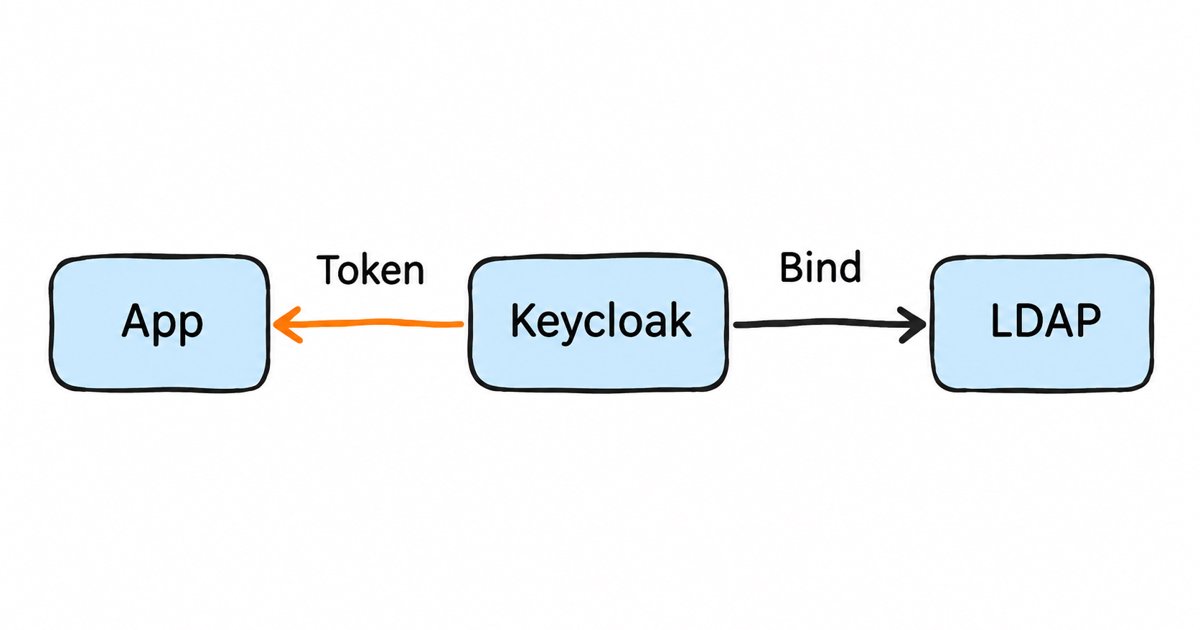
Here is a single sign-in for an app connected to Keycloak, with Keycloak federating an LDAP directory.
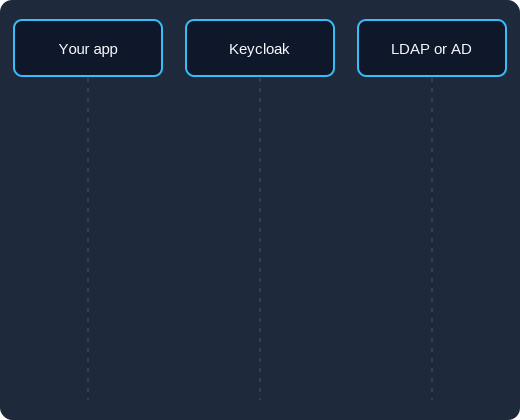
The app redirects the user to Keycloak (1), the user types their directory password on Keycloak’s login page (2), Keycloak sends an LDAP bind to the directory (3), the directory confirms it (4), Keycloak sends the app a signed OIDC token or SAML assertion (5), and the app checks the signature and signs the user in without ever seeing the password (6).
- The user opens your app, which has no session for them, so it redirects the browser to Keycloak over OIDC or SAML.
- Keycloak shows its login page, and the user types the same username and password they use for their directory account.
- Keycloak finds the user in its federated LDAP provider and validates the password against the directory. Keycloak’s documentation is explicit here: “Keycloak never imports passwords. Password validation always occurs on the LDAP server.” (Keycloak Server Administration Guide, LDAP and Active Directory).
- The directory confirms the credentials, and Keycloak creates its own SSO session for the user.
- Keycloak sends the app a signed ID token (OIDC) or a signed SAML assertion, with the attributes you mapped from the directory, such as email and name.
- The app validates the signature and signs the user in. When the user then opens a second app connected to the same realm, Keycloak already has a session, so the user is signed in without typing the password again. That second login is the “single” in single sign-on.
In the admin console, you set this up by choosing User Federation in the realm menu and then Add LDAP providers, which opens the LDAP configuration page (Keycloak Server Administration Guide). There you give the connection URL, the bind DN and credential Keycloak uses to search the directory, and the base DN where users live. The Edit mode decides whether Keycloak may write back: READ_ONLY blocks changes to mapped attributes and passwords, WRITABLE syncs changes to the directory, and UNSYNCED keeps changes in Keycloak only (Keycloak Server Administration Guide, Edit mode). Our LDAP integration tutorial walks through every field, and LDAP user federation explained covers the import, sync and edit modes in depth.
You can also choose whether Keycloak imports a copy of each user. With import on, Keycloak keeps a local copy of the user’s attributes (never the password) and refreshes it on demand or with a periodic sync. With import off, Keycloak reads the directory each time, and the documentation notes that features needing data the directory does not hold will then not work (Keycloak Server Administration Guide).
Why are signed tokens safer than apps doing LDAP binds?
When an app authenticates users with LDAP directly, every app receives the user’s real directory password, holds it in memory and sends it on to the directory. That password usually opens email, the VPN and everything else tied to the directory, so each of those apps is now a place where it can leak, through logs, a debugging session or a compromised server. The LDAP authentication specification says plainly that the name and password mechanism “discloses the password to the server, which is an inherent security risk” (RFC 4513, section 6.3.2), and that it “is not suitable for authentication in environments without confidentiality protection” (RFC 4513, section 5.1.3).
With SSO in front, only the identity provider ever sees the password, and it is the only system that needs a connection to the directory. The apps receive a signed token that says who the user is, for that app, for a limited time. A stolen token is still a problem, but it is scoped to one app and expires, whereas a stolen directory password works everywhere until someone resets it.
It also concentrates your security controls. Multi-factor authentication, brute-force protection and login policies live in one place instead of being rebuilt, or skipped, in every app that does its own bind.
Identity management as a service, on open source
Skycloak is a managed identity platform in the same category as Auth0 or Okta, built on real upstream Keycloak. You get SSO, MFA, SCIM and audit logs without running the servers, and you can export and self-host whenever you want.
Why can’t most SaaS and cloud apps use LDAP directly?
An LDAP bind needs a network connection from the app to the directory server. Your Active Directory domain controllers usually sit on a private network, and a SaaS vendor’s servers run on the vendor’s own infrastructure, so opening LDAP to the internet for each vendor would expose the directory and send every user’s password to each of them. For that reason, SaaS products are built to accept SSO through SAML or OIDC instead, where the browser carries the user between your identity provider and the vendor and no direct connection to your directory is needed.
The same is true of mobile apps and single-page apps, which cannot keep a directory service account secret, and of modern internal apps that run in the cloud. LDAP still works well for software inside your network that was built for it, such as Linux hosts, file servers, network gear and older on-premises applications.
Where does Active Directory fit?
Active Directory is the directory most companies already have, and Keycloak handles LDAP and Active Directory servers in the same user federation section (Keycloak Server Administration Guide, Lightweight Directory Access Protocol (LDAP) and Active Directory), where you pick Active Directory as the Vendor of the LDAP provider. Keycloak creates the provider’s initial LDAP mappers based on the Vendor, Edit Mode and Import Users settings (Keycloak Server Administration Guide, Configuring federated LDAP storage). The LDAP provider also has an Allow Kerberos authentication option, which enables Kerberos/SPNEGO sign-in with user data provisioned from LDAP, so a browser that holds a Kerberos ticket from the desktop login can pass it to Keycloak instead of showing the login form (Keycloak Server Administration Guide, Kerberos). Our Active Directory integration guide covers the Active Directory specifics, and what is Active Directory explains the basics.
Where does SCIM fit once SSO sits on a directory?
SSO answers who may sign in, but it does not tell your apps when someone joins or leaves. SCIM (System for Cross-domain Identity Management) is “an application-level HTTP-based protocol for provisioning and managing identity data” (RFC 7644, section 1), which a directory or identity provider uses to create, update and deactivate accounts in an app ahead of any login.
So a full setup has three layers. The directory holds the people, the SSO identity provider signs them in to apps, and SCIM keeps the accounts inside each app in step with the directory, including removing leavers. Without SCIM, an app usually creates the account at first login from the token’s claims (just-in-time provisioning), which never removes anyone. Our post on JIT provisioning vs SCIM compares the two. If Keycloak is your identity layer, its documentation describes SCIM APIs that external systems such as HR systems or other identity providers can use to provision and manage users in Keycloak (Keycloak Server Administration Guide, Managing users and groups through SCIM). Our post on the Keycloak 26.8 SCIM API covers its move to supported in that release.
LDAP only, SSO only, or both: which do you need?
| Your situation | What fits | Why |
|---|---|---|
| A few on-premises apps and servers, all inside one network, no SaaS | LDAP only | Everything can reach the directory, and a central identity provider adds little yet |
| A cloud-first company with no directory, using SaaS and its own web apps | SSO only | The identity provider’s own user store is the directory, so there is nothing to federate |
| An existing LDAP or Active Directory, plus SaaS or new web apps | Both, with SSO federating the directory | Users keep one password and one source of truth, and apps get signed tokens |
| Moving away from an old directory over time | Both for now, then retire LDAP | Federate first so nothing breaks, then move users across when ready |
| Customers or auditors asking for leaver removal in each app | Both, plus SCIM | SSO stops sign-in, SCIM removes or disables the account inside the app |
The fourth row deserves a word. Federating LDAP keeps the directory in the login path, so if it is slow or down, sign-ins fail. Because Keycloak never imports LDAP passwords, retiring the directory means moving users into Keycloak’s own database and giving them a way to set a Keycloak password, for example with a reset, and our post on whether to federate or migrate legacy users explains the trade-offs and the order of steps.
Frequently asked questions
Is LDAP a type of SSO?
No. LDAP is a protocol for reading a directory and checking credentials, and each app that uses it shows its own login form. You get SSO when apps trust one identity provider that keeps a session, and that identity provider can use LDAP behind the scenes to check passwords.
Can SSO work without LDAP?
Yes. An identity provider such as Keycloak has its own user database, so a company with no directory can run SSO with users stored there. LDAP only comes in when you already have a directory you want to keep as the source of truth.
Can SSO use Active Directory passwords?
Yes. When the identity provider federates Active Directory, users sign in on its login page with their usual Active Directory username and password, and the identity provider validates them against Active Directory. In Keycloak, the password is never imported and is always checked on the directory side.
What is the difference between LDAP and SAML?
LDAP is how software reads a directory and verifies a password, usually inside one network. SAML is how an identity provider tells an app, over the browser, that a user has already signed in, using a signed XML assertion. They work at different steps of the same login, as the flow above shows.
Next steps
If you have an LDAP directory or Active Directory today, you do not need to choose between it and SSO. Put an identity provider in front of it, federate the directory so users keep their passwords, and connect your apps over OIDC or SAML so they receive signed tokens instead. The Keycloak LDAP integration guide shows how to connect the directory step by step, and Skycloak’s user management docs list LDAP and Active Directory among the user sources you can federate.
If you would rather not run Keycloak yourself, Skycloak runs it for you as managed Keycloak.