

Privileged access management (PAM) secures, limits and monitors accounts with elevated rights, such as admins, root, service accounts and break-glass logins. Part of identity and access management (IAM), it adds credential vaulting, just-in-time elevation and session recording for the few accounts that can do the most damage.
If you already run an identity provider or single sign-on and an auditor, a customer questionnaire or a vendor has started asking about PAM, this post is for you. It defines PAM, lists the kinds of privileged accounts you should inventory, separates PAM from PIM, IGA and plain IAM, and then draws the line we care about most: which PAM controls your identity provider already gives you, and which ones need a dedicated vault or session recorder. If you want the full side-by-side comparison of the two disciplines, our post on IAM vs PAM covers it, so here we keep that comparison to one section.
What is privileged access management?
A privileged account is one that can change how a system works rather than just use it: it can read all of the data, create other accounts, change configuration or turn off security controls. NIST’s National Cybersecurity Center of Excellence describes these accounts as ones that “provide elevated, often nonrestricted, access to the underlying IT resources and technology, which is why external and internal malicious actors seek to gain access to them” (NIST SP 1800-18, Privileged Account Management for the Financial Services Sector, draft). PAM is the set of practices and tools that keeps those accounts few, protected, time-limited and watched.
PAM is an application of least privilege, the principle that each person or process gets only the access its task needs. NIST’s control catalog states it in control AC-6, “Employ the principle of least privilege, allowing only authorized accesses for users (or processes acting on behalf of users) that are necessary to accomplish assigned organizational tasks”, and enhancement AC-6(5) adds the PAM-specific part: “Restrict privileged accounts on the system to” a defined set of personnel or roles (NIST SP 800-53 Rev. 5, AC-6, from the official publication). In other words, a PAM program starts by deciding who should hold power at all, and only then adds tooling around those people and machines.
What counts as a privileged account?
NIST’s privileged account management project lists them as “local and domain administrative accounts, emergency accounts, application management, and service accounts” (NIST SP 1800-18). For a SaaS or mid-size company, that list usually looks like this in practice:
- Cloud and domain administrators. The owner or administrator of your cloud accounts, your directory and your email tenant, who can change anything in that environment.
- Local administrators and root. Root on Linux servers, local admin on laptops and servers, and the superuser of each database.
- Identity administrators. Anyone who can create users, reset MFA or change sign-in policy in your identity provider. This one is easy to forget, and it controls access to everything else.
- Application administrators. Admin users inside your SaaS tools and your own product’s back office, such as a support console that can see customer data.
- Service accounts. Non-human accounts that applications and scripts use to call each other, often with broad and long-lived permissions.
- CI/CD and automation credentials. Deployment keys, cloud credentials stored in your pipeline and infrastructure-as-code tokens, which can usually change production.
- AI agents. Agents that act on systems through API credentials, which hold the same kind of power as a service account but take actions nobody scripted in advance.
- Emergency or break-glass accounts. Accounts kept for when normal sign-in fails, which are rarely used and therefore rarely reviewed.
How does PAM work?
Most PAM programs combine the same handful of controls, whatever product they are bought from:
- Discovery and inventory. You find every privileged account, including local admins and service accounts nobody remembers creating, and give each an owner.
- Credential vaulting and rotation. Shared passwords and keys move into a vault. People check a credential out for a task instead of knowing it, and the vault changes it after use.
- Just-in-time elevation. People hold normal rights day to day and receive admin rights only for a task and a limited time, with a recorded reason.
- Strong authentication for admins. Privileged sign-in needs phishing-resistant MFA and re-authentication before sensitive actions.
- Session monitoring and recording. The PAM tool sits between the admin and the server or database, so it can record the session and, in some products, stop it.
- Logging and review. Every privileged action is logged, and someone regularly checks that each privilege is still needed.
The last two map directly onto NIST controls. AC-6(9) says “Log the execution of privileged functions”, and AC-6(7) asks you to “Review [Assignment: organization-defined frequency] the privileges assigned to [Assignment: organization-defined roles and classes] to validate the need for such privileges” (NIST SP 800-53 Rev. 5, AC-6(9) and AC-6(7), from the official publication). AC-2(7), on privileged user accounts, asks you to “Monitor privileged role or attribute assignments” and to “Revoke access when privileged role or attribute assignments are no longer appropriate” (NIST SP 800-53 Rev. 5, AC-2(7), from the official publication).
How do PAM, PIM, IGA and IAM differ?
The four acronyms overlap, and vendors use them loosely, so it helps to say what each one is mainly for:
| What it covers | Main question | Typical controls | |
|---|---|---|---|
| IAM (identity and access management) | Every user and application | Who is this, and may they use this app? | Single sign-on, MFA, roles, sessions, sign-in logs |
| PAM (privileged access management) | The small set of powerful human and machine accounts | Who can do dangerous things, when, and what did they do? | Vaulting, rotation, just-in-time elevation, session recording |
| PIM (privileged identity management) | Who is eligible for a privileged role, and when it is active | Who may become an admin, and for how long? | Eligible role assignments, time-bound activation, approval |
| IGA (identity governance and administration) | The evidence over time for all access | Should this person still have this access, and who approved it? | Access requests, approvals, access reviews, joiner-mover-leaver |
PIM is often a product name rather than a separate discipline. Microsoft, for example, describes its Privileged Identity Management as “a service in Microsoft Entra ID that enables you to manage, control, and monitor access to important resources in your organization” (Microsoft Learn, What is Microsoft Entra Privileged Identity Management?). In practice, PIM manages privileged roles inside an identity system, while PAM also reaches the servers, databases and shared credentials outside it. IGA sits across both and checks that access granted anywhere still makes sense, which our post on IAM vs IGA explains in more detail, and IAM vs PAM covers when a small team needs which.
Why are zero standing privileges and just-in-time access the current standard?
A standing privilege is admin access that stays in place whether or not anyone is using it. If an attacker steals the password or the session of someone with a standing admin role, they can use that role at any hour. Just-in-time access removes the privilege when it is not in use, so a stolen credential is worth much less most of the time. “Zero standing privileges” is the goal state where no human account holds admin rights by default.
This is now written into public guidance. CISA’s Zero Trust Maturity Model grades each capability at four stages: traditional, initial, advanced and optimal. In its Identity pillar table, the Access Management row (marked “New Function” in version 2.0) reads, at the optimal stage, “Agency uses automation to authorize just-in-time and just-enough access tailored to individual actions and individual resource needs”, and at the advanced stage, “Agency authorizes need-based and session-based access, including for privileged access request, that is tailored to actions and resources” (CISA Zero Trust Maturity Model, Version 2.0, April 2023, PDF, Identity pillar table, Access Management function, linked from CISA’s model page). Our post on what just-in-time access is walks through the request, approve, grant and expire loop in more detail.
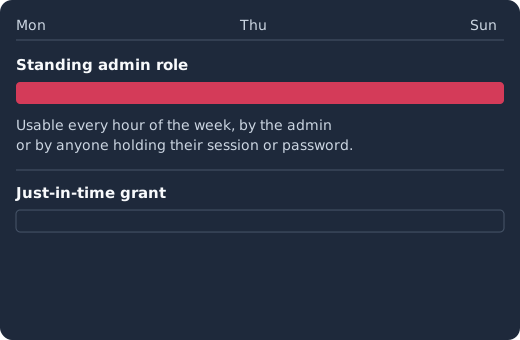
With a standing role, the admin right exists every hour of the week. With a just-in-time grant, the engineer requests the role with a reason, an approver accepts, the identity provider grants the role, it is revoked four hours later, and every step is written to the audit log.
Identity management as a service, on open source
Skycloak is a managed identity platform in the same category as Auth0 or Okta, built on real upstream Keycloak. You get SSO, MFA, SCIM and audit logs without running the servers, and you can export and self-host whenever you want.
Which non-human identities need PAM?
Service accounts, CI/CD credentials and AI agents now often outnumber the human admins in a company, and they are harder to watch because nobody signs in interactively. They also tend to collect permissions over time, because removing a permission from a running integration feels riskier than leaving it.
The same least-privilege rules apply to them. For tokens, the OAuth working group’s security guidance says “The privileges associated with an access token SHOULD be restricted to the minimum required for the particular application or use case” (RFC 9700, Best Current Practice for OAuth 2.0 Security, section 2.3). In practice that means each service or agent gets its own client with a narrow scope and an audience, short-lived tokens instead of static keys where the target system supports them, and a named human owner. Our post on non-human identity and AI agents with Keycloak shows that setup, and managing Keycloak secrets with the vault SPI covers keeping the secrets Keycloak itself uses out of plaintext configuration.
Where does IAM stop and PAM start?
Here is the practical line. An identity provider controls how people and services sign in and what roles their tokens carry, so it can deliver several PAM controls for anything that trusts it. It cannot reach a shared root password on a database server, and it does not sit in the middle of an SSH or database session. We use Keycloak as the example: it is open-source identity and access management (keycloak.org), and it is what Skycloak’s managed Keycloak hosting runs for you. The links go to its Server Administration Guide.
| PAM control | Your identity provider (Keycloak) | Needs a dedicated PAM tool |
|---|---|---|
| MFA and step-up for admins | Yes: required MFA and step-up authentication by level of authentication | No |
| Scoped admin roles | Yes: realm-specific admin roles and admin permissions | No |
| Short-lived sessions and tokens | Yes: session and token timeouts per realm and per client | No |
| Time-bound role grants | Yes, with limits: workflow user steps can grant and later revoke a role | The approval step, if you have no request service |
| Admin audit trail | Yes: admin events | No |
| Controlled impersonation | Yes: only holders of the impersonation role | No |
| Vaulting and rotating shared passwords for servers and databases | No | Yes |
| Recording SSH, RDP and database sessions | No | Yes |
| Discovering local admin accounts on hosts | No | Yes |
What your identity provider already covers
MFA and step-up on admins. You can require MFA for every administrator and ask for a stronger factor before a sensitive action. Keycloak’s guide says “The purpose of step-up authentication is to allow access to clients or resources based on a specific authentication level of a user” (Keycloak Server Administration Guide, step-up flow), and our step-up authentication guide shows the configuration. For how often an admin should re-authenticate, NIST’s highest assurance level is a useful reference: “the overall timeout for reauthentication SHALL be no more than 12 hours”, and “The inactivity timeout SHOULD be no more than 15 minutes” (NIST SP 800-63B-4, AAL3 reauthentication).
Scoped admin roles. Each Keycloak realm has a realm-management client whose roles split admin power into pieces such as view-users, manage-users and realm-admin, so a support engineer can view users without being able to change sign-in policy. Admin permissions go further: realm administrators “can define permissions to realm resources such as users, groups, and clients … so that a realm administrator is limited to access a subset of realm resources and their operations” (Keycloak Server Administration Guide, delegating realm administration using permissions). That section is the current, supported version of the feature. The guide’s section on the older “Fine grained admin permissions V1” says that version “has been deprecated and will be removed in future release” (Keycloak Server Administration Guide, fine grained admin permissions V1), so follow the newer section when you set this up.
Short-lived sessions and tokens. The SSO Session Idle setting ends a session after inactivity, and the Access Token Lifespan setting “controls the lifetime of the token” (Keycloak Server Administration Guide, timeouts). Giving your admin console and admin tools shorter values than ordinary apps narrows how long a stolen admin session stays useful.
Time-bound role grants. Keycloak workflows, which the 26.6.0 release notes say were “promoted from preview to supported” (Keycloak 26.6.0 release notes, Workflows), include a grant-role step that will “Grant one or more roles to the user” and a revoke-role step that will “Revoke one or more roles from the user” (Keycloak Server Administration Guide, user steps). A step “can be scheduled to run after a specific duration using the after field” (Keycloak Server Administration Guide, scheduled steps), so one workflow can grant an admin role and revoke it a few hours later. Two limits matter for PAM. First, “By default, the background task tracking due steps runs every 12 hours, but this interval can be configured” (Keycloak Server Administration Guide, scheduled steps execution interval), so shorten that interval if your grants are measured in hours. Second, the documented user steps act on the user directly (add or remove a required action, grant or revoke a role, join or leave a group, set or remove an attribute, notify, unlink, invite, disable or delete), and among the steps we found, none waits for a human to approve, so the request and approval part needs a small service on the Admin REST API, as in our guide to access request and approval workflows.
Admin audit events. Keycloak can “record all actions that are performed by an administrator in the Admin Console” (Keycloak Server Administration Guide, admin events), which covers the AC-6(9) requirement for changes made inside the identity provider. Our Keycloak auditing and event logging guide shows how to turn them on and where to send them.
Controlled impersonation. Support teams often need to see what a user sees, which is a privileged action in its own right. In Keycloak, “Any user with the impersonation role in the realm can impersonate a user” (Keycloak Server Administration Guide, impersonation), so you can keep that role to a few people and audit its use, as our post on secure user impersonation for support describes.
What needs a vault or session recorder
Keycloak is an identity server, not a credential vault or a session gateway: its administration guide covers sign-in, roles, sessions and events, and we found nothing in it for storing or rotating the shared passwords your team uses on servers, databases or network devices, or for recording what an admin did inside an SSH or database session. If an auditor or a customer asks for recorded admin sessions, or several people still share a root or break-glass credential, that is where a PAM product earns its place. The identity provider then stays the front door: the PAM tool signs admins in through single sign-on with MFA, and your identity provider’s roles decide who may request which target. This is why we describe Keycloak as the foundation a vault pairs with, not as a replacement for one.
How do you roll out PAM without breaking production?
Engineers resist PAM when it suddenly blocks the access they use during an incident, so roll it out in an order that removes risk before it adds friction:
- Inventory first. List every account from the account types above, with an owner and a reason, and mark which ones hold standing access.
- Fix the identity provider’s own admins. Require phishing-resistant MFA, split the admin roles, shorten admin sessions and turn on admin events. This protects everything else that trusts the identity provider.
- Tie privilege to the employee lifecycle. When someone changes team or leaves, their admin roles should go with it, which the joiner-mover-leaver process covers.
- Convert one standing privilege at a time. Pick the most powerful role, such as production database admin, make it a time-bound grant with a recorded reason, and run it for a few weeks before converting the next.
- Keep a tested break-glass path. Store the emergency credentials somewhere you control, alert on their use and test them on a schedule, so the new controls never lock you out during an outage. Keycloak takes the same view of its own recovery admin: an admin account created through its bootstrap process “is temporary. This means the account should exist only for the duration necessary to perform operations needed to gain permanent and more secure admin access” (Keycloak, bootstrap admin recovery).
- Add vaulting and session recording where the gaps remain. Whatever is still shared or unmonitored after the steps above is the shortlist for a PAM product.
How do you evaluate a PAM tool?
When you get to step 6, compare products on how they fit the stack you already have rather than on feature counts. These questions tend to separate them:
- Does it sign admins in through your identity provider with single sign-on and MFA, or does it keep its own user list that you will have to manage separately?
- Which targets does it reach? Check the specific servers, databases, cloud consoles and Kubernetes clusters you run, not the category list on the website.
- How does just-in-time access work? Look for a request with a reason, an approver, an automatic expiry and an audit entry for each step.
- Does it handle non-human credentials? Your CI/CD pipelines and service accounts may hold more power than your human admins.
- Can you export its logs to the same place as your identity provider’s events, so one investigation covers both?
- How is it priced? Ask whether you pay per user, per managed target or per feature tier, because that decides what it costs as your infrastructure grows.
FAQ
What is privileged access management in simple terms?
PAM is the set of controls that protects the accounts able to change or break your systems, such as admins, root and service accounts. It keeps those accounts few, protects their credentials, grants admin rights only when needed and records how they are used.
What is the difference between PAM and IAM?
IAM controls sign-in and access for every user and application, while PAM adds extra controls for the small set of privileged accounts. PAM is usually treated as part of IAM, and our IAM vs PAM post compares them side by side.
What is the difference between PAM and PIM?
PIM (privileged identity management) usually means managing who is eligible for privileged roles inside an identity system and activating those roles for a limited time. PAM is broader and also covers credentials and sessions on servers, databases and other systems outside the identity provider.
What are examples of privileged accounts?
Cloud and domain administrators, root and local administrator accounts, database superusers, identity provider administrators, application admins, service accounts, CI/CD credentials, AI agents with broad API access and emergency break-glass accounts.
Can Keycloak be used for privileged access management?
Keycloak covers the identity side of PAM: MFA and step-up for admins, scoped admin roles, short sessions, time-bound role grants through workflows, impersonation controls and admin audit events. It is not a credential vault or a session recorder, so pair it with a dedicated tool if you need those.
Is just-in-time access the same as zero standing privileges?
They are closely related. Just-in-time access is the mechanism that grants a privilege only for a task and a limited time, and zero standing privileges is the goal state where no account holds admin rights by default because every privilege arrives just in time.
What to do next
List your privileged accounts this week: cloud owner, database admin, identity admin, shared service credentials and break-glass accounts. Mark which ones have standing access and which have no owner, then work through the identity provider controls above before deciding what a vault needs to cover. If you would rather not run the identity side yourself, Skycloak’s managed Keycloak hosting gives you Keycloak’s MFA, role-based access control, session settings and admin events on a cluster run for you, with workspace audit logs of the changes your team makes and forwarding of admin and security events to your SIEM.