

Last updated: March 2026
The traditional security model assumes that anything inside your network perimeter is trusted. Zero trust flips that assumption: no user, device, or network location is inherently trusted. Every access request must be verified, regardless of where it originates.
This is not just a buzzword. NIST SP 800-207 defines a formal zero trust architecture framework, and regulatory bodies including CISA and the EU’s NIS2 directive are pushing organizations toward zero trust adoption. Keycloak, as a flexible identity platform, provides the authentication and authorization building blocks to implement zero trust principles.
This guide covers how to apply zero trust concepts using Keycloak: continuous verification, context-aware access policies, device trust, step-up authentication, session risk scoring, and integration with policy engines.
Zero Trust Principles for Authentication
Zero trust is built on a few core principles as they relate to identity:
- Verify explicitly: Authenticate and authorize every request based on all available data points (user identity, device, location, resource sensitivity).
- Least privilege access: Grant minimum permissions needed. Use just-in-time and just-enough-access approaches.
- Assume breach: Design systems as if the network is already compromised. Minimize blast radius and enforce segmentation.
These principles translate into concrete authentication patterns that Keycloak supports.
Continuous Verification
Traditional authentication is a single event: the user logs in, gets a session, and is trusted for the session’s lifetime. Zero trust requires ongoing verification throughout the session.
Short-Lived Access Tokens
The simplest form of continuous verification is using short-lived access tokens. The standards-based alternative, where an identity provider pushes session events to relying parties instead of making them poll, is covered in our post on Keycloak, CAEP, and Shared Signals. Configure Keycloak to issue access tokens with a short lifetime:
- Navigate to Realm Settings > Tokens
- Set Access Token Lifespan to 5 minutes (or less for high-security scenarios)
- Set Client Session Idle to match your inactivity timeout requirements
With 5-minute tokens, the client must refresh regularly. Each refresh gives Keycloak an opportunity to:
- Check if the user’s account is still active
- Verify the user still has the required roles
- Evaluate updated context (session metadata, risk signals)
{
  "accessTokenLifespan": 300,
  "ssoSessionIdleTimeout": 900,
  "ssoSessionMaxLifespan": 28800
}
Token Refresh with Context Re-evaluation
Configure Keycloak to re-evaluate policies during token refresh by using client-specific token settings:
- In the client’s Advanced tab, set shorter token lifespans
- Enable Token Exchange if you need to re-evaluate permissions across service boundaries
Applications should handle token expiration gracefully and re-authenticate when refresh tokens are revoked. For details on token lifecycle management, see our guide on JWT token lifecycle management.
Context-Aware Access Policies
Zero trust authentication considers multiple signals when making access decisions, not just the username and password.
IP-Based Policies
Restrict or require additional authentication based on the client’s IP address:
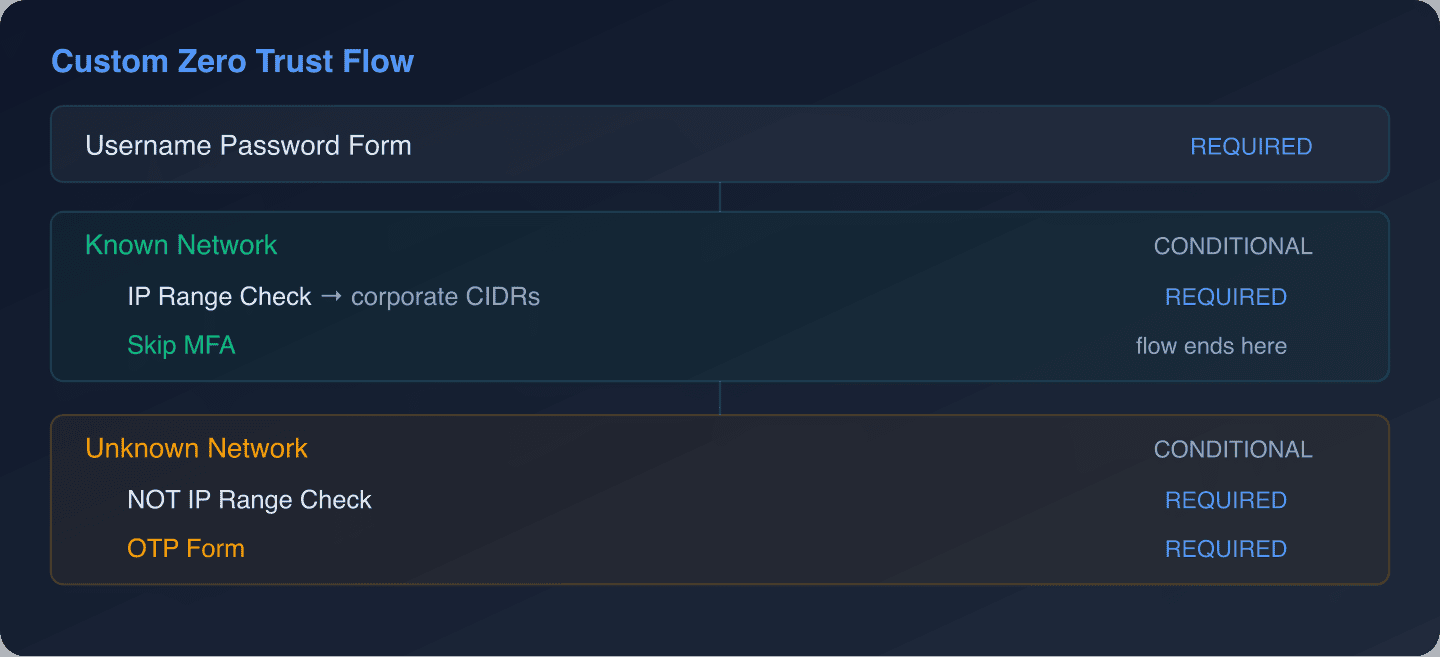
For implementing the IP range check, you can build a custom authenticator SPI as described in our custom authentication flows guide. For Skycloak customers, IP-based restrictions are available through the configurable WAF.
Time-Based Policies
Restrict access to business hours or flag off-hours authentication for additional scrutiny:
public class BusinessHoursAuthenticator implements Authenticator {

    @Override
    public void authenticate(AuthenticationFlowContext context) {
        ZonedDateTime now = ZonedDateTime.now(ZoneId.of("America/New_York"));
        int hour = now.getHour();
        DayOfWeek day = now.getDayOfWeek();

        boolean isBusinessHours = hour >= 8 && hour < 18
                && day != DayOfWeek.SATURDAY
                && day != DayOfWeek.SUNDAY;

        if (isBusinessHours) {
            context.success();
        } else {
            // Don't block, but add a note for risk scoring
            context.getAuthenticationSession()
                .setAuthNote("off_hours_login", "true");
            context.success();
        }
    }

    // ... remaining interface methods
}
This authenticator does not block off-hours logins but tags the session. Downstream policy decisions can use this flag to require step-up authentication or limit access to sensitive resources.
Geographic Policies
Detect impossible travel (user logging in from two distant locations in a short time span):
public class GeoVelocityAuthenticator implements Authenticator {

    @Override
    public void authenticate(AuthenticationFlowContext context) {
        UserModel user = context.getUser();
        String currentIp = getClientIp(context);

        // Look up the user's last known login location
        String lastLoginIp = user.getFirstAttribute("last_login_ip");
        String lastLoginTime = user.getFirstAttribute("last_login_time");

        if (lastLoginIp != null && lastLoginTime != null) {
            long timeDiffMinutes = calculateTimeDiff(lastLoginTime);
            double distanceKm = calculateDistance(lastLoginIp, currentIp);

            // Impossible travel: more than 500km in less than 60 minutes
            if (distanceKm > 500 && timeDiffMinutes < 60) {
                context.getAuthenticationSession()
                    .setAuthNote("impossible_travel", "true");
                context.getAuthenticationSession()
                    .setAuthNote("risk_level", "high");
            }
        }

        // Update last login metadata
        user.setSingleAttribute("last_login_ip", currentIp);
        user.setSingleAttribute("last_login_time",
            String.valueOf(System.currentTimeMillis()));

        context.success();
    }

    // ... helper methods for geo lookup and distance calculation
}
The geo lookup would typically call an IP geolocation service. This authenticator does not block the login but escalates the risk level, triggering step-up authentication downstream.
Step-Up Authentication
Step-up authentication requires stronger authentication for sensitive operations, even if the user has an active session.
ACR-Based Step-Up
Keycloak supports Authentication Context Class Reference (ACR) values, which allow applications to request specific authentication levels:
Level 0 (basic): Username + password
Level 1 (standard): Username + password + OTP
Level 2 (high): Username + password + FIDO2/WebAuthn
Configure ACR-to-flow mappings in Keycloak:
- Go to Authentication > Flows
- Create flows for each authentication level
- In Realm Settings > ACR to LoA Mapping, map ACR values to flows:
| ACR Value | Level of Assurance | Flow |
|---|---|---|
urn:zt:acr:basic |
0 | Password only |
urn:zt:acr:standard |
1 | Password + OTP |
urn:zt:acr:high |
2 | Password + WebAuthn |
Applications request specific levels in the authorization request:
// Request standard authentication (password + OTP)
const authUrl = new URL(
  "https://keycloak.example.com/realms/my-realm/protocol/openid-connect/auth"
);
authUrl.searchParams.set("client_id", "my-app");
authUrl.searchParams.set("response_type", "code");
authUrl.searchParams.set("scope", "openid");
authUrl.searchParams.set("redirect_uri", "https://app.example.com/callback");
authUrl.searchParams.set("acr_values", "urn:zt:acr:standard");

window.location.href = authUrl.toString();
The resulting token includes the ACR claim, which the API can verify:
// API middleware that enforces minimum ACR level
function requireAcr(minimumLevel) {
  return (req, res, next) => {
    const token = req.decodedToken; // From JWT validation middleware
    const acr = token.acr || "0";

    const acrLevels = {
      "urn:zt:acr:basic": 0,
      "urn:zt:acr:standard": 1,
      "urn:zt:acr:high": 2,
    };

    const currentLevel = acrLevels[acr] ?? 0;

    if (currentLevel < minimumLevel) {
      return res.status(403).json({
        error: "insufficient_authentication",
        required_acr: Object.keys(acrLevels).find(
          k => acrLevels[k] === minimumLevel
        ),
        current_acr: acr,
      });
    }

    next();
  };
}

// Usage
app.get("/api/data", requireAcr(0), dataHandler);
app.post("/api/transfer", requireAcr(2), transferHandler);
app.delete("/api/account", requireAcr(2), deleteAccountHandler);
When the API returns a 403 with insufficient_authentication, the frontend redirects the user back to Keycloak with the required ACR value. Keycloak prompts for the additional authentication factor and issues a new token with the elevated ACR.
You can inspect ACR claims in tokens using the JWT Token Analyzer.
Session Risk Scoring
Combine multiple context signals into a risk score that drives authentication decisions:
public class RiskScoringAuthenticator implements Authenticator {

    @Override
    public void authenticate(AuthenticationFlowContext context) {
        int riskScore = 0;

        // Factor 1: New device
        String deviceFingerprint = context.getHttpRequest()
            .getHttpHeaders().getHeaderString("X-Device-Fingerprint");
        UserModel user = context.getUser();

        if (user != null) {
            String knownDevices = user.getFirstAttribute("known_devices");
            if (knownDevices == null || !knownDevices.contains(deviceFingerprint)) {
                riskScore += 30;
                context.getAuthenticationSession()
                    .setAuthNote("new_device", "true");
            }
        }

        // Factor 2: Off-hours login
        String offHours = context.getAuthenticationSession()
            .getAuthNote("off_hours_login");
        if ("true".equals(offHours)) {
            riskScore += 20;
        }

        // Factor 3: Impossible travel
        String impossibleTravel = context.getAuthenticationSession()
            .getAuthNote("impossible_travel");
        if ("true".equals(impossibleTravel)) {
            riskScore += 50;
        }

        // Factor 4: Failed login attempts in the last hour
        // (would query Keycloak's event store)
        int recentFailures = getRecentFailures(context, user);
        riskScore += recentFailures * 10;

        // Store the risk score
        context.getAuthenticationSession()
            .setAuthNote("risk_score", String.valueOf(riskScore));

        // Determine action based on risk score
        if (riskScore >= 70) {
            // High risk: require strong authentication
            context.getAuthenticationSession()
                .setAuthNote("require_step_up", "high");
        } else if (riskScore >= 40) {
            // Medium risk: require OTP
            context.getAuthenticationSession()
                .setAuthNote("require_step_up", "standard");
        }

        context.success();
    }

    private int getRecentFailures(AuthenticationFlowContext context, UserModel user) {
        // Query Keycloak's event store for recent LOGIN_ERROR events
        // This is simplified - production code would use the EventStoreProvider
        return 0;
    }

    // ... remaining interface methods
}
Then use a conditional sub-flow that checks the require_step_up auth note to trigger additional authentication factors based on the calculated risk.
Device Trust
Zero trust extends beyond user identity to the device making the request. While Keycloak does not have built-in device trust evaluation, you can integrate it through several approaches.
WebAuthn for Device Binding
WebAuthn/FIDO2 authenticators are inherently bound to specific devices. When a user registers a passkey on their laptop, that credential can only be used from that device (or devices synced through the platform’s passkey sync).
Configure WebAuthn in Keycloak:
- Go to Authentication > Required Actions
- Enable WebAuthn Register and WebAuthn Register Passwordless
- In your authentication flow, add WebAuthn as a required step for high-security access
Certificate-Based Device Authentication
For managed corporate devices, use X.509 client certificates:
- Go to Authentication > Flows
- Create a flow with the X.509/Validate Username Form execution
- Configure the X.509 authenticator to extract the username from the certificate’s Subject DN or Subject Alternative Name
This ensures only devices with valid certificates issued by your corporate CA can authenticate.
Device Metadata in Tokens
Include device information in tokens for downstream policy decisions:
// Custom protocol mapper that adds device metadata to tokens
public class DeviceInfoMapper extends AbstractOIDCProtocolMapper
        implements OIDCAccessTokenMapper, OIDCIDTokenMapper {

    @Override
    protected void setClaim(IDToken token, ProtocolMapperModel mappingModel,
                            UserSessionModel userSession,
                            KeycloakSession session,
                            ClientSessionContext clientSessionCtx) {

        AuthenticatedClientSessionModel clientSession =
            clientSessionCtx.getClientSession();

        Map<String, Object> deviceInfo = new HashMap<>();
        deviceInfo.put("ip", userSession.getIpAddress());
        deviceInfo.put("started", userSession.getStarted());
        deviceInfo.put("auth_method",
            userSession.getNote("auth_method") != null
                ? userSession.getNote("auth_method") : "password");

        token.getOtherClaims().put("device_info", deviceInfo);
    }
}
Network Segmentation with Authentication
In a zero trust architecture, network location affects what a user can access. Integrate network context into Keycloak’s authorization decisions.
Keycloak Authorization Services
Keycloak’s built-in authorization services support policy-based access control. Define policies that consider network context:
- Resource server: Register your API as a resource server in Keycloak
- Resources: Define protected resources (e.g.,
/api/admin,/api/reports) - Policies: Create policies based on roles, time, and custom attributes
- Permissions: Connect resources to policies
For a deeper look at Keycloak’s authorization capabilities, see our guide on fine-grained authorization and the RBAC feature page.
Integration with Open Policy Agent (OPA)
For complex policy decisions that go beyond what Keycloak’s authorization services provide, integrate with Open Policy Agent:
# policy.rego
package authz

import rego.v1

default allow := false

# Allow if user has the required role AND is on a trusted network
allow if {
    token := input.token
    required_role := input.required_role

    # Check role
    required_role in token.realm_access.roles

    # Check network
    net.cidr_contains("10.0.0.0/8", input.source_ip)
}

# Allow from untrusted networks only with high ACR
allow if {
    token := input.token
    required_role := input.required_role

    required_role in token.realm_access.roles
    token.acr == "urn:zt:acr:high"
}
Your API calls OPA for every request:
import requests

def check_authorization(token_claims, resource, source_ip):
    response = requests.post(
        "http://opa:8181/v1/data/authz/allow",
        json={
            "input": {
                "token": token_claims,
                "required_role": resource["required_role"],
                "source_ip": source_ip,
            }
        },
    )
    result = response.json()
    return result.get("result", False)
This pattern separates authentication (Keycloak) from authorization (OPA), a common zero trust architecture pattern.
Session Management in Zero Trust
Zero trust demands stricter session management than traditional approaches:
Idle Session Timeout
Set aggressive idle timeouts to reduce the window of exposure:
- High-security applications: 5-15 minutes
- Standard applications: 15-30 minutes
- Low-risk read-only applications: 30-60 minutes
Configure in Realm Settings > Sessions or per-client in client settings.
Session Revocation
Keycloak supports immediate session revocation through several mechanisms:
- Admin console: Manually revoke specific user sessions
- Admin API: Programmatically revoke sessions
- Account console: Users can view and terminate their own sessions
- Not-Before policy: Invalidate all tokens issued before a specific time
# Revoke all sessions for a user via the Admin API
curl -X DELETE
  "https://keycloak.example.com/admin/realms/my-realm/users/{user-id}/sessions"
  -H "Authorization: Bearer ${ADMIN_TOKEN}"
For production session management patterns, see our session management feature page.
Concurrent Session Limits
Limit the number of simultaneous sessions per user. This is especially important in zero trust because it prevents credential sharing and limits the impact of compromised credentials:
Configure in your custom authentication flow or use Keycloak’s session limits feature.
Monitoring and Audit in Zero Trust
Zero trust requires comprehensive visibility into authentication events:
Event Logging
Enable all relevant event types in Keycloak:
- Go to Realm Settings > Events
- Enable Save events
- Configure event types to include: LOGIN, LOGIN_ERROR, LOGOUT, CODE_TO_TOKEN, REFRESH_TOKEN, CLIENT_LOGIN
SIEM Integration
Forward Keycloak events to your SIEM for correlation with other security signals. See our guides on forwarding events to SIEM and integrating security logs with Syslog.
Keycloak’s audit logs provide the event data foundation for zero trust monitoring. Skycloak’s insights dashboards offer pre-built views for authentication metrics and anomaly detection.
Alerting
Set up alerts for zero trust-relevant events:
- Multiple failed logins from the same IP
- Successful login from a new geographic location
- Login outside business hours for sensitive accounts
- Session created without expected MFA factor
- Unusual token refresh patterns
Implementation Roadmap
Implementing zero trust is a journey, not a single deployment. Here is a phased approach:
Phase 1: Foundation
- Deploy Keycloak with single sign-on for all applications
- Enable audit logging and SIEM integration
- Set access token lifetime to 5-15 minutes
- Configure brute force detection
Phase 2: Strong Authentication
- Roll out multi-factor authentication for all users
- Deploy WebAuthn/passkeys for privileged accounts
- Implement conditional MFA based on risk signals
Phase 3: Context-Aware Access
- Build custom authenticators for IP, geo, and time-based policies
- Implement step-up authentication with ACR values
- Integrate device trust signals
Phase 4: Continuous Verification
- Deploy session risk scoring
- Implement impossible travel detection
- Integrate with external threat intelligence feeds
- Automate session revocation based on risk thresholds
Conclusion
Zero trust authentication is not a product you buy, it is an architecture you build. Keycloak provides the core identity capabilities, flexible authentication flows, fine-grained authorization, session management, and audit logging. By combining these with custom SPIs for context-aware policies, risk scoring, and integration with external policy engines, you can build a zero trust authentication layer that adapts to the risk level of every access request.
The key is to start with the fundamentals (strong authentication, short-lived tokens, comprehensive logging) and progressively add context-aware policies as your maturity grows.
For organizations implementing zero trust without the operational overhead of managing Keycloak infrastructure, Skycloak’s managed hosting provides a production-hardened identity platform with built-in security controls, audit logging, and session management. See our pricing page to get started, or review the SLA for uptime commitments.