

Single sign-on (SSO) lets users authenticate once and access multiple applications without logging in again. It is no longer a nice-to-have; it is an expectation. Enterprise customers require it. Employees waste time managing separate credentials. Support teams field password reset requests that SSO eliminates.
This guide covers both SSO protocols (SAML 2.0 and OpenID Connect), their flows, when to choose one over the other, and how to implement each with Keycloak as the identity provider. We include configuration examples, architectural patterns, and session management considerations.
SAML vs OIDC: When to Use Which
Both protocols achieve single sign-on, but they were designed for different eras and use cases.
SAML 2.0
SAML (Security Assertion Markup Language) is an XML-based protocol from 2005. It uses browser redirects and POST requests to exchange authentication assertions between an Identity Provider (IdP) and a Service Provider (SP).
Use SAML when:
- Integrating with enterprise applications that only support SAML (Salesforce, Workday, ServiceNow)
- Connecting to a customer’s corporate IdP (most enterprises use SAML-first infrastructure)
- Compliance requirements specify SAML
- You need signed and/or encrypted assertions for regulatory reasons
Key characteristics:
- XML-based messages (verbose but well-defined)
- Uses browser redirects (HTTP-Redirect and HTTP-POST bindings)
- Assertions contain authentication statements, attribute statements, and authorization decisions
- Metadata exchange for automated configuration between IdP and SP
OpenID Connect (OIDC)
OIDC is a JSON-based identity layer built on top of OAuth 2.0. It was finalized in 2014 and is the modern standard for authentication.
Use OIDC when:
- Building new web applications, SPAs, or mobile apps
- You need a lightweight, JSON-based protocol
- Token-based authentication is preferred (JWTs)
- You want automatic discovery via
.well-known/openid-configuration - Your application ecosystem is primarily API-driven
Key characteristics:
- JSON-based tokens (compact, easy to parse)
- Uses OAuth 2.0 flows (authorization code, client credentials, device)
- ID tokens carry identity claims as JWTs
- Discovery document enables automatic client configuration
Comparison Table
| Aspect | SAML 2.0 | OpenID Connect |
|---|---|---|
| Data format | XML | JSON/JWT |
| Transport | Browser redirect/POST | HTTP redirect + back-channel |
| Token type | XML Assertion | JWT (ID Token, Access Token) |
| Discovery | Metadata XML | .well-known/openid-configuration |
| Encryption | Built-in assertion encryption | TLS transport encryption + optional JWE |
| Mobile support | Poor (XML parsing in apps) | Good (lightweight JSON) |
| Enterprise adoption | Very high | Growing |
| Specification age | 2005 | 2014 |
For inspecting SAML messages, use the SAML Decoder. For JWT tokens, use the JWT Token Analyzer.
Keycloak as the SSO Hub
Keycloak serves as both an Identity Provider (IdP) and an SSO hub. Applications register as clients in a Keycloak realm. Users authenticate once against Keycloak and receive tokens or assertions for each application they access.
Architecture
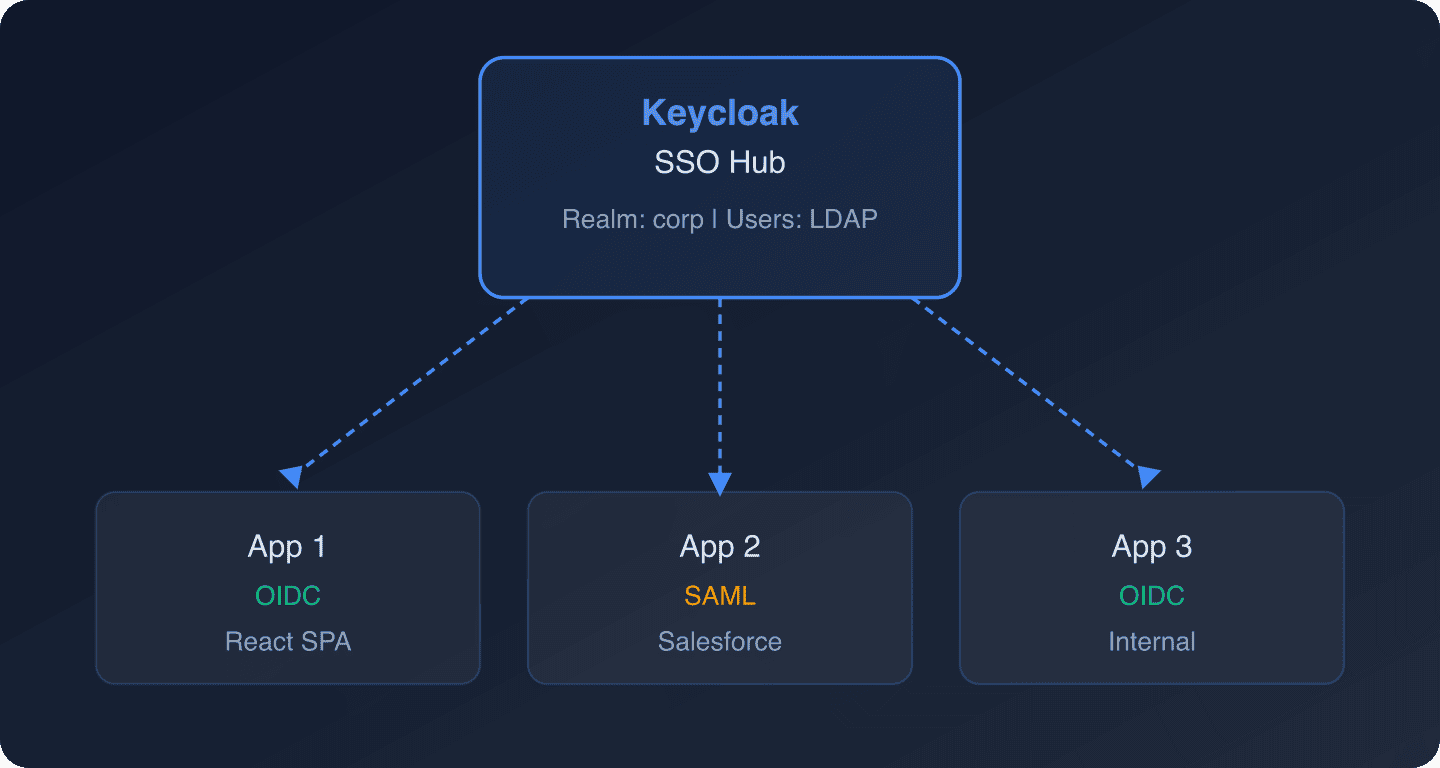
Each application connects to Keycloak using whichever protocol it supports. Keycloak handles the protocol translation. The user authenticates once, and Keycloak issues the appropriate token or assertion for each application.
For single sign-on configuration in a managed environment, Skycloak provides guided setup through its platform.
SP-Initiated SSO (Most Common)
In SP-initiated SSO, the user starts at the application (Service Provider). The application detects the user is not authenticated and redirects them to Keycloak.
OIDC SP-Initiated Flow
Step 1: User visits https://app.example.com/dashboard.
Step 2: The app checks for a valid session. Finding none, it redirects to Keycloak:
GET https://keycloak.example.com/realms/corp/protocol/openid-connect/auth
  ?response_type=code
  &client_id=app1
  &redirect_uri=https://app.example.com/callback
  &scope=openid profile email
  &state=random-state-value
  &code_challenge=E9Melhoa2OwvFrEMTJguCHaoeK1t8URWbuGJSstw-cM
  &code_challenge_method=S256
Step 3: Keycloak presents the login page. The user authenticates (or Keycloak finds an existing SSO session and skips the login page).
Step 4: Keycloak redirects back with an authorization code:
HTTP/1.1 302 Found
Location: https://app.example.com/callback?code=abc123&state=random-state-value
Step 5: The app exchanges the code for tokens:
curl -X POST https://keycloak.example.com/realms/corp/protocol/openid-connect/token
  -d "grant_type=authorization_code"
  -d "client_id=app1"
  -d "client_secret=app1-secret"
  -d "redirect_uri=https://app.example.com/callback"
  -d "code=abc123"
  -d "code_verifier=dBjftJeZ4CVP-mB92K27uhbUJU1p1r_wW1gFWFOEjXk"
Step 6: If the user then visits https://app2.example.com, App 2 redirects to Keycloak. Keycloak detects the existing SSO session and issues tokens for App 2 without showing the login page.
SAML SP-Initiated Flow
Step 1: User visits https://saml-app.example.com.
Step 2: The app generates a SAML AuthnRequest and redirects to Keycloak:
<samlp:AuthnRequest
    xmlns:samlp="urn:oasis:names:tc:SAML:2.0:protocol"
    ID="_abc123"
    Version="2.0"
    IssueInstant="2026-04-17T09:00:00Z"
    Destination="https://keycloak.example.com/realms/corp/protocol/saml"
    AssertionConsumerServiceURL="https://saml-app.example.com/saml/acs"
    ProtocolBinding="urn:oasis:names:tc:SAML:2.0:bindings:HTTP-POST">
    <saml:Issuer>https://saml-app.example.com</saml:Issuer>
</samlp:AuthnRequest>
Step 3: Keycloak authenticates the user (or uses an existing SSO session).
Step 4: Keycloak sends a SAML Response back to the app’s Assertion Consumer Service URL:
<samlp:Response
    Destination="https://saml-app.example.com/saml/acs"
    InResponseTo="_abc123">
    <saml:Assertion>
        <saml:Subject>
            <saml:NameID>john.smith@company.com</saml:NameID>
        </saml:Subject>
        <saml:AuthnStatement AuthnInstant="2026-04-17T09:00:30Z">
            <saml:AuthnContext>
                <saml:AuthnContextClassRef>
                    urn:oasis:names:tc:SAML:2.0:ac:classes:PasswordProtectedTransport
                </saml:AuthnContextClassRef>
            </saml:AuthnContext>
        </saml:AuthnStatement>
        <saml:AttributeStatement>
            <saml:Attribute Name="email">
                <saml:AttributeValue>john.smith@company.com</saml:AttributeValue>
            </saml:Attribute>
        </saml:AttributeStatement>
    </saml:Assertion>
</samlp:Response>
For details on SAML SP configuration, see Keycloak as a SAML Service Provider: The Complete Guide.
IdP-Initiated SSO
In IdP-initiated SSO, the user starts at the identity provider (Keycloak) and selects an application to access. This is common in enterprise portal scenarios.
SAML IdP-Initiated Flow
Keycloak supports SAML IdP-initiated SSO. The user accesses a special URL:
https://keycloak.example.com/realms/corp/protocol/saml/clients/salesforceKeycloak generates a SAML assertion and POSTs it to the SP’s ACS URL without a prior AuthnRequest. The SP must be configured to accept unsolicited responses.
OIDC IdP-Initiated Flow
OIDC does not natively support IdP-initiated flows the way SAML does. The workaround is to initiate the authorization code flow from a portal page that redirects to the application:
https://keycloak.example.com/realms/corp/protocol/openid-connect/auth
  ?response_type=code
  &client_id=app1
  &redirect_uri=https://app.example.com/callback
  &scope=openid
  &prompt=none
The prompt=none parameter tells Keycloak to use the existing session without showing a login page. If no session exists, Keycloak returns an error and the portal can then initiate a standard login.
For bridging IdP-initiated SAML to OIDC applications, see Bridging IdP-Initiated SAML to OIDC with Keycloak.
Keycloak OIDC Client Configuration
Create an OIDC Client
In the Keycloak admin console:
- Navigate to Clients > Create client.
- Set Client type to
OpenID Connect. - Enter the Client ID (e.g.,
my-web-app). - Set Client authentication to
Onfor server-side apps,Offfor SPAs. - Enable Standard flow (authorization code).
- Set Valid redirect URIs to your application’s callback URL.
- Set Valid post logout redirect URIs for single logout.
- Configure Web origins for CORS if the client is a browser app.
Example OIDC Client Configuration via REST API
curl -X POST -H "Authorization: Bearer $ADMIN_TOKEN"
  -H "Content-Type: application/json"
  "https://keycloak.example.com/admin/realms/corp/clients"
  -d '{
    "clientId": "my-web-app",
    "enabled": true,
    "protocol": "openid-connect",
    "publicClient": false,
    "redirectUris": ["https://app.example.com/callback"],
    "webOrigins": ["https://app.example.com"],
    "standardFlowEnabled": true,
    "directAccessGrantsEnabled": false,
    "attributes": {
      "pkce.code.challenge.method": "S256",
      "post.logout.redirect.uris": "https://app.example.com/"
    }
  }'
For quick client generation, use the Keycloak Config Generator.
Keycloak SAML Client Configuration
Create a SAML Client
- Navigate to Clients > Create client.
- Set Client type to
SAML. - Enter the Client ID (this is your SP’s Entity ID, usually a URL).
- Configure the SAML settings:
- Name ID Format:
emailorpersistent - Assertion Consumer Service POST Binding URL: Your SP’s ACS endpoint
- Sign Assertions:
On(recommended) - Encrypt Assertions:
On(if the SP supports it)
- Name ID Format:
SAML Metadata Exchange
The fastest way to configure SAML is through metadata exchange.
Export Keycloak’s IdP metadata:
https://keycloak.example.com/realms/corp/protocol/saml/descriptorImport this metadata into your SP.
Import SP metadata into Keycloak:
In the client configuration, use the SAML metadata import option and provide the SP’s metadata URL.
SAML Attribute Mapping
Configure mappers to include user attributes in the SAML assertion:
curl -X POST -H "Authorization: Bearer $ADMIN_TOKEN"
  -H "Content-Type: application/json"
  "https://keycloak.example.com/admin/realms/corp/clients/$CLIENT_UUID/protocol-mappers/models"
  -d '{
    "name": "email",
    "protocol": "saml",
    "protocolMapper": "saml-user-attribute-idp-mapper",
    "config": {
      "user.attribute": "email",
      "friendly.name": "email",
      "attribute.name": "urn:oid:0.9.2342.19200300.100.1.3",
      "attribute.nameformat": "URI Reference"
    }
  }'
For attribute mapping details, see Attribute Mapping When Using Keycloak as a SAML SP.
Session Management Across Applications
SSO introduces a shared session that spans multiple applications. Managing this session is critical for both security and user experience.
Session Types in Keycloak
- SSO Session: The master session at the Keycloak level. As long as this is active, users can access applications without re-authenticating.
- Client Sessions: Sub-sessions for each application. Created when a user accesses an application.
- Application Sessions: Sessions managed by each application independently (cookies, server-side sessions).
Session Timeout Configuration
{
  "ssoSessionIdleTimeout": 1800,
  "ssoSessionMaxLifespan": 36000,
  "clientSessionIdleTimeout": 1800,
  "clientSessionMaxLifespan": 36000,
  "accessTokenLifespan": 300,
  "accessTokenLifespanForImplicitFlow": 300
}| Setting | Recommended | Effect |
|---|---|---|
| SSO Session Idle | 30 min | Auto-logout after 30 min of inactivity |
| SSO Session Max | 10 hours | Force re-auth after 10 hours regardless |
| Access Token Lifespan | 5 min | Short-lived API access |
| Refresh Token Lifespan | 30 min | Matches SSO session idle |
For deeper session management strategies, see Session Management in Distributed Systems and Skycloak’s Session Management feature.
Single Logout (SLO)
Single logout is the complement to single sign-on: when a user logs out of one application, they should be logged out of all applications.
OIDC Back-Channel Logout (Recommended)
Keycloak sends a logout token to each application’s back-channel logout endpoint when the SSO session ends:
# Configure back-channel logout URL on the client
curl -X PUT -H "Authorization: Bearer $ADMIN_TOKEN"
  -H "Content-Type: application/json"
  "https://keycloak.example.com/admin/realms/corp/clients/$CLIENT_UUID"
  -d '{
    "attributes": {
      "backchannel.logout.url": "https://app.example.com/logout/callback",
      "backchannel.logout.session.required": "true"
    }
  }'
Your application’s back-channel endpoint receives a logout token (JWT) and must invalidate the user’s local session:
// Express.js back-channel logout endpoint
app.post('/logout/callback', express.urlencoded({ extended: true }), async (req, res) => {
    const logoutToken = req.body.logout_token;

    // Verify the logout token signature
    const { payload } = await jwtVerify(logoutToken, JWKS, {
        issuer: 'https://keycloak.example.com/realms/corp',
    });

    // Extract the session ID
    const sessionId = payload.sid;

    // Invalidate the local session
    await sessionStore.destroyByKeycloakSession(sessionId);

    res.status(200).send();
});
OIDC Front-Channel Logout
Keycloak loads each application’s front-channel logout URL in an iframe:
https://app.example.com/logout?sid=session-id&iss=https://keycloak.example.com/realms/corpFront-channel logout is simpler to implement but less reliable (depends on the browser loading iframes).
SAML Single Logout
Keycloak sends a SAML LogoutRequest to each SP’s Single Logout Service URL:
<samlp:LogoutRequest
    Destination="https://saml-app.example.com/saml/slo"
    ID="_xyz789">
    <saml:NameID>john.smith@company.com</saml:NameID>
    <samlp:SessionIndex>keycloak-session-id</samlp:SessionIndex>
</samlp:LogoutRequest>
Initiating Logout
OIDC logout:
https://keycloak.example.com/realms/corp/protocol/openid-connect/logout
  ?id_token_hint=eyJhbGciOi...
  &post_logout_redirect_uri=https://app.example.com/
  &state=random-state
SAML logout:
Send a SAML LogoutRequest to Keycloak’s SLO endpoint:
https://keycloak.example.com/realms/corp/protocol/samlIdentity Provider Federation
Keycloak can broker authentication to external identity providers, acting as a centralized SSO hub that connects to multiple upstream IdPs.
Connecting External SAML IdPs
For enterprise customers using Azure AD, Okta, or ADFS:
- In Keycloak, navigate to Identity Providers > Add provider > SAML v2.0.
- Import the customer’s SAML metadata.
- Configure attribute mappers to normalize claims.
- Set up the First Broker Login flow.
See How to Set Entra ID SAML in Keycloak as an IdP for a step-by-step Azure AD integration.
Connecting External OIDC IdPs
For OIDC-based providers:
- Navigate to Identity Providers > Add provider > OpenID Connect v1.0.
- Enter the Discovery URL (the
.well-known/openid-configurationendpoint). - Enter the Client ID and Client Secret from the external provider.
- Configure scope and claim mappings.
Using kc_idp_hint
If you know which IdP a user should authenticate with (e.g., based on their email domain), skip the Keycloak login page entirely:
https://keycloak.example.com/realms/corp/protocol/openid-connect/auth
  ?client_id=my-app
  &redirect_uri=https://app.example.com/callback
  &response_type=code
  &scope=openid
  &kc_idp_hint=azure-ad
See Use kc_idp_hint to Choose Identity Provider in Keycloak for implementation details.
For managing multiple identity providers, see Skycloak’s Identity Providers feature.
Step-Up Authentication
Some applications require stronger authentication for sensitive operations (like approving payments or changing security settings) even when the user is already logged in via SSO.
Keycloak supports step-up authentication using the acr_values parameter:
https://keycloak.example.com/realms/corp/protocol/openid-connect/auth
  ?client_id=my-app
  &redirect_uri=https://app.example.com/callback
  &response_type=code
  &scope=openid
  &acr_values=gold
This forces the user to complete a higher assurance level (e.g., MFA) even if they have an existing SSO session.
For implementation details, see Keycloak Step-Up Authentication Guide and Multi-Factor Authentication.
Real-World Architecture Patterns
Pattern 1: Corporate SSO Hub
One Keycloak realm federated to Active Directory via LDAP. All internal applications (intranet, Jira, Confluence, custom tools) connect as clients. Users sign in once at the start of their workday.
Pattern 2: B2B Multi-Tenant SSO
Each customer gets their own Keycloak realm (or uses the Organizations feature). Each customer realm has an identity provider connection to the customer’s corporate IdP. Your application connects to the appropriate realm based on the customer’s domain.
Pattern 3: Consumer Application SSO
A single realm with social login providers (Google, GitHub, Apple) configured as identity providers. Web, mobile, and desktop clients connect as OIDC clients. SSO is maintained across all client applications.
Monitoring SSO
Track these metrics for your SSO deployment:
- SSO adoption rate: Percentage of logins that use an existing SSO session vs. fresh authentication
- Session duration: How long SSO sessions last before expiry
- SLO success rate: Percentage of single logout attempts that successfully terminate all sessions
- Protocol distribution: SAML vs. OIDC usage across your application portfolio
Keycloak events capture all of these. Configure event listeners to stream to your monitoring platform. See Skycloak Insights for built-in SSO monitoring.
Frequently asked questions
What is single sign-on (SSO) and how does it work?
Single sign-on (SSO) lets a user authenticate once against a central identity provider and then access multiple applications without logging in again. When a user authenticates with Keycloak, it creates an SSO session. Any other application that redirects the user to the same Keycloak realm detects the existing session and issues tokens without showing the login page. This works across protocol boundaries, an OIDC app and a SAML app in the same realm share the same underlying SSO session.
When should I use SAML vs OpenID Connect for SSO?
Use SAML 2.0 when integrating with enterprise applications that only support SAML (Salesforce, Workday, ServiceNow), or when connecting to a customer’s existing corporate identity provider, most enterprises have SAML-first infrastructure. Use OpenID Connect for new web applications, SPAs, mobile apps, or any API-driven ecosystem. OIDC is lighter (JSON/JWT vs XML), has native discovery via .well-known/openid-configuration, and is better supported on mobile platforms.
What is the difference between SP-initiated and IdP-initiated SSO?
In SP-initiated SSO (the most common pattern), the user starts at the application (the Service Provider), which redirects them to Keycloak when no valid session is found. In IdP-initiated SSO, the user starts at Keycloak and selects an application to access, Keycloak then sends an assertion or token to the application without a prior request. SAML natively supports IdP-initiated flows; OIDC does not, but the same effect can be achieved using prompt=none to silently reuse an existing Keycloak session.
What is single logout (SLO) and how does Keycloak implement it?
Single logout ensures that when a user logs out of one application, all other applications sharing the same SSO session are also terminated. Keycloak supports OIDC back-channel logout (Keycloak sends a signed logout token to each application’s registered logout endpoint, reliable but requires server-side endpoint), front-channel logout (Keycloak loads logout URLs in iframes, simpler but browser-dependent), and SAML Single Logout for SAML clients. Back-channel logout is the recommended approach for production environments.
Can Keycloak act as a hub between different identity providers?
Yes. Keycloak acts as an identity broker, connecting to multiple upstream identity providers simultaneously, corporate SAML IdPs (Azure AD, Okta, ADFS), social providers (Google, GitHub, Apple), and OIDC providers. Your applications only need to integrate with Keycloak; Keycloak handles the protocol translation and attribute normalization from each upstream IdP. Use kc_idp_hint to route users directly to the correct IdP based on their email domain.
Ready to implement enterprise SSO? Skycloak provides managed Keycloak with pre-configured SSO support, identity provider management, and audit logging. Book a demo or explore our documentation to get started.