Introduction
Many organizations have multiple applications developed over a period of time. Traditionally, each application maintains its own user database and login mechanism.
This approach creates several challenges:
- Users need to remember multiple usernames and passwords.
- Password policies must be implemented separately in each application.
- User onboarding and offboarding become difficult to manage.
- Providing a Single Sign-On (SSO) experience becomes nearly impossible.
A common solution is to centralize authentication using an Identity Provider (IdP) such as Keycloak.
Instead of each application validating usernames and passwords, applications delegate authentication to Keycloak. Users log in through Keycloak, and applications trust the authentication performed by Keycloak.
In this model, Keycloak becomes responsible for identity management. User information may be stored directly in Keycloak or sourced from external systems such as LDAP or Active Directory through User Federation.
As a result, the source of truth for user identities moves from individual applications to a centralized identity platform.
Understanding the Architecture
Without Keycloak:
Application A --> User Database A
Application B --> User Database B
Application C --> User Database C
With Keycloak:
Application A ----\
Application B ----- > Keycloak
Application C ----/
Users authenticate once with Keycloak and can then access multiple applications without repeatedly entering credentials.
This is known as Single Sign-On (SSO).
SAML and OpenID Connect
Keycloak supports both:
- SAML (Security Assertion Markup Language)
- OpenID Connect (OIDC)
Both protocols can provide Single Sign-On capabilities.
For modern applications, OpenID Connect is generally preferred because:
- It is easier to implement.
- It uses JSON-based tokens.
- It integrates well with modern web, mobile, and microservice architectures.
- Most frameworks provide built-in support.
For the remainder of this article, we focus on OpenID Connect.
Does My Application Need a Local User Database?
A common beginner question is:
If Keycloak manages users, do I still need a local user database?
The answer depends on your application’s requirements.
Scenario 1: No Local User Data Required
Some applications only need to know:
- Who the user is
- Whether the user is authenticated
In this case, the application can rely entirely on information contained in the tokens issued by Keycloak.
No local user database is required.
Scenario 2: Application-Specific Data Required
Many applications store information that is not part of identity management:
- Employee records
- Customer information
- Subscription details
- Domain-specific permissions
- Application preferences
In such cases, the application usually maintains its own database.
The challenge becomes:
How do we identify which local record belongs to the authenticated Keycloak user?
Mapping Keycloak Users to Local Users
Every user in Keycloak has a unique identifier.
When a user authenticates, Keycloak includes this identifier in the token.
The most important claim is:
sub
The sub (subject) claim uniquely identifies the user.
For example:
{
  "sub": "4c3c4f61-3b85-4e6c-96a0-6e6fdbf4f85e",
  "preferred_username": "john.doe",
  "email": "[email protected]"
}
The sub value is:
- Unique
- Stable
- Generated by Keycloak
- Not editable
For this reason, many applications store the Keycloak sub value in their local database and use it as the mapping key.
Some organizations choose to use preferred_username, but usernames can occasionally change. Therefore, the sub claim is usually the safer option.
Understanding OAuth2 Clients and Resource Servers
When integrating Keycloak, applications generally play one of two roles.
OAuth2 Client (Relying Party)
A web application that redirects users to Keycloak for login acts as an OAuth2 Client.
Examples:
- Spring Boot Web Applications
- React Applications
- Angular Applications
- Mobile Applications
The application trusts Keycloak for authentication.
OAuth2 Resource Server
A backend API that receives access tokens acts as a Resource Server.
Its responsibilities include:
- Validating token signatures
- Checking token expiry
- Verifying issuer information
- Extracting claims from the token
Most modern frameworks provide built-in Resource Server support.
For example:
- Spring Security
- ASP.NET Authentication Middleware
- Node.js libraries
- Quarkus Security
User Provisioning Considerations
Before users can authenticate, they must exist in Keycloak.
There are several ways to achieve this:
1. Direct User Creation
Administrators create users directly in Keycloak.
Suitable for:
- Small environments
- Proof-of-concepts
- Development environments
2. User Federation
Keycloak can read users from:
- LDAP
- Microsoft Active Directory
In this case, user data remains in the external directory.
3. REST APIs
Applications can create users programmatically using Keycloak’s Admin REST APIs.
Suitable for:
- Self-registration
- Customer onboarding
- Automated provisioning
4. Custom User Storage SPI
Organizations can implement a custom User Storage SPI to connect Keycloak to proprietary user stores.
Keeping Local Databases in Sync
Suppose your application maintains a local user database.
What happens when:
- A new user is created?
- A user is deleted?
- User information changes?
Several approaches are possible.
Just-In-Time (JIT) Provisioning
When a user logs in for the first time:
- Keycloak authenticates the user.
- The application receives the token.
- The application checks whether the user exists locally.
- If not, it creates the local user record.
This approach is simple and commonly used.
Event-Based Synchronization
Keycloak can generate events when:
- Users are created
- Users are updated
- Users are deleted
A custom Event Listener can forward these events to downstream applications for synchronization.
SCIM-Based Provisioning
SCIM is an industry-standard protocol for identity provisioning.
At the time of writing, Keycloak provides SCIM support primarily through preview features and community extensions. Native outbound SCIM client functionality is not currently a standard Keycloak feature. Organizations requiring automated provisioning to downstream applications typically use custom integrations, event-driven synchronization, or community-supported SCIM extensions.
Including User Attributes in Tokens
Organizations often maintain additional user information beyond the standard attributes provided by Keycloak. Examples include:
- Employee ID
- Phone Number
- Department
- Cost Center
These custom attributes can be created through:
Realm Settings
  → User Profile
      → Create Attribute
For example, you may create a custom attribute named:
phoneNumber
Creating the attribute alone does not automatically make it available to applications. If an application needs to receive the attribute inside an ID token or access token, a Protocol Mapper must be configured.
What is a Protocol Mapper?
A Protocol Mapper is a Keycloak component that controls how user information is mapped into OpenID Connect tokens. It allows standard or custom user attributes stored in Keycloak to be exposed as token claims.
Typically, an OAuth2 Client application is represented in Keycloak by an OpenID Connect (OIDC) client. Protocol Mappers are configured on the client or one of its associated client scopes so that tokens issued for that client contain the required claims.
Example: Exposing the phoneNumber Attribute
Assume that a custom user attribute named phoneNumber has already been created and populated for users.
To include this value in the access token:
- Navigate to Clients.
- Select the OIDC client used by your application.
- Open the Client Scopes tab.
- Select the dedicated client scope:
<client-id>-dedicated
- Choose:
Add Mapper
  → By Configuration
      → User Attribute
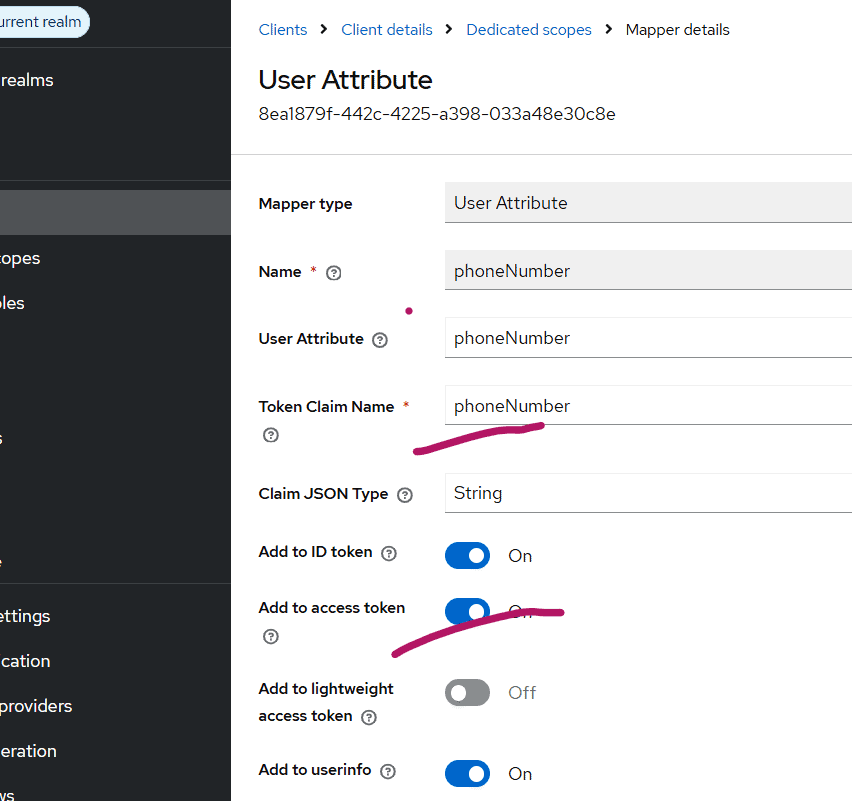
Configure the mapper with values similar to the following:
| Field | Value |
|---|---|
| Name | phoneNumber |
| Mapper Type | User Attribute |
| User Attribute | phoneNumber |
| Token Claim Name | phoneNumber |
| Claim JSON Type | String |
| Add to Access Token | ON |
| Add to ID Token | Optional |
The mapper copies the value of the phoneNumber user attribute into a token claim named phoneNumber.
Resulting Access Token
After the mapper is configured, Keycloak may issue an access token similar to the following:
{
  "sub": "4c3c4f61-3b85-4e6c-96a0-6e6fdbf4f85e",
  "preferred_username": "john.doe",
  "employeeId": "EMP1001",
  "phoneNumber": "+91xxxxxxxxxx"
}
The application can now read the phoneNumber claim directly from the token.
Depending on business requirements, the application may use these claims directly or use the sub claim to locate a corresponding user record in a local database and apply application-specific authorization logic.
To keep this article focused on user mapping and token processing, the OIDC client creation process is not covered here. It is assumed that an OAuth2 Client application has already been configured in Keycloak and is capable of obtaining access tokens from the realm.
Reading Token Claims in Spring Security Resource Server
Spring Security Resource Server automatically validates JWT access tokens issued by Keycloak and makes token claims available to your application. This allows your application to access user information contained in the token without having to parse or validate the JWT manually.
From Spring Starter URL, create a maven or gradle project.
Spring version: 3.5.14, I have used
Dependencies
- OAuth2 Resource Server
- Spring Web
Changes in the source code:
The following issuer-uri property points to the Keycloak realm that issues access tokens. Spring Security automatically discovers the OpenID Connect configuration and the public keys required to validate JWT signatures.
application.properties
spring.application.name=sampleapp
server.port=9090
spring.security.oauth2.resourceserver.jwt.issuer-uri=http://localhost:8080/realms/acme
The following security configuration requires authentication for the /api/profile endpoint while allowing all other endpoints to be accessed without authentication.
SecurityConfig.java
package com.example.sampleapp;

import org.springframework.context.annotation.Bean;
import org.springframework.context.annotation.Configuration;
import org.springframework.security.config.Customizer;
import org.springframework.security.config.annotation.web.builders.HttpSecurity;
import org.springframework.security.web.SecurityFilterChain;

@Configuration
public class SecurityConfig {

    @Bean
    SecurityFilterChain securityFilterChain(HttpSecurity http)
            throws Exception {

        http
            .authorizeHttpRequests(auth -> auth
                .requestMatchers("/api/profile").authenticated()
                .anyRequest().permitAll()
            )
            .oauth2ResourceServer(oauth2 ->
                oauth2.jwt(Customizer.withDefaults()));

        return http.build();
    }
}
With this configuration in place, Spring Security automatically validates JWT access tokens presented to the protected endpoint. Requests containing missing, expired, or invalid tokens are rejected before reaching the controller.
The following example extracts standard and custom claims from the authenticated JWT token.
In the following example, preferred_username is a standard Keycloak claim and phoneNumber is assumed to be a custom user attribute that has been added to the access token using a Protocol Mapper.
The @AuthenticationPrincipal annotation injects the authenticated Jwt object into the controller method. Since Spring Security has already validated the access token, the application can safely read claims directly from the Jwt instance.
ProfileController.java
package com.example.sampleapp;

import org.springframework.security.core.annotation.AuthenticationPrincipal;
import org.springframework.security.oauth2.jwt.Jwt;
import org.springframework.web.bind.annotation.GetMapping;
import org.springframework.web.bind.annotation.RequestMapping;
import org.springframework.web.bind.annotation.RestController;

@RestController
@RequestMapping("/api")
public class ProfileController {

    @GetMapping("/profile")
    public String profile(@AuthenticationPrincipal Jwt jwt) {

        String userId = jwt.getSubject();

        String username =
                jwt.getClaimAsString("preferred_username");

        String phoneNumber =
                jwt.getClaimAsString("phoneNumber");

        //handle local database lookup  as per the business requirement
       return "User ID: " + userId +
              ", User: " + username +
             ", Phone Number: " + phoneNumber;

    }
}
Testing the Endpoint
Once the application is running and a valid access token has been obtained from Keycloak, invoke the protected endpoint by including the access token in the Authorization header.
Invoke the endpoint using curl:

```bash
curl -H "Authorization: Bearer <access-token>" \
     http://localhost:9090/api/profile
```
Replace <access-token> with an actual access token issued by your Keycloak realm.
If authentication is successful, Spring Security validates the JWT access token and invokes the controller method. The response will contain the user information extracted from the token claims.
Example response:
User ID: 4c3c4f61-3b85-4e6c-96a0-6e6fdbf4f85e,
User: john.doe,
Phone Number: +91xxxxxxxxxx
In this example:
subis exposed as the User ID and uniquely identifies the authenticated user.preferred_usernamecontains the username.phoneNumberis a custom user attribute that has been added to the access token using a Protocol Mapper.
In a real-world application, the sub claim is often used to locate the corresponding user record in the application’s local database. Once the user record is found, application-specific authorization and business logic can be applied.
Conclusion
Keycloak provides a centralized and secure approach to authentication and identity management.
For beginners, the most important concepts to understand are:
- Keycloak becomes the central Identity Provider.
- Applications delegate authentication to Keycloak.
- OpenID Connect is the preferred protocol for modern applications.
- The
subclaim uniquely identifies users. - Applications may optionally maintain their own local databases.
- Custom attributes can be added and exposed through tokens using Protocol Mappers.
- Resource Servers validate access tokens and use token claims for authorization decisions.
Once these fundamentals are understood, you can move on to more advanced topics such as role-based access control, identity brokering, user federation, multi-factor authentication, and custom Keycloak extensions. Understanding how users are identified, mapped, and authorized across applications is one of the foundational concepts in Identity and Access Management (IAM), and Keycloak provides a flexible platform to implement these patterns.
About Skycloak
Skycloak is a fully managed Keycloak platform hosted in the cloud. It enables organizations to leverage the power of open-source Keycloak IAM without the operational overhead of installing, maintaining, and scaling production-grade Keycloak environments — delivered securely and cost-effectively.
If you’re new to Skycloak, visit the Skycloak Getting Started Guide to learn more

Ready to simplify your authentication?
Deploy production-ready Keycloak in minutes. Unlimited users, flat pricing, no SSO tax.