
Introduction
Many organizations need Keycloak to read user details from external directories or databases. Keycloak supports a User Federation feature that allows integration with LDAP and Microsoft Active Directory servers. It also supports extending functionality through the User Storage SPI for custom integrations.
In this article, we discuss the built-in User Federation option for integrating an LDAP server with Keycloak.
Overview
In the Keycloak Admin Console, under a realm, navigate to:
User Federation → Add LDAP Provider
This option allows you to configure an LDAP server connection. Since LDAP provider configuration values vary between LDAP servers, this article does not cover those settings in detail.
This blog discusses some of the common general settings and other details.
Authentication Flow
By default, Keycloak first checks its own internal database during authentication. If the user belongs to an external LDAP directory, Keycloak does not synchronize the password into its local database.
Instead, during login, Keycloak validates the password directly against the LDAP server.
Will Keycloak Store LDAP Users in Its Own Database?
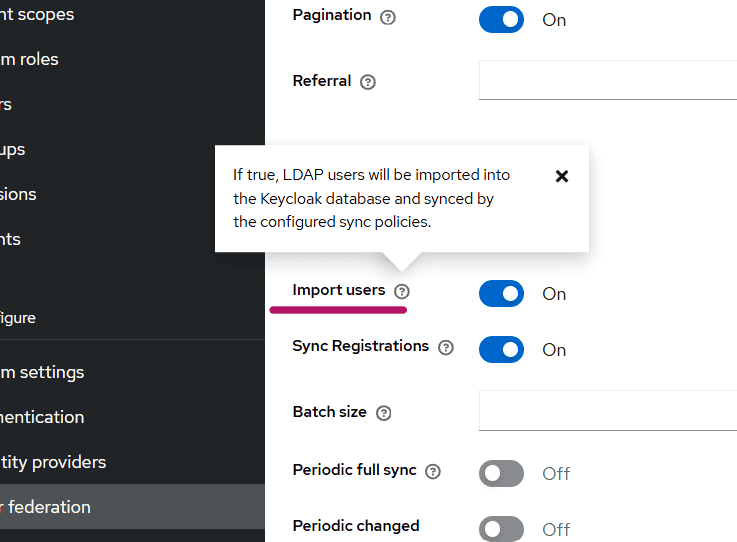
By default, yes. This behavior is controlled by the following setting:
- Import Users toggle button
When the Import Users toggle is enabled, LDAP users are imported and stored in the Keycloak database after their first login or user lookup.
Example Behavior
When a user logs in for the first time, or when the user appears in a search result in the Admin Console, the LDAP provider imports that user into the Keycloak database.
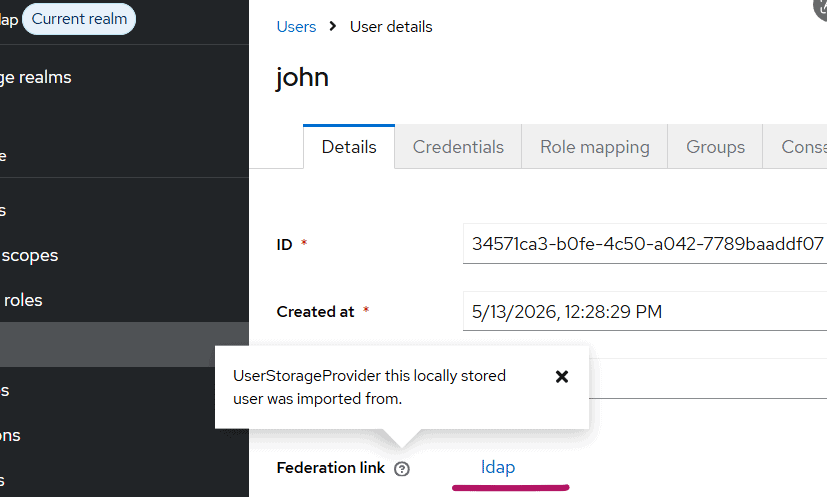
The imported user will have a UUID-style ID in Keycloak.
This indicates that the user data is persisted locally in the Keycloak database.
If Import Users is turned OFF:
- Users are not permanently stored in the Keycloak database
- The displayed ID may appear as generated/random characters
- User data is retrieved dynamically from LDAP
The synced user in Keycloak, will be shown as below:
Password Handling
Even when users are imported into Keycloak, passwords are typically not stored locally.
The credentials section for federated users indicates that password validation is performed against LDAP.
This means:
- User profile data may exist in Keycloak
- Password verification still happens through the LDAP server
Edit Modes in LDAP Federation
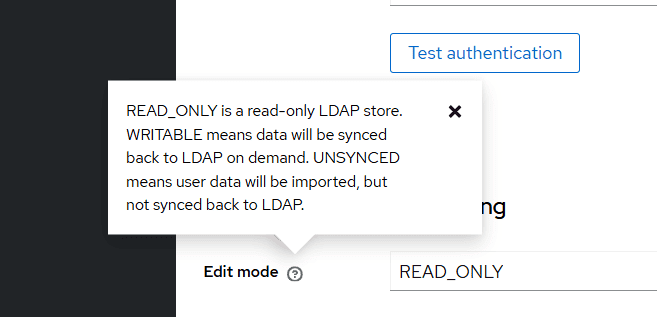
When configuring LDAP User Federation, Keycloak requires an Edit Mode setting.
Available options are:
- READ_ONLY
- WRITABLE
- UNSYNCED
READ_ONLY
In READ_ONLY mode:
- User properties cannot be modified from Keycloak
- Changes must be made directly in LDAP
- Fields appear disabled in the Keycloak Admin Console
This mode is commonly used when LDAP is treated as the authoritative user store.
Talk through your identity setup with us
Book a demo and we will walk you through Skycloak with the sign-in, SSO and migration questions your team is working on.
WRITABLE
In WRITABLE mode:
- User data changes can be written back to LDAP
- Updates made in Keycloak are synchronized to LDAP
If Sync Registrations is enabled:
- Newly created Keycloak users are also created in LDAP
This mode is useful when Keycloak should actively manage LDAP users.
UNSYNCED
In UNSYNCED mode:
- User data is imported from LDAP
- Changes made in Keycloak are not synchronized back to LDAP
This allows local customization of imported users without affecting the LDAP directory.
User Synchronization
Keycloak provides flexible synchronization options for LDAP users.
A common recommendation is:
- Click Synchronize all users when creating the LDAP provider
- Configure periodic synchronization for changed users
This ensures Keycloak remains updated with LDAP changes.
LDAP Mappers
When an LDAP provider is created, Keycloak automatically creates a set of default LDAP mappers.
LDAP mappers define how LDAP attributes are mapped to Keycloak user attributes.
Examples include:
- username
- first name
- last name
- group mappings
These mappers can be customized based on organizational requirements.
Provider Priority
Keycloak also provides a Priority setting for User Federation providers.
This becomes important when multiple providers are configured.
The priority determines:
- The order in which providers are queried for users
- Which provider is preferred during user lookup or user creation
LDAP Security Best Practice
When using Keycloak in production environments, LDAP communication should always use SSL/TLS.
Instead of using:
ldap://myhost.com:389Use secure LDAP:
ldaps://myhost.com:636When a secure LDAP URL is configured, Keycloak communicates with the LDAP server over SSL/TLS, helping protect credentials and user data during transmission.
For more details on user federation, please visit this Keycloak documentation.
Summary
LDAP User Federation in Keycloak provides a flexible mechanism for integrating external user directories without migrating all users into Keycloak.
Key features include:
- LDAP authentication support
- Optional local user import
- Multiple synchronization strategies
- Flexible edit modes
- LDAP-to-Keycloak attribute mapping
- Secure LDAP communication using SSL/TLS
This makes Keycloak suitable for enterprise environments where centralized identity management and integration with existing directory services are required.
About Skycloak
Skycloak is a fully managed Keycloak platform hosted in the cloud. It enables organizations to leverage the power of open-source Keycloak IAM without the operational overhead of installing, maintaining, and scaling production-grade Keycloak environments, delivered securely and cost-effectively.
If you’re new to Skycloak, visit the Skycloak Getting Started Guide to learn more