
HPE has patched eight maximum severity (CVSS 10.0) flaws in Aruba OS, AOS-8 and AOS-10, in security bulletin HPESBNW05162, released on 22 October 2026 and reported by BleepingComputer on 23 October. Three of the eight are authentication bypasses that let an unauthenticated attacker on the network take control of a mobility conductor, controller, gateway or access point, and the rest run code on the device without any login. The CVE records HPE published list AOS-10.8 up to 10.8.1.1, 10.7 up to 10.7.2.6, 10.4 up to 10.4.1.13, 8.13 up to 8.13.3.0 and 8.10 up to 8.10.0.23 as affected, so upgrade to a later release on your branch now, then treat the device as a possible identity breach: rotate the RADIUS, TACACS+ and LDAP credentials and SSO client secrets it held, and review who authenticated through it.
This post is for the network and identity engineers who run Aruba wireless and already know a critical advisory landed. We go through the authentication bypass CVEs in detail, checked against the CVE records HPE published and BleepingComputer’s report on the bulletin, put the code execution flaws in one table, and then spend most of the time on the part the news coverage skips. A wireless controller sits between your users and your identity provider, so the secrets it stores to talk to RADIUS, TACACS+, LDAP and any single sign-on portal are worth more to an attacker than the controller itself.
Key takeaways
- Affected: AOS-10.8 up to 10.8.1.1, AOS-10.7 up to 10.7.2.6, AOS-10.4 up to 10.4.1.13 (CVE-2026-79844), AOS-8.13 up to 8.13.3.0 and AOS-8.10 up to 8.10.0.23 (CVE-2026-79850), on mobility conductors, access points, controllers and gateways (BleepingComputer).
- HPE patched 72 vulnerabilities in this release (BleepingComputer); eight are maximum severity, and several more authentication bypasses score between 8.5 and 9.8 in HPE’s CVE records, such as CVE-2026-79855 and CVE-2026-79881.
- HPE says it is “not aware of any public discussion or exploit code” as of release (BleepingComputer), and none of these CVEs is in CISA’s Known Exploited Vulnerabilities catalog as of its 29 October 2026 version (JSON feed).
- Patching closes the holes but does not reissue anything. Every shared secret, bind password and client secret the device held stays valid until you change it on both ends.
Which Aruba AOS flaws are authentication bypasses?
HPE patched 72 vulnerabilities in this release, according to BleepingComputer, which is a lot to read during a maintenance window, so it helps to sort them by what an attacker gains. An authentication bypass means the attacker skips the login check entirely and is treated as an administrator, without needing a password or a stolen session. Among the eight maximum severity flaws, three are bypasses, and the seven with a published HPE CVE record all carry the same core vector: reachable over the network (AV:N), low complexity (AC:L), no privileges (PR:N), no user interaction (UI:N) and a changed scope (S:C), meaning the damage reaches beyond the vulnerable component.
| CVE | Branch | What the attacker gets | CVSS 3.1 |
|---|---|---|---|
| CVE-2026-79844 | AOS-10 | Bypasses authentication and runs commands on the host, “if certain preconditions outside of the attacker’s control are met” | 10.0, AV:N/AC:L/PR:N/UI:N/S:C/C:H/I:H/A:N |
| CVE-2026-79845 | AOS-10 | “Authentication Bypass in the PAPI Protocol of AOS-10”, as BleepingComputer lists it | Maximum severity |
| CVE-2026-79850 | AOS-8 | Bypasses authentication and runs commands “as root on the underlying operating system leading to complete system compromise” | 10.0, AV:N/AC:L/PR:N/UI:N/S:C/C:H/I:H/A:N |
The descriptions and vectors for CVE-2026-79844 and CVE-2026-79850 are quoted from the linked CVE records, which HPE published as the numbering authority and which point back to HPE’s bulletin. For CVE-2026-79845, the row gives the title BleepingComputer reports from the bulletin.
PAPI comes up again and again in these CVE records, which name it as a protocol of AOS-8 and AOS-10 separately from the API, the SSH daemon and the other interfaces. That matters for containment, because a flaw in PAPI is reachable by anything that can send PAPI traffic to the device, not only by someone who can open the web interface.
The other authentication bypasses in the same bulletin
Below the 10.0 line, HPE’s CVE records for the same release list more bypasses that are just as relevant to identity teams, because each one ends with administrative access to the device:
- CVE-2026-79855 (AOS-8, 9.8): an authentication bypass in the SSH daemon that lets an unauthenticated remote attacker “gain administrative privileges leading to complete compromise of the AOS-8 host”.
- CVE-2026-79856 (AOS-8, 9.8): a buffer overflow in PAPI that leads to an authentication bypass and administrative access.
- CVE-2026-79868 and CVE-2026-79870 (AOS-8, 9.6) and CVE-2026-79869 (AOS-10, 9.6): bypasses that need an adjacent attacker (
AV:A), meaning someone on the same network segment, which for a wireless controller can include a client on a poorly separated wireless network. - CVE-2026-79873, CVE-2026-79874 (AOS-10, 9.3) and CVE-2026-79875 (AOS-8, 9.3): adjacent bypasses in PAPI and the AOS-10 API.
- CVE-2026-79881 (AOS-8, 8.5): a bypass in the underlying operating system that needs user interaction and has high attack complexity.
The CVE records give all of these the same affected version ranges as the 10.0 flaws on the same branch, so the same upgrade covers them.
What are the other five maximum severity flaws?
The remaining five 10.0 flaws are not bypasses in name, but each runs code on the device without a login, so the outcome for your secrets is the same. We list them here so you have the full headline in one place.
| CVE | Branch | Flaw type | CVSS 3.1 |
|---|---|---|---|
| CVE-2026-79846 | AOS-8 | Unauthenticated command injection (preconditions apply) | 10.0 |
| CVE-2026-79847 | AOS-10 | Unauthenticated buffer overflow leading to code execution | 10.0 |
| CVE-2026-79848 | AOS-8 | Unauthenticated SQL injection leading to code execution | 10.0 |
| CVE-2026-79849 | AOS-8 | Unauthenticated SQL injection leading to code execution | 10.0 |
| CVE-2026-79851 | AOS-10 | Unauthenticated buffer overflow leading to code execution | 10.0 |
Source for every row: the linked CVE records, which HPE published and which reference HPESBNW05162.
Which AOS versions are affected, and what is the fix?
HPE’s CVE records, for example CVE-2026-79844 for AOS-10 and CVE-2026-79850 for AOS-8, name the affected releases per branch. The fix is a later release on the same branch:
| Branch | Affected | What to run |
|---|---|---|
| AOS-10.8 | 10.8.0.0 to 10.8.1.1 | A 10.8 release later than 10.8.1.1 |
| AOS-10.7 | 10.7.0.0 to 10.7.2.6 | A 10.7 release later than 10.7.2.6 |
| AOS-10.4 | 10.4.0.0 to 10.4.1.13 | A 10.4 release later than 10.4.1.13 |
| AOS-8.13 | 8.13.0.0 to 8.13.3.0 | An 8.13 release later than 8.13.3.0 |
| AOS-8.10 | 8.10.0.0 to 8.10.0.23 | An 8.10 release later than 8.10.0.23 |
BleepingComputer lists the affected devices as mobility conductors, access points, controllers and gateways. If you run an older branch that is not in the table, check its support status in HPE’s bulletin, and plan an upgrade to a supported branch.
Is anyone exploiting these Aruba flaws yet?
Not publicly, as far as anyone has said. HPE’s CVE records credit “Internal security research (HPE Networking)” as the reporter (CVE-2026-79844), and HPE says it “is not aware of any public discussion or exploit code that targets the listed vulnerabilities as of the release date” (BleepingComputer). We also checked CISA’s Known Exploited Vulnerabilities catalog through its JSON feed, and when we downloaded it on 30 October 2026 (catalog version 2026.10.29), none of the CVE-2026-798xx IDs from this bulletin was listed. CISA adds entries often, so check the catalog yourself before you rely on that.
That is good news, but it does not make the patch less urgent. HPE itself says customers “are strongly urged to patch their instances due to the complexity, breadth, and impact of these vulnerabilities” (BleepingComputer), and once fixed firmware is public, comparing it with the vulnerable release is a well-known way to find the bugs. Plan on the window between “no known exploit” and “exploited” being short.
What can you do if you cannot patch today?
HPE’s only workaround is to shrink who can reach the management plane: restrict “the CLI and web-based management interfaces” to “a dedicated layer 2 segment/VLAN and/or controlled by firewall policies at layer 3”, together with accounting controls that log user activity (BleepingComputer).
Because so many of the flaws sit in PAPI, we would add one step of our own: make sure PAPI traffic is only reachable from the Aruba devices that need it, and never from user subnets, guest networks or the internet. Also keep SSH to the controllers on the management network only, since CVE-2026-79855 is in the SSH daemon. None of this fixes the adjacent bypasses for an attacker who is already on the right segment, so treat it as a bridge to the upgrade and not a replacement for it.
In what order should you respond?
Order matters here for the same reason it does after any appliance compromise. If you rotate secrets while an attacker still controls the device, they read the new values the moment you type them in, and if you wipe or reimage before you collect logs, you lose the record of what was reached. We suggest this sequence for every controller and gateway that was reachable on a vulnerable release:
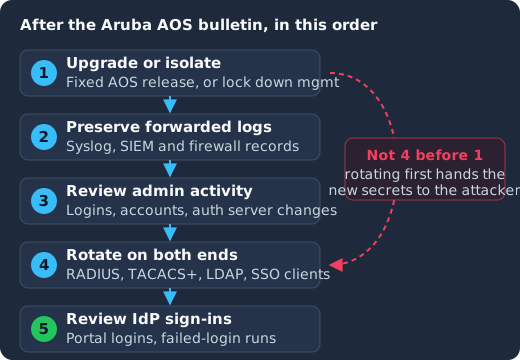
Upgrade or isolate the device first, collect the logs you forwarded off it second, review administrator activity and configuration changes third, rotate every secret on both the controller and the server side fourth, and review sign-ins at your identity provider last, because rotating on a device that is still vulnerable hands the new secret to whoever controls it.
- Upgrade or isolate. Move to a fixed release, or apply HPE’s management plane restrictions until you can.
- Preserve the logs you forwarded. An attacker with root on the device can edit or clear what is stored on it, so your syslog server, SIEM and firewall logs are the record that counts. Keep them for the whole period the device ran a vulnerable release.
- Review administrator activity and configuration. The next section covers what to look for.
- Rotate the secrets the device held, on both ends of each relationship. The section after that lists them.
- Review sign-ins at your identity provider for accounts whose passwords passed through the controller, which covers captive portal logins.
Patched on the day, not on your next maintenance window
Keycloak 26.7.2 fixed CVE-2026-18963, an account takeover through password reset. Skycloak had it available for auto-upgrade and told customers the same day upstream shipped it. Self-hosted teams schedule that work themselves.
What should you look for in the controller’s logs?
HPE does not publish indicators of compromise for these flaws, so there is no list of log lines that proves exploitation. What you can do is look for the results of an attacker acting as an administrator, which look the same whichever CVE they used. In your forwarded logs and in the controller’s audit trail, check for:
- Administrator logins you cannot match to a person, especially from addresses outside your management network, at odd hours, or with no matching login on your TACACS+ or RADIUS server. A bypass skips the external check, so an admin session on the controller with no corresponding authentication record on the server is the strongest signal you will get.
- New or changed local administrator accounts, and changes to the management user roles.
- Changes to the authentication server configuration: a new RADIUS or TACACS+ server, a changed server address, or a server group that now points somewhere unfamiliar. Redirecting authentication to a server the attacker controls is an easy way to collect every password your users type.
- Changes to the logging configuration, such as a removed or changed syslog destination, because that is how an attacker hides the next step.
- Unusual SSH sessions to the controllers, given CVE-2026-79855.
- Configuration exports or large downloads from the management interface, because a configuration file carries the stored secrets.
Then compare the running configuration with your last known-good backup from before the vulnerable period, and remove anything that has no change record behind it.
Which secrets does an Aruba controller hold?
HPE’s AOS-8 documentation lists RADIUS, LDAP and TACACS+ as the external authentication servers a controller can use, in server groups for user and management authentication, and each of those relationships rests on a credential stored in the controller’s configuration. An attacker who reaches administrator or root level on the device can read that configuration, so assume every one of these is known:
- RADIUS shared secrets. RADIUS is the protocol behind 802.1X wireless logins (WPA2 and WPA3 Enterprise) and many captive portals. The controller is the RADIUS client, and RFC 2865, section 1 explains that “transactions between the client and RADIUS server are authenticated through the use of a shared secret”. With that secret, an attacker can impersonate the controller to your RADIUS server, or stand up a fake RADIUS server that the controller will trust.
- TACACS+ keys. TACACS+ usually controls administrator logins to network gear, and RFC 8907, section 4.5 says its packet obfuscation “relies on a secret key, a shared secret” between client and server. A known key lets someone read the administrator authentication traffic that crosses the network.
- LDAP bind credentials. When the controller queries a directory directly, it binds with a service account and password. That account usually can read your whole directory, so it is worth more than the controller.
- Local administrator accounts and any management passwords set on the device.
- Single sign-on client credentials. If your captive portal or guest login hands off to an identity provider over OpenID Connect or SAML, the component that talks to the identity provider holds a client secret or a signing key. Wherever that lives in the controller’s or portal’s configuration, it is exposed too.
- User passwords in transit. With captive portal authentication, the user types a user name and password that the device sends on for checking. An attacker who controlled the device during the vulnerable period could have collected them, which is why step 5 above exists.
Rotate on both ends. A RADIUS secret changed on the controller but not on the server simply breaks authentication, and a secret changed on the server alone leaves the old value valid. Change it on the server, then on every controller in the same maintenance window, and give each controller its own secret where your RADIUS server allows it, so one compromised device does not expose the rest.
How does Keycloak fit into an Aruba deployment?
Many teams want their wireless logins to use the same identities as their applications, and Keycloak is often the identity provider in that picture. It is worth being precise about how the pieces connect, because the answer decides which secrets you rotate where.
Keycloak does not speak RADIUS out of the box. Its SSO protocols are OpenID Connect and SAML, and an Aruba controller doing 802.1X needs a RADIUS server. There are two common ways to bridge that gap:
- A RADIUS server in front of the same user store. A RADIUS server such as FreeRADIUS or HPE’s ClearPass answers the controller, and checks credentials against the directory Keycloak also federates. In this layout the controller’s RADIUS secret is shared with the RADIUS server, not with Keycloak, and the RADIUS server’s own directory bind account is a second credential to check.
- A Keycloak extension that adds RADIUS. The community project keycloak-radius-plugin describes itself as an “Embedded Radius Server in Keycloak SSO”, so Keycloak answers RADIUS requests itself. It is not part of Keycloak, so check that the version you deploy matches your Keycloak release (its README currently lists Keycloak 26.5.4 under its requirements). Here the controller’s shared secret is configured in the extension, and you rotate it there. On Skycloak, extensions are JAR files you add to a cluster, and custom extension uploads are included on Enterprise and available on Business with the Bring Your Own Extension add-on.
Captive portal and SSO logins are ordinary Keycloak clients. A portal that signs users in through Keycloak over OpenID Connect is a client in your realm, and if it is confidential, it authenticates with a client secret. Rotate that secret in Keycloak with Regenerate Secret on the client’s Credentials tab or through the Admin REST API, as the Server Administration Guide’s rotation section describes; our guide to client secret rotation in Keycloak 26.8 gives the REST call, POST /admin/realms/{realm}/clients/{id}/client-secret. With a secret rotation policy enabled, Keycloak “supports up to two concurrently active secrets for each client” (Server Administration Guide), so that you can roll the new one out without downtime, and the Keycloak 26.8.0 release notes promote the feature to supported; our guide walks through the policy and the rollout. For a secret you believe is compromised, you do not want that overlap: once the portal has the new value, end it early with DELETE /admin/realms/{realm}/clients/{id}/client-secret/rotated, which the Admin REST API reference lists and our rotation guide describes.
Keep the secrets Keycloak holds out of plain configuration. If Keycloak federates the same LDAP directory the controller uses, its bind password is another copy of a sensitive credential. The vault section of Keycloak’s Server Administration Guide lists the SMTP password, the LDAP bind credential, the OIDC identity provider secret and the OIDC client secret as fields that can take their value from a vault outside Keycloak, which our Keycloak secrets management guide covers. Rotate that bind password if the controller used the same service account.
Review Keycloak’s events for the vulnerable period. Keycloak has user events such as LOGIN and LOGIN_ERROR, and admin events for changes made through the console or API, and the Server Administration Guide has you toggle Save events on for user events and for admin events in the realm before it stores them, so check that first. Our guide to Keycloak auditing and event logging covers turning both on and forwarding them to your SIEM. Look for logins to the portal client from unfamiliar addresses, and a run of failed logins across many accounts, which is what a list of captured or guessed passwords looks like when someone tries it. As our post on the brute-force IP gap explains, Keycloak’s built-in brute-force detection counts failures per account, so it does little against that pattern on its own, and the post covers how to close that gap.
How do you keep network gear out of your identity trust chain?
The broader lesson from this bulletin is to give network devices as little identity trust as possible, so that the next bypass costs you a few secrets and not your directory. A few habits help with that:
- Give each device its own narrow credentials. A unique RADIUS secret per controller, a directory service account that can read only what authentication needs, and a separate Keycloak client for each portal mean one compromised device exposes only its own secrets.
- Never let a device’s assertion stand in for a login. Applications should trust tokens from the identity provider, not a header or a network location that a controller vouches for, because a controller that has been taken over will vouch for anything.
- Keep the management planes apart. The controller’s management interface and Keycloak’s admin console should each be reachable only from an administration network, which is one of the first items on our Keycloak security hardening checklist.
- Check what you are given, at every layer. Identity providers have their own flaws too; CVE-2026-97176, for example, can let Keycloak issue a token at a lower assurance level than a client’s essential
acrrequest demands, as our write-up of that flaw explains, and the defence there is the same idea: the application checks the claim itself rather than trusting the layer in front of it.
Frequently asked questions
Which Aruba AOS versions fix the authentication bypass CVEs?
A release later than the last affected build on your branch: the CVE records list AOS-10.8 up to 10.8.1.1, 10.7 up to 10.7.2.6 and 10.4 up to 10.4.1.13 (CVE-2026-79844), and AOS-8.13 up to 8.13.3.0 and 8.10 up to 8.10.0.23 (CVE-2026-79850) as affected. HPESBNW05162 lists the updates; check it before you choose the release to install. On an older branch, plan an upgrade to a supported one.
Which of the eight maximum severity Aruba flaws are authentication bypasses?
CVE-2026-79844 and CVE-2026-79845 in AOS-10, and CVE-2026-79850 in AOS-8, all maximum severity (BleepingComputer). HPE’s CVE records for the same release list further authentication bypasses scored 8.5 to 9.8, including CVE-2026-79855 in the AOS-8 SSH daemon.
Are these Aruba vulnerabilities exploited in the wild?
HPE said it knew of no public discussion or exploit code at release (BleepingComputer), and none of the CVEs appears in CISA’s KEV catalog as of its 29 October 2026 version (JSON feed); check the catalog yourself, since it changes often. Patch anyway, because fixed firmware makes the bugs easier to find.
Do I need to rotate RADIUS secrets if I found nothing in the logs?
We recommend it for any controller that was reachable from an untrusted network while it ran a vulnerable release. An attacker with root on the device can change the logs stored on it, so a clean search is weaker evidence than usual, and rotating a RADIUS secret is a short, planned change once the device is patched.
Can Keycloak act as the RADIUS server for an Aruba controller?
Not on its own. Keycloak’s built-in protocols are OpenID Connect and SAML. You need a RADIUS server in front of the same user store, or a community extension such as keycloak-radius-plugin that adds a RADIUS server to Keycloak.
What to do next
Pull HPE’s bulletin, confirm every conductor, controller, gateway and access point is on a fixed AOS release, and restrict the management interfaces and PAPI traffic until each one is. Then save your forwarded logs, review administrator activity and authentication server changes for the vulnerable period, and rotate every RADIUS secret, TACACS+ key, LDAP bind password and SSO client secret the controller held, on both ends. If Keycloak is behind your portal, the client secret rotation guide covers that half. If you would rather have someone else run, patch and monitor your Keycloak, take a look at Skycloak’s managed Keycloak hosting.
Sources
- HPE, HPESBNW05162 rev.1, “Multiple Vulnerabilities in HPE Networking Wireless Operating Systems (AOS-10 & AOS-8)”, released 22 October 2026, referenced by HPE’s CVE records
- BleepingComputer, “HPE patches eight max severity RCE and auth bypass AOS flaws”, 23 October 2026
- CVE Program records published by HPE: CVE-2026-79844, CVE-2026-79846, CVE-2026-79847, CVE-2026-79848, CVE-2026-79849, CVE-2026-79850, CVE-2026-79851, CVE-2026-79855, CVE-2026-79856, CVE-2026-79868, CVE-2026-79869, CVE-2026-79870, CVE-2026-79873, CVE-2026-79874, CVE-2026-79875, CVE-2026-79881, retrieved 2026-10-30
- CISA, Known Exploited Vulnerabilities Catalog and its JSON feed, catalog version 2026.10.29, retrieved 2026-10-30
- HPE Aruba Networking, AOS-8 documentation, “Understanding Servers and Server Groups”
- IETF, RFC 2865, Remote Authentication Dial In User Service (RADIUS), and RFC 8907, The TACACS+ Protocol
- Keycloak, Server Administration Guide, sections “SSO protocols”, “Client Secret Rotation”, “Vault” and “Auditing and events”, retrieved 2026-10-30
- keycloak-radius-plugin on GitHub, retrieved 2026-10-30