NextScan CVE-2026-126797: Hardcoded JWT Admin Key. CVE-2026-126797 lets anyone forge NextScan ns-admin admin tokens with a hardcoded HS256 key. Affected versions, exposure checks, mitigations and JWT key hygiene.
CVE-2026-126797 (CVSS 9.8) lets an unauthenticated attacker forge administrator tokens for ns-admin, the management side of NextScan 1.1.0 through 1.2.0, because the HS256 key that signs those tokens is hardcoded in the ns-admin binary and is the same in every install. As of 18 November 2026 there is no fixed release: v1.2.0 is still the latest and the project’s issue is open. Take ns-admin off any network an attacker can reach, upgrade past 1.2.0 as soon as the vendor ships a fix, and treat every token an affected install accepted as untrusted.
This post has two halves. The first is the advisory: which versions are affected, how to check whether your ns-admin is reachable, and what to do before a patch exists. The second is the general lesson for anyone who issues or checks JWTs (JSON Web Tokens, the signed tokens most web APIs use for login): why a signing key shipped in code breaks every deployment at once, why replacing a key logs everyone out, and how asymmetric keys with rotation, as Keycloak does them, avoid both problems.
Key takeaways
- Affected: NextScan 1.1.0 through 1.2.0, the
lysec/ns-adminimage, per the CVE record. No fixed version is published yet.- Impact: a forged token carries the super administrator role and gives full access to user management, scan tasks and stored vulnerability results.
- No setting fixes it: the key is a constant in the binary, and the configuration has no field for it, so network isolation is the only mitigation until a release changes the code.
- The general fix: sign tokens with a private key that never leaves your identity provider, publish the public key through a JWKS endpoint, rotate it, and check
alg,iss,audandexpon every request.
Which NextScan versions does CVE-2026-126797 affect?
The CVE record, published on 11 November 2026 by VulnCheck as the CVE Numbering Authority, lists NextScan from the tongcheng-security-team project, versions 1.1.0 through 1.2.0 inclusive, with the Docker image lysec/ns-admin as the affected package. It classifies the flaw as CWE-321, use of a hard-coded cryptographic key, and scores it 9.8 under CVSS 3.1 and 9.3 under CVSS 4.0, with no privileges and no user interaction needed. CISA’s enrichment in the same record marks it as automatable with total technical impact, and as of publication it reports no known exploitation.
NextScan is an open-source scanning platform. Its v1.2.0 compose file runs ns-admin (the management web UI and API) beside scan nodes, a crawler and agents, backed by Redis, MongoDB, etcd and MinIO. The project’s releases show v1.2.0 as the newest, so every install built from a release since 1.1.0 is affected.
| Item | Detail | Source |
|---|---|---|
| Affected versions | 1.1.0 through 1.2.0 | CVE record |
| Component | ns-admin, image lysec/ns-admin |
CVE record |
| Severity | CVSS 3.1: 9.8, CVSS 4.0: 9.3 | CVE record |
| Reported to the project | 7 November 2026, still open on 18 November | Issue #48 |
| CVE published | 11 November 2026 | CVE record |
| Fixed version | None published yet | Releases |
The same researcher’s write-up also lists CVE-2026-126802, a hardcoded Basic Auth credential on the agent API, so if you run NextScan agents, read that entry too.
How does the CVE-2026-126797 token forgery work?
ns-admin checks a JWT sent in the X-Access-Token header and verifies it with HS256, which is HMAC with SHA-256: the same secret both signs and verifies the token. According to the researcher’s report, that secret is a string constant compiled into the ns-admin binary, the application’s configuration has no field for it, and the conf.ini file has no section for it, so a deployment cannot replace it. Anyone can pull the public image and read the string out of the binary.
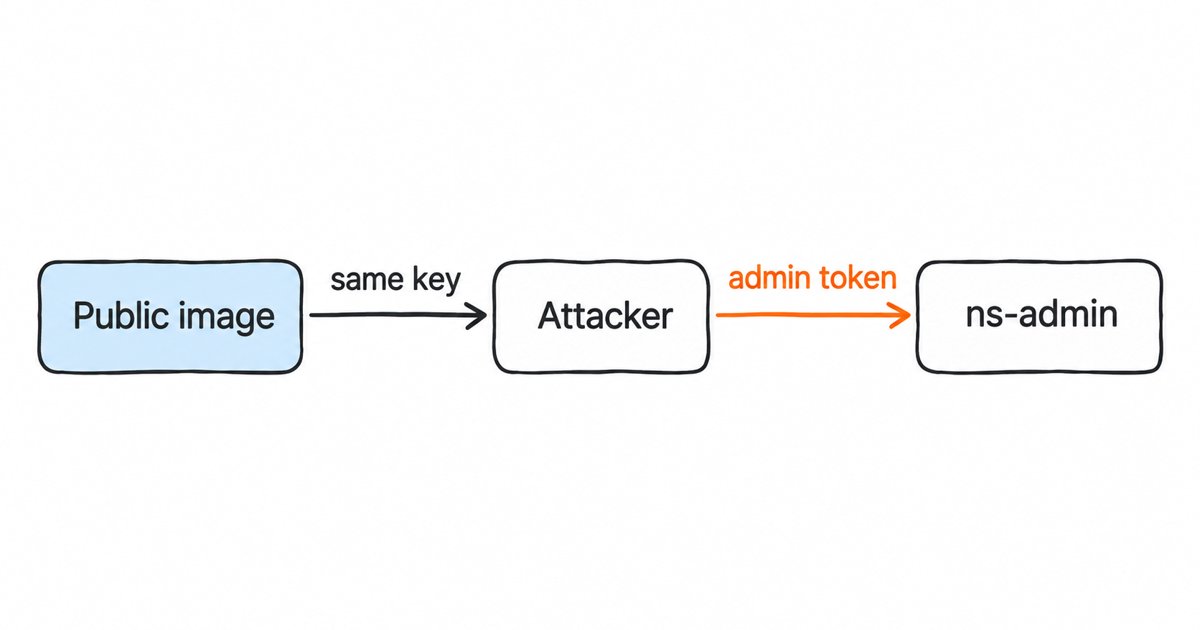
Once an attacker has the key, they can sign a token with any claims they like. The report says ns-admin reads only the id and roleIds claims after the signature check, without confirming that the user or role exists, so a token that names the public super administrator role ID is accepted as an administrator. We are not publishing the key or a working token here, because the steps above are enough to understand the flaw and to check your exposure.
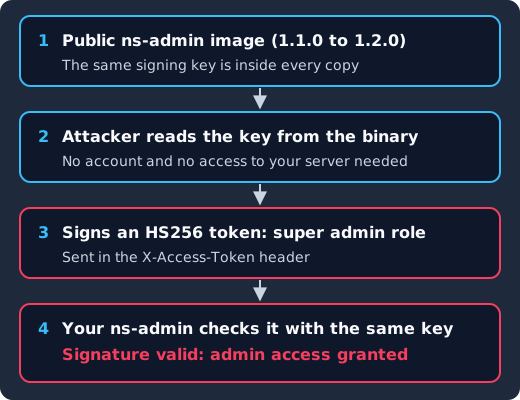
The same key ships in every copy of the public image (1), so an attacker can read it without touching your server (2), sign an HS256 token that claims the super administrator role (3), and your ns-admin verifies that token with the same key and grants admin access (4).
This is different from algorithm confusion, where an attacker changes the alg header to trick a verifier. Here the verifier works exactly as written; the problem is that the secret it trusts is public. Our posts on algorithm confusion and the none algorithm and on WSO2’s CVE-2026-5430 cover that other family of verifier bugs.
How do you check whether your ns-admin is affected and reachable?
Start by finding every running copy and its version. On a Docker host, list containers built from the image:
docker ps --format '{{.Names}}\t{{.Image}}\t{{.Ports}}' | grep -i 'ns-admin'Any tag from v1.1.0 to v1.2.0, or latest (which the v1.2.0 compose file uses), is affected. If you build from source, check the tag you built from.
Next, check who can reach it. The default compose file publishes the web service, which is ns-admin, on port 80 of the host on all interfaces. From a machine outside your management network, try to reach that port:
curl -s -o /dev/null -w '%{http_code}\n' http://nextscan.example.internal/Any HTTP status means the UI and its API are reachable from there. Run the same check from the internet side if the host has a public address, and check your cloud security groups and load balancers for rules that forward to it. If the only answer is a timeout from everywhere except an administrator’s VPN, your exposure is much smaller, although anyone already inside that network can still forge a token.
Then look for signs of use. Because forged tokens are valid tokens, the ns-admin side will not log a failed login. Review the user list for accounts you did not create, review scan tasks and targets for jobs nobody on your team started, and check the proxy or load balancer logs in front of ns-admin for admin API calls from addresses you do not recognize.
What should you do before a fix for CVE-2026-126797 exists?
Since no configuration change replaces the key, every mitigation is about who can send a request to ns-admin.
- Take ns-admin off public networks. Change the published port to bind to
127.0.0.1or a management interface only, or block port 80 at the firewall, and reach the UI through a VPN or bastion host. - Put a separate login in front of it. A reverse proxy that requires its own sign-in, ideally through your identity provider, means a forged
X-Access-Tokennever reaches ns-admin unless the attacker has also signed in to the proxy. - Stop it when you are not using it. If the team only opens the UI to review results, stopping the
webcontainer between sessions removes the exposure while the scan nodes keep their own lifecycle. - Treat what ns-admin stores as exposed if it was reachable. The VulnCheck advisory lists stored vulnerability results among what an attacker can read, and a list of your unfixed vulnerabilities is useful to an attacker, so prioritize fixing the findings stored there.
- Watch the project. Follow issue #48 and the releases page, and upgrade past 1.2.0 to the first release that generates or requires a per-install key.
When a fixed release does change the key, every token signed with the old one stops verifying, so every administrator has to sign in again. That is the result you want here, because it also invalidates any token an attacker forged, and it is worth telling your team before you upgrade so the logout is expected.
Why does a hardcoded HS256 secret compromise every install at once?
With HS256, the key that verifies a token is the same key that signs it. RFC 7518 section 3.2 requires that key to be at least 256 bits for HS256, and RFC 8725 section 3.5 adds that a human-memorizable password must not be used directly as the key. A hardcoded key can pass both of those rules and still fail, because its strength does not matter once it is public. Everything that holds the verification key can mint tokens, and when the key is compiled into a product, everyone who downloads the product holds it.
That is why the scope is every install rather than one. A leaked secret on a single server is an incident on that server, but a secret shipped in a public image is the same secret on every server that runs it, so an attacker who reads it once can sign in as an administrator anywhere the product is reachable. It also means the operator cannot fix it alone, since there is no setting to change.
A recurring pattern: hardcoded JWT secrets in other products
NextScan is one of several recent products where a fixed JWT secret let attackers forge admin tokens, and the cases fall into three shapes.
- A constant in code. In go-base (CVE-2026-48031) the signing secret was a known string in the repository, fixed in the 2026-05-18 version. MaxKey up to 4.1.11 (CVE-2026-69102, CVSS 9.8) shipped a hardcoded JWT signing secret in
application-maxkey.properties. - A fallback when configuration is missing. Kubero 3.0.0 through 3.1.1 (CVE-2026-125370, CVSS 9.3) used “a hardcoded fallback signing secret when JWT_SECRET is unset”, so any install that forgot the variable was open.
- A default in a helper. FUXA 1.2.7 (CVE-2025-69971, CVSS 9.8) had a hard-coded credential in its JWT helper,
server/api/jwt-helper.js.
The fix in each case has the same parts: the product must refuse to start without a key, generate a unique key per install if none is given, and never put a real key in source, sample configuration or an image. When you review your own services, search code, configuration and built images for signing secrets, including the strings output of compiled binaries, since that is how this CVE was found.
Identity you do not have to patch yourself
Skycloak is a managed identity platform for SSO, MFA, SCIM and audit logs. When an advisory lands, the fix is ours to ship: Keycloak 26.7.2 closed an account takeover through password reset and customers had it the same day upstream published it.
How do asymmetric keys and JWKS remove the shared secret?
With an asymmetric algorithm such as RS256 (RSA) or ES256 (elliptic curve), a private key signs and a separate public key verifies. Only the identity provider holds the private key, and every API that checks tokens gets the public key, which cannot be used to sign. RFC 7518 section 3.1 lists RS256 as Recommended and ES256 as Recommended+, and section 3.3 requires RSA keys of 2048 bits or larger.
Keycloak realms work this way. Each realm has its own signing keys, and the realm’s certificate endpoint at /realms/{realm-name}/protocol/openid-connect/certs “returns the public keys enabled by the realm, encoded as a JSON Web Key (JWK)”. This is a JWKS (JSON Web Key Set): the list of public keys a verifier may trust, each with a kid (key ID) that a token names in its header. Our explainer on JSON Web Key Sets covers caching and how verifiers pick a key.
Because APIs only ever hold public keys, a copy of your API’s code or container image gives an attacker nothing they can sign with, which is the property NextScan lacked.
Why does replacing a signing key invalidate existing tokens?
A token is only valid while the verifier still trusts the key that signed it. If you have one shared HS256 secret and you replace it, every token signed with the old secret fails at once, every user is logged out, and any service you forgot to update starts rejecting all traffic. That cost is why teams put off rotating shared secrets, and why a hardcoded secret tends to stay in place for years.
With keys identified by kid you can overlap old and new. The Keycloak Server Administration Guide explains that a realm “has a single active key pair at a time, but can have several passive keys as well”, and that a passive key pair can still verify earlier signatures. Its advice on rotating keys comes down to three steps:
- Add a new key with a higher priority than the active one, which makes it the active key, so new tokens are signed with it while the JWKS still publishes the old public key.
- Or make the old key passive. The guide also allows a new key with the same priority while the previous key is made passive; a passive key no longer signs new tokens but can still verify earlier signatures.
- Remove the old key later. The guide on rotating keys suggests “deleting old keys one to two months after you create the new keys”, and warns that a user inactive in that period will have to sign in again, and that applications holding offline tokens need to refresh them before the old key is removed.
A compromised key is the exception. For that case the guide’s section on compromised keys says to “immediately remove the compromised key pair” and to push a not-before policy so client applications do not accept existing tokens signed by it. Plan for that day before it comes: know which services hold long-lived tokens, and remember that the Sign out all active sessions action “does not revoke outstanding access tokens”, which “must expire naturally”. Short access token lifespans keep that window small, which our guide to JWT lifecycle management covers in more depth.
What should every API check on a JWT?
A trustworthy key is only half of it, because the API that receives the token still has to check it properly. RFC 7519 section 7.2 says that “if any of the listed steps fail, then the JWT MUST be rejected”, and RFC 8725 adds the current best practices. For each request, check:
- Algorithm allowlist. Accept only the algorithm your issuer signs with, because RFC 8725 section 3.1 says libraries “MUST enable the caller to specify a supported set of algorithms”. For a Keycloak realm, that is the algorithm set as the realm’s Default Signature Algorithm on its Tokens tab.
- Key from the issuer’s JWKS. Select the key by
kidfrom your issuer’s JWKS and reject akidthat is not there. RFC 8725 section 3.8 requires that the keys “belong to the issuer”. - Issuer. Compare
isswith the exact realm URL you expect, such ashttps://auth.example.com/realms/acme. - Audience. Compare
audwith your API’s own identifier. RFC 7519 section 4.1.3 says a principal not named in the audience must reject the token, and Apache CXF’s CVE-2026-50627 shows what happens when this check is skipped. - Expiry. Under RFC 7519 section 4.1.4, the current time must be before
exp; allow a small clock tolerance and nothing more. - Fail closed. Any error in verification ends the request with a 401, never a log line followed by the handler.
Here is the same checklist in Node.js with the jose library, verifying a token from a Keycloak realm that signs with RS256. The option names are in jose’s JWTVerifyOptions documentation.
import { createRemoteJWKSet, jwtVerify } from "jose";

const issuer = "https://auth.example.com/realms/acme";
const jwks = createRemoteJWKSet(
  new URL(`${issuer}/protocol/openid-connect/certs`)
);

export async function verifyAccessToken(token) {
  // Throws on a bad signature, unknown kid, wrong alg, iss, aud or an expired token.
  const { payload } = await jwtVerify(token, jwks, {
    algorithms: ["RS256"],      // the realm's signing algorithm, nothing else
    issuer,                     // exact realm URL
    audience: "scanner-admin-api", // this API's own identifier
    requiredClaims: ["exp", "iss", "aud", "sub"],
    clockTolerance: 30,         // seconds
  });
  return payload;
}

// In your middleware: any thrown error means 401, and the handler never runs.
Notice that this code holds no secret at all. The only configuration is the issuer URL and the audience, so publishing this code or its image tells an attacker nothing they can use to forge a token. To make Keycloak put your API’s identifier in aud, you add an audience mapper to the client, which our guide to verifying a Keycloak-issued access token on the backend walks through together with the other checks.
Frequently asked questions
Is there a patch for CVE-2026-126797?
Not as of 18 November 2026. The latest NextScan release is v1.2.0, which is affected, and the report to the project is still open. Until a fixed release ships, restrict network access to ns-admin.
Can I change the NextScan JWT key in configuration?
No. The researcher’s report says the configuration code and conf.ini have no setting for the key, so it cannot be replaced through configuration or an environment variable. Only a code change can fix it.
Does CVE-2026-126797 affect Keycloak?
No. The CVE record lists only NextScan. Keycloak signs tokens with per-realm keys, and the Server Administration Guide says a key pair is automatically generated when a realm is created, rather than a key shipped in its code, and it lets you rotate those keys as described above.
Would a short token lifespan have helped?
Not against forgery. A short lifespan limits how long a stolen genuine token works, but an attacker who holds the signing key writes whatever exp they want and can sign a new token whenever the old one expires.
What to do next
If you run NextScan, find every ns-admin instance, take it off any network an attacker can reach, review its users and scan tasks for changes, and upgrade past 1.2.0 when a fixed release appears. Expect every administrator to be logged out when the key changes.
For your own services, audit code, configuration files and built images for signing secrets, including fallbacks that apply when an environment variable is unset. Then move token issuance to an identity provider such as Keycloak that signs with asymmetric keys and rotates them, and make every API check the algorithm, issuer, audience and expiry. Our JWT best practices for developers is a good checklist for that review.
If you would rather not run the identity provider yourself, Skycloak’s managed hosting runs Keycloak for you, so your team can focus on the APIs that verify its tokens.
Sources
- CVE Program, CVE-2026-126797 record (CNA: VulnCheck), published 2026-11-11, retrieved 2026-11-18
- NVD, CVE-2026-126797
- VulnCheck, NextScan 1.1.0 through 1.2.0 Hardcoded JWT Key Authentication Bypass in ns-admin, retrieved 2026-11-18
- Wu Yulun, NextScan vulnerability report, 2026-11-07, retrieved 2026-11-18
- NextScan, issue #48, releases and v1.2.0 docker-compose.yaml, retrieved 2026-11-18
- dhax/go-base, GHSA-mqq6-462x-jxmm (CVE-2026-48031), retrieved 2026-11-18
- CVE Program, CVE-2026-69102 record and CVE-2025-69971 record, retrieved 2026-11-18
- VulnCheck, Kubero 3.0.0 through 3.1.1 authentication bypass via hardcoded JWT secret, retrieved 2026-11-18
- IETF, RFC 7519, JSON Web Token, May 2015
- IETF, RFC 7518, JSON Web Algorithms, May 2015
- IETF, RFC 8725, JSON Web Token Best Current Practices, February 2020
- Keycloak, Server Administration Guide and Securing applications with OpenID Connect, retrieved 2026-11-18
- panva, jose, retrieved 2026-11-18