
CVE-2026-102764 is an authentication bypass in BeyondTrust Remote Support, versions 26.2.3 and earlier, that lets an unauthenticated attacker perform file operations on the appliance. The NVD record (also readable through the NVD API) scores it 9.8 Critical on CVSS 3.1 and also lists a 9.3 on CVSS 4.0; it was published on 15 October 2026, and CISA’s Known Exploited Vulnerabilities catalog (its JSON feed carries the same fields) added it on 16 October 2026 with a 19 October remediation date, because a China-linked espionage group had been using it since late August. Apply the BT26-05-RS patch now (or upgrade first if you are below 24.3.1), then treat the appliance as a credential store that may have been read: preserve its logs, review session and permission changes for the exposure window, and rotate every credential the appliance held or brokered, including the SAML and API material that ties it to your identity provider.
This post is written for the admin who runs Remote Support, saw the CISA alert, and already knows what an authentication bypass is. You will not find a restatement of the advisory here. The aim is the order of work after the patch, and the part of it that lands on the identity side, because a Remote Support appliance sits between your support staff and your privileged endpoints and holds the credentials for both.
Key takeaways
- Affected: Remote Support 26.2.3 and earlier. Fixed: the BT26-05-RS patch for 24.3.1 through 26.2.3; older releases upgrade first. BeyondTrust says all Remote Support SaaS instances were patched by 9 October 2026 (SecurityWeek).
- Exploited as a zero-day from 29 August 2026 by BeyondTrust’s own account (SecurityWeek), nearly seven weeks before disclosure, so “patched on 16 October” is not the same as “never exposed”.
- The attackers dumped the appliance’s credential vault, raised their own Jump Item permissions, opened sessions to internal endpoints and deleted the on-appliance logs, so your forwarded logs are the record that counts.
- Rotate credentials only after the appliance is patched or rebuilt, and include the identity provider side: SAML signing material, API client secrets and any service account the appliance used.
What does CVE-2026-102764 allow?
The NVD record, as its API returns it, describes it in one paragraph: “The vulnerability exists within internal components of BeyondTrust’s Remote Support product. The components did not adequately validate the origin of the messages it received. Under the right conditions, this could allow an attacker to perform file operations on the appliance.” The same record classifies the weakness as CWE-290, authentication bypass by spoofing, and the CVSS 3.1 vector NVD assigns (source nvd@nist.gov in the API record) is AV:N/AC:L/PR:N/UI:N/S:U/C:H/I:H/A:H: reachable over the network, no privileges, no user interaction, full impact on confidentiality, integrity and availability.
“File operations” sounds modest until you read what was done with them. Google’s Threat Intelligence Group and Mandiant, who investigated the intrusions, report that the actor used the bug to stage files in the appliance’s web-accessible directories, dropped an obfuscated PHP webshell they named SAWFLY, copied a shell binary to a system path with the SUID bit set to go from the web service account to root, and then ran the appliance’s own bt-secrets utility to dump its credential vault (ARMORY CASTLE Exploits BeyondTrust, 15 October 2026). From there they logged into the administrative portal with harvested administrator credentials, raised a compromised account’s Jump Item and Team permissions from “No Access” to “Administrator”, started remote support sessions to internal endpoints, and pulled documents out through the product’s native file transfer.
Two details from that write-up shape the rest of this post. The persistence they planted survives a reboot and a configuration reset, which is why the guidance below says rebuild rather than clean. And they deleted the appliance’s authentication, web server, PHP and system logs as they went, so whatever you forwarded off the box before the intrusion is likely the only complete record you have.
Which versions are affected, and what is the fix?
CISA’s alert of 16 October 2026 states the scope plainly: Remote Support (formerly Bomgar) versions 26.2.3 and earlier are affected, and the fix is the BT26-05-RS patch described in BeyondTrust’s security advisory BT26-05. The patch applies to versions 24.3.1 and later; anything older has to be upgraded to a supported release first and then patched. Canada’s Cyber Centre says the same in AL26-025, also dated 16 October, and adds a reminder that is easy to miss: BeyondTrust advises manual patching for self-hosted instances that are not subscribed to automatic updates, so check which of yours are before you assume the patch arrived on its own.
The timeline matters more than usual here. SecurityWeek’s reporting, quoting BeyondTrust’s own account, puts the first exploitation on 29 August 2026, the vulnerability’s identification on 28 September, the patch shipping on 8 October and all Remote Support SaaS instances patched by 9 October, with public disclosure on 15 October. A self-hosted appliance that was reachable from the internet at any point between late August and the day you patched was exposed, whether or not anyone got around to it.
Privileged Remote Access shares code with Remote Support. Deepwatch’s advisory notes that BeyondTrust issued a precautionary patch for it too, because “PRA shares affected code, although BeyondTrust states its internal testing has not identified a way to exploit this CVE in PRA”. Apply it anyway, because a precautionary patch only costs a maintenance window.
Is CVE-2026-102764 being exploited in the wild?
Yes, and the evidence is unusually complete. CISA’s alert says threat actors “are actively exploiting the vulnerability to gain initial access, then establishing persistence, escalating privileges, and moving laterally.” The KEV catalog entry, as the catalog’s JSON feed records it, is titled “BeyondTrust Remote Support Authentication Bypass by Spoofing Vulnerability”, shows a date added of 16 October 2026 and a due date of 19 October 2026 for federal civilian agencies, and records known ransomware campaign use as Unknown; the NVD API record carries the same KEV dates. Three days is the shortest timeline in CISA’s current directive, BOD 26-04, which reserves it for publicly exposed assets with a KEV listing and an automatable exploit. Mandiant attributes the activity to ARMORY CASTLE, a suspected China-nexus espionage actor it previously tracked as UNC5221.
That directive is BOD 26-04, “Prioritizing Security Updates Based on Risk”, issued on 10 June 2026, which supersedes BOD 22-01 and sets timelines from three days to “fix on system upgrade” depending on the asset’s exposure, KEV status, exploit automation and technical impact. For the three-day tier the directive says the agency “must complete remediation or mitigation action within the timeline (three days) and carry out a forensic triage of the asset to assess whether the system is compromised”, and CISA’s note on the two KEV additions that day says the directive “establishes basic expectations for when agencies must check whether threat actors compromised the system before the patch was applied”. That obligation is only binding on federal agencies, but it is the right shape for everyone: with a zero-day this old, the patch closes the door, and the triage tells you who already came through it.
In what order should you respond?
Order is the whole point. Rotating credentials before the appliance is clean hands the new credentials to whoever still controls it, and cleaning before you preserve evidence erases the record you need to know what was reached. The steps below put patching first, evidence second, the hunt third, the rebuild fourth, and rotation and session revocation last, and the rotation step is the one we would ask you not to skip even when the hunt finds nothing, because an attacker who deletes logs leaves no reliable “nothing” to find.
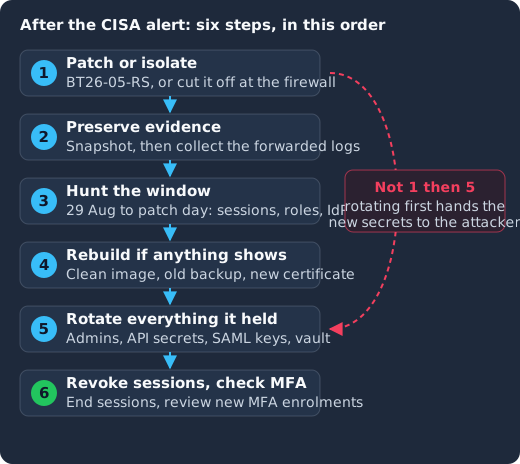
Patch or isolate the appliance first, snapshot it and collect the forwarded logs second, hunt through the exposure window third, rebuild from a clean image if anything turns up, only then rotate credentials, because rotating while the attacker still holds the appliance hands them the new secrets, and finish by revoking active support sessions and reviewing new MFA registrations.
- Patch or isolate. Apply BT26-05-RS from the appliance interface on 24.3.1 or later, or upgrade and then patch. Alongside the patch, CISA’s alert asks every affected organisation to limit external connectivity to the appliance and restrict its administrative interfaces to trusted networks, not only those who cannot patch today. Mandiant adds that an appliance you suspect should be cut off at the perimeter firewall rather than from inside its own admin interface, so the configuration stays intact for review, with egress denied except to BeyondTrust’s update and licensing endpoints.
- Preserve evidence before you change anything else. Snapshot virtual appliances with memory and disk, and collect syslog, reverse proxy or WAF logs, and perimeter firewall logs for the full window from 29 August to the day you patched. CISA asks for forensic images, tells you to “immediately forward appliance syslog and session events to the SIEM” so that nothing else is lost from the box, and asks for “network and forensic investigations for evidence of compromise”; Mandiant’s point is that the actor removed logs throughout the incident, so the forwarded copies are what you will work from.
- Hunt through the exposure window. The sections below list what to look for in Remote Support’s own reports and in your identity provider.
- Rebuild rather than clean if you find anything. CISA’s alert says that where compromise is suspected you should isolate the appliance, collect forensic images, investigate, and “rebuild from a known-good state and apply the BT26-05-RS patch”. Mandiant recommends redeploying from a clean, fully patched image, restoring only a configuration backup dated before the exposure window, issuing a new TLS certificate and redeploying Jump Clients, Jumpoints and the representative console, because “host-level persistence survives reboot and configuration reset”.
- Rotate every credential the appliance stored or brokered. This is the step the next section expands. CISA’s alert asks for it after the rebuild where compromise is suspected, Deepwatch’s advisory tells organisations to “treat all credentials stored or brokered by the appliance as exposed”, and our recommendation is to do it for every appliance that was reachable while vulnerable, found or not.
- Revoke the sessions and check the MFA registrations. This is CISA’s step, not ours: after the rebuild, its alert says to “revoke all active support sessions, and review new multifactor authentication registrations on privileged accounts”. Mandiant’s version is to end every active support session and then redeploy Jump Clients, Jumpoints and the representative console from the patched or rebuilt appliance, so that tokens issued before the rebuild stop working. Our recommendation is to revoke the sessions on every appliance that was reachable while vulnerable, like the rotation, because an attacker who already holds a session does not need the bug any more.
What should you look for in Remote Support’s logs?
Mandiant’s list of what to review is specific, and it maps onto the attacker’s steps. Start with the administrative interface’s session, team activity and user audit reports, then the support session reports, with file transfers first, because that is how documents left. Look for user_changed events that raise a Jump Item or Team role, user_added, api_account and security_provider events with no change ticket behind them, and any change to outbound event or syslog destinations, which is the quiet way to blind your SIEM. On the network side, look for requests to unknown .php paths and WebSocket upgrades from addresses that are not your support staff or your endpoints, and for gaps in syslog forwarding inside a single session, which is the signature of someone cleaning up as they go. Administrative logins from residential broadband or commercial VPN ranges, or outside business hours, are the remaining tell. Prophet Security’s investigation guide walks through the same sources and notes that the log files where Mandiant found evidence of exploitation “sit on an encrypted partition that customers cannot read on their own”, so preserving them is a request to BeyondTrust support.
Then review the configuration itself, not only the logs: user and role assignments, especially any Jump Item role raised to Administrator, group and session policies, API accounts, security providers, Jump Items and Jumpoints, and outbound event destinations. Remove anything without a change record or a named owner.
Patched on the day, not on your next maintenance window
Keycloak 26.7.2 fixed CVE-2026-18963, an account takeover through password reset. Skycloak had it available for auto-upgrade and told customers the same day upstream shipped it. Self-hosted teams schedule that work themselves.
Which credentials do you rotate, and in what order?
Mandiant gives an order, and it is a good one because it starts with the credentials that control the appliance and works outward to the credentials the appliance was holding for other systems:
- The appliance interface’s administrative credentials.
- The administrators and local users of the administrative portal.
- API client secrets, meaning every integration account that calls the Remote Support API: ticketing, SIEM, monitoring, provisioning scripts.
- Security provider bind accounts and SAML signing keys, which is where your identity provider comes in.
- Remote Support Vault and integrated Password Safe credentials, rotated at the target systems, because those are the privileged accounts behind Jump Items.
- Integration credentials such as SMTP, syslog and ITSM connectors.
- Any credential a technician typed into a support session during the exposure window, because session recordings and the attacker’s own sessions could both have captured it.
Item four deserves more than one line, because it is the item admins tend to leave to “the identity team” and the identity team tends not to hear about. A Remote Support security provider is the configuration that authenticates users against an existing LDAP, RADIUS, Kerberos, OpenID Connect or SAML server. An LDAP bind account is a password the appliance stores and uses on every login, so it is in the vault that was dumped. A SAML provider stores the identity provider’s signing certificate and, for signed requests or encrypted assertions, the appliance’s own key material, and if the appliance has been holding a private key the attacker could read, assertions signed with it are no longer proof of anything.
What does the identity side look like when Keycloak is the IdP?
If Keycloak is the SAML identity provider your support staff sign in with, the appliance is a SAML client in your realm, and the rotation above has a Keycloak half.
Rotate the realm’s signing key. Keycloak creates new signatures, SAML assertions included, with the realm’s single active key pair, while passive keys can still verify earlier signatures. The server administration guide’s section on rotating keys describes the safe sequence: “start by creating new keys with a higher priority than the existing active keys”, so new signatures use the new key while the old key stays available to verify what it already signed, then delete the old key once nothing depends on it. Update the certificate in the Remote Support security provider at the same time, or logins stop. If the appliance’s own SAML signing or encryption key was in scope, generate a new one on the appliance and replace the certificate on the Keycloak client.
End the sessions that were opened through the appliance. The attacker signed in with harvested administrator credentials and opened sessions of their own. If any of those administrators also have Keycloak sessions elsewhere, you do not have to log everyone out of everything: revoking one Keycloak session without logging the user out everywhere shows how to list a user’s sessions with their IP address and start time and delete the ones you do not recognise by ID through the Admin REST API.
Rotate the secrets of any confidential client the appliance held. Provisioning scripts and integration jobs that talk to Keycloak’s Admin API usually authenticate as a confidential client with a service account, and if that secret lived in the appliance’s vault or in a Jump Item, treat it as read. The Keycloak 26.8.0 release notes promote client secret rotation to supported, “keeping up to two concurrently active secrets”, and our guide to it shows how to roll the new secret out while the old one still works, and the lesson of the Storm-3168 service principal attacks applies unchanged: a leaked long-lived secret is a standing key to everything its service account can do, and the fix is fewer static secrets with narrower roles.
Check the login and admin events for the window. Keycloak records user events such as LOGIN and LOGIN_ERROR and admin events for changes made through the console or API, but it only saves them once you enable user events and admin events in the realm, each with its own expiration setting. Our guide to Keycloak auditing and event logging covers enabling both and forwarding them off the server, and Skycloak’s audit logs keep them for you on managed realms. If they were on, filter logins for the appliance’s SAML client between 29 August and your patch date and compare the IP addresses against your support staff’s. If they were not on, enable them now, because the next bug in a tool like this will come with the same question.
Keep the division of labour straight. The appliance was the thing that got breached, and nothing here is a Keycloak vulnerability. The identity provider work exists because the appliance stored material that the identity provider trusts, and that trust has to be reissued, which is the same reason the appliance’s own TLS certificate gets reissued in a rebuild.
What is the broader pattern?
Authentication bypasses in access tools have kept turning up this year, and the shape repeats. CVE-2026-59822 in LiteLLM let any fabricated Bearer token open an authenticated MCP session on an AI gateway holding provider keys. CVE-2026-97176 can let Keycloak issue a token at a lower assurance level than the client demanded, skipping step-up authentication, and CVE-2026-97177 let a delegated Keycloak administrator set passwords after being denied the reset-password permission. Each one lived in a component whose job is to decide who gets in, and each one is worth far more than its CVSS score to an attacker because of what sits behind that decision: in BeyondTrust’s case, a vault of administrative credentials and a broker for sessions to every endpoint it can reach.
The two controls that limit the damage from the next one are the same each time. Keep the access tool off the public internet, behind an identity-aware proxy or at least an allowlist, so that “no privileges required” still needs a position on your network. And keep the credentials it holds short-lived, narrowly scoped and rotatable in minutes, so that a vault dump buys hours rather than months. Mandiant’s hardening list for Remote Support says the same in product terms: SAML single sign-on with phishing-resistant MFA for every portal user, MFA on the built-in admin account, a default Jump Item role of “No Access” granted through policy, API accounts scoped to the minimum, and privileged credentials in an external vault with credential injection rather than stored on the appliance.
Frequently asked questions
Which BeyondTrust products and versions are affected by CVE-2026-102764?
Remote Support, self-hosted, versions 26.2.3 and earlier. The BT26-05-RS patch applies to 24.3.1 through 26.2.3; older versions need an upgrade first. BeyondTrust says all Remote Support SaaS instances were patched by 9 October 2026 (SecurityWeek). Privileged Remote Access received a precautionary patch because it shares the affected code, although BeyondTrust states its testing has not found a way to exploit the CVE in it (Deepwatch).
Is CVE-2026-102764 actively exploited?
Yes. BeyondTrust’s account puts the first exploitation on 29 August 2026 (SecurityWeek), Mandiant attributes it to ARMORY CASTLE, a suspected China-nexus espionage actor also tracked as UNC5221, and CISA’s KEV catalog added the CVE on 16 October 2026 with a 19 October due date for federal civilian agencies.
Why does the NVD record show two scores?
The NVD record, as its API returns it, scores it 9.8 Critical on CVSS 3.1 as its primary metric, and lists a secondary 9.3 on CVSS 4.0 from the CVE’s assigning organisation; SecurityWeek reports the 9.3 figure as well. The two versions of the standard weigh the same facts differently; both put it at the top of the Critical band, so the difference changes nothing about the response.
Should I rotate credentials even if the hunt finds nothing?
We recommend it for any appliance that was reachable from the internet while vulnerable. The attackers deleted the on-appliance logs during their intrusions, so a clean search of what remains is weaker evidence than it would normally be, and the credentials in a Remote Support vault are precisely the ones you least want to gamble on. Rotate after the appliance is patched or rebuilt, never before.
Does patching BeyondTrust fix the identity provider side?
No. The patch stops new exploitation. The SAML signing material, bind accounts and API secrets the appliance held remain valid until you reissue them at the identity provider and in the integrations, which is why the rotation list above includes them.
What to do next
Check every Remote Support appliance’s version against BT26-05 today and apply the patch, or upgrade and patch, before you do anything else. Then preserve the forwarded logs and snapshots, work through the session and permission reports for the window since 29 August, rebuild anything that shows signs of the webshell or the persistence, and rotate the credentials in the order above, with the identity provider half included. If Keycloak is the identity provider behind the appliance, the linked session and secret runbooks cover that half, and if you would rather have someone else run and patch Keycloak while you deal with the appliance, that is what our managed Keycloak hosting is for.
Sources
- NVD, CVE-2026-102764, published 15 October 2026, and the same record from the NVD API, retrieved 2026-10-28
- CISA, “CISA Urges Patching Critical Vulnerability in BeyondTrust Remote Support”, 16 October 2026, retrieved 2026-10-28
- CISA, “CISA Adds Two Known Exploited Vulnerabilities to Catalog”, 16 October 2026, retrieved 2026-10-28
- CISA, Known Exploited Vulnerabilities Catalog, entry for CVE-2026-102764 added 2026-10-16 with due date 2026-10-19, and the catalog’s JSON feed, retrieved 2026-10-28
- MITRE, CWE-290: Authentication Bypass by Spoofing, retrieved 2026-10-28
- CISA, BOD 26-04 “Prioritizing Security Updates Based on Risk”, 10 June 2026, retrieved 2026-10-28
- BeyondTrust, Security Advisories, advisory BT26-05 and the blog post “ARMORY CASTLE and BT26-05: What Security Teams Need to Know”
- BeyondTrust, Remote Support documentation, “Security providers”, retrieved 2026-10-28
- Google Threat Intelligence Group and Mandiant, “ARMORY CASTLE Exploits BeyondTrust”, 15 October 2026, retrieved 2026-10-28
- Canadian Centre for Cyber Security, AL26-025 “Critical vulnerability impacting BeyondTrust Remote Support (CVE-2026-102764)”, 16 October 2026, retrieved 2026-10-28
- SecurityWeek, “Chinese APT Exploited BeyondTrust Vulnerability as Zero-Day”, 16 October 2026, retrieved 2026-10-28
- Deepwatch, “CA-26-039: Active Exploitation of BeyondTrust Remote Support (CVE-2026-102764)”, retrieved 2026-10-28
- Prophet Security, “BeyondTrust Remote Support Zero-Day: Detecting and Investigating CVE-2026-102764”, retrieved 2026-10-28
- Keycloak, Server Administration Guide, sections “Realm keys”, “Rotating keys”, “Auditing user events” and “Auditing admin events”, retrieved 2026-10-28
- Keycloak, 26.8.0 release notes, “Client Secret Rotation supported”, retrieved 2026-10-28
- Keycloak, Admin REST API, retrieved 2026-10-28