
Data security is the practice of protecting data from unauthorized access, loss or misuse across its whole lifecycle, from the moment it is collected to the day it is deleted. The usual list of controls is encryption, masking, backups, erasure and access control. In the Verizon 2025 Data Breach Investigations Report (the headline figures are in its press release), credential abuse was the leading way attackers got in, ahead of exploited vulnerabilities, so the first control to get right is identity: who can log in, how strongly they have to prove it, and what they can reach once they are in. Encryption, backups and masking all assume that the person holding a valid session is who they claim to be, and a stolen password breaks that assumption for every one of them at once.
This post is for founders, engineers and ops leads at small software companies who meet the term in compliance questionnaires and customer contracts, know the basics of encryption and backups, and want to know what to do first without a security team. It defines the standard types of data security in one paragraph each, separates data security from data privacy, then spends most of its length on the login layer: which controls depend on it, what Keycloak gives you for each, and a first 90 days you can run without a security hire.
What is data security?
The two definitions that rank for the term agree on the shape of it. IBM calls data security “the practice of protecting digital information from unauthorized access, corruption or theft throughout its lifecycle”, and Fortinet calls it “the process of safeguarding digital information throughout its entire life cycle to protect it from corruption, theft, or unauthorized access”. Both then list types of control. IBM names encryption, erasure, masking and resiliency; Fortinet adds access control, authentication and governance to the same four. Here is what each one does, in a paragraph, so the rest of the post can refer back to them.
Encryption turns data into something unreadable without a key, both on disk (at rest) and on the wire (in transit). It protects against someone who gets hold of the storage or the traffic without also getting the key. It does nothing against someone the application has already let in, because the application decrypts the data for every valid session.
Data masking replaces real values with realistic fakes in copies of the data, so that developers, analysts and test environments work on records that look right but reveal nothing. Masking protects the copies; the production records behind them are still only as safe as the accounts that can read them.
Backups and resiliency keep a copy you can restore after ransomware, a bad deploy or a failed disk. Ransomware was present in 44% of the breaches in the 2025 DBIR, up 37% on the year before, which is why backups count as a security control and not only an operations one. A backup that any administrator account can delete is only as safe as that account.
Erasure is deleting data properly when it is no longer needed or when a person asks you to, so that it cannot come back from a disk, a log or an export. Retention rules decide when erasure happens; the erasure itself has to reach every copy, including the identity store, which is where our guide to deleting, anonymizing and purging user data in Keycloak starts.
Access control decides who can see, change or share which data. Fortinet describes it as role-based permissions that “ensure employees only access what their job requires”, and that is the layer this post is about. Authentication proves who is asking, authorization decides what they may do, and the two are different problems, as our post on authentication vs authorization explains with the example of a valid login that still gets a 403.
Data security vs data privacy
Data security and data privacy are often asked about in the same questionnaire, and they are related but not the same. Data security is about how data is protected: the controls above, applied to whatever data you hold. Data privacy is about what you are allowed to do with the data in the first place: what you collect, why, for how long, who you share it with, and what rights the person it describes has. IBM’s short version is that data security protects the data and data privacy governs its use.
The practical overlap is that privacy obligations create security requirements. A retention limit needs erasure that works. A promise that only support staff see customer records needs roles that enforce it and an audit log that proves it. If you operate in Europe, the question of which laws can reach your data also depends on where it lives and who runs the service, which our post on the US CLOUD Act and your Keycloak data walks through.
Why identity comes first
The 2025 DBIR analysed 12,195 confirmed breaches. Credential abuse was the initial access vector in 22% of them and exploitation of vulnerabilities in 20%, and the report notes “a significant overlap between social engineering and credential abuse” (Verizon, 2025 DBIR). The share of breaches involving a third party doubled to 30%, which matters to a small software company twice over: your suppliers’ logins are a route into you, and your customers count you as the third party.
This is also the reasoning behind zero trust. The abstract of NIST SP 800-207 defines zero trust as granting “no implicit trust” to users or assets based on their network location, and says that “authentication and authorization (both subject and device) are discrete functions performed before a session to an enterprise resource is established”. Put plainly, the network no longer tells you who someone is, so the login has to. Our guide to zero trust authentication with Keycloak covers how that looks in practice.
The animation below shows why the other controls depend on this one. A stolen password against a system with encryption at rest but no multi-factor authentication (MFA, a second proof of identity beyond the password) produces a valid session, and the application decrypts the data for it as it would for anyone. The same password against a system that requires MFA and gives each account only the roles it needs is rejected before any data is touched.
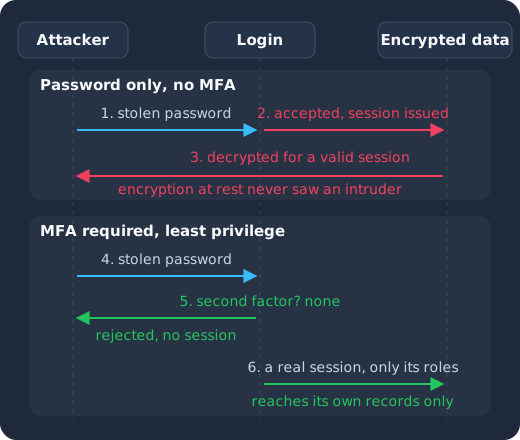
An attacker sends a stolen password (1); without MFA the login accepts it and issues a session (2), and the application decrypts the data for that session, so encryption at rest never saw an intruder (3). With MFA required, the same password (4) meets a request for a second factor the attacker does not have and is rejected (5), and even a real session carries only its own roles, so it reaches only its own records (6).
Patched on the day, not on your next maintenance window
Keycloak 26.7.2 fixed CVE-2026-18963, an account takeover through password reset. Skycloak had it available for auto-upgrade and told customers the same day upstream shipped it. Self-hosted teams schedule that work themselves.
Which data security controls depend on login?
Each of the controls above has an identity control underneath it. The sections that follow take them one at a time and say what Keycloak, the open-source identity server that Skycloak runs as a managed service, gives you for each, with a link to the Keycloak documentation and to our deeper guide where we have one.
Authentication: MFA and passkeys
MFA is the single control with the best ratio of effort to effect, because it turns a stolen password from a breach into a failed login. CISA’s Turn On MFA page puts it as: “Even if an unauthorized user steals your password, they won’t be able to meet the second step requirement to access your accounts.” The current NIST guidance goes further for anything that matters. SP 800-63B-4, part of the current revision of the Digital Identity Guidelines, SP 800-63-4, says verifiers “SHALL offer at least one phishing-resistant authentication option” at Authentication Assurance Level 2, the level at which “proof of the possession and control of two distinct authentication factors is required”. Phishing resistant in practice means passkeys or hardware security keys, where the credential is bound to your site and cannot be replayed to a fake one.
Keycloak supports time-based one-time passwords (TOTP, the six-digit code from an authenticator app) through its OTP policies, and passkeys and other WebAuthn authenticators, including passwordless login, through its passkeys support, whose documentation says that when the feature is activated “both conditional UI and modal UI are available” in the login forms. It can also require a second factor rather than merely offer one, by assigning the Configure OTP or Webauthn Register required action: the documentation defines required actions as “actions a user must perform during the authentication process”, and the user cannot complete a login until they are done. Our multi-factor authentication feature page lists the factors, TOTP and HOTP codes, security keys, passkeys, conditional MFA and step-up, and the admin console settings behind each. Our complete guide to Keycloak passkeys and WebAuthn walks through the realm settings and the policy options.
Password policy and brute force protection
Passwords are not going away this quarter, so they need two controls: a sane policy and a limit on guessing. On policy, NIST has moved away from the rules most of us grew up with. SP 800-63B-4 says, in its password requirements, that beyond a minimum length verifiers “SHALL NOT impose other composition rules (e.g., requiring mixtures of different character types)” and “SHALL NOT require subscribers to change passwords periodically”, while they “SHALL force a change if there is evidence that the authenticator has been compromised”. Length, a block list of known-breached passwords and a check against the username are what remain.
The Keycloak documentation on password policies says that when Keycloak creates a realm “it does not associate password policies with the realm”, and is blunt that “simple passwords are unacceptable in production environments”. The policies it lists include a minimum length, Not username, Not email, Not recently used (a password history), a password blacklist and a regular expression, and its hashing table names Argon2 as the default for non-FIPS deployments. Our Keycloak password policy best practices post explains which to combine. Brute force detection, which locks an account temporarily or permanently after a number of failures, is the other control; the documentation says “brute force detection is disabled by default” and describes enabling it on the realm’s Security Defenses tab. Both can be set from the admin CLI in one command, using the realm fields named in the Admin REST API reference:
bin/kcadm.sh update realms/myrealm \
  -s 'passwordPolicy=length(12) and notUsername and notEmail and passwordHistory(5)' \
  -s bruteForceProtected=true \
  -s permanentLockout=false \
  -s failureFactor=10 \
  -s waitIncrementSeconds=60 \
  -s maxFailureWaitSeconds=900
One caveat: Keycloak’s built-in protection temporarily disables the user whose attempts exceed Max Login Failures, so it counts per account rather than per source address, which leaves two gaps that our post on the blind spot in Keycloak’s brute force protection describes: an attacker who spreads guesses across many accounts stays under the threshold, and one who hammers a single account can lock a real user out on purpose. Rate limiting at the edge covers the first; our managed clusters offer rate limiting, a WAF, geo-blocking and CAPTCHA in front of the cluster.
Authorization: roles and least privilege
Once someone is in, what they can reach is the second half of access control. Least privilege means each account carries only the permissions its job needs, so a compromised support login cannot export the customer table and a developer’s token cannot read production records. In Keycloak this is done with realm roles, client roles and composite roles assigned to users or groups, and, for the admin console itself, with fine-grained admin permissions, which the documentation describes as the way to “delegate realm management to other administrators” (for example, managing the users in one group) without handing out the whole realm.
The identity server enforces who gets which roles; your application still has to check them on every request. The 403 example in authentication vs authorization is the common failure where the login works and the permission check is missing or wrong. Least privilege also has a time dimension: the access someone had on day one is rarely what they need a year later, and a role nobody removed when a person changed teams or left is a stolen credential waiting to be used. Our joiner, mover and leaver process is the routine that keeps roles matched to jobs.
Sessions: how long a login stays valid
A session is a login that is still valid, and a long-lived one is a stolen password that keeps working after the password has been changed. Keycloak’s realm session and token timeouts include SSO Session Idle and SSO Session Max, and the Client Session Idle and Client Session Max values, about which the documentation says “Users can override it for individual clients in the Advanced Settings client tab”, let one application run shorter sessions than the realm. The user session count limiter authenticator caps concurrent sessions, and its documentation offers two behaviours when the limit is reached: “Deny new session” or “Terminate oldest session”. An administrator can also see a user’s sessions on the user’s Sessions tab, sign out all active sessions in the realm at once, or log out one user through the Admin REST API, which is the step that makes a leaver’s access actually stop.
Audit events: proving who did what
Every questionnaire asks whether you keep a log of sign-ins and administrative changes, and every incident investigation starts with it. Keycloak records login events (successful logins, failed passwords, token exchanges, logouts) and admin events (every change made through the admin console or API), but its documentation on auditing says that “by default, Keycloak does not store or display events in the Admin Console” and that “only the error events are logged to the Admin Console and the server’s log file”. Saving events, with an expiration, is a per-realm events configuration, set here with the same command form the documentation uses:
bin/kcadm.sh update events/config -r myrealm \
  -s eventsEnabled=true \
  -s eventsExpiration=7776000 \
  -s adminEventsEnabled=true \
  -s adminEventsDetailsEnabled=true \
  -s 'eventsListeners=["jboss-logging"]'
The documentation describes eventsExpiration as a time to live in seconds, so 7776000 keeps user events for 90 days before they expire, and the jboss-logging listener is the one its examples use to write events to the server log. For anything longer, or for feeding a SIEM (a security information and event management system, where logs from every system are searched together), you forward the events out: our complete guide to Keycloak auditing and event logging covers the event types and the forwarding options. On our managed clusters, Keycloak events can be forwarded to SIEM destinations and webhooks as they happen, so the log survives the cluster it came from.
Erasure and retention: the identity store holds personal data too
The identity store is itself a database of personal data: names, email addresses, login timestamps, IP addresses in the event log. Data security’s erasure control has to reach it. Keycloak’s event expiration handles the log; deleting or anonymizing the user record, and purging it from backups and exports, is a process you design, and our GDPR guide to deleting, anonymizing and purging user data lays it out. Backups cut both ways here: on our managed clusters they run daily, stay in the cluster’s region and are kept for the plan’s retention, at most 30 days, which is also the longest a deleted record can linger in one.
A first 90 days without a security hire
If none of this exists yet, the order below gets the largest reduction in risk first and leaves the slower work for when the basics are in place. It assumes one engineer with a few hours a week and no budget beyond what you already pay for identity.
Days 1 to 30: find out who can log in, and make admins prove it.
- List every system that holds customer or company data and every account that can log in to it, including service accounts and former staff. Remove what should not be there. This is a first pass at the user access review you will later run on a schedule.
- Require MFA for every administrator and every account that can read production data, today, with TOTP if that is what you have and passkeys where you can. Turn on brute force detection and set a password policy of length, history and a block list.
- Turn on event storage with a retention period, so that from this week on you have a log.
Days 31 to 60: narrow what each login can reach.
- Write down the three to five roles your product and your internal tools actually have, and assign accounts to roles rather than granting permissions one by one. Delete the catch-all admin role from everyone who is not operating the system.
- Set session lifetimes that match how the application is used, and a concurrent session limit if a shared account is a known habit.
- Set up the leaver step: when someone leaves, their sessions are ended and their account disabled the same day, and the step is on a checklist, not in someone’s head.
Days 61 to 90: make it provable and make it routine.
- Forward the events somewhere that outlives the server, even if it is only a log bucket for now, and write the one-page description of the setup that answers the login section of a questionnaire. Our list of what security questionnaires ask about login is the shape of that page.
- Run the hardening pass. Our Keycloak security hardening checklist is the full list; after the steps above, most of it is already done.
- Put the access review and the password and session settings on a quarterly calendar, and decide what you keep operating yourselves. The questions in build vs buy for identity are the ones to ask before you commit an engineer’s recurring time to patching and upgrading the identity server itself.
Frequently asked questions
Is data security the same as cybersecurity?
No. Cybersecurity covers every system and network you run; data security is the part concerned with the data itself, wherever it is stored, copied or sent. The two meet at access control, because the way into most data is through an account that is allowed to read it.
If our database is encrypted, are we covered?
Encryption at rest protects you against someone who obtains the disk, the backup file or the storage volume without the key. It does not protect against a valid login, because the application decrypts the data for every session it accepts. That is why the 2025 DBIR can report credential abuse as the leading initial access vector even where the databases involved are encrypted at rest.
Do we need MFA for customers as well as staff?
Start with staff and administrators, because those accounts reach everyone’s data. For customers, offer it and require it for roles that can see other users’ records, such as a customer’s own administrators. NIST’s SP 800-63B-4 asks verifiers at Authentication Assurance Level 2 to offer at least one phishing-resistant option, which passkeys satisfy.
Does a managed identity service do the 90 days for us?
It does the operating part: on Skycloak that means automatic updates, security patches and the uptime SLA, daily backups and event forwarding. The decisions stay with you: which accounts exist, which roles they hold, whether MFA is required and how long a session lasts. A managed service makes those settings easier to apply and prove, but it cannot decide them.
Summary
Data security is the whole set of controls that protect data across its lifecycle, and encryption, masking, backups and erasure all belong in it. Each of them, though, assumes that the session reading the data belongs to the right person, and the breach data says that assumption is the one attackers go after first. So start at login: require MFA for anyone who can reach production data, turn on brute force detection and a sensible password policy, give each account only the roles it needs, keep sessions short, and store the events. Audit who can log in to your systems this week, run the 90 days above, and when you would rather not spend an engineer’s recurring time operating the identity server underneath those settings, see how Skycloak runs hosted Keycloak with these controls for teams without a security hire, or read about our managed Keycloak hosting.