
Keycloak’s Service Provider Interface (SPI) system is what makes it genuinely extensible. While the admin console and REST API cover most configuration needs, SPIs let you inject custom logic directly into Keycloak’s runtime. You can listen to authentication events, build custom authenticators, integrate with external user stores, or modify token contents in ways that configuration alone cannot achieve.
This guide walks through building three types of SPI extensions: an EventListenerProvider (the most common starting point), a custom Authenticator, and a UserStorageProvider. Each example includes complete, working code with Maven project setup, deployment instructions, and development workflow tips.
Understanding the SPI Architecture
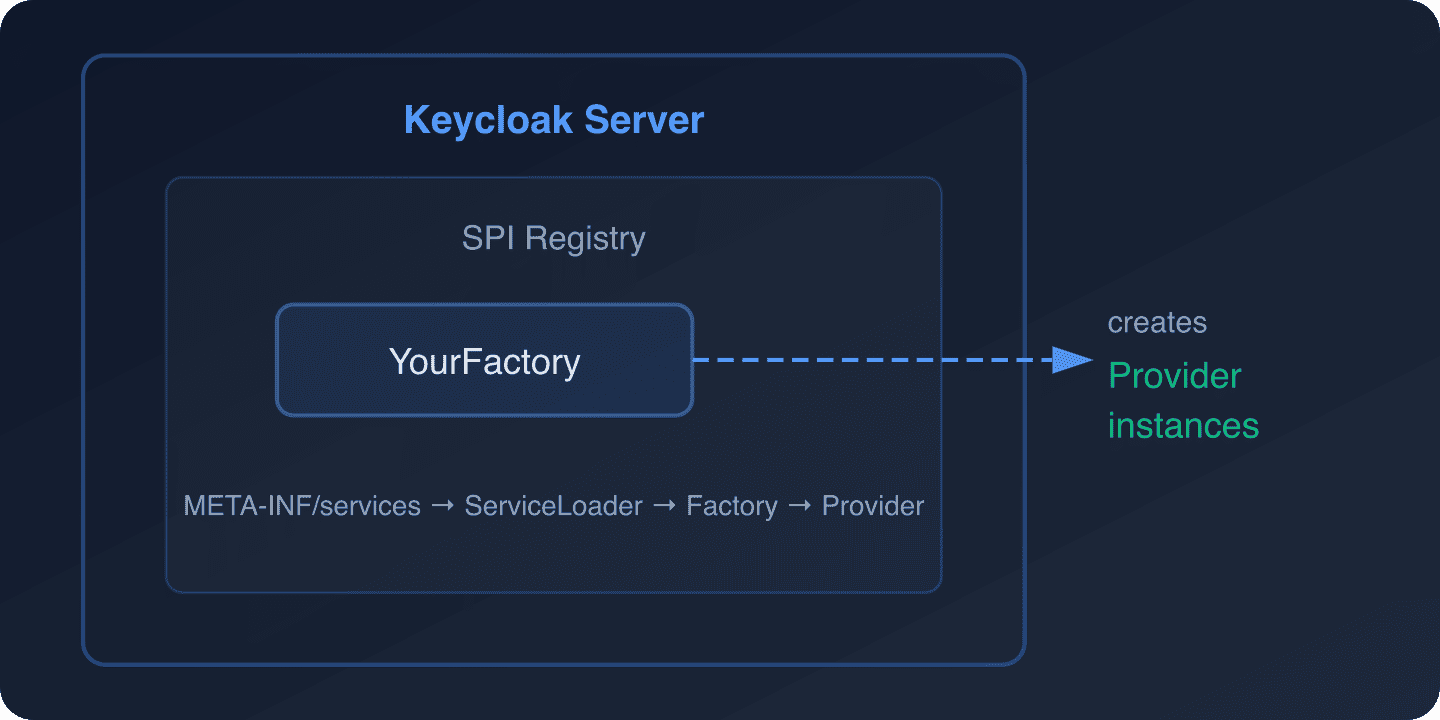
Keycloak’s SPI system follows the Java ServiceLoader pattern. Every extension point in Keycloak has two interfaces:
- Provider – The implementation that does the actual work (e.g.,
EventListenerProvider) - ProviderFactory – A factory that creates instances of the provider and handles lifecycle (e.g.,
EventListenerProviderFactory)
When Keycloak starts, it scans the classpath for META-INF/services files that declare your factory implementations. The factory creates provider instances per session (for session-scoped providers) or once at startup (for singleton providers).
The key SPIs you are most likely to implement:
| SPI | Purpose | Common Use Cases |
|---|---|---|
EventListenerProvider |
React to Keycloak events | Audit logging, notifications, webhooks |
Authenticator |
Custom authentication steps | Step-up auth, custom MFA, conditional logic |
UserStorageProvider |
External user stores | Legacy database integration, API-backed users |
ProtocolMapper |
Modify token claims | Custom claims from external sources |
RequiredActionProvider |
Custom required actions | Terms acceptance, profile completion |
Maven Project Setup
Start by creating a Maven project for your SPI extension. This structure works for all SPI types:
<?xml version="1.0" encoding="UTF-8"?>
<project xmlns="http://maven.apache.org/POM/4.0.0"
         xmlns:xsi="http://www.w3.org/2001/XMLSchema-instance"
         xsi:schemaLocation="http://maven.apache.org/POM/4.0.0
         http://maven.apache.org/xsd/maven-4.0.0.xsd">
    <modelVersion>4.0.0</modelVersion>

    <groupId>com.example</groupId>
    <artifactId>keycloak-custom-spi</artifactId>
    <version>1.0.0</version>
    <packaging>jar</packaging>

    <properties>
        <maven.compiler.source>17</maven.compiler.source>
        <maven.compiler.target>17</maven.compiler.target>
        <keycloak.version>26.1.0</keycloak.version>
    </properties>

    <dependencies>
        <!-- Keycloak SPI dependencies - provided by Keycloak at runtime -->
        <dependency>
            <groupId>org.keycloak</groupId>
            <artifactId>keycloak-core</artifactId>
            <version>${keycloak.version}</version>
            <scope>provided</scope>
        </dependency>
        <dependency>
            <groupId>org.keycloak</groupId>
            <artifactId>keycloak-server-spi</artifactId>
            <version>${keycloak.version}</version>
            <scope>provided</scope>
        </dependency>
        <dependency>
            <groupId>org.keycloak</groupId>
            <artifactId>keycloak-server-spi-private</artifactId>
            <version>${keycloak.version}</version>
            <scope>provided</scope>
        </dependency>
        <dependency>
            <groupId>org.keycloak</groupId>
            <artifactId>keycloak-services</artifactId>
            <version>${keycloak.version}</version>
            <scope>provided</scope>
        </dependency>

        <!-- Logging -->
        <dependency>
            <groupId>org.jboss.logging</groupId>
            <artifactId>jboss-logging</artifactId>
            <version>3.6.1.Final</version>
            <scope>provided</scope>
        </dependency>
    </dependencies>

    <build>
        <finalName>${project.artifactId}</finalName>
    </build>
</project>
The provided scope is critical. Keycloak already has these libraries at runtime, so your JAR should not bundle them. This keeps the deployment artifact small and avoids classpath conflicts.
Building an Event Listener Provider
Event listeners are the most practical starting point. They react to authentication events (login success, login failure, logout, register) and admin events (create user, update client, delete realm) without modifying Keycloak’s behavior.
Use Cases
- Send webhook notifications when users log in or register
- Forward audit events to an external SIEM or logging system
- Track failed login attempts for security monitoring
- Sync user events with external systems (CRM, analytics)
For a production webhook example, see our guide on forwarding Keycloak events to SIEM via HTTP webhook.
The Provider Implementation
package com.example.spi.event;

import org.jboss.logging.Logger;
import org.keycloak.events.Event;
import org.keycloak.events.EventListenerProvider;
import org.keycloak.events.EventType;
import org.keycloak.events.admin.AdminEvent;
import org.keycloak.models.KeycloakSession;

import java.io.IOException;
import java.net.URI;
import java.net.http.HttpClient;
import java.net.http.HttpRequest;
import java.net.http.HttpResponse;
import java.time.Duration;
import java.time.Instant;

public class WebhookEventListenerProvider implements EventListenerProvider {

    private static final Logger LOG = Logger.getLogger(WebhookEventListenerProvider.class);

    private final KeycloakSession session;
    private final String webhookUrl;
    private final HttpClient httpClient;

    public WebhookEventListenerProvider(KeycloakSession session, String webhookUrl) {
        this.session = session;
        this.webhookUrl = webhookUrl;
        this.httpClient = HttpClient.newBuilder()
                .connectTimeout(Duration.ofSeconds(5))
                .build();
    }

    @Override
    public void onEvent(Event event) {
        // Handle user events (login, logout, register, etc.)
        if (event.getType() == EventType.LOGIN) {
            LOG.infof("User login: userId=%s, realmId=%s, clientId=%s, ipAddress=%s",
                    event.getUserId(),
                    event.getRealmId(),
                    event.getClientId(),
                    event.getIpAddress());

            sendWebhook(buildUserEventPayload(event));
        }

        if (event.getType() == EventType.LOGIN_ERROR) {
            LOG.warnf("Failed login attempt: userId=%s, error=%s, ipAddress=%s",
                    event.getUserId(),
                    event.getError(),
                    event.getIpAddress());

            sendWebhook(buildUserEventPayload(event));
        }

        if (event.getType() == EventType.REGISTER) {
            LOG.infof("New user registered: userId=%s, realmId=%s",
                    event.getUserId(),
                    event.getRealmId());

            sendWebhook(buildUserEventPayload(event));
        }
    }

    @Override
    public void onEvent(AdminEvent adminEvent, boolean includeRepresentation) {
        // Handle admin events (create user, update client, etc.)
        LOG.infof("Admin event: operation=%s, resourceType=%s, resourcePath=%s",
                adminEvent.getOperationType(),
                adminEvent.getResourceType(),
                adminEvent.getResourcePath());

        String payload = String.format(
                "{"type":"ADMIN_EVENT","operation":"%s","resourceType":"%s","
                + ""resourcePath":"%s","realmId":"%s","timestamp":"%s"}",
                adminEvent.getOperationType(),
                adminEvent.getResourceType(),
                adminEvent.getResourcePath(),
                adminEvent.getRealmId(),
                Instant.ofEpochMilli(adminEvent.getTime()).toString()
        );

        sendWebhook(payload);
    }

    @Override
    public void close() {
        // Clean up resources if needed
    }

    private String buildUserEventPayload(Event event) {
        return String.format(
                "{"type":"%s","userId":"%s","realmId":"%s","
                + ""clientId":"%s","ipAddress":"%s","timestamp":"%s""
                + "%s}",
                event.getType(),
                event.getUserId(),
                event.getRealmId(),
                event.getClientId(),
                event.getIpAddress(),
                Instant.ofEpochMilli(event.getTime()).toString(),
                event.getError() != null ? ","error":"" + event.getError() + """ : ""
        );
    }

    private void sendWebhook(String payload) {
        if (webhookUrl == null || webhookUrl.isEmpty()) {
            LOG.debug("No webhook URL configured, skipping");
            return;
        }

        try {
            HttpRequest request = HttpRequest.newBuilder()
                    .uri(URI.create(webhookUrl))
                    .header("Content-Type", "application/json")
                    .timeout(Duration.ofSeconds(10))
                    .POST(HttpRequest.BodyPublishers.ofString(payload))
                    .build();

            HttpResponse<String> response = httpClient.send(
                    request, HttpResponse.BodyHandlers.ofString());

            if (response.statusCode() >= 400) {
                LOG.warnf("Webhook returned status %d: %s",
                        response.statusCode(), response.body());
            }
        } catch (IOException | InterruptedException e) {
            LOG.errorf("Failed to send webhook: %s", e.getMessage());
            // Don't rethrow - webhook failure should not block authentication
        }
    }
}
The Provider Factory
package com.example.spi.event;

import org.jboss.logging.Logger;
import org.keycloak.Config;
import org.keycloak.events.EventListenerProvider;
import org.keycloak.events.EventListenerProviderFactory;
import org.keycloak.models.KeycloakSession;
import org.keycloak.models.KeycloakSessionFactory;

public class WebhookEventListenerProviderFactory implements EventListenerProviderFactory {

    private static final Logger LOG = Logger.getLogger(WebhookEventListenerProviderFactory.class);
    private static final String PROVIDER_ID = "webhook-event-listener";

    private String webhookUrl;

    @Override
    public EventListenerProvider create(KeycloakSession session) {
        return new WebhookEventListenerProvider(session, webhookUrl);
    }

    @Override
    public void init(Config.Scope config) {
        // Read configuration from keycloak.conf or environment variables
        webhookUrl = config.get("webhookUrl",
                System.getenv("KC_SPI_EVENTS_LISTENER_WEBHOOK_EVENT_LISTENER_WEBHOOK_URL"));
        LOG.infof("Webhook Event Listener initialized with URL: %s",
                webhookUrl != null ? webhookUrl : "NOT CONFIGURED");
    }

    @Override
    public void postInit(KeycloakSessionFactory factory) {
        // Called after all providers are initialized
    }

    @Override
    public void close() {
        // Clean up global resources
    }

    @Override
    public String getId() {
        return PROVIDER_ID;
    }
}
Service Declaration
Create the META-INF/services file that tells Keycloak about your factory:
# src/main/resources/META-INF/services/org.keycloak.events.EventListenerProviderFactory
com.example.spi.event.WebhookEventListenerProviderFactory
The file name must be the fully qualified interface name, and the contents must be the fully qualified class name of your factory.
Building a Custom Authenticator
Custom authenticators let you add steps to Keycloak’s authentication flow. Common use cases include IP-based restrictions, custom MFA challenges, consent gates, and conditional authentication based on user attributes.
Example: IP Allowlist Authenticator
This authenticator checks the user’s IP address against an allowlist and blocks access from unauthorized IPs:
package com.example.spi.auth;

import org.jboss.logging.Logger;
import org.keycloak.authentication.AuthenticationFlowContext;
import org.keycloak.authentication.AuthenticationFlowError;
import org.keycloak.authentication.Authenticator;
import org.keycloak.models.AuthenticatorConfigModel;
import org.keycloak.models.KeycloakSession;
import org.keycloak.models.RealmModel;
import org.keycloak.models.UserModel;

import java.util.Arrays;
import java.util.List;

public class IpAllowlistAuthenticator implements Authenticator {

    private static final Logger LOG = Logger.getLogger(IpAllowlistAuthenticator.class);

    @Override
    public void authenticate(AuthenticationFlowContext context) {
        String remoteAddress = context.getConnection().getRemoteAddr();

        // Get the X-Forwarded-For header if behind a proxy
        String forwardedFor = context.getHttpRequest()
                .getHttpHeaders()
                .getHeaderString("X-Forwarded-For");

        String clientIp = forwardedFor != null
                ? forwardedFor.split(",")[0].trim()
                : remoteAddress;

        LOG.debugf("Checking IP allowlist for IP: %s", clientIp);

        // Get allowed IPs from authenticator config
        AuthenticatorConfigModel config = context.getAuthenticatorConfig();
        if (config == null || config.getConfig() == null) {
            // No config means allow all (fail open)
            LOG.warn("No IP allowlist configured, allowing access");
            context.success();
            return;
        }

        String allowedIpsConfig = config.getConfig().get("allowedIps");
        if (allowedIpsConfig == null || allowedIpsConfig.isEmpty()) {
            context.success();
            return;
        }

        List<String> allowedIps = Arrays.asList(allowedIpsConfig.split(","));

        // Check if client IP matches any allowed pattern
        boolean allowed = allowedIps.stream()
                .map(String::trim)
                .anyMatch(pattern -> matchesIp(clientIp, pattern));

        if (allowed) {
            LOG.debugf("IP %s is in the allowlist", clientIp);
            context.success();
        } else {
            LOG.warnf("IP %s is NOT in the allowlist, blocking access", clientIp);
            context.failure(AuthenticationFlowError.ACCESS_DENIED);
        }
    }

    private boolean matchesIp(String clientIp, String pattern) {
        // Support exact match and CIDR notation
        if (pattern.contains("/")) {
            return matchesCidr(clientIp, pattern);
        }
        return clientIp.equals(pattern);
    }

    private boolean matchesCidr(String ip, String cidr) {
        try {
            String[] parts = cidr.split("/");
            String networkAddress = parts[0];
            int prefixLength = Integer.parseInt(parts[1]);

            long ipLong = ipToLong(ip);
            long networkLong = ipToLong(networkAddress);
            long mask = -(1L << (32 - prefixLength));

            return (ipLong & mask) == (networkLong & mask);
        } catch (Exception e) {
            LOG.warnf("Invalid CIDR pattern: %s", cidr);
            return false;
        }
    }

    private long ipToLong(String ip) {
        String[] octets = ip.split("\.");
        long result = 0;
        for (int i = 0; i < 4; i++) {
            result = (result << 8) | Integer.parseInt(octets[i]);
        }
        return result;
    }

    @Override
    public void action(AuthenticationFlowContext context) {
        // Not needed for this authenticator
    }

    @Override
    public boolean requiresUser() {
        return false; // Check IP before user is identified
    }

    @Override
    public boolean configuredFor(KeycloakSession session,
                                  RealmModel realm, UserModel user) {
        return true;
    }

    @Override
    public void setRequiredActions(KeycloakSession session,
                                    RealmModel realm, UserModel user) {
        // No required actions
    }

    @Override
    public void close() {
    }
}
The Authenticator Factory
package com.example.spi.auth;

import org.keycloak.Config;
import org.keycloak.authentication.Authenticator;
import org.keycloak.authentication.AuthenticatorFactory;
import org.keycloak.models.AuthenticationExecutionModel;
import org.keycloak.models.KeycloakSession;
import org.keycloak.models.KeycloakSessionFactory;
import org.keycloak.provider.ProviderConfigProperty;

import java.util.List;

public class IpAllowlistAuthenticatorFactory implements AuthenticatorFactory {

    public static final String PROVIDER_ID = "ip-allowlist-authenticator";
    private static final IpAllowlistAuthenticator SINGLETON =
            new IpAllowlistAuthenticator();

    @Override
    public String getDisplayType() {
        return "IP Allowlist";
    }

    @Override
    public String getReferenceCategory() {
        return "access-control";
    }

    @Override
    public boolean isConfigurable() {
        return true;
    }

    @Override
    public AuthenticationExecutionModel.Requirement[] getRequirementChoices() {
        return new AuthenticationExecutionModel.Requirement[]{
                AuthenticationExecutionModel.Requirement.REQUIRED,
                AuthenticationExecutionModel.Requirement.ALTERNATIVE,
                AuthenticationExecutionModel.Requirement.DISABLED
        };
    }

    @Override
    public boolean isUserSetupAllowed() {
        return false;
    }

    @Override
    public String getHelpText() {
        return "Restricts authentication to specific IP addresses or CIDR ranges.";
    }

    @Override
    public List<ProviderConfigProperty> getConfigProperties() {
        return List.of(
                new ProviderConfigProperty(
                        "allowedIps",
                        "Allowed IPs",
                        "Comma-separated list of allowed IP addresses or CIDR ranges "
                        + "(e.g., 10.0.0.0/8, 192.168.1.100)",
                        ProviderConfigProperty.STRING_TYPE,
                        ""
                )
        );
    }

    @Override
    public Authenticator create(KeycloakSession session) {
        return SINGLETON;
    }

    @Override
    public void init(Config.Scope config) {
    }

    @Override
    public void postInit(KeycloakSessionFactory factory) {
    }

    @Override
    public void close() {
    }

    @Override
    public String getId() {
        return PROVIDER_ID;
    }
}
Service declaration for the authenticator:
# src/main/resources/META-INF/services/org.keycloak.authentication.AuthenticatorFactory
com.example.spi.auth.IpAllowlistAuthenticatorFactory
For a production-ready IP restriction implementation, see our guide on path-based IP restriction for Keycloak admin console. Skycloak also provides built-in geo-blocking for IP-based access control without custom SPIs.
Building a User Storage Provider
User Storage Providers let Keycloak authenticate against external user stores (legacy databases, REST APIs, flat files). When a user logs in, Keycloak queries your provider instead of (or in addition to) its own database.
Example: REST API User Storage
This provider authenticates users against an external REST API:
package com.example.spi.storage;

import org.jboss.logging.Logger;
import org.keycloak.component.ComponentModel;
import org.keycloak.credential.CredentialInput;
import org.keycloak.credential.CredentialInputValidator;
import org.keycloak.models.*;
import org.keycloak.models.credential.PasswordCredentialModel;
import org.keycloak.storage.StorageId;
import org.keycloak.storage.UserStorageProvider;
import org.keycloak.storage.user.UserLookupProvider;
import org.keycloak.storage.adapter.AbstractUserAdapterFederatedStorage;

import java.io.IOException;
import java.net.URI;
import java.net.http.HttpClient;
import java.net.http.HttpRequest;
import java.net.http.HttpResponse;
import java.util.Map;
import java.util.stream.Stream;

public class RestApiUserStorageProvider implements
        UserStorageProvider,
        UserLookupProvider,
        CredentialInputValidator {

    private static final Logger LOG = Logger.getLogger(RestApiUserStorageProvider.class);

    private final KeycloakSession session;
    private final ComponentModel model;
    private final String apiBaseUrl;
    private final HttpClient httpClient;

    public RestApiUserStorageProvider(KeycloakSession session,
                                      ComponentModel model,
                                      String apiBaseUrl) {
        this.session = session;
        this.model = model;
        this.apiBaseUrl = apiBaseUrl;
        this.httpClient = HttpClient.newBuilder().build();
    }

    @Override
    public UserModel getUserByUsername(RealmModel realm, String username) {
        LOG.debugf("Looking up user by username: %s", username);

        try {
            HttpRequest request = HttpRequest.newBuilder()
                    .uri(URI.create(apiBaseUrl + "/users?username=" + username))
                    .GET()
                    .build();

            HttpResponse<String> response = httpClient.send(
                    request, HttpResponse.BodyHandlers.ofString());

            if (response.statusCode() == 200) {
                // Parse the response and create a UserModel adapter
                // In production, use a proper JSON parser
                return createUserAdapter(realm, username, response.body());
            }
        } catch (IOException | InterruptedException e) {
            LOG.errorf("Failed to look up user: %s", e.getMessage());
        }

        return null;
    }

    @Override
    public UserModel getUserByEmail(RealmModel realm, String email) {
        // Similar implementation for email lookup
        return null;
    }

    @Override
    public UserModel getUserById(RealmModel realm, String id) {
        StorageId storageId = new StorageId(id);
        String username = storageId.getExternalId();
        return getUserByUsername(realm, username);
    }

    @Override
    public boolean supportsCredentialType(String credentialType) {
        return PasswordCredentialModel.TYPE.equals(credentialType);
    }

    @Override
    public boolean isConfiguredFor(RealmModel realm, UserModel user,
                                    String credentialType) {
        return supportsCredentialType(credentialType);
    }

    @Override
    public boolean isValid(RealmModel realm, UserModel user,
                            CredentialInput credentialInput) {
        if (!supportsCredentialType(credentialInput.getType())) {
            return false;
        }

        // Validate password against the external API
        try {
            String payload = String.format(
                    "{"username":"%s","password":"%s"}",
                    user.getUsername(),
                    credentialInput.getChallengeResponse()
            );

            HttpRequest request = HttpRequest.newBuilder()
                    .uri(URI.create(apiBaseUrl + "/auth/validate"))
                    .header("Content-Type", "application/json")
                    .POST(HttpRequest.BodyPublishers.ofString(payload))
                    .build();

            HttpResponse<String> response = httpClient.send(
                    request, HttpResponse.BodyHandlers.ofString());

            return response.statusCode() == 200;
        } catch (IOException | InterruptedException e) {
            LOG.errorf("Failed to validate credentials: %s", e.getMessage());
            return false;
        }
    }

    private UserModel createUserAdapter(RealmModel realm, String username,
                                         String apiResponse) {
        return new AbstractUserAdapterFederatedStorage(session, realm, model) {
            @Override
            public String getUsername() {
                return username;
            }

            @Override
            public void setUsername(String username) {
                // Read-only: external users cannot change username
            }
        };
    }

    @Override
    public void close() {
    }
}
For production deployments that need to federate with existing directories, Keycloak’s built-in LDAP and Active Directory federation is often simpler than a custom SPI. See our LDAP integration guide or Active Directory integration guide for those approaches.
Deploying Your SPI
Build the JAR
mvn clean packageThis produces target/keycloak-custom-spi.jar.
Deploy to Keycloak
Copy the JAR to Keycloak’s providers directory:
# For Docker
docker cp target/keycloak-custom-spi.jar keycloak:/opt/keycloak/providers/

# Rebuild Keycloak (required after adding providers)
docker exec keycloak /opt/keycloak/bin/kc.sh build
docker restart keycloak
Docker Compose Deployment
Mount the JAR as a volume:
services:
  keycloak:
    image: quay.io/keycloak/keycloak:26.1.0
    command: start-dev
    volumes:
      - ./target/keycloak-custom-spi.jar:/opt/keycloak/providers/keycloak-custom-spi.jar
    environment:
      KC_BOOTSTRAP_ADMIN_USERNAME: admin
      KC_BOOTSTRAP_ADMIN_PASSWORD: admin
      # SPI configuration via environment variables
      KC_SPI_EVENTS_LISTENER_WEBHOOK_EVENT_LISTENER_WEBHOOK_URL: http://host.docker.internal:3000/webhook
Custom Dockerfile for Production
FROM quay.io/keycloak/keycloak:26.1.0 AS builder

COPY target/keycloak-custom-spi.jar /opt/keycloak/providers/

RUN /opt/keycloak/bin/kc.sh build

FROM quay.io/keycloak/keycloak:26.1.0

COPY --from=builder /opt/keycloak/ /opt/keycloak/

ENTRYPOINT ["/opt/keycloak/bin/kc.sh"]
Use our Keycloak Config Generator to create a base Keycloak configuration that works with your custom SPIs.
Development Workflow
Hot Reload in Development
For faster iteration, mount the providers directory and restart Keycloak after rebuilding:
# Build and deploy in one command
mvn clean package && docker restart keycloak
Or use a file watcher for automatic rebuilds:
# Using entr (install via brew/apt)
find src -name "*.java" | entr -r sh -c
  'mvn clean package -q && docker restart keycloak && echo "Deployed at $(date)"'
Enabling the Event Listener
After deploying the event listener SPI, enable it in your realm:
- Open the Keycloak admin console
- Navigate to Realm Settings > Events
- Under Event Listeners, add your listener ID (
webhook-event-listener) - Save
Or via the Admin REST API:
# Get admin token
TOKEN=$(curl -s -X POST
  http://localhost:8080/realms/master/protocol/openid-connect/token
  -d "client_id=admin-cli&username=admin&password=admin&grant_type=password"
  | jq -r '.access_token')

# Update realm events config
curl -X PUT
  http://localhost:8080/admin/realms/my-realm
  -H "Authorization: Bearer $TOKEN"
  -H "Content-Type: application/json"
  -d '{"eventsListeners": ["jboss-logging", "webhook-event-listener"]}'
Adding the Authenticator to a Flow
- Navigate to Authentication > Flows
- Copy the Browser flow
- Add your custom authenticator as an execution step
- Set it as Required or Alternative
- Bind the new flow to the Browser flow binding
Testing Your SPI
Use Testcontainers to test your SPI in isolation:
@Container
static KeycloakContainer keycloak = new KeycloakContainer("quay.io/keycloak/keycloak:26.1.0")
    .withProviderClassesFrom("target/classes")
    .withRealmImportFile("test-realm.json");
Verify event listeners fire correctly, authenticators block/allow as expected, and user storage providers resolve users from your external store.
SPI Best Practices
- Never block authentication on external calls. If your event listener sends a webhook, do it asynchronously or handle failures gracefully. A failing webhook should not prevent users from logging in.
- Use
providedscope for Keycloak dependencies. Bundling Keycloak classes in your JAR causes classpath conflicts. - Version your SPI JARs. Include the version in the filename and track compatibility with Keycloak versions.
- Log at appropriate levels. Use
DEBUGfor operational details andWARN/ERRORfor problems. Production Keycloak instances generate a lot of log volume. - Handle upgrades. When Keycloak releases a new version, check if SPI interfaces have changed. The Keycloak team maintains backward compatibility within major versions, but breaking changes do happen.
- Consider managed alternatives. Skycloak provides built-in session management, audit logging, and WAF capabilities that cover many SPI use cases without custom code.
Further Reading
- Keycloak SPI documentation
- Keycloak Server Developer Guide
- Keycloak Testcontainers: Automated Testing
- Forwarding Keycloak Events to SIEM
- Fine-Grained Authorization in Keycloak
- Step-Up Authentication Guide
Custom SPIs give you unlimited flexibility, but they also add maintenance overhead. Skycloak provides many commonly needed features out of the box, including audit logging, session management, and security controls. See pricing to find the right plan for your team.