
Keycloak is a Java and Quarkus identity server that covers OpenID Connect, SAML, LDAP and Active Directory federation and lets you extend almost any part of it through Service Provider Interfaces (SPIs), while Logto is a developer-first Node.js auth product with OIDC, enterprise SSO and a hosted cloud. Choose Keycloak when you need protocol depth, directory federation or deep customization, and choose Logto when you want a lighter stack and a modern sign-in flow with less to run. The rest of this post works through the same question from the other side too (Logto vs Keycloak), axis by axis.
Key Takeaways
- Both are open source and self-hostable: Keycloak under Apache 2.0 (GitHub) as a CNCF incubating project since April 2023 (CNCF), Logto under MPL-2.0 (GitHub), built by Silverhand Inc. (Logto).
- Keycloak federates users from LDAP and Active Directory directly and can act as both a SAML identity provider and a SAML service provider (Keycloak docs). As of October 2026, Logto’s connector docs list email, SMS, social and enterprise SSO connectors, with no LDAP directory connector among them (Logto docs).
- Logto runs on Node.js and PostgreSQL (Logto docs); Keycloak runs on the JVM and supports PostgreSQL, MySQL, MariaDB, SQL Server and Oracle (Keycloak).
- Keycloak extends through Java SPIs, authentication flows and themes (Keycloak docs). Logto extends through TypeScript connectors (Logto docs), a custom JWT claims function (Logto docs) and webhooks (Logto docs).
- Logto Cloud bills on usage (Logto pricing), and a managed Keycloak service removes most of the operations work that pushes teams toward a lighter product in the first place.
Both projects speak OpenID Connect, the identity layer on top of OAuth 2.0 that lets an app ask “who is this user?” and get a signed ID token back, and both can be run on your own servers. That shared base is why people shortlist them together. The differences show up once you need an older protocol, a corporate directory, a custom login step or a plan for who is on call for the server, so this guide compares them on protocols, hosting and extensibility, then licensing and migration.
We should say up front that this post comes from Skycloak, which offers managed Keycloak hosting. We have kept the comparison neutral and point to Logto where it fits better, and the one section about us is at the end.
Keycloak vs Logto at a glance
| Keycloak | Logto | |
|---|---|---|
| Language and runtime | Java on Quarkus | TypeScript on Node.js |
| License | Apache 2.0 | MPL-2.0 |
| Backing | CNCF incubating project | Silverhand Inc. |
| Databases | PostgreSQL, MySQL, MariaDB, SQL Server, Oracle and others | PostgreSQL |
| Main extension model | Java SPIs, authentication flows, themes | Connectors, custom JWT claims, webhooks |
| Vendor-hosted option | None from the project; third-party managed services | Logto Cloud |
| Best fit | Enterprise integration, legacy protocols, deep customization | New apps that want quick, modern sign-in |
Protocol support: where do Keycloak and Logto differ?
Protocols are the sharpest difference between the two projects. Logto covers the modern core well, and its repository describes support for “OIDC and OAuth 2.1” plus SAML (GitHub). Keycloak covers the same core and adds the older enterprise pieces, like directory federation and Kerberos, that many companies still depend on.
| Protocol or feature | Keycloak | Logto |
|---|---|---|
| OpenID Connect provider | Yes (docs) | Yes (GitHub) |
| OAuth 2.1 | Global client profiles for OAuth 2.1 compliance (docs) | Listed as supported (GitHub) |
| SAML identity provider (your apps trust it) | Yes (docs) | Yes, SP-initiated SAML apps (docs) |
| SAML service provider (it trusts a customer’s IdP) | Yes, through identity brokering (docs) | Yes, enterprise SSO connectors (docs) |
| LDAP and Active Directory federation | Yes (docs) | No directory connector listed as of October 2026 (docs) |
| Kerberos | Yes (docs) | Not found in the docs as of October 2026 (docs) |
| SCIM 2.0 provisioning | Supported since 26.8 (release notes) | Not found in the docs as of October 2026 (docs) |
| Token exchange (RFC 8693) | Standard token exchange, on by default (docs) | Yes, used for impersonation (docs) |
SAML in both directions
SAML comes up in two roles, and it helps to keep them apart. As an identity provider, the server signs users in and sends SAML assertions to apps such as an older HR tool. As a service provider, the server accepts assertions from a customer’s own identity provider, which is how B2B products offer “sign in with your company account”. Keycloak does both: it hosts SAML clients, and it brokers to external SAML and OIDC providers (Keycloak docs). Our Keycloak SAML service provider guide walks through the second role.
Logto also covers both roles now. Its enterprise SSO connectors accept SAML and OIDC identity providers, with ready-made ones for Google Workspace, Microsoft Entra ID and Okta and just-in-time provisioning into organizations on first sign-in (Logto docs). Its SAML app integration lets Logto act as the identity provider for SAML apps, and the docs describe it as primarily following the SP-initiated flow, where the sign-in starts at your application (Logto docs). If you have apps that start the flow from the identity provider side, test that case before you commit.
LDAP, Active Directory and SCIM
Directory federation is where the projects differ most. Keycloak can connect to an existing LDAP or Active Directory server and use it as the user store, so users keep the passwords and groups they already have and Keycloak checks credentials against the directory (Keycloak docs). Our LDAP user federation explainer covers the sync and edit modes.
As of October 2026, Logto’s connector catalogue lists four kinds of connectors: email, SMS, social login and enterprise SSO (Logto docs). None of them binds to an LDAP directory, so an on-premises Active Directory would have to reach Logto through a federation service that speaks SAML or OIDC, rather than directly.
For provisioning, the Keycloak 26.8 release notes say “the SCIM API is promoted from preview to supported” (Keycloak release notes), which lets a customer’s identity provider create, update and remove users and groups in a realm. We did not find a SCIM endpoint in Logto’s documentation as of October 2026 (Logto docs), so check the current docs if your customers expect SCIM.
Token exchange
Token exchange (RFC 8693) lets a trusted client swap one token for another with a different audience or subject, which is useful for service-to-service calls and for support staff acting as a user. Keycloak’s docs say its standard token exchange feature, token-exchange-standard:v2, is enabled by default (Keycloak docs). Logto implements the same grant type and documents it for user impersonation, where your backend requests a subject token and exchanges it for an access token that represents the user (Logto docs).
Self-hosting: what does each one take to run?
Both projects are free to self-host, but they ask for different stacks. Logto needs Node.js and PostgreSQL, and its self-hosting guide lists Node.js ^26.0.0 and PostgreSQL ^14.0 as prerequisites, with a recommendation of 2 vCPU, 8 GiB of memory and 256 GiB of disk (Logto docs). The same page warns that its Docker Compose file bundles a Postgres database and is not meant for production, because re-running it creates a new database. Logto serves its core on port 3001 and its admin console on port 3002 by default, so plan for two routes behind your proxy.
Keycloak runs on the JVM, and its bare-metal guide asks for OpenJDK 25 (Keycloak), though most teams run the container image instead. It supports a wider range of databases: PostgreSQL 14 to 18, MySQL, MariaDB, Microsoft SQL Server, Oracle, Amazon Aurora PostgreSQL and Azure SQL (Keycloak). That breadth matters if your company standardises on one database.
Keycloak’s sizing guidance is driven by request rate rather than user count. The project’s load-tested figures are 1 vCPU for each 15 password logins per second, 150% extra CPU head-room for spikes, and about 1250 MB of RAM per pod as a base (Keycloak sizing guide). In practice, the bigger cost on both sides is people’s time: upgrades, database backups, certificate renewals, monitoring and on-call. Our post on whether self-hosting Keycloak is worth it works through that cost in detail.
Hosted options: Logto Cloud vs managed Keycloak
Logto’s company runs Logto Cloud itself. Its pricing page describes a free plan, a Pro plan with a monthly base and included usage, and an Enterprise plan with custom quotas and data regions (Logto pricing). Billing is based on usage, and the page says “only access tokens are counted”. Several features, including RBAC, organizations, MFA and enterprise SSO (priced per connector), are sold as add-ons on top of the plan, so price out the features you need, not just the base plan.
The Keycloak project does not sell hosting, so hosted Keycloak comes from third parties. Managed providers differ in how they charge, such as per user, per active user or per cluster, and in whether they run upstream Keycloak or a fork. Skycloak runs upstream Keycloak with infrastructure-based pricing and unlimited users on every plan, which you can see on our pricing page. Whichever route you take, check where your data lives and whether you can export it in a standard format if you leave.
Extensibility: SPIs and themes vs connectors and custom claims
Keycloak’s extension model reaches into most parts of the server. The server development guide explains that Keycloak “has a number of Service Provider Interfaces (SPI) for which you can implement your own providers” (Keycloak docs), and the guide covers SPIs for authenticators, user storage, event listeners and password policies, among others. You write a provider in Java, package it as a JAR and drop it into the server. Our custom SPI development guide shows a full example.
Without writing code, you can rebuild the login process itself in Keycloak’s authentication flow editor, by adding steps such as a second factor for one client, or an identity provider redirect based on email domain. Themes control every page users see, from login to account management to emails, and our theme customization guide covers the structure.
Logto takes a lighter approach that suits JavaScript teams. Connectors are small TypeScript programs that handle a third-party sign-in or message delivery, and you can write your own by copying an official connector and linking it with the Logto CLI (Logto docs). Custom JWT claims let you provide a getCustomJwtClaims function whose return value is merged into the access token (Logto docs). The same page warns that in self-hosted deployments these scripts run with the Logto server’s privileges, so only trusted administrators should edit them.
Logto webhooks send an HTTP request to your endpoint when users, roles, organizations or sign-ins change, and they run asynchronously, so they “cannot change the outcome of the current flow” (Logto docs). That is the main difference in model: Keycloak lets you put custom code inside the sign-in itself, while Logto mostly lets you react to it or enrich the token.
| Need | Keycloak | Logto |
|---|---|---|
| Custom sign-in step | Authenticator SPI or flow editor | Not inside the flow; webhooks react after it |
| Extra token claims | Protocol mappers, or a mapper SPI | getCustomJwtClaims function |
| New social or enterprise provider | Built-in OIDC and SAML brokering, or an identity provider SPI | Enterprise SSO connector, or a custom connector |
| Branded pages | Themes for login, account, admin and email | Sign-in experience settings and custom UI |
| Event handling | Event listener SPI | Webhooks |
Open source, without the per-user bill
Most identity platforms charge per monthly active user and gate enterprise SSO behind an upgrade. Skycloak bills for infrastructure instead, so every plan carries unlimited users and unlimited applications, on real upstream Keycloak you can export at any time.
Licensing and governance
Keycloak is licensed under Apache 2.0 (GitHub), a permissive license with no obligation to publish your changes. The CNCF’s project page says “Keycloak was accepted to CNCF on April 10, 2023 at the Incubating maturity level” (CNCF), so the project follows a foundation’s governance rather than a single company’s roadmap.
Logto is licensed under MPL-2.0 (GitHub), a file-level copyleft license: you can use it in a commercial product, but if you change Logto’s own source files and distribute them, you have to share those changes. Logto is built by Silverhand Inc. (Logto), which also runs Logto Cloud. A company-backed project can move quickly, and you should weigh how its paid cloud and the open-source release relate when you plan for the long term.
Migrating from Logto to Keycloak as your product grows
Teams that start on Logto sometimes move to Keycloak later, usually when an enterprise customer asks for LDAP, SCIM or a custom sign-in step. You do not have to move everyone at once. Keycloak’s identity brokering can treat Logto as one more OpenID Connect provider (Keycloak docs), so you can switch your apps over first and let users follow as they sign in.
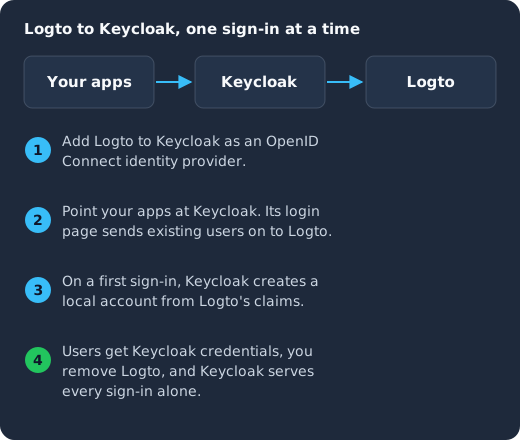
You add Logto to Keycloak as an OpenID Connect identity provider (1), point your apps at Keycloak so its login page sends existing users on to Logto (2), let Keycloak create a local account from Logto’s claims on each user’s first sign-in (3), and remove Logto once users have Keycloak credentials (4).
In practice, the steps look like this:
- Create a realm in Keycloak and register an OIDC application in Logto for it, then add that application to Keycloak as an OpenID Connect identity provider, with mappers for the claims you need.
- Recreate your roles and organizations in Keycloak, and move your apps’ OIDC settings (issuer, client ID and redirect URIs) to the new realm.
- Release the apps against Keycloak. Existing users click through to Logto, and Keycloak’s first broker login flow creates their account.
- Ask users to set a Keycloak password or passkey, for example through a required action, then disable the Logto provider when sign-ins through it stop.
If you would rather move everyone in one go, export users from Logto and import them into Keycloak, and check whether Keycloak can verify the password hashes you export or whether users will need to reset their passwords.
When to choose Keycloak, and when to choose Logto
Choose Keycloak if you need LDAP or Active Directory federation, Kerberos, SAML in both directions, SCIM provisioning, custom authentication steps inside the sign-in, or a database other than PostgreSQL. It is also the safer bet if foundation governance and a permissive license matter to your legal team.
Choose Logto if you are building a new app on a JavaScript stack, your enterprise needs stop at SAML and OIDC SSO with major identity providers, and you want a polished sign-in experience and a vendor-run cloud without much configuration.
If you are still comparing more options, our guides to Keycloak vs Auth0, Keycloak vs Clerk, Keycloak vs Authentik and Keycloak vs Authelia use the same axes.
Frequently asked questions
Is Logto a good Keycloak alternative?
Logto is a good alternative for new applications that need OIDC sign-in, social login, MFA and SAML or OIDC enterprise SSO, and that want a lighter Node.js stack. It is a weaker fit when you need LDAP or Active Directory federation or custom code inside the sign-in, because its connectors do not include a directory connector (Logto docs) and its webhooks cannot change the outcome of a sign-in (Logto docs).
Does Logto support SAML?
Yes. Logto accepts SAML identity providers through its enterprise SSO connectors (Logto docs) and can act as a SAML identity provider for your apps, primarily through the SP-initiated flow (Logto docs).
Is Logto lighter to self-host than Keycloak?
Logto runs on Node.js with PostgreSQL (Logto docs), which many web teams already operate, while Keycloak runs on the JVM. Keycloak’s own sizing guide starts at about 1250 MB of RAM per pod (Keycloak), and Logto recommends 2 vCPU and 8 GiB of memory for a self-hosted server. For either one, the larger cost is the ongoing work of upgrades, backups and monitoring.
Which license is more permissive, Keycloak’s or Logto’s?
Keycloak’s Apache 2.0 license is more permissive (GitHub). Logto’s MPL-2.0 (GitHub) asks you to share changes you make to Logto’s own files if you distribute them, though it does not extend to your application code.
Can I move from Logto to Keycloak without forcing every user to reset their password?
Yes, if you migrate gradually. Add Logto to Keycloak as an OpenID Connect identity provider (Keycloak docs), and users sign in through Logto once while Keycloak creates their accounts. They set Keycloak credentials afterwards, at a time that suits them.
When managed Keycloak removes the reason to pick Logto
Many teams lean toward Logto because they do not want to run a JVM service, tune it and keep it patched, rather than because they need fewer protocols. If that is your reason, a managed Keycloak service gives you Keycloak’s protocol coverage and extension model while someone else handles the servers.
On Skycloak, you create and manage your Keycloak clusters from a dashboard while Skycloak runs them (Skycloak docs), with daily backups on the Business and Enterprise plans (Skycloak docs), a theme library that accepts ZIP themes and Keycloakify JARs (Skycloak docs), and custom extension uploads on Enterprise or as a Business add-on (Skycloak docs). Realm import is open before you commit to a plan, so you can bring an existing realm over and test it first (Skycloak docs).
If you want help planning a move from Logto, contact our team. And if you have decided on Keycloak but do not want to run it, see how Skycloak managed Keycloak hosting works.