OAuth Audience: The aud Claim and How to Set It in Keycloak. The OAuth audience (aud claim) names the API a token is for. What aud means, how it differs from scope and azp, and how to set it in Keycloak with mappers.
The OAuth audience, carried in the aud claim of a token, names the API or resource server the token is meant for, and that API must reject any token whose aud does not include it (RFC 9068, section 4). In Keycloak you set the audience with an Audience protocol mapper on a client or, better, on a client scope, or you let the Audience Resolve mapper add every client the user holds client roles for (Keycloak Server Administration Guide, Audience support).
This post explains what aud means in the standards, how it differs from scope and azp, and then walks through the Keycloak side: why your tokens often show aud: account or no API audience at all, how to add the right audience with a client scope, what a token looks like before and after, and how a resource server should check it. The Keycloak steps follow the current Keycloak Server Administration Guide as it read in November 2026.
What does the aud claim mean?
The aud claim comes from the JSON Web Token standard, which says each party “intended to process the JWT MUST identify itself with a value in the audience claim”, and that a party which does not find itself in aud must reject the token (RFC 7519, section 4.1.3). The value is usually an array of strings, and when there is only one audience it may be a single string, so your validation code has to handle both shapes.
For JWTs in general, RFC 7519 says “Use of this claim is OPTIONAL” (RFC 7519, section 4.1.3), but the profile for JWT access tokens lists it as “aud REQUIRED” (RFC 9068, section 2.2). That profile also tells the resource server what to do with it: validate that aud contains an identifier it expects for itself, and reject the token if it does not (RFC 9068, section 4). A resource server is simply the API that receives the access token in an Authorization: Bearer header and decides whether to serve the request.
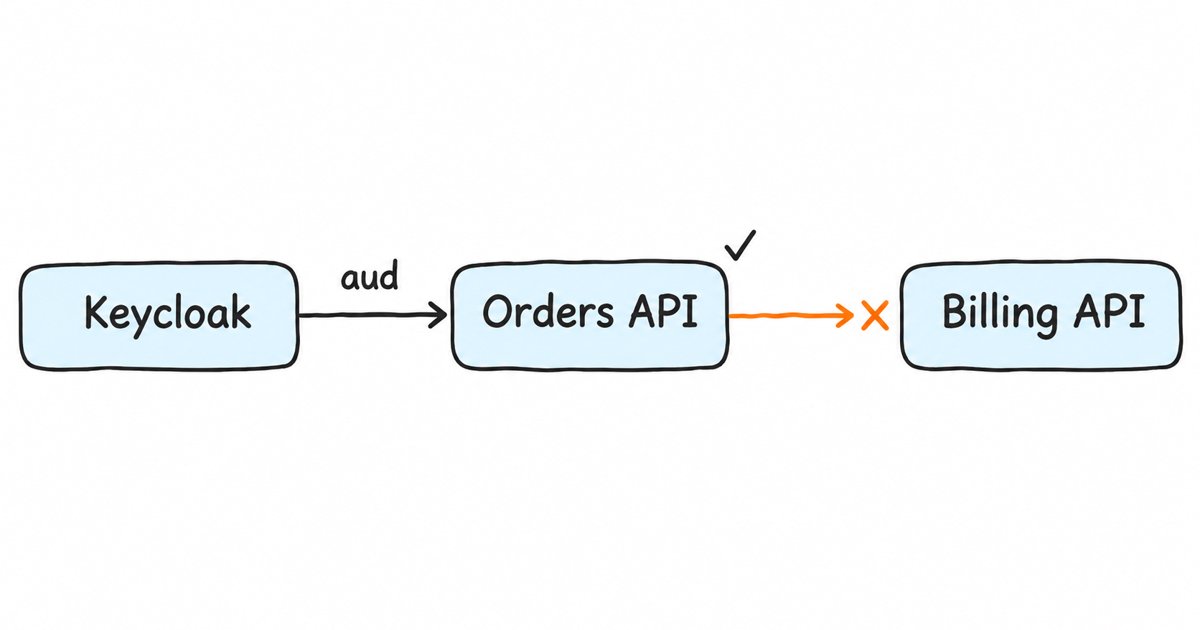
The reason this matters is replay between services. Suppose two APIs trust the same Keycloak realm. If neither checks aud, a token issued so a user can call the Orders API is just as good at the Billing API, and so is a token that the Orders API itself keeps and forwards. The signature only proves that your realm issued the token, while the audience says which service it was issued for. The Keycloak guide describes exactly this scenario, a service reusing a token it received to call another service, as the reason to limit audiences and have every service verify them (Keycloak Server Administration Guide, Audience support).
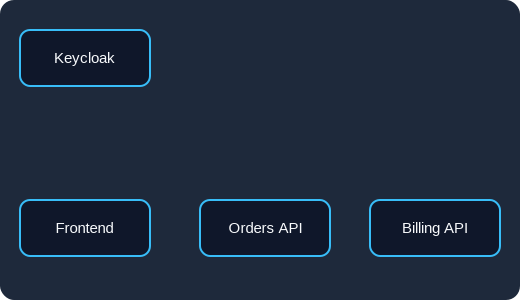
Keycloak issues the frontend a token with aud orders-api (1), the Orders API finds itself in aud and accepts it (2), the Orders API replays the same token to the Billing API (3), and the Billing API rejects it with 401 because billing-api is not in aud (4).
How is aud different from scope and azp?
These three claims are often confused, because all of them say something about who may use a token. They answer different questions, and an API usually needs to look at more than one of them.
| Claim | Question it answers | Typical value in a Keycloak access token | Who checks it |
|---|---|---|---|
aud (audience) |
Which API or service is this token meant for? | The client ID of the API, for example orders-api |
Every resource server, before anything else in the payload |
scope |
What has the client been allowed to do or ask for? | Space-separated strings such as openid profile orders-api-scope |
The resource server, when deciding whether to allow a particular action |
azp (authorized party) |
Which client was this token issued to? | The client ID of the calling application, for example frontend-client |
Rarely required; useful for logging and per-caller rules |
OAuth 2.0 describes the scope value as “a list of space-delimited, case-sensitive strings” that “are defined by the authorization server” (RFC 6749, section 3.3), and RFC 9068 links the two claims: “All the individual scope strings in the “scope” claim MUST have meaning for the resources indicated in the “aud” claim” (RFC 9068, section 2.2.3). So scope narrows what the caller may do at an API, while aud decides which API it may do it at.
The azp claim comes from OpenID Connect, which defines it as “the party to which the ID Token was issued” (OpenID Connect Core 1.0, section 2). It names the caller, not the recipient, so checking azp instead of aud tells your API who sent the token but not whether the token was meant for your API. One more difference trips people up: the same section says an ID token’s aud “MUST contain the OAuth 2.0 client_id of the Relying Party as an audience value” (OpenID Connect Core 1.0, section 2), while the Keycloak guide says the requesting client “is not automatically added to the access token audience” (Keycloak Server Administration Guide, Automatically add audience based on client roles). If you want the longer comparison of the two token types, our post on ID tokens versus access tokens covers it.
Why do Keycloak access tokens show aud: account or no API audience?
Keycloak does not guess which API a token is for. It fills aud in access tokens through protocol mappers, and out of the box only one of them runs: the Audience Resolve mapper, which sits in the built-in roles client scope that every client gets by default. In the guide’s words, “An Audience Resolve protocol mapper is defined in the default client scope roles”, and it “checks for clients that have at least one client role available for the current token”, adding the client ID of each one as an audience (Keycloak Server Administration Guide, Automatically add audience based on client roles).
Two settings decide which client roles end up in the token. The first is the user’s own role mappings, including roles from groups and composite roles. The second is the client’s role scope, and the guide says “By default, clients are created with Full Scope Allowed enabled, which causes every access token to contain all roles held by the authenticated user” (Keycloak Server Administration Guide, Enforcing Full Scope Allowed to be disabled). The guide’s own example token shows manage-account and manage-account-links, client roles of the built-in account client, inside resource_access. When a user holds roles like those and the client still allows full scope, Audience Resolve dutifully adds account to aud, which is why so many tokens from a fresh realm show "aud": "account" and nothing about your API.
The opposite symptom has the same cause. If your API client defines no client roles, or the user holds none of them, Audience Resolve has nothing to resolve and your API never appears in aud. The frontend client is not added either: the guide says “The frontend client itself is not automatically added to the access token audience, therefore allowing easy differentiation between the access token and the ID token” (Keycloak Server Administration Guide, Automatically add audience based on client roles). Our post on Keycloak client scopes versus roles explains the role and scope model behind this in more depth.
How do you set the audience in Keycloak?
The guide describes two ways to put your API into aud: the hardcoded Audience mapper and Audience Resolve driven by client roles (Keycloak Server Administration Guide, Setup). The Audience mapper is the one to start with, because it works whether or not your API uses client roles. In the steps below, orders-api is the API and frontend-client is the application that calls it.
Step 1: Create a client for the API
In the admin console, open Clients and create an OpenID Connect client with the client ID orders-api. This client represents the resource server, so it does not need to sign anyone in, and the guide notes you can turn off the standard flow and other flows for it. Its client ID is the value that will appear in aud.
Step 2: Create a client scope with an Audience mapper
Open Client scopes, create a scope named orders-api-scope, and on its Mappers tab choose Configure a new mapper and pick Audience. Set Included Client Audience to orders-api and save. If you would rather use a URL as the audience, the mapper’s Included Custom Audience field takes any string instead of a client ID (Keycloak Server Administration Guide, Hardcoded audience). Both Audience and Audience Resolve add to the access token only by default, so ID tokens keep their single client audience.
You could add the same mapper directly to the frontend client, and then the audience is always added. Putting it on a client scope gives you more control, because you decide per client, and per request, which APIs a token is for.
Step 3: Link the scope to the calling client
Open frontend-client, go to its Client scopes tab, choose Add client scope and add orders-api-scope as Optional. An optional scope only applies when the application asks for it, so the application now sends scope=openid orders-api-scope when it needs a token for the Orders API. If every token from this client should carry the audience, link the scope as Default instead, and it applies without the scope parameter.
While you are on this client, open the dedicated scope (the row named frontend-client-dedicated), go to its Scope tab and turn off Full scope allowed. The guide marks this switch as deprecated and recommends disabling it on every client and granting only the roles a client needs, and doing so also removes audiences such as account that only appeared because of roles the client never needed (Keycloak Server Administration Guide, Role scope mappings).
Step 4: Check the token with the Evaluate tab
Still in frontend-client, open Client scopes, then the Evaluate sub-tab. Pick a user, select orders-api-scope among the optional scopes and look at Generated access token. The console builds an example token for that user and client with the effective mappers and role scope mappings, so you can confirm aud before any code runs (Keycloak Server Administration Guide, Evaluating client scopes).
What a token looks like before and after
Here is the relevant part of an access token for frontend-client in a realm with default settings. The values are illustrative, but the shape is what the Evaluate tab shows.
{
  "iss": "https://auth.example.com/realms/demo",
  "aud": "account",
  "azp": "frontend-client",
  "scope": "openid profile email",
  "resource_access": {
    "account": { "roles": ["manage-account", "manage-account-links", "view-profile"] }
  }
}
After Full scope allowed is off and the application requests orders-api-scope, the same user gets this:
{
  "iss": "https://auth.example.com/realms/demo",
  "aud": "orders-api",
  "azp": "frontend-client",
  "scope": "openid profile email orders-api-scope"
}
The account audience is gone because the account roles are no longer in the token, orders-api is present because of the Audience mapper, and azp still names the caller.
Identity management as a service, on open source
Skycloak is a managed identity platform in the same category as Auth0 or Okta, built on real upstream Keycloak. You get SSO, MFA, SCIM and audit logs without running the servers, and you can export and self-host whenever you want.
How does Audience Resolve derive aud from client roles?
If your API already makes decisions on its own client roles, you can let Audience Resolve add the audience instead of a hardcoded mapper. The guide’s example works like this: create client roles on the API client (say orders-reader on orders-api), assign them to users, create a client scope whose Scope tab maps those roles, turn off Full scope allowed on the frontend client and link the scope as optional (Keycloak Server Administration Guide, Automatically add audience based on client roles). When the application requests the scope and the user holds orders-reader, the role lands in the token and Audience Resolve adds orders-api to aud.
The catch is that this audience depends on the user. A user with no client role on orders-api gets no orders-api audience, even when the scope is requested, and the guide points to the hardcoded Audience mapper for cases where you want the audience regardless of roles. In practice many teams use both: the Audience mapper to say which API the token is for, and client roles to say what the user may do there.
How should a resource server validate aud?
Your API should check the signature, the issuer (iss), the audience, and the expiry before it reads any role or scope, and it should reject a token on the first failure. Most JWT libraries do the audience comparison for you if you pass the expected value. Here is a Node.js example with the jose library, which handles both the string and the array form of aud:
import { createRemoteJWKSet, jwtVerify } from "jose";

const issuer = "https://auth.example.com/realms/demo";
const jwks = createRemoteJWKSet(new URL(`${issuer}/protocol/openid-connect/certs`));

export async function verifyAccessToken(token) {
  const { payload } = await jwtVerify(token, jwks, {
    issuer,
    audience: "orders-api",   // rejects tokens whose aud does not include orders-api
    algorithms: ["RS256"],
  });
  return payload;
}
Test it with a token that is valid in every way except its audience, for example one generated in the Evaluate tab without orders-api-scope, and make sure the API answers 401. Our guide on verifying a Keycloak access token on the backend covers the signature and JWKS side in detail, and the post on Apache CXF CVE-2026-50627 shows what happens when a framework quietly skips the aud check. If your API uses token introspection instead of local validation, note that the guide says Keycloak’s introspection endpoint “validates that the authenticated client is present in the token’s audience (aud) claim before allowing introspection” of an access token (Keycloak Server Administration Guide, Token introspection audience validation), so the same audience setup is needed there too.
What about resource indicators and token exchange?
RFC 8707 adds a resource request parameter, an absolute URI with which a client names the protected resource it wants a token for (RFC 8707, section 2), and RFC 9068 says that when a request includes it, the token’s aud claim “SHOULD have the same value as the “resource” parameter in the request” (RFC 9068, section 3). MCP clients rely on this, and we cover how it plays out with Keycloak in Keycloak MCP Server 401: Fixing the Audience Claim. Keycloak’s own token exchange documentation says “Keycloak Token exchange does not yet have support for the resource parameter” (Keycloak, Configuring and using token exchange, Token exchange - Additional details), so client scopes remain the reliable way to choose an audience.
When one service needs to call another without giving the original client a token for both, the guide suggests token exchange: the first service exchanges the token it received for one whose audience is the second service. In standard token exchange the audience parameter takes the client ID of the target, and it filters the audiences the new token carries rather than adding new ones (Keycloak, Configuring and using token exchange). We cover delegation with it in Keycloak 26.8 token exchange for AI agents, and CVE-2026-93999 shows one case where an exchanged audience outlived a disabled client.
Frequently asked questions
What should the OAuth audience contain?
It should contain an identifier for each API the token may be used at, and nothing else. In Keycloak that is usually the API’s client ID, or a URL if you set Included Custom Audience on the Audience mapper. Keep the list short, because every extra audience is another service that will accept the token.
Is the OAuth audience the same as the client ID?
Not in an access token. The client the token was issued to appears in azp, while aud names the API that receives the token. In an ID token the two coincide, because OpenID Connect requires the client’s own ID in aud.
Why does my Keycloak token have aud: account?
Because the token carries client roles of the built-in account client, usually through Full scope allowed being on, and the Audience Resolve mapper adds every client whose roles appear in the token. Turn off Full scope allowed on the client and add your API’s audience with a client scope.
Can an access token have more than one audience?
Yes. aud can be an array, and Keycloak adds one entry per Audience mapper or resolved client, so requesting two API scopes gives a token both APIs accept. If you want one service to call another without the original client holding that power, use token exchange instead of a wider audience.
Next steps
Create a client for each API, add an Audience mapper for it on a client scope, link that scope to the applications that call the API, and turn off Full scope allowed on those applications. Then make each API reject tokens whose aud does not include it, and test that with a token issued for a different API.
To try it, add an Audience mapper to your API’s client scope in your Keycloak realm, then paste a fresh access token into the Skycloak JWT decoder to confirm the aud claim. If you would rather not run the Keycloak server yourself, you can set up the same realm on managed Keycloak hosting with Skycloak.